HashSet in Java
HashSet is one of the most commonly used implementations of the Set interface in
the Java Collections Framework. It stores unique elements and provides fast performance for basic operations
such as adding, removing, and checking whether a value exists. When developers need a collection that rejects
duplicates and does not care about order, HashSet is usually the first practical choice.
The most important idea behind HashSet is simple: a value should appear only once. If the same
logical value is added again, the set does not store another copy. This behavior makes HashSet
useful for duplicate removal, membership testing, filtering, validation, and many interview-style coding
problems. In real applications, a HashSet may store unique email addresses, user IDs, product
codes, permissions, tags, visited pages, processed records, or any other data where repetition should be
avoided.
HashSet is also a high-frequency interview topic because it connects several core Java concepts. To explain
it well, a developer must understand the Set contract, hashing, HashMap internals,
duplicate handling, null handling, iteration order, time complexity, and the importance of
equals and hashCode. A strong answer goes beyond saying "HashSet does not allow
duplicates." It explains how that uniqueness is achieved and when HashSet is the right collection to choose.
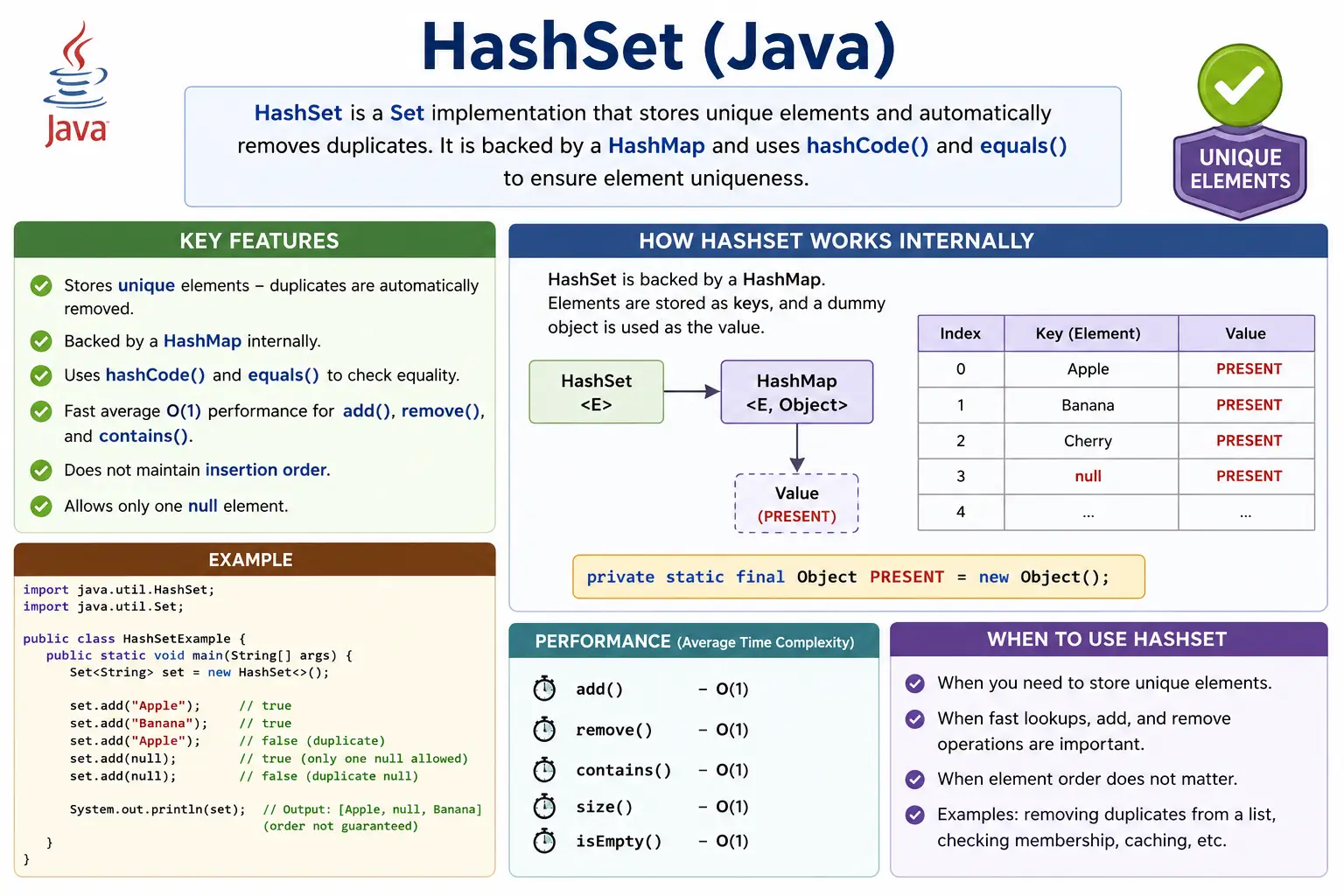
What Is HashSet?
HashSet is a class in the java.util package that implements the
Set interface. It stores unique elements only, allows at most one null element, and does not
guarantee insertion order. The word "hash" in HashSet comes from the hashing technique used internally to
organize elements for fast access.
Because HashSet implements Set, it follows the same basic rule as every set:
duplicates are not allowed. If an element already exists and the program tries to add it again, the add
operation returns false and the collection remains unchanged. No exception is thrown for a
duplicate. The collection simply keeps one logical copy.
Unlike a List, HashSet does not support index-based access. There is no
get(0) or get(index) method because a set is not designed around positions. It is
designed around uniqueness and membership. If the question is "does this value exist?", HashSet is a strong
candidate. If the question is "what is the value at index three?", a list is the more appropriate structure.
Set<String> set = new HashSet<>();
It is common to declare the variable using the Set interface and create the object using
HashSet. This keeps the code flexible. If the implementation later needs insertion order, the
right side can be changed to LinkedHashSet without changing most of the surrounding code.
Position in Collection Hierarchy
HashSet belongs to the Java Collections Framework. It is part of a hierarchy where
Iterable sits at the top, Collection defines common collection behavior,
Set defines the uniqueness contract, and HashSet provides a concrete hash-based
implementation.
Iterable
   |-- Collection
        |-- Set
             |-- HashSet
This hierarchy matters because HashSet inherits general collection behavior such as iteration, size checks, adding, removing, and clearing elements. At the same time, it specializes that behavior by applying the set rule that duplicate elements are not stored.
How HashSet Works Internally
Internally, HashSet is backed by a HashMap. The elements added to the HashSet are
stored as keys in that internal map. Since a map cannot contain duplicate keys, HashSet can reuse the same
key-uniqueness behavior to prevent duplicate elements. The values in the internal map are not meaningful to
the HashSet user; Java uses a shared dummy object as the value.
private static final Object PRESENT = new Object();
This design explains why HashSet operations are usually fast. When an element is added, Java uses the
element's hashCode to determine where it should go internally. If another element already exists
in the same location, Java uses equals to check whether the two elements are logically the same.
If they are equal, the new element is not added. If they are different, HashSet can store both values even if
their hash codes led them to the same internal area.
This is the interview-favorite part of HashSet. HashSet is fast because it does not normally scan every element to find a match. It uses hashing to narrow the search. It prevents duplicates because the backing HashMap does not allow duplicate keys. The combination of hashing and equality checking gives HashSet its practical power.
Key Characteristics of HashSet
The first characteristic of HashSet is uniqueness. It stores only one logical copy of each element. The second characteristic is that it is unordered. It does not promise insertion order, sorted order, or any stable display order. The printed output may appear ordered in a small example, but that is not part of the contract and should not be relied upon.
The third characteristic is average constant-time performance for common operations. In typical conditions,
add, remove, and contains are O(1) on average. The fourth
characteristic is that HashSet depends heavily on hashCode and equals. For built-in
immutable types such as String and wrapper classes, these methods are already implemented. For
custom objects, developers must implement them correctly.
HashSet is not synchronized by default. That means it is not automatically safe for concurrent modification by multiple threads. In single-threaded workflows or method-local usage, this is usually not an issue. In shared multi-threaded code, synchronization or a concurrent collection should be considered.
Creating a HashSet
A HashSet can be created using the no-argument constructor when default settings are acceptable. This is the most common form in beginner programs and in many real application flows where the expected size is not a major concern.
HashSet<Integer> set = new HashSet<>();
With Initial Capacity and Load Factor
HashSet also supports constructor options for initial capacity and load factor. Initial capacity controls the starting size of the internal structure. Load factor controls how full the structure can become before it is resized. The default initial capacity is commonly 16, and the default load factor is 0.75.
HashSet<Integer> set = new HashSet<>(16, 0.75f);
Most developers do not need to tune these values for ordinary code. However, they matter in performance-aware systems. If a program expects to store a very large number of elements, choosing a reasonable initial capacity can reduce resizing work. If the set is small, the default constructor is usually enough.
Commonly Used Methods
HashSet supports the common operations inherited from the collection interfaces. The add method
inserts a value if it is not already present. The remove method deletes a value if it exists.
The contains method checks membership. The size method returns the number of unique
elements. The isEmpty method checks whether the set currently has no elements.
set.add("Java");
set.remove("Java");
set.contains("Java");
set.size();
set.isEmpty();
The absence of index-based methods is just as important as the methods that exist. HashSet is not meant for positional access. If code repeatedly needs the first element, second element, or a specific index, HashSet is probably not the correct collection for that part of the design.
Duplicate Handling Example
Duplicate handling is where HashSet becomes immediately useful. In the following example, the same string is
added twice, but the set stores only one copy. The second add operation does not throw an error. It simply
returns false because the value already exists.
HashSet<String> set = new HashSet<>();
set.add("Java");
set.add("Java");

System.out.println(set); // [Java]
This behavior is useful in validation flows. For example, if a user uploads a list of email addresses,
placing them in a HashSet can remove duplicates before further processing. If the application needs to report
which values were duplicated, the program can inspect the return value of add and record the
values that failed to insert.
Importance of equals() and hashCode()
HashSet uniqueness depends on hashCode and equals. The hash code helps HashSet
locate where an element may be stored. The equality check confirms whether an existing element is logically
the same as the new element. These two methods work together to enforce uniqueness.
class Employee {
    int id;
}
Without overriding both methods for custom objects, duplicates may be stored logically. Two
Employee objects may both represent employee ID 101, but if the class does not define equality
based on that ID, HashSet may treat them as two different objects. This is why interviewers often ask what
happens when custom objects are added to a HashSet.
The rule is practical: if two objects are equal according to equals, they must return the same
hash code. If this contract is broken, hash-based collections can behave unpredictably. For reliable HashSet
behavior, custom identity rules should be stable, consistent, and aligned with the business meaning of the
object.
Null Handling
HashSet allows one null element. Since a set cannot contain duplicates, adding null multiple times still
results in only one null value. This behavior is different from TreeSet, which usually cannot
accept null because it needs to compare elements for sorting.
set.add(null);
set.add(null); // ignored
In real applications, null should still be handled deliberately. If null is not a valid business value, it is better to filter it before adding values to a set. If null is allowed, later processing must be prepared to handle it safely during iteration or validation.
Performance Complexity
HashSet is popular because its common operations are fast on average. Adding, removing, and searching are typically O(1), which means they do not usually grow linearly with the number of elements. Iteration is O(n) because every stored element must be visited.
These are average-case expectations, not a promise that every operation is always constant in every possible situation. Poor hash distribution, excessive collisions, or very large collections can affect performance. Still, for normal use with well-designed element classes, HashSet provides excellent lookup efficiency.
| Operation | Time Complexity |
|---|---|
| add | O(1) average |
| remove | O(1) |
| contains | O(1) |
| iteration | O(n) |
HashSet vs LinkedHashSet vs TreeSet
HashSet, LinkedHashSet, and TreeSet all implement the Set contract, but they solve different ordering problems. HashSet focuses on speed and uniqueness without order guarantees. LinkedHashSet adds predictable insertion order. TreeSet stores values in sorted order.
The correct choice depends on the requirement. If order does not matter, HashSet is usually the simplest and fastest option. If the first-seen order should be preserved while removing duplicates, LinkedHashSet is a better fit. If sorted output is required, TreeSet is the natural choice, even though its operations are generally slower than HashSet.
| Feature | HashSet | LinkedHashSet | TreeSet |
|---|---|---|---|
| Order | No | Insertion | Sorted |
| Performance | Fastest | Slightly slower | Slowest |
| Null allowed | One | One | No |
| Internal DS | HashMap | LinkedHashMap | Red-Black Tree |
Thread Safety
HashSet is not thread-safe by default. If multiple threads modify the same HashSet at the same time without coordination, the result can be inconsistent. This does not mean HashSet is unsafe everywhere. It means that shared mutable access must be controlled.
Common thread-safe alternatives include Collections.synchronizedSet and
CopyOnWriteArraySet. The right choice depends on read and write patterns. A synchronized set can
protect ordinary access, while CopyOnWriteArraySet is useful for cases with many reads and few
writes.
When to Use HashSet
Use HashSet when unique elements are required and order does not matter. It is a good fit for fast membership testing, duplicate removal, filtering already-processed values, collecting unique IDs, and comparing groups of data. It is also useful in coding problems where repeated scanning of a list would be inefficient.
For example, if a program needs to know whether an item was already processed, a HashSet can store processed
IDs. Each new ID can be checked quickly with contains or added directly while inspecting the
return value of add. This pattern is clean, efficient, and easy to understand.
When Not to Use HashSet
Do not use HashSet when duplicates are meaningful. If the number of occurrences matters, HashSet will lose
information because it stores only unique values. Do not use HashSet when insertion order or sorted order is a
requirement. Use LinkedHashSet for insertion order and TreeSet for sorted order.
HashSet is also not ideal when index-based access is required. If code needs to retrieve elements by
position, use a List. If code needs key-value lookup, use a Map. Choosing HashSet
just because it is fast can create confusing code if its behavior does not match the problem.
Common Beginner Mistakes
One common beginner mistake is expecting HashSet to maintain insertion order. Sometimes output from a small example may appear sorted or stable, but that is accidental and should not be used as a rule. If order is important, HashSet is the wrong implementation.
Another common mistake is forgetting to override equals and hashCode for custom
objects. This leads to logical duplicates. Beginners also sometimes place mutable objects in a HashSet and
later change fields that participate in equality. That can make the object difficult for the set to find or
remove correctly.
A third mistake is using HashSet in concurrent scenarios without synchronization. HashSet works well in many ordinary workflows, but shared multi-threaded modification requires careful handling. A collection choice should always match both the data rule and the execution environment.
Interview-Ready Answers
Short Answer
HashSet is a Set implementation that stores unique elements using hashing.
Detailed Answer
In Java, HashSet implements the Set interface and uses a HashMap internally to store elements as keys. It
ensures uniqueness using hashCode and equals, provides average constant-time
performance for add, remove, and contains operations, allows at most one null element, and does not maintain
insertion order. It is best used when uniqueness and fast lookup are more important than ordering.
Practical Interview Perspective
In interviews, HashSet questions often start with a definition and quickly move into internal working. Be
ready to explain that HashSet is backed by HashMap, that elements become keys, that a dummy value is used
internally, and that uniqueness depends on hashCode and equals. Also be ready to
compare HashSet with LinkedHashSet and TreeSet.
A strong practical answer includes the tradeoff: HashSet is fast, but it does not preserve order. If the
interviewer asks what happens when duplicate values are added, explain that the duplicate is ignored and the
add method returns false. If the interviewer asks about custom objects, explain that failing to
override both equality methods can allow logical duplicates.
HashSet Examples
The following examples show HashSet behavior in small, focused programs. They are written for learning and interview preparation, but the same ideas apply in production code. Notice how each example focuses on one behavior: creation, duplicate handling, unordered output, null support, membership checking, iteration, conversion, custom object equality, thread safety, and set operations.
1. Creating a HashSet
A HashSet is created from the java.util package. In this example, two unique strings are added
and printed. The collection stores both values because they are different from each other.
import java.util.*;

class Demo {
    public static void main(String[] args) {
        HashSet<String> set = new HashSet<>();
        set.add("Java");
        set.add("API");
        System.out.println(set);
    }
}
Output
[Java, API]
2. HashSet Does Not Allow Duplicates
This example demonstrates the most important HashSet rule. The value 10 is added twice, but it
appears only once in the set. HashSet uses equality to determine that the second 10 is a
duplicate.
import java.util.*;

class Demo {
    public static void main(String[] args) {
        HashSet<Integer> set = new HashSet<>();
        set.add(10);
        set.add(10);
        set.add(20);
        System.out.println(set);
    }
}
Output
[10, 20]
In real applications, this behavior removes the need for manual duplicate checks in many workflows. Instead of writing an if condition before every insert, the set itself enforces the uniqueness rule.
3. No Guaranteed Order in HashSet
HashSet does not promise that values will be printed in the same order in which they were added. The output may look ordered in some runs, but that is not guaranteed. Code should never depend on HashSet iteration order.
import java.util.*;

class Demo {
    public static void main(String[] args) {
        HashSet<String> set = new HashSet<>();
        set.add("B");
        set.add("A");
        set.add("C");
        System.out.println(set);
    }
}
Explanation
Order may vary on each run.
If order matters, choose a different implementation. LinkedHashSet preserves insertion order,
and TreeSet keeps elements sorted. HashSet should be chosen when order is irrelevant.
4. HashSet Allows One null
HashSet can store a null element. Since duplicates are not allowed, adding null multiple times still produces only one null entry. This is useful to know, but null values should be used carefully because they can create later processing errors if the code assumes every element is non-null.
import java.util.*;

class Demo {
    public static void main(String[] args) {
        HashSet<String> set = new HashSet<>();
        set.add(null);
        set.add(null);
        set.add("Java");
        System.out.println(set);
    }
}
Output
[null, Java]
5. Checking Element Existence (contains)
The contains method is one of the main reasons HashSet is useful. It checks whether a value is
present without requiring a manual loop. For average cases, this lookup is very fast.
import java.util.*;

class Demo {
    public static void main(String[] args) {
        HashSet<String> set = new HashSet<>(Arrays.asList("Java", "API"));
        System.out.println(set.contains("Java"));
    }
}
Output
true
Membership checking appears in many real problems. A program may check whether a user has a permission, whether an ID was already processed, or whether a value is part of an allowed list.
6. Removing Elements
Removing an element from a HashSet is direct. If the value exists, it is removed. If it does not exist, the set remains unchanged. The method returns a boolean that can be used when the program needs to know whether removal actually happened.
import java.util.*;

class Demo {
    public static void main(String[] args) {
        HashSet<Integer> set = new HashSet<>(Arrays.asList(1, 2, 3));
        set.remove(2);
        System.out.println(set);
    }
}
Output
[1, 3]
7. Iterating Using for-each
A for-each loop is the simplest way to read elements from a HashSet. It is clean and readable when the goal is only to process each element. The order of values printed by this loop is still not guaranteed.
import java.util.*;

class Demo {
    public static void main(String[] args) {
        HashSet<String> set = new HashSet<>(Arrays.asList("A", "B", "C"));
        for (String s : set) {
            System.out.println(s);
        }
    }
}
8. Iterating Using Iterator
An Iterator is another way to traverse a HashSet. It gives explicit control over the traversal
process and is especially important when elements may need to be removed during iteration.
import java.util.*;

class Demo {
    public static void main(String[] args) {
        HashSet<Integer> set = new HashSet<>(Arrays.asList(10, 20, 30));
        Iterator<Integer> it = set.iterator();
        while (it.hasNext()) {
            System.out.println(it.next());
        }
    }
}
9. Removing While Iterating (Correct Way)
Removing elements while iterating must be handled carefully. If a collection is structurally modified in the
wrong way during traversal, Java can throw a concurrent modification exception. The safe approach is to use
the iterator's own remove method.
import java.util.*;

class Demo {
    public static void main(String[] args) {
        HashSet<Integer> set = new HashSet<>(Arrays.asList(1, 2, 3));
        Iterator<Integer> it = set.iterator();
        while (it.hasNext()) {
            if (it.next() == 2) {
                it.remove();
            }
        }
        System.out.println(set);
    }
}
Output
[1, 3]
10. Converting List to HashSet (Remove Duplicates)
Converting a list to a HashSet is a common duplicate-removal technique. The list may contain repeated values, but the HashSet keeps only unique values. This is useful in data cleanup, import processing, and simple interview questions.
import java.util.*;

class Demo {
    public static void main(String[] args) {
        List<Integer> list = Arrays.asList(1, 2, 2, 3);
        HashSet<Integer> set = new HashSet<>(list);
        System.out.println(set);
    }
}
Output
[1, 2, 3]
If the original order of first occurrence must be preserved, use LinkedHashSet for this
conversion. A plain HashSet removes duplicates but does not preserve the list's ordering contract.
11. Converting HashSet to List
A HashSet can be converted back to a list when list-based APIs or index-based operations are required later. The resulting list contains the unique values from the set, but its order follows the set's iteration order, not necessarily the original insertion order.
import java.util.*;

class Demo {
    public static void main(String[] args) {
        HashSet<String> set = new HashSet<>(Arrays.asList("A", "B"));
        List<String> list = new ArrayList<>(set);
        System.out.println(list);
    }
}
12. isEmpty() and size()
The isEmpty and size methods are basic but important. They are often used before
validation, reporting, or conditional processing. In HashSet, size represents the number of unique elements,
not the number of add attempts.
import java.util.*;

class Demo {
    public static void main(String[] args) {
        HashSet<String> set = new HashSet<>();
        System.out.println(set.isEmpty());
        set.add("Java");
        System.out.println(set.size());
    }
}
Output
true
1
13. HashSet with Custom Objects (Without equals/hashCode)
This example shows why custom object equality matters. Two different User objects are created
with the same ID, but the class does not define equality. As a result, HashSet treats them as different
objects and stores both.
class User {
    int id;
    User(int id) { this.id = id; }
}

import java.util.*;

class Demo {
    public static void main(String[] args) {
        HashSet<User> set = new HashSet<>();
        set.add(new User(1));
        set.add(new User(1));
        System.out.println(set.size());
    }
}
Output
2
From a business perspective, this may be wrong if the ID is supposed to uniquely identify a user. Java cannot infer that rule automatically. The class must define it.
14. HashSet with Custom Objects (With equals & hashCode)
In this version, the User class overrides equals and hashCode. Now two
users with the same ID are treated as the same logical user. HashSet stores only one of them.
class User {
    int id;
    User(int id) { this.id = id; }

    public boolean equals(Object o) {
        return this.id == ((User)o).id;
    }

    public int hashCode() {
        return id;
    }
}

import java.util.*;

class Demo {
    public static void main(String[] args) {
        HashSet<User> set = new HashSet<>();
        set.add(new User(1));
        set.add(new User(1));
        System.out.println(set.size());
    }
}
Output
1
This pattern is essential in real systems. If customer ID, employee ID, product code, or account number defines uniqueness, the equality methods should reflect that rule. Otherwise, the HashSet may not protect the application from logical duplicates.
15. Internal Working (Conceptual Example)
The following example is small, but it represents what happens internally. When "Java" is added,
the HashSet uses an internal HashMap. The string becomes a key, and Java stores a dummy value with it.
HashSet<String> set = new HashSet<>();
set.add("Java");
Explanation
- Uses HashMap internally
- Elements stored as keys
- Dummy value is used internally
This explains both duplicate prevention and fast lookup. Since the internal map does not allow duplicate keys, the HashSet naturally prevents duplicate elements.
16. HashSet vs LinkedHashSet (Order)
This example compares unordered uniqueness with insertion-order uniqueness. Both collections reject
duplicates, but LinkedHashSet remembers the order in which values were added.
import java.util.*;

class Demo {
    public static void main(String[] args) {
        HashSet<String> h = new HashSet<>();
        h.add("B");
        h.add("A");

        LinkedHashSet<String> l = new LinkedHashSet<>();
        l.add("B");
        l.add("A");

        System.out.println(h);
        System.out.println(l);
    }
}
Output
[A, B]
[B, A]
The exact HashSet output may vary. The important lesson is not the specific printed order, but the absence of any insertion-order guarantee.
17. Thread-Safe HashSet
When a set must be shared across multiple threads, a plain HashSet may not be enough. Wrapping it with
Collections.synchronizedSet provides synchronized access for basic operations.
import java.util.*;

class Demo {
    public static void main(String[] args) {
        Set<String> set = Collections.synchronizedSet(new HashSet<>());
        set.add("Safe");
        System.out.println(set);
    }
}
18. retainAll() for Intersection
retainAll keeps only the values that are present in both sets. This is the set intersection
operation. It is useful when finding common IDs, common permissions, or shared categories.
import java.util.*;

class Demo {
    public static void main(String[] args) {
        HashSet<Integer> s1 = new HashSet<>(Arrays.asList(1, 2, 3));
        HashSet<Integer> s2 = new HashSet<>(Arrays.asList(2, 3, 4));
        s1.retainAll(s2);
        System.out.println(s1);
    }
}
Output
[2, 3]
19. addAll() for Union
addAll combines values from another collection. Because the target collection is a HashSet,
duplicate values are still stored only once. This produces a union of unique values.
import java.util.*;

class Demo {
    public static void main(String[] args) {
        HashSet<Integer> s1 = new HashSet<>(Arrays.asList(1, 2));
        HashSet<Integer> s2 = new HashSet<>(Arrays.asList(2, 3));
        s1.addAll(s2);
        System.out.println(s1);
    }
}
Output
[1, 2, 3]
20. Interview Summary for HashSet
This final example reinforces the central behavior of HashSet. Adding the same value twice still produces a set with one value. In interviews, connect this behavior with HashMap internals, hashing, and equality rules.
import java.util.*;

class Demo {
    public static void main(String[] args) {
        HashSet<String> set = new HashSet<>();
        set.add("Unique");
        set.add("Unique");
        System.out.println(set);
    }
}
Key Points
- No duplicates
- Allows one null
- No insertion order
- Backed by HashMap
- Depends on hashCode() & equals()
Key Takeaway
Use HashSet when uniqueness and fast lookup matter more than order. It is simple to use, fast in
average cases, and extremely useful for duplicate removal and membership testing. Its correctness depends on
proper equality rules, especially when custom objects are stored. If order matters, choose
LinkedHashSet or TreeSet; if duplicates matter, choose a list or a map-based count
structure instead. HashSet is powerful when its strengths match the requirement.