HashMap Internal Working
HashMap internal working is one of the most important Core Java topics because it connects basic syntax with
real performance behavior. Many beginners use HashMap only as a convenient collection for storing key-value
pairs, but interviewers often expect a deeper explanation of what happens after a key and value are passed to
put(), how the key is converted into a bucket location, why equals() and
hashCode() must work together, how collisions are handled, when resizing happens, and why Java 8
introduced tree-based collision handling. Understanding these details helps you write better code, choose good
keys, avoid subtle bugs, and explain performance confidently in interviews.
At a high level, HashMap is designed for fast lookup. Instead of searching every element one by one, it uses a
hashing mechanism to decide where a key-value pair should be stored. When you later search using the same key,
HashMap applies the same hashing process and goes directly to the likely storage location. This is why common
operations such as put(), get(), and remove() are usually described as
average O(1). The phrase "average O(1)" is important. HashMap is not magic, and it is not guaranteed to be
constant time in every possible situation. Its performance depends on good hash distribution, correct equality
logic, controlled resizing, and collision handling.
A good way to think about HashMap is to imagine an indexed storage system. The key is not stored randomly.
HashMap asks the key for a hash code, transforms that hash into an array index, and stores the entry in the
bucket at that index. If only one key lands in a bucket, lookup is very fast. If multiple keys land in the same
bucket, HashMap must compare keys inside that bucket to identify the exact match. That comparison is where
equals() becomes important. The hash code narrows the search area, but equality decides whether a
key is truly the same logical key.
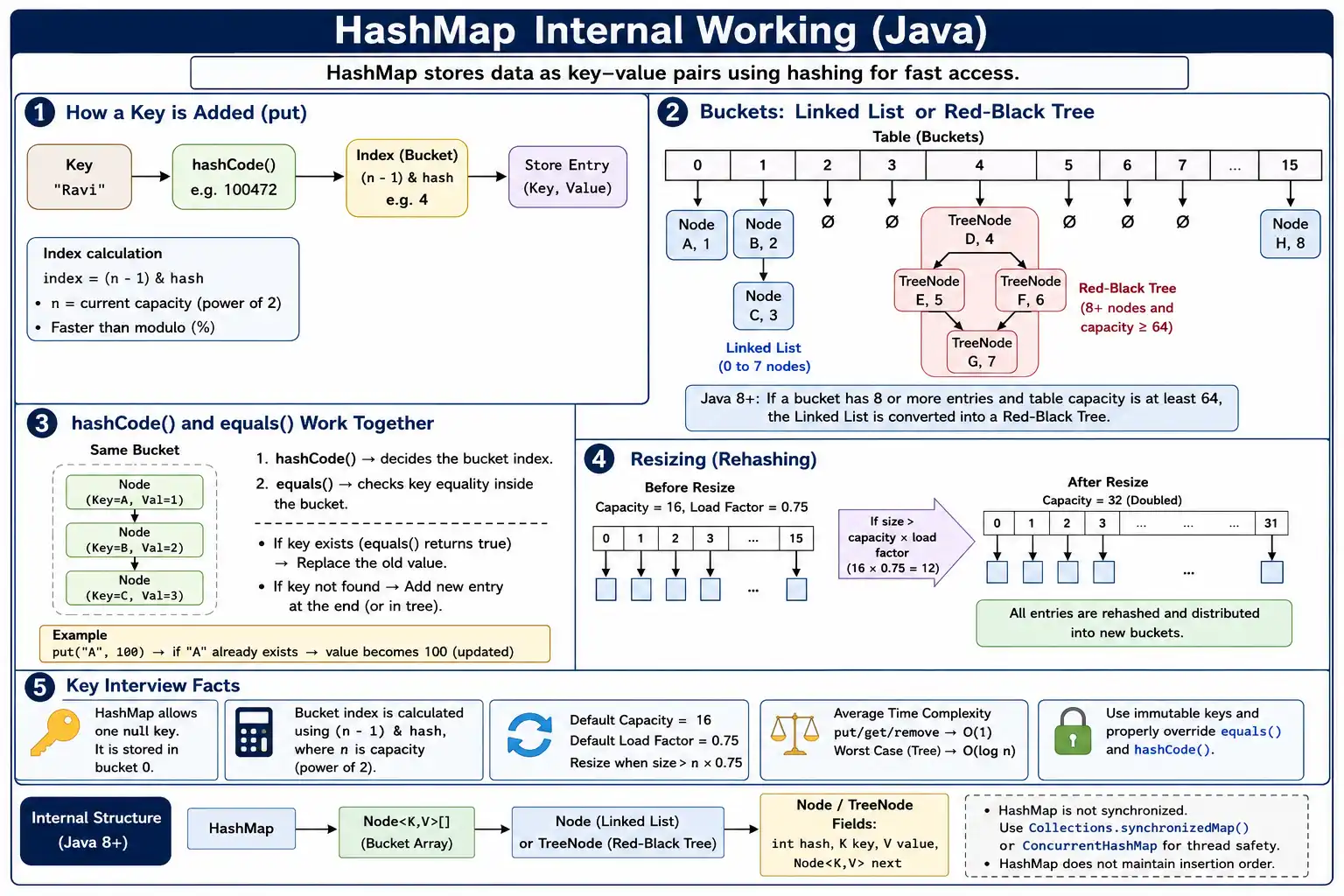
High-Level Idea
A HashMap stores data as key-value pairs using hashing to achieve fast access. The key acts as the identity
used to store and retrieve the value. The value can be any object, including another collection, but the key is
the part that drives the internal lookup process. When you call map.put("language", "Java"), the
string "language" is not simply placed at the end of a list. HashMap calculates a hash from that
key and uses the hash to choose a bucket in an internal array.
This design is different from a list. In an ArrayList, if you do not know the index, you may need to scan the elements until you find what you want. In a HashMap, the key itself guides the map toward the correct storage location. That is why HashMap is commonly used for caches, dictionaries, lookup tables, frequency counters, grouping logic, configuration values, and many real-world data access patterns where fast retrieval by key is more important than maintaining sorted order.
Key → hashCode() → index (bucket) → Entry (key, value)
The sequence above is the core mental model. The key produces a hash code. HashMap uses that hash to calculate an index. The index points to a bucket. The bucket contains the entry, which stores the key, the value, the computed hash, and a reference to the next node if collision handling is required. Once this chain of steps is clear, most HashMap interview questions become easier because they are variations of the same internal flow.
Core Internal Structure
Java 8+ Internal Data Structure
- Array of buckets
- Each bucket contains:
- Linked List (few collisions)
- Red-Black Tree (many collisions)
Bucket[ ] → Node / TreeNode
Internally, HashMap uses an array. Each position in this array is called a bucket. A bucket may be empty, may contain a single node, may contain a linked list of nodes, or, in Java 8 and later, may contain a red-black tree when too many keys collide into the same bucket. This means HashMap is not a simple flat array of values. It is an array whose elements can represent more complex structures depending on how many keys map to the same index.
A normal node contains four important pieces of information: the stored hash, the key, the value, and a reference to the next node. The next reference is needed when multiple entries share the same bucket. If the bucket has only one entry, there is no chain to traverse. If the bucket has many entries, HashMap must walk through those entries and compare keys. Java 8 improved this area by allowing long collision chains to become balanced trees, which prevents lookup from degrading into a long linear scan under heavy collision conditions.
This internal design also explains why HashMap does not preserve insertion order. The storage position is based on hash distribution, not the order in which entries were added. If you need insertion order, you use LinkedHashMap. If you need sorted key order, you use TreeMap. HashMap focuses mainly on fast key-based access, and its internal bucket array is optimized for that purpose.
Step-by-Step: put(key, value) Flow
1. hashCode() Calculation
The first important step in put(key, value) is hash calculation. HashMap asks the key object for
its hash code. For a normal non-null key, this starts with the key's hashCode() method.
int hash = key.hashCode();
The actual HashMap implementation does a little more than simply using the raw hash code. It applies an
additional spreading function so that higher bits of the hash also influence the final bucket calculation.
This helps reduce clustering when keys have weak or uneven hash codes. For interview purposes, the essential
point is that hashCode() is used to determine the bucket area where the entry should live.
The quality of hashCode() matters. If many different keys return the same hash code, they will
keep landing in the same bucket. HashMap can still work correctly because it uses equals() to
distinguish keys, but performance suffers because more comparisons are required inside that bucket. A good
hash code distributes keys across buckets as evenly as possible while still following the equality contract:
if two objects are equal according to equals(), they must return the same hash code.
2. Index (Bucket) Calculation
After HashMap has a hash value, it calculates the bucket index. The index must be within the bounds of the
internal array. If the current table capacity is n, valid indexes range from 0 to
n - 1. HashMap calculates that index using a bitwise AND operation.
index = (n - 1) & hash;
Where:
- n = current capacity (default 16)
- ✔ Faster than modulo (%)
- ✔ Works because capacity is always a power of 2
This is a common interview favorite because many candidates say HashMap uses the modulo operator. Conceptually,
it needs a value similar to hash % n, but internally it can use (n - 1) & hash
because the capacity is maintained as a power of two. This bitwise calculation is fast and fits well with
HashMap's resizing strategy. When the capacity is 16, the bucket index will be from 0 to 15. When the capacity
doubles to 32, the index range becomes 0 to 31.
The power-of-two design is not just a small optimization. It is part of the reason resizing can redistribute entries efficiently. When capacity doubles, an entry either stays in the same bucket or moves by the old capacity offset, depending on one bit of the hash. You do not usually need to explain this at source-code level in a beginner interview, but mentioning that power-of-two capacity supports fast indexing and efficient resizing shows that you understand the design rather than memorizing a formula.
3. Insert into Bucket
- If bucket is empty → insert entry
- If bucket is not empty:
- Compare keys using equals()
- If key exists → replace value
- Else → add new node (collision)
Once the bucket index is found, HashMap checks the bucket. If the bucket is empty, insertion is simple: a new
node is created and placed in that bucket. If the bucket already contains an entry, HashMap has to decide
whether the incoming key is a duplicate key or a different key that happens to share the same bucket. It first
compares hash values and then compares keys using == or equals() logic. If the key is
considered the same, the old value is replaced. If the key is different, a new node is added to the bucket's
collision structure.
This flow explains why duplicate keys do not create duplicate entries. A HashMap can have only one value for a
given logical key. Calling put() again with the same key updates the value associated with that
key. This behavior is frequently used in real code. For example, a frequency counter repeatedly puts the same
word with an updated count. A cache may replace an old value with a newer value for the same ID. The map's job
is not to store every insertion event; it stores the latest value associated with each distinct key.
Collision Handling (Critical)
A collision happens when two different keys map to the same bucket index. Collisions are normal in hash-based structures because the number of possible keys is much larger than the number of buckets. Even with a good hash function, some collisions are expected. The important question is not whether collisions happen, but how the data structure handles them while preserving correctness and reasonable performance.
Java 7 and Earlier
- Linked List only
- Worst-case time: O(n)
In Java 7 and earlier, a bucket with multiple entries was handled using a linked list. When HashMap searched for a key in that bucket, it compared entries one by one. If only a few entries collided, this was acceptable. However, if many keys landed in the same bucket, lookup could become slow because the map had to traverse a long list. In the worst case, a single bucket could contain many entries, and operations on that bucket could degrade to O(n).
Java 8 and Later (Major Improvement)
- Linked List → Red-Black Tree when:
- Bucket size ≥ 8
- Table capacity ≥ 64
- ✔ Improves worst-case performance to O(log n)
Java 8 introduced an important optimization. If a bucket becomes too crowded, HashMap can convert the linked list into a red-black tree. A red-black tree is a self-balancing binary search tree, which means lookup inside that bucket can be done in O(log n) instead of O(n). This does not change the average case for a well-behaved HashMap, but it protects performance when collision chains become unusually long.
The tree conversion does not happen immediately after a small collision. Java waits until the bucket size reaches a threshold and the overall table is large enough. The common interview thresholds are bucket size greater than or equal to 8 and table capacity greater than or equal to 64. If the table is still small, HashMap prefers resizing instead of treeifying because spreading entries across a larger table may solve the collision problem without the overhead of tree nodes.
equals() and hashCode() Role
The relationship between equals() and hashCode() is central to HashMap correctness.
Both methods are used, but they do different jobs.
- hashCode() → bucket location
- equals() → key equality within bucket
The hash code decides where to look. Equality decides whether the object found in that location is the key you
are asking for. Same hash code does not mean same key. Two different objects can have the same hash code, so
HashMap cannot rely on hash code alone. It must use equals() to confirm the final match.
This is why overriding only one of these methods is dangerous. If you override equals() but forget
to override hashCode(), two logically equal objects may produce different hash codes and land in
different buckets. HashMap would then fail to find a value even though the key appears logically equal. If you
override hashCode() poorly, many keys may collide, and performance may suffer. The correct
approach is to implement both methods consistently, usually based on stable fields that uniquely identify the
object.
For example, if an Employee object is used as a key and equality is based on employee ID, then
equals() and hashCode() should both use the employee ID. If the name changes but ID
remains the identity, the hash code should not depend on name. This kind of design choice matters because
HashMap assumes the key's hash behavior remains stable while the key is inside the map.
What Happens with Duplicate Keys?
map.put(1, "Java");
map.put(1, "Python");
- ✔ Key found using equals()
- ✔ Old value replaced
- ✔ No exception
In this example, the second put() call does not create a second entry for key 1.
HashMap calculates the bucket for key 1, finds an existing matching key, and replaces the value
from "Java" to "Python". The map size remains the same because the number of distinct
keys has not changed. This behavior is often tested in interviews because it checks whether you understand
that HashMap uniqueness is based on keys, not values.
Values do not need to be unique. Many keys can point to the same value. For example, multiple user IDs might
map to the role "ADMIN". HashMap only enforces uniqueness on keys. If you want to store multiple
values for the same key, you usually store a collection as the value, such as Map<String,
List<String>>. That design keeps the key unique while allowing the value side to hold multiple
items.
Default Capacity & Load Factor
| Parameter | Default |
|---|---|
| Initial Capacity | 16 |
| Load Factor | 0.75 |
The default initial capacity of a HashMap is 16, and the default load factor is 0.75. Capacity refers to the number of buckets in the internal table. Load factor controls how full the table is allowed to become before resizing. A load factor of 0.75 means HashMap allows the table to become 75 percent full before increasing capacity. This is a practical balance between memory usage and lookup performance.
A lower load factor means resizing happens earlier. That can reduce collisions because entries are spread across more buckets, but it uses more memory. A higher load factor uses memory more tightly, but it can increase collisions and make operations slower. The default value is suitable for most applications. You usually change it only when you have a specific performance or memory reason.
When Does Rehashing Occur?
Rehashing happens when the number of entries crosses the threshold calculated from capacity and load factor.
size > capacity × loadFactor
Example:
16 × 0.75 = 12
With the default capacity of 16 and load factor of 0.75, the threshold is 12. When the 13th entry is inserted, HashMap resizes the internal table. This resize is not just a matter of increasing a number. HashMap creates a larger table and redistributes entries across the new bucket range. Because the capacity changes, the bucket index for some entries changes as well.
This is why repeatedly growing a HashMap can have a performance cost. Individual operations are usually fast, but resizing is more expensive because many entries must be moved or reorganized. The cost is still considered amortized O(1) over many insertions, but in performance-sensitive code you may want to set an appropriate initial capacity when you already know approximately how many entries the map will hold.
Rehashing Process
- Capacity doubles (16 → 32)
- All entries are rehashed
- Buckets are redistributed
⚠ Costly operation
✔ Amortized performance still O(1)
During rehashing, HashMap doubles the capacity, such as from 16 to 32 or from 32 to 64. Entries are then placed
into appropriate buckets in the new table. In older explanations, this is often described as recalculating the
bucket index for every entry. In modern implementations, Java can optimize part of this redistribution because
doubling a power-of-two capacity gives predictable movement. Still, the important practical point remains the
same: resizing touches many entries and is more expensive than a normal put().
Rehashing is not incorrect or dangerous. It is a normal part of HashMap growth. Problems appear when a program grows very large maps without planning. For example, if you know you will insert 100,000 records, creating a default HashMap and letting it resize many times is less efficient than choosing an initial capacity close to the expected size. A good developer does not always tune every map, but understands when initial capacity can reduce unnecessary resizing.
Why Capacity Is Power of 2 (Interview Favorite)
- Enables fast index calculation
- Uniform distribution of keys
- Efficient resizing logic
(n - 1) & hash // instead of hash % n
HashMap capacity is maintained as a power of two because it enables efficient index calculation. When capacity
is a power of two, subtracting one produces a bit mask. For capacity 16, n - 1 is 15, whose binary
form can mask the lower bits of the hash to produce an index between 0 and 15. This is faster than division
based modulo and fits naturally with CPU-level bit operations.
The power-of-two rule also helps resizing. When capacity doubles, each existing entry either remains at the same index or moves to an index offset by the old capacity. This makes redistribution more efficient than a completely arbitrary recalculation strategy. Interviewers often ask this topic to see whether you understand that HashMap's internal choices are connected: capacity, index calculation, resizing, and performance are all part of one design.
However, power-of-two capacity also means hash quality matters. If many keys have poor lower-bit variation,
they may cluster into the same buckets. Java's internal hash spreading helps reduce this risk, but custom key
classes should still provide a well-distributed hashCode(). A good hashCode() does
not need to be cryptographically secure; it simply needs to distribute typical keys reasonably across buckets.
Treeification Conditions (Java 8+)
A bucket converts to Red-Black Tree only if:
| Condition | Value |
|---|---|
| Bucket size | ≥ 8 |
| Table capacity | ≥ 64 |
✔ Prevents premature tree creation
Treeification is the process of converting a bucket's linked list into a red-black tree. It is important to remember that Java does not treeify a bucket after every collision. A few collisions are normal and cheaper to handle with a linked list. Tree nodes use more memory and are more complex than normal linked-list nodes, so converting too early would add overhead without enough benefit.
The two commonly discussed conditions are bucket size at least 8 and table capacity at least 64. If the bucket size reaches the threshold while the table is still small, HashMap prefers to resize the table instead. This is because a larger table may spread the entries across more buckets, eliminating the long chain naturally. Only when the table is already large enough does Java decide that the collision pattern is serious enough to justify a tree.
There is also an untreeification behavior when the number of nodes in a tree bucket becomes small again after removals or resizing. You do not always need to discuss that in beginner interviews, but knowing it reinforces the idea that HashMap chooses the simplest structure that gives acceptable performance. It uses linked lists when chains are short and trees when chains become too long.
null Key Handling
HashMap allows one null key.
map.put(null, "Java");
Internally:
- null key always maps to bucket 0
HashMap allows one null key because key uniqueness still applies. There can be only one null key, but its value
can be updated just like any other key. Multiple null values are allowed because values do not need to be
unique. Internally, a null key cannot call hashCode(), so HashMap treats it specially and maps it
to bucket 0.
This behavior is different from some other map implementations. For example, Hashtable does not allow null keys or null values. ConcurrentHashMap also does not allow null keys or null values because null would create ambiguity in concurrent operations. In HashMap, null support is convenient for single-threaded maps, but it should still be used carefully. A null key can sometimes hide missing data or unclear design, so many teams prefer explicit keys or Optional-style handling where possible.
Time Complexity (Interview Table)
| Operation | Average | Worst Case |
|---|---|---|
| put | O(1) | O(log n) |
| get | O(1) | O(log n) |
| remove | O(1) | O(log n) |
(Java 8+)
The average case for HashMap operations is O(1), which means the operation takes roughly constant time as the map grows, assuming keys are well distributed. The worst case in Java 8 and later is often described as O(log n) because long collision chains can become red-black trees. Before Java 8, the worst case could be O(n) because a bucket could remain a linked list even when it became very long.
In real applications, average-case performance is what you usually experience. HashMap is popular because it is fast for normal workloads. But an interview-ready answer should avoid saying "HashMap is always O(1)." That statement ignores collisions, resizing, treeification, and poor key design. A more accurate answer is: HashMap provides average O(1) performance for put, get, and remove, while worst-case behavior depends on collision handling and Java version.
Mutable Keys and Hidden Bugs
One of the most serious real-world mistakes is using mutable objects as HashMap keys. A mutable key is an
object whose fields can change after it is inserted into the map. If those changed fields are used by
equals() or hashCode(), the key's bucket location may no longer match its current
hash. The entry still exists in the internal table, but HashMap may not be able to find it using the modified
key.
Imagine an employee object used as a key where hashCode() depends on employee email. If the object
is inserted into a HashMap and the email is later changed, a lookup with the same object may fail because the
new hash points to a different bucket. This kind of bug is hard to debug because the object reference still
exists, the map still has an entry, and yet get() returns null. The safest practice is to use
immutable keys such as String, Integer, UUID, enums, or custom immutable classes whose identity fields do not
change.
HashMap and Concurrency
HashMap is not synchronized. It is intended for use when either one thread accesses the map or external synchronization protects shared access. If multiple threads modify a HashMap at the same time without proper control, the result is undefined behavior. You may see lost updates, inconsistent reads, or structural issues during resizing. For concurrent access, Java provides better choices such as ConcurrentHashMap.
ConcurrentHashMap is not just a synchronized HashMap. It is designed for concurrent access with internal strategies that allow better scalability than locking the entire map for every operation. In interviews, it is enough to say that HashMap is not thread-safe and should not be used for shared mutable maps without synchronization. If the interviewer asks for the alternative, mention ConcurrentHashMap for concurrent read/write scenarios and Collections.synchronizedMap for a simple synchronized wrapper when appropriate.
Choosing Initial Capacity
Setting initial capacity can improve performance when you know the expected map size. Because HashMap resizes when size exceeds capacity multiplied by load factor, inserting many entries into a default map can trigger multiple resizes. Each resize requires table expansion and redistribution work. If the expected number of entries is known, choosing a suitable initial capacity reduces that overhead.
A practical rule is to choose a capacity that can hold the expected size without crossing the threshold too early. For example, if you expect around 1,000 entries and use the default load factor of 0.75, the internal capacity needs to be greater than 1,000 divided by 0.75. HashMap will round capacity internally to a power of two. You do not need to calculate this perfectly for every small map, but for large maps, caches, imports, and batch processing, this awareness can reduce avoidable resizing.
How get(key) Works Internally
Although interviews often focus on put(), understanding get() completes the picture.
When you call get(key), HashMap calculates the hash for the key, calculates the bucket index, and
checks that bucket. If the first node matches the key, the value is returned immediately. If not, HashMap walks
through the linked list or searches the tree in that bucket until it finds a matching key or reaches the end.
The important point is that HashMap never searches every bucket during a normal lookup. It uses the hash to go directly to one bucket and then searches only inside that bucket. This is why good distribution is so powerful. If entries are spread evenly, each bucket has very few entries, and lookup is fast. If many entries pile into one bucket, lookup becomes slower because HashMap must do more equality comparisons within that bucket.
How remove(key) Works Internally
The remove(key) operation follows a similar path. HashMap calculates the hash, finds the bucket,
searches for a matching key, and then removes the matching node from the bucket structure. If the bucket is a
linked list, removing a node means reconnecting the previous and next references. If the bucket is a tree,
removal follows tree rules and may rebalance the tree if needed.
Removing entries can reduce the map size, but it does not necessarily shrink the internal table immediately. HashMap grows automatically when thresholds are crossed, but it does not constantly shrink on removals. This avoids expensive resizing back and forth. If you create a huge map and then remove most entries, the internal capacity may remain large. In long-running applications, this is one reason to create a new smaller map when a large temporary map is no longer needed.
HashMap Order and Iteration
HashMap does not guarantee iteration order. The order you see when printing keys may look stable in a small test, but it is not part of the contract. The order depends on hash codes, capacity, insertion patterns, resizing, and implementation details. A program should not rely on HashMap iteration order unless it is willing to accept incorrect behavior when the map changes or the runtime implementation differs.
If insertion order matters, use LinkedHashMap. If sorted order matters, use TreeMap. If no ordering guarantee is required and fast lookup is the main goal, HashMap is usually the right choice. This distinction is useful in interviews because it shows that you know not only how HashMap works, but also when another map implementation is more appropriate.
Common Interview Traps
- Forgetting treeification conditions
- Saying HashMap is always O(1)
- Ignoring equals() role
- Using mutable objects as keys
- Forgetting rehashing cost
The most common trap is saying that HashMap directly stores values based only on hashCode(). In
reality, hashCode() chooses a bucket, but equals() confirms the key. Another common
mistake is assuming that two objects with the same hash code are equal. Same hash means they may be in the same
bucket; it does not prove equality. Equality must still be checked.
Another trap is forgetting Java 8's treeification conditions. Some candidates say every collision becomes a tree, but that is not correct. A bucket becomes a tree only when the collision chain is long enough and the table capacity is large enough. This detail matters because it explains why HashMap does not pay tree overhead for normal small collisions.
The final trap is ignoring key design. HashMap performance and correctness depend heavily on stable and
consistent keys. If a custom key class does not correctly implement equals() and
hashCode(), the map may behave unpredictably from a business point of view. You may insert a value
and fail to retrieve it later with an apparently equal key. Interviewers like this topic because it reveals
whether you understand collection behavior beyond method names.
Best Practices (Real-World)
- Override both equals() and hashCode()
- Use immutable keys
- Set initial capacity when size is known
- Avoid excessive collisions
- Use ConcurrentHashMap for concurrency
The first best practice is to use reliable key types. Strings, wrapper classes, enums, and UUIDs are common
choices because their equality and hash behavior are well-defined. If you create a custom key class, make it
immutable when possible and generate equals() and hashCode() using the same identity
fields. Modern IDEs can generate these methods, but you still need to choose the correct fields.
The second best practice is to avoid over-tuning small maps while still tuning large predictable maps. For a small map with a handful of entries, defaults are fine. For a large import process, a cache, or a map built from a known dataset, initial capacity can reduce resizing. Practical Java development is about knowing when tuning matters and when defaults are enough.
The third best practice is to choose the right map implementation. Use HashMap for fast unsorted lookups in single-threaded or externally synchronized contexts. Use LinkedHashMap when iteration order matters. Use TreeMap when sorted keys matter. Use ConcurrentHashMap when multiple threads must access and update the map safely. Choosing the right collection often prevents complicated fixes later.
Real-World Example: Counting Frequencies
A common practical use of HashMap is counting frequencies. Suppose you have a list of words and need to count how many times each word appears. The word is the key, and the count is the value. Each time a word appears, the map quickly finds the current count using the word's hash and updates the value. Without a HashMap, you might scan a list of existing words every time, which becomes slower as the dataset grows.
This example also shows why duplicate keys replace values. The word "java" should not appear as
multiple separate keys. Instead, the map should keep one key and update its count from 1 to 2, then 3, and so
on. HashMap's key uniqueness makes this pattern natural and efficient.
Real-World Example: Caching by ID
Another common use is caching objects by ID. In an application, you may load user details from a database and store them in a map where the user ID is the key. Later, if the same ID is requested, the application can check the map first instead of calling the database again. HashMap is suitable here because IDs are usually stable, hash well, and provide clear logical identity.
In this kind of design, key choice is critical. If the key is a mutable user object instead of a stable user ID, the cache may become unreliable. If multiple threads access the cache, a plain HashMap may not be safe. Depending on the application, ConcurrentHashMap or a dedicated caching library may be a better fit. HashMap internals help you reason about these design decisions instead of treating maps as black boxes.
How to Explain HashMap in an Interview
A strong interview answer should start simple and then add depth. First say that HashMap stores key-value pairs
using hashing and an internal bucket array. Then explain that the key's hashCode() helps determine
the bucket index, while equals() is used to identify the exact key inside that bucket. After that,
mention collision handling through linked lists and Java 8 red-black trees. Finally, cover resizing using
capacity and load factor.
This order works well because it mirrors the actual internal flow. It also avoids jumping directly into advanced details before explaining the foundation. If the interviewer asks follow-up questions, you can expand into treeification thresholds, null key handling, mutable key problems, power-of-two capacity, and concurrency. The goal is not to recite source code line by line. The goal is to show that you understand how the design produces fast lookup and where the edge cases are.
Interview-Ready Answers
Short Answer
HashMap stores key-value pairs using hashing and buckets.
Detailed Answer
Internally, HashMap uses an array of buckets where each bucket stores entries using linked lists or red-black trees. The key’s hashCode determines the bucket index, and equals is used to resolve collisions. Java 8 optimizes collision handling by converting long chains into balanced trees, ensuring efficient performance.
You can make the answer stronger by adding that HashMap uses default capacity 16 and default load factor 0.75, resizes when the threshold is crossed, and allows one null key. You can also mention that average performance is O(1), but worst-case behavior depends on collisions and Java version. This gives a complete answer without becoming unnecessarily complicated.
Key Takeaway
HashMap = Hashing + Buckets + equals/hashCode + Smart Resizing. Mastering internals is essential for performance tuning, correctness, and interview success.
The most important lesson is that HashMap performance comes from reducing search space. A key is converted into a hash, the hash points to a bucket, and equality confirms the exact key. Collisions, resizing, treeifying, null handling, and key design all exist around that core idea. Once you understand that flow, HashMap becomes predictable rather than mysterious, and you can use it confidently in both interviews and real Java projects.