HashMap in Java
HashMap is the most widely used implementation of the Map interface in Java. It
stores data as key-value pairs, where each key is associated with a value. The key is used for lookup, and
the value is the data connected to that key. This makes HashMap one of the most practical data structures in
day-to-day Java programming.
HashMap is popular because it provides fast average performance for common operations such as
put, get, remove, and containsKey. When order does not
matter and thread safety is not required, HashMap is usually the default choice for key-based lookup. It is
used in service code, data transformation, caching, grouping, configuration storage, API processing, and many
interview coding problems.
HashMap is also a top-tier interview topic because it connects several important concepts: the
Map interface, hashing, buckets, collisions, equals, hashCode, load
factor, rehashing, null handling, iteration, and thread safety. A strong explanation should go beyond "it
stores key-value pairs." It should explain how keys are used, what happens when a duplicate key is inserted,
and why correct key design matters.
What Is HashMap?
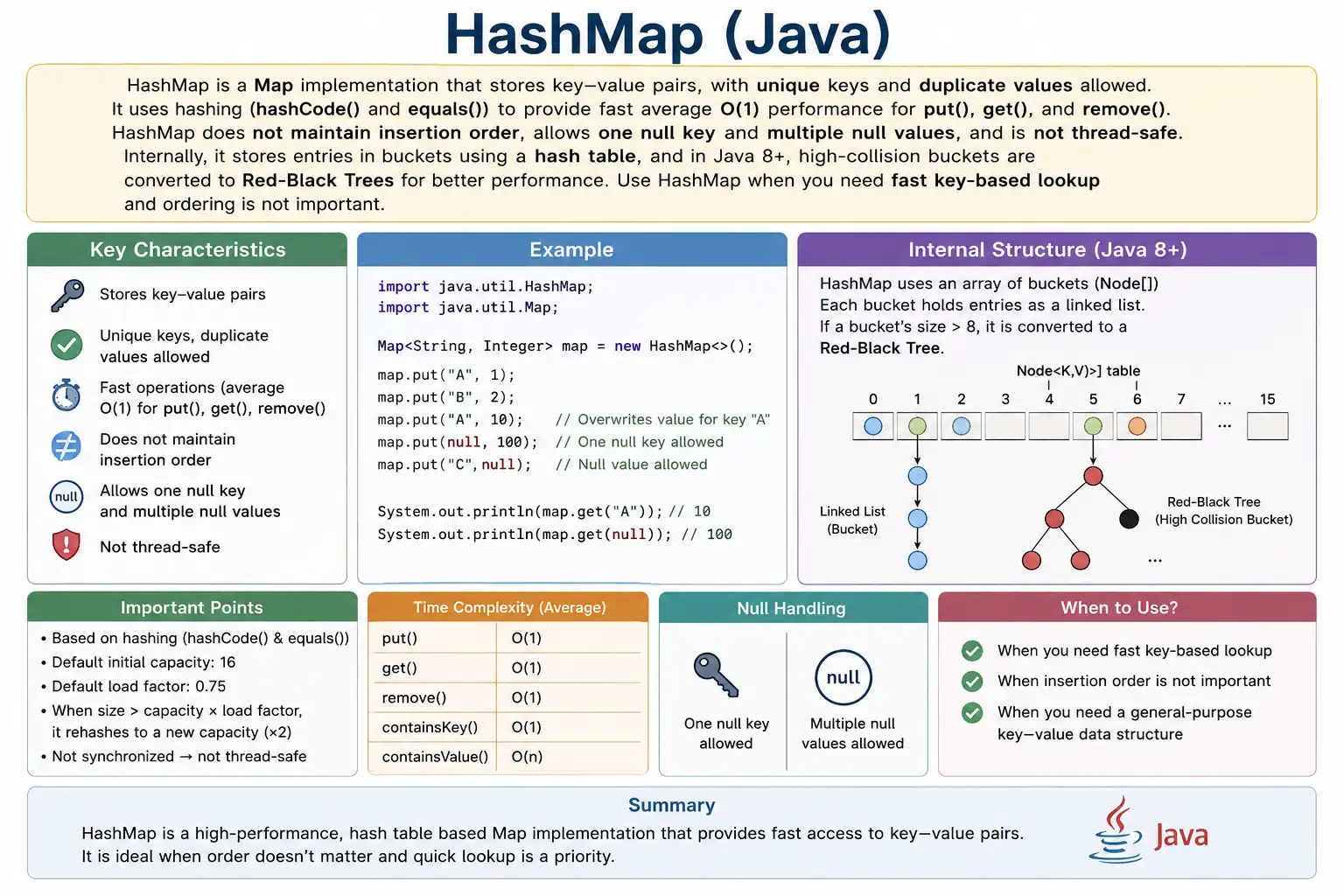
HashMap is a class in the java.util package that implements the
Map interface. It stores entries as key-value pairs. Keys must be unique, but values can be
duplicated. If the same key is added again, the old value is replaced by the new value.
HashMap does not guarantee insertion order. The order in which entries are printed or iterated should not be
treated as stable. If insertion order is required, LinkedHashMap is a better choice. If sorted
keys are required, TreeMap should be considered.
HashMap allows one null key and multiple null values. A second entry with a null key replaces the first
null-key mapping because keys must be unique. This behavior is different from Hashtable, which
does not allow null keys or null values.
Map<Integer, String> map = new HashMap<>();
Position in Map Hierarchy
HashMap belongs to the Map hierarchy. Unlike List and Set, Map does not extend the Collection interface because it stores mappings rather than single elements. HashMap is one concrete implementation of the Map contract.
Map
 |-- HashMap
Key Characteristics of HashMap
The first key characteristic of HashMap is fast average lookup. It is designed around hashing, which allows keys to be converted into internal bucket locations. The second characteristic is key uniqueness. A key can appear only once in the map, although many keys can share the same value.
The third characteristic is that HashMap is unordered. It does not preserve insertion order and does not sort
keys. The fourth characteristic is that HashMap is not synchronized. It is suitable for ordinary single-thread
usage or method-local data, but shared concurrent modification requires a different approach such as
ConcurrentHashMap.
HashMap is highly practical, but its correctness depends on good key behavior. For built-in immutable keys
such as String, Integer, and enums, equality is already well-defined. For custom
key objects, developers must implement equals and hashCode correctly.
How HashMap Works Internally
HashMap works internally using hashing. When a key is inserted, Java calls the key's
hashCode method. The hash value is then processed to decide an internal bucket index. A bucket
is a location inside the internal table where one or more entries may be stored.
If the target bucket is empty, the new key-value entry can be stored there directly. If the bucket already
contains entries, HashMap must determine whether the new key is equal to an existing key. It uses
equals for that final equality check. If an equal key already exists, the old value is replaced.
If no equal key exists, a new entry is added in that bucket.
This process explains why hashCode and equals are so important. The hash code helps
locate where the key may belong, and equals confirms whether two keys are logically the same. A poor hashCode
implementation can create too many collisions. A poor equals implementation can cause incorrect key matching.
Internal Data Structure
Internally, HashMap uses an array of buckets. Each bucket stores entries that are mapped to that bucket by the hashing process. In older Java versions, bucket collisions were handled with linked lists. In Java 8 and later, when collisions become heavy enough and certain conditions are met, a bucket can be transformed from a linked list into a tree structure to improve lookup performance.
This improvement matters because many keys can theoretically map to the same bucket. That situation is called a collision. HashMap is designed to handle collisions, but too many collisions can reduce performance. Tree bins help protect performance in high-collision cases by making lookup more efficient than a long linear linked-list scan.
In practical everyday Java code, developers usually do not manage buckets directly. The important lesson is conceptual: HashMap uses hashing for speed, and key quality strongly affects that speed. Well-designed keys distribute well across buckets and compare consistently.
Important Internal Parameters
Initial Capacity
Initial capacity is the starting size of the internal bucket table. The default initial capacity is commonly 16. If the expected number of entries is known in advance, providing a reasonable initial capacity can reduce resizing work.
Load Factor
Load factor controls how full the map can become before it resizes. The default load factor is commonly 0.75. This value balances memory usage and lookup performance. A lower load factor can reduce collisions but may use more memory. A higher load factor may use less memory but can increase collision risk.
Rehashing
Rehashing occurs when the number of entries exceeds the threshold calculated from capacity and load factor. During resizing, HashMap creates a larger internal table and redistributes entries into new bucket positions.
size > capacity * loadFactor
Resizing improves future performance but has a cost at the moment it happens. This is why initial capacity tuning can matter in large maps. For small maps or ordinary application logic, the defaults are usually acceptable.
Creating a HashMap
A HashMap can be created using the no-argument constructor. This is the most common form when the expected size is unknown or small.
HashMap<String, Integer> map = new HashMap<>();
With Initial Capacity
If the expected number of entries is known, an initial capacity can be supplied. This can reduce resizing in large maps.
HashMap<String, Integer> map = new HashMap<>(32);
Commonly Used HashMap Methods
Adding / Updating Entries
The put method adds a new mapping or updates an existing one. If the key is new, a new entry is
created. If the key already exists, the value is replaced.
map.put(1, "Java");
map.put(2, "Python");
map.put(1, "C++"); // replaces value
Accessing Values
The get method retrieves the value for a key. getOrDefault is useful when the code
wants a fallback value for missing keys.
map.get(1);
map.getOrDefault(3, "NA");
Removing Entries
The remove method deletes the mapping for a key. If the key is not present, the map remains
unchanged.
map.remove(2);
Checking Keys and Values
containsKey checks whether a key exists. containsValue checks whether a value
appears anywhere in the map. HashMap is optimized for key lookup, so key checks are usually more efficient
than value checks.
map.containsKey(1);
map.containsValue("Java");
Iterating HashMap
The preferred way to iterate when both keys and values are needed is entrySet. It gives direct
access to each key-value pair and avoids extra lookups.
for (Map.Entry<Integer, String> entry : map.entrySet()) {
    System.out.println(entry.getKey() + " " + entry.getValue());
}
Duplicate Key Behavior
HashMap does not allow duplicate keys. When the same key is inserted again, the existing value is replaced. No exception is thrown. This behavior is useful for updates, but it can surprise beginners who expect both values to remain.
map.put(1, "Java");
map.put(1, "Python");
System.out.println(map); // {1=Python}
If overwriting should be avoided, use putIfAbsent or check containsKey before
calling put. That makes the update rule explicit.
Null Handling
HashMap allows one null key and multiple null values. A second null key replaces the previous null-key entry because keys must be unique. Multiple null values are allowed because values do not need to be unique.
map.put(null, "Java");  // allowed
map.put(null, "Python"); // replaces value
map.put(1, null);
map.put(2, null); // multiple null values allowed
Performance Complexity
HashMap is known for fast average performance. In normal conditions, put, get, and
remove are O(1) on average. Iteration is O(n) because every entry must be visited.
The worst case can be worse when many keys collide into the same bucket. Java 8 improved collision handling by treeifying heavily populated buckets under certain conditions, but the general lesson remains: good key design and a reasonable hash distribution are important for performance.
| Operation | Time Complexity |
|---|---|
| put | O(1) average |
| get | O(1) average |
| remove | O(1) |
| iteration | O(n) |
In interviews, it is acceptable to say HashMap has O(1) average performance for get and put, while noting that collisions can affect worst-case behavior. This answer shows both practical understanding and awareness of internal mechanics.
HashMap vs Hashtable
HashMap and Hashtable are often compared in interviews. HashMap is not synchronized and allows one null key and multiple null values. Hashtable is synchronized, does not allow null keys or null values, and is considered a legacy class. For new code, HashMap is usually used in non-concurrent scenarios, while ConcurrentHashMap is commonly used when concurrency is required.
| Feature | HashMap | Hashtable |
|---|---|---|
| Thread-safe | No | Yes |
| Null key | One | No |
| Null values | Yes | No |
| Performance | Faster | Slower |
| Legacy | No | Yes |
HashMap vs LinkedHashMap vs TreeMap
HashMap, LinkedHashMap, and TreeMap all implement Map, but they optimize for different behavior. HashMap is usually fastest when order does not matter. LinkedHashMap preserves insertion order. TreeMap sorts entries by key and supports sorted-map behavior.
The implementation should be chosen by requirement. Use HashMap for fast unordered lookup. Use LinkedHashMap when predictable insertion order matters. Use TreeMap when keys must be sorted or range-based operations are needed.
| Feature | HashMap | LinkedHashMap | TreeMap |
|---|---|---|---|
| Order | No guarantee | Insertion | Sorted |
| Performance | Fastest | Slightly slower | Slower |
| Null key | One | One | No |
Common Beginner Mistakes
A common beginner mistake is assuming HashMap preserves insertion order. It does not. Output may appear stable in a small example, but that order is not guaranteed. If order matters, use LinkedHashMap or TreeMap depending on the required order.
Another serious mistake is using mutable objects as keys. If fields used in equals or
hashCode are changed after the key is inserted, HashMap may no longer be able to find the entry
reliably. Good HashMap keys should be stable while they are stored in the map.
Beginners also forget to override equals and hashCode for custom keys. This causes
logical duplicate keys and failed lookups. Another mistake is using HashMap in concurrent code without
understanding that it is not thread-safe.
Best Practices
The best practice for HashMap is to use stable and meaningful keys. Immutable keys such as strings, wrapper
objects, enums, and IDs are usually reliable. If custom objects are used as keys, implement
equals and hashCode carefully and base them on stable identity fields.
If the expected number of entries is large and known in advance, consider setting an initial capacity to
reduce resizing. For multithreaded access, use ConcurrentHashMap or proper synchronization
rather than sharing a plain HashMap unsafely. When iterating and both keys and values are needed, prefer
entrySet.
It is also good practice to choose HashMap only when unordered behavior is acceptable. If business logic or tests depend on iteration order, HashMap is the wrong implementation even if it appears to work during local testing.
Interview-Ready Answers
Short Answer
HashMap is a Map implementation that stores key-value pairs using hashing.
Detailed Answer
In Java, HashMap implements the Map interface and stores entries using a hash table. It allows one null key,
multiple null values, and provides average constant-time performance for get and put operations. It uses
hashCode and equals to locate and compare keys, replaces old values when duplicate
keys are inserted, does not guarantee insertion order, and is not thread-safe.
HashMap in Real Projects
HashMap appears constantly in real Java systems. Backend services use it to build lookup tables, cache data during a request, group records, count occurrences, map IDs to objects, and transform one data structure into another. Frameworks and libraries also use map-like structures for headers, request attributes, configuration properties, and metadata.
In testing and automation, HashMap is useful for storing test data by field name, comparing expected and actual values, preparing API payloads conceptually, and mapping identifiers to expected outcomes. Its biggest value is clarity: when a piece of data is naturally retrieved by a key, HashMap expresses that relationship directly.
Designing Good HashMap Keys
The quality of HashMap behavior depends heavily on the quality of its keys. A good key should be stable,
meaningful, and easy to compare. Common key choices include String, Integer,
Long, enums, UUIDs, and immutable custom value objects. These keys work well because their
identity does not unexpectedly change after insertion.
Mutable keys are dangerous. Suppose an object is used as a key and its ID field contributes to
hashCode. If that ID changes after the object is inserted into a HashMap, the map may look in
the wrong bucket when trying to retrieve it later. The entry may still physically exist inside the map, but
the lookup may fail because the key's hash behavior changed.
For custom keys, equals and hashCode should be based on the same stable identity
fields. If two objects are equal, they must produce the same hash code. This rule is essential for HashMap,
HashSet, LinkedHashMap, and other hash-based collections. Breaking it creates bugs that are difficult to
diagnose because the code may compile and run but behave inconsistently.
Collision Handling in Practical Terms
A collision occurs when two different keys map to the same bucket. Collisions are normal and expected in
hash-based structures. HashMap handles them internally by storing more than one entry in the bucket and then
comparing keys using equals. The problem is not that collisions exist; the problem is when too
many collisions occur in the same bucket.
Java 8 improved collision handling by allowing heavily populated buckets to become tree-based under certain
conditions. This helps protect performance when many keys collide. However, developers should still design
keys well. A poor hashCode implementation that returns the same value for every object defeats
the main advantage of HashMap because too many entries land in the same bucket.
In interviews, you do not usually need to describe every internal threshold unless asked. The practical explanation is enough: HashMap uses buckets, collisions are resolved by checking equality, and Java can use tree bins in high-collision cases to improve performance.
When to Choose Another Map
HashMap is a strong default, but it is not always the right map. If iteration order must match insertion
order, use LinkedHashMap. If keys must be sorted, use TreeMap. If the map is shared
and modified by multiple threads, use ConcurrentHashMap or another thread-safe design.
This distinction matters in real projects. A report generated from HashMap may display entries in an unpredictable order. A test that compares HashMap output as a string may fail because the iteration order is not guaranteed. A shared HashMap in concurrent code can create correctness issues. The implementation choice should reflect the required behavior, not just habit.
Interpreting null from get()
One subtle HashMap behavior is that get returns null both when a key is missing and when a key
exists but is mapped to null. This can create ambiguity. If the program must know whether the key exists,
containsKey should be used.
For example, a configuration map may contain a key with a null value to indicate that the setting was
intentionally left blank. A missing key may mean the setting was never configured. Both situations can
produce null from get, but they have different meanings. Clear null-handling rules prevent these
cases from being confused.
HashMap Examples
The following examples show common HashMap operations and interview behaviors. They are intentionally small so each concept is visible: creation, duplicate key replacement, duplicate values, null handling, retrieval, iteration, removal, conditional updates, custom keys, and thread-safety awareness.
1. Creating a HashMap
This example creates a HashMap with integer keys and string values. The keys can later be used to retrieve the corresponding values directly.
import java.util.*;

class Demo {
    public static void main(String[] args) {
        HashMap<Integer, String> map = new HashMap<>();
        map.put(1, "Java");
        map.put(2, "API");
        System.out.println(map);
    }
}
Output
{1=Java, 2=API}2. Duplicate Key Overwrites Value
A key can appear only once in a HashMap. When key 1 is inserted again, the value
"Java" is replaced by "Selenium".
import java.util.*;

class Demo {
    public static void main(String[] args) {
        HashMap<Integer, String> map = new HashMap<>();
        map.put(1, "Java");
        map.put(1, "Selenium");
        System.out.println(map);
    }
}
Output
{1=Selenium}3. Duplicate Values Are Allowed
HashMap allows duplicate values because uniqueness applies only to keys. Two different keys can point to the same value without any problem.
import java.util.*;

class Demo {
    public static void main(String[] args) {
        HashMap<Integer, String> map = new HashMap<>();
        map.put(1, "Test");
        map.put(2, "Test");
        System.out.println(map);
    }
}
4. HashMap Allows One null Key
HashMap allows one null key. In this example, the second null-key entry replaces the first one, because null is still a key and keys must be unique.
import java.util.*;

class Demo {
    public static void main(String[] args) {
        HashMap<String, String> map = new HashMap<>();
        map.put(null, "Value1");
        map.put(null, "Value2");
        System.out.println(map);
    }
}
Output
{null=Value2}5. HashMap Allows Multiple null Values
Multiple null values are allowed because values do not need to be unique. This is different from null keys, where only one null key can exist.
import java.util.*;

class Demo {
    public static void main(String[] args) {
        HashMap<Integer, String> map = new HashMap<>();
        map.put(1, null);
        map.put(2, null);
        System.out.println(map);
    }
}
6. Retrieving Value Using get()
The get method retrieves a value using its key. If the key exists, the mapped value is returned.
import java.util.*;

class Demo {
    public static void main(String[] args) {
        HashMap<Integer, String> map = new HashMap<>();
        map.put(10, "Java");
        System.out.println(map.get(10));
    }
}
Output
Java7. get() with Missing Key
When a key is missing, get returns null. This can mean the key is absent, but it can also mean
the key exists and is mapped to null. Use containsKey when the difference matters.
import java.util.*;

class Demo {
    public static void main(String[] args) {
        HashMap<Integer, String> map = new HashMap<>();
        System.out.println(map.get(1));
    }
}
Output
null8. Checking Key and Value
containsKey checks whether a key exists. containsValue checks whether a value is
present somewhere in the map. HashMap is optimized around keys, so key checks are usually more natural.
import java.util.*;

class Demo {
    public static void main(String[] args) {
        HashMap<Integer, String> map = new HashMap<>();
        map.put(1, "Java");
        System.out.println(map.containsKey(1));
        System.out.println(map.containsValue("Java"));
    }
}
Output
true
true
9. Iterating Using entrySet() (Best Practice)
When both key and value are needed, entrySet is the preferred iteration style. It gives direct
access to the complete map entry.
import java.util.*;

class Demo {
    public static void main(String[] args) {
        HashMap<Integer, String> map = new HashMap<>();
        map.put(1, "A");
        map.put(2, "B");

        for (Map.Entry<Integer, String> e : map.entrySet()) {
            System.out.println(e.getKey() + " = " + e.getValue());
        }
    }
}
10. Iterating Using keySet()
keySet is useful when the program mainly needs keys. It can also be used with get
to fetch values, but entrySet is usually clearer when both are needed.
import java.util.*;

class Demo {
    public static void main(String[] args) {
        HashMap<Integer, String> map = new HashMap<>();
        map.put(1, "X");
        map.put(2, "Y");

        for (Integer k : map.keySet()) {
            System.out.println(k + " -> " + map.get(k));
        }
    }
}
11. Iterating Using values()
The values view is useful when only the values matter. Remember that values can be duplicated,
so this collection is not a set of unique values.
import java.util.*;

class Demo {
    public static void main(String[] args) {
        HashMap<Integer, String> map = new HashMap<>();
        map.put(1, "Java");
        map.put(2, "API");

        for (String v : map.values()) {
            System.out.println(v);
        }
    }
}
12. Removing Entry by Key
Removing by key deletes the mapping for that key. If the key is not present, the map remains unchanged.
import java.util.*;

class Demo {
    public static void main(String[] args) {
        HashMap<Integer, String> map = new HashMap<>();
        map.put(1, "Java");
        map.remove(1);
        System.out.println(map);
    }
}
Output
{}13. Conditional Remove
Conditional remove deletes an entry only when both the key and value match. This is useful when the program wants to avoid removing a value that may have changed since it was last read.
import java.util.*;

class Demo {
    public static void main(String[] args) {
        HashMap<Integer, String> map = new HashMap<>();
        map.put(1, "Java");
        map.remove(1, "API");   // no effect
        map.remove(1, "Java");  // removed
        System.out.println(map);
    }
}
14. putIfAbsent()
putIfAbsent inserts a value only when the key is not already present. This prevents accidental
overwriting and is useful for defaults and initialization logic.
import java.util.*;

class Demo {
    public static void main(String[] args) {
        HashMap<Integer, String> map = new HashMap<>();
        map.put(1, "Java");
        map.putIfAbsent(1, "API");
        map.putIfAbsent(2, "API");
        System.out.println(map);
    }
}
Output
{1=Java, 2=API}15. replace() Method
replace updates an existing mapping. It is useful when the code should modify a value only if
the key already exists.
import java.util.*;

class Demo {
    public static void main(String[] args) {
        HashMap<Integer, String> map = new HashMap<>();
        map.put(1, "Java");
        map.replace(1, "Selenium");
        System.out.println(map);
    }
}
16. computeIfAbsent()
computeIfAbsent lazily creates a value when a key is missing. It is often used for grouping,
caching, or creating nested collections inside a map.
import java.util.*;

class Demo {
    public static void main(String[] args) {
        HashMap<Integer, String> map = new HashMap<>();
        map.computeIfAbsent(1, k -> "Generated");
        System.out.println(map);
    }
}
17. Custom Object as Key (Without equals & hashCode)
This example shows the danger of using custom objects as keys without equality methods. Two user objects with the same ID are treated as different keys because Java compares object identity by default.
class User {
    int id;
    User(int id) { this.id = id; }
}

import java.util.*;

class Demo {
    public static void main(String[] args) {
        HashMap<User, String> map = new HashMap<>();
        map.put(new User(1), "Admin");
        map.put(new User(1), "Admin");
        System.out.println(map.size());
    }
}
Output
218. Custom Object as Key (With equals & hashCode)
After implementing equals and hashCode, two user objects with the same ID are
treated as the same logical key. The second put replaces the first mapping instead of creating a new key.
class User {
    int id;
    User(int id) { this.id = id; }

    public boolean equals(Object o) {
        return this.id == ((User)o).id;
    }

    public int hashCode() {
        return id;
    }
}

import java.util.*;

class Demo {
    public static void main(String[] args) {
        HashMap<User, String> map = new HashMap<>();
        map.put(new User(1), "Admin");
        map.put(new User(1), "Admin");
        System.out.println(map.size());
    }
}
Output
119. Thread-Unsafe Nature of HashMap
HashMap is not thread-safe. It is fine for local variables and single-threaded usage, but shared concurrent
modification should use ConcurrentHashMap or another synchronization strategy.
import java.util.*;

class Demo {
    public static void main(String[] args) {
        HashMap<String, String> map = new HashMap<>();
        map.put("A", "Not Thread Safe");
        System.out.println(map);
    }
}
Explanation
Use ConcurrentHashMap for concurrency.
20. Interview Summary for HashMap
This final example summarizes the core behavior: HashMap stores key-value pairs, allows one null key, supports fast lookup, and does not guarantee ordering.
import java.util.*;

class Demo {
    public static void main(String[] args) {
        HashMap<Integer, String> map = new HashMap<>();
        map.put(1, "Fast");
        map.put(2, "Unordered");
        map.put(null, "OneNullKey");
        System.out.println(map);
    }
}
Key Points
- Key-value structure
- Keys are unique
- One null key allowed
- Multiple null values allowed
- Backed by buckets (hashing)
- Average time: O(1)
Key Takeaway
Use HashMap when fast key-based lookup is required and ordering is not important. It is one of
the most useful Java collections because it models real-world relationships directly through keys and values.
Its performance is excellent on average, but correctness depends on stable keys and proper
equals and hashCode implementations for custom key classes. If insertion order,
sorted order, or thread safety is required, choose a different map implementation that matches that
requirement.