Functional Interfaces
A functional interface is the foundation of lambda expressions in Java. It represents a single unit of behavior and enables functional programming constructs introduced in Java 8.
To understand modern Java, functional interfaces are one of the first Java 8 concepts you should become comfortable with. Lambda expressions, method references, stream operations, collection filtering, custom callbacks, thread tasks, and many utility-style APIs all depend on the same foundation: an interface that exposes one clear abstract operation. The interface defines the shape of the behavior, and the lambda or method reference supplies the actual implementation.
Before functional interfaces became central to Java programming, developers commonly used anonymous inner
classes when they wanted to pass behavior into a method. For example, sorting a list required creating an
anonymous Comparator, and starting a thread required creating an anonymous
Runnable. That style was valid, but it added many lines of boilerplate around a small piece of
logic. Functional interfaces gave Java a formal model for those one-method contracts, making lambdas
possible and allowing behavior to be passed around in a concise, type-safe way.
The key point is that a functional interface is still an interface. It participates in Java's normal type system, can be used as a variable type, can be passed as a method argument, can be returned from a method, and can be implemented by a class. What makes it special is the single abstract method rule. Because there is only one abstract method to implement, Java can map a lambda expression directly to that method without ambiguity.
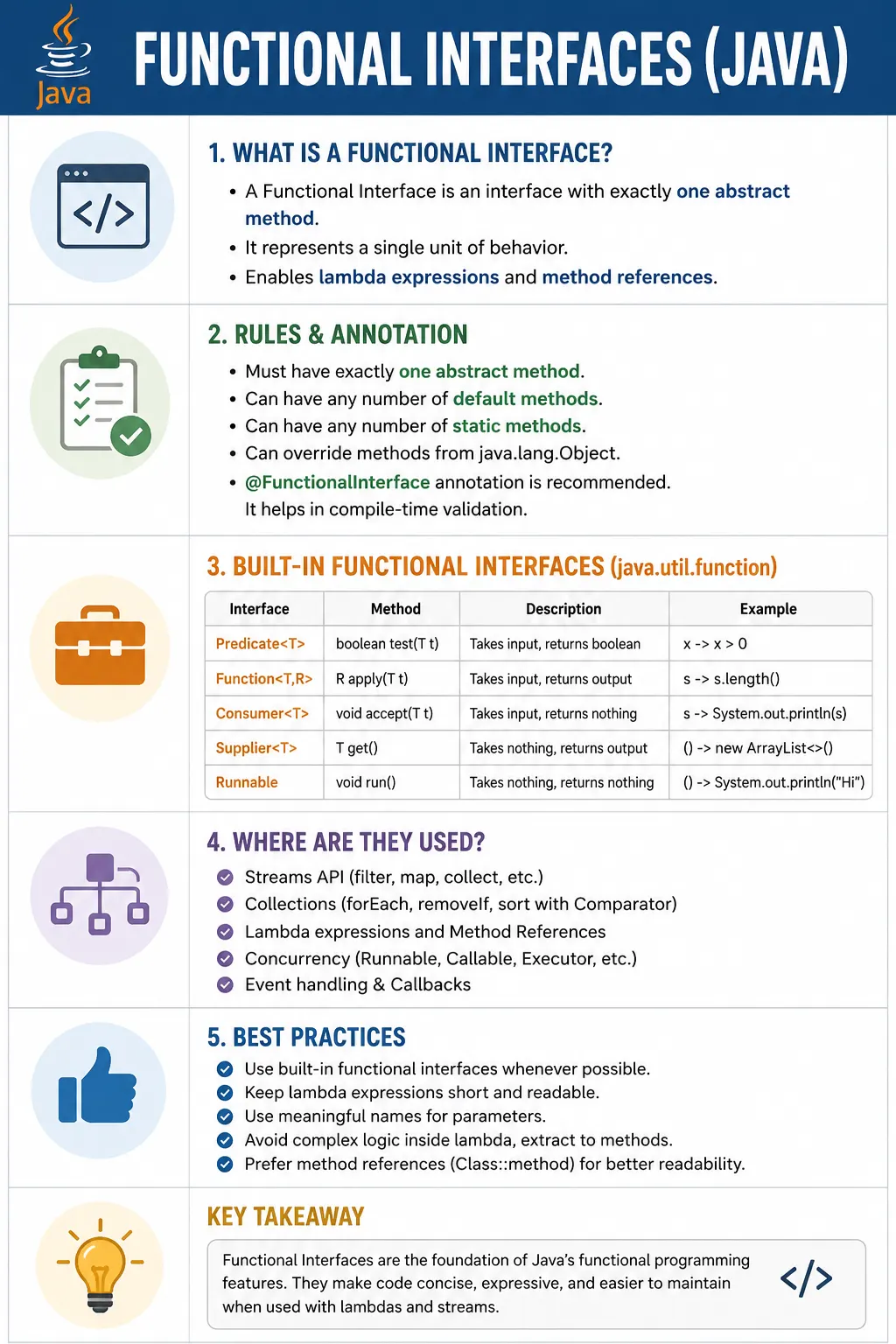
This is a very high-frequency interview topic, tightly coupled with lambdas, streams, and method references.
Interviewers focus on functional interfaces because they reveal whether a candidate understands how modern
Java features connect. A memorized answer such as "one abstract method" is a start, but a complete answer
also explains why the rule matters. Functional interfaces are the target types for lambdas. They make
method references possible. They define the contracts used by Predicate, Function,
Consumer, Supplier, Runnable, Comparator, and many
stream operations. Once this relationship is clear, lambdas and streams become easier to read.
What Is a Functional Interface?
A functional interface is an interface that has exactly one abstract method.
@FunctionalInterface
public interface Runnable {
    void run();
}
- Can have any number of default and static methods
- Must have only one abstract method
The single abstract method is often called the SAM, which stands for Single Abstract Method. The lambda expression becomes the implementation of that SAM. If the method accepts no input and returns nothing, the lambda must match that shape. If the method accepts two integers and returns an integer, the lambda must match that shape. Java checks this at compile time, so a functional interface gives lambdas strong type safety rather than loose dynamic behavior.
Runnable is a classic example because it has one abstract method, run(). A lambda
assigned to Runnable does not need to mention the method name because there is only one
abstract method available. Java already knows the lambda is implementing run(). This same idea
applies to custom interfaces, built-in functional interfaces, and stream-related interfaces.
A functional interface can contain other members without breaking the rule. Default methods have method
bodies, static methods have method bodies, and methods inherited from Object are treated
specially. These members do not create ambiguity for lambdas because they are not extra abstract operations
that the lambda must implement.
Why Functional Interfaces Were Introduced
- Enable lambda expressions
- Reduce boilerplate code
- Support functional programming style
- Improve readability and expressiveness
Functional interfaces were introduced as part of Java's move toward more expressive programming without abandoning object orientation. Java applications frequently need to pass a small operation into a larger workflow. A sorting method needs comparison behavior. A filtering method needs a condition. A mapping method needs transformation behavior. A thread needs a task. A retry utility needs a rule or action to execute. Functional interfaces provide a common way to represent those units of behavior.
The benefit becomes clear when you compare old and modern Java code. In older code, a simple condition or action often required an anonymous inner class with several lines of syntax. In modern Java, the same behavior can be represented with a lambda. The functional interface still provides the contract, so the code remains strongly typed, but the implementation becomes short enough to read at the point where it is used.
Functional interfaces also enabled the Streams API to feel natural. Stream methods such as
filter, map, and forEach all ask for behavior. A stream does not know
your business rule by itself. It knows how to traverse and process data, and your functional interface
implementation tells it which elements to keep, how to transform them, or what action to perform. This is
why functional interfaces are sometimes described as the backbone of modern Java.
Rules of Functional Interfaces (Interview Must-Know)
- Exactly one abstract method
-
Can contain:
- default methods
- static methods
- Can override Object class methods
- @FunctionalInterface annotation is optional but recommended
The most important rule is simple: exactly one abstract method. If there are zero abstract methods, there is no behavior for a lambda to implement. If there are two or more abstract methods, Java cannot decide which method the lambda should represent. The single method rule removes that ambiguity and gives the compiler a precise target signature.
Default and static methods do not violate the rule because they already have implementations. A default method can provide reusable behavior to all implementers, while a static method can provide a helper operation associated with the interface itself. These methods make functional interfaces more flexible without changing the one abstract method contract.
The @FunctionalInterface annotation is optional, but using it is a strong practice. It tells
other developers that the interface is intentionally designed for lambda usage. It also asks the compiler to
protect that design. If someone later adds another abstract method, the compiler reports an error
immediately. Without the annotation, the interface may silently stop being usable with lambdas after a
future change.
Methods from Object, such as toString, equals, and
hashCode, do not count as additional abstract methods for the functional interface rule. This
detail is sometimes asked in interviews. The reason is that every object already has these methods, so they
do not create a new functional contract for the lambda to implement.
Example: Custom Functional Interface
@FunctionalInterface
interface Calculator {
    int add(int a, int b);
}
Valid functional interface.
The Calculator interface is functional because it describes exactly one operation:
add. The operation accepts two integers and returns an integer. A lambda that implements this
interface must therefore accept two compatible values and return a compatible result. The method name does
not need to appear in the lambda because the interface contains only one abstract method.
Custom functional interfaces are useful when the operation has domain meaning that built-in interfaces do
not express clearly. For example, Calculator, Validator,
RetryCondition, or ReportFormatter can make code more readable than a generic
type if the operation is central to the design. However, if the behavior is simply a condition,
transformation, consumer, or supplier, the built-in interfaces are often enough.
Using Functional Interface with Lambda
Calculator c = (a, b) -> a + b;
System.out.println(c.add(10, 20));
Lambda implements the abstract method.
In this example, the lambda (a, b) -> a + b is assigned to the Calculator
reference. Java checks the Calculator interface, sees the add method, and confirms
that the lambda accepts two parameters and produces a result. When c.add(10, 20) is called,
the lambda body runs and returns the sum.
This pattern is powerful because the implementation can be changed without changing the caller. One
Calculator variable can hold addition logic, another can hold multiplication logic, and another
can hold a more complex calculation. The caller only knows that it has a Calculator. The
behavior can vary because functional interfaces allow behavior to be represented as values.
Invalid Functional Interface Example
@FunctionalInterface
interface Invalid {
    void m1();
    void m2(); // ❌ Compilation error
}
Reason: more than one abstract method.
This interface fails because it has two abstract methods. A lambda assigned to Invalid would
have no clear target. Should the lambda implement m1, m2, or both? Java avoids
that ambiguity by rejecting the interface as a functional interface. If multiple related operations are
required, use a normal interface or an abstract class instead of trying to force the design into a lambda
shape.
Default & Static Methods in Functional Interface
@FunctionalInterface
interface Demo {
    void show();

    default void info() {
        System.out.println("Default method");
    }

    static void help() {
        System.out.println("Static method");
    }
}
- Still functional
- Only one abstract method matters
Default methods are useful when a functional interface needs convenience behavior. For example, a logging
interface may require one abstract log method but also provide default methods such as
info, warn, or error that internally call log with a
prefix. The lambda still only supplies the core behavior, while the interface provides reusable helper
behavior.
Static methods are useful for factory methods, utility operations, or common predefined behavior. They are called on the interface name and do not depend on an implementing object. Because they are not abstract instance methods, they do not affect whether the interface is functional. This design allows functional interfaces to be expressive without weakening the single abstract method rule.
Built-in Functional Interfaces (Very Important)
Java provides many functional interfaces in java.util.function.
The built-in functional interfaces should be your first choice for common behavior shapes. They reduce the
need for unnecessary custom interfaces and make code familiar to other Java developers. When someone sees
Predicate<T>, they immediately expect a boolean condition. When they see
Function<T, R>, they expect a transformation from one type to another. This shared
vocabulary is one reason modern Java code is easier to scan when it uses the standard interfaces properly.
1️⃣ Predicate<T>
- Takes one input
- Returns boolean
- Used for conditions / filtering
Predicate<Integer> isEven = n -> n % 2 == 0;
Method:
boolean test(T t);
A Predicate answers a yes-or-no question. It is heavily used in filtering, validation,
eligibility checks, and rule evaluation. In a testing project, a predicate might check whether a test case
is automated, whether a defect is critical, or whether a response status code is acceptable. In a business
application, it might check whether a customer is active, whether an order is eligible for discount, or
whether a transaction crosses a risk threshold.
2️⃣ Function<T, R>
- Takes one input
- Returns one output
Function<String, Integer> length = s -> s.length();
Method:
R apply(T t);
A Function transforms one value into another. It is common in stream map
operations, data conversion, extracting fields, formatting values, and adapting one object model into
another. If you have a list of user objects and want a list of email addresses, a
Function<User, String> is the natural shape of that behavior.
3️⃣ Consumer<T>
- Takes one input
- Returns nothing
Consumer<String> print = s -> System.out.println(s);
Method:
void accept(T t);
A Consumer receives a value and performs an action. It does not return a result. Printing,
logging, sending a notification, adding an item to a report, and invoking a side-effect operation are all
consumer-style behaviors. Because consumers often involve side effects, they should be used carefully in
streams, especially parallel streams.
4️⃣ Supplier<T>
- Takes no input
- Returns output
Supplier<Double> random = () -> Math.random();
Method:
T get();
A Supplier produces a value without receiving input. It is useful for lazy value creation,
factories, random values, timestamps, generated IDs, configuration values, or deferred object construction.
The calling code can ask the supplier for a value when needed instead of creating the value immediately.
5️⃣ Runnable (Classic Functional Interface)
Runnable r = () -> System.out.println("Thread running");
Method:
void run();
Runnable existed before Java 8, but it became easier to use with lambdas. It represents a task
with no input and no return value. Threads, executors, scheduled jobs, and background tasks often use this
shape. A lambda does not make the task automatically thread-safe, but it makes the task definition shorter
and clearer.
Primitive Functional Interfaces (Performance-Oriented)
Avoid boxing/unboxing.
| Interface | Example |
|---|---|
| IntPredicate | int → boolean |
| IntFunction<R> | int → R |
| IntConsumer | int → void |
| IntSupplier | → int |
Used in performance-critical code.
Generic functional interfaces such as Predicate<Integer> work well, but they may require
boxing and unboxing when primitive values are involved. Boxing converts a primitive such as
int into its wrapper type Integer, and unboxing converts it back. For most
ordinary application code this overhead is not a major concern, but in performance-sensitive loops or large
stream operations, primitive functional interfaces can be more efficient.
Java provides specialized interfaces such as IntPredicate, IntConsumer,
IntSupplier, LongFunction, and DoubleUnaryOperator for these cases.
They also make intent clear when the operation is specifically designed for a primitive type. You do not
need to use them everywhere, but you should recognize them when reading stream and performance-oriented
code.
Functional Interface vs Normal Interface
| Aspect | Functional Interface | Normal Interface |
|---|---|---|
| Abstract methods | Exactly 1 | Multiple |
| Lambda support | ✔ Yes | ❌ No |
| Java version | 8+ | All |
| Usage | Behavior | Contract |
A normal interface defines a general contract that may require several operations. For example, a repository interface might include methods to save, find, update, and delete records. That is a broader object contract, not a single piece of behavior. A functional interface narrows the contract to one abstract operation, which is why it can be implemented with a lambda.
This difference affects design. Use a functional interface when the interface represents one action, condition, transformation, provider, comparison, or command. Use a normal interface when an object must support multiple related operations. Trying to turn every interface into a functional interface can produce weak designs. Functional interfaces are best for behavior parameters, callbacks, strategies, and compact logic units.
Functional Interface vs Abstract Class
| Aspect | Functional Interface | Abstract Class |
|---|---|---|
| Inheritance | Multiple allowed | Single |
| State | ❌ No | ✔ Yes |
| Lambda support | ✔ Yes | ❌ No |
| Constructor | ❌ No | ✔ Yes |
A functional interface and an abstract class solve different problems. A functional interface defines one behavior contract and can be implemented by a lambda. It does not hold instance state, does not have a constructor, and allows a class to implement multiple interfaces. An abstract class can hold state, define constructors, provide fields, and contain both implemented and abstract methods, but Java allows a class to extend only one class.
If you need to pass a simple piece of behavior, a functional interface is usually the right tool. If you need a partially implemented base type with state and lifecycle behavior, an abstract class is more appropriate. In interviews, mention that lambda support is a major difference: lambdas can implement functional interfaces, but they cannot extend abstract classes.
Functional Interface & Method References (Preview)
Consumer<String> c = System.out::println;
- Cleaner alternative to lambdas
- Requires functional interface
A method reference is a compact way to point to an existing method when that method already matches the
functional interface signature. For example, System.out::println can be used where a
Consumer<String> is expected because it accepts a string and returns nothing. Method
references do not replace functional interfaces; they depend on them. The target interface still tells Java
which method shape is required.
Method references are best when they make the code clearer than an equivalent lambda. If
s -> System.out.println(s) simply calls an existing method, System.out::println is
cleaner. If the lambda contains custom logic, conditions, or multiple statements, a normal lambda is more
readable than forcing a method reference.
Common Beginner Mistakes
- Adding multiple abstract methods
- Forgetting functional interface requirement
- Overusing lambdas for complex logic
- Confusing default methods with abstract methods
- Not using built-in interfaces when available
The most common mistake is adding a second abstract method to an interface marked
@FunctionalInterface. The compiler catches this immediately, but beginners sometimes do not
understand why. The reason is that a lambda can implement only one abstract method target. If you need
multiple operations, the design is no longer a functional interface.
Another mistake is creating custom interfaces for every small operation when a built-in one already exists. A custom interface can be meaningful, but generic behavior such as testing a condition, transforming a value, consuming a value, or supplying a value is already represented by standard Java interfaces. Using the standard names makes the code easier for other developers to understand.
Beginners also confuse default methods with abstract methods. A default method has a body, so it does not count as another abstract method. This allows a functional interface to provide helper methods while still remaining usable with lambdas. The important question is how many methods must an implementer provide. For a functional interface, the answer must be exactly one.
Best Practices (Interview + Real World)
- Use built-in functional interfaces whenever possible
- Mark custom ones with @FunctionalInterface
- Keep lambdas short and readable
- Prefer method references when clearer
- Avoid state inside lambdas
In real projects, the best practice is to start with the built-in functional interfaces. If your operation
is a condition, use Predicate. If it transforms input to output, use Function. If
it performs an action without returning anything, use Consumer. If it supplies a value, use
Supplier. Create a custom functional interface when the name adds domain meaning or when the
method signature is not well represented by the standard interfaces.
Keep lambda implementations short. A functional interface enables concise behavior, but the code should still be easy to debug and review. If the lambda grows large, extract the logic into a named method. This gives the behavior a clear name, allows unit testing, and keeps stream pipelines readable. A method reference can then point to the extracted method if the signature matches.
Avoid unnecessary mutable state inside lambdas. Functional-style code is easiest to reason about when
operations depend mainly on their inputs and return clear outputs. Side effects are sometimes required,
especially with Consumer, but they should be intentional. This is particularly important when
lambdas are used in parallel streams, callbacks, or concurrent tasks.
Interview-Ready Answers
Short Answer
A functional interface is an interface with exactly one abstract method.
Detailed Answer
In Java, a functional interface is an interface that contains a single abstract method and can be implemented using lambda expressions. It enables functional programming in Java and includes built-in interfaces like Predicate, Function, Consumer, and Supplier.
A more complete interview answer should add that functional interfaces are also the target type for method
references and stream operations. The single abstract method defines the parameter list and return type that
the lambda must match. The @FunctionalInterface annotation is optional but recommended because
it documents intent and causes the compiler to report an error if the interface stops being functional.
If asked for examples, mention Runnable for thread tasks, Comparator for sorting,
Predicate for filtering, Function for mapping, Consumer for actions,
and Supplier for value creation. These examples show that you understand functional interfaces
as practical Java contracts rather than just a definition.
Key Takeaway
Functional Interfaces enable lambdas. They are the backbone of modern Java, powering streams, concurrency, and functional programming.
The simplest way to remember the concept is this: a functional interface defines one behavior, and a lambda provides that behavior. The interface gives Java the type information, while the lambda gives Java the implementation. This combination allows Java to support functional-style programming while keeping compile time type checking and familiar interface-based design.
Once you understand functional interfaces, many Java 8 features become easier. Stream pipelines are a sequence of methods that accept functional interfaces. Method references are shorthand for implementations of functional interfaces. Thread tasks, callbacks, validations, transformations, and event handlers all use the same underlying idea. That is why functional interfaces are not a small side topic; they are a core part of writing and reading modern Java.
How to Choose the Right Functional Interface
Choosing the right functional interface starts with the shape of the operation. If the operation asks a
question and returns true or false, use a Predicate. If it converts
one value into another, use a Function. If it performs an action with a value and returns
nothing, use a Consumer. If it creates or provides a value without input, use a
Supplier. If it compares two values for ordering, use a Comparator. This
input-output thinking is the fastest way to select the correct interface.
You should create a custom functional interface when the operation has a meaningful business name or when
the built-in interface makes the code harder to read. For example, a
Predicate<Release> can work for a release approval rule, but a custom
ReleaseReadinessRule may communicate intent better in a large domain model. The tradeoff is
familiarity versus expressiveness. Built-in interfaces are familiar to Java developers, while custom
interfaces can make domain-specific code more descriptive.
In a testing or automation codebase, functional interfaces can make reusable utilities cleaner. A wait utility can accept a condition, a retry helper can accept an action, a data generator can accept a supplier, and a report builder can accept a formatter. The utility owns the repeated workflow, while the functional interface lets each caller provide the behavior that changes. This leads to less duplication and more flexible design when used carefully.
Functional Interfaces in Streams and Collections
Streams and collections show functional interfaces in action more clearly than almost any other part of
Java. When you call filter on a stream, you pass a Predicate. When you call
map, you pass a Function. When you call forEach, you pass a
Consumer. When you sort a collection, you often pass a Comparator. Each of these
APIs has a stable workflow, and each workflow needs one small piece of behavior from your code.
This design makes stream code expressive because the method names and functional interface shapes work
together. A line such as filter(user -> user.isActive()) reads as "keep active users." A line
such as map(User::getEmail) reads as "convert users into email values." The stream handles
traversal, ordering, and result construction, while the functional interface implementation supplies the
rule. This reduces repeated loop code and keeps business behavior close to the operation that uses it.
Collections benefit in a similar way. Sorting no longer requires a separate comparator class for every small ordering rule. You can sort employees by salary, products by price, test cases by priority, or defects by severity by passing the appropriate comparator behavior. If the comparison rule becomes complex, it can still be moved into a named method. Functional interfaces do not remove the need for clean design; they simply give Java a concise way to plug behavior into common workflows.
Functional Interfaces in Real Project Design
In real project design, functional interfaces are most valuable when they make repeated workflows reusable. Suppose several parts of an application need retry logic. The retry process may be the same each time: attempt an operation, catch a temporary failure, wait, and try again. The changing part is the operation being attempted. A functional interface lets the retry utility accept that operation as a parameter. The utility becomes reusable without knowing the details of each caller's business logic.
The same approach works for validation pipelines, test data generation, report formatting, file processing, notification handling, and event processing. A validation engine can accept predicates. A report generator can accept functions that convert domain objects into display values. A scheduler can accept runnable tasks. A factory can accept suppliers. In each case, the functional interface separates the reusable framework from the specific behavior.
This separation should be used with judgment. If the behavior is central to the domain and has a long life, a named class may be clearer. If the behavior is short, local, and obvious, a lambda implementation of a functional interface is often ideal. The best Java code uses both approaches: classes for meaningful concepts, and functional interfaces for focused behavior that can be passed into a workflow.
How to Debug and Review Functional Interface Code
Debugging functional interface code starts by finding the target method. If a lambda is assigned to
Predicate<Integer>, the target method is test. If it is assigned to
Function<String, Integer>, the target method is apply. If it is assigned to
Consumer<String>, the target method is accept. Knowing the target method
tells you what inputs the lambda receives and what output, if any, it must produce.
During code review, check whether the lambda body matches the meaning of the functional interface. A predicate should not perform heavy side effects. A function should not silently mutate external state while pretending to be a simple transformation. A consumer can perform an action, but that action should be clear. A supplier should be safe to call when the value is needed. These review habits prevent functional-style code from becoming difficult to reason about.
Also check exception handling and variable capture. If a lambda calls a method that throws a checked exception, the target functional interface must allow that exception or the lambda must handle it. If a lambda captures a local variable, that variable must be final or effectively final. These rules are not optional style preferences; they are part of how Java keeps lambda-based code type-safe and predictable.
Functional Interface Quick Reference (Examples + Traps)
1) What Makes an Interface Functional
@FunctionalInterface
interface Task {
    void execute();
}
Rule
- Exactly one abstract method
- default / static methods allowed
2) Functional Interface with Lambda
Task t = () -> System.out.println("Task executed");
t.execute();
3) ❌ Not a Functional Interface (Trap)
interface Bad {
    void a();
    void b(); // ❌ two abstract methods
}
4) @FunctionalInterface Catches Errors
@FunctionalInterface
interface Safe {
    void run();
    // void stop(); // ❌ compile-time error
}
5) Predicate<T> – Boolean Result
import java.util.function.Predicate;

Predicate<Integer> isEven = x -> x % 2 == 0;
System.out.println(isEven.test(10)); // true
6) Function<T, R> – Transform Input
import java.util.function.Function;

Function<String, Integer> length = s -> s.length();
System.out.println(length.apply("Java")); // 4
7) Consumer<T> – No Return
import java.util.function.Consumer;

Consumer<String> printer = s -> System.out.println(s);
printer.accept("Hello");
8) Supplier<T> – No Input
import java.util.function.Supplier;

Supplier<Double> random = () -> Math.random();
System.out.println(random.get());
9) BiFunction<T, U, R>
import java.util.function.BiFunction;

BiFunction<Integer, Integer, Integer> sum = (a, b) -> a + b;
System.out.println(sum.apply(3, 4)); // 7
10) BiPredicate<T, U>
import java.util.function.BiPredicate;

BiPredicate<String, String> equalsIgnore =
        (a, b) -> a.equalsIgnoreCase(b);

System.out.println(equalsIgnore.test("java", "JAVA")); // true
11) UnaryOperator<T> (Same Input/Output)
import java.util.function.UnaryOperator;

UnaryOperator<Integer> square = x -> x * x;
System.out.println(square.apply(5)); // 25
12) BinaryOperator<T>
import java.util.function.BinaryOperator;

BinaryOperator<Integer> max = (a, b) -> a > b ? a : b;
System.out.println(max.apply(10, 20)); // 20
13) Custom Functional Interface with Parameters
@FunctionalInterface
interface Calculator {
    int calc(int a, int b);
}

Calculator add = (a, b) -> a + b;
System.out.println(add.calc(5, 7)); // 12
14) Default Method in Functional Interface
@FunctionalInterface
interface Logger {
    void log(String msg);

    default void info(String msg) {
        log("INFO: " + msg);
    }
}

Logger l = s -> System.out.println(s);
l.info("Started");
15) Static Method in Functional Interface
@FunctionalInterface
interface MathOp {
    int apply(int a, int b);

    static int add(int a, int b) {
        return a + b;
    }
}
16) Functional Interface with Method Reference
import java.util.function.Consumer;

Consumer<String> c = System.out::println;
c.accept("Method reference");
17) Passing Functional Interface as Argument
import java.util.function.Predicate;

class Demo {
    static boolean check(int x, Predicate<Integer> p) {
        return p.test(x);
    }

    public static void main(String[] args) {
        System.out.println(check(10, n -> n > 5)); // true
    }
}
18) Returning Functional Interface
import java.util.function.Supplier;

class Demo {
    static Supplier<String> supplier() {
        return () -> "Hello";
    }

    public static void main(String[] args) {
        System.out.println(supplier().get());
    }
}
19) Functional Interface with Streams
import java.util.*;

class Demo {
    public static void main(String[] args) {
        List<Integer> list = Arrays.asList(1, 2, 3, 4);
        list.stream()
            .filter(x -> x % 2 == 0)   // Predicate
            .map(x -> x * 10)          // Function
            .forEach(System.out::println); // Consumer
    }
}
20) Effectively Final Rule (Trap)
int x = 10;
Runnable r = () -> System.out.println(x);
// x++; // ❌ not allowed
21) Functional Interface vs Abstract Class
@FunctionalInterface
interface A { void run(); }

// Abstract class can have state
abstract class B {
    int x;
    abstract void run();
}
22) Using Functional Interface in Thread
new Thread(() -> System.out.println("Running")).start();
23) Comparator Is a Functional Interface
import java.util.*;

List<Integer> list = Arrays.asList(3, 1, 2);
list.sort((a, b) -> a - b);
System.out.println(list);
24) ❌ Lambda with Non-Functional Interface (Trap)
// Interface with 2 abstract methods → lambda not allowed
25) Interview Summary – Functional Interfaces
@FunctionalInterface
Key Points
- Exactly one abstract method
- Enables lambda expressions
- Built-ins: Predicate, Function, Consumer, Supplier
- default / static methods allowed
- Variables must be effectively final