forEach()
The forEach() method is a terminal operation used to iterate over elements and perform an action on each element. It exists in both the Collection interface and the Stream API, with important behavioral differences.
The name forEach() looks simple, but it is one of those Java methods that beginners often use
before they fully understand its behavior. At a basic level, it runs an action for every element. In real
code, however, the details matter: whether the source is a collection or a stream, whether the stream is
sequential or parallel, whether order matters, whether the lambda changes external state, and whether the
operation is being used for an action or a transformation.
Java introduced forEach() as part of the move toward functional-style programming in Java 8.
It works naturally with lambda expressions and method references because it accepts behavior through a
functional interface. When you write list.forEach(System.out::println), you are not writing an
external loop yourself. You are giving Java a Consumer, and Java applies that consumer to each
element.
This makes forEach() useful for final actions such as printing, logging, sending notifications,
updating a user interface, or calling another method for each element. It is not meant to replace every loop
and it is not meant for data transformation. If you want to produce a new value or a new collection, use
operations such as map(), filter(), and collect(). Understanding
that difference is the key to using forEach() correctly.
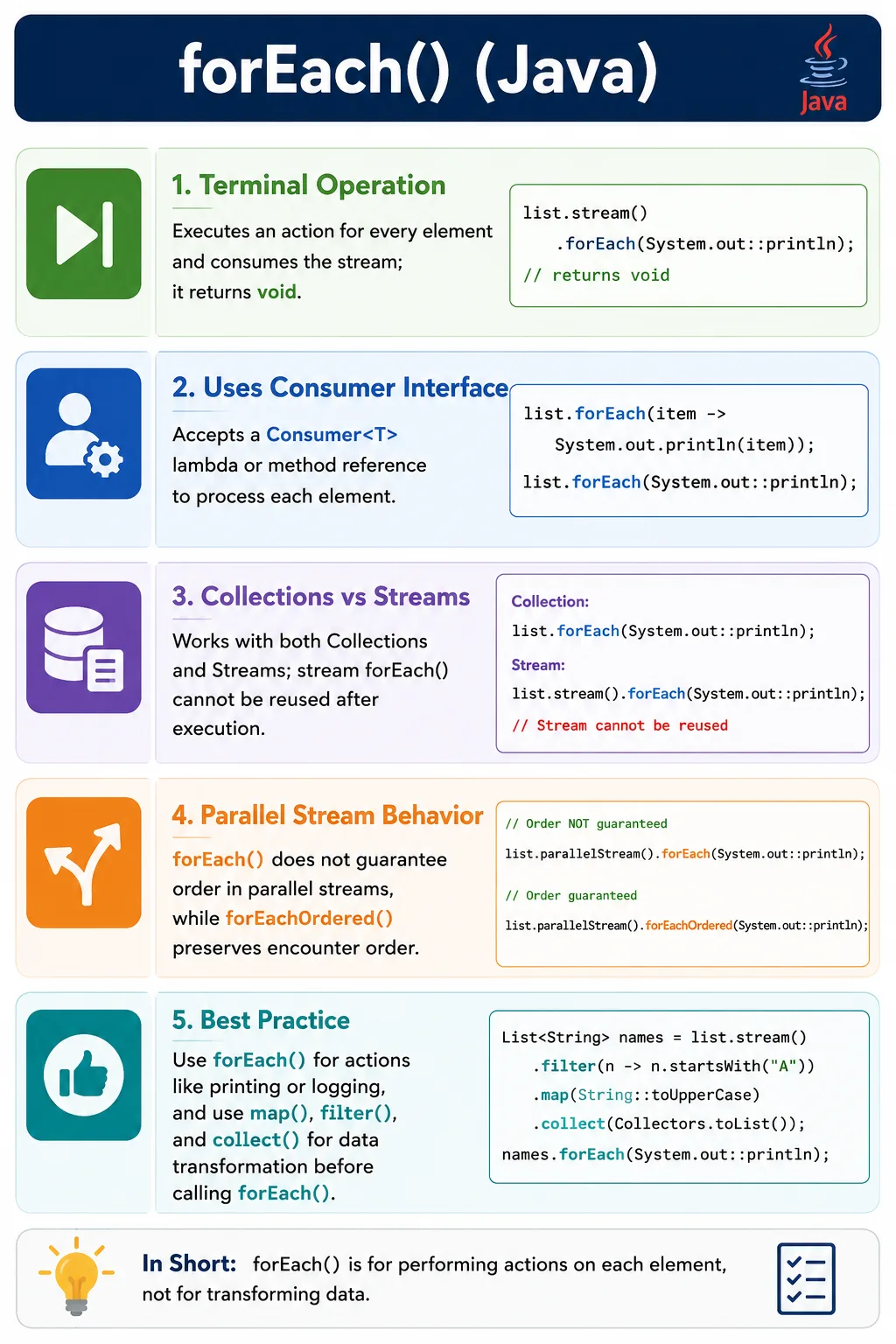
This is a common interview topic, especially forEach() vs forEachOrdered() and Collection vs Stream usage.
Interviewers ask about forEach() because it exposes several important Java 8 ideas at once.
You need to know Consumer, internal iteration, terminal operations, stream consumption,
encounter order, parallel stream behavior, and side effects. A strong answer does not simply say that
forEach() loops through values. It explains when to use it, when not to use it, and why
forEachOrdered() exists.
What Is forEach()?
- Executes an action for each element
- Uses internal iteration
- Accepts a Consumer functional interface
- Returns void (terminal operation in streams)
The action passed to forEach() is represented by the Consumer functional
interface. A Consumer<T> accepts one input of type T and returns nothing.
Its purpose is to consume the value by performing an action. That action might be printing the value,
calling a setter, writing to a log, invoking a service, or adding output to a report.
Because Consumer returns void, forEach() is not designed to create a
transformed value. If the lambda calculates something but does not store it or pass it onward, the result is
lost. This is why forEach(x -> x * 2) is meaningless in a stream pipeline. The multiplication
produces a value, but forEach() has nowhere to return that value.
The phrase internal iteration means the collection or stream controls the iteration. With a traditional
loop, your code controls the loop variable, the exit condition, and statements such as break
and continue. With forEach(), your code supplies the action, and the API decides
how to apply that action to the elements.
forEach() in Collections
Method Signature
void forEach(Consumer action)
Example
Listlist = List.of("Java", "Python", "C++"); list.forEach(s -> System.out.println(s));
- Iterates in encounter order (for List)
- Modifies allowed (not recommended)
Collection-level forEach() is defined on Iterable, which means many collection
types can use it directly. A List normally has a predictable encounter order, so the action is
applied in list order. A Set may not have a predictable order unless the specific set
implementation guarantees one, such as LinkedHashSet or TreeSet. This means the
source collection still matters.
Collection forEach() is often used as a cleaner alternative to a simple enhanced for-loop when
the action is short. For example, printing every value or calling a simple method on each object can read
well with forEach(). However, if the logic needs multiple branches, early exit, exception
handling, or removal of elements, an ordinary loop may be clearer and safer.
Modifying the structure of a collection while iterating over it is risky. Removing elements from an
ArrayList inside forEach() can cause ConcurrentModificationException.
If you need to remove elements while iterating, use an Iterator, removeIf(), or
create a filtered result collection. forEach() is best for actions, not structural changes to
the source.
forEach() in Stream API
list.stream()
    .forEach(s -> System.out.println(s));
- Terminal operation
- Stream is consumed
- Cannot reuse stream afterward
In the Stream API, forEach() is a terminal operation. This means it triggers the execution of
the stream pipeline. Intermediate operations such as filter() and map() are lazy;
they do not execute until a terminal operation is reached. When forEach() appears at the end
of the pipeline, the stream begins processing elements and applying the supplied action.
After forEach() runs, the stream is consumed. You cannot reuse the same stream for another
terminal operation. If another pass is required, create a new stream from the original source. This is an
important difference between a stream and a collection. A collection can be iterated multiple times, but a
stream pipeline is single-use.
Stream forEach() is most appropriate at the end of a pipeline when the final result is an
action rather than a returned value. For example, after filtering log messages down to errors, you may print
them. After selecting failed tests, you may send each result to a report writer. If the goal is to build a
list, count values, group data, or calculate a total, another terminal operation is usually more suitable.
forEach() vs Enhanced for-loop
| Aspect | forEach() | for-each loop |
|---|---|---|
| Style | Functional | Imperative |
| Iteration | Internal | External |
| Lambda support | ✔ Yes | ❌ No |
| Break/Continue | ❌ No | ✔ Yes |
| Parallel-friendly | ✔ Yes | ❌ No |
The enhanced for-loop gives you direct control over iteration. You can use break to stop early,
continue to skip the rest of the current iteration, and local variables to track complex
state. This makes it better for procedural logic. forEach() is better when you want a compact
functional action applied to every element without custom loop control.
Lack of break and continue is one of the biggest practical differences. You
cannot naturally stop forEach() early. If early exit matters, use a loop or a stream operation
designed for short-circuiting, such as anyMatch(), allMatch(),
noneMatch(), findFirst(), or findAny(). These methods communicate
the intent better than forcing control flow into forEach().
The choice between a for-loop and forEach() should be based on clarity. A one-line action often
reads nicely with forEach(). A multi-step algorithm usually reads better with a normal loop.
Professional Java code uses both styles where they fit.
forEach() vs map() (Very Important)
| Method | Purpose |
|---|---|
| map() | Transform elements |
| forEach() | Perform side effects |
❌ Wrong
list.stream().forEach(x -> x * 2); // no effect
✔ Correct
list.stream()
    .map(x -> x * 2)
    .forEach(System.out::println);
The difference between map() and forEach() is one of the most important Stream
API concepts. map() transforms each element and passes the transformed value to the next stage
of the pipeline. forEach() consumes each element and returns nothing. If your intention is to
convert values, use map(). If your intention is to perform an action with values, use
forEach().
A common beginner mistake is using forEach() to mutate an external list as a replacement for
map() and collect(). For example, creating an empty list and adding transformed
values inside forEach() works in some simple sequential cases, but it is not the clean stream
style and can fail with parallel streams. The preferred approach is to transform with map()
and collect the result.
You can remember the rule this way: map() is for data flow, and forEach() is for
final action. If the operation produces a new value, it belongs in map(). If the operation
sends, prints, logs, writes, or triggers something, forEach() may be appropriate.
forEach() vs forEachOrdered() (Interview Favorite)
forEach()
- Order not guaranteed in parallel streams
- Faster
list.parallelStream().forEach(System.out::println);
forEachOrdered()
- Maintains encounter order
- Slightly slower
list.parallelStream().forEachOrdered(System.out::println);
Ordering becomes important when streams run in parallel. In a sequential stream, forEach()
usually behaves in encounter order for ordered sources such as lists. In a parallel stream, however,
elements may be processed by different threads, and forEach() does not guarantee that actions
happen in the original order. This can make the output appear shuffled.
forEachOrdered() exists for cases where encounter order must be preserved. It is especially
useful when printing, writing, or sending results in a predictable order matters. The tradeoff is that
preserving order can reduce some of the performance benefit of parallel execution because the stream must
coordinate ordered output.
In interviews, explain both sides. forEach() may be faster in parallel streams because it does
not enforce order. forEachOrdered() is safer when order matters. In production, do not use
parallel streams only for style. Use them when the workload is suitable and when ordering and shared state
concerns are handled correctly.
Using forEach() with Maps
Best Practice (entrySet)
map.forEach((key, value) ->
    System.out.println(key + " = " + value)
);
- Clean
- Efficient
Maps have their own forEach() method that accepts a BiConsumer. A
BiConsumer accepts two inputs and returns nothing. For maps, those two inputs are the key and
value. This makes map iteration concise because you do not need to manually call entrySet(),
extract the key, and extract the value for simple actions.
For more complex map processing, entrySet() is still useful, especially if you want a stream
over entries. A map stream allows filtering by key, filtering by value, mapping entries to another type, or
collecting into a different map. Use map.forEach() for straightforward key-value actions. Use
entrySet().stream() when you need a full stream pipeline.
Side Effects & Caution (Interview Trap)
forEach() is intended for side effects (logging, printing).
❌ Avoid modifying shared state:
list.stream().forEach(x -> sharedList.add(x)); // risky
✔ Prefer:
Listresult = list.stream().map(x -> x * 2).toList();
Side effects are actions that affect something outside the current lambda, such as modifying a shared list,
writing to a file, updating a counter, changing an object field, or calling an external service. Since
forEach() is designed for actions, side effects are not automatically wrong. Printing and
logging are side effects. The risk appears when side effects depend on shared mutable state or when they
make the pipeline's behavior difficult to reason about.
Shared mutable state is especially dangerous with parallel streams. If multiple threads add to the same ordinary list, increment the same counter, or update the same object without synchronization, the result can be inconsistent. Even in sequential streams, hidden side effects reduce readability because the pipeline no longer clearly describes data processing. Prefer collectors, reducers, or immutable transformations when the goal is to build a result.
A practical guideline is to reserve forEach() for final actions that are obvious and safe. If
the action is actually building new data, use stream operations designed to produce data. If the action
modifies external state, make sure the reason is clear and the state is safe to modify.
Exception Handling in forEach()
- Lambdas cannot throw checked exceptions directly
- Must handle inside lambda
list.forEach(x -> {
    try {
        // risky operation
    } catch (Exception e) {
        e.printStackTrace();
    }
});
Exception handling inside forEach() can be awkward because the lambda must match the
Consumer method signature, and Consumer.accept() does not declare checked
exceptions. If the action calls a method that throws a checked exception, you must handle it inside the
lambda, wrap it in an unchecked exception, or move the logic into a helper method that handles the
exception.
For simple cases, a local try-catch block inside the lambda is acceptable. For larger logic,
it is better to extract a named method. This makes the stream or collection call readable and keeps
exception handling in one place. If the exception represents a failure that should stop processing, a normal
loop may sometimes communicate the control flow more clearly than forEach().
Common Beginner Mistakes
- Using forEach() instead of map()
- Expecting return values
- Modifying source collection
- Assuming order in parallel streams
- Overusing forEach() for business logic
The most frequent mistake is expecting forEach() to return something. It does not. It returns
void. If you need a new list, use collect() or toList(). If you need
a count, use count(). If you need a sum or combined value, use reduce() or a
primitive stream operation. Choosing the right terminal operation makes the code clearer.
Another common mistake is modifying the source collection during iteration. Removing elements from the same
list being iterated can fail. Use removeIf() when the task is removing matching elements from a
collection. Use filter() and collect into a new list when the task is to create a filtered
result. These alternatives express intent better and avoid structural modification problems.
Beginners also put too much business logic inside the lambda. A long forEach() block with many
conditions, external updates, and exception handling becomes hard to test. Move business rules into named
methods and keep forEach() focused on applying a clear action.
Best Practices
- Use forEach() for final actions (print, log)
- Prefer map(), filter(), collect() for transformations
- Use forEachOrdered() when order matters
- Avoid shared mutable state
- Keep lambdas simple
The best use of forEach() is a final, easy-to-understand action. Printing each value, logging
selected errors, calling a simple notification method, or passing each record to a report writer are good
examples. The reader can immediately see that the pipeline ends with an action rather than a returned
value.
If the operation is part of data preparation, prefer the stream operations that describe data flow.
filter() should select values, map() should transform values,
sorted() should order values, and collect() should build the result. This keeps
pipelines declarative. It also makes the code safer if the pipeline later becomes parallel.
Keep lambdas small. If the action is more than a few lines, extract a method with a meaningful name and use
a method reference or a short lambda that calls that method. This keeps forEach() readable and
makes the action easier to test independently.
More forEach() Examples
The examples below show how forEach() appears across lists, sets, maps, streams, optional
values, queues, nested collections, and concurrent collections. The repeated pattern is that
forEach() receives an action and applies it to available elements. The exact ordering and
safety rules depend on the source type and execution mode.
When reading these examples, pay attention to the intention of each use case. Printing values is a natural
forEach() action. Filtering before forEach() is valid because the selection is
done by filter() and the final action is done by forEach(). Transforming before
forEach() is valid when map() performs the transformation and
forEach() consumes the transformed values. Problems appear when developers skip the proper
intermediate operation and try to make forEach() do everything.
Also notice the traps around indexes, local variables, removal, and stream reuse. forEach()
does not provide an index, so index-based logic usually belongs in a normal loop or an indexed stream
workaround. Local variables captured by lambdas must be final or effectively final. Removing elements from
a normal list during forEach() can fail. A stream that has ended with forEach()
cannot be used again.
1. forEach() with List
import java.util.*;

class Demo {
    public static void main(String[] args) {
        List list = Arrays.asList("Java", "Selenium");
        list.forEach(s -> System.out.println(s));
    }
}
2. forEach() with Method Reference
list.forEach(System.out::println);
3. forEach() with Set
import java.util.*;

class Demo {
    public static void main(String[] args) {
        Set set = new HashSet<>(Arrays.asList(1, 2, 3));
        set.forEach(n -> System.out.println(n));
    }
}
4. forEach() with Map (BiConsumer)
import java.util.*;

class Demo {
    public static void main(String[] args) {
        Map map = Map.of(1, "A", 2, "B");
        map.forEach((k, v) -> System.out.println(k + " = " + v));
    }
}
5. forEach() on Stream
import java.util.*;

class Demo {
    public static void main(String[] args) {
        Arrays.asList(1, 2, 3)
              .stream()
              .forEach(n -> System.out.println(n));
    }
}
6. forEach() vs forEachOrdered() (Parallel Stream)
import java.util.*;

class Demo {
    public static void main(String[] args) {
        Arrays.asList(1, 2, 3, 4)
              .parallelStream()
              .forEach(System.out::println);
    }
}
Note: Order not guaranteed.
7. forEachOrdered() to Maintain Order
Arrays.asList(1, 2, 3, 4)
      .parallelStream()
      .forEachOrdered(System.out::println);
8. forEach() with Filtering (Stream Chain)
import java.util.*;

class Demo {
    public static void main(String[] args) {
        Arrays.asList(1, 2, 3, 4)
              .stream()
              .filter(n -> n % 2 == 0)
              .forEach(System.out::println);
    }
}
9. forEach() with Transformation
Arrays.asList("java", "api")
      .stream()
      .map(String::toUpperCase)
      .forEach(System.out::println);
10. forEach() with Index (Workaround)
import java.util.*;

class Demo {
    public static void main(String[] args) {
        List list = Arrays.asList("A", "B", "C");
        for (int i = 0; i < list.size(); i++) {
            System.out.println(i + " -> " + list.get(i));
        }
    }
}
Interview Note: forEach() does not provide index.
11. forEach() Modifying External Variable (Trap)
int sum = 0;
// Arrays.asList(1,2,3).forEach(n -> sum += n); // ❌ compilation error
Reason: Variable must be effectively final.
12. Correct Way Using AtomicInteger
import java.util.concurrent.atomic.AtomicInteger;
import java.util.*;

class Demo {
    public static void main(String[] args) {
        AtomicInteger sum = new AtomicInteger();
        Arrays.asList(1, 2, 3)
              .forEach(n -> sum.addAndGet(n));
        System.out.println(sum.get());
    }
}
13. forEach() vs Enhanced for Loop
// Enhanced for
for (String s : list) {
    System.out.println(s);
}

// forEach
list.forEach(System.out::println);
14. forEach() with Exception Handling
list.forEach(s -> {
    try {
        System.out.println(s);
    } catch (Exception e) {
        System.out.println("Error");
    }
});
15. ❌ Removing Elements Inside forEach() (Trap)
list.forEach(s -> {
    // list.remove(s); // ❌ ConcurrentModificationException
});
16. Correct Removal Using Iterator
Iteratorit = list.iterator(); while (it.hasNext()) { if (it.next().equals("A")) { it.remove(); } }
17. forEach() with Custom Object
class User {
    String name;
    User(String name) { this.name = name; }
}

List users = List.of(new User("A"), new User("B"));
users.forEach(u -> System.out.println(u.name));
18. forEach() in Optional
import java.util.*;

class Demo {
    public static void main(String[] args) {
        Optional opt = Optional.of("Java");
        opt.forEach(System.out::println);
    }
}
19. forEach() as Terminal Operation
Arrays.asList(1, 2, 3)
      .stream()
      .forEach(System.out::println); // terminal
Rule: After forEach(), stream cannot be reused.
20. forEach() with Nested Collections
import java.util.*;

class Demo {
    public static void main(String[] args) {
        List> list =
            Arrays.asList(Arrays.asList(1,2), Arrays.asList(3,4));

        list.forEach(inner ->
            inner.forEach(System.out::println)
        );
    }
}
21. forEach() with Queue
import java.util.*;

class Demo {
    public static void main(String[] args) {
        Queue q = new LinkedList<>(List.of("A", "B"));
        q.forEach(System.out::println);
    }
}
22. forEach() with CopyOnWriteArrayList
import java.util.concurrent.*;

class Demo {
    public static void main(String[] args) {
        CopyOnWriteArrayList list =
            new CopyOnWriteArrayList<>(List.of(1,2));
        list.forEach(n -> list.add(3)); // allowed
        System.out.println(list);
    }
}
23. forEach() vs map() (Interview Trap)
// Wrong
list.forEach(s -> s.toUpperCase());

// Correct
list.stream().map(String::toUpperCase).forEach(System.out::println);
24. forEach() with Logging Use Case
logs.stream()
    .filter(l -> l.contains("ERROR"))
    .forEach(System.out::println);
25. Interview Summary – forEach()
collection.forEach()
stream.forEach()
map.forEach()
Key Points
- Terminal operation (for streams)
- No index support
- Order not guaranteed in parallel streams
- Cannot modify collection structure
- Best with lambdas & method references
Interview-Ready Answers
Short Answer
forEach() performs an action on each element of a collection or stream.
Detailed Answer
In Java, forEach() is a terminal operation that accepts a Consumer and executes it for each element. In streams, it triggers execution and may not preserve order in parallel streams unless forEachOrdered() is used. It is mainly intended for side effects rather than data transformation.
A stronger interview answer should separate collection usage from stream usage. In collections,
forEach() is a convenient internal iteration method that applies a consumer to each element. In
streams, forEach() is a terminal operation that triggers the pipeline and consumes the stream.
After that terminal operation, the same stream cannot be reused.
You should also mention the distinction between forEach() and map(). Use
map() when the goal is to transform data. Use forEach() when the goal is a final
action, such as printing, logging, or invoking a method for each element. If order matters in a parallel
stream, use forEachOrdered(), understanding that it may reduce parallel performance.
If asked about risks, explain side effects and shared mutable state. forEach() often performs
side effects by design, but those side effects should be safe and intentional. Mutating external collections
from inside a stream pipeline, especially a parallel stream, can create bugs. Prefer collectors and
transformation operations when building new results.
Key Takeaway
forEach() is for actions, not transformations. Use it at the end of a stream pipeline, and be cautious with parallel execution and side effects.
The practical rule is simple: if you want to do something with each existing element, forEach()
may be the right tool. If you want to create new values, build a new collection, calculate a result, or
stop early based on a condition, another stream operation or a normal loop may be better. This distinction
keeps Java code readable and prevents misuse of the Stream API.
Good Java developers do not use forEach() simply because it looks modern. They use it when the
final action is clear, the lambda is short, ordering expectations are understood, and side effects are safe.
With those rules in mind, forEach() becomes a useful and readable part of modern Java rather
than a confusing replacement for every loop.
Real-World Use Cases for forEach()
In real projects, forEach() is most useful when the work is naturally action-oriented. Logging
is a common example. After filtering a stream of log entries to only errors or warnings, using
forEach() to print or send each message to a logger is reasonable because the final purpose is
an action. Report generation can use the same style when each processed row is written to an output writer
or displayed in a console.
Test automation utilities also use forEach() frequently. A test report may iterate over failed
scenarios and print each failure reason. A data setup utility may iterate over users and call a setup method
for each user. A cleanup tool may iterate over temporary files and delete them. In these cases,
forEach() can make intent clear because each element is being consumed by a final action.
Business applications may use forEach() when sending notifications, updating a cache, invoking
callbacks, or applying a simple command to each item. However, these uses require care because the action
may involve external systems. If one action fails, you need a clear decision about whether processing should
continue or stop. A plain forEach() lambda with a hidden try-catch block may not
be the best design if error handling is important to the workflow.
If the action is important enough to have business meaning, give it a named method. For example,
orders.forEach(this::sendInvoice) is easier to read than a large lambda that builds an invoice,
sends an email, logs a message, and updates a status. The method name tells the reader what is happening,
and the method body can be tested separately. This is one of the best ways to keep forEach()
readable in production code.
Choosing forEach() or Another Stream Operation
Many mistakes with forEach() happen because developers choose it too early. Before using it,
ask what result you need. If you need a new collection, use collect() or toList().
If you need transformed values, use map(). If you need only matching values, use
filter(). If you need to check whether a condition exists, use anyMatch(). If you
need a single combined value, use reduce() or a primitive stream operation.
forEach() should usually appear near the end of your thinking. After the data is already
selected, transformed, sorted, or grouped, ask whether the final step is an action. If yes,
forEach() may fit. If the final step is a value that other code needs to use, then
forEach() is probably the wrong terminal operation because it returns nothing.
This decision is especially important for beginners learning streams. It is tempting to write
forEach() and place every task inside the lambda because it feels similar to a loop. But stream
code is clearer when each operation does one job. Let filter() filter, let map()
transform, let collect() build results, and let forEach() perform final actions.
Ordering, Encounter Order, and Predictability
Ordering in forEach() depends on the source and the execution mode. A list has an encounter
order because its elements are stored in a defined sequence. A LinkedHashSet has insertion
order. A TreeSet has sorted order. A HashSet does not promise a meaningful order.
When you call forEach() on these sources, the order you observe depends on those source
characteristics.
With sequential streams over ordered sources, the observed order is usually what developers expect. With
parallel streams, the situation changes. The Stream API may process elements in different threads, and
forEach() is allowed to perform actions as elements are ready. That freedom can improve
throughput, but it means output order is not guaranteed. This is why printing numbers from a parallel
stream with forEach() may produce a different order each time.
If order is part of the correctness of the program, be explicit. Use forEachOrdered() for
ordered parallel stream output or avoid parallel execution altogether. If order is not important, regular
forEach() is fine. The mistake is assuming order without checking the source and execution
mode.
Concurrency and Shared State
forEach() becomes more risky when combined with parallel streams or shared mutable objects. In
a sequential stream, adding elements to an external list inside forEach() may appear to work,
but it still mixes data processing with side effects. In a parallel stream, the same code can fail or
produce inconsistent results because multiple threads may update the same list at the same time.
Thread-safe structures such as CopyOnWriteArrayList, concurrent queues, atomic variables, or
synchronized blocks can make some shared updates safe, but they do not automatically make the design good.
Often the better solution is to avoid shared mutation and use collectors or reducers. For example, instead
of adding transformed values to a shared list inside forEach(), use map() followed
by toList().
If you truly need side effects in a parallel stream, make sure the action is independent for each element and safe to execute concurrently. Sending independent messages, writing to a thread-safe logger, or calling a safe stateless method may be acceptable. Updating shared counters, changing object fields, or relying on action order is where problems usually begin.
How to Explain forEach() in Interviews
A good interview explanation should start with the purpose: forEach() applies a
Consumer action to each element. Then explain the context: collection forEach()
provides internal iteration over collection elements, while stream forEach() is a terminal
operation that triggers and consumes a stream pipeline. This shows that you know the method exists in more
than one place.
Next, compare it with related constructs. Compared with an enhanced for-loop, forEach() is more
functional and concise but does not support natural break or continue. Compared
with map(), forEach() performs actions and returns nothing, while
map() transforms values and returns a stream. Compared with forEachOrdered(),
forEach() does not guarantee order in parallel streams.
Finally, mention risks and best practices. Do not modify the source collection during iteration. Do not use
forEach() to build result collections when collectors are available. Do not assume ordering in
parallel streams. Keep lambdas short, prefer method references when clear, and use forEach()
mainly for final side-effect actions such as logging, printing, or invoking a simple operation.