File Class
The File class in Java (from the java.io package) represents a file or directory path in the file system. It is used to create, delete, inspect, and manage files/directories, but does not read or write file content. This is a high-frequency interview topic, often confused with file I/O streams.
File handling is one of the first places where Java programs interact with the operating system. A program may
need to check whether a configuration file exists, create a log directory, delete a temporary file, list files
uploaded by users, or inspect the size and permissions of a document. The File class gives Java a
simple object-oriented way to represent those file system locations. It does not represent the text, bytes, or
records inside the file. It represents the path and the file system object at that path.
This distinction is important because many beginners create a File object and expect Java to
create the physical file immediately. That is not how the class works. A File object is only a
reference to a pathname. The actual file may exist or may not exist. The object simply gives your program a
way to ask questions about that path or request operations such as creation, deletion, listing, or renaming.
In modern Java, new code often uses Path and Files from
java.nio.file, but the File class is still important. Many older APIs accept
File, many interview questions use it, and many real projects still contain it. Understanding
File also makes it easier to understand the difference between path management and content I/O.
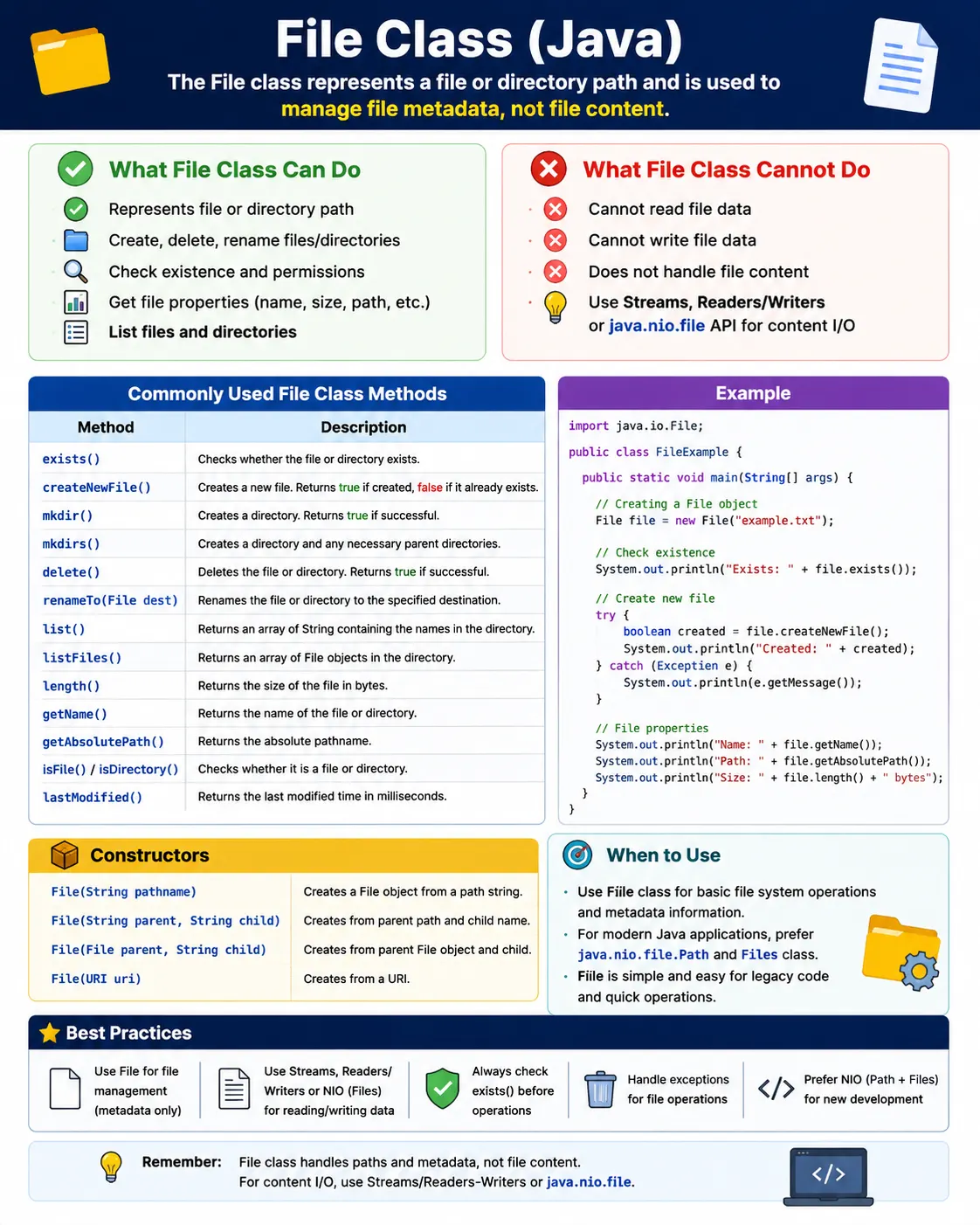
What Is the File Class?
The File class is part of the java.io package. It represents an abstract pathname,
which may point to a file or a directory. The word "abstract" here means the pathname is represented in a way
that Java can work with across operating systems. Windows, Linux, and macOS use different path conventions,
but Java gives you one class to represent those paths in your program.
A File object can represent an existing file, an existing directory, or a path that does not
currently exist. For example, new File("report.txt") creates a Java object that refers to the
path report.txt. It does not guarantee that report.txt exists. To know whether the
file exists, you must call exists(). To create it, you must call a method such as
createNewFile().
- Represents file or directory metadata
- Works with paths, not content
- Platform-independent (uses OS-specific separators internally)
- Part of java.io package
File file = new File("data.txt");
What File Can and Cannot Do
The File class is useful for file system structure and metadata. It can tell you whether a path
exists, whether the path points to a file or directory, what the file name is, how large the file is, when it
was last modified, and whether the program has read or write permission. It can also request structural
operations such as creating files, creating directories, deleting files, deleting empty directories, listing
directory contents, and renaming paths.
✔ Can Do
- Check existence
- Create/delete files & directories
- Get file properties (name, size, path, permissions)
- List directory contents
❌ Cannot Do
- Read file data
- Write file data
(Use streams/readers/writers for content I/O)
The limitation is equally important. A File object cannot read the text inside a file, cannot
write bytes into a file, and cannot append content to an existing file. For reading and writing content, Java
uses APIs such as FileInputStream, FileOutputStream, FileReader,
FileWriter, BufferedReader, BufferedWriter, and modern
Files methods. In interviews, this is a common trap: File manages the path and
metadata, while streams and readers handle the actual data.
Creating a File Object
Creating a File object is simple, but the meaning of the path matters. A relative path is resolved
against the current working directory of the Java process. This is often the project folder in an IDE, the
folder from which the command was launched in command-line execution, or a configured working directory in a
server or build tool. Because of this, relative paths can behave differently depending on how the program is
started.
1️⃣ Using Relative Path
File f = new File("data.txt");
✔ Path relative to current working directory
2️⃣ Using Absolute Path
File f = new File("C:\\files\\data.txt");
3️⃣ Using Parent + Child
File f = new File("C:\\files", "data.txt");
✔ Cleaner and safer path handling
An absolute path specifies the full location from the root of the file system or drive. It is explicit, but it
can reduce portability when hardcoded. A Windows path such as C:\files\data.txt may not work on
Linux. A parent-child constructor is cleaner because it separates the folder from the file name and reduces
manual string concatenation. In modern code, Path.of(parent, child) is usually even clearer, but
the parent-child File constructor is still useful in legacy code.
Commonly Used Methods (Must-Know)
The most commonly used File methods fall into a few practical groups. First are existence and
type checks. These answer whether the path exists and whether it points to a regular file or a directory.
Second are information methods. These return the file name, path, absolute path, size, and modification time.
Third are permission methods. These tell whether the Java process can read, write, or execute the file.
Existence & Type Checks
f.exists();        // true/false
f.isFile();        // file?
f.isDirectory();   // directory?
File Information
f.getName();
f.getPath();
f.getAbsolutePath();
f.length();        // size in bytes
f.lastModified();
Permissions
f.canRead();
f.canWrite();
f.canExecute();
Return values matter. Many File methods return false when the operation cannot be
completed. This may happen because the file does not exist, the directory is not empty, the application lacks
permission, the path is invalid, or the operating system blocks the operation. Robust code should not ignore
these return values. A failed delete, failed directory creation, or failed rename can cause later code to
behave incorrectly.
Creating Files and Directories
Creating a file and creating a directory are different operations. createNewFile() requests an
empty file at the specified path. It returns true if the file was created and false
if the file already existed. It can throw IOException if the operation fails because of an I/O
problem. This checked exception forces the program to acknowledge that file system work can fail.
Create a File
File f = new File("test.txt");
f.createNewFile();   // throws IOException
✔ Creates empty file if not exists
❌ Returns false if already exists
Create Directory
File dir = new File("logs");
dir.mkdir();        // single directory
Create Directory Tree
File dir = new File("a/b/c");
dir.mkdirs();       // creates parent directories too
For directories, mkdir() creates only the final directory in the path. If parent folders are
missing, it usually fails. mkdirs() creates the full directory tree, including missing parent
directories. This makes mkdirs() more useful when the program needs to prepare a nested structure
such as logs/2026/january, upload folders, export folders, or report-output directories.
Deleting Files and Directories
f.delete();
⚠ Directory must be empty to delete successfully
Deleting with File is intentionally simple but limited. Calling delete() returns a
boolean result. It does not throw a detailed exception explaining exactly why deletion failed. If the path does
not exist, the method returns false. If the path is a non-empty directory, it returns
false. If the program lacks permission, it also returns false. This is one reason
modern Java code often prefers Files.delete() or Files.deleteIfExists(), where
exception information is stronger.
A common beginner mistake is trying to delete a directory that still contains files. The File
class does not recursively delete directory trees with one call. To delete a directory tree using old APIs,
code must list the directory contents, delete child files and child directories first, and then delete the
parent. Because recursive deletion can be dangerous, production code should be reviewed carefully before it is
allowed to remove folders automatically.
Listing Directory Contents
Listing directory contents is another important use case. list() returns names as strings, while
listFiles() returns File objects. The second approach is usually more useful because
each returned object can be inspected further. You can check whether each entry is a file or directory, read
its size, filter by extension, check last modified time, or perform another operation.
List Names
File dir = new File("C:\\files");
String[] names = dir.list();
List Files as File Objects (Preferred)
File[] files = dir.listFiles();
✔ Allows further inspection
Directory listing methods can return null if the path is not a directory or if an I/O error
occurs. Therefore, code that lists files should check the result before iterating. This is especially important
in real projects where the folder may be missing, access may be denied, or the environment may be configured
differently across developer machines, build servers, and production servers.
Renaming / Moving Files
File oldFile = new File("old.txt");
File newFile = new File("new.txt");
oldFile.renameTo(newFile);
✔ Also works as move if paths differ
⚠ Behavior may vary across OS
The renameTo() method can rename a file or move it to another location if the source and target
paths are different. However, its behavior can vary across operating systems and file systems. It may fail if
the target already exists, if the source and target are on different volumes, if permissions are missing, or if
another process is using the file. Since it returns a boolean, failure details may be limited.
In modern Java, Files.move() is usually preferred because it provides options and better
exceptions. Still, renameTo() appears in older code and interview examples. The practical lesson
is to check the return value and not assume that a rename or move always succeeds.
File Separator (Platform-Independent)
File.separator
✔ Avoid hardcoding / or \\
Platform-independent path handling matters because Java programs often run on different operating systems.
Hardcoding Windows-style backslashes can make code less portable. Hardcoding Unix-style forward slashes may
work in many Java contexts, but it is still clearer to use APIs that understand path segments. With
File, File.separator helps avoid manual separator assumptions. With modern Java,
Path.of() is usually the cleaner option because it joins path parts without manual string
concatenation.
File vs Streams (Interview Trap)
The difference between File and streams is one of the most important interview points. A
File object points to a location. A stream moves bytes. A reader or writer moves characters. If
the requirement is "check whether this file exists," File can help. If the requirement is "read
the lines inside this file," File alone is not enough.
This separation is useful because file systems and file contents are different concerns. A program may inspect
a file's size before opening it. It may create a directory before writing a report. It may list files before
deciding which ones to process. In each case, File handles the structure and metadata portion,
while streams, readers, writers, or NIO APIs handle the content portion.
| Aspect | File | Streams / Readers |
|---|---|---|
| Purpose | Metadata & path | Read/write content |
| Package | java.io | java.io, java.nio |
| Reads data | ❌ No | ✔ Yes |
| Writes data | ❌ No | ✔ Yes |
File vs Path (Modern Java)
Java 7 introduced the NIO.2 file API, centered around Path and Files. This modern
API is richer than File. It provides better exception handling, more options for copying and
moving files, stronger directory traversal support, symbolic link handling, file attributes, and utility
methods for reading and writing content. For new Java code, Path and Files are
generally preferred.
That does not make File useless. It remains part of the Java platform, appears in old libraries,
and is easy to understand for basic tasks. The most practical approach is to know both. Use
File confidently when reading legacy code or answering interview questions, and use
Path plus Files when designing modern file handling from scratch.
| Aspect | File | Path (java.nio.file) |
|---|---|---|
| Introduced | Java 1.0 | Java 7 |
| API | Limited | Rich & modern |
| Exception handling | Weak | Strong |
| Recommendation | Legacy | Preferred |
✔ Use Path + Files for new code
✔ Still must know File for interviews
File Class in Real Projects
In real applications, the File class is often used around supporting workflows rather than core
business logic. A reporting module may create folders for daily reports. A batch process may list incoming
files from a directory. A log cleanup task may inspect last modified dates. A test automation framework may
check whether a downloaded file exists before validating its content. A build utility may delete temporary
output before generating a fresh artifact.
These use cases show why return values and environment assumptions matter. A folder that exists on a developer's laptop may not exist on a CI server. A file that can be written locally may be read-only in a production container. A relative path may point to one folder in an IDE and a different folder when the same program is launched from a command line. Good file-handling code checks its assumptions and fails with a clear message when the environment is not ready.
File handling also needs care in web applications. User-provided file names should not be trusted blindly,
because they may contain unexpected path segments or characters. Applications should validate file names,
choose controlled storage directories, avoid exposing server paths in responses, and separate uploaded content
from executable application code. The File class can represent paths, but secure file handling
requires broader design discipline.
Working Directory and Relative Path Confusion
One of the most common practical issues with File is confusion about the current working
directory. When code says new File("data.txt"), Java does not automatically look beside the
source file. It looks relative to the process working directory. In an IDE, that may be the project root. In a
packaged application, it may be the directory from which the command was started. In a server, it may be a
configured runtime folder.
This is why printing getAbsolutePath() is often useful during debugging. It shows where Java is
actually looking. If exists() returns false even though the file appears to be in the
project, the problem may be that the program is checking a different folder than expected. Understanding this
behavior prevents a lot of beginner frustration.
For production code, avoid depending on accidental working directories. Prefer configuration values, known application directories, environment variables, or paths passed explicitly into the program. The more explicit the file location is, the easier the program is to deploy, test, and troubleshoot.
Common Beginner Mistakes
Most beginner mistakes with File come from assuming more than the class actually guarantees. A
File object does not prove that a file exists. A successful path string does not prove that the
program has permission. A method returning false should not be ignored. A directory path should
not be treated like a file path. A relative path should not be assumed to point beside the Java source file.
- Assuming File reads/writes content
- Forgetting createNewFile() throws exception
- Deleting non-empty directories
- Hardcoding path separators
- Ignoring return values of mkdir() / delete()
Another mistake is using length() without checking whether the path is a real file. If the file
does not exist or the path is a directory, the result may not mean what the developer expects. Similarly,
calling listFiles() and immediately looping over the result can cause a
NullPointerException if the path is not a directory or cannot be accessed. Defensive checks make
file-handling code much more reliable.
Hardcoded paths are also risky. A path that works on Windows may fail on Linux. A path that works on one user's machine may fail on another user's machine. A path with spaces or special characters may behave differently if it is later passed to external commands. Java path APIs help, but developers still need to think about where the program will run.
Best Practices for Using File
A good first practice is to separate file-system checks from content processing. Before reading or writing
content, confirm that the path exists when it should exist, that it is the expected type, and that the program
has the required access. If the code needs a directory, check isDirectory(). If it needs a regular
file, check isFile(). This makes failures easier to understand.
A second practice is to avoid silent failures. Since many File methods return boolean values, the
code should respond when an operation fails. If mkdirs() returns false, check whether
the directory already exists or whether creation failed. If delete() returns false,
do not continue as though the file disappeared. Clear error handling prevents later defects that are harder to
trace.
A third practice is to prefer modern APIs for complex work. Use File when it fits the surrounding
code or when an API expects it. Use Path and Files when you need richer operations,
better exceptions, copy options, recursive traversal, or clean path composition. A strong Java developer does
not treat old and new APIs as enemies. They choose based on clarity, reliability, and compatibility.
File Class in Testing and Automation
The File class is very useful in testing and automation work. Selenium tests often need to verify
whether a downloaded file exists. API tests may generate response files and compare them with expected
output. Data-driven tests may check whether an input file is present before execution starts. Reporting logic
may create screenshot folders, HTML report folders, or log folders for each run. In all of these cases, the
test is not necessarily reading the content first; it is validating the file system structure around the test.
A common automation pattern is to clean an output directory before a run, create a fresh directory, execute
the test, and then verify that expected files were produced. The File class can help with
existence checks, directory creation, last modified time, file size, and directory listing. These checks make
automation more reliable because the test can fail early with a clear reason instead of failing later with a
confusing missing-file error.
Test automation also exposes path portability issues. A download folder configured on a Windows laptop may not exist on a Linux CI agent. A relative path may resolve differently when tests run from Maven, Gradle, an IDE, or a pipeline. Good framework code centralizes file paths, creates required directories before use, and avoids spreading hardcoded path strings across test classes.
Error Handling with File Operations
File operations should always be treated as operations that can fail. The disk may be full, the path may be
invalid, another process may hold a file lock, the application may not have permission, or a directory may be
missing. Some File methods throw checked exceptions, while others return boolean values. Both
styles require attention.
For example, createNewFile() throws IOException, so the code must either handle or
declare that exception. In contrast, delete(), mkdir(), mkdirs(), and
renameTo() return boolean results. If those return values are ignored, the program may continue
with an incorrect assumption. A report generator may believe it created a folder when it did not. A cleanup
utility may believe it removed old output when the files are still present.
In beginner examples, printing the boolean result is enough to understand behavior. In real applications, failures should usually be logged or converted into clear application errors. This makes support easier. A message such as "Unable to create report directory: C:\reports\run-101" is far more useful than a later null pointer or missing output file.
Security and Safety Considerations
File paths can become a security issue when they are built from user input. If a web application allows users
to upload, download, or name files, the program must validate the file name and control the storage location.
A user should not be able to include path traversal sequences and access files outside the intended directory.
The File class can represent such paths, but it does not automatically make them safe.
Applications should also avoid exposing full server paths to users. Internal paths may reveal operating system details, application structure, usernames, deployment folders, or security-sensitive information. It is better to log detailed paths internally and show users a controlled message. File handling code should also avoid deleting directories based on untrusted or loosely validated input.
Safety matters in local utilities too. A cleanup script that recursively deletes generated files must be carefully constrained to the intended workspace. Before deleting, the code should verify that the resolved target path is the expected folder. This is not just a Java issue; it is a general engineering rule whenever a program modifies the file system.
Migrating from File to Path and Files
When maintaining older Java code, you may see File used everywhere. Migration does not have to
happen all at once. Java provides bridges between the APIs. A File can be converted to a
Path using toPath(), and a Path can be converted to a
File using toFile(). This allows teams to introduce modern operations gradually
while still working with older libraries.
A practical migration strategy is to keep method boundaries stable at first. If an existing public method
accepts File, internal code can convert it to Path and use Files for
clearer operations. Over time, new APIs can accept Path directly. This improves exception
handling and readability without forcing a risky rewrite of the whole application.
For interview purposes, the balanced answer is best: File is older and still widely known, while
Path and Files are preferred for modern Java file handling. Knowing why the newer API
is preferred shows practical understanding, and knowing File shows that you can read and maintain
existing Java code.
Interview-Ready Answers
Short Answer
The File class represents a file or directory path in Java.
Detailed Answer
In Java, the File class from the java.io package is used to represent file and directory paths. It provides methods to create, delete, and inspect files and directories, but it does not perform actual file reading or writing. For content I/O, streams or NIO APIs are used.
Key Takeaway
File is about paths and metadata, not data.
Use it to manage files and directories, and combine it with streams or NIO for actual I/O operations.
Hands-On File Class Examples (Quick Reference)
1. Creating a File Object (No File Created Yet)
import java.io.File;

class Demo {
    public static void main(String[] args) {
        File f = new File("test.txt");
        System.out.println(f.exists());
    }
}
Key Point
File object ≠ actual file
2. Creating a New File Using createNewFile()
import java.io.*;

class Demo {
    public static void main(String[] args) throws Exception {
        File f = new File("sample.txt");
        System.out.println(f.createNewFile());
    }
}
Output
true // if file did not exist
3. Creating a Directory Using mkdir()
import java.io.File;

class Demo {
    public static void main(String[] args) {
        File dir = new File("logs");
        System.out.println(dir.mkdir());
    }
}
4. Creating Nested Directories Using mkdirs()
import java.io.File;

class Demo {
    public static void main(String[] args) {
        File dir = new File("data/2026/jan");
        System.out.println(dir.mkdirs());
    }
}
5. Checking File Properties
import java.io.File;

class Demo {
    public static void main(String[] args) {
        File f = new File("test.txt");

        System.out.println(f.exists());
        System.out.println(f.isFile());
        System.out.println(f.isDirectory());
    }
}
6. Reading File Metadata
import java.io.File;

class Demo {
    public static void main(String[] args) {
        File f = new File("test.txt");

        System.out.println("Name: " + f.getName());
        System.out.println("Path: " + f.getAbsolutePath());
        System.out.println("Size: " + f.length());
    }
}
7. Listing Files in a Directory
import java.io.File;

class Demo {
    public static void main(String[] args) {
        File dir = new File(".");
        String[] files = dir.list();

        for (String name : files) {
            System.out.println(name);
        }
    }
}
8. Listing Files with File[]
import java.io.File;

class Demo {
    public static void main(String[] args) {
        File dir = new File(".");
        File[] files = dir.listFiles();

        for (File f : files) {
            System.out.println(f.getName());
        }
    }
}
9. Filtering Files (Only .txt Files)
import java.io.File;

class Demo {
    public static void main(String[] args) {
        File dir = new File(".");
        File[] files = dir.listFiles(
            f -> f.getName().endsWith(".txt")
        );

        for (File f : files) {
            System.out.println(f.getName());
        }
    }
}
10. Checking Read / Write / Execute Permissions
import java.io.File;

class Demo {
    public static void main(String[] args) {
        File f = new File("test.txt");

        System.out.println(f.canRead());
        System.out.println(f.canWrite());
        System.out.println(f.canExecute());
    }
}
11. Renaming a File
import java.io.File;

class Demo {
    public static void main(String[] args) {
        File oldFile = new File("old.txt");
        File newFile = new File("new.txt");

        System.out.println(oldFile.renameTo(newFile));
    }
}
12. Deleting a File
import java.io.File;

class Demo {
    public static void main(String[] args) {
        File f = new File("temp.txt");
        System.out.println(f.delete());
    }
}
13. Deleting Empty Directory
import java.io.File;

class Demo {
    public static void main(String[] args) {
        File dir = new File("logs");
        System.out.println(dir.delete());
    }
}
Note
Directory must be empty
14. File Path Variations
File f1 = new File("test.txt");                 // relative
File f2 = new File("C:/data/test.txt");         // absolute
File f3 = new File("C:/data", "test.txt");      // parent + child
15. Checking Hidden Files
import java.io.File;

class Demo {
    public static void main(String[] args) {
        File f = new File(".gitignore");
        System.out.println(f.isHidden());
    }
}
16. Last Modified Time
import java.io.File;
import java.util.Date;

class Demo {
    public static void main(String[] args) {
        File f = new File("test.txt");
        System.out.println(new Date(f.lastModified()));
    }
}
17. File Separator (Cross-Platform)
class Demo {
    public static void main(String[] args) {
        System.out.println(File.separator);
    }
}
18. Common Interview Trap – File Does Not Exist
File f = new File("abc.txt");
f.delete(); // returns false if file doesn't exist
19. File vs Directory Check Before Operation
if (f.exists() && f.isFile()) {
    System.out.println("Valid file");
}
20. Interview Summary – File Class
java.io.File
Key Points
- Represents file or directory path
- Does not read/write content
- Supports metadata & structure operations
- Platform-independent paths
- For content → use Streams / NIO