== vs .equals()
Understanding the difference between == and .equals() is fundamental in Java and a very high-frequency interview question, especially for String, wrapper classes, and collections.
Equality looks simple at first, but in Java it has two very different meanings. Sometimes you want to know
whether two values are numerically the same. Sometimes you want to know whether two variables point to the
exact same object in memory. Sometimes you want to know whether two different objects represent the same
logical data, such as two employee objects with the same employee ID. Java separates these ideas through the
== operator and the equals() method.
The confusion happens because == behaves differently for primitives and object references. For
primitive values such as int, char, boolean, and double,
== compares the actual value. For object variables, == compares whether both
references point to the same object. It does not look inside the object to compare fields.
The equals() method exists for logical equality. A class can decide what it means for two
objects to be equal. String defines equality based on character content. Wrapper classes such
as Integer define equality based on wrapped value. Collections define equality based on their
contained elements according to their own contracts. Custom classes must override equals() if
they need logical equality instead of identity equality.
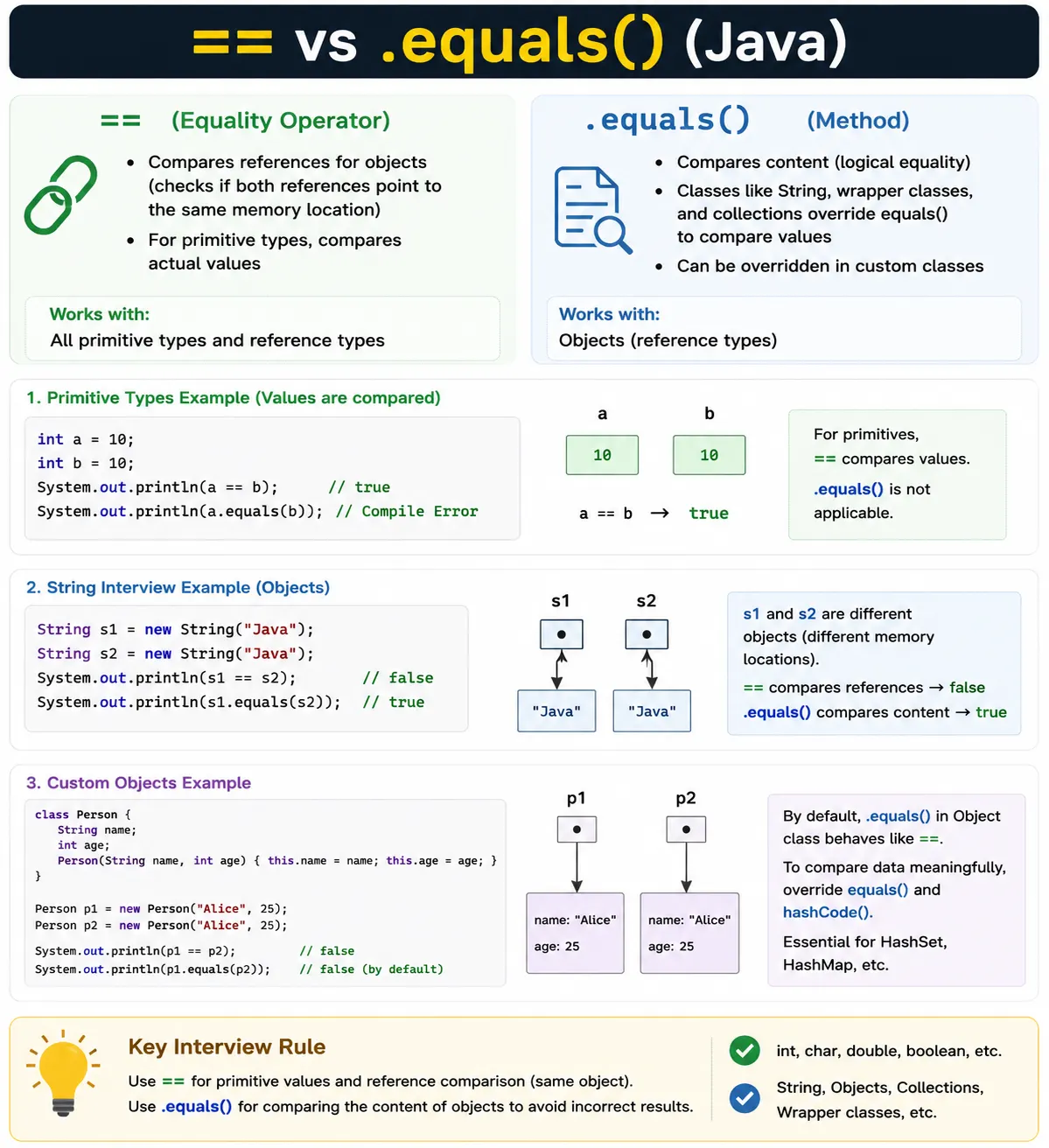
High-Level Difference (One Line)
- == → compares references (memory addresses)
- .equals() → compares content (logical equality)
This one-line rule is useful, but it needs one important qualification: == compares values for
primitives and references for objects. Since primitives are not objects, there is no object reference to
compare. For objects, the reference is the value stored in the variable, and that reference points to an
object. Two references can point to the same object, or they can point to two separate objects that happen
to contain the same data.
equals() is a method, so its behavior depends on the class implementation. If a class does not
override equals(), it inherits the implementation from Object, which behaves like
==. This is why saying ".equals() always compares content" is not completely accurate. It
compares logical content only when the class has defined logical equality by overriding the method.
== Operator
What It Does
- Compares whether two references point to the same object
- For primitive types, compares actual values
The == operator is built into the Java language. You cannot override it. Its meaning is fixed.
For primitives, it checks whether the two primitive values are equal. For references, it checks whether the
two references identify the same object. This distinction is the foundation for nearly every equality
interview question in Java.
Reference comparison is sometimes exactly what you want. If you need to know whether two variables point to
the same object instance, use ==. This is common when checking singletons, enum constants, or
object identity. But if you want to know whether two objects represent the same logical value, use
equals() when the class supports it.
Example (Primitives)
int a = 10;
int b = 10;
System.out.println(a == b); // true
✔ Values compared
Primitive comparison is straightforward because primitives directly store values. When a and
b are both int variables with value 10, a == b evaluates to
true. The same principle applies to other primitive types, though floating-point comparisons
require care because of precision issues. The main point is that primitives do not use
equals() because they are not objects.
Example (Objects)
String s1 = new String("Java");
String s2 = new String("Java");
System.out.println(s1 == s2); // false
❌ Different memory locations
In the object example, s1 and s2 both contain the same text, but they refer to two
separately created String objects. The new keyword creates a new object instance.
Since == checks whether both references point to the exact same object, the result is
false. The content does not matter for == in this case.
This is the most common beginner trap with strings. The output feels surprising only if you expect
== to compare text. In Java, text comparison should normally use equals() or
related methods such as equalsIgnoreCase() when case-insensitive comparison is required.
.equals() Method
What It Does
- Compares object content
- Defined in Object class
- Many classes override it (String, wrappers, collections)
equals() is an instance method inherited by every Java object because it is declared in
Object. The default behavior checks identity, but classes can override it to define logical
equality. Logical equality means equality according to the meaning of that class. For a string, that means
the same sequence of characters. For an employee, it might mean the same employee ID. For a date, it may
mean the same point in time or same date value depending on the class.
This flexibility is powerful because Java cannot know the business meaning of equality for every custom class. The class designer must decide which fields matter, how null fields should be handled, whether subclasses can be equal to parent class instances, and whether equality should be based on identity or domain values.
Default Implementation (Object class)
public boolean equals(Object obj) {
    return (this == obj);
}
✔ Same as == unless overridden
The default implementation in Object is identity equality. It returns true only
when both references point to the same object. Therefore, if a custom class does not override
equals(), calling e1.equals(e2) gives the same logical result as
e1 == e2 for different instances. This is why custom domain objects often need their own
equals() implementation.
Example with String
String s1 = new String("Java");
String s2 = new String("Java");
System.out.println(s1.equals(s2)); // true
- ✔ Content compared
- ✔ String overrides equals()
String overrides equals() to compare character content. This is why two separate
string objects created with new String("Java") can be equal according to
equals() even though they are not the same object according to ==. This difference
is fundamental to Java string handling.
In real applications, string values often come from user input, files, databases, API responses, or
constructed objects. You should not rely on reference equality for these values. Use equals()
for exact content comparison, and use a null-safe pattern such as "Java".equals(value) when the
variable might be null.
String Pool Example (Interview Favorite)
String s1 = "Java";
String s2 = "Java";
System.out.println(s1 == s2);       // true (string pool)
System.out.println(s1.equals(s2));  // true
✔ Both references point to same pooled object
String literals are stored in the string pool. When the same literal appears more than once, Java can reuse
the same pooled String object. In the example, both s1 and s2 refer
to the same pooled object, so == returns true. equals() also returns
true because the content is the same.
This example is an interview favorite because it can mislead beginners into thinking == is safe
for strings. It is not. The result is true because of string pooling, not because == compares
text. If one string is created with new, read from input, or built dynamically, reference
equality may be false even when content is equal.
Wrapper Classes Example
Integer a = 100;
Integer b = 100;
System.out.println(a == b);        // true (cached)
System.out.println(a.equals(b));   // true

Integer x = 200;
Integer y = 200;
System.out.println(x == y);        // false
System.out.println(x.equals(y));   // true
✔ Integer cache range: -128 to 127
Wrapper classes add another layer of confusion because autoboxing can hide object creation. When you assign
an int value to an Integer, Java may use cached wrapper objects for certain small
values. For Integer, the standard cache range is typically -128 to 127. Values in that range
may refer to the same cached object, so == can return true.
Values outside the cache range may produce separate wrapper objects, so == can return
false even when the numeric values are the same. equals() compares the wrapped
numeric value, so it is the correct choice when comparing wrapper object content. This is why wrapper class
examples are common in interviews.
The safest rule is simple: use == for primitives, and use equals() or unbox to
primitives intentionally when comparing wrapper values. Do not rely on wrapper caching behavior for program
logic.
Custom Object Example (Important)
class Employee {
    int id;
    String name;
}

Employee e1 = new Employee(1, "A");
Employee e2 = new Employee(1, "A");
System.out.println(e1 == e2);        // false
System.out.println(e1.equals(e2));   // false
- ❌ Content not compared
- ✔ Need to override equals()
Custom objects use identity equality unless the class overrides equals(). In the employee
example, both objects contain the same field values, but they are two separate instances. Since
Employee does not override equals(), the inherited Object.equals()
method checks identity and returns false.
Whether this is a problem depends on the class. Some objects should be compared by identity. Others should be compared by domain values. For an employee record, equality may be based on employee ID. For a point in a coordinate system, equality may be based on x and y values. For a session object, identity may matter more than field values. The class design should define the right equality meaning.
Overriding .equals() (Best Practice)
@Override
public boolean equals(Object obj) {
    if (this == obj) return true;
    if (obj == null || getClass() != obj.getClass()) return false;
    Employee e = (Employee) obj;
    return id == e.id && name.equals(e.name);
}
✔ Logical equality achieved
A good equals() method starts with fast and safe checks. this == obj returns
true immediately when both references point to the same object. A null check ensures
x.equals(null) returns false. A class check prevents comparing incompatible object
types. After those checks, the object can be cast and meaningful fields can be compared.
Field comparison should be null-safe. In modern Java, Objects.equals(name, e.name) is often
safer than name.equals(e.name) because it handles null values on either side. If a class has
many fields, IDEs and records can help generate correct implementations. The important design decision is
which fields actually define equality.
Be careful with inheritance. Using getClass() means only objects of the exact same runtime
class can be equal. Using instanceof allows subclass comparisons but can make the equality
contract harder to preserve. Both approaches exist, and the right choice depends on the class hierarchy.
equals() Contract (Interview Must-Know)
- Reflexive: x.equals(x) → true
- Symmetric: x.equals(y) ⇔ y.equals(x)
- Transitive
- Consistent
- x.equals(null) → false
The equals() contract exists so equality behaves predictably across Java libraries. Reflexive
means every non-null object must equal itself. Symmetric means if one object says it is equal to another,
the other object must agree. Transitive means if a equals b and b
equals c, then a must equal c. Consistent means repeated equality
checks should return the same result as long as the objects do not change in a way that affects equality.
Violating this contract can create serious bugs. Collections such as HashSet, HashMap,
and ArrayList rely on equality behaving correctly. If equality is inconsistent, objects may not
be found, duplicates may appear, or map lookups may fail unexpectedly.
equals() and hashCode() Relationship (Preview)
- If equals() is overridden
- hashCode() must also be overridden
- ✔ Required for HashMap, HashSet correctness
hashCode() is tightly connected to equals(). The rule is that if two objects are
equal according to equals(), they must return the same hash code. This does not mean unequal
objects must always have different hash codes, but equal objects must match. Hash-based collections depend
on this rule.
If you override equals() but forget to override hashCode(), a
HashSet may store duplicate logical values, or a HashMap may fail to find a key
that appears equal. This is why IDEs usually generate equals() and hashCode()
together, and why interviews often ask about the relationship.
== vs .equals() (Interview Table)
| Aspect | == | .equals() |
|---|---|---|
| Type | Operator | Method |
| Compares | Reference | Content |
| Primitives | ✔ Value | ❌ N/A |
| Objects | Reference | Content (if overridden) |
| Override possible | ❌ No | ✔ Yes |
The table captures the practical decision. Use == when comparing primitive values or checking
whether two references are the same object. Use equals() when comparing logical object content,
assuming the class defines logical equality correctly. For strings, wrappers, dates, enums, and collections,
know the class-specific behavior before choosing.
Enums are a special case where == is commonly recommended because enum constants are single
instances. Comparing enum constants with == is safe and null-safe when the enum constant is on
the left side of the comparison. For most ordinary objects, however, logical content comparison should use
equals().
Common Beginner Mistakes
- Using == to compare Strings
- Forgetting to override equals() in custom classes
- Ignoring Integer cache behavior
- Not handling null in equals
- Assuming .equals() always compares content
The most common mistake is using == for string content comparison. This may accidentally work
with string literals because of the string pool, but it fails when different string objects hold the same
text. Always use equals() for string content unless you specifically want to check object
identity.
Another mistake is assuming custom objects automatically compare their fields. They do not. Unless
equals() is overridden, the default behavior is identity comparison. This becomes visible when
custom objects are used in collections. A list may not find an object you expect, or a set may allow
duplicates that look logically the same.
Null handling is also important. Calling value.equals("Java") throws
NullPointerException if value is null. A safer pattern is
"Java".equals(value) when comparing against a known constant. For custom equality code, use
Objects.equals() to compare nullable fields safely.
Interview-Ready Answers
Short Answer
== compares references, while .equals() compares object content.
Detailed Answer
In Java, the == operator checks whether two references point to the same memory location, whereas the .equals() method checks logical equality of objects. For classes like String, .equals() is overridden to compare content, while for custom classes it must be overridden explicitly.
A stronger interview answer should mention primitives, default behavior, and hashCode. For primitives,
== compares actual values. For object references, == checks identity. The default
equals() method in Object also checks identity unless a class overrides it. When a
class overrides equals(), it should also override hashCode() to work correctly in
hash-based collections.
Key Takeaway
Use == for primitives. Use .equals() for object content. This distinction is critical for Strings, collections, and custom domain objects.
The practical takeaway is to be clear about what kind of equality you need. If you need numeric or primitive
equality, == is correct. If you need to know whether two references point to the same object,
== is correct. If you need to know whether two objects represent the same logical value, use
equals() and make sure the class defines equality properly.
Equality in Collections
Collections make equality rules visible in real projects. List.contains(),
Set.add(), Map.get(), and many other collection operations rely on
equals(). A list checks whether an equal element exists. A set uses equality to decide whether
a value is already present. A map uses equality to find matching keys after hash-based lookup.
If custom objects do not override equals(), collections compare them by identity. Two employee
objects with the same ID may be treated as different values because they are different instances. This can
cause duplicate entries in sets, failed lookups, and confusing behavior in tests. Correct equality is
essential when domain objects are used as collection elements or map keys.
For hash-based collections, hashCode() must be consistent with equals(). If two
objects are equal but have different hash codes, a HashMap may look in the wrong bucket and fail
to find the key. This is why equality and hashing are usually taught together.
Real-World Equality Design
In business applications, equality should match the domain meaning. For an entity loaded from a database, equality may be based on a stable ID. For a value object such as money, address, or coordinate, equality may be based on all meaningful fields. For mutable objects, equality can be tricky because changing fields that participate in equality can break collection behavior.
Immutable objects are easier to use with equals() and hashCode() because their
equality-defining fields do not change after construction. Java records help with this by automatically
generating equality based on record components. For ordinary classes, developers must be deliberate about
which fields define equality and whether those fields can change.
Avoid including fields in equals() that are not part of logical identity. Temporary status,
cached values, audit timestamps, or calculated fields may not belong in equality. Poor field selection can
make objects unequal for reasons that do not matter to the business problem.
Testing equals() Correctly
Custom equals() implementations should be tested, especially for domain objects used in
collections. Test that an object equals itself, that two objects with the same logical values are equal, and
that objects with different logical values are not equal. Also test null comparison and different class
comparison.
If hashCode() is overridden, test that equal objects produce the same hash code. You do not
need every unequal object to have a different hash code, but equal objects must match. Testing with
HashSet or HashMap can reveal mistakes quickly because these collections depend on
the equality and hashCode contract.
Equality tests are especially important when objects are mutable. If a field used in equality changes after the object is placed in a hash-based collection, lookup behavior can break. This is another reason immutable keys are preferred for maps and sets.
How to Explain == vs .equals() in Interviews
A clear interview explanation should start with the main rule: == compares primitive values or
object references, while equals() compares logical equality when the class overrides it. Then
give a string example because strings are the most familiar case. Two different string objects can contain
the same text, so == may be false while equals() is true.
Next, mention the default Object.equals() behavior. Unless a class overrides
equals(), it behaves like ==. This explains why custom objects with identical
field values are not automatically equal. Then connect the topic to hashCode(), because
overriding equality without hashing breaks hash-based collections.
Finally, mention common traps: string pool behavior, wrapper caching, null-safe string comparison, and Integer cache range. These details show practical experience and help distinguish a strong answer from a memorized one.
Null Safety with equals()
Null safety is one of the most practical reasons to understand equality carefully. The expression
value.equals("Java") is safe only when value is not null. If value is
null, the method call fails before Java can compare anything. This is why many developers place a known
non-null constant on the left side, as in "Java".equals(value). If value is null,
the result is simply false.
For comparing fields inside custom equals() methods, Objects.equals(a, b) is
usually the cleanest choice. It returns true when both values are null, false when
only one is null, and otherwise delegates to a.equals(b). This reduces repetitive null checks
and makes equality code easier to review.
Null safety also matters in collections and service code. If a list may contain null values, calling
item.equals(target) inside a loop or stream can fail. Either filter nulls first, use
Objects.equals(item, target), or design the collection so nulls are not allowed. Clear null
rules make equality behavior more predictable.
equals() with Inheritance
Equality becomes more complicated when inheritance is involved. Suppose a base class has an ID field and a subclass adds more fields. Should a base object and subclass object with the same ID be equal? The answer depends on the domain, but the implementation must preserve the equals contract. This is why equality in class hierarchies is a common advanced interview topic.
Using getClass() in equals() requires both objects to have the exact same runtime
class. This avoids many symmetry problems, but it means subclass instances are not equal to base class
instances even if they share key fields. Using instanceof allows broader comparisons, but it
can create symmetry or transitivity issues if subclasses add fields and define equality differently.
For many domain classes, especially value objects, making classes final or using records can simplify equality. If the type cannot be subclassed, equality rules are easier to reason about. If a class hierarchy is necessary, equality should be designed deliberately and tested carefully.
Java Records and Equality
Java records provide a modern way to define simple immutable data carriers. A record automatically generates
equals(), hashCode(), and toString() based on its record components.
This makes records useful for value-style objects where equality should be based on all declared
components.
For example, a record such as record Point(int x, int y) naturally treats two points with the
same x and y values as equal. Developers do not need to manually write the equality logic. This reduces
boilerplate and avoids many common mistakes. However, records are not the right fit for every class,
especially mutable entities or classes with complex identity rules.
Records reinforce an important idea: equality should match the purpose of the type. For a pure value type, component-based equality is usually correct. For an entity with lifecycle and identity, equality may need to be based on a stable identifier instead of all fields.
String Comparison in Real Applications
String comparison appears everywhere in real Java applications: checking user input, comparing statuses,
matching configuration values, validating API responses, and reading file data. In all these cases, use
equals() for exact content comparison. If case should not matter, use
equalsIgnoreCase() or normalize both strings according to the rule you need.
Be careful with whitespace and formatting. Two strings may not be equal because one has leading spaces,
trailing spaces, different line endings, or different Unicode representations. This is not a problem with
equals(); it is a data normalization issue. If the business rule says spaces should be ignored,
trim or normalize before comparison.
In testing code, failed string equality often reveals useful information. Instead of switching to
== or ignoring the mismatch, inspect whether the actual value contains hidden whitespace,
different casing, unexpected encoding, or a different source value. equals() is doing exact
comparison; the data may not be what you assumed.
Wrapper Classes and Autoboxing Details
Wrapper equality becomes confusing because Java automatically boxes and unboxes values in many situations.
When an Integer is compared with an int using ==, Java may unbox the
wrapper and compare primitive values. When two Integer references are compared with
==, Java compares references unless unboxing is triggered by the expression context.
This is why relying on == with wrappers is risky. Some examples appear to work because of
caching or unboxing, while others fail because the comparison is reference-based. The safer habit is to use
primitives when you need numeric comparison, or use equals() when comparing wrapper object
values and null is not a problem.
Also remember that calling a.equals(b) throws NullPointerException if
a is null. For nullable wrapper comparisons, use Objects.equals(a, b). This is
both readable and safe.
Equality and Mutable Objects
Mutable objects can create equality problems when the fields used by equals() and
hashCode() change after the object is placed in a collection. For example, if an object is used
as a key in a HashMap and its hash-related field changes, the map may no longer be able to find
the key. The object is stored in a bucket based on its old hash code, but lookup uses the new hash code.
This is why immutable keys are strongly preferred for hash-based collections. If an object must be mutable, avoid using mutable fields in equality and hashing, or avoid using the object as a hash key. Equality design is not only about comparing two objects today; it also affects how objects behave over time inside collections.
Domain entities often need special care. If equality is based on a database ID that is assigned only after saving, the object's equality may change during its lifecycle. Teams usually define conventions for entity equality to avoid subtle persistence and collection bugs.
Debugging Equality Bugs
Equality bugs usually appear as surprising collection behavior, failed assertions, or conditions that do not
execute. The first debugging question is whether the code is using == or
equals(). If == is used with objects, check whether identity comparison was really
intended. If equals() is used, check whether the class overrides it correctly.
The second question is whether hashCode() is consistent with equals(). If a
HashSet contains duplicates or a HashMap cannot find a key, inspect both methods.
Equal objects must produce the same hash code. If they do not, hash-based collections will behave
incorrectly even when equals() looks right.
The third question is whether the data really matches. Strings may differ by whitespace or case. Wrappers may be null. Custom objects may have fields that differ silently. Logging or debugging the fields used in equality often reveals the issue quickly.
Practical Rules to Remember
Use == for primitive comparisons. Use == for enum constants and intentional
identity checks. Use equals() for string content, wrapper content, collection content, and
domain object logical equality. Use Objects.equals() when either side may be null.
Override equals() only when the class has a clear logical equality rule. When you override it,
override hashCode() too. Keep equality fields stable when objects are used in hash-based
collections. Test equality behavior for important domain types.
Most interview questions about == and equals() are variations of these rules.
Strings test content versus reference. Wrappers test caching and autoboxing. Custom objects test overriding.
Collections test the equals/hashCode contract. If you can explain those patterns, you can answer the topic
confidently.