Deserialization
Deserialization is the reverse process of serialization. It converts a byte stream back into a live Java object, restoring the object’s state exactly as it was at the time of serialization.
When an object is serialized, Java records the state of that object into a byte stream. Deserialization reads that byte stream and recreates an object in memory. This is useful when object state has been saved to a file, transferred across a network, stored in a cache, or preserved as part of a session. The process lets a program continue working with an object even after the original JVM execution has ended.
Deserialization is not the same as calling a constructor and filling values manually. Java restores the object through the serialization mechanism. For serializable classes, normal constructors are not called during deserialization. Instead, Java allocates a new object and restores the saved instance field values from the stream. This constructor behavior is one of the most important interview points.
The concept is powerful, but it must be used carefully. Deserialization can fail if class versions do not match, if the class is missing from the classpath, if referenced objects are not compatible, or if the stream has been corrupted. It can also be dangerous when the input comes from an untrusted source. A strong Java developer understands both the convenience and the risks.
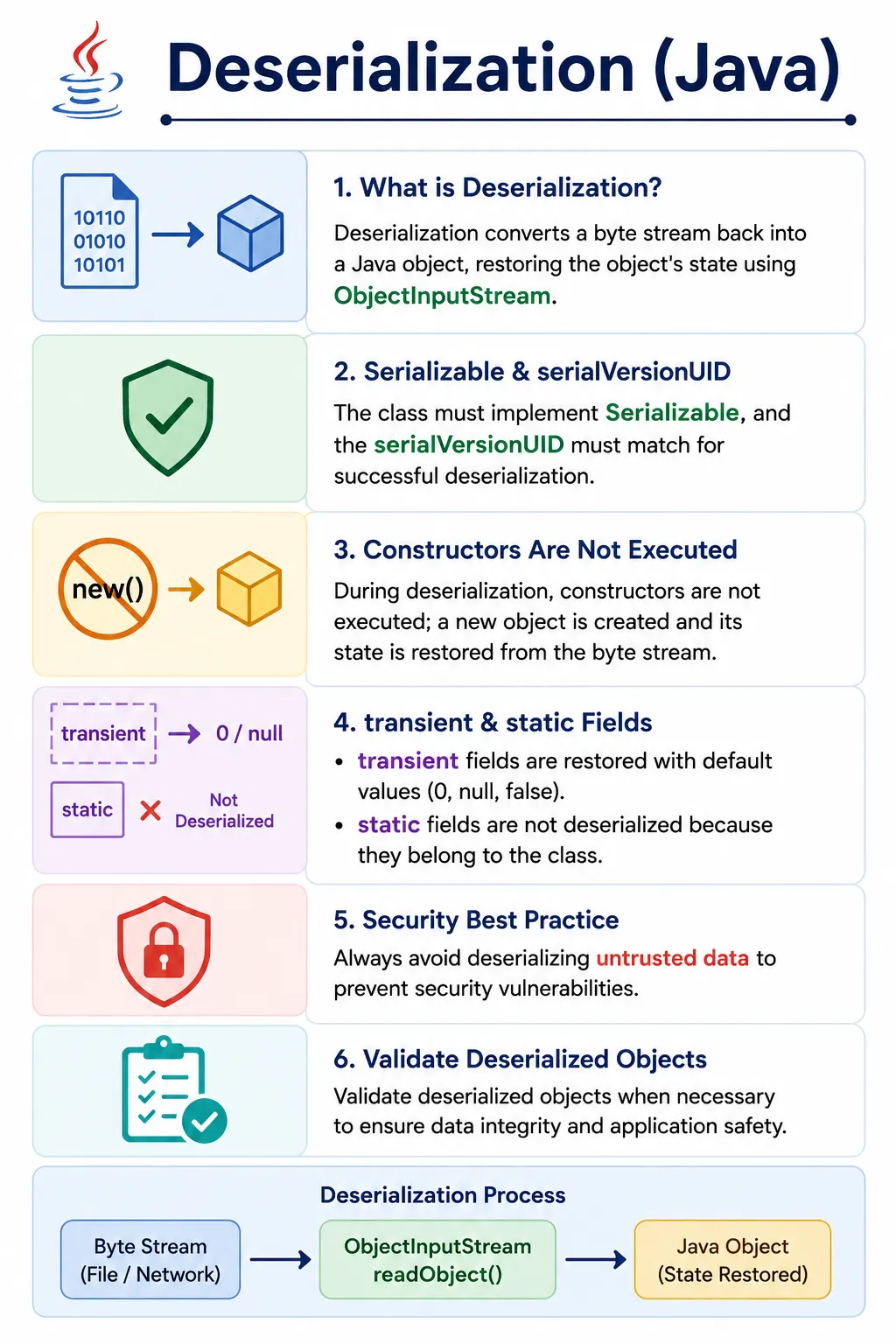
This is a high-frequency interview topic, usually asked together with serialization, transient, and serialVersionUID.
What Is Deserialization?
Deserialization converts a serialized byte stream into a Java object. The main class used for this process is
ObjectInputStream. Its readObject() method reads object data from an input stream and
returns an Object. The caller usually casts that object back to the expected class.
The byte stream must have been produced in a compatible serialized format, usually through
ObjectOutputStream.writeObject(). The class must be available to the JVM during deserialization.
The class must also be compatible with the version used during serialization. If these conditions are not met,
deserialization can fail at runtime.
- Converts byte stream → Java object
- Reconstructs object state from serialized data
- Uses ObjectInputStream
- Creates a new object in memory
Why Deserialization Is Needed
Deserialization is needed when previously saved object state must be restored. A program may save an object to disk and load it later. A Java-specific distributed system may receive an object from another JVM. A cache may store object state and restore it when needed. A session replication mechanism may move session data between application servers.
Although modern applications often use JSON, XML, databases, or binary schema formats for external data
exchange, deserialization remains important in core Java. It appears in legacy systems, interview questions,
object stream examples, and framework internals. Understanding it also helps explain related topics such as
transient, serialVersionUID, object graphs, and deserialization security.
- Restore objects from files
- Receive objects over network
- Reload cached objects
- Session restoration in applications
Deserialization Flow (Conceptual)
The conceptual flow starts with a source of serialized data. That source may be a file, network stream, memory
buffer, or other input stream. ObjectInputStream reads the serialized format, verifies class
information, restores field values, and returns a new object. The returned object exists in heap memory like
any other Java object.
Serialized File / Network Stream
          ↓
ObjectInputStream.readObject()
          ↓
New Java Object (state restored)
Basic Deserialization Example
A basic deserialization example needs the same compatible class that was used when the object was serialized.
The class implements Serializable, and the file contains serialized object data. The
readObject() method returns Object, so a cast is needed after reading.
Serializable Class
import java.io.Serializable;

class Employee implements Serializable {
    int id;
    String name;

    Employee(int id, String name) {
        this.id = id;
        this.name = name;
    }
}
Deserialization Code
ObjectInputStream ois =
    new ObjectInputStream(new FileInputStream("emp.ser"));

Employee e = (Employee) ois.readObject();
ois.close();

System.out.println(e.id + " " + e.name);

✔ Object recreated
✔ Same state as during serialization
✔ Constructor NOT called
Key Rules of Deserialization (Interview Critical)
Deserialization follows rules that often surprise beginners. Constructors of serializable classes are not
executed. Static fields are not restored from the stream because they belong to the class, not the object.
Transient fields are skipped during serialization and therefore receive default values during deserialization.
The serialVersionUID must be compatible, or Java throws InvalidClassException.
- Class must implement Serializable
- serialVersionUID must match
- Constructors are NOT executed
- Static fields are NOT restored
- Transient fields get default values
- New object is created in heap
What Happens to Different Fields?
Different field types behave differently because not every field belongs to the serialized object state. Ordinary instance variables are restored. Transient fields are not restored because they were deliberately excluded. Static fields are read from the currently loaded class, not from the serialized stream. Final fields can be restored if they were part of the serialized state.
| Field Type | Deserialization Behavior |
|---|---|
| Instance variable | Restored |
| transient | Default value (null, 0, false) |
| static | Not restored |
| final | Restored (if serialized) |
serialVersionUID and Deserialization (Very Important)
serialVersionUID is a compatibility identifier. During deserialization, Java compares the UID in
the serialized stream with the UID of the loaded class. If they do not match, Java assumes the stream and class
are incompatible and throws InvalidClassException. This protects the program from restoring old
data into a class that may no longer match the stored structure.
private static final long serialVersionUID = 1L;
If serialVersionUID Mismatch
java.io.InvalidClassException
- ✔ Same UID → success
- ❌ Different UID → failure
Parent Class Behavior (Interview Trap)
Parent class behavior is a favorite interview trap. If the parent class is serializable, its fields are restored from the stream and its constructor is not called. If the parent class is not serializable but the child class is serializable, the parent portion is initialized through the parent's no-argument constructor. The child portion is restored from the stream.
Case 1: Parent is Serializable
- Parent fields are restored
- Parent constructor NOT called
Case 2: Parent is NOT Serializable
- Parent no-arg constructor IS called
- Parent fields initialized normally
Custom Deserialization (Advanced)
Custom deserialization lets a class run controlled logic while being restored. A private
readObject() method with the expected signature can call defaultReadObject() to
restore normal fields and then perform additional work. This is useful for validation, rebuilding transient
fields, decrypting stored values, or rejecting invalid object state.
Override readObject() for custom logic.
private void readObject(ObjectInputStream ois)
        throws IOException, ClassNotFoundException {

    ois.defaultReadObject();
    // custom validation / logic
}
✔ Used for:
- Validation
- Decryption
- Reinitializing transient fields
Deserialization Security Risks (Real-World)
Deserialization has serious security implications. Reading serialized data is not the same as parsing a simple text file. It can create objects and trigger class-specific deserialization behavior. If an application accepts serialized data from an untrusted source, attackers may craft malicious streams that exploit vulnerable object graphs or library classes. This is why secure Java guidance strongly warns against deserializing untrusted data.
- Malicious serialized data
- Arbitrary code execution
- Object injection attacks
Mitigation
- Never deserialize untrusted data
- Validate object state
- Use filtering (ObjectInputFilter)
- Prefer JSON/XML for APIs
Serialization vs Deserialization (Quick Compare)
Serialization and deserialization are opposite directions of the same mechanism. Serialization saves or sends
object state. Deserialization restores that state. Serialization uses ObjectOutputStream, while
deserialization uses ObjectInputStream. Both operate on byte streams and both require compatible
serializable classes.
| Aspect | Serialization | Deserialization |
|---|---|---|
| Direction | Object → Stream | Stream → Object |
| Main class | ObjectOutputStream | ObjectInputStream |
| Constructor called | ❌ No | ❌ No |
| Purpose | Save / send | Restore |
Common Beginner Mistakes
Many beginner mistakes come from assuming deserialization behaves like normal object creation. It does not. Constructors are not called for serializable classes, transient values do not come back automatically, and static values are not restored from the file. Another common issue is reading objects in a different order than they were written. Object streams must be read in the same sequence used during serialization.
- Expecting constructor to run
- Forgetting serialVersionUID
- Assuming transient values restore
- Deserializing untrusted data
- Class mismatch between serialize/deserialize
Constructor Behavior During Deserialization
Constructor behavior is one of the most important differences between ordinary object creation and
deserialization. When code uses new, Java runs constructors and initialization logic. During
deserialization of a serializable class, Java restores the object from the stream without invoking that class's
constructor. This means constructor logging, validation, default setup, and calculated initialization do not
happen automatically.
This does not mean the object is invalid, but it does mean the class must be designed with deserialization in
mind. If important invariants are normally enforced in constructors, similar checks may be needed in
readObject() or in validation logic after reading. Otherwise, an object can be restored into a
state that normal construction would never allow.
The exception involves non-serializable parent classes. If a serializable child extends a parent class that
does not implement Serializable, Java calls the no-argument constructor of the first
non-serializable superclass. That parent portion is initialized normally, while the serializable child portion
is restored from the stream.
Default Values and Missing Data
Deserialization may restore default values in several situations. A transient field was never written to the
stream, so it comes back as null, 0, or false. A newly added field may
also receive a default value when reading older serialized data that did not contain that field. A parent
field from a non-serializable superclass may be initialized by the parent constructor rather than by the stream.
These default values are not always errors. They are part of Java's compatibility behavior. However, the application must know whether those defaults are acceptable. If a newly added field is required for business logic, old serialized data may need migration or validation. If a transient field is required at runtime, it should be rebuilt after deserialization.
This is why deserialization should not be treated as a blind restore operation. The restored object should be considered a reconstructed object that may need verification before use.
Object Graph Restoration
Deserialization restores not only the top-level object but also the object graph that was serialized with it.
If a serialized Order contains a User, a list of items, and an address, Java attempts
to restore those referenced objects as well. This is convenient because relationships between objects can be
reconstructed automatically.
Object graph restoration also creates risk. If one referenced class is missing, incompatible, or not available
in the expected form, deserialization may fail. If the graph is large, the process may restore more data than
the developer expected. If the graph contains sensitive information that was not marked transient,
that information may come back into memory after deserialization.
A good deserialization review checks the entire graph. The top-level class implementing
Serializable is not enough. Every referenced object that was serialized must be compatible and
safe to restore. This is one reason serialization can become complex in real domain models.
ClassNotFoundException and Class Compatibility
readObject() can throw ClassNotFoundException. This happens when the serialized data
refers to a class that is not available in the current runtime classpath. The bytes may be valid, but Java
cannot reconstruct the object without the class definition. This is common when serialized files are moved
between projects, versions, or environments.
Compatibility also depends on class structure. Even when the class exists, its serialVersionUID
and field structure must be compatible with the serialized data. If the class has changed too much,
deserialization may fail or restore an object with default values for newly added fields. Compatibility testing
is important when serialized data must survive application upgrades.
Reading Multiple Objects and Stream Order
Object streams preserve the order in which objects are written. If two objects are serialized using
writeObject(obj1) and then writeObject(obj2), they must be read in the same order.
The stream does not automatically search for the object type the program wants next. It returns the next object
in the stream.
This order requirement becomes important when files contain several objects or when a protocol writes a header
object followed by data objects. If the reader expects a User but the next object is actually a
List, the cast may fail or the program may process the wrong data. A clear stream structure and
matching read logic are essential.
In real systems, it is often better to serialize one clear container object rather than many unrelated objects
in sequence. For example, a SessionData object can contain the user, preferences, and state
together. This makes the stream easier to version and read correctly.
Validation After Deserialization
Deserialized objects should not always be trusted immediately. The serialized data may be old, incomplete, or tampered with. Even trusted data may have been created by an older class version with different assumptions. Validation ensures that restored objects still obey business rules before the application uses them.
Validation can happen inside a custom readObject() method or immediately after reading the object.
For example, an object may require a non-null ID, a positive amount, a valid status, or a collection that is not
empty. If those rules are violated, the program should reject the object rather than continuing with invalid
state.
This is especially important for security. Deserialization can bypass normal constructor checks for serializable classes. If constructors normally enforce invariants, similar checks may need to be repeated after deserialization.
ObjectInputFilter and Safer Deserialization
Modern Java provides ObjectInputFilter as a way to restrict what can be deserialized. Filters can
limit allowed classes, maximum depth, array size, number of references, and stream size. This helps reduce risk
when deserialization is unavoidable.
Filtering is not a reason to accept arbitrary serialized input casually. It is one layer of defense. The safer rule remains: do not deserialize data from untrusted sources. When deserialization must be used, restrict the allowed types, validate the restored object, and keep the deserialization boundary small and controlled.
Deserialization Review Checklist
A practical review starts with the source of the serialized data. If the source is untrusted, stop and choose a
safer format or a strongly controlled deserialization boundary. If the source is trusted and internal, check
whether the class is present, whether serialVersionUID matches, and whether old serialized data
must remain compatible with the current class version.
Next, review the restored class. Confirm that transient fields have a restoration strategy if they are needed after loading. Confirm that static values are not expected to come from the stream. Confirm that any required business invariants are validated after reading. Confirm that the object graph does not restore services, connections, credentials, or large unexpected state.
Finally, review exception handling. Deserialization can fail because of missing classes, incompatible classes, corrupted files, security filters, invalid casts, or I/O problems. Error messages should make it clear whether the problem is a missing file, old serialized data, a classpath issue, or invalid object state.
Deserialization in Real Applications
Deserialization historically appeared in Java-specific caching, session replication, RMI, local object storage, and framework internals. A web application might restore session state after failover. A cache might reload objects from disk. A desktop application might restore saved preferences or workspace state. In these cases, deserialization gives the application a way to bring object state back into memory.
Modern systems are more careful. For public APIs, JSON or Protobuf is usually preferred because the data is easier to inspect, more portable, and safer to exchange across languages. Java deserialization is still useful to understand because legacy systems, interview questions, and internal Java mechanisms may rely on it.
Deserialization in Testing and Debugging
Testers and automation engineers may encounter deserialization failures when cached files, session files, or
serialized fixtures are loaded during tests. A failure may appear as InvalidClassException,
ClassNotFoundException, ClassCastException, or NotSerializableException
during the earlier serialization step. Understanding the root cause helps separate data-version issues from
application logic defects.
When debugging, check which class wrote the serialized data, which class version is reading it, whether the UID matches, whether all referenced classes are present, and whether transient values are expected to be restored. Also check the order of reads if multiple objects were written to the same stream. The read order must match the write order.
When Not to Use Deserialization
Do not use Java deserialization for untrusted data. Do not use it as a public API format when clients may be written in other languages. Do not use it for long-term data storage unless class compatibility is managed carefully. Do not use it for sensitive objects without reviewing transient fields, storage protection, and validation.
Alternatives such as JSON, XML, Protobuf, Avro, databases, and configuration formats are often better for external communication and long-term storage. These formats are more explicit and usually easier to version. Java deserialization should be chosen intentionally for controlled Java-specific use cases.
Handling Version Upgrades Safely
Version upgrades are one of the most practical challenges with deserialization. A serialized file may have been
created by an older version of the application, while the current application uses a newer class definition. If
the class changed, deserialization may succeed with default values, fail with InvalidClassException,
or restore an object that needs migration before it is safe to use.
A safe upgrade strategy starts by deciding whether old serialized data must remain readable. If it must, keep
serialVersionUID stable for compatible changes and write tests that deserialize old sample files.
If an old format is no longer supported, fail clearly and document the migration path. Silent failure or
unclear default values can create subtle defects later in the workflow.
Migration logic may be placed after reading the object or inside custom readObject() logic when
appropriate. For example, a newly added field may be initialized from older fields, a missing collection may be
replaced with an empty list, or an old status value may be mapped to a new status model. The goal is to restore
a valid object for the current application, not merely to avoid an exception.
In production systems, serialized data should be treated like a data format with lifecycle rules. Teams should know where serialized data is stored, how long it lives, which application versions can read it, and how it is retired. Without those rules, deserialization problems often appear during deployments or environment migrations.
How to Explain Deserialization in Interviews
A strong interview answer starts with the definition: deserialization converts a byte stream back into a Java
object. Then mention ObjectInputStream.readObject(), the need for a compatible serializable class,
and the fact that a new object is created in heap memory.
Next, include the rules. Constructors of serializable classes are not called. Transient fields get default
values. Static fields are not restored from the stream. serialVersionUID must match. The class
must be available in the classpath. Referenced objects in the object graph must also be compatible.
A strong closing point is security. Deserialization is useful but risky. Never deserialize untrusted data, validate restored objects, use filters where appropriate, and prefer safer formats for APIs and external data exchange.
Interview-Ready Answers
Short Answer
Deserialization converts a byte stream back into a Java object.
Detailed Answer
In Java, deserialization is the process of reconstructing an object from its serialized byte stream using ObjectInputStream. It restores the object’s state without invoking constructors and requires the class to implement Serializable with a compatible serialVersionUID.
Key Takeaway
Deserialization restores object state, not object behavior. Understand constructor behavior, transient fields, and UID compatibility to avoid runtime failures and security issues.
Deserialization Interview Cheatsheet
1. Basic Deserialization
import java.io.*;

class Demo {
    public static void main(String[] args) throws Exception {
        ObjectInputStream ois =
            new ObjectInputStream(new FileInputStream("user.ser"));

        User u = (User) ois.readObject();
        System.out.println(u.id + " " + u.name);
        ois.close();
    }
}
2. Deserialization Order Matters
Object obj1 = ois.readObject();
Object obj2 = ois.readObject();
Explanation
Must read in same order as written.
3. transient Field After Deserialization
class User implements Serializable {
    int id;
    transient String password;
}

// After deserialization
password == null
4. static Field After Deserialization
class Demo implements Serializable {
    static int x = 10;
}
Explanation
static value comes from class, not stream.
5. serialVersionUID Match (Successful Deserialization)
class User implements Serializable {
    private static final long serialVersionUID = 1L;
}
Result
Class changes allowed (within compatibility).
6. serialVersionUID Mismatch (Failure)
// Change class structure without matching UID
Exception
InvalidClassException
7. Deserializing Inherited Object (Parent Serializable)
class Parent implements Serializable {
    int x = 10;
}

class Child extends Parent {
    int y = 20;
}

Child c = (Child) ois.readObject();
Result
Both x and y restored.
8. Parent NOT Serializable, Child Serializable
class Parent {
    int x = 10;
}

class Child extends Parent implements Serializable {
    int y = 20;
}
Result
x reset using parent no-arg constructor.
y restored from stream.
9. Custom Deserialization (readObject)
class User implements Serializable {
    transient String password;

    private void readObject(ObjectInputStream ois) throws Exception {
        ois.defaultReadObject();
        password = "recovered";
    }
}
10. Deserializing ArrayList
import java.io.*;
import java.util.*;

class Demo {
    public static void main(String[] args) throws Exception {
        ObjectInputStream ois =
            new ObjectInputStream(new FileInputStream("list.ser"));

        ArrayList<String> list =
            (ArrayList<String>) ois.readObject();

        System.out.println(list);
        ois.close();
    }
}
11. Deserializing Multiple Objects
User u1 = (User) ois.readObject();
User u2 = (User) ois.readObject();
Rule
Same order as serialization.
12. Deserialization with try-with-resources
try (ObjectInputStream ois =
         new ObjectInputStream(new FileInputStream("a.ser"))) {
    Object obj = ois.readObject();
}
13. ClassNotFoundException Trap
try {
    ois.readObject();
} catch (ClassNotFoundException e) {
    System.out.println("Class missing");
}
Why
.class not found in classpath.
14. Object Graph Restoration
class Order implements Serializable {
    User user;
}

Order o = (Order) ois.readObject();
Explanation
Entire object graph restored.
All referenced objects must be serializable.
15. Deserialization with Cast Safety
Object obj = ois.readObject();
if (obj instanceof User) {
    User u = (User) obj;
}
16. Deserializing After JVM Restart
// Works because data stored in .ser file
Interview Point
Independent of JVM lifecycle.
17. Default Values After Deserialization
int x;        // 0
String s;     // null
boolean b;    // false
When
Field not serialized (transient / parent field).
18. Security Trap (Untrusted Source)
// Never deserialize untrusted data
Risk
Remote code execution.
Gadget attacks.
19. Deserialization vs Constructor
// Constructor is NOT called during deserialization
Exception
Non-serializable parent constructor is called.
20. Interview Summary – Deserialization
ObjectInputStream.readObject()
Key Points
- Byte stream → object
- Constructor not invoked
- transient → default value
- UID must match
- Order matters
- All referenced objects must be serializable