Custom Exceptions
Custom exceptions are user-defined exception classes created to represent application-specific error conditions. They allow Java developers to express failures in the language of the application instead of relying only on generic built-in exception types. A generic exception can tell the program that something went wrong, but a well-named custom exception can explain what kind of business or domain problem occurred. This makes error handling clearer, logs more meaningful, APIs easier to understand, and interview answers stronger.
In real applications, not every failure is simply a technical problem. A bank account may have insufficient balance. A user may not be eligible for an operation. An order may already be shipped. A file may have an invalid business format even though it exists physically. These are application-specific conditions, and Java cannot provide a built-in exception for every domain. Custom exceptions fill that gap by giving important failures meaningful names.
Custom exceptions are especially important in enterprise Java because applications are usually divided into layers such as controllers, services, repositories, validators, and integration clients. Each layer needs to communicate failures clearly. A custom exception helps one layer tell another layer exactly what happened without depending on vague strings or overly broad exception types.
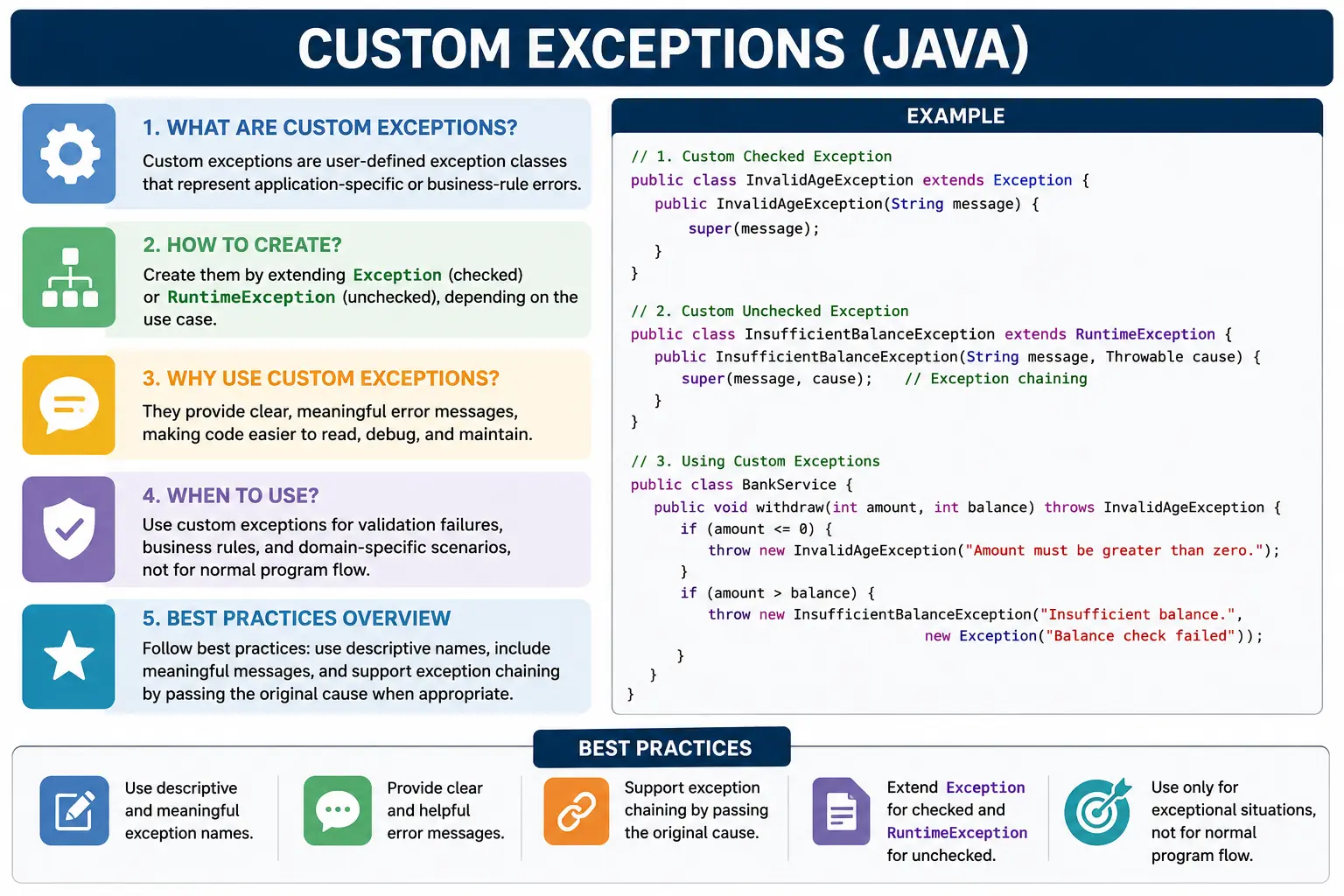
This is a high-frequency interview topic because it tests exception hierarchy, checked versus unchecked design, constructor usage, exception chaining, naming conventions, and real-world judgment. Knowing how to create a custom exception is easy. Knowing when to create one, whether it should be checked or unchecked, and how it should be handled is the deeper skill.
What Is a Custom Exception?
A custom exception is a Java class created by the programmer to represent a specific failure condition. It
normally extends either Exception or RuntimeException. If it extends
Exception, it becomes a checked custom exception, meaning callers must handle it or declare it.
If it extends RuntimeException, it becomes an unchecked custom exception, meaning the compiler
does not force callers to handle it.
The purpose of the class is not to add complex behavior. Most custom exceptions are simple classes with
constructors that pass messages and causes to the parent class. Their real value is semantic clarity. A
UserNotFoundException tells a developer much more than a generic Exception. An
InsufficientBalanceException explains a business failure immediately.
class InvalidAgeException extends Exception {
}
Even this minimal class is a valid custom checked exception. In production code, however, it is usually better to add constructors so messages and root causes can be preserved.
Why Custom Exceptions Are Needed
Custom exceptions are needed because generic exceptions often lack business meaning. Throwing
new Exception("Error") technically signals a failure, but it does not communicate what kind of
failure occurred. The caller cannot easily decide whether the problem is validation-related, authorization
related, data-related, recoverable, or unexpected. A specific custom exception makes that decision easier.
They also enable domain-specific handling. A service layer can catch InsufficientBalanceException
and show a balance-related message. An API layer can catch UserNotFoundException and return a
404 response. A batch process can catch InvalidRecordException, log the bad record, and continue
processing the next record. Without custom exceptions, developers often end up inspecting exception messages,
which is fragile and hard to maintain.
Custom exceptions improve logs and debugging as well. A stack trace that starts with
OrderAlreadyShippedException immediately points toward a business rule. A stack trace that starts
with Exception forces the developer to dig deeper. Clear exception names reduce investigation
time and make production support easier.
Bad practice:
throw new Exception("Error");
Better practice:
throw new InvalidAgeException("Age must be >= 18");
The second version is better because it gives the failure a name and a useful message. It tells the caller what rule was violated without requiring the caller to parse a generic message.
Types of Custom Exceptions
1. Checked Custom Exception
A checked custom exception extends Exception. It must be handled with try-catch or
declared using throws. Checked custom exceptions are useful when the caller is expected to know
about the failure and make a recovery decision. They make the failure part of the method's compile-time
contract.
class InvalidAgeException extends Exception {

    InvalidAgeException(String message) {
        super(message);
    }
}
Usage
The method below declares throws InvalidAgeException because the exception is checked. Any caller
must handle or declare it.
void validateAge(int age) throws InvalidAgeException {
    if (age < 18) {
        throw new InvalidAgeException("Not eligible to vote");
    }
}
2. Unchecked Custom Exception
An unchecked custom exception extends RuntimeException. It is not forced by the compiler. This
style is common for programming errors, invalid arguments, violated preconditions, and many business-rule
failures that are handled centrally rather than by every immediate caller.
class InvalidAgeException extends RuntimeException {

    InvalidAgeException(String message) {
        super(message);
    }
}
Usage
In this version, the method does not need a throws declaration because the custom exception is
unchecked.
void validateAge(int age) {
    if (age < 18) {
        throw new InvalidAgeException("Age below 18");
    }
}
Checked vs Unchecked Custom Exceptions
Choosing between checked and unchecked custom exceptions is a design decision. Checked exceptions are useful when callers are expected to recover directly. Unchecked exceptions are useful when the failure represents invalid usage, a violated business rule, or a condition that is normally handled at a higher boundary such as a global exception handler.
| Aspect | Checked | Unchecked |
|---|---|---|
| Parent class | Exception | RuntimeException |
| Compiler check | Yes | No |
| Must handle | Yes | No |
| Use case | Recoverable | Programming / rule violation |
Best Practice: Add Constructors
A production-ready custom exception should usually provide constructors that support a default exception, a message, and a message with a cause. The cause is especially important when wrapping a lower-level exception. Without it, the original root cause can be lost.
class BusinessException extends Exception {

    BusinessException() {
        super();
    }

    BusinessException(String message) {
        super(message);
    }

    BusinessException(String message, Throwable cause) {
        super(message, cause);
    }
}
These constructors support exception chaining and make the custom exception easier to use in real projects. A message explains the business failure, while a cause preserves the original technical failure.
Exception Chaining (Important)
Exception chaining means wrapping one exception inside another while preserving the original cause. This is useful when low-level technical failures need to be converted into higher-level business or application exceptions. For example, a calculation failure, database failure, or integration failure can be wrapped in a custom exception that explains what the application was trying to do.
try {
    int x = 10 / 0;
} catch (ArithmeticException e) {
    throw new BusinessException("Calculation failed", e);
}
Passing e as the cause preserves the original stack trace. This helps debugging because the
final exception explains the business context, while the cause explains the technical root problem.
Naming Conventions
Custom exception names should normally end with Exception and should describe the error
condition clearly. A good exception name should be understandable without reading the implementation.
InvalidAgeException, InsufficientBalanceException, and
UserNotFoundException are clear because they describe the exact problem.
Examples:
- InvalidAgeException
- InsufficientBalanceException
- UserNotFoundException
Real-World Example (Interview-Friendly)
A banking example is a strong way to understand custom exceptions. Insufficient balance is not simply a Java technical error. It is a business condition. A custom exception gives that condition a meaningful name and allows the caller to handle it separately from other failures.
class InsufficientBalanceException extends Exception {

    InsufficientBalanceException(String msg) {
        super(msg);
    }
}

class BankAccount {
    private double balance = 5000;

    void withdraw(double amount) throws InsufficientBalanceException {
        if (amount > balance) {
            throw new InsufficientBalanceException("Insufficient funds");
        }
        balance -= amount;
    }
}
When to Use Custom Exceptions
Use custom exceptions when a failure has domain meaning and needs to be handled or communicated clearly. They are useful for business rule violations, validation failures, domain-specific errors, service-layer failures, and API-layer responses. If a standard Java exception does not express the problem clearly, a custom exception may be appropriate.
Custom exceptions are especially useful when different failures need different handling. A
UserNotFoundException may map to one response, while DuplicateUserException maps to
another. A single generic exception would make that distinction harder.
When NOT to Use Custom Exceptions
Do not create custom exceptions for normal control flow. If a condition is ordinary and expected, a return value, validation result, optional value, or conditional branch may be clearer. Exceptions should represent exceptional or invalid conditions, not routine decisions.
Also avoid custom exceptions when a standard exception already fits well. For invalid method arguments,
IllegalArgumentException is often enough. For invalid object state,
IllegalStateException may be appropriate. Creating a custom exception for every tiny failure can
make the codebase noisy and harder to maintain.
Custom Exceptions in Layered Applications
In layered applications, custom exceptions help separate technical failures from business failures. A
repository layer may receive a database exception. A service layer may catch it and throw a
UserServiceException or AccountUpdateException with business context. A controller
layer may convert that exception into a user-friendly API response. This keeps each layer focused on its own
responsibility.
Without custom exceptions, technical exception types can leak through the whole application. Business code may start depending on database exceptions, file exceptions, or integration exceptions. This creates tight coupling. Custom exceptions act as a translation layer, allowing low-level details to be wrapped in meaningful application-level errors.
Custom Exceptions in APIs
In API development, custom exceptions are often used with centralized exception handlers. A service method may
throw ResourceNotFoundException, and a global handler may convert it into a 404 response. A
ValidationException may become a 400 response. An AccessDeniedException may become a
403 response. This pattern keeps API behavior consistent.
This is better than having every controller method manually build error responses. The business layer throws meaningful exceptions, and the API boundary decides how those exceptions should be presented to clients. The result is cleaner service code and more consistent error handling.
Checked or Unchecked: Practical Decision
A practical rule is to use checked custom exceptions when immediate callers are expected to recover directly. For example, if a user can choose another file after an invalid file format error, a checked exception may be reasonable. Use unchecked custom exceptions when the failure represents a violated rule, invalid method use, or a condition handled centrally.
Many modern enterprise applications prefer unchecked custom exceptions for service-layer business failures. This keeps method signatures clean and allows a central handler to translate failures into responses. However, checked exceptions are still valuable when they make recovery responsibility explicit. The decision should be based on caller responsibility, not personal preference alone.
Designing Exception Messages
A custom exception should carry a clear and safe message. The message should explain what went wrong and, if useful, include safe context such as a field name, rule name, or identifier. It should not expose sensitive data such as passwords, tokens, credit card numbers, or internal system secrets.
Messages such as "Invalid" or "Error" are weak because they do not help debugging.
A message such as "Withdrawal amount exceeds available balance" is much better. It tells the
developer and support team what rule failed.
Testing Custom Exceptions
Custom exceptions should be tested just like normal business behavior. If a method should throw
InsufficientBalanceException when the withdrawal amount is too high, the test should verify that
the exception type is thrown. It should also check the message or important fields if those are part of the
expected behavior.
Testing exception paths is important because custom exceptions often represent critical business rules. A payment system must reject invalid amounts. A user system must reject duplicate registrations. A security module must reject unauthorized access. These failure paths are not secondary; they protect the correctness of the application.
Designing a Custom Exception Hierarchy
Larger applications sometimes benefit from a small custom exception hierarchy. Instead of every custom
exception directly extending RuntimeException or Exception, the application may
define a base exception such as ApplicationException, BusinessException, or
DomainException. More specific exceptions can extend that base class. This allows common
handling for all application-level failures while still preserving specific exception types.
For example, InsufficientBalanceException, OrderAlreadyShippedException, and
InvalidSubscriptionException may all extend BusinessException. A service or API
layer can catch the specific exception when it needs special handling, or catch the common parent when a
common business-error response is enough. This design should remain simple. A very deep exception hierarchy
can become harder to understand than the problem it solves.
Custom Exceptions with Error Codes
Some applications add error codes to custom exceptions. An error code can help API clients, front-end
applications, support teams, and logs identify failures consistently. For example,
INSUFFICIENT_BALANCE, USER_NOT_FOUND, or INVALID_ORDER_STATE may be
more stable than a human-readable message. Messages can change for readability, but error codes often remain
stable for integration.
Error codes should be added deliberately. They are useful when failures must be mapped to API responses, translated into multiple languages, tracked in analytics, or handled by external clients. They are less useful in very small programs where a clear exception type and message are enough. If used, error codes should be consistent and documented.
Centralized Handling of Custom Exceptions
Custom exceptions become especially powerful when combined with centralized exception handling. In a web
application, service methods can throw meaningful custom exceptions, and a central handler can convert them
into consistent responses. This avoids copying similar try-catch logic across many controller
methods.
For example, a UserNotFoundException can always produce a not-found response. A
ValidationException can always produce a bad-request response. A
BusinessException can produce a standard business-error payload. The service layer stays focused
on business rules, while the API layer stays focused on response formatting.
Wrapping Technical Exceptions
A common real-world use of custom exceptions is wrapping technical exceptions. A repository method might
encounter SQLException, a file parser might encounter IOException, and an external
client might encounter a network timeout. These technical failures may not be meaningful to higher business
layers in their raw form. Wrapping them in a custom exception adds context.
When wrapping, always preserve the original cause. For example, throwing
new DataLoadException("Unable to load customer profile", e) is much better than throwing
new DataLoadException("Unable to load customer profile") and losing e. The custom
exception explains what the application was doing, while the cause explains the technical root failure.
Avoiding Over-Engineering
Custom exceptions are useful, but too many of them can create over-engineering. If every minor validation rule gets its own class, the project can become cluttered with exception types that are rarely handled differently. A good custom exception should usually meet at least one of these conditions: it communicates a meaningful domain concept, it is handled differently from other failures, it improves API clarity, or it carries useful structured information.
If two failures are always handled the same way and do not need separate names, a shared custom exception with a clear message or error code may be enough. The goal is not to create the largest exception hierarchy. The goal is to make failures understandable and maintainable.
Versioning and Public APIs
In public APIs or shared libraries, custom exceptions become part of the API contract. If callers catch
InvalidFileFormatException, changing that exception to a different checked exception can break
their code. Even unchecked custom exceptions may be documented and relied upon by clients. This means custom
exceptions should be named and designed carefully before they become widely used.
When APIs evolve, exception changes should be handled thoughtfully. Adding new checked exceptions can force callers to update code. Removing an exception may be safe technically, but documentation should stay accurate. Exception classes are not just internal details when exposed through public method signatures or documented behavior.
Custom Exceptions and Clean Code
Clean custom exception usage makes code read naturally. A statement such as
throw new InsufficientBalanceException("Insufficient funds") communicates a rule directly. The
reader understands the business problem without needing to inspect several conditions. This is one reason
custom exceptions are common in service-layer code.
At the same time, exception names should not replace clear validation logic. A method should still be easy to follow. If a long method contains many unrelated custom exceptions, it may be doing too much. Extracting validation into focused methods can make the business flow clearer while still using custom exceptions to report invalid conditions.
Custom Exceptions and Logging
Logging custom exceptions requires balance. The exception type already communicates part of the story, but a
good log entry should also include useful context. For example, when logging
InsufficientBalanceException, the operation name and account identifier may be useful if they
are safe to log. Sensitive data such as passwords, full card numbers, tokens, or confidential personal data
should not be written into exception messages or logs.
Avoid logging the same exception repeatedly at every layer. If a low-level method logs and rethrows, and a service logs and rethrows, and a controller logs again, production logs become noisy. A cleaner approach is to add context where needed and log at a clear boundary. Custom exceptions make that easier because the boundary handler can identify exception types and decide the right log level and response.
Migrating from Generic Exceptions
Many projects begin with generic exceptions and later introduce custom exceptions as the domain becomes
clearer. This migration should be done gradually. Start with the most important business failures, especially
failures that need different user messages, API responses, or recovery actions. Replace vague
Exception usage with named custom exceptions where the added meaning is clear.
During migration, avoid changing every exception at once. That can create unnecessary churn and risk. Focus on places where custom exceptions improve readability, testability, or handling. Update tests to assert the new exception types, and ensure callers still receive the behavior they expect.
Custom Exceptions and User Experience
Custom exceptions can improve user experience when they are translated into clear messages. A user does not
need to see a Java class name, but the application can use the exception type to choose the right message.
For example, DuplicateUserException can become "This username is already taken," while
InsufficientBalanceException can become "Your available balance is not enough for this
transaction."
This translation should usually happen at the application boundary, not inside the exception class itself. The exception identifies the failure. The presentation or API layer decides how to communicate it. This keeps custom exceptions reusable across command-line tools, web APIs, services, and batch jobs.
Common Beginner Mistakes
One common beginner mistake is extending Throwable or Error. Application-level
custom exceptions should normally extend Exception or RuntimeException. Errors
represent serious JVM-level or system-level problems and are not intended for ordinary business logic.
Another mistake is creating too many custom exceptions. Not every small validation needs its own class. Too
many exception classes can make the codebase harder to understand. Beginners also sometimes use checked
exceptions everywhere, which forces many callers to add noisy throws clauses or catch blocks.
Finally, ignoring exception chaining is a serious problem because it hides the original root cause.
Best Practices
Create custom exceptions only when they add meaning. Name them clearly. End names with
Exception. Add constructors for message and cause. Preserve root causes when wrapping lower-level
exceptions. Choose checked or unchecked based on caller responsibility. Avoid broad generic exceptions when a
specific custom exception would communicate intent better.
Keep custom exception classes simple. Most should not contain complex business logic. If extra data is useful, such as an error code or field name, add it deliberately and keep the class focused. The goal is clear error communication, not building a large hierarchy that becomes difficult to maintain.
Interview Perspective
In interviews, a strong answer should say that custom exceptions are user-defined exception classes used to
represent application-specific failures. They are created by extending Exception for checked
custom exceptions or RuntimeException for unchecked custom exceptions. They improve readability,
domain clarity, and meaningful handling.
A stronger answer also mentions constructors, exception chaining, naming conventions, and the checked versus unchecked decision. If you can explain when not to create a custom exception, your answer sounds practical rather than memorized.
Interview-Ready Answers
Short Answer
A custom exception is a user-defined exception used to represent application-specific error conditions.
Detailed Answer
In Java, custom exceptions are created by extending Exception or
RuntimeException. They allow developers to represent business-specific errors clearly and handle
them meaningfully. Checked custom exceptions must be handled or declared, while unchecked custom exceptions
are optional from the compiler's perspective. Good custom exceptions use clear names, meaningful messages,
and constructor support for exception chaining.
Key Takeaway
Custom exceptions express business intent. They turn error handling from a technical necessity into a clear, readable, and maintainable design feature. Use them when they improve meaning, handling, logging, and API clarity. Avoid them when a standard exception already communicates the problem well.
More Custom Exception Examples
1. Basic Custom Checked Exception
class InvalidAgeException extends Exception {
    InvalidAgeException(String msg) {
        super(msg);
    }
}

class Demo {
    static void checkAge(int age) throws InvalidAgeException {
        if (age < 18) {
            throw new InvalidAgeException("Age below 18");
        }
        System.out.println("Eligible");
    }

    public static void main(String[] args) throws InvalidAgeException {
        checkAge(16);
    }
}
Output
Exception in thread "main" InvalidAgeException: Age below 18
2. Handling Custom Checked Exception
class InvalidAgeException extends Exception {
    InvalidAgeException(String msg) {
        super(msg);
    }
}

class Demo {
    static void checkAge(int age) throws InvalidAgeException {
        if (age < 18) {
            throw new InvalidAgeException("Too young");
        }
    }

    public static void main(String[] args) {
        try {
            checkAge(15);
        } catch (InvalidAgeException e) {
            System.out.println(e.getMessage());
        }
    }
}
Output
Too young
3. Custom Unchecked Exception (Extends RuntimeException)
class InvalidAmountException extends RuntimeException {
    InvalidAmountException(String msg) {
        super(msg);
    }
}

class Demo {
    static void pay(int amt) {
        if (amt <= 0) {
            throw new InvalidAmountException("Amount must be positive");
        }
        System.out.println("Payment done");
    }

    public static void main(String[] args) {
        pay(-10);
    }
}
Output
Exception in thread "main" InvalidAmountException: Amount must be positive
4. Handling Custom Unchecked Exception
class InvalidAmountException extends RuntimeException {
    InvalidAmountException(String msg) {
        super(msg);
    }
}

class Demo {
    public static void main(String[] args) {
        try {
            throw new InvalidAmountException("Invalid payment");
        } catch (InvalidAmountException e) {
            System.out.println("Handled: " + e.getMessage());
        }
    }
}
Output
Handled: Invalid payment
5. Custom Exception with Default Constructor
class DataNotFoundException extends Exception {
    DataNotFoundException() {
        super("Data not found");
    }
}

class Demo {
    public static void main(String[] args) throws DataNotFoundException {
        throw new DataNotFoundException();
    }
}
6. Custom Exception with Multiple Constructors
class AppException extends Exception {
    AppException() {}

    AppException(String msg) {
        super(msg);
    }

    AppException(String msg, Throwable cause) {
        super(msg, cause);
    }
}
Explanation
Supports flexibility and chaining.
7. Exception Chaining (Cause)
class ServiceException extends Exception {
    ServiceException(String msg, Throwable cause) {
        super(msg, cause);
    }
}

class Demo {
    public static void main(String[] args) {
        try {
            int a = 10 / 0;
        } catch (ArithmeticException e) {
            throw new RuntimeException(
                new ServiceException("Service failed", e)
            );
        }
    }
}
Explanation
Preserves root cause.
8. Custom Exception Thrown from Constructor
class InvalidConfigException extends Exception {
    InvalidConfigException(String msg) {
        super(msg);
    }
}

class Config {
    Config(String env) throws InvalidConfigException {
        if (!"PROD".equals(env)) {
            throw new InvalidConfigException("Invalid environment");
        }
    }

    public static void main(String[] args) throws InvalidConfigException {
        new Config("DEV");
    }
}
9. Custom Exception in Method Overriding (Checked)
class Base {
    void process() throws Exception {}
}

class Child extends Base {
    void process() throws Exception {}  // same exception allowed
}
10. Overriding with Narrower Custom Exception
class AppException extends Exception {}
class SubAppException extends AppException {}

class Base {
    void run() throws AppException {}
}

class Child extends Base {
    void run() throws SubAppException {}
}
11. Overriding with Broader Custom Exception (Not Allowed)
class AppException extends Exception {}

class Base {
    void run() throws AppException {}
}

class Child extends Base {
    // void run() throws Exception {} // not allowed
}
12. Custom Exception with Error Code
class BusinessException extends Exception {
    int code;

    BusinessException(int code, String msg) {
        super(msg);
        this.code = code;
    }
}

class Demo {
    public static void main(String[] args) {
        try {
            throw new BusinessException(401, "Unauthorized");
        } catch (BusinessException e) {
            System.out.println(e.code + " - " + e.getMessage());
        }
    }
}
Output
401 - Unauthorized
13. Custom Exception as Validation Failure
class ValidationException extends RuntimeException {
    ValidationException(String msg) {
        super(msg);
    }
}

class Demo {
    static void validate(String name) {
        if (name == null || name.isEmpty()) {
            throw new ValidationException("Name required");
        }
    }

    public static void main(String[] args) {
        validate("");
    }
}
14. Custom Exception in Interface Contract
class AuthException extends Exception {
    AuthException(String msg) {
        super(msg);
    }
}

interface AuthService {
    void login(String user) throws AuthException;
}

class ServiceImpl implements AuthService {
    public void login(String user) throws AuthException {
        if (!"admin".equals(user)) {
            throw new AuthException("Invalid user");
        }
    }
}
15. Custom Exception + finally
class MyException extends Exception {}

class Demo {
    public static void main(String[] args) {
        try {
            throw new MyException();
        } catch (MyException e) {
            System.out.println("Caught");
        } finally {
            System.out.println("Cleanup");
        }
    }
}
Output
Caught
Cleanup
16. Wrapping Custom Checked into Unchecked
class DataException extends Exception {
    DataException(String msg) {
        super(msg);
    }
}

class Demo {
    static void load() {
        try {
            throw new DataException("DB error");
        } catch (DataException e) {
            throw new RuntimeException(e);
        }
    }

    public static void main(String[] args) {
        load();
    }
}
17. Custom Exception vs Error (Do NOT Extend Error)
class MyError extends Error {} // bad practice
Explanation
Custom logic exceptions should extend Exception or RuntimeException, not Error.
18. Custom Exception in Lambda (Unchecked Only)
interface Task {
    void run();
}

class MyRuntimeException extends RuntimeException {}

class Demo {
    public static void main(String[] args) {
        Task t = () -> {
            throw new MyRuntimeException();
        };
        t.run();
    }
}
19. Custom Exception with Logging Pattern
class ServiceException extends RuntimeException {
    ServiceException(String msg) {
        super(msg);
    }
}

class Demo {
    static void process() {
        try {
            int a = 10 / 0;
        } catch (Exception e) {
            System.err.println("ERROR: " + e.getMessage());
            throw new ServiceException("Process failed");
        }
    }

    public static void main(String[] args) {
        process();
    }
}
20. Interview Summary: Custom Exceptions
class MyException extends Exception {
    MyException(String msg) {
        super(msg);
    }
}

class Demo {
    static void test() throws MyException {
        throw new MyException("Custom failure");
    }

    public static void main(String[] args) throws MyException {
        test();
    }
}
Key Points
- Extend Exception for checked custom exceptions
- Extend RuntimeException for unchecked custom exceptions
- Used for business rules & validations
- Improves readability & error clarity