Creating Threads in Java
In Java, threads enable concurrent execution within a single process. Java provides two primary ways to create threads, plus modern executor-based approaches used in production systems. This is a high-frequency interview topic.
A thread is a lightweight execution path inside a Java process. When a Java application starts, the JVM
creates the main thread to execute the main() method. From there, an application can create
additional threads to perform work concurrently. These threads may process background tasks, handle user
requests, perform scheduled work, wait for I/O, or keep an application responsive while long-running work
continues elsewhere.
Creating a thread is not only about syntax. It is a design decision. A developer must decide whether the task should be tied directly to a Thread class, separated as a Runnable, written as a lambda, submitted as a Callable, or managed by an ExecutorService. Modern Java code usually favors task-based design and executor management because it scales better than manually creating unmanaged threads everywhere.
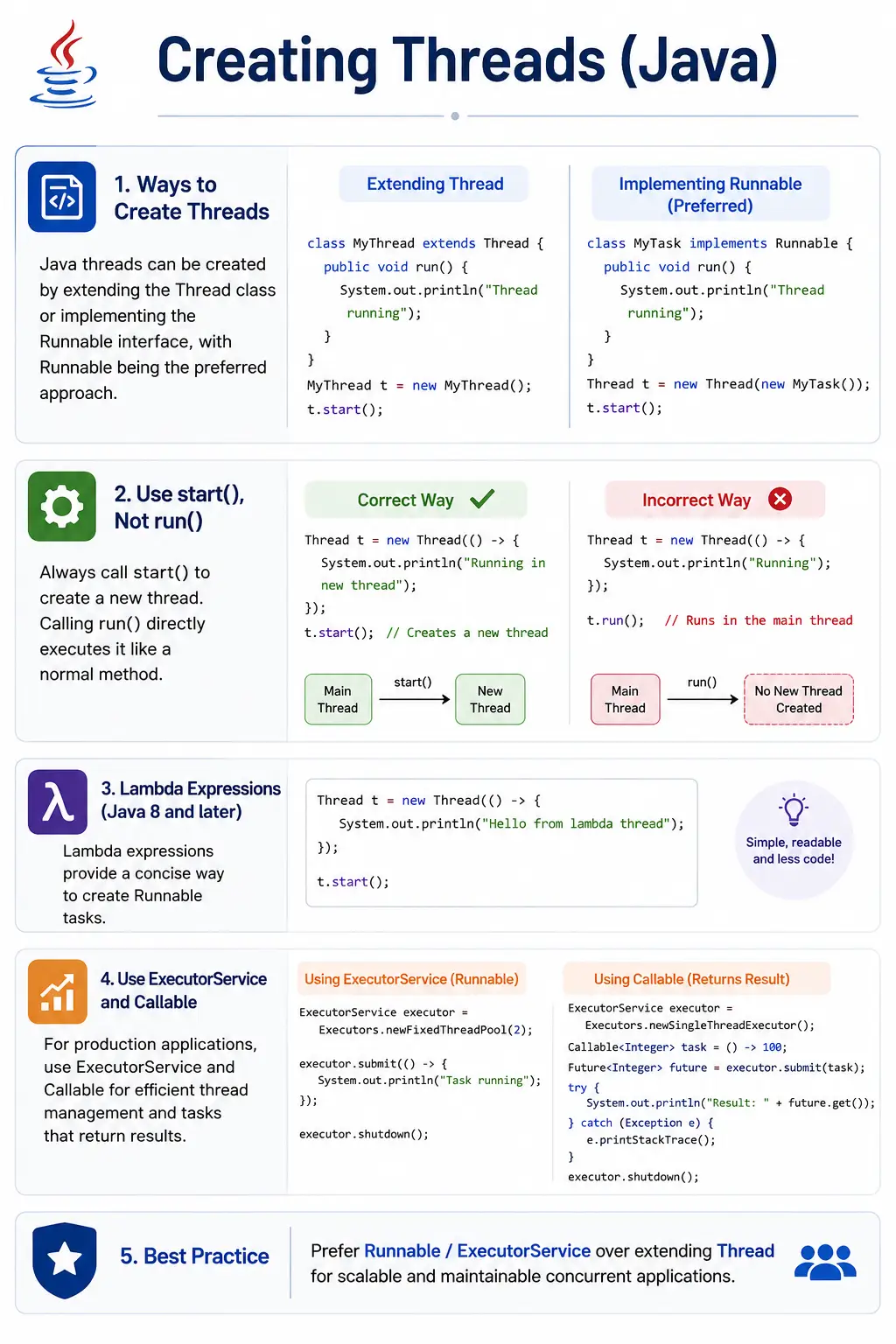
Ways to Create Threads in Java
Java supports multiple ways to create or run concurrent work. The classic approaches are extending the
Thread class and implementing the Runnable interface. Java 8 made Runnable easier
to use with lambda expressions. For tasks that return values or throw checked exceptions, Java provides
Callable through the executor framework.
- Extend Thread class
- Implement Runnable interface
- Implement Callable (Executor framework) (advanced/modern)
In interviews, the expected answer usually starts with Thread and Runnable. A stronger answer continues with Callable, Future, ExecutorService, and the reason Runnable is preferred over extending Thread. In real projects, creating threads manually is less common than submitting tasks to an executor or framework-managed thread pool.
Creating a Thread by Extending Thread Class
How It Works
The first traditional way to create a thread is to extend the Thread class. The subclass
overrides the run() method, and the program calls start() on the thread object.
The run() method contains the work that should execute on the new thread.
Example
class MyThread extends Thread {

@Override
    public void run() {
        System.out.println("Thread running: " + Thread.currentThread().getName());
    }
}

public class Test {
    public static void main(String[] args) {
        MyThread t = new MyThread();
        t.start(); // starts new thread
    }
}
This approach is easy to understand because the class itself is a thread. However, that simplicity comes with
a design limitation. Since Java does not support multiple class inheritance, a class that extends
Thread cannot extend another class. It also mixes two responsibilities: what the task does and
how the task is executed.
Important Rules
The most important rule is that start() creates the new thread of execution. The
run() method contains the logic, but calling run() directly does not create a new
thread. It behaves like an ordinary method call on the current thread.
Limitations
Extending Thread is acceptable for simple learning examples, but it is less flexible for real design. It prevents the class from extending another superclass and tightly couples the task to the execution mechanism. For this reason, Runnable is generally preferred.
Creating a Thread by Implementing Runnable
How It Works
The preferred classic approach is to implement Runnable. Runnable represents a task that can be
executed by a thread. The task object is passed to a Thread constructor, and start() begins
execution.
Example
class MyTask implements Runnable {

@Override
    public void run() {
        System.out.println("Thread running: " + Thread.currentThread().getName());
    }
}

public class Test {
    public static void main(String[] args) {
        Thread t = new Thread(new MyTask());
        t.start();
    }
}
This design separates the task from the thread. MyTask describes what should run, while
Thread provides the execution path. That separation makes the code easier to reuse and aligns
better with executor services, where tasks are submitted to a pool instead of manually wrapped in Thread
objects.
Why Runnable Is Preferred (Interview Point)
Runnable is preferred because it supports better object-oriented design. A class can implement Runnable and still extend another class if needed. It also makes the task independent of the execution mechanism. The same Runnable can be executed by a Thread, submitted to an ExecutorService, scheduled, tested, or reused in another context.
Creating Thread Using Lambda
Because Runnable is a functional interface with a single abstract method, it can be written using a lambda expression in Java 8 and later. This is common for short tasks.
Thread t = new Thread(() -> {
    System.out.println("Thread using lambda");
});
t.start();
The lambda is still a Runnable internally. It is clean and concise when the task is small. For larger or reusable tasks, a named Runnable class or separate method may be clearer.
Creating Threads Using Callable and Executor Framework
Callable is used when a task must return a result or throw checked exceptions. Callable is not
passed directly to a Thread constructor. It is normally submitted to an ExecutorService, which
returns a Future representing the pending result.
Callabletask = () -> 10 + 20; ExecutorService service = Executors.newSingleThreadExecutor(); Future result = service.submit(task); System.out.println(result.get()); service.shutdown();
This style is closer to production-ready concurrency because the executor controls thread creation and reuse. Instead of creating a new thread for every task, the application can submit work to a managed pool. This improves scalability and makes shutdown management more predictable.
start() vs run() (Very Important)
| Method | Behavior |
|---|---|
start() |
Creates new thread |
run() |
Executes like normal method |
t.run();   // no new thread
t.start(); // new thread
This distinction is one of the most common interview questions. start() asks the JVM to create a
new call stack and run the task on a separate thread. run() simply executes the code on the
current thread like any other method.
Thread Naming (Good Practice)
Naming threads is a simple but valuable practice. Meaningful names make logs, debugging output, and thread dumps easier to understand.
Thread t = new Thread(new MyTask(), "Worker-1");
t.start();
Thread Priority (Hint)
Java allows thread priority hints, but priority is scheduler-dependent. It should not be used as a reliable correctness mechanism.
t.setPriority(Thread.MAX_PRIORITY);
A higher priority may influence scheduling on some platforms, but it does not guarantee execution order. Correct programs should use synchronization, queues, or coordination utilities instead of relying on priority.
Comparison: Thread vs Runnable (Interview Favorite)
| Aspect | Thread | Runnable |
|---|---|---|
| Inheritance | Extends Thread | Implements Runnable |
| Multiple inheritance | No | Yes |
| Code separation | Poor | Good |
| Recommended | Less | More |
Best Practices (Real-World)
In real-world Java applications, prefer Runnable or Callable over extending Thread. This keeps task logic separate from thread management. Use ExecutorService or framework-managed thread pools for larger systems because they reuse threads, control concurrency, and provide cleaner shutdown handling.
Avoid creating unlimited threads manually. Every thread consumes memory for its stack and adds scheduling
overhead. Too many threads can make an application slower, not faster. Name threads meaningfully so that logs
and thread dumps clearly show what kind of work is running. Also avoid overriding start(); the
thread behavior belongs in run() or in the submitted task.
Common Beginner Mistakes
The most common beginner mistake is calling run() instead of start(). The program
still prints output, so the mistake may go unnoticed, but no new thread is created. Another mistake is
extending Thread unnecessarily when Runnable would provide cleaner design.
Beginners also create too many threads without understanding lifecycle and resource cost. They may ignore executor shutdown, causing applications to keep running unexpectedly. They may also assume that threads automatically improve performance. Threads help when tasks can truly run concurrently, but they also require careful management of shared data, exceptions, and shutdown.
Interview-Ready Answers
Short Answer
Threads can be created by extending the Thread class or implementing Runnable.
Detailed Answer
In Java, threads can be created by extending the Thread class or implementing the Runnable interface. Implementing Runnable is preferred because it supports multiple inheritance and separates task logic from thread management. Modern applications use the Executor framework with Runnable or Callable for better scalability.
A stronger interview answer should mention that start() creates a new thread while
run() is only a normal method call. Runnable is preferred for design, Callable is used when a
result is required, and ExecutorService is preferred in production because it manages threads efficiently.
Key Takeaway
Runnable is for task design. Thread is one way to execute a task. ExecutorService is the standard production approach for managing threads. Mastering thread creation is the foundation for safe, scalable, and efficient Java concurrency.
How to Choose the Right Thread Creation Approach
Use extends Thread only for simple demonstrations or rare cases where the class truly represents
a custom thread. For most application code, use Runnable when the task does not return a value. Runnable is
lightweight, reusable, and works naturally with executors.
Use Callable when the task needs to produce a result or throw checked exceptions. Callable integrates with Future, allowing the caller to wait for a result, handle exceptions, or cancel the task. For repeated, scalable, or production work, submit Runnable or Callable tasks to an ExecutorService instead of manually creating new Thread objects.
This decision keeps code maintainable. A task should describe work. A thread or executor should describe execution. Mixing both concerns makes code harder to test, reuse, and tune.
Manual Threads vs ExecutorService in Production
Manual thread creation is useful for learning because it clearly shows how Thread,
Runnable, start(), and run() work. Production applications usually
need more control. A server cannot create an unlimited new Thread for every request without risking memory
pressure, scheduling overhead, and unstable performance. ExecutorService solves this by managing a controlled
group of reusable worker threads.
With an executor, the application submits tasks instead of directly managing thread objects. The executor decides when a worker thread is available, runs the task, and then keeps the thread ready for future work. This model is cleaner because it separates task submission from thread lifecycle management. It also gives developers standard shutdown methods and makes it easier to tune concurrency limits.
ExecutorService is also easier to integrate with Callable and Future. When a task returns a value, the caller
can retrieve it through Future.get(). When a task fails, the failure can be captured and handled.
In larger systems, this is more manageable than trying to collect results or exceptions from manually created
Thread objects.
Thread Creation and Thread Safety
Creating a thread is only the beginning of concurrent programming. Once multiple threads run inside the same process, they may share objects, static variables, collections, files, database connections, or service clients. Shared data introduces thread-safety concerns. If two threads update the same value at the same time without coordination, the final result may be incorrect.
For example, starting many threads that increment the same counter does not automatically produce correct
results. The statement count++ looks simple, but it involves reading the value, increasing it,
and writing it back. If two threads interleave those steps, one update may overwrite another. This is why
synchronization, locks, atomic classes, concurrent collections, and immutable objects are important in
multithreaded design.
A good thread creation strategy considers both execution and data access. It is not enough to start a thread successfully. The thread must also interact safely with the rest of the application. This is why interviews often move from creating threads to lifecycle, synchronization, wait/notify, ExecutorService, and thread safety.
Thread Creation Lifecycle View
When a Thread object is constructed, it is in the NEW state. Calling start() moves it toward
RUNNABLE. The scheduler then decides when it actually runs. When the run() method finishes, the
thread becomes TERMINATED. A terminated Thread object cannot be started again.
This lifecycle view explains several rules. You cannot call start() twice on the same Thread
object. You cannot assume a thread starts executing immediately after start(). You cannot reuse
a terminated Thread object for another run. If repeated execution is needed, create a new Thread, use a loop
inside the worker, or submit repeated tasks to an executor.
Practical Thread Creation Examples
The examples below show the common ways Java code creates or runs threaded work. They move from basic Thread usage to executor-based patterns that are closer to real-world systems.
1. Creating Thread by Extending Thread
This example extends Thread and overrides run(). Calling start() creates a new
thread and executes the overridden method.
class MyThread extends Thread {
    public void run() {
        System.out.println("Thread using Thread class");
    }

    public static void main(String[] args) {
        MyThread t = new MyThread();
        t.start();
    }
}
This approach is straightforward, but it tightly couples the task with the Thread class. It is useful for learning but less preferred for flexible application design.
2. Creating Thread Using Runnable (Preferred)
This example separates the task from the thread. MyTask implements Runnable, and the Thread
object executes that task.
class MyTask implements Runnable {
    public void run() {
        System.out.println("Thread using Runnable");
    }

    public static void main(String[] args) {
        Thread t = new Thread(new MyTask());
        t.start();
    }
}
Runnable is preferred because the same task can be reused in different execution contexts, including thread pools and testing utilities.
3. Thread Using Lambda Expression
A lambda expression is a concise way to create a Runnable when the task is short.
class Demo {
    public static void main(String[] args) {
        Thread t = new Thread(() ->
                System.out.println("Thread using Lambda"));
        t.start();
    }
}
The lambda does not create a new threading model. It simply provides the Runnable implementation in a compact form.
4. Anonymous Runnable Implementation
Before Java 8 lambdas, anonymous inner classes were commonly used to create Runnable implementations inline.
class Demo {
    public static void main(String[] args) {
        Thread t = new Thread(new Runnable() {
            public void run() {
                System.out.println("Anonymous Runnable");
            }
        });
        t.start();
    }
}
This style is still useful to understand when reading older code. Modern code usually replaces it with a lambda when the logic is simple.
5. Multiple Threads Creation
Multiple Thread objects can be created and started independently. Their output order is not guaranteed because scheduling depends on the JVM and operating system.
class Demo {
    public static void main(String[] args) {
        new Thread(() -> System.out.println("Thread 1")).start();
        new Thread(() -> System.out.println("Thread 2")).start();
    }
}
This is the first sign of real concurrency. Once multiple threads run, the program must not rely on a fixed execution order unless explicit coordination is added.
6. Naming a Thread
Thread names help identify execution paths in logs and thread dumps.
class Demo {
    public static void main(String[] args) {
        Thread t = new Thread(() -> {
            System.out.println(Thread.currentThread().getName());
        }, "Worker-1");
        t.start();
    }
}
A name such as Worker-1 is more useful than a default generated thread name when debugging
production issues.
7. Getting Current Thread
Thread.currentThread() returns the thread currently executing the code.
class Demo {
    public static void main(String[] args) {
        System.out.println(Thread.currentThread().getName());
    }
}
Output
main
In a basic Java program, the current thread is usually main. This confirms that even a simple
program runs on a thread.
8. Creating Thread Using ExecutorService (Industry Standard)
ExecutorService manages thread creation and task execution. Instead of manually creating a Thread, the program submits work to the executor.
import java.util.concurrent.*;

class Demo {
    public static void main(String[] args) {
        ExecutorService executor = Executors.newSingleThreadExecutor();
        executor.execute(() -> System.out.println("Executor Thread"));
        executor.shutdown();
    }
}
Calling shutdown() is important. It tells the executor to stop accepting new tasks and finish
existing tasks. Forgetting to shut down an executor can keep the JVM alive.
9. Fixed Thread Pool
A fixed thread pool limits concurrency to a specific number of worker threads. This prevents uncontrolled thread creation.
import java.util.concurrent.*;

class Demo {
    public static void main(String[] args) {
        ExecutorService pool = Executors.newFixedThreadPool(2);
        pool.execute(() -> System.out.println("Task 1"));
        pool.execute(() -> System.out.println("Task 2"));
        pool.shutdown();
    }
}
Thread pools are useful when many tasks must be processed but the application needs control over resource usage. The pool reuses worker threads instead of creating a new thread for every task.
10. Creating Thread Using Callable (Returns Value)
Callable is used when the task should return a value. Submitting a Callable returns a Future.
import java.util.concurrent.*;

class Demo {
    public static void main(String[] args) throws Exception {
        Callable task = () -> 10 + 20;
        ExecutorService ex = Executors.newSingleThreadExecutor();
        Future result = ex.submit(task);
        System.out.println(result.get());
        ex.shutdown();
    }
}
Output
30
result.get() waits until the Callable completes and then returns the computed value. It can also
throw exceptions if the task fails.
11. Difference: run() vs start()
This example calls run() directly. The task executes, but it does not execute on a new thread.
class Demo {
    public static void main(String[] args) {
        Thread t = new Thread(() -> System.out.println("Thread"));
        t.run(); // no new thread
    }
}
Explanation
run() is a normal method call. start() creates a new thread. This difference is
critical because code may appear to work while still not being concurrent.
12. Thread with Sleep
Thread.sleep() pauses the current thread for a specified time. It is often used in examples to
demonstrate timing, but it should not be used as a primary synchronization mechanism.
class Demo {
    public static void main(String[] args) {
        new Thread(() -> {
            try {
                Thread.sleep(500);
                System.out.println("After sleep");
            } catch (Exception e) {}
        }).start();
    }
}
Sleep places the thread into TIMED_WAITING. After the time expires, the thread becomes eligible to continue.
13. Thread with Join
join() makes one thread wait for another thread to finish. Here, the main thread waits until the
worker thread completes.
class Demo {
    public static void main(String[] args) throws Exception {
        Thread t = new Thread(() -> {
            try { Thread.sleep(300); } catch (Exception e) {}
            System.out.println("Worker done");
        });

        t.start();
        t.join();
        System.out.println("Main resumed");
    }
}
Join is useful when one task depends on another task's completion. In larger applications, Future and executor-based coordination are often cleaner.
14. Daemon Thread Creation
A daemon thread is a background thread that does not prevent the JVM from exiting. Daemon status must be set before the thread is started.
class Demo {
    public static void main(String[] args) {
        Thread t = new Thread(() -> {
            while (true) {}
        });
        t.setDaemon(true);
        t.start();
        System.out.println("Main ends");
    }
}
Daemon threads are useful for background support work, but they should not be used for critical tasks that must complete before application shutdown.
15. Thread Priority (Hint to Scheduler)
Thread priority is a hint to the scheduler, not a guarantee. It should not be used to enforce business ordering or correctness.
class Demo {
    public static void main(String[] args) {
        Thread t = new Thread(() -> System.out.println("Priority"));
        t.setPriority(Thread.MAX_PRIORITY);
        t.start();
    }
}
If order matters, use coordination tools such as locks, queues, latches, or executor sequencing instead of relying on priority.
16. Creating Thread Using Method Reference
A method reference can be used when an existing method matches the Runnable shape: no arguments and no return value.
class Demo {
    static void task() {
        System.out.println("Method Reference Thread");
    }

    public static void main(String[] args) {
        Thread t = new Thread(Demo::task);
        t.start();
    }
}
This style is clean when the task already exists as a named method. It also improves readability by giving the task a meaningful method name.
17. Thread Factory (Advanced)
A ThreadFactory customizes how executor-created threads are built. It can set names, daemon status, priority, or exception handlers.
import java.util.concurrent.*;

class Demo {
    public static void main(String[] args) {
        ThreadFactory factory = r -> new Thread(r, "Custom-Thread");
        ExecutorService ex = Executors.newSingleThreadExecutor(factory);
        ex.execute(() -> System.out.println(Thread.currentThread().getName()));
        ex.shutdown();
    }
}
Thread factories are useful in production systems because they make thread behavior consistent across a pool. Meaningful names from a factory make debugging much easier.
18. Creating Thread Inside Loop
Threads can be created in a loop, but this pattern must be used carefully. Creating many threads at once can exhaust resources.
class Demo {
    public static void main(String[] args) {
        for (int i = 1; i <= 3; i++) {
            int id = i;
            new Thread(() -> System.out.println("Thread " + id)).start();
        }
    }
}
Notice the use of int id = i. The lambda captures the effectively final local variable
id, allowing each thread to print its own number. For large numbers of tasks, use a thread pool
instead.
19. Thread with Exception Handling
Exceptions inside a thread do not automatically propagate to the thread that started it. An uncaught exception handler can capture and report failures.
class Demo {
    public static void main(String[] args) {
        Thread t = new Thread(() -> {
            throw new RuntimeException("Error");
        });
        t.setUncaughtExceptionHandler(
            (th, ex) -> System.out.println("Handled: " + ex.getMessage()));
        t.start();
    }
}
This is useful for logging and diagnosing background task failures. With ExecutorService, exceptions are often captured through Future results instead.
20. Interview Summary - Creating Threads
Java supports Thread, Runnable, lambda-based Runnable, ExecutorService, and Callable-based task execution. The best interview answer explains not only how each one works, but also when to use it.
Key Points
Prefer Runnable or ExecutorService for most work. Use start() whenever a new Thread object
should actually begin concurrent execution. Use Callable when a result is required. Use ExecutorService to
manage threads efficiently. Remember that daemon threads do not block JVM exit.
The practical rule is simple: define work as a task, then choose the right execution mechanism. Manual Thread creation is useful for learning and small cases. Executors and thread pools are better for scalable applications.
Final Practical Summary
Creating threads in Java should be understood in layers. At the lowest level, a Thread object represents an execution path. At the task level, Runnable represents work that does not return a value, and Callable represents work that returns a value or throws checked exceptions. At the application level, ExecutorService manages how tasks are assigned to threads.
For interviews, start with the two classic methods: extending Thread and implementing Runnable. Then explain
why Runnable is preferred. Add that lambda expressions are a concise form of Runnable, Callable is used for
returned results, and ExecutorService is the modern production approach. Always mention the difference
between start() and run(), because that is the most common trap.
For real projects, focus on controlled concurrency. Do not create threads casually. Name them, manage them, shut down executors, handle exceptions, and protect shared data. Thread creation is powerful, but the quality of a concurrent program depends on lifecycle management and thread safety as much as on starting the thread itself.