Comparable vs Comparator in Java
Comparable and Comparator are two important Java interfaces used to define how objects should be sorted. They are closely related, but they solve different design problems. Comparable answers the question, "What is the natural order of this object?" Comparator answers the question, "How should these two objects be compared using an external sorting rule?" This difference looks small at first, but it becomes very important when working with lists, sets, maps, custom objects, and interview problems.
Sorting primitive values and simple strings is usually straightforward because Java already knows how to
compare them. Integers have numeric order, strings have lexicographic order, and dates have chronological
order. Custom objects are different. If a Student object has an id, name, age, and marks, Java
does not automatically know whether students should be sorted by id, name, marks, or some combination of
fields. Comparable and Comparator exist to make that sorting logic explicit.
This is a high-frequency interview topic because it tests both syntax and design judgment. A candidate must know the method names, packages, return values, and common collection behavior. More importantly, they must understand when sorting logic should live inside the class and when it should be supplied from outside. That design choice affects flexibility, maintainability, and how collections such as TreeSet and TreeMap treat objects.
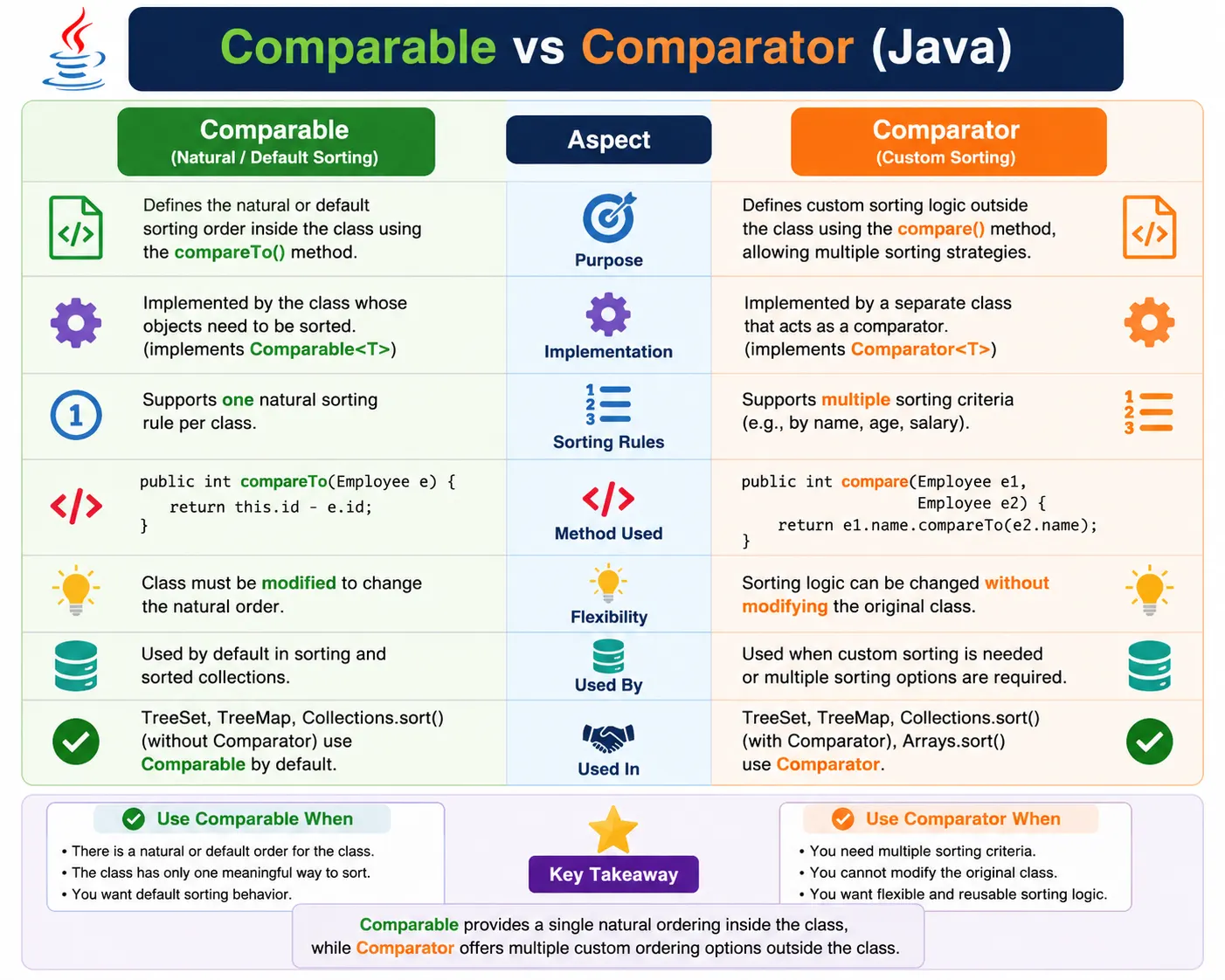
What Is Comparable?
Comparable is an interface that defines the natural ordering of objects. Natural ordering means the default
order that makes the most sense for a class. For a student class, natural order might be by roll number. For
an employee class, it might be by employee id. For a version class, it might be by version number. The class
itself decides this default ordering by implementing Comparable.
public interface Comparable<T> {
    int compareTo(T o);
}
Comparable belongs to the java.lang package, so it is available without an explicit import. The
interface has one main method: compareTo(). This method compares the current object with another
object of the same type and returns an integer that tells Java which object should come first.
Because Comparable is implemented inside the class, it is tightly connected to the class's identity. This is useful when there is a clear default order that most code should follow. The limitation is that a class can define only one natural ordering. If the same class must be sorted in several different ways, Comparator is usually a better fit.
Comparable Example
In the example below, Student implements Comparable<Student>. The
compareTo() method compares students by id, so id becomes the natural order of the Student
class.
class Student implements Comparable<Student> {
    int id;
    String name;

    Student(int id, String name) {
        this.id = id;
        this.name = name;
    }

    @Override
    public int compareTo(Student s) {
        return this.id - s.id; // sort by id
    }
}

List<Student> list = new ArrayList<>();
Collections.sort(list);
Once the class implements Comparable, Collections.sort(list) can sort the list without receiving
any extra sorting rule. Java uses the compareTo() method automatically. TreeSet and TreeMap also
rely on Comparable when no Comparator is provided.
In production code, avoid subtraction for comparison when values may be large because subtraction can
overflow. Prefer Integer.compare(this.id, s.id). The intent is clearer and the implementation is
safer.
What Is Comparator?
Comparator is an interface used to define sorting logic outside the class being sorted. Instead of making the object compare itself, Comparator compares two objects passed to it. This is useful when the class cannot be modified, when multiple sorting rules are needed, or when sorting should depend on a specific screen, report, or business requirement.
public interface Comparator<T> {
    int compare(T o1, T o2);
}
Comparator belongs to the java.util package. Its main method is compare(), which
receives two objects and decides their order. Because Comparator is external, many comparators can be written
for the same class. One comparator can sort students by name, another by id, another by marks, and another by
age.
Comparator became even more convenient with Java 8 because lambdas, method references, and helper methods
such as Comparator.comparing() allow sorting logic to be expressed clearly and concisely.
Comparator Example
This example defines a separate comparator class that sorts students by name. The Student class itself does not need to change. The sorting rule is supplied from outside.
class NameComparator implements Comparator<Student> {
    @Override
    public int compare(Student s1, Student s2) {
        return s1.name.compareTo(s2.name);
    }
}

Collections.sort(list, new NameComparator());
This design is flexible. If another part of the application wants to sort the same students by id or marks, it can use another comparator. The class remains stable, and sorting behavior can vary according to the use case.
Comparator Using Lambda (Java 8+)
In modern Java, Comparator is often written with a lambda expression. The lambda receives two objects and returns the comparison result. This keeps sorting logic close to where it is used.
Collections.sort(list, (s1, s2) -> s1.name.compareTo(s2.name));
Lambdas are especially useful for short sorting rules. For longer or reusable rules, a named comparator class or a static comparator field may still be clearer. The choice depends on readability and reuse.
Sorting with TreeSet / TreeMap
TreeSet and TreeMap are sorted collections. TreeSet sorts elements, while TreeMap sorts keys. Both need a comparison rule. If objects implement Comparable, the collection can use natural ordering. If a Comparator is supplied to the constructor, the collection uses that custom ordering instead.
Using Comparable
TreeSet<Student> set = new TreeSet<>();
This works only when Student implements Comparable or when the elements are naturally comparable. Otherwise, TreeSet cannot decide how to position the objects.
Using Comparator
TreeSet<Student> set =
    new TreeSet<>((a, b) -> a.name.compareTo(b.name));
Here, the TreeSet uses the comparator passed to its constructor. The sorting rule is by name, even if the Student class has a different natural order or no natural order at all.
Comparable vs Comparator (Interview Favorite Table)
The comparison table below captures the most important interview differences. Comparable is internal and natural. Comparator is external and flexible. Both return integer comparison values, and both can influence sorting in collections and utility methods.
| Aspect | Comparable | Comparator |
|---|---|---|
| Package | java.lang | java.util |
| Method | compareTo() | compare() |
| Sorting logic | Inside class | Outside class |
| Number of strategies | One | Multiple |
| Class modification | Required | Not required |
| Flexibility | Less | More |
Return Values of compare / compareTo (Important)
Both compareTo() and compare() follow the same return-value contract. The exact
integer value does not matter; only whether it is negative, zero, or positive matters.
| Return Value | Meaning |
|---|---|
| 0 | Objects equal |
| < 0 | First object smaller |
| > 0 | First object greater |
Returning zero is especially important. In sorted sets and sorted maps, zero means the two keys are treated as equal for ordering. In TreeSet, a second object that compares as zero is not added as a separate element. In TreeMap, a new value for an equal key can replace the old value. This is why comparison logic must be designed carefully.
Real-World Analogy
Comparable
Comparable is like a student knowing how to compare itself with another student by roll number. The rule is part of the student object. Whenever someone asks for the default order of students, roll number is used.
Comparator
Comparator is like an external examiner deciding how to compare students for a specific purpose. One examiner may sort by name, another by marks, and another by age. The student class does not need to change for each sorting requirement.
Common Beginner Mistakes
A common mistake is confusing equals() with compareTo(). The equals()
method checks object equality, while comparison methods define ordering. They should usually be consistent,
especially when objects are used in sorted collections. If two objects compare as zero but are not considered
equal by equals(), behavior can become confusing.
Another mistake is returning incorrect comparison values. The method should return a negative number when the first object comes before the second, zero when both are equal in ordering, and a positive number when the first object comes after the second. Reversing this logic changes the sort order.
Beginners also often use subtraction for numeric comparison. This works for small values but can overflow for
large integers. It is safer to use Integer.compare(), Long.compare(), or
Comparator helper methods. Null handling is another common gap. If nullable values are possible, comparators
should explicitly decide whether nulls come first or last.
Best Practices
Use Comparable when a class has one obvious natural order. For example, an employee may naturally sort by employee id, a product may naturally sort by product code, and a version object may naturally sort by version number. Natural ordering should be stable and meaningful across the application.
Use Comparator for alternate sorting rules. If a screen needs employees sorted by salary, another report needs them sorted by name, and another module needs them sorted by joining date, Comparator keeps those rules outside the Employee class. This improves flexibility and avoids forcing one class to carry every possible ordering rule.
In modern Java, prefer helper methods such as Comparator.comparing(),
Comparator.comparingInt(), thenComparing(), nullsFirst(), and
nullsLast(). They reduce error-prone manual comparison code and make the intent easier to read.
return Integer.compare(this.id, s.id);
Interview-Ready Answers
Short Answer
Comparable is used for natural ordering, while Comparator is used for custom ordering.
Detailed Answer
In Java, Comparable defines a class’s natural ordering using the compareTo() method, whereas Comparator defines external sorting logic using the compare() method. Comparable allows only one sorting order, while Comparator supports multiple sorting strategies and greater flexibility.
A strong answer should also mention that Comparable belongs to java.lang, Comparator belongs to
java.util, and sorted collections such as TreeSet and TreeMap rely on comparison logic to order
elements or keys. Returning zero can make objects behave like duplicates in sorted collections.
Key Takeaway
Comparable = natural order (inside class). Comparator = custom order (outside class). Use Comparable for default sorting and Comparator for flexible, multiple sorting rules.
The practical decision is simple: if the class has a single obvious default order, implement Comparable. If sorting depends on context, report, user preference, or multiple fields, use Comparator.
Choosing Between Comparable and Comparator in Real Projects
In real projects, the choice between Comparable and Comparator should start from the domain model. If the object has a natural identity-like order, Comparable can make the model easier to use. For example, an employee id, account number, product code, or version number may represent the default way the business recognizes and orders that object. When that order is stable across the application, placing it inside the class with Comparable is reasonable.
If the ordering changes depending on the screen or report, Comparator is usually the stronger design. A product listing page may sort products by price, name, rating, discount, or newest arrival. None of these may be the single natural order of the Product class. Keeping each rule as a Comparator avoids overloading the class with display-specific decisions and allows sorting behavior to be selected dynamically.
Comparator also fits better when sorting logic belongs to the caller rather than the object. A user object does not always know whether the current workflow wants users ordered by username, last login date, account status, or region. Those are contextual rules. By passing a Comparator at the point of sorting, the code makes the context visible and keeps the model class cleaner.
Another practical factor is ownership. If you own the class and can define a meaningful default order, Comparable is available. If the class comes from a library, framework, generated model, or shared dependency, modifying it may not be possible or wise. Comparator allows sorting without changing the class source. This is especially common when working with DTOs, records from external services, or objects provided by third-party APIs.
Consistency with equals and Sorted Collections
One of the most subtle parts of Comparable and Comparator is consistency with equals(). Sorted
collections such as TreeSet and TreeMap do not rely on equals() in the same way HashSet and
HashMap do. They use comparison results to decide ordering and uniqueness. If comparison returns zero, the
sorted collection treats the objects as equal for its own purpose.
This can surprise beginners. Two objects may be different according to equals(), but if
compareTo() or compare() returns zero, TreeSet may keep only one of them. Similarly,
TreeMap may treat two keys as the same key. That is why comparison logic should include all fields that
matter for uniqueness in a sorted collection.
Consider a comparator that compares employees only by department. If two employees belong to the same department, the comparator returns zero even if their ids and names are different. In a TreeSet, only one employee per department may remain. That might be correct for a department-level set, but it would be wrong for a set that should store every employee. Comparator design must match the collection's purpose.
The safest habit is to ask what returning zero should mean. If zero means "these objects are the same for
sorting and uniqueness," the comparator is suitable for TreeSet or TreeMap keys. If zero only means "these
objects share one sorting field," add a tie-breaker with thenComparing() or another comparison
step.
Extended Examples
The following examples move from basic natural ordering to flexible comparator patterns used in real projects. They also show common traps around TreeSet, TreeMap, null handling, and comparison return values.
1. Comparable - Natural Ordering (Single Logic)
This example defines one natural order for Student: ascending id. Once this logic is placed inside
compareTo(), standard sorting methods can use it automatically.
class Student implements Comparable<Student> {
    int id;

    Student(int id) {
        this.id = id;
    }

    public int compareTo(Student s) {
        return this.id - s.id;
    }

    public String toString() {
        return "" + id;
    }
}

import java.util.*;

class Demo {
    public static void main(String[] args) {
        List<Student> list = Arrays.asList(
                new Student(3),
                new Student(1),
                new Student(2)
        );
        Collections.sort(list);
        System.out.println(list);
    }
}
Output
[1, 2, 3]
The list is sorted by id because Student knows how to compare itself with another Student. No external comparator is required.
2. Comparable Affects Default Sorting
TreeSet depends on comparison logic. If Student implements Comparable, TreeSet uses
compareTo() to decide the sorted position of each Student object.
import java.util.*;

class Demo {
    public static void main(String[] args) {
        TreeSet<Student> set = new TreeSet<>();
        set.add(new Student(2));
        set.add(new Student(1));
        System.out.println(set);
    }
}
Explanation
TreeSet uses compareTo() when no Comparator is provided. If a custom object does not implement
Comparable and no Comparator is supplied, sorting cannot happen.
3. Comparator - External Sorting Logic
Comparator can reverse or customize sorting without changing the data type. Here, integers are sorted in descending order by reversing the comparison.
import java.util.*;

class Demo {
    public static void main(String[] args) {
        List<Integer> list = Arrays.asList(3, 1, 2);

        Collections.sort(list, (a, b) -> b - a); // descending
        System.out.println(list);
    }
}
Output
[3, 2, 1]
For safer numeric comparison, write Integer.compare(b, a) instead of b - a when
large values are possible.
4. Sorting Custom Object Using Comparator
This example sorts Employee objects by salary using an external comparator. The Employee class does not implement Comparable.
class Employee {
    int salary;
    Employee(int salary) {
        this.salary = salary;
    }

    public String toString() {
        return "" + salary;
    }
}

import java.util.*;

class Demo {
    public static void main(String[] args) {
        List<Employee> list = Arrays.asList(
                new Employee(5000),
                new Employee(3000)
        );

        Collections.sort(list, (a, b) -> a.salary - b.salary);
        System.out.println(list);
    }
}
Output
[3000, 5000]
This is useful when the class is simple, reused in many contexts, or belongs to a library that you cannot modify.
5. Multiple Sorting Logic Using Comparator
Comparator allows different sorting strategies for the same object type. One comparator can sort salary in ascending order, while another can sort salary in descending order.
import java.util.*;

class Demo {
    public static void main(String[] args) {
        List<Employee> list = Arrays.asList(
                new Employee(5000),
                new Employee(3000)
        );

        Collections.sort(list, (a, b) -> b.salary - a.salary);
        System.out.println(list);
    }
}
Explanation
Multiple sort strategies are possible because the sorting rule is external. Comparable alone cannot provide several independent natural orders for the same class.
6. Comparator with TreeSet
A TreeSet can receive a Comparator in its constructor. The set then uses that comparator to order elements and to decide whether two elements are duplicates.
import java.util.*;

class Demo {
    public static void main(String[] args) {
        TreeSet<Integer> set =
                new TreeSet<>((a, b) -> b - a);
        set.add(1);
        set.add(3);
        set.add(2);
        System.out.println(set);
    }
}
Output
[3, 2, 1]
In this example, the set stores integers in descending order. This is not the natural order of Integer; it is the order supplied by the comparator.
7. Comparable vs Comparator - Method Location
The method location is one of the easiest ways to remember the difference. Comparable logic is inside the class. Comparator logic is outside the class.
// Comparable: inside class
public int compareTo(T o)

// Comparator: separate class / lambda
public int compare(T o1, T o2)
This difference affects ownership. Comparable says the class owns its natural order. Comparator says the caller supplies the ordering rule.
8. Comparator Using Separate Class
A separate comparator class is useful when sorting logic is reused in many places or when the comparison rule is too long for a lambda.
import java.util.*;

class SalaryComparator implements Comparator<Employee> {
    public int compare(Employee a, Employee b) {
        return a.salary - b.salary;
    }
}

class Demo {
    public static void main(String[] args) {
        List<Employee> list = Arrays.asList(
                new Employee(4000),
                new Employee(2000)
        );
        Collections.sort(list, new SalaryComparator());
        System.out.println(list);
    }
}
Named comparator classes also make unit testing easier because the sorting rule can be tested independently
from the code that calls Collections.sort().
9. Comparable Limitation - Only One Sorting Rule
Comparable can define only one natural order. In this example, User is naturally sorted by age. If another module wants to sort users by name, it needs a Comparator.
class User implements Comparable<User> {
    int age;

    User(int age) {
        this.age = age;
    }

    public int compareTo(User u) {
        return this.age - u.age;
    }
}
Explanation
Cannot sort by name without Comparator.
This is not a weakness of Comparable; it is simply its purpose. Comparable is for the default order, not for every possible order.
10. Comparator with Method Reference
Java 8 comparator helpers make common sorting rules concise. This example sorts strings by length using
Comparator.comparingInt() and a method reference.
import java.util.*;

class Demo {
    public static void main(String[] args) {
        List<String> list = Arrays.asList("Java", "API", "Test");
        list.sort(Comparator.comparingInt(String::length));
        System.out.println(list);
    }
}
Output
[API, Test, Java]
This style is often preferred because it avoids manual subtraction and clearly communicates the sorting key.
11. Comparator.thenComparing()
Real sorting often needs more than one field. thenComparing() defines a secondary comparison
when the first comparison returns zero.
class Person {
    int age;
    String name;

    Person(int age, String name) {
        this.age = age;
        this.name = name;
    }

    public String toString() {
        return age + "-" + name;
    }
}

import java.util.*;

class Demo {
    public static void main(String[] args) {
        List<Person> list = Arrays.asList(
                new Person(30, "B"),
                new Person(30, "A"),
                new Person(20, "C")
        );

        list.sort(Comparator
                .comparingInt((Person p) -> p.age)
                .thenComparing(p -> p.name));

        System.out.println(list);
    }
}
Output
[20-C, 30-A, 30-B]
The list is sorted first by age. When two people have the same age, they are sorted by name. This produces a stable business-friendly ordering rule.
12. compareTo() Returning 0 Means Duplicate (TreeSet Trap)
In TreeSet, comparison result zero means the set treats two objects as the same element for ordering. This is a common interview trap.
class User implements Comparable<User> {
    int id;
    User(int id) { this.id = id; }

    public int compareTo(User u) {
        return this.id - u.id;
    }
}

import java.util.*;

class Demo {
    public static void main(String[] args) {
        TreeSet<User> set = new TreeSet<>();
        set.add(new User(1));
        set.add(new User(1));
        System.out.println(set.size());
    }
}
Output
1
Even though two different User objects are created, they both have the same id. Since
compareTo() returns zero, TreeSet stores only one of them.
13. Comparator Allows Sorting Without Modifying Class
Comparator is valuable when you cannot or should not modify the class. This is common when sorting objects from third-party libraries or Java built-in types.
import java.util.*;

class Demo {
    public static void main(String[] args) {
        List<String> list = Arrays.asList("B", "A");
        Collections.sort(list, Comparator.naturalOrder());
        System.out.println(list);
    }
}
Here, Comparator.naturalOrder() supplies the normal string ordering externally. Similar helper
methods can reverse order, handle nulls, or compose multiple fields.
14. Sorting Map Keys Using Comparator
TreeMap sorts keys, not values. By passing a comparator to TreeMap, you control the order of keys.
import java.util.*;

class Demo {
    public static void main(String[] args) {
        TreeMap<Integer, String> map =
                new TreeMap<>(Comparator.reverseOrder());
        map.put(1, "A");
        map.put(2, "B");
        System.out.println(map);
    }
}
Output
{2=B, 1=A}
This is useful for maps that need reverse chronological order, descending numeric order, or custom key ordering in reports and dashboards.
15. Comparable vs Comparator - Compilation Rule
Sorted collections need a way to compare elements. If no Comparator is provided, elements must implement Comparable. Otherwise, Java cannot order them.
// TreeSet without Comparator requires Comparable
TreeSet<Student> set = new TreeSet<>();

// Otherwise

ClassCastException
This failure usually appears at runtime when the collection tries to compare objects. The fix is to implement Comparable or provide a Comparator.
16. Comparator Using Anonymous Class (Old Style)
Before lambdas, comparators were often written as anonymous classes. This style is still seen in older Java codebases.
Collections.sort(list, new Comparator<Employee>() {
    public int compare(Employee a, Employee b) {
        return a.salary - b.salary;
    }
});
Modern Java usually favors lambdas or comparator helper methods, but understanding anonymous classes helps when reading legacy code.
17. Null Handling with Comparator
Comparator can explicitly handle null values. This is safer than allowing a comparison to fail unexpectedly when a null appears in the list.
import java.util.*;

class Demo {
    public static void main(String[] args) {
        List<String> list = Arrays.asList("A", null, "B");
        list.sort(Comparator.nullsLast(String::compareTo));
        System.out.println(list);
    }
}
Output
[A, B, null]
Comparator.nullsLast() places null values after non-null values. nullsFirst() does
the opposite. This is useful for data imported from forms, files, or external systems where missing values
are possible.
18. Performance Concept
In most ordinary applications, the performance difference between Comparable and Comparator is less important than the design difference. Comparable can be slightly direct because the comparison is built into the class, while Comparator adds an external rule. However, sorting cost is usually dominated by the sorting algorithm and the complexity of the comparison itself.
The better question is maintainability. If comparison logic is complex, repeated, or context-specific, Comparator often produces cleaner code. If the order is obvious and stable, Comparable is simpler.
19. Real Interview Comparison
In interviews, explain Comparable as natural ordering and Comparator as custom ordering. Then add one practical example: Student can implement Comparable to sort by roll number, while Comparator can sort the same students by name, marks, or age.
This answer shows that you understand both the syntax and the reason these interfaces exist. It also avoids a common weak answer that only says "Comparable has compareTo and Comparator has compare."
20. Interview Summary - Comparable vs Comparator
The final summary should connect method names, location of logic, and practical usage. Comparable defines the class's own ordering. Comparator defines a separate ordering rule supplied by the caller.
Comparable<T>   // compareTo()
Comparator<T>   // compare()
Key Points
Comparable is inside the class and provides one natural sorting logic. Comparator is outside the class and supports multiple sorting strategies. TreeSet and TreeMap rely on comparison logic to maintain sorted order, and returning zero means objects are treated as equal for sorting. In most real projects, Comparator is more flexible, while Comparable is clearer when a single natural order truly exists.
The safest rule is to use Comparable for default identity-like order and Comparator for user-specific, report-specific, or temporary ordering. When you can explain that distinction clearly, Comparable vs Comparator becomes a design topic rather than a memorized interview answer.