Command Line Compilation & Execution in Java
Command line compilation and execution in Java explains how a Java program moves from source code to a running application. Although many developers write and run Java programs through IDEs such as IntelliJ IDEA, Eclipse, or VS Code, the command line reveals what actually happens behind the scenes. It shows how the javac compiler converts a .java file into bytecode, and how the java command starts the Java Virtual Machine to execute that bytecode. This understanding is essential for beginners, automation engineers, backend developers, build engineers, and anyone working with servers or CI/CD pipelines.
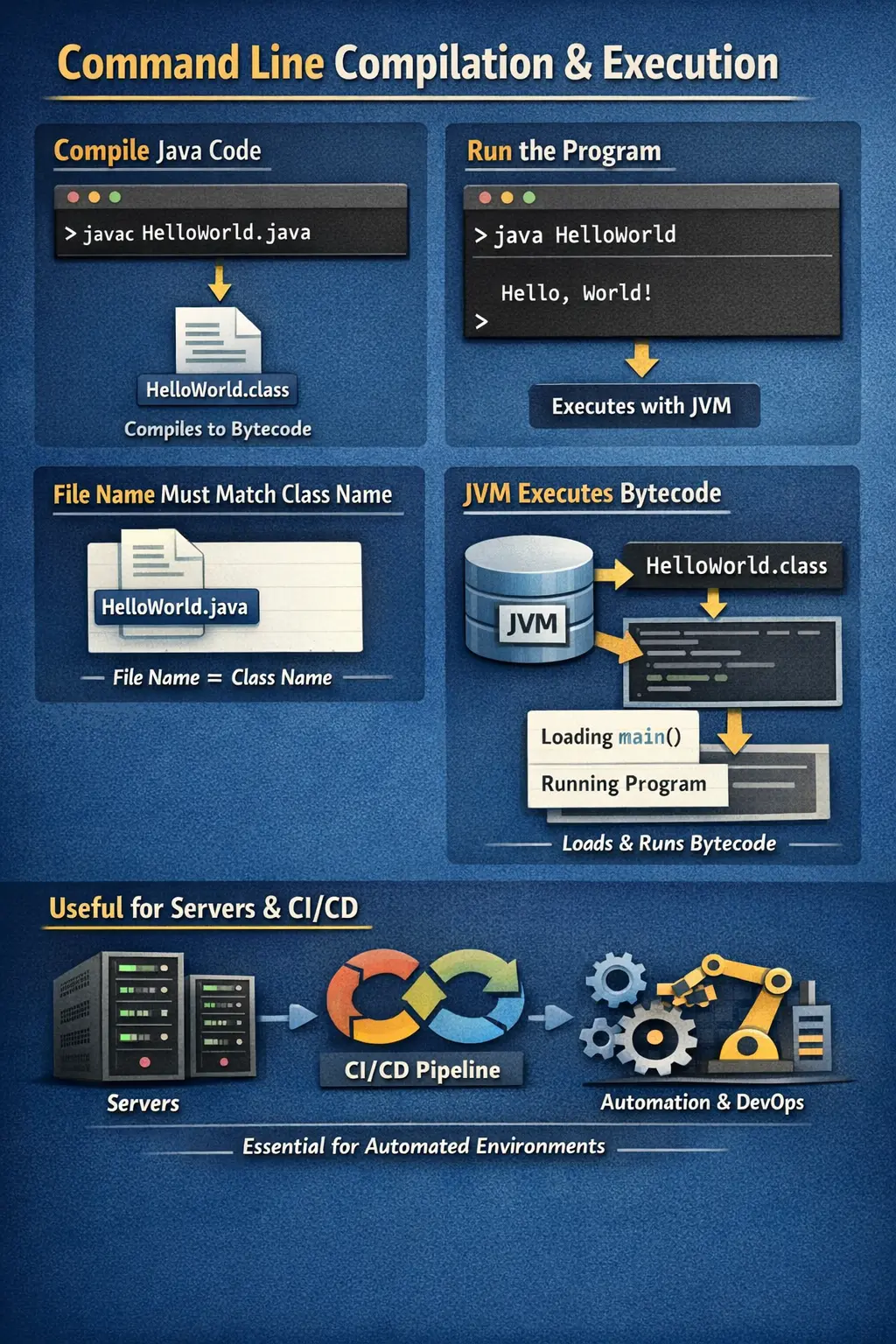
Java is often described as both compiled and interpreted. The source code written by the programmer is not executed directly. First, it is compiled into an intermediate format called bytecode. This bytecode is stored in a .class file. Then the JVM loads, verifies, and executes that bytecode on the target machine. This is the foundation of Java’s well-known principle: Write Once, Run Anywhere. The same bytecode can run on different operating systems as long as the correct JVM is available.
Understanding command line compilation answers an important question: how does a Java program become a running application? IDEs hide much of this process by compiling and running programs automatically. That convenience is useful, but command line knowledge gives you control. It helps you troubleshoot compiler errors, package issues, classpath problems, runtime exceptions, environment setup failures, and deployment behavior in real systems.
Introduction to Command Line Compilation
Command line compilation means using the Java compiler directly from a terminal or command prompt. The compiler tool is called javac. It reads Java source files with the .java extension and produces bytecode files with the .class extension. This bytecode is not machine code for one specific operating system. It is JVM-readable code that can be executed on any platform where a compatible JVM is installed.
Command line execution means using the java command to launch the JVM and run a compiled class. The java command does not normally run the source file in the traditional compilation workflow. It runs the compiled class by class name. The JVM then searches for the main() method and begins execution from there.
The two main tools are therefore easy to remember. javac compiles source code. java executes compiled bytecode. Modern IDEs, Maven, Gradle, and build pipelines use these concepts internally, even when the commands are not typed manually. Learning them gives you a clear mental model of how Java works.
Prerequisites for Command Line Compilation
Before compiling and running Java programs from the command line, the Java Development Kit must be installed. The JDK includes the compiler, runtime, standard libraries, and development tools needed to build Java applications. Installing only a runtime environment is not enough for compilation because the compiler is part of the JDK.
The system should also be configured so that Java tools are available from the command line. Many systems use a JAVA_HOME environment variable that points to the JDK installation directory. The PATH environment variable should include the JDK bin directory, because that is where commands such as javac and java are located.
After installation, the setup can be verified using two commands.
java -version
javac -version
The java -version command confirms that the runtime is available. The javac -version command confirms that the compiler is available. If java works but javac does not, the system may have only a runtime installed, or the PATH may not include the JDK bin directory. This distinction is a common beginner setup issue.
Step 1: Creating a Java Source File
The first step is creating a Java source file. A source file contains Java code written by the developer and uses the .java extension. For a simple example, create a file named Hello.java with the following code.
public class Hello {
    public static void main(String[] args) {
        System.out.println("Hello Java");
    }
}
This program defines a public class named Hello. Inside the class, it defines the main() method, which acts as the entry point for standalone execution. When the program runs, the JVM starts executing from this method and prints the message to the console.
A critical Java rule is that the file name must match the public class name. Since the public class is named Hello, the source file must be saved as Hello.java. If the file is saved with a different name, the compiler reports an error. This rule helps Java maintain a clear relationship between public classes and source files.
Step 2: Compiling the Java Program
After the source file is created, the next step is compilation. Compilation converts human-readable Java code into bytecode that the JVM can execute. The command used for this step is javac, followed by the source file name.
javac Hello.java
If the program is correct, this command usually completes silently. Successful compilation does not always print a success message. Instead, it creates a new file named Hello.class in the same directory. This class file contains the bytecode version of the program.
During compilation, the compiler checks syntax, types, variable declarations, method calls, braces, semicolons, and many other language rules. If the source code contains mistakes, compilation fails and the compiler prints error messages. The program cannot be executed until compilation errors are fixed.
What Happens Internally During Compilation
Internally, compilation is more than simply converting text into another file. The compiler reads the source code and breaks it into meaningful pieces called tokens. Keywords, identifiers, operators, literals, and punctuation are all recognized during this stage. This is often described as lexical analysis.
After tokenization, the compiler checks whether the tokens follow Java grammar. This is syntax analysis. For example, it checks whether braces are balanced, statements are written correctly, and method declarations follow valid structure. If the code violates grammar rules, the compiler reports syntax errors.
The compiler also performs semantic analysis, where it verifies meaning. It checks whether variables are declared before use, whether types are compatible, whether methods exist with matching parameters, and whether access rules are followed. Finally, if all checks pass, the compiler generates bytecode and stores it in the .class file.
Common Compilation Errors
Beginners often encounter compilation errors while learning command line execution. One common error is a missing semicolon. Java statements usually end with semicolons, so the following line is invalid.
System.out.println("Hello Java")
The compiler may display an error similar to ';' expected. This message tells the developer that the compiler expected a semicolon at that location. Another common error is mismatched braces, where a class or method block is not closed correctly.
File name mismatch is another frequent error. If the file is named HelloWorld.java but contains public class Hello, the compiler rejects it because the public class name and file name do not match. Type errors are also common, such as assigning a string value to an integer variable or calling a method with incorrect arguments.
Compiler messages are sometimes intimidating at first, but they are useful. They usually show the file name, line number, and reason for failure. Learning to read these messages is an important part of Java development.
Step 3: Executing the Java Program
After successful compilation, the program is executed using the java command. The command uses the class name, not the source file name and not the .class file name.
java Hello
Notice that the command does not include Hello.java or Hello.class. The JVM expects a class name. It then locates the corresponding Hello.class file, loads it, searches for the main method, and starts execution. The output of the sample program is shown below.
Hello Java
This confirms that the source file was compiled successfully and that the JVM executed the bytecode. If the JVM cannot find the class, cannot find the main method, or cannot locate required dependencies, execution fails with a runtime error.
What Happens Internally During Execution
When the java command runs, the JVM begins by loading the required class files through the class loader. The class loader searches configured locations such as the current directory, classpath entries, and libraries. Once the class is loaded, the JVM verifies the bytecode to ensure it follows Java safety and security rules.
After verification, the JVM prepares the class for execution and invokes the main() method. Bytecode may be interpreted or compiled just in time into native machine instructions by the JVM. This combination of bytecode verification, interpretation, and just-in-time compilation is part of what makes Java portable and secure.
Execution begins inside the main method and continues statement by statement. Method calls, object creation, loops, conditions, exceptions, and threads can change the flow, but the initial starting point remains the same. When the main method finishes and no non-daemon threads remain, the application terminates.
Working with Packages from the Command Line
In real Java projects, classes are usually organized into packages. A package is a namespace that groups related classes and avoids naming conflicts. When a source file declares a package, the compiled class should be placed into a matching directory structure.
Consider the following class.
package com.softwaretips4u.demo;

public class Test {
    public static void main(String[] args) {
        System.out.println("Package example");
    }
}
To compile this file correctly from the command line, use the -d option.
javac -d . Test.java
The -d option tells the compiler where to place generated class files. The dot means the current directory. Because the class belongs to com.softwaretips4u.demo, the compiler creates matching folders and places Test.class inside them.
com/
 └── softwaretips4u/
      └── demo/
           └── Test.class
This folder structure mirrors the package declaration. Understanding this relationship is important because package-related errors are common when beginners compile from the command line.
Executing Packaged Classes
To run a packaged class, the fully qualified class name must be used. The fully qualified name includes the package name and the class name. For the previous example, the command is shown below.
java com.softwaretips4u.demo.Test
This tells the JVM exactly which class to load. Running only java Test will not work from the project root because the class is not in the default package. It belongs to com.softwaretips4u.demo. Fully qualified names are essential when working with packages.
Understanding Classpath
The classpath defines where the JVM and compiler search for classes and libraries. If a class is in the current directory, the dot character represents that location. If a class is in another folder or inside an external library, the classpath must include that location. Without the correct classpath, Java may compile or run with errors such as class not found.
java -cp . Test
In this command, -cp means classpath, and . means current directory. The longer form -classpath can also be used. Classpath can include multiple directories and libraries. On Windows, entries are commonly separated by semicolons. On macOS and Linux, entries are commonly separated by colons.
java -classpath lib/*;. Test
This example includes all libraries in the lib directory and the current directory. Classpath configuration becomes especially important when applications use external JAR files, database drivers, Selenium libraries, logging frameworks, or utility libraries.
Passing Command-Line Arguments
Java programs can receive values from the command line through the String[] args parameter of the main method. These arguments are passed after the class name during execution. They are stored as strings in the order they are provided.
java Hello one two
Inside the program, the values can be accessed like this.
args[0] = "one"
args[1] = "two"
Command-line arguments allow programs to receive input without changing the source code. They are useful for simple configuration, file names, modes, flags, or runtime values. Since they are strings, values must be converted manually if the program needs numbers or other data types.
Compilation Errors vs Runtime Errors
Compilation errors occur before the program runs. They are detected by javac. Examples include syntax mistakes, missing semicolons, type mismatches, invalid method calls, missing braces, and public class name mismatches. A program with compilation errors does not produce valid bytecode and cannot be executed.
Runtime errors occur after successful compilation, while the program is executing. For example, the following code compiles because it is syntactically valid.
int x = 10 / 0;
However, when executed, it throws an ArithmeticException because division by zero is not allowed at runtime. Other runtime errors include null pointer access, array index errors, file-not-found conditions, classpath failures, and invalid user input.
Understanding the difference helps developers troubleshoot correctly. If the program does not compile, focus on source code rules. If it compiles but fails while running, focus on runtime data, logic, environment, dependencies, and exception handling.
Common Beginner Mistakes
One common mistake is trying to run a source file using the normal execution command.
java Hello.java
In the traditional workflow, this is incorrect because java expects a class name, not a source file name. Another mistake is including the .class extension during execution.
java Hello.class
This is also incorrect for normal execution. The correct command is java Hello. Beginners also often run commands from the wrong directory, which causes class-not-found errors. When packages are involved, forgetting javac -d . or running the class without its fully qualified name also causes problems.
Classpath mistakes are another common issue. If an external library is required but not included in the classpath, the program may fail during compilation or execution. Learning these mistakes early makes command line Java much easier to troubleshoot.
Summary of Important Commands
The core Java command line workflow uses two primary commands. The first command compiles a source file.
javac Hello.java
The second command executes the compiled class.
java Hello
For packaged classes, the compiler should generate the package directory structure.
javac -d . Test.java
The packaged class is executed using its fully qualified name.
java com.softwaretips4u.demo.Test
When dependencies or external locations are needed, classpath options are used.
java -cp . Test
These commands provide direct control over compilation and execution. They also explain what IDEs and build tools do behind the scenes.
Interview-Ready Explanation
A short interview answer can be: "Java source files are compiled using the javac command, which converts .java files into bytecode stored in .class files. The compiled bytecode is then executed using the java command by the JVM." This answer is concise and covers the basic workflow.
A detailed answer can be: "Java programs are first written as source files with the .java extension. The javac compiler checks the source code and generates platform-independent bytecode in .class files. During execution, the java command starts the JVM, which loads the class, verifies the bytecode, searches for the main() method, and executes the program. If packages are used, the class must be compiled with the correct directory structure and executed using the fully qualified class name."
If the interviewer asks why this matters when IDEs exist, explain that command line knowledge helps in debugging, server execution, build tools, CI/CD pipelines, classpath problems, package handling, and understanding the Java runtime architecture. IDEs are convenient, but the underlying compilation and execution model remains the same.
Key Takeaway
Command line compilation and execution provide a clear understanding of how Java programs transform from source code into running applications. The javac compiler converts source code into platform-independent bytecode, and the java command launches the JVM to execute that bytecode.
Mastering this process strengthens Java fundamentals. It helps developers understand bytecode, JVM execution, packages, classpath, command-line arguments, compilation errors, and runtime errors. This knowledge remains valuable even when using IDEs, build tools, servers, containers, and automated deployment pipelines.