Java Collections Framework
The Java Collections Framework, commonly called JCF, is a unified architecture for storing, organizing, retrieving, and processing groups of objects. It gives Java developers a standard set of interfaces, concrete implementations, and utility algorithms for common data-handling problems. Instead of building a dynamic list, duplicate-free group, queue, or key-value table from scratch, developers can use ready-made collection types that are consistent, reusable, and widely understood.
Collections are central to real Java programming because almost every useful application works with groups of data. A shopping cart contains many items. A test framework stores many test cases. A user management system holds many users and roles. A report may process many records. A cache stores values by key. These problems are not rare edge cases; they are everyday software tasks. The Collections Framework gives Java a common vocabulary for solving them.
This topic is also one of the most important areas for interviews. Interviewers often ask about
ArrayList, LinkedList, HashSet, TreeSet,
HashMap, TreeMap, iterators, generics, sorting, duplicate handling, ordering, and
time complexity. A strong answer does not simply list class names. It explains when to use each collection,
what behavior it provides, and what tradeoffs come with that choice.
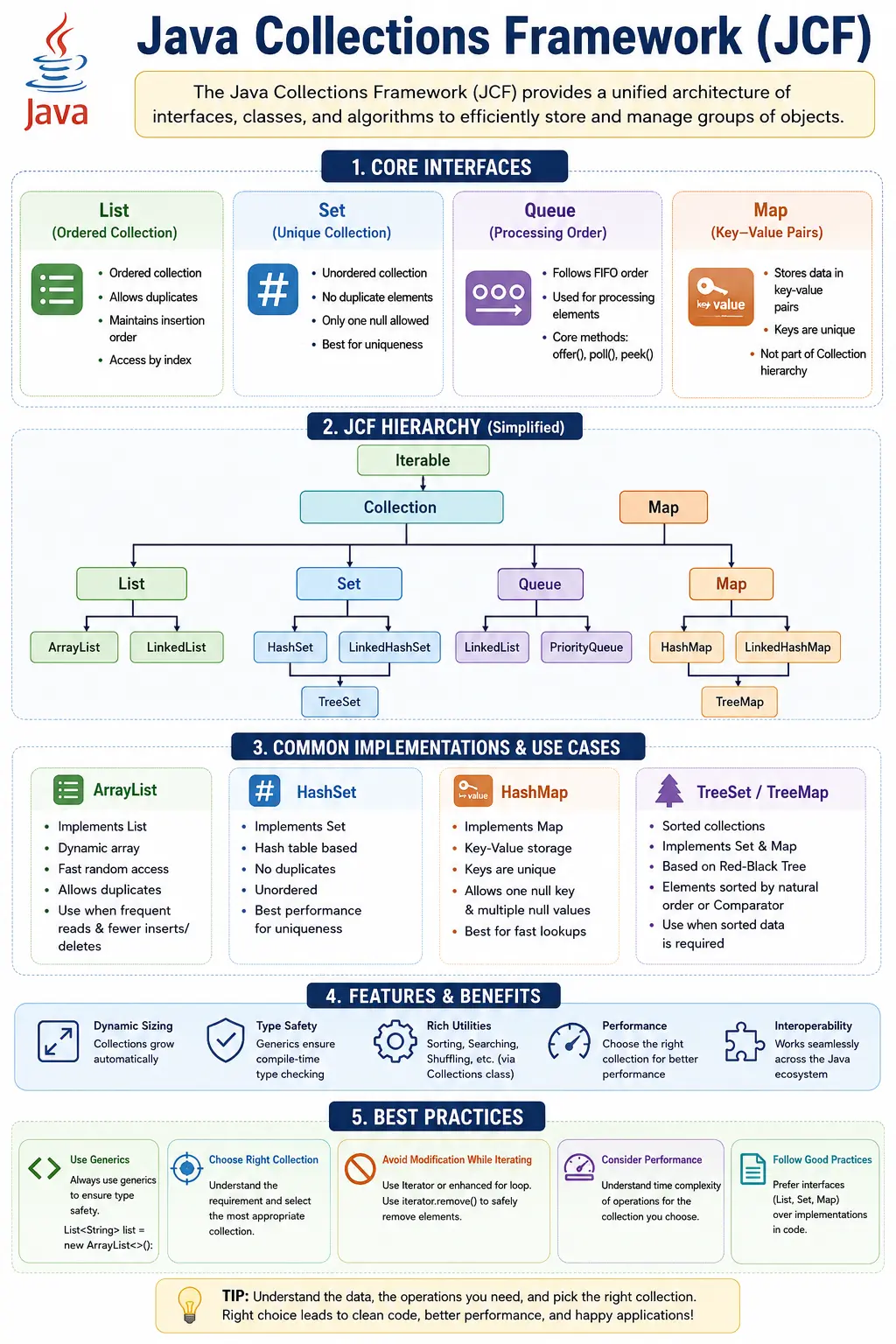
What Is the Java Collections Framework?
The Java Collections Framework is a set of interfaces, classes, and algorithms that define how groups of
objects can be represented and manipulated. Most of the commonly used collection types are located in the
java.util package. The framework provides interfaces such as List, Set,
Queue, and Map, and implementations such as ArrayList,
HashSet, PriorityQueue, and HashMap.
The word framework is important here. Collections are not just unrelated classes. They follow a common design
where interfaces define behavior and classes provide concrete implementations. This allows code to be written
against an interface while the actual implementation can be changed when needed. For example, a variable can
be declared as List<String> while the object can be an ArrayList or
LinkedList.
The framework also includes utility algorithms through classes such as Collections and
Arrays. These utilities support operations like sorting, searching, reversing, shuffling, copying,
and creating synchronized or unmodifiable views. This makes the framework useful not only for storing data,
but also for processing it.
Why Collections Are Needed
Collections are needed because arrays are limited for many real-world problems. An array has a fixed size
once it is created. If a program does not know how many values it will store, an array can become awkward.
Collections such as ArrayList grow and shrink dynamically, which makes them easier to use when
the amount of data changes at runtime.
Collections also provide data structures with different behavior. A List keeps elements in order
and allows duplicates. A Set prevents duplicate elements. A Queue supports
processing elements in a specific sequence. A Map stores key-value pairs for fast lookup. These
structures match different problem types, so the developer can choose based on the required behavior instead
of forcing every problem into an array.
Another reason collections are needed is consistency. Many collection implementations share method names such
as add, remove, contains, size, and isEmpty.
Once a developer understands these common operations, they can move between different collection types more
easily. This consistent API is one of the major strengths of the framework.
Performance is also a major reason to use the right collection. A HashSet is usually efficient
for membership checks. An ArrayList is efficient for index-based access. A TreeMap
maintains sorted keys. Choosing correctly can make code faster and simpler. Choosing poorly can create slow,
confusing, or fragile logic.
Core Components of Collections Framework
The framework has three main parts: interfaces, implementations, and algorithms. Interfaces define contracts.
They describe what operations a collection type supports without forcing one particular internal structure.
For example, the List interface says that elements are ordered and index-based, but it does not
say whether the data is stored in an array or linked nodes.
Implementations are concrete classes that provide actual behavior. ArrayList implements
List using a resizable array internally. LinkedList implements list behavior using
linked nodes. HashMap implements map behavior using hashing. Each implementation has strengths
and weaknesses, so understanding the implementation helps when choosing the right collection.
Algorithms are reusable operations provided by utility classes. The Collections class provides
methods for sorting, reversing, shuffling, searching, and creating special collection views. These algorithms
save time and reduce bugs because developers can use tested library methods instead of writing every operation
manually.
Collection Hierarchy
The collection hierarchy begins with Iterable, which allows objects to be used in enhanced
for-each loops. The Collection interface extends Iterable and represents a group of
objects. List, Set, and Queue extend Collection.
Map is important, but it is separate from the Collection hierarchy because it stores
key-value pairs rather than individual elements.
Iterable
   |-- Collection
        |-- List
        |     |-- ArrayList
        |     |-- LinkedList
        |     |-- Vector
        |-- Set
        |     |-- HashSet
        |     |-- LinkedHashSet
        |     |-- TreeSet
        |-- Queue
              |-- PriorityQueue
              |-- Deque (ArrayDeque)

Map (separate hierarchy)
   |-- HashMap
   |-- LinkedHashMap
   |-- TreeMap
   |-- Hashtable
This hierarchy is useful because it shows what behavior is shared and what behavior is specialized. If a
method accepts a Collection, it can work with many collection types. If it needs index access, it
should accept a List. If it needs key-value lookup, it should use a Map. Good method
signatures often use the most general interface that still expresses the required behavior.
Major Collection Interfaces
1. List
A List is an ordered collection that allows duplicate elements. Ordered means the elements have a
defined sequence, and each element can be accessed by index. Lists are useful when position matters, when
duplicates are valid, or when the application needs to process values in insertion order.
Examples: ArrayList, LinkedList
2. Set
A Set stores unique elements. If the same element is added more than once, the set keeps only one
logical copy. Sets are useful when duplicate prevention matters, such as storing unique user IDs, unique tags,
or unique visited states. Different set implementations handle ordering differently.
Examples: HashSet, LinkedHashSet, TreeSet
3. Queue
A Queue represents a collection designed for holding elements before processing. Many queues
follow first-in, first-out behavior, but some queue implementations use priority or double-ended access.
Queues are common in scheduling, buffering, task processing, and producer-consumer style workflows.
Examples: PriorityQueue, ArrayDeque
4. Map
A Map stores key-value pairs. Keys are unique, and each key maps to one value. Maps are not
sub-interfaces of Collection, but they are part of the broader Collections Framework. They are
used whenever fast lookup by key is needed, such as storing configuration values, user records by ID, or
counts by category.
Examples: HashMap, LinkedHashMap, TreeMap
Collections vs Arrays
Arrays and collections both store multiple values, but they solve different problems. Arrays are fixed in size
and can store primitives as well as objects. Collections are dynamic and store objects, which means primitive
values must be wrapped using types such as Integer, Double, and
Boolean. Autoboxing makes this convenient, but it is still an important conceptual difference.
| Aspect | Arrays | Collections |
|---|---|---|
| Size | Fixed | Dynamic |
| Data type | Primitive + Object | Objects only |
| Performance | Faster | Slight overhead |
| Utilities | Limited | Rich APIs |
| Flexibility | Low | High |
Arrays can be faster and simpler for fixed-size, low-level operations. Collections are usually better for business applications where data grows, shrinks, needs searching, sorting, grouping, or passing through reusable APIs. The right choice depends on the problem. A beginner should not assume that collections always replace arrays or that arrays are always more efficient in a meaningful way.
Commonly Used Collection Classes
| Class | Characteristics |
|---|---|
| ArrayList | Fast random access |
| LinkedList | Fast insert/delete |
| HashSet | No duplicates, fast lookup |
| TreeSet | Sorted set |
| HashMap | Fast key-value access |
| TreeMap | Sorted map |
These classes are frequently compared in interviews. ArrayList is usually the default choice for
list behavior because it is simple and efficient for random access. LinkedList is useful in more
specific cases where frequent insertions or queue-like operations are needed. HashSet is common
for duplicate prevention, while TreeSet is useful when sorted order is required.
Utility Class: Collections
The Collections utility class provides static methods that operate on collections. It should not
be confused with the word collections in general. The class name starts with a capital C and provides helper
methods for common tasks such as sorting, reversing, shuffling, searching, and creating special collection
views.
- sort()
- reverse()
- shuffle()
- binarySearch()
Collections.sort(list);
Iterating Collections
Iteration means visiting elements one by one. Java collections can be iterated using enhanced for-each loops, iterators, list iterators, streams, or index-based loops in the case of lists. The enhanced for-each loop is the simplest option when the code only needs to read elements.
for (String s : list) {
    System.out.println(s);
}
An Iterator is useful when elements need to be removed safely during traversal. Removing elements
directly from a collection while using an enhanced for loop can cause a
ConcurrentModificationException. The iterator's remove method is the standard safe
option for this pattern.
Key Characteristics of Collections
Collections store objects, grow and shrink dynamically, support generics, and provide consistent operations.
Generics are especially important because they provide compile-time type safety. A List<String>
should contain strings, and the compiler can warn if code tries to add a different type. Without generics,
collection code becomes more error-prone and requires unsafe casting.
Collections also support polymorphic programming. A method can accept a List instead of a
specific ArrayList, allowing callers to pass different list implementations. This makes code more
flexible and easier to test. Programming to interfaces is one of the key design habits encouraged by the
Collections Framework.
Choosing the Right Collection
Choosing the right collection begins with behavior, not class names. If duplicates are allowed and order
matters, a List is usually appropriate. If duplicates must be prevented, use a Set.
If values must be retrieved by key, use a Map. If elements must be processed in a queue-like
manner, use a Queue or Deque.
Ordering is another decision point. HashSet and HashMap do not guarantee insertion
order. LinkedHashSet and LinkedHashMap preserve insertion order. TreeSet
and TreeMap maintain sorted order. If the output order matters to users, tests, or reports, the
chosen collection should reflect that requirement.
Performance should also influence the choice. A collection that is perfect for one operation may be weak for
another. ArrayList is strong for random access but can be costly for frequent insertions in the
middle. Hash-based collections are usually strong for lookup but require proper equals and
hashCode behavior. Tree-based collections maintain order but add sorting overhead.
Collections and Time Complexity
Time complexity describes how the cost of an operation grows as the collection size grows. Interviews often
test this concept at a high level. For example, retrieving an element by index from an
ArrayList is usually fast. Searching for a value in an unsorted list requires scanning elements.
Looking up a key in a HashMap is usually efficient, while a TreeMap provides ordered
keys with different performance characteristics.
Beginners do not need to memorize every implementation detail immediately, but they should understand that
collection choice affects performance. If a program repeatedly checks whether a value exists, a
HashSet may be better than repeatedly searching a list. If keys must be sorted, a
TreeMap may be better than sorting map keys manually every time.
Collections in Real Projects
Collections appear throughout real Java projects. Backend services use maps to store lookup data, lists to return records, sets to remove duplicates, and queues to process tasks. Test automation frameworks use lists for test data, maps for configuration, sets for unique validations, and queues for ordered execution tasks. Collections are not a separate academic topic; they are part of everyday programming.
They also affect API design. A method returning List<User> tells callers that order and
duplicates may matter. A method returning Set<Role> tells callers that roles are unique. A
method returning Map<String, String> tells callers to expect lookup by key. Collection
types communicate intent.
Collections and Mutability
Mutability means whether a collection can be changed after it is created. Many collections such as
ArrayList and HashMap are mutable. Elements can be added, removed, or replaced.
Java also provides ways to create unmodifiable collections, such as List.of or
Collections.unmodifiableList. These are useful when data should be shared for reading but not
modified by callers.
Mutability decisions matter for safety. Returning a mutable internal list from a class can allow outside code to change the object's internal state. Returning an unmodifiable view or a defensive copy can protect the object. This connects collections with encapsulation and API design.
Collections and Generics
Generics are one of the most important features used with collections. Before generics, collections could hold
objects of any type, and developers had to cast values back to the expected type when retrieving them. This
created runtime risk. A list intended to hold strings could accidentally receive an integer, and the problem
might appear later as a ClassCastException. Generics move that safety check to compile time.
With generics, a collection declares the type it is expected to store. A List<String>
communicates that the list should contain strings. A Map<Integer, String> communicates
that keys are integers and values are strings. This improves readability and allows the compiler to catch
incorrect usage early. It also removes the need for many explicit casts because the compiler already knows the
expected type.
Generics also improve API design. A method that returns List<Order> is clearer than a
method that returns a raw List. The caller immediately knows what kind of objects to expect.
This is especially valuable in larger applications where methods are used by many classes and teams. Strong
type information reduces assumptions and makes code easier to maintain.
Collections, equals, and hashCode
Hash-based collections such as HashSet and HashMap depend heavily on
equals and hashCode. These methods define object equality and help the collection
locate values efficiently. If a custom class is used as a key in a map or as an element in a set, it should
usually implement equals and hashCode correctly.
For example, imagine a User class where two users with the same ID should be considered the same
logical user. If equals and hashCode are not implemented based on that ID, a
HashSet may allow duplicates that the business considers identical. A HashMap may
also fail to find a value using another object that represents the same logical key.
This is why collections are closely connected to object design. A collection cannot automatically know what equality means for every business object. The class must define equality clearly. In interviews, this is a strong point to mention when discussing sets, maps, duplicate handling, and hash-based lookup.
Collections and Thread Safety
Most common collection implementations, such as ArrayList, HashMap, and
HashSet, are not thread-safe by default. This means they should not be modified by multiple
threads at the same time without proper coordination. In single-threaded code this is not a problem. In
concurrent applications, it can cause data corruption, inconsistent reads, or runtime exceptions.
Java provides multiple ways to handle thread-safety needs. The Collections utility class can
create synchronized wrappers, such as Collections.synchronizedList. Java also provides
concurrent collection classes in java.util.concurrent, such as ConcurrentHashMap.
These are usually better suited for modern concurrent programming than older legacy classes such as
Vector and Hashtable.
Thread safety should be chosen based on actual requirements. Adding synchronization when it is not needed can create unnecessary overhead and complexity. Ignoring thread safety when multiple threads share mutable collections can create serious defects that are hard to reproduce. Understanding whether a collection is shared, mutable, and accessed concurrently is part of professional collection design.
Collections and Streams
Java streams provide a modern way to process collections declaratively. A stream can filter, transform, sort, group, or reduce collection data without writing all loop logic manually. For example, a list of users can be filtered to active users, mapped to email addresses, sorted, and collected into another list. Streams are not replacements for collections; they are a processing mechanism that often starts from a collection.
Streams can make code expressive when used clearly. They are useful for data transformations and pipeline-like operations. However, they should not be used simply to avoid loops. A simple loop may be clearer for step-by-step logic, debugging, or operations with side effects. The best choice depends on readability and the nature of the task.
Understanding the relationship between collections and streams helps developers write modern Java code. Collections store data. Streams process data. A collection can produce a stream, and a stream can collect results back into a collection. This flow appears frequently in real Java applications.
Collections in Coding Interviews
Collections are heavily used in coding interviews because they allow candidates to solve problems efficiently. A set can track visited values. A map can count frequencies. A list can store ordered results. A queue can support breadth-first processing. A stack-like deque can support parsing or backtracking patterns. Knowing which collection fits a problem often matters as much as writing the loop itself.
For example, duplicate detection is usually simpler with a HashSet than with nested loops.
Frequency counting is usually cleaner with a HashMap. Sorted output may suggest a
TreeSet, TreeMap, or sorting a list depending on the requirement. Interviewers look
for this reasoning because it shows that the candidate understands both correctness and efficiency.
A good interview answer explains the selected collection and why it fits the problem. Saying "I will use a map because I need fast lookup by key" is stronger than simply writing code. Collections are tools, and strong developers choose tools based on behavior, constraints, and tradeoffs.
Common Beginner Mistakes
A common beginner mistake is choosing the wrong collection type. For example, using a list when uniqueness is required forces the developer to manually check for duplicates. Using a set when order and index access are required creates confusion. The collection type should match the behavior required by the problem.
Another mistake is ignoring generics. Raw collections can store mixed types and later fail with casting problems. Generics allow the compiler to catch type errors earlier. Beginners also modify collections while iterating without using an iterator safely, which can cause runtime exceptions.
Legacy classes such as Vector and Hashtable still exist, but they are not usually
the first choice for modern code. Developers should understand them for interviews and old codebases, while
preferring modern alternatives such as ArrayList, HashMap, and concurrent
collection classes when thread safety is required.
Interview Perspective
In interviews, a strong answer should define the Java Collections Framework as a set of interfaces, classes,
and algorithms used to store and manipulate groups of objects. It should mention core interfaces such as
List, Set, Queue, and Map. It should also explain that
Map is part of the framework but not a child of Collection.
A stronger answer includes behavior and examples. List allows duplicates and maintains order.
Set prevents duplicates. Queue supports ordered processing. Map stores
key-value pairs with unique keys. Mentioning implementation choices such as ArrayList,
HashSet, LinkedHashMap, and TreeMap shows practical understanding.
Interview-Ready Answers
Short Answer
The Java Collections Framework is a set of classes and interfaces used to store and manipulate groups of objects.
Detailed Answer
The Java Collections Framework provides a unified architecture of interfaces and classes such as List, Set, Queue, and Map, enabling efficient storage, retrieval, and manipulation of data. It offers dynamic sizing, built-in algorithms, and consistent APIs.
Key Takeaway
Collections are the backbone of Java data handling. Choosing the right collection type directly impacts performance, readability, and scalability.
Hands-On Examples: Collections in Action
1. ArrayList: Allows Duplicates and Maintains Order
import java.util.*;

class Demo {
    public static void main(String[] args) {
        List<String> list = new ArrayList<>();
        list.add("Java");
        list.add("Java");
        list.add("API");
        System.out.println(list);
    }
}
Output
[Java, Java, API]
2. LinkedList: List and Queue Behavior
import java.util.*;

class Demo {
    public static void main(String[] args) {
        LinkedList<Integer> list = new LinkedList<>();
        list.add(10);
        list.addFirst(5);
        list.addLast(20);
        System.out.println(list);
    }
}
Output
[5, 10, 20]
3. Vector: Synchronized List
import java.util.*;

class Demo {
    public static void main(String[] args) {
        Vector<Integer> v = new Vector<>();
        v.add(1);
        v.add(2);
        System.out.println(v);
    }
}
Explanation
- Thread-safe
- Slower than ArrayList
4. HashSet: No Duplicates and No Guaranteed Order
import java.util.*;

class Demo {
    public static void main(String[] args) {
        Set<Integer> set = new HashSet<>();
        set.add(10);
        set.add(10);
        set.add(20);
        System.out.println(set);
    }
}
Output
[10, 20]
5. LinkedHashSet: No Duplicates and Maintains Insertion Order
import java.util.*;

class Demo {
    public static void main(String[] args) {
        Set<String> set = new LinkedHashSet<>();
        set.add("B");
        set.add("A");
        set.add("B");
        System.out.println(set);
    }
}
Output
[B, A]
6. TreeSet: Sorted Set
import java.util.*;

class Demo {
    public static void main(String[] args) {
        Set<Integer> set = new TreeSet<>();
        set.add(30);
        set.add(10);
        set.add(20);
        System.out.println(set);
    }
}
Output
[10, 20, 30]
7. HashMap: Key-Value with No Guaranteed Order
import java.util.*;

class Demo {
    public static void main(String[] args) {
        Map<Integer, String> map = new HashMap<>();
        map.put(1, "Java");
        map.put(2, "API");
        System.out.println(map);
    }
}
8. HashMap: Duplicate Key Overwrites Value
import java.util.*;

class Demo {
    public static void main(String[] args) {
        Map<Integer, String> map = new HashMap<>();
        map.put(1, "Java");
        map.put(1, "Selenium");
        System.out.println(map);
    }
}
Output
{1=Selenium}
9. LinkedHashMap: Maintains Insertion Order
import java.util.*;

class Demo {
    public static void main(String[] args) {
        Map<Integer, String> map = new LinkedHashMap<>();
        map.put(2, "B");
        map.put(1, "A");
        System.out.println(map);
    }
}
Output
{2=B, 1=A}
10. TreeMap: Sorted by Key
import java.util.*;

class Demo {
    public static void main(String[] args) {
        Map<Integer, String> map = new TreeMap<>();
        map.put(3, "C");
        map.put(1, "A");
        map.put(2, "B");
        System.out.println(map);
    }
}
Output
{1=A, 2=B, 3=C}
11. Iterating Collection Using for-each
import java.util.*;

class Demo {
    public static void main(String[] args) {
        List<String> list = Arrays.asList("A", "B", "C");
        for (String s : list) {
            System.out.println(s);
        }
    }
}
12. Iterating Using Iterator
import java.util.*;

class Demo {
    public static void main(String[] args) {
        List<Integer> list = Arrays.asList(1, 2, 3);
        Iterator<Integer> it = list.iterator();
        while (it.hasNext()) {
            System.out.println(it.next());
        }
    }
}
13. Removing Element Using Iterator (Safe Way)
import java.util.*;

class Demo {
    public static void main(String[] args) {
        List<Integer> list = new ArrayList<>(Arrays.asList(1, 2, 3));
        Iterator<Integer> it = list.iterator();
        while (it.hasNext()) {
            if (it.next() == 2) {
                it.remove();
            }
        }
        System.out.println(list);
    }
}
Output
[1, 3]
14. Collections.sort(): Natural Order
import java.util.*;

class Demo {
    public static void main(String[] args) {
        List<Integer> list = Arrays.asList(3, 1, 2);
        Collections.sort(list);
        System.out.println(list);
    }
}
Output
[1, 2, 3]
15. Custom Sorting Using Comparator
import java.util.*;

class Demo {
    public static void main(String[] args) {
        List<String> list = Arrays.asList("Java", "API", "Test");
        list.sort((a, b) -> a.length() - b.length());
        System.out.println(list);
    }
}
Output
[API, Test, Java]
16. Collections.reverse()
import java.util.*;

class Demo {
    public static void main(String[] args) {
        List<Integer> list = Arrays.asList(1, 2, 3);
        Collections.reverse(list);
        System.out.println(list);
    }
}
Output
[3, 2, 1]
17. Collections.synchronizedList()
import java.util.*;

class Demo {
    public static void main(String[] args) {
        List<String> list = Collections.synchronizedList(new ArrayList<>());
        list.add("ThreadSafe");
        System.out.println(list);
    }
}
18. Collections.unmodifiableList()
import java.util.*;

class Demo {
    public static void main(String[] args) {
        List<String> list = List.of("A", "B");
        List<String> unmodifiable = Collections.unmodifiableList(list);
        System.out.println(unmodifiable);
        // unmodifiable.add("C"); // throws exception
    }
}
19. Queue: PriorityQueue
import java.util.*;

class Demo {
    public static void main(String[] args) {
        Queue<Integer> q = new PriorityQueue<>();
        q.add(30);
        q.add(10);
        q.add(20);
        System.out.println(q.poll());
    }
}
Output
10
20. Interview Summary: Collections Framework
import java.util.*;

class Demo {
    public static void main(String[] args) {
        List<String> list = new ArrayList<>();
        Set<String> set = new HashSet<>();
        Map<Integer, String> map = new HashMap<>();

        System.out.println("Collections used");
    }
}
Key Points
- List allows duplicates and maintains order
- Set prevents duplicates
- Map stores key-value pairs
- Hash-based collections are generally fast and unordered
- Tree-based collections are sorted
- LinkedHash-based collections preserve insertion order