Class & Object in Java
Class and Object form the conceptual and practical bedrock of Object-Oriented Programming (OOP) in Java. Every non-trivial Java application, whether it is a backend service, a desktop tool, or a test automation framework, is composed of classes that define structure and behavior, and objects that bring those definitions to life at runtime. Understanding this pair is not merely about syntax; it is about internalizing how Java models real-world entities, organizes code into cohesive units, and manages memory and execution flow.
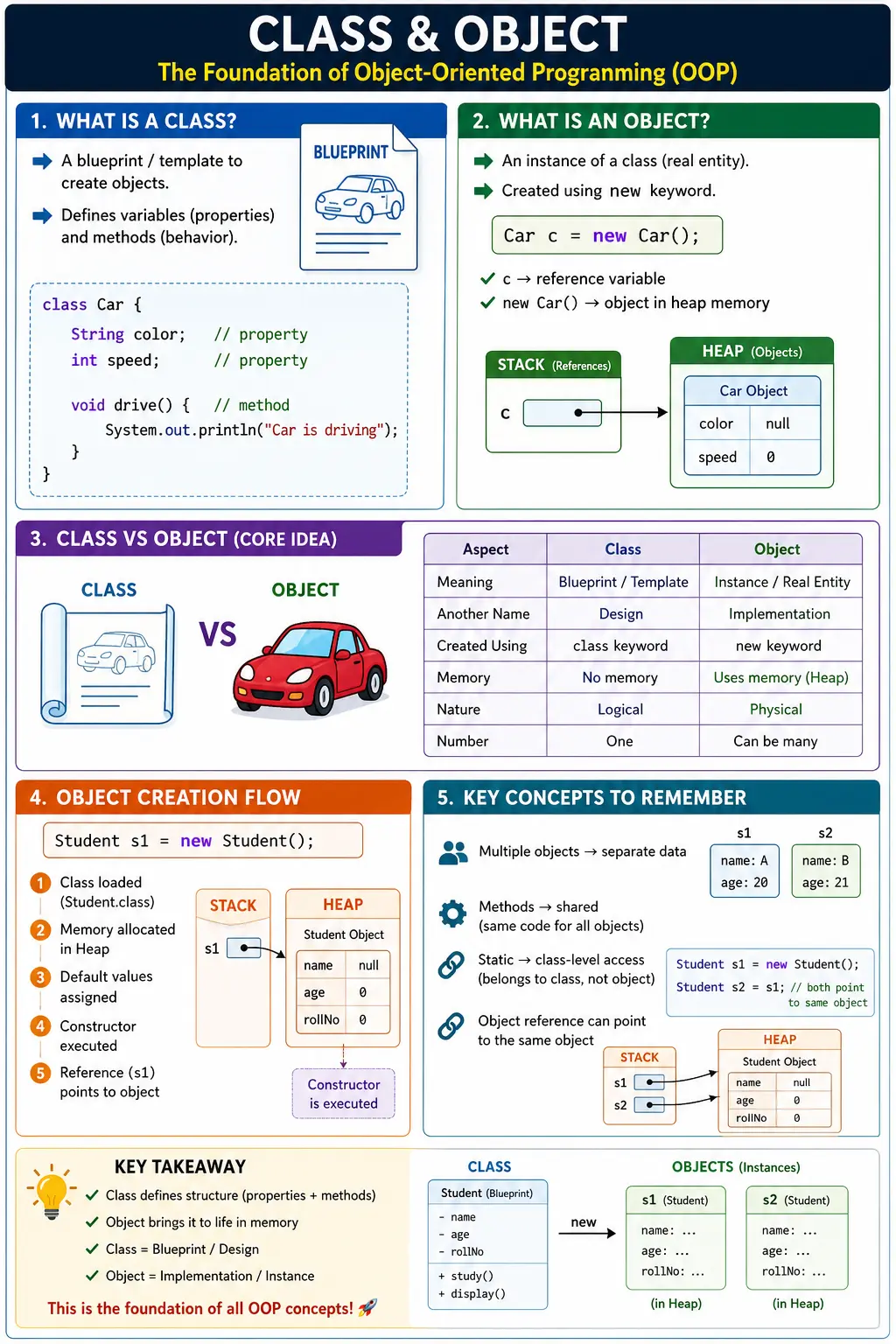
At a high level, a class is a blueprint, and an object is a concrete instance of that blueprint. But the real value lies in how these abstractions enable modularity, encapsulation, and reuse. When you define a class, you specify what something is: its properties, behavior, responsibilities, and relationships. When you create an object, you create a runtime entity that has its own state in memory and can interact with other objects during program execution.
What Is a Class?
A class in Java is a user-defined data type that groups data and behavior into one logical unit. Data is represented through fields or variables, and behavior is represented through methods. A class acts as a template from which objects are created. A well-designed class models a coherent concept in the domain, such as a Car, User, Order, Invoice, Account, Product, or TestCase.
Consider a simple class:
class Car {
    String color;
    int speed;

    void drive() {
        System.out.println("Car is driving");
    }
}
This class defines two properties, color and speed, and one behavior, drive(). Importantly, declaring this class does not create a specific car. It only defines what a car object can contain and what it can do. The class definition contains metadata about the type, while memory for instance variables is allocated only when an object is created.
A class is therefore a logical construct. It describes the shape and capabilities of objects but does not represent a specific runtime entity until instantiated. This distinction is important because many beginners assume that writing a class automatically creates usable data. In reality, the class is a design. Objects are the runtime instances created from that design.
What Is an Object?
An object is a runtime instance of a class. It is a concrete entity that occupies memory and has its own state. When you create an object, Java allocates space in heap memory for that object's instance variables and returns a reference that can be used to access the object.
Car c = new Car();
In this statement, Car is the class type, c is a reference variable, and new Car() creates the actual object in heap memory. The reference variable does not store the whole object. It stores a reference value that allows the program to reach the object. Through that reference, the program can set fields, call methods, and pass the object to other methods.
The object c can now use the properties and behaviors defined in the Car class. Multiple objects can be created from the same class, and each object can hold independent state. One Car object may be red with speed 60, while another may be blue with speed 90. Both objects are created from the same class, but their data can differ.
Class and Object Analogy
The blueprint analogy is common because it captures the basic relationship clearly. A class is like a blueprint of a house. An object is an actual house built from that blueprint. The blueprint defines possible rooms, doors, windows, and structure. The actual house has real paint, furniture, address, and condition. Many houses can be built from one blueprint, and each house can be different in actual state.
In Java, a class defines fields and methods. An object stores real values for those fields and can execute those methods. The class says that a Student has a name and age. A Student object stores actual values such as "John" and 20. Another Student object can store "Priya" and 22. The class is shared as a definition, but object state is separate.
This analogy also explains why classes are reusable. Once a class is designed correctly, many objects can be created from it. This reduces duplication and keeps related behavior in one place. If the behavior of a Student changes, the class can be updated, and all Student objects follow the updated definition when the program runs with the new code.
Structure of a Java Class
A typical Java class can contain fields, constructors, methods, blocks, nested classes, and access modifiers. Not every class contains every element, but fields, constructors, and methods are the most common. Fields store state. Constructors initialize objects. Methods define behavior. Access modifiers control visibility.
class ClassName {
    dataType variableName;

    ClassName() {
        // constructor logic
    }

    returnType methodName() {
        // behavior
    }
}
Fields should represent meaningful state for the object. Methods should represent actions or queries related to that object. Constructors should create valid initial state. A class becomes easier to understand when these parts work together around one clear responsibility.
For example, a BankAccount class should contain account-related fields and account-related behavior. It should not also contain unrelated email formatting logic or report generation logic unless that is genuinely part of its responsibility. Good class design is not only about syntax; it is about assigning responsibilities thoughtfully.
Example: Class and Object in Action
Consider a Student class:
class Student {
    String name;
    int age;

    void display() {
        System.out.println(name + " " + age);
    }

    public static void main(String[] args) {
        Student s1 = new Student();
        s1.name = "John";
        s1.age = 20;
        s1.display();
    }
}
Here, Student is the class and s1 is a reference to a Student object. The object has its own name and age. When s1.display() is called, the method uses the state stored inside that object. This is the heart of object-oriented programming: data and behavior are connected.
If another object is created, it receives its own copy of the instance variables. The same display method can work for both objects because the method runs in the context of whichever object calls it. This object-specific behavior is one of the main reasons Java uses classes and objects.
Object Creation: What Happens Internally
When you write:
Student s1 = new Student();
several steps happen behind the scenes. The JVM loads the Student class if it has not already been loaded. Memory is allocated in the heap for the new object. Instance variables are initialized with default values. The constructor is invoked to initialize the object. Finally, the reference value is assigned to s1.
This process highlights the separation between class definition and object instantiation. The class definition provides metadata and behavior. The object occupies heap memory and stores actual state. The reference variable provides a way to access that object.
Understanding this flow helps explain many Java behaviors. If an object reference is null, no object is being referenced. If two references point to the same object, changes made through one reference can be seen through the other. If two separate objects are created, changing one does not affect the other unless they share some internal object reference.
Fields, State, and Behavior
Object state is the set of values stored in an object's instance variables at a given time. Behavior is the set of operations the object can perform through its methods. A good class keeps related state and behavior together. This makes code easier to reason about because the logic that changes data is close to the data it changes.
For example, an Account object may have balance as state and deposit or withdraw as behavior. A weak design would expose balance publicly and allow unrelated code to change it freely. A stronger design keeps balance controlled and provides methods that enforce rules. This is where classes and objects connect directly to encapsulation.
When a method reads or changes instance variables, it works with the state of the current object. That is why the same method can behave differently for different objects. If account1 has balance 1000 and account2 has balance 500, calling displayBalance on each object produces different results even though both objects share the same class definition.
Class Variables vs Instance Variables
Java distinguishes between class-level and object-level data. Class variables are declared with the static keyword and belong to the class. Instance variables belong to individual objects.
class Test {
    static int x = 10;  // class variable
    int y = 20;         // instance variable
}
The variable x is shared across all objects of Test because it belongs to the class. The variable y is stored separately inside each object. If ten Test objects are created, there are ten separate y values but one shared x value.
This distinction matters for memory, behavior, and design. Use instance variables for object-specific data. Use static variables only for class-level data that is truly shared. Beginners sometimes make variables static just to access them easily, but that can create shared state bugs. Static should communicate class-level ownership, not convenience.
Multiple Objects and State Isolation
Creating multiple objects from the same class results in independent object state:
Student s1 = new Student();
Student s2 = new Student();
Each object has its own copy of instance variables. Changing s1.name does not affect s2.name because s1 and s2 point to different objects. This state isolation allows programs to represent many real-world entities using the same class. A school system can have thousands of Student objects. An e-commerce application can have thousands of Order objects. Each object follows the same structure but stores its own values.
Methods are not duplicated for each object in the same conceptual way. The method definition belongs to the class, but when an instance method runs, it works on the state of the object that invoked it. This is why object-oriented code can be memory-conscious while still supporting many independent objects.
Accessing Class Members
Members of a class can be accessed in two primary ways. Instance members are accessed through objects:
s1.display();
Static members are accessed using the class name:
Test.x;
This distinction reinforces the idea that instance members belong to objects, while static members belong to the class. An instance method can directly access instance variables because it runs in an object context. A static method does not belong to a specific object, so it cannot directly access instance variables without an object reference.
Using the correct access style makes code clearer. Calling static members through objects is technically allowed in some cases, but it is misleading. Calling instance members through the class name is not allowed because the class does not contain object-specific state.
Object Reference Behavior
Java uses references to interact with objects. Consider:
Student s1 = new Student();
Student s2 = s1;
Both s1 and s2 now point to the same object. Any changes made through one reference are visible through the other because there is only one object in heap memory. The program has two reference variables, but both reference the same runtime entity.
This behavior is essential for understanding Java. Passing an object to a method passes a copy of the reference value. The method can use that copied reference to modify the same object. Assigning one reference to another does not create a new object. It only creates another way to reach the same object. To create a separate object, the program must use new or another object creation mechanism.
The new Keyword
The new keyword is responsible for object creation. It allocates memory in the heap, creates a new object, invokes the constructor, and returns a reference to the object. Without new, no new object is created for ordinary class instantiation.
This is why the difference between declaration and object creation matters:
Student s;
s = new Student();
The first line declares a reference variable. The second line creates an object and assigns its reference to that variable. A reference variable without an object does not provide usable instance data. If it remains null and you try to call a method on it, the program throws NullPointerException.
Constructors and Object Initialization
A constructor is a special block of code used to initialize an object when it is created. Constructors have the same name as the class and do not have a return type. They help ensure that an object starts its life in a valid state.
Without a constructor, instance variables receive default values such as 0, false, or null. Sometimes defaults are acceptable. In many real applications, objects need meaningful starting values. A Student object may require a name. An Account object may require an account number. A constructor allows the class to enforce that requirement.
Good constructors support good object design. They prevent incomplete objects, reduce manual field assignment, and make object creation more expressive. Instead of creating an empty object and setting fields one by one, the caller can provide required values at creation time.
Anonymous Objects
Java allows creation of objects without assigning them to a named reference:
new Student().display();
This is called an anonymous object. It is useful for one-time operations where the object does not need to be reused. However, overuse can reduce readability. If the object must be used more than once, passed around, inspected, or modified later, assigning it to a reference variable is clearer.
Anonymous objects show that the reference variable and the object are different things. The object can exist without a named reference, although it becomes eligible for garbage collection once it is no longer reachable. In normal application code, named references are more common because objects usually participate in longer workflows.
Classes, Objects, and Encapsulation
Encapsulation is the practice of bundling data and behavior together and controlling access to internal details. Classes provide the structure for encapsulation. Objects carry the actual data. Instead of allowing every part of the program to modify fields directly, a class can expose methods that protect rules.
For example, an Account class should not allow balance to be changed to any arbitrary value from outside code. It can provide deposit and withdraw methods that validate amounts and preserve business rules. This design keeps the object's state consistent and prevents accidental misuse.
Encapsulation is one reason classes are more than data containers. A strong class does not merely store fields. It owns behavior related to those fields. This makes the system easier to maintain because rules live where the data lives.
Classes, Objects, and Abstraction
Abstraction means exposing what an object can do while hiding unnecessary implementation details. When another part of the program calls account.withdraw(100), it does not need to know every internal calculation or validation step. It only needs to know the behavior promised by the method.
Classes help define these abstractions. A class provides a public surface through methods and hides internal details through access modifiers. Objects use that class design at runtime. This allows large systems to be built from smaller, understandable parts.
Good abstraction makes code easier to use. A caller should not need to understand every field inside an object to perform a valid operation. The class should provide meaningful methods that express business intent.
Why Java Is Object-Oriented
Java's design revolves around objects because objects help organize complexity. Encapsulation bundles data and behavior. Abstraction hides unnecessary detail. Inheritance allows classes to reuse and extend behavior. Polymorphism allows code to work with different object types through common contracts. Classes and objects are the foundation upon which these principles are built.
Even though Java also supports static methods, primitive values, and procedural-style code, its main design model is object-oriented. Most meaningful Java programs define classes that represent domain concepts, services, utilities, data models, controllers, pages, and workflows. Objects created from those classes collaborate to perform application behavior.
Practical Implications in Real Projects
In real-world systems, classes are used to model domain entities, services, utilities, controllers, test pages, API clients, and data transfer objects. Objects represent actual instances such as users, transactions, sessions, orders, accounts, or test cases. Understanding how objects are created, referenced, and managed is critical for writing scalable and maintainable code.
In a Selenium automation framework, a LoginPage class may define locators and actions for the login screen. A LoginPage object is created during test execution and used to perform actions such as entering credentials and submitting the form. In a backend application, a UserService class may define user-related operations, while User objects represent actual users moving through the system.
Once you understand classes and objects, design patterns and frameworks become easier to understand. Spring creates and manages objects called beans. Test frameworks create test class instances. Page Object Model uses classes to represent pages and objects to interact with them during tests. These ideas all build on the same foundation.
Object Lifetime and Garbage Collection
An object exists as long as it is reachable from some active part of the program. If no reference can reach an object anymore, it becomes eligible for garbage collection. Java's garbage collector is responsible for reclaiming memory from unreachable objects, so developers do not manually free object memory as they would in some lower-level languages.
This does not mean object lifetime can be ignored. Holding references longer than necessary can keep objects alive and increase memory usage. For example, storing objects in static collections without removing them can prevent garbage collection. In long-running applications, this can become a memory leak. Understanding references helps developers know why an object remains alive or why it becomes eligible for cleanup.
For beginners, the most important point is simple: new creates an object, references allow access to that object, and the object can be collected only when it is no longer reachable. This memory model is central to Java application behavior.
Object Equality and Identity
Objects also introduce an important difference between identity and equality. Identity asks whether two references point to the exact same object. Equality asks whether two objects should be considered logically equal based on their data. In Java, the == operator compares reference identity for objects. The equals method is used for logical equality when a class defines it properly.
For example, two different Student objects may contain the same name and age. They are not the same object in memory, so == returns false. But the application may still consider them equal if their identifying data matches. To support that behavior, the class should override equals and hashCode according to its equality rules.
This topic becomes important when objects are stored in collections such as HashSet or used as keys in HashMap. A class is not only a container for fields; it also defines how objects of that class behave in comparison, printing, storage, and collaboration. Methods such as equals, hashCode, and toString are part of practical object design.
Designing Good Classes
A good class should have a clear responsibility. It should represent one meaningful concept and keep related data and behavior together. If a class tries to do too many unrelated things, it becomes hard to understand and maintain. If a class contains only public data with no behavior, it may fail to protect important rules.
Good class names are nouns or noun phrases that reflect the domain: Customer, Invoice, LoginPage, PaymentRequest, TestResult, or OrderService. Method names should describe behavior: calculateTotal, submitOrder, validatePassword, or displayDetails. Fields should represent state that belongs to the object.
Access modifiers should be used deliberately. Instance variables are commonly kept private, and controlled access is provided through methods when needed. This protects object state and allows the class to enforce rules. Constructors should initialize required data so objects do not start in an invalid or incomplete state.
Strong class design is the difference between simply writing Java syntax and writing maintainable object-oriented Java. The syntax creates classes and objects, but design judgment decides whether those classes and objects model the problem well.
Common Beginner Mistakes
Many beginners confuse classes with objects and use the terms interchangeably. A class is the definition. An object is the runtime instance. This distinction should be clear in both code and explanation.
Another common mistake is trying to access instance members using the class name. Instance members require an object because they belong to object state. Static members belong to the class and should be accessed through the class name.
A frequent runtime mistake is forgetting to create an object before using a reference. Declaring Student s; does not create a Student object. If s remains null and the program calls s.display(), a NullPointerException occurs. The object must be created before instance behavior can be used.
Some developers also assume that classes occupy memory for instance variables, which is incorrect. The class definition exists as metadata, but instance variable memory is allocated per object. Finally, creating unnecessary objects can lead to inefficient memory usage and unclear design. Objects should represent meaningful runtime entities or useful collaborators.
Interview Perspective
A concise answer to define class and object is: a class is a blueprint that defines properties and behaviors, while an object is an instance of that class. A stronger answer adds that the class is a logical template and the object is a runtime entity stored in heap memory.
A detailed explanation should mention fields, methods, constructors, reference variables, heap memory, and independent object state. Multiple objects can be created from one class, and each object has its own copy of instance variables. Static variables, by contrast, belong to the class and are shared.
Interviewers often probe deeper into object creation steps, differences between static and instance members, reference behavior, and the role of constructors. A strong candidate can explain not only the definition but also what happens when code such as Student s = new Student(); executes.
Key Takeaway
A class defines the structure, behavior, and responsibilities of an entity, while an object represents an actual runtime instance of that class in memory. Classes organize code. Objects carry state and perform behavior. Mastering this distinction is essential for understanding encapsulation, abstraction, inheritance, polymorphism, constructors, references, memory management, and framework design.
One-Line Insight
Class defines the blueprint; object brings it to life in memory.
1. Basic Class and Object Creation
class Car {
String model;
}
class Demo {
public static void main(String[] args) {
Car c = new Car();
c.model = "BMW";
System.out.println(c.model);
}
}
Explanation
- Car is a class
- c is an object
- Output: BMW
2. Multiple Objects of Same Class
class Car {
String model;
}
class Demo {
public static void main(String[] args) {
Car c1 = new Car();
Car c2 = new Car();
c1.model = "Audi";
c2.model = "Tesla";
System.out.println(c1.model);
System.out.println(c2.model);
}
}
Explanation
- Each object has separate memory
- Output:
Audi
Tesla
3. Object Reference Assignment
class Car {
String model;
}
class Demo {
public static void main(String[] args) {
Car c1 = new Car();
c1.model = "BMW";
Car c2 = c1;
c2.model = "Audi";
System.out.println(c1.model);
}
}
Explanation
- Both references point to same object
- Output: Audi
4. Object Creation Using Constructor
class Car {
String model;
Car(String m) {
model = m;
}
}
class Demo {
public static void main(String[] args) {
Car c = new Car("Honda");
System.out.println(c.model);
}
}
Explanation
- Constructor initializes object
- Output: Honda
5. Default Constructor Behavior
class Car {
int price;
}
class Demo {
public static void main(String[] args) {
Car c = new Car();
System.out.println(c.price);
}
}
Explanation
- Default value for int is 0
- Output: 0
6. Object as Method Parameter
class User {
String name;
}
class Demo {
static void update(User u) {
u.name = "Admin";
}
public static void main(String[] args) {
User u = new User();
u.name = "Guest";
update(u);
System.out.println(u.name);
}
}
Explanation
- Object reference passed (call by value)
- Output: Admin
7. Reassigning Object Reference Inside Method
class User {
String name;
}
class Demo {
static void update(User u) {
u = new User();
u.name = "NewUser";
}
public static void main(String[] args) {
User u = new User();
u.name = "OldUser";
update(u);
System.out.println(u.name);
}
}
Explanation
- Reassignment is local
- Output: OldUser
8. Object Array Creation
class Student {
String name;
}
class Demo {
public static void main(String[] args) {
Student[] arr = new Student[2];
arr[0] = new Student();
arr[1] = new Student();
arr[0].name = "A";
arr[1].name = "B";
System.out.println(arr[0].name + " " + arr[1].name);
}
}
Explanation
- Array holds object references
- Output: A B
9. this Keyword with Class & Object
class Car {
String model;
Car(String model) {
this.model = model;
}
}
class Demo {
public static void main(String[] args) {
Car c = new Car("Toyota");
System.out.println(c.model);
}
}
Explanation
- this refers to current object
- Output: Toyota
10. Object Comparison Using ==
class Car {
String model;
}
class Demo {
public static void main(String[] args) {
Car c1 = new Car();
Car c2 = new Car();
System.out.println(c1 == c2);
}
}
Explanation
- == compares references
- Output: false
11. Object Comparison Using equals()
class Car {
String model;
}
class Demo {
public static void main(String[] args) {
Car c1 = new Car();
Car c2 = new Car();
System.out.println(c1.equals(c2));
}
}
Explanation
- Default equals() behaves like ==
- Output: false
12. Overriding equals() for Object Comparison
class Car {
String model;
public boolean equals(Object o) {
Car c = (Car) o;
return this.model.equals(c.model);
}
}
class Demo {
public static void main(String[] args) {
Car c1 = new Car();
Car c2 = new Car();
c1.model = "BMW";
c2.model = "BMW";
System.out.println(c1.equals(c2));
}
}
Explanation
- Logical comparison
- Output: true
13. Object as Return Type
class User {
String role;
}
class Demo {
static User createUser() {
User u = new User();
u.role = "Admin";
return u;
}
public static void main(String[] args) {
User u = createUser();
System.out.println(u.role);
}
}
Explanation
- Methods can return objects
- Output: Admin
14. Anonymous Object
class Demo {
Demo() {
System.out.println("Object created");
}
public static void main(String[] args) {
new Demo();
}
}
Explanation
- No reference stored
- Output: Object created
15. Multiple References to Same Object
class Demo {
int x;
}
class Test {
public static void main(String[] args) {
Demo d1 = new Demo();
Demo d2 = d1;
Demo d3 = d2;
d3.x = 50;
System.out.println(d1.x);
}
}
Explanation
- All references point to same object
- Output: 50
16. Object Eligible for Garbage Collection
class Demo {
int x;
}
class Test {
public static void main(String[] args) {
Demo d = new Demo();
d = null;
}
}
Explanation
- Object becomes eligible for GC
17. Object Creation Inside Loop
class Demo {
int x;
public static void main(String[] args) {
for (int i = 0; i < 3; i++) {
Demo d = new Demo();
d.x = i;
System.out.println(d.x);
}
}
}
Explanation
- New object each iteration
- Output:
0
1
2
18. Class with Static and Non-Static Members
class Demo {
static int a = 10;
int b = 20;
public static void main(String[] args) {
Demo d = new Demo();
System.out.println(a);
System.out.println(d.b);
}
}
Explanation
- Static means class level
- Non-static means object level
- Output:
10
20
19. Object Passing Between Methods
class Box {
int size;
}
class Demo {
static void increase(Box b) {
b.size += 10;
}
public static void main(String[] args) {
Box b = new Box();
b.size = 5;
increase(b);
System.out.println(b.size);
}
}
Explanation
- Object state modified
- Output: 15
20. Interview Summary – Class & Object
class Demo {
int x;
static void change(Demo d) {
d.x = 100;
}
public static void main(String[] args) {
Demo d = new Demo();
d.x = 10;
change(d);
System.out.println(d.x);
}
}
Explanation
- Objects passed by value (reference copy)
- Object state can change
- Output: 100