Checked vs Unchecked Exceptions
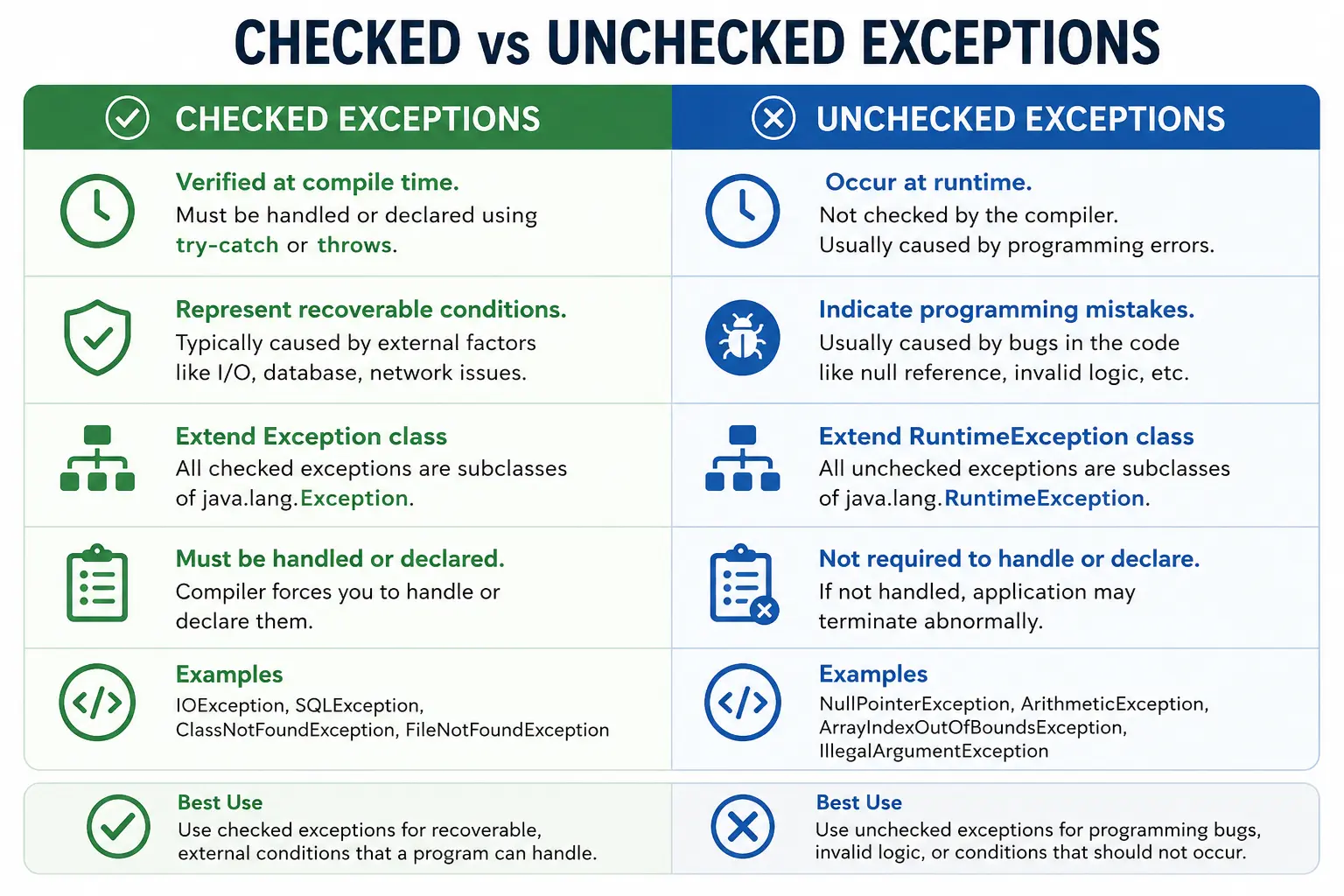
Java classifies exceptions into checked and unchecked exceptions so that the language can balance compile-time safety with runtime flexibility. Some failures are predictable enough that the compiler forces a developer to acknowledge them. Other failures usually represent programming mistakes or invalid assumptions, so Java allows them to appear at runtime without forcing every method to declare or catch them. Understanding this distinction is critical for writing reliable Java code, designing clean APIs, and answering interview questions with practical depth.
Checked exceptions are verified by the compiler. If a method contains code that can throw a checked
exception, the method must either handle it with a try-catch block or declare it using
throws. Unchecked exceptions are not verified by the compiler. They can still occur and still
matter, but Java does not force every caller to handle or declare them. This difference affects method
signatures, API design, caller responsibility, and error-handling strategy.
The purpose of the distinction is not to say that one type is important and the other is not. Both are important. Checked exceptions are about explicit responsibility for predictable recoverable conditions. Unchecked exceptions are about correctness, validation, and fail-fast behavior when the program reaches an invalid state. Mature Java developers know when each type is appropriate.
What Are Checked Exceptions?
Checked exceptions are exceptions that the compiler checks at compile time. If code calls a method that may throw a checked exception, the compiler requires the calling code to handle that exception or declare that it may be thrown further. This rule makes checked exceptions part of the method contract. Anyone calling the method can see from the signature that a specific kind of failure may occur.
Checked exceptions usually represent external, recoverable, or expected failure conditions. A file may be missing. A database may be unavailable. A network connection may time out. A class may not be found at runtime. These problems are not always caused by a coding mistake. They are often caused by environment, configuration, user action, or external system behavior. Java forces the developer to think about these conditions because ignoring them can make programs unreliable.
Key Characteristics
The main characteristic of a checked exception is mandatory handling. A method that uses file I/O or database operations often cannot guarantee success because the external world may fail. By requiring handling or declaration, Java makes that risk visible. Checked exceptions are commonly associated with I/O, database, network, reflection, and class-loading operations.
This mandatory handling does not mean every checked exception must be caught immediately. Sometimes the
current method has enough context to recover, so it should catch the exception. Sometimes the current method
cannot recover, so it should declare the exception with throws and let a higher layer handle it.
The key is that the decision must be explicit.
Examples
Common checked exceptions include IOException, SQLException,
ClassNotFoundException, and FileNotFoundException. These exception types often
indicate that an operation depends on something outside normal in-memory program logic. Because external
conditions are uncertain, Java requires explicit handling.
Example
void readFile() throws IOException {
    FileReader fr = new FileReader("data.txt");
}
// Compile-time error if not handled or declared
// Forces developer to think about recovery
In this example, FileReader may throw an IOException. The method declares
throws IOException, which means it passes responsibility to the caller. If the method did not
handle or declare the checked exception, the code would not compile.
What Are Unchecked Exceptions?
Unchecked exceptions are exceptions that are not checked by the compiler. They usually occur at runtime and
typically extend RuntimeException. The compiler does not require methods to catch or declare
unchecked exceptions, even though they may still happen during execution. This keeps code from being filled
with excessive try-catch blocks for programming mistakes that should usually be prevented
rather than handled repeatedly.
Unchecked exceptions often indicate invalid program state or incorrect logic. Examples include dividing by zero, accessing an invalid array index, parsing invalid text as a number, or calling a method on a null reference. In many cases, the best solution is not to catch the exception everywhere but to correct the logic or validate input before the operation.
Key Characteristics
The key characteristic of unchecked exceptions is optional handling from the compiler's point of view. A
method may throw NullPointerException or IllegalArgumentException without declaring
it. This does not mean the exception is harmless. It means Java expects developers to prevent such failures
through correct programming, validation, and clear preconditions.
Examples
Common unchecked exceptions include NullPointerException, ArithmeticException,
ArrayIndexOutOfBoundsException, IndexOutOfBoundsException,
IllegalArgumentException, and NumberFormatException. These exception names often
describe a problem in how the program used data or called a method.
Example
int a = 10 / 0; // ArithmeticException
// Compiles successfully
// Fails at runtime
This code compiles because ArithmeticException is unchecked. The compiler does not force a
try-catch block. At runtime, however, integer division by zero fails. The correct fix is usually
to validate the divisor before dividing, not to catch ArithmeticException everywhere.
Exception Hierarchy (Important)
Throwable
 |-- Exception
 |    |-- Checked Exceptions (IOException, SQLException)
 |    |-- RuntimeException (Unchecked)
 |         |-- NullPointerException
 |         |-- ArithmeticException
 |         |-- IndexOutOfBoundsException
 |-- Error
The root type is Throwable. Under it, Exception represents conditions that
application code may handle. Most checked exceptions are direct or indirect subclasses of
Exception but not subclasses of RuntimeException. Unchecked exceptions are
subclasses of RuntimeException. Error represents serious JVM or system-level
problems and is not normally handled by application code.
Core Differences: Checked vs Unchecked (Interview Favorite)
| Aspect | Checked Exceptions | Unchecked Exceptions |
|---|---|---|
| Compiler check | Yes | No |
| When detected | Compile time | Runtime |
| Must handle | Yes | No |
| Parent class | Exception | RuntimeException |
| Cause | External / Recoverable | Programming bugs |
| API usage | Mandatory handling | Optional handling |
The most important difference is compiler enforcement. Checked exceptions must be handled or declared before the code can compile. Unchecked exceptions do not require that treatment. Another practical difference is intent. Checked exceptions often communicate recoverable or external failures. Unchecked exceptions often communicate invalid usage, programming bugs, or failed preconditions.
Handling Requirements
Checked Exception: Mandatory
When code may throw a checked exception, Java requires either handling or declaration. Handling means using a
try-catch block and responding to the exception. Declaration means using throws in
the method signature and passing the responsibility to the caller.
try {
    FileReader fr = new FileReader("file.txt");
} catch (IOException e) {
    e.printStackTrace();
}
OR

void method() throws IOException { }
Unchecked Exception: Optional
Unchecked exceptions do not require compiler-enforced handling. They may still be caught when there is a useful recovery or boundary-level handling strategy, but in normal logic they are often prevented through validation.
int[] arr = new int[3];
System.out.println(arr[5]); // Runtime failure
// No compiler enforcement
// Better prevented using validations
Why Java Introduced Checked Exceptions
Java introduced checked exceptions to force robust handling of predictable failure conditions. In enterprise applications, many operations depend on external systems. Files may be unavailable, databases may reject queries, network calls may time out, and permissions may be missing. Checked exceptions make these risks visible in code. A developer cannot accidentally ignore them without making an explicit decision.
This design improves reliability when used well. A method signature that declares
throws IOException tells callers that file or stream handling can fail. The caller can then
recover, retry, inform the user, or pass the exception higher. Checked exceptions encourage explicit recovery
logic instead of silent failure.
Why Unchecked Exceptions Exist
Unchecked exceptions exist because not every failure should clutter every method signature. If Java forced handling for every possible null access, invalid argument, array boundary mistake, or arithmetic mistake, code would become noisy and harder to read. Instead, Java treats these as runtime problems that developers should usually prevent with correct logic.
Unchecked exceptions also support fail-fast behavior. When a programming error occurs, it is often better for
the program to fail clearly during development or at a controlled boundary than to continue in a corrupted
state. For example, if a method receives an invalid argument, throwing
IllegalArgumentException immediately can reveal misuse clearly.
Best Practices (Real-World)
Use Checked Exceptions When:
Use checked exceptions when the failure is recoverable or when the caller is expected to take corrective action. They are appropriate for external resources such as files, databases, network calls, and integration points. A caller may choose another file, retry a request, show a user-friendly message, or perform a fallback operation.
Use Unchecked Exceptions When:
Use unchecked exceptions when the failure indicates a programming bug, invalid method usage, or a violated precondition. Examples include passing a negative amount where only positive values are valid, passing null where null is not allowed, or calling a method in an invalid object state. In these cases, forcing every caller to catch the exception may not improve the design. Fixing the caller or validating the input is often better.
Common Beginner Mistakes
A common beginner mistake is catching Exception everywhere. This may appear to make code safer,
but it often hides the exact failure type and makes recovery logic vague. Specific exceptions communicate
intent more clearly. Another serious mistake is using empty catch blocks. Ignoring a checked exception only
silences the compiler; it does not solve the underlying problem.
Developers also sometimes convert every checked exception into an unchecked exception to avoid writing
throws or try-catch. This can be appropriate in some architectural layers, but doing
it blindly removes useful information from the API. The opposite mistake is using checked exceptions for
programming errors, which forces callers to handle conditions that should have been prevented by validation
or correct code.
Interview-Ready Answers
Short Answer
Checked exceptions are verified by the compiler and must be handled, while unchecked exceptions occur at runtime and are not enforced by the compiler.
Detailed Answer
In Java, checked exceptions represent recoverable conditions and must be either handled or declared at compile time. Unchecked exceptions extend RuntimeException and usually indicate programming errors. Java uses this distinction to balance safety and flexibility.
A complete interview answer should also mention that checked exceptions are part of a method's compile-time contract, while unchecked exceptions can occur without declaration. Checked exceptions are useful for predictable external failures. Unchecked exceptions are useful for invalid program states, failed preconditions, and coding mistakes.
Key Takeaway
Checked exceptions enforce responsibility. Unchecked exceptions enforce correctness. Using the right exception type leads to cleaner APIs, safer code, and better maintainability.
API Design Impact
The choice between checked and unchecked exceptions affects API design. A checked exception in a public method signature becomes part of the contract. Every caller must handle or declare it. This is useful when the caller can reasonably recover, but it can become burdensome if the caller cannot do anything meaningful. For this reason, API designers should use checked exceptions carefully and intentionally.
Unchecked exceptions keep method signatures cleaner, but they should still be documented when they represent
important precondition failures. For example, a method may throw IllegalArgumentException if an
amount is negative. The compiler will not force callers to handle it, but good documentation and validation
make the expectation clear.
Exception Handling in Real Applications
In real applications, checked exceptions often appear near infrastructure boundaries. File processing, database access, message queues, and external APIs all have failure modes outside the application's direct control. These failures may be handled near the boundary or converted into application-specific exceptions with additional context.
Unchecked exceptions often appear when internal assumptions are violated. A service may throw
IllegalStateException if an operation is called before initialization. A validation method may
throw IllegalArgumentException when input violates a required condition. These exceptions help
expose incorrect usage quickly and clearly.
A mature exception strategy does not catch everything everywhere. It handles recoverable exceptions where recovery is possible, logs unexpected failures at application boundaries, preserves root causes, and avoids hiding defects. This balance keeps applications reliable without making code unnecessarily noisy.
Propagation Difference
Both checked and unchecked exceptions can propagate through the call stack, but they affect method signatures
differently. If a checked exception is not handled inside a method, the method must declare it with
throws. That declaration continues upward until some caller handles the exception or also
declares it. This makes checked exception propagation visible in the source code.
Unchecked exceptions can also propagate, but the compiler does not force method signatures to mention them.
A NullPointerException thrown in a low-level method can travel up to a controller or main method
even if no method declares it. This is why unchecked exceptions should not be ignored simply because they are
not visible in method signatures. They can still affect application stability.
In real applications, checked exceptions are often handled or wrapped near infrastructure boundaries. For
example, a repository method may catch SQLException and convert it into a project-specific data
access exception. Unchecked exceptions are often allowed to propagate to a global handler that logs the
problem and returns a controlled error response.
Overriding Rules and Exception Types
Checked and unchecked exceptions also matter in method overriding. When a child class overrides a parent
method, it cannot declare broader checked exceptions than the parent method. This protects callers that rely
on the parent type. If the parent method promises only IOException, the child method cannot
suddenly declare a broader checked exception such as Exception, because callers may not be
prepared to handle it.
A child method can declare the same checked exception, a narrower checked exception, or no checked exception at all. Unchecked exceptions are more flexible because they are not part of the compiler-enforced method contract in the same way. A child method may throw unchecked exceptions even if the parent method does not declare them.
This rule is a common interview trap. It shows that checked exceptions are not just runtime events; they are part of Java's compile-time type contract. Overriding must preserve that contract so polymorphic calls remain safe.
Custom Checked vs Custom Unchecked Exceptions
When creating custom exceptions, the same decision applies. Extending Exception creates a custom
checked exception. Extending RuntimeException creates a custom unchecked exception. The right
choice depends on what the caller is expected to do.
A custom checked exception is useful when the failure is part of the normal business or integration contract
and the caller can take action. For example, a file import service may throw a checked
InvalidFileFormatException if the caller can ask the user to upload a corrected file. The method
signature makes that possibility explicit.
A custom unchecked exception is useful when the failure indicates invalid usage, a violated precondition, or
a condition that callers are not expected to recover from at every call site. For example,
InvalidAmountException may be unchecked if passing a negative amount is a programming or
validation error that should be prevented before calling the method.
Practical Selection Rule
A useful practical rule is to ask, "Can the immediate caller do something meaningful to recover?" If yes, a checked exception may be appropriate. If no, an unchecked exception may be better. Another question is, "Is this failure caused by an external condition or by incorrect program usage?" External conditions often fit checked exceptions. Incorrect program usage often fits unchecked exceptions.
This rule is not absolute, because project conventions matter. Some modern frameworks prefer unchecked exceptions for many infrastructure failures to keep APIs clean and centralize handling. Other systems use checked exceptions for explicit recoverable workflows. What matters most is consistency, meaningful naming, and clear handling strategy.
Interview Explanation Strategy
In interviews, start with a simple distinction: checked exceptions are checked at compile time and must be handled or declared, while unchecked exceptions occur at runtime and are not compiler-enforced. Then explain intent: checked exceptions usually represent recoverable external problems, while unchecked exceptions often represent programming mistakes or invalid preconditions.
Follow that with examples. IOException and SQLException are checked exceptions.
NullPointerException, ArithmeticException, and
ArrayIndexOutOfBoundsException are unchecked exceptions. Then mention best practices: catch
specific exceptions, avoid empty catch blocks, do not catch generic Exception everywhere, and
use checked or unchecked exceptions based on recovery responsibility.
Where Exceptions Should Be Handled
One of the most practical questions in Java development is where an exception should be handled. The answer depends on context. An exception should be handled where the code has enough information to make a useful decision. A low-level file-reading method may know that a file cannot be opened, but it may not know whether the program should ask the user for a new file, retry from another location, log an audit event, or stop the process. A higher-level method may have that context.
Checked exceptions make this decision visible because every layer must either handle the exception or declare it. This visibility can be helpful in systems where recovery matters. However, passing checked exceptions through too many layers can also make method signatures noisy. In such cases, teams often translate low-level checked exceptions into higher-level application exceptions that better match the business context.
Unchecked exceptions are often handled at application boundaries. For example, a web application may have a global exception handler that catches unexpected runtime exceptions, logs them, and returns a safe error response. This avoids scattering generic catch blocks across every service method while still preventing raw failures from leaking to users.
Checked Exceptions and User-Correctable Problems
Checked exceptions are a good fit when the caller can guide correction. If a user uploads a file and the file is missing, locked, unreadable, or in an invalid external location, the program can show a clear message and ask for another file. If a database is temporarily unavailable, the program may retry, queue the operation, or show a service-unavailable message. These are not necessarily coding mistakes; they are operational realities.
The strength of checked exceptions is that they make these realities part of the method contract. A method that reads from a file tells callers that file reading can fail. A method that connects to a database tells callers that database access can fail. This forces the calling code to think about the failure path instead of assuming only the happy path exists.
Unchecked Exceptions and Defensive Programming
Unchecked exceptions are closely related to defensive programming. If a method cannot accept null, negative values, empty strings, invalid states, or unsupported options, it should validate inputs early and fail with a clear unchecked exception when the contract is violated. This is better than letting the program continue and fail later in a less obvious place.
For example, a method that transfers money should reject a negative amount immediately. Throwing
IllegalArgumentException with a clear message is more useful than allowing the amount to move
through the system and cause inconsistent calculations later. In this sense, unchecked exceptions help expose
incorrect usage quickly.
Defensive programming does not mean wrapping every line in try-catch. It means validating
assumptions at meaningful boundaries, writing clear method contracts, and failing early when those contracts
are violated. This keeps bugs easier to locate.
Logging and Preserving Root Cause
Whether an exception is checked or unchecked, preserving root cause is important. When code catches an exception and throws a new exception, the original exception should usually be passed as the cause. This allows logs to show the full chain of failure. Without the original cause, developers may see only a high level message and lose the technical details needed to fix the problem.
Logging should also be intentional. Logging the same exception at every layer creates duplicate noise. Logging too little makes troubleshooting difficult. A common strategy is to add context when wrapping an exception and log it once at a boundary where the operation fails completely. The exact convention depends on the project, but consistency matters.
Balanced Use in Modern Java
Modern Java projects vary in how heavily they use checked exceptions. Some teams value checked exceptions for explicit recoverable failures. Other teams prefer unchecked application exceptions to keep service signatures smaller and centralize handling. Both approaches can work when used consistently. Problems arise when exception types are chosen randomly or when handling code hides failures instead of clarifying them.
The most practical mindset is to treat exception type as a design signal. A checked exception tells the caller, "You are expected to acknowledge this failure." An unchecked exception tells the caller, "This is an invalid state or usage problem, or it will be handled at a broader boundary." Clear naming, documentation, and consistent handling make that signal useful.
Examples: Checked vs Unchecked Exceptions
1. Checked Exception – Compile-Time Error
import java.io.FileInputStream;

class Demo {
    public static void main(String[] args) {
        // FileInputStream fis = new FileInputStream("data.txt"); // Compile-time error
    }
}
Explanation
- FileNotFoundException is checked
- Must be handled or declared
2. Handling Checked Exception with try-catch
import java.io.FileInputStream;

class Demo {
    public static void main(String[] args) {
        try {
            new FileInputStream("data.txt");
        } catch (Exception e) {
            System.out.println("Checked exception handled");
        }
    }
}
Output
Checked exception handled
3. Handling Checked Exception with throws
import java.io.FileInputStream;
import java.io.FileNotFoundException;

class Demo {
    static void read() throws FileNotFoundException {
        new FileInputStream("data.txt");
    }

    public static void main(String[] args) throws FileNotFoundException {
        read();
    }
}
Explanation
- Responsibility passed to caller
4. Unchecked Exception – No Compile-Time Error
class Demo {
    public static void main(String[] args) {
        int a = 10 / 0;
    }
}
Explanation
- ArithmeticException is unchecked
- Detected only at runtime
5. Catching Unchecked Exception
class Demo {
    public static void main(String[] args) {
        try {
            int a = 10 / 0;
        } catch (ArithmeticException e) {
            System.out.println("Unchecked exception handled");
        }
    }
}
Output
Unchecked exception handled
6. Checked Exception in Method Signature
import java.io.IOException;

class Demo {
    static void read() throws IOException {}

    public static void main(String[] args) throws IOException {
        read();
    }
}
Explanation
- Checked exceptions must be declared or handled
7. Unchecked Exception – No throws Needed
class Demo {
    static void calc() {
        int[] a = new int[2];
        a[5] = 10;
    }

    public static void main(String[] args) {
        calc();
    }
}
Explanation
- ArrayIndexOutOfBoundsException is unchecked
8. Exception Propagation – Checked Exception
import java.io.IOException;

class Demo {
    static void m1() throws IOException {
        m2();
    }

    static void m2() throws IOException {
        throw new IOException("IO error");
    }

    public static void main(String[] args) {
        try {
            m1();
        } catch (IOException e) {
            System.out.println("Handled in main");
        }
    }
}
Output
Handled in main
9. Exception Propagation – Unchecked Exception
class Demo {
    static void m1() {
        m2();
    }

    static void m2() {
        throw new NullPointerException();
    }

    public static void main(String[] args) {
        try {
            m1();
        } catch (Exception e) {
            System.out.println("Unchecked handled");
        }
    }
}
Output
Unchecked handled
10. Overriding Method – Checked Exception Rule
import java.io.IOException;

class A {
    void show() throws IOException {}
}

class B extends A {
    // void show() throws Exception {} // Not allowed
}
Explanation
- Cannot throw broader checked exception while overriding
11. Overriding Method – Removing Checked Exception
import java.io.IOException;

class A {
    void show() throws IOException {}
}

class B extends A {
    void show() {}   // allowed
}
Explanation
- Child can remove checked exception
12. Overriding Method – Unchecked Exception Allowed
class A {
    void show() {}
}

class B extends A {
    void show() throws RuntimeException {}
}
Explanation
- Unchecked exceptions have no restriction
13. Custom Checked Exception
class InvalidUserException extends Exception {
    InvalidUserException(String msg) {
        super(msg);
    }
}

class Demo {
    static void login(String user) throws InvalidUserException {
        if (!user.equals("admin")) {
            throw new InvalidUserException("Invalid user");
        }
    }

    public static void main(String[] args) throws InvalidUserException {
        login("guest");
    }
}
14. Custom Unchecked Exception
class InvalidAmountException extends RuntimeException {
    InvalidAmountException(String msg) {
        super(msg);
    }
}

class Demo {
    static void pay(int amt) {
        if (amt <= 0) {
            throw new InvalidAmountException("Amount invalid");
        }
    }

    public static void main(String[] args) {
        pay(-10);
    }
}
15. throw with Checked Exception
import java.io.IOException;

class Demo {
    static void test() throws IOException {
        throw new IOException("IO issue");
    }

    public static void main(String[] args) throws IOException {
        test();
    }
}
Explanation
- Checked exception must be declared
16. throw with Unchecked Exception
class Demo {
    static void test() {
        throw new NullPointerException("Null issue");
    }

    public static void main(String[] args) {
        test();
    }
}
Explanation
- No throws needed
17. Checked Exception in Constructor
import java.io.IOException;

class Demo {
    Demo() throws IOException {
        throw new IOException("Error");
    }

    public static void main(String[] args) throws IOException {
        new Demo();
    }
}
18. Unchecked Exception in Constructor
class Demo {
    Demo() {
        throw new ArithmeticException();
    }

    public static void main(String[] args) {
        new Demo();
    }
}
19. Common Interview Trap
class Demo {
    static void test() {
        try {
            throw new Exception();
        } catch (Exception e) {
            throw new RuntimeException();
        }
    }

    public static void main(String[] args) {
        test();
    }
}
Explanation
- Checked exception converted to unchecked
20. Interview Summary – Checked vs Unchecked
class Demo {
    static void checked() throws Exception {}
    static void unchecked() {}

    public static void main(String[] args) throws Exception {
        checked();
        unchecked();
    }
}
Key Differences
- Checked means compile-time check, must handle or declare
- Unchecked means runtime only, no compiler enforcement
- Checked examples include IOException and SQLException
- Unchecked examples include NullPointerException and ArithmeticException