Character Streams
Character Streams in Java are used to read and write text data. They work with 16-bit Unicode characters, making them suitable for text files and internationalization.
Text handling looks simple at first because users see letters, words, and lines. Internally, however, text is
stored as bytes and interpreted using character encoding. Java character streams exist to make text-oriented
I/O easier and safer. Instead of asking the developer to manually convert every byte into a character, Java
provides Reader and Writer classes that work at the character level.
Character streams are useful whenever the data is meant to be read as text. A configuration file, log file, CSV file, JSON file, XML file, properties file, test data file, or plain text document should usually be handled as characters rather than raw bytes. This lets the program read meaningful characters and lines, write strings directly, and work with international text more naturally.
The main idea is simple: byte streams are for binary data, and character streams are for text data. The difference matters because text requires encoding awareness. If a file contains English, Tamil, Hindi, Japanese, emojis, or special symbols, the program must interpret the bytes correctly. Character streams help bridge the gap between stored bytes and Java's character-based string handling.
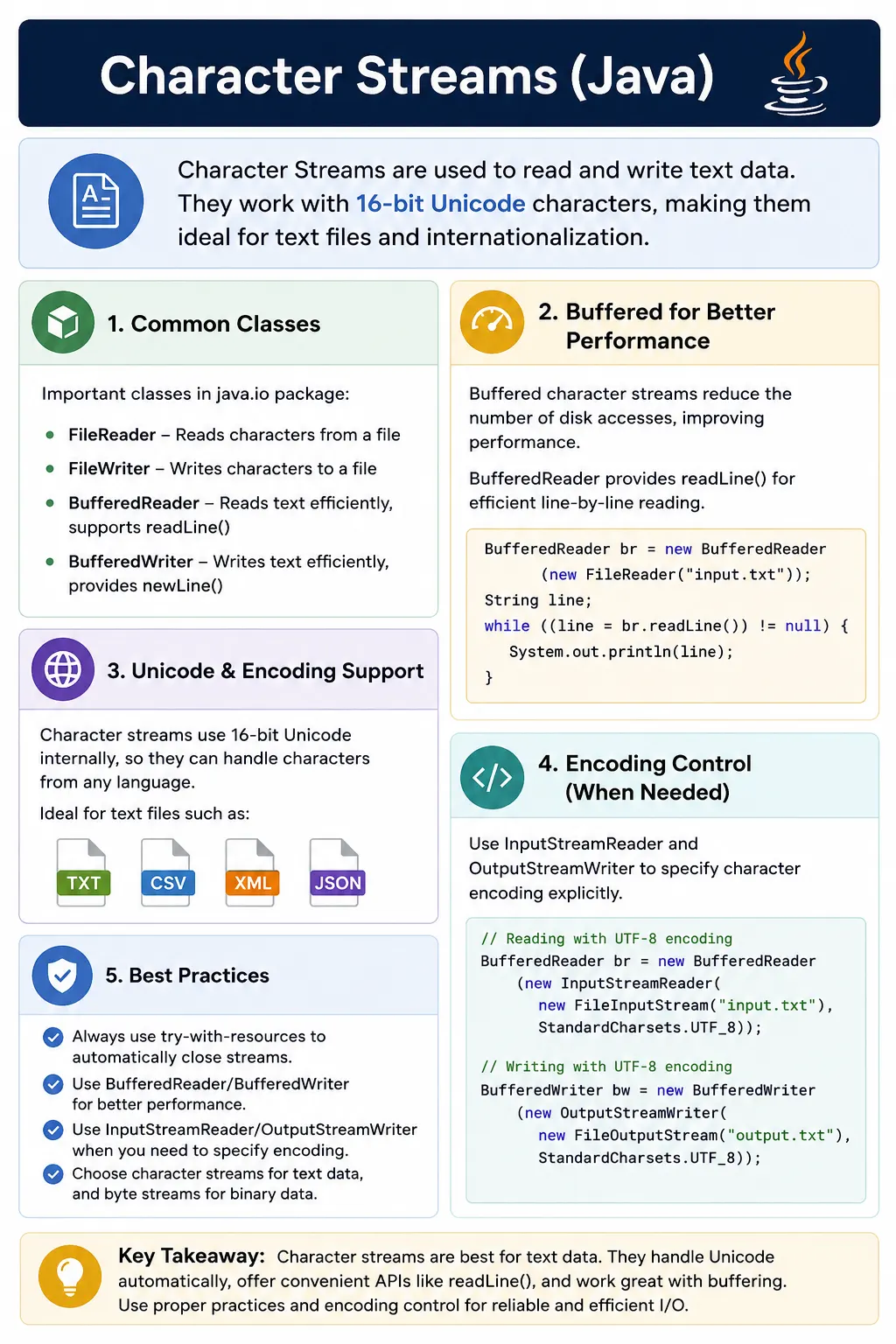
This is a core Java I/O topic and a common interview question, often compared with Byte Streams.
What Are Character Streams?
Character streams are Java I/O streams that process characters instead of raw bytes. The input side is based
on the abstract Reader class, and the output side is based on the abstract Writer
class. A reader brings characters into the program. A writer sends characters out of the program.
When using character streams, the program can read one character, read several characters into a buffer, read
a full line through BufferedReader, or write strings through Writer classes. This is
more natural for text than reading numeric byte values from an InputStream.
- Work with characters instead of bytes
- Handle Unicode automatically
- Support character encoding
- Part of java.io package
- Base classes:
- Reader
- Writer
When to Use Character Streams
Use character streams when the file content is human-readable text. Text files are not limited to files ending
in .txt. CSV, XML, JSON, logs, SQL scripts, HTML files, and many configuration files are all text
formats. They may be stored as bytes on disk, but the program's intention is to read and write characters,
words, lines, keys, values, and structured text.
- ✔ Text files (.txt, .csv, .xml, .json)
- ✔ Logs and configuration files
- ✔ User-readable data
- ✔ Language-specific characters
- ❌ Not for binary data (images, audio, PDFs)
Character streams should not be used for binary files such as images, audio, video, PDFs, ZIP files, or executable files. Binary files need exact byte preservation. If binary data is passed through a character conversion process, byte values may be changed or lost, corrupting the file. This is one of the most important practical differences between character streams and byte streams.
Character Stream Class Hierarchy
The character stream hierarchy follows the same broad design as the byte stream hierarchy. There are base
classes, concrete file-based classes, buffered wrapper classes, and bridge classes. Reader and
Writer define the general contract. FileReader and FileWriter connect
character streams to files. BufferedReader and BufferedWriter improve performance and
convenience. InputStreamReader and OutputStreamWriter connect byte streams to
character streams with encoding control.
Input Side
Reader
 ├── FileReader
 ├── BufferedReader
 ├── InputStreamReader
 └── CharArrayReader
Output Side
Writer
 ├── FileWriter
 ├── BufferedWriter
 ├── OutputStreamWriter
 └── PrintWriter
Reader (Base Class)
Reader is the abstract base class for reading characters. The simplest method,
read(), reads one character and returns it as an integer. It returns -1 at the end of
the stream. Just like byte streams, this end-of-stream signal is used in loops to continue reading until no
more data is available.
Used to read characters.
Key Methods
int read();            // reads one character
int read(char[] c);    // reads multiple characters
void close();          // closes stream
✔ Returns -1 at end of stream
Reading one character at a time is easy to understand, but it is not ideal for large files. Reading into a
character array or using BufferedReader is usually more efficient. For line-oriented text,
BufferedReader.readLine() is especially useful because many real files are processed line by line.
Writer (Base Class)
Writer is the abstract base class for writing characters. It can write a single character, a
character array, or a full string. This makes text output straightforward because the program can write Java
strings directly instead of manually converting them into byte arrays.
Used to write characters.
Key Methods
void write(int c);           // writes one character
void write(char[] c);        // writes char array
void write(String s);        // writes string
void flush();
void close();
Like output byte streams, writers may buffer data before sending it to the final destination. The
flush() method requests that pending data be written out. The close() method releases
resources and normally flushes pending data. Try-with-resources is the preferred way to close writers safely.
FileReader (Reading Text Files)
FileReader is a simple class for reading text from a file. It is convenient for beginner examples
and small programs, but it uses the platform default charset. That means the same code may interpret a file
differently on different systems if their default encodings differ. For serious applications, explicit charset
control through InputStreamReader or Files methods is often better.
FileReader fr = new FileReader("data.txt");
int ch;
while ((ch = fr.read()) != -1) {
    System.out.print((char) ch);
}
fr.close();
- ✔ Reads character by character
- ❌ No buffering → slower
FileWriter (Writing Text Files)
FileWriter writes characters to a file. If the file does not exist, Java attempts to create it. If
the file already exists, the default constructor overwrites it. This behavior is useful when generating a fresh
output file, but risky if existing content must be preserved. Append mode is enabled by passing
true to the constructor.
FileWriter fw = new FileWriter("output.txt");
fw.write("Hello Java");
fw.close();
- ✔ Overwrites by default
- ✔ Append mode available
FileWriter fw = new FileWriter("output.txt", true);
Buffered Character Streams (Recommended)
Buffered character streams are preferred for most text file work. Buffering reduces the number of direct file
system operations and adds convenient methods. BufferedReader provides readLine(),
which is one of the most commonly used methods in Java text processing. BufferedWriter provides
newLine(), which writes the correct line separator for the current platform.
BufferedReader
- Reads text efficiently
- Supports line-by-line reading
BufferedReader br =
    new BufferedReader(new FileReader("data.txt"));
String line;
while ((line = br.readLine()) != null) {
    System.out.println(line);
}
br.close();
- ✔ Very fast
- ✔ Most commonly used
BufferedWriter
- Writes text efficiently
BufferedWriter bw =
    new BufferedWriter(new FileWriter("out.txt"));
bw.write("Java I/O");
bw.newLine();
bw.close();
A common pattern is to wrap FileReader inside BufferedReader and
FileWriter inside BufferedWriter. The file-based class connects to the file, and the
buffered class improves reading or writing behavior. Closing the outer buffered stream closes the inner file
stream as well.
InputStreamReader & OutputStreamWriter (Bridge Classes)
Bridge classes are important because text is stored as bytes but processed as characters. An
InputStreamReader converts bytes from an InputStream into characters using a
charset. An OutputStreamWriter converts characters into bytes and writes them to an
OutputStream. These classes are especially useful when the program must specify UTF-8 or another
charset explicitly.
- Convert byte streams to character streams
- Handle explicit character encoding
InputStreamReader isr =
    new InputStreamReader(new FileInputStream("data.txt"), "UTF-8");
✔ Important for encoding control
This is an important interview point. FileReader is simple, but it does not make the charset
obvious in older Java versions and commonly relies on the default charset. InputStreamReader makes
the encoding decision visible. For internationalized applications and portable tools, explicit encoding is a
better habit.
Character Streams vs Byte Streams (Interview Favorite)
Character streams and byte streams solve different problems. Character streams are designed for text, where encoding and characters matter. Byte streams are designed for raw binary data, where exact byte preservation matters. Confusing the two can either corrupt binary files or make text handling harder than necessary.
| Aspect | Character Streams | Byte Streams |
|---|---|---|
| Data unit | Character (16-bit) | Byte (8-bit) |
| Encoding | ✔ Yes | ❌ No |
| File type | Text | Binary |
| Base classes | Reader / Writer | InputStream / OutputStream |
| Example | Text files | Images, PDFs |
Common Beginner Mistakes
The most common beginner mistake is using character streams for binary data. A character stream may transform bytes according to a charset, which is correct for text but dangerous for binary formats. If an image or PDF is read through a reader and written through a writer, the output may be corrupted even if the program appears to run without errors.
- Using character streams for binary data
- Ignoring encoding issues
- Not using buffering
- Forgetting to close streams
- Hardcoding file paths
Another mistake is ignoring encoding. A file written as UTF-8 should be read as UTF-8. If the writer and reader use different encodings, characters may appear as question marks, boxes, or incorrect symbols. This is especially visible when files contain non-English languages, currency symbols, accented characters, or emojis.
Forgetting to close streams is also a real issue. Writers may hold buffered data in memory until the stream is flushed or closed. If the program exits early or an exception occurs before closing, output may be incomplete. Try-with-resources avoids this problem and makes cleanup clear.
Best Practices
The best practice for character streams is to use them only when the data is text. Choose byte streams for
binary files and character streams for text files. For performance and convenience, prefer
BufferedReader and BufferedWriter when reading or writing files repeatedly. For
encoding control, prefer bridge classes or modern NIO methods with explicit charsets.
- Use BufferedReader / BufferedWriter for text files
- Use InputStreamReader for encoding control
- Use try-with-resources
- Prefer NIO (Files.readAllLines) for modern code
try (BufferedReader br = new BufferedReader(new FileReader("a.txt"))) {
    // read logic
}
In modern Java, the Files class provides convenient text methods such as
Files.readString(), Files.writeString(), Files.readAllLines(), and
Files.newBufferedReader(). These methods are often cleaner for everyday file tasks. However,
traditional character streams remain important because many APIs still expose Reader and
Writer, and because streaming is better when large text files should be processed gradually.
Character Streams in Real Applications
Character streams are common in real applications because so much application data is text. Configuration files, log files, CSV exports, JSON responses, XML documents, SQL scripts, template files, and test data files are often processed as text. A program may read a configuration line by line, write a report, append log entries, generate a CSV file, or parse a simple input file.
Line-by-line processing is one of the strongest use cases for BufferedReader. It lets the program
read a large file one line at a time without loading the whole file into memory. This is useful for logs,
imports, batch jobs, and test data. A large CSV file can be processed line by line, validated, and transformed
without storing every row at once.
Writers are equally useful for generated text output. A test automation framework may write execution logs or simple result files. A utility may generate a properties file. A reporting job may write CSV output for another system. Character streams make these tasks readable because the code writes strings and line separators directly.
Encoding and Internationalization
Encoding is the bridge between bytes and characters. Java strings represent text in memory, but files store bytes on disk. A charset defines how characters become bytes and how bytes become characters. UTF-8 is widely used because it supports many languages and is common across modern systems.
If encoding is ignored, a program may work in one environment and fail in another. A file containing only basic English letters may appear fine because many encodings represent those characters similarly. Problems appear when the file contains international characters, symbols, or emojis. A Tamil word, a euro symbol, or a heart symbol may be damaged if the wrong encoding is used.
For portable applications, make the encoding explicit. Use StandardCharsets.UTF_8 with
InputStreamReader, OutputStreamWriter, or modern Files methods. This
makes the code easier to understand and prevents environment-dependent behavior.
Append, Overwrite, Flush, and New Lines
Writing text requires careful handling of overwrite and append behavior. FileWriter overwrites by
default. If the file already contains text, that content is replaced when the writer is opened. Append mode is
enabled by using the constructor that accepts true. This is useful for logs or incremental output,
but it should be used intentionally.
Flushing matters when data is buffered. A writer may keep characters in memory temporarily. Calling
flush() pushes pending data to the underlying destination. Closing the writer normally flushes it
too. In most file-writing examples, closing through try-with-resources is enough. In long-running programs,
explicit flushing may be useful when output must be visible before the writer closes.
New line handling is another small but practical detail. Different operating systems historically use
different line separators. BufferedWriter.newLine() writes the platform-specific line separator,
while manually writing \n always writes the newline character. For many modern files, either may
work, but newLine() expresses intent clearly.
Character Streams in Testing and Automation
Test automation uses character streams for many everyday tasks. Reading test data from TXT or CSV files, writing simple execution logs, generating temporary configuration files, validating downloaded text content, and creating lightweight reports can all use readers and writers. These are text problems, so character streams are more suitable than byte streams.
Automation teams should be especially careful with encoding. Test data may include names, addresses, multilingual content, currency symbols, or special characters. If the test data file is written in UTF-8 but read with the wrong charset, tests may fail for reasons unrelated to the application under test. Explicit encoding makes test data handling predictable across laptops and CI servers.
Character streams also help avoid memory issues in data-driven testing. A large input file can be read line by line instead of loaded completely. This makes the framework more scalable and easier to run in constrained pipeline environments.
Line-by-Line Processing Patterns
Many text files are naturally line-oriented. Logs are written line by line, CSV files usually contain one
record per line, configuration files often contain one setting per line, and simple data files may contain one
input value per line. BufferedReader.readLine() fits this model well because it returns one line
at a time and returns null when the end of the file is reached.
Line-by-line processing also keeps memory usage predictable. A program does not need to load the full file into memory before doing work. It can read a line, validate it, transform it, write output, and move to the next line. This is a common pattern in batch jobs, import utilities, reporting tools, and test data readers.
There is one detail to remember: readLine() removes the line separator from the returned string.
If the program copies a text file line by line and wants to preserve line breaks, it must write a new line
explicitly using newLine() or another chosen separator. This is why text-copy examples usually
read a line, write the line, and then call newLine().
Default Charset Risks
Default charset behavior is one of the quiet risks in Java text I/O. If a program relies on the system default charset, it may behave differently across developer laptops, CI servers, containers, and production machines. The file content may be the same, but the interpretation of bytes can change when the default charset changes.
This issue is easy to miss when files contain only basic ASCII characters. The same code may appear reliable for months. Then a user name, product name, address, or test data row includes a non-English character, and the problem appears. Characters may become corrupted, comparisons may fail, JSON may not parse correctly, or output files may look broken when opened in another tool.
The best defense is to choose a charset deliberately. UTF-8 is the usual choice for modern applications. Using
StandardCharsets.UTF_8 makes the decision visible in code and avoids spelling mistakes in charset
names. This practice is especially important for tutorials, frameworks, shared utilities, and any code that
will run in more than one environment.
Safe Text File Writing Design
Writing text files safely means thinking about the file lifecycle. Should the file be overwritten every time, appended to, or created only if it does not already exist? Should incomplete output be acceptable if the program fails halfway through? Should another process be able to read the file while it is being written? These questions matter in real applications.
For simple generated files, overwriting may be correct. For logs, append mode may be correct. For important reports, a safer pattern may be to write to a temporary file first and then move it into the final location after writing succeeds. That way, readers do not see a half-written final file. This pattern is common in tools that generate files consumed by other systems.
Writers should also be closed reliably. Closing is not just cleanup; it is part of making output complete. A buffered writer may still have characters waiting in memory. Try-with-resources ensures that the writer is closed even if an exception happens while generating content. This is why it is preferred over manually closing streams at the end of a method.
Choosing Between Character Streams and NIO
Modern Java NIO methods are excellent for common text operations. If the file is small and the task is to read
the whole content, Files.readString() is concise. If the task is to write a complete string,
Files.writeString() is clear. If the task is to process lines, Files.newBufferedReader()
or Files.lines() may be useful.
Traditional character streams remain valuable when code needs to work with APIs that expect
Reader or Writer, when processing should happen gradually, or when layering wrappers
is useful. For example, a parser may accept a Reader so it can read from a file, string, network
stream, or any custom source. Understanding character streams helps you work across all those situations.
A practical rule is to use the clearest tool that preserves correctness. Use NIO convenience methods for simple modern file tasks. Use character streams for streaming, wrappers, older APIs, and line-by-line processing. Always keep encoding visible when portability matters.
Choosing the Right Reader and Writer Combination
A good way to choose a character stream is to start with the source or destination. If the text is in a file,
a file-based reader or writer can connect to it. If the text comes from a byte stream such as a network
response, classpath resource, or uploaded file stream, a bridge class such as InputStreamReader
is the right starting point. If the text is already in memory, classes such as StringReader or
CharArrayReader may be useful.
After choosing the source or destination, add buffering when the access pattern benefits from it. If the code
reads line by line, wrap the reader in BufferedReader. If the code writes many small pieces of
text, wrap the writer in BufferedWriter. This wrapper-based design keeps responsibilities
separate: one class connects to the data source, another improves performance or convenience, and another may
handle encoding.
This combination approach is common across Java I/O. A realistic input chain may be a
FileInputStream wrapped by an InputStreamReader with UTF-8, then wrapped by a
BufferedReader for line reading. A realistic output chain may be a
FileOutputStream wrapped by an OutputStreamWriter with UTF-8, then wrapped by a
BufferedWriter for efficient text output.
Understanding this layering helps in interviews and real code reviews. Instead of memorizing isolated class names, you can explain why each class is present. The file stream connects to the file, the bridge stream controls encoding, and the buffered stream improves text processing. That is the practical design behind many Java text I/O solutions.
How to Explain Character Streams in Interviews
A strong interview answer starts with the purpose: character streams read and write text data in Java. Then
name the base classes, Reader and Writer. Explain that they work with characters
rather than raw bytes and are suitable for text files, logs, CSV, XML, JSON, and other human-readable content.
Next, compare them with byte streams. Byte streams use InputStream and
OutputStream and are used for binary files such as images and PDFs. Character streams handle text
and encoding. This comparison is important because many interview questions test whether you know when each
stream type should be used.
Finally, mention best practices. Use BufferedReader and BufferedWriter for efficient
text processing. Use try-with-resources to close streams. Use InputStreamReader and
OutputStreamWriter when explicit charset control is required. Prefer modern Files
methods for simple new code.
Interview-Ready Answers
Short Answer
Character streams are used to read and write text data in Java.
Detailed Answer
In Java, character streams are based on Reader and Writer classes and are used for handling text data. They support Unicode characters and character encoding, making them suitable for reading and writing text files, unlike byte streams which handle raw binary data.
Key Takeaway
Character Streams = Text Data Handling. Use them for human-readable content, prefer buffering for performance, and manage encoding explicitly when required.
Practical Examples (FileWriter, FileReader, Buffered I/O)
1. Writing Text Using FileWriter
import java.io.*;

class Demo {
    public static void main(String[] args) throws Exception {
        FileWriter fw = new FileWriter("text.txt");
        fw.write("Hello Java");
        fw.close();
    }
}
Key Point
- Writes characters, not bytes
- Best for text files
2. Writing Multiple Lines
import java.io.*;

class Demo {
    public static void main(String[] args) throws Exception {
        FileWriter fw = new FileWriter("data.txt");
        fw.write("Java\n");
        fw.write("Selenium\n");
        fw.write("Testing");
        fw.close();
    }
}
3. Appending Text Using FileWriter
import java.io.*;

class Demo {
    public static void main(String[] args) throws Exception {
        FileWriter fw = new FileWriter("data.txt", true);
        fw.write("\nAppended Line");
        fw.close();
    }
}
Interview Trap
- Default mode overwrites
- Use
truefor append
4. Reading Text Using FileReader
import java.io.*;

class Demo {
    public static void main(String[] args) throws Exception {
        FileReader fr = new FileReader("text.txt");
        int ch;
        while ((ch = fr.read()) != -1) {
            System.out.print((char) ch);
        }
        fr.close();
    }
}
5. Reading Characters into Buffer
import java.io.*;

class Demo {
    public static void main(String[] args) throws Exception {
        FileReader fr = new FileReader("text.txt");
        char[] buffer = new char[50];
        int len = fr.read(buffer);
        System.out.println(new String(buffer, 0, len));
        fr.close();
    }
}
6. Using BufferedWriter (Best Practice)
import java.io.*;

class Demo {
    public static void main(String[] args) throws Exception {
        BufferedWriter bw =
            new BufferedWriter(new FileWriter("buffer.txt"));
        bw.write("Buffered Writing");
        bw.newLine();
        bw.write("Fast IO");
        bw.close();
    }
}
Why
- Reduces disk I/O
- Faster than FileWriter
7. Using BufferedReader (Line by Line)
import java.io.*;

class Demo {
    public static void main(String[] args) throws Exception {
        BufferedReader br =
            new BufferedReader(new FileReader("buffer.txt"));
        String line;
        while ((line = br.readLine()) != null) {
            System.out.println(line);
        }
        br.close();
    }
}
8. Copying Text File (Character Stream Way)
import java.io.*;

class Demo {
    public static void main(String[] args) throws Exception {
        BufferedReader br =
            new BufferedReader(new FileReader("source.txt"));
        BufferedWriter bw =
            new BufferedWriter(new FileWriter("target.txt"));

        String line;
        while ((line = br.readLine()) != null) {
            bw.write(line);
            bw.newLine();
        }

        br.close();
        bw.close();
    }
}
9. Writing Characters Using write(char[])
import java.io.*;

class Demo {
    public static void main(String[] args) throws Exception {
        char[] data = {'J', 'a', 'v', 'a'};
        FileWriter fw = new FileWriter("chars.txt");
        fw.write(data);
        fw.close();
    }
}
10. Try-With-Resources (Recommended)
import java.io.*;

class Demo {
    public static void main(String[] args) throws Exception {
        try (BufferedReader br =
                 new BufferedReader(new FileReader("text.txt"))) {
            System.out.println(br.readLine());
        }
    }
}
Why
- Auto-closes streams
- Cleaner code
11. Character Streams Handle Unicode Properly
import java.io.*;

class Demo {
    public static void main(String[] args) throws Exception {
        FileWriter fw = new FileWriter("unicode.txt");
        fw.write("Java ❤️ Selenium");
        fw.close();
    }
}
12. Encoding Control Using InputStreamReader
import java.io.*;
import java.nio.charset.StandardCharsets;

class Demo {
    public static void main(String[] args) throws Exception {
        InputStreamReader isr =
            new InputStreamReader(
                new FileInputStream("text.txt"),
                StandardCharsets.UTF_8);
        BufferedReader br = new BufferedReader(isr);
        System.out.println(br.readLine());
        br.close();
    }
}
Interview Note
- FileReader uses default charset
- InputStreamReader gives explicit control
13. Writing with Encoding Using OutputStreamWriter
import java.io.*;
import java.nio.charset.StandardCharsets;

class Demo {
    public static void main(String[] args) throws Exception {
        OutputStreamWriter osw =
            new OutputStreamWriter(
                new FileOutputStream("utf8.txt"),
                StandardCharsets.UTF_8);
        osw.write("UTF-8 Content");
        osw.close();
    }
}
14. Common Interview Trap – Using Byte Stream for Text
FileInputStream fis = new FileInputStream("text.txt"); // ❌ not ideal
Correct
FileReader fr = new FileReader("text.txt");
15. Reading Entire File at Once (Java 11+)
import java.nio.file.*;

class Demo {
    public static void main(String[] args) throws Exception {
        String content = Files.readString(Path.of("text.txt"));
        System.out.println(content);
    }
}
16. Writing Entire Text at Once (Java 11+)
import java.nio.file.*;

class Demo {
    public static void main(String[] args) throws Exception {
        Files.writeString(Path.of("file.txt"), "Hello World");
    }
}
17. Character Stream vs Byte Stream (Code View)
FileReader / FileWriter   // text
FileInputStream / FileOutputStream // binary
18. Handling IOException
try (FileReader fr = new FileReader("missing.txt")) {
} catch (IOException e) {
    System.out.println("File error");
}
19. Real-World Use Case
- Logs
- Configuration files
- Test data (CSV, TXT)
20. Interview Summary – Character Streams
Reader / Writer
Key Points
- Designed for text data
- Automatically handles characters
- Buffered versions are faster
- Encoding matters
- Prefer BufferedReader/Writer in real apps