Call by Value in Java
In Java, the concept of call by value is foundational to understanding how methods receive and manipulate data. Despite its apparent simplicity, this topic is one of the most frequently misunderstood areas, especially when objects and references enter the discussion. Many developers initially assume that Java supports both call by value and call by reference depending on context. However, this assumption is incorrect. Java follows a strict and consistent rule: everything in Java is passed by value.
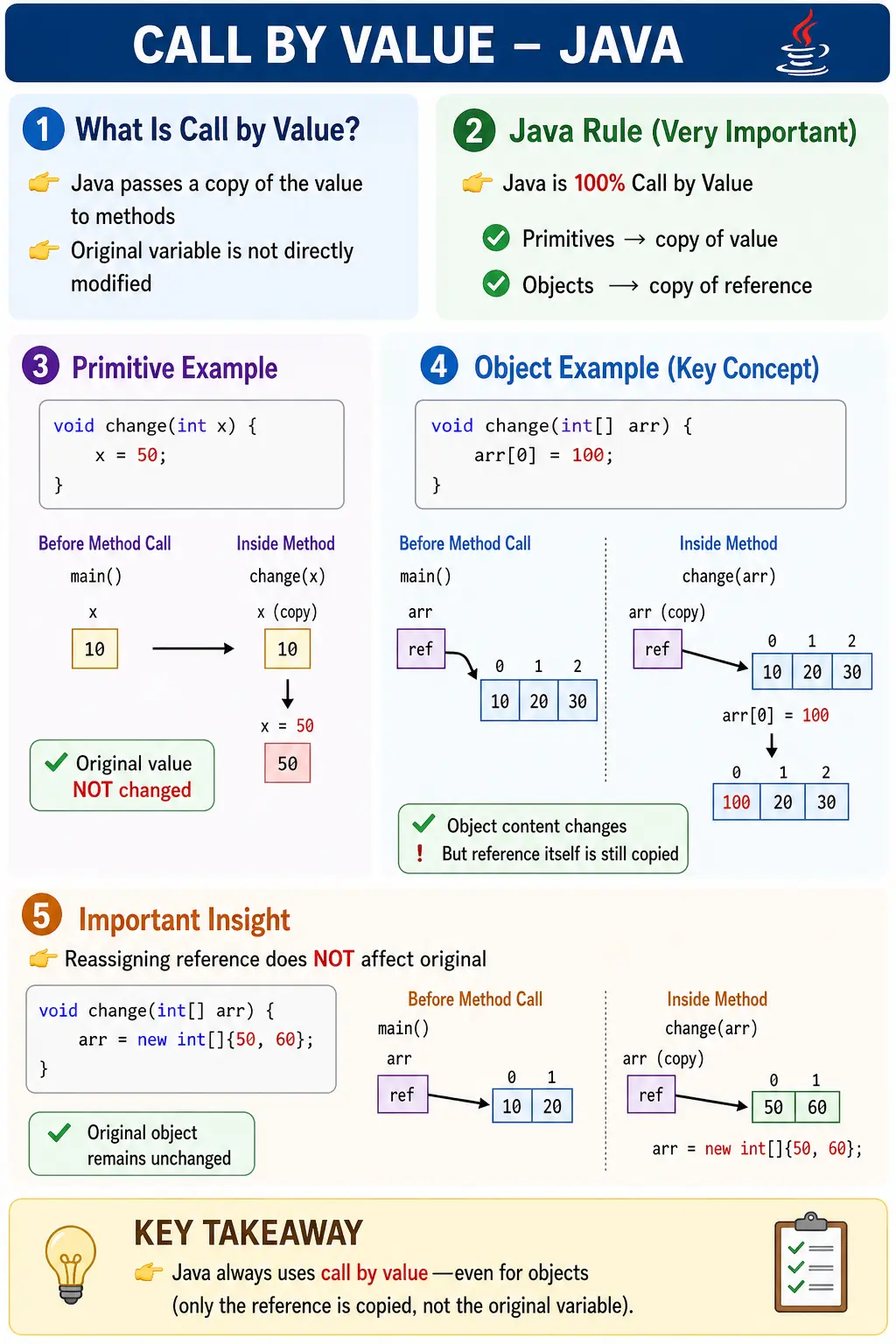
This design decision has deep implications for how variables behave when passed to methods, how memory is managed, and how side effects propagate through a program. A clear understanding of call by value is essential not only for writing correct code but also for debugging subtle issues, designing APIs, and answering interview questions with precision.
What Does Call by Value Mean?
At its core, call by value means that when a method is invoked, Java passes a copy of the argument value into the method. The method parameter receives that copied value and works with it as a local variable. The original variable in the calling method is not handed over to the called method. Because the original variable is not handed over, the called method cannot directly replace or reassign the caller's variable.
This rule applies consistently across the language. Whether a program passes an int, a double, a boolean, a String, an array, or a custom object reference, Java still passes a value. The type of value differs, but the mechanism does not. For primitive types, the copied value is the actual primitive data. For reference types, the copied value is the reference value that points to an object. This distinction is the center of the topic.
The word value can be misleading for beginners because they often think of value only as visible data such as 10 or true. In Java, a reference stored in a variable is also a value. It is a value that tells the program where an object can be reached. When that reference value is copied, two separate variables can point to the same object. That is why a method can modify the object through the copied reference while still being unable to change the caller's original reference variable.
Is Java Call by Value or Call by Reference?
The correct answer is simple: Java is always call by value. Java does not support call by reference for method arguments. This is true for primitive values and object references. The confusion exists because object references create behavior that looks similar to call by reference in some examples. If a method receives an object reference and changes the object's fields, the caller can observe those field changes. That visible change makes many learners assume that the object was passed by reference. The more accurate explanation is that the reference was passed by value, and both reference variables pointed to the same object.
Call by reference, in the strict sense, would mean the called method receives direct access to the caller's variable itself. If Java supported that, a method could make the caller's variable point to a completely different object by reassigning the parameter. Java does not allow this. Reassigning a parameter changes only the method's local copy. The caller's variable continues to hold the same value it held before the method call.
This difference is subtle but important. Java allows object mutation through a copied reference, but it does not allow caller variable reassignment through a method parameter. Once this is understood, most confusing examples become predictable.
Call by Value with Primitive Types
Primitive types make call by value easy to see because primitives store direct data. If an int variable a contains 10 and a method is called with a as an argument, Java copies the value 10 into the method parameter. The parameter is a new local variable inside the method. Changing that parameter does not affect a.
void change(int x) {
    x = 50;
}

public static void main(String[] args) {
    int a = 10;
    change(a);
    System.out.println(a);
}
The output is:
10
The value of a is copied into x. Inside change, x becomes 50, but a remains 10 because a and x are two different variables. The method changed its local copy only. If the program wants the new value to affect the caller, the method must return the new value and the caller must assign it back.
This is why methods that perform calculations often return a result. A method cannot silently replace the caller's primitive variable. It must communicate a new value through a return statement or through a mutable object supplied by the caller.
Returning Values Instead of Expecting Parameters to Change
A clean way to work with primitives is to return the calculated value. If a method should increase a number, the method can return the increased value and the caller can decide whether to store it. This keeps behavior explicit. The method does not secretly change the caller's variable, and the caller remains in control of assignment.
static int increase(int x) {
    return x + 1;
}

public static void main(String[] args) {
    int count = 10;
    count = increase(count);
}
Here, the original variable changes only because the caller explicitly assigns the returned value back to count. This pattern is common in Java and supports readable, predictable code. It also fits well with immutable objects such as String, Integer, BigDecimal, and LocalDate, where operations usually return new values instead of modifying existing ones.
Call by Value with Object References
Object references are where the topic becomes more nuanced. A reference variable does not store the entire object. It stores a reference value that allows Java to access the object in memory. When a reference variable is passed to a method, the reference value is copied into the method parameter. Now the caller's variable and the method parameter are separate variables, but both may point to the same object.
void change(int[] arr) {
    arr[0] = 100;
}

public static void main(String[] args) {
    int[] a = {10, 20};
    change(a);
    System.out.println(a[0]);
}
The output is:
100
This output does not prove call by reference. It proves that both reference variables point to the same array object. The method receives a copy of the reference value. Through that copied reference, it reaches the same array and changes the first element. Since the object itself changed, the caller can see the change through its own reference.
The key distinction is between changing the object and changing the reference variable. Java allows the method to use the copied reference to modify a mutable object. Java does not allow the method to replace the caller's reference variable.
Why Object Mutation Is Still Call by Value
To prove that Java is still call by value with objects, consider a method that reassigns the parameter to a new object.
void change(int[] arr) {
    arr = new int[]{50, 60};
}

public static void main(String[] args) {
    int[] a = {10, 20};
    change(a);
    System.out.println(a[0]);
}
The output is:
10
The method parameter arr initially receives a copy of the reference stored in a. Both variables point to the original array. Inside the method, arr is reassigned to a new array. That reassignment changes only arr, the local parameter variable. The caller's variable a still points to the original array. Therefore a[0] remains 10.
If Java were call by reference, assigning arr to a new array would also make a point to that new array. Since that does not happen, the example clearly demonstrates Java's pass-by-value behavior. The copied reference can be used to access an object, but the copied reference variable itself is local to the method.
Visualizing the Difference
For primitives, the visualization is straightforward. If a holds 10, the method receives another variable x that also holds 10. The two variables are independent. Changing x does not touch a.
a = 10
copy to x = 10
For object references, the visualization has one additional layer. The caller variable and the parameter variable can both hold reference values that point to the same object.
a points to [10, 20]
arr also points to [10, 20]
If arr changes an element inside the array, the shared object changes. If arr is reassigned to a different array, only arr changes. The original variable a remains connected to the original array.
This mental model is powerful because it explains arrays, custom objects, lists, maps, String references, wrapper objects, and null references with one consistent rule. Java copies the value stored in the variable. For primitives, that value is data. For reference variables, that value is a reference.
Mutable Objects and Side Effects
Call by value does not mean methods are always free from side effects. A method cannot reassign the caller's variable, but it can modify the state of a mutable object if it receives a reference to that object. Arrays, ArrayList, HashMap, StringBuilder, and most custom objects are mutable unless designed otherwise. If a method receives one of these objects and changes its contents, the caller will see those changes.
This is important in real projects. Suppose a method receives a List of users and removes inactive users from it. The method receives a copy of the reference, but both the caller and the method refer to the same list object. Removing elements inside the method changes the shared list. The caller's variable still points to the same list, but the list contents are different.
Sometimes this is intended. A method may be designed to update an object, add data to a collection, or populate a result. Other times it creates bugs because the caller did not expect its object to be changed. Understanding call by value helps developers identify whether a method is changing an object or simply working with a local reference.
Good method design should make side effects clear. If a method mutates an object, its name should communicate that behavior, and documentation or tests should make the expectation visible. If mutation is not intended, the method should work on a copy or return a new object instead.
Immutable Objects and Call by Value
Immutable objects provide another useful angle. A String object cannot be changed after it is created. If a method receives a String reference and performs an operation such as concatenation, Java creates a new String rather than modifying the original object. Reassigning the method parameter to the new String does not affect the caller's variable because the parameter is only a local copy.
This is why a method cannot change a caller's String by assigning a new value to the parameter. The parameter can point to a different String inside the method, but the caller's variable remains unchanged. The same principle applies to wrapper classes such as Integer and Double. They are immutable, so operations create new values or objects rather than modifying the original.
This distinction matters in interviews because String examples are often used to test whether a candidate understands both immutability and call by value. A String not changing after a method call is not only because Java is call by value. It is also because String objects are immutable. With a mutable object such as StringBuilder, a method can change the object's contents through the copied reference.
Call by Value with Arrays and Collections
Arrays and collections are common sources of confusion because they are mutable reference types. Passing an array to a method copies the reference value, not the full array. If the method changes an element, the array object changes. If the method assigns the parameter to a new array, the caller's array variable is unaffected.
The same idea applies to ArrayList and HashMap. A method can add, remove, or update elements through the copied reference. Those changes are visible to the caller because the underlying object is shared. But if the method writes list = new ArrayList<>(), it only changes the local parameter list. The caller still points to the original list.
Because of this behavior, developers should be careful when passing mutable collections to methods. If the method should not modify the caller's collection, it can create a defensive copy. If the method should modify the collection, the method name should make that clear. A name such as addDefaultRoles communicates mutation better than a vague name such as processRoles.
Call by Value and Swapping Variables
Swapping is a classic way to expose Java's call by value behavior. A method that attempts to swap two primitive variables will not work because the method receives copies. The local variables inside the method may swap, but the caller's variables remain unchanged. The same is true for swapping two object references. A method can swap its local copies of the references, but it cannot make the caller's reference variables swap places.
This surprises many beginners because the swap method looks logically correct inside the method body. The missing point is scope. Method parameters are local variables. Reassigning them affects only those local variables. Once the method ends, those local variables disappear, and the caller's variables remain as they were.
To perform a swap-like operation in Java, the program must use a different design. It may return a new object containing the values in swapped order, modify fields inside a mutable wrapper object, or swap array elements by passing the array and indexes. In the array element case, the method is not swapping the caller's variables; it is modifying the contents of a shared mutable object.
Method Parameters Are Local Variables
A method parameter behaves like a local variable initialized with the copied argument value. This is one of the simplest ways to remember call by value. When a method starts, its parameters exist inside the method stack frame. They have their own names and their own storage. They are initialized using values copied from the caller's arguments.
Because parameters are local to the method, reassigning a parameter is usually not useful outside the method. It may be useful temporarily inside the method, but it does not update the caller. This is why many teams avoid unnecessary parameter reassignment. Keeping parameters stable can make code easier to read, especially for beginners.
If a method needs to produce a different value, returning the value is clearer. If a method needs to update object state, update the object deliberately and make the mutation visible through naming and tests. Both approaches are better than relying on parameter reassignment that the caller will never see.
How Call by Value Affects API Design
Call by value influences how Java APIs are designed. Methods that calculate values usually return results. Methods that update objects usually make mutation explicit. Methods that need multiple outputs often return a result object rather than trying to modify several caller variables. This leads to cleaner APIs because method behavior becomes visible in the method signature and return type.
For example, a method named calculateTotal should return a total instead of trying to modify a primitive total passed into it. A method named normalizeCustomerName can return the normalized name. A method named updateCustomerAddress can modify a Customer object if that is the intended behavior. The method name, parameter type, and return type should help readers understand whether the method calculates, creates, validates, or mutates.
This is especially important in large systems where side effects can be difficult to trace. If a method receives a mutable object and changes it silently, debugging becomes harder. If a method returns a result instead, the flow is easier to follow. Call by value does not prevent side effects through mutable objects, so developers must design APIs responsibly.
Common Misconceptions
The biggest misconception is that Java supports call by reference for objects. It does not. Java passes a copy of the reference value. The object itself is not copied automatically, and the caller's reference variable is not passed directly. This explains why object fields can change while reference reassignment does not affect the caller.
Another misconception is that call by value means objects cannot be changed. That is also incorrect. If a method receives a reference to a mutable object, it can modify the object through that reference. Call by value protects the caller's variable binding, not necessarily the object that the variable points to.
A third misconception is that references are the same as objects. A reference variable and an object are different concepts. The variable stores a reference value. The object exists separately in memory. Multiple variables can hold reference values that point to the same object. This is why changes made through one reference may be observed through another reference.
Call by Value vs Call by Reference
Call by value means the method receives a copy of the argument value. Reassigning the parameter does not affect the caller's variable. Call by reference means the method receives direct access to the caller's variable, so reassignment inside the method can affect the caller. Java follows the first model only.
Some languages support true reference parameters, pointers, or special syntax for passing variables by reference. Java intentionally avoids that model for method arguments. This keeps method calls simpler and more predictable. A Java method can change a mutable object it receives, but it cannot directly change which value the caller's variable stores.
The interview-safe sentence is: Java is strictly pass by value; for objects, the value being passed is a copy of the reference. That sentence captures both halves of the concept without falling into the common trap of saying objects are passed by reference.
Why Java Uses Call by Value
Java's consistent use of call by value supports simplicity and safety. Developers do not need to remember different passing rules for different data types. The same rule applies everywhere: the argument value is copied into the parameter. This consistency makes method behavior easier to reason about.
Call by value also prevents a method from unexpectedly replacing the caller's local variables. A method can return a value, and the caller can decide whether to assign it. This explicit assignment style improves readability. It also reduces accidental side effects at the variable-binding level.
At the same time, Java still allows efficient object handling because passing a reference value is cheaper than copying an entire object. When a large object is passed to a method, Java copies the reference value, not the full object. This allows methods to work with objects efficiently while preserving the rule that parameters are local copies.
Practical Implications in Real Applications
Understanding call by value is critical in real-world development. When working with primitives, developers must remember that changes inside methods do not persist unless explicitly returned. When working with objects, developers must distinguish between modifying object state and reassigning references. Updating fields of an object inside a method can affect the original object. Assigning a new object to the parameter will not.
This distinction appears in service methods, data transformation utilities, test automation frameworks, and collection processing logic. A method that receives a request object may update some fields for normalization. A method that receives a list may sort it or add values. A method that receives a String may create a modified String but must return it if the caller needs the change.
In testing and debugging, call by value helps explain why a value did or did not change after a method call. If a primitive did not change, the reason is that only a copy was modified. If an object's field changed, the reason is that both the caller and method referred to the same object. If a reference reassignment did not affect the caller, the reason is that only the local copy of the reference was reassigned.
Common Beginner Mistakes
Several mistakes frequently occur when developers misunderstand call by value. One common error is expecting primitive values to change after method calls. Since only copies are passed, such expectations lead to incorrect assumptions. The correct approach is to return the new value and assign it in the caller.
Another mistake is believing that Java is call by reference because object fields can be changed inside a method. This misconception often results in confusion when debugging reference reassignment examples. The correct explanation is that the method receives a copied reference value that points to the same object.
Developers also confuse object mutation with reference reassignment. Modifying object content is allowed when the object is mutable. Changing the parameter to point to a different object is not reflected outside the method. These are two different operations, and understanding the difference is essential.
Finally, beginners sometimes ignore mutability. A String does not change because it is immutable, while a StringBuilder can change because it is mutable. Both are still passed by value. The difference in behavior comes from object design, not from a different parameter-passing mechanism.
Best Practices
Design methods so their behavior is clear. If a method calculates a value, return the result. If a method mutates an object, use a name that makes the mutation obvious. If a method should not modify the caller's object, create a defensive copy before changing data. This is especially important for arrays and collections because they are mutable and commonly shared.
Avoid relying on parameter reassignment for meaningful program behavior. Reassigning a parameter may be useful inside a method, but it does not affect the caller. If the caller needs a new object or value, return it. This makes the flow explicit and easier to test.
Be careful when passing mutable objects across layers of an application. A method that modifies a shared list, map, request object, or domain object can create side effects outside its local scope. Sometimes that is intended, but it should be deliberate. Clear naming, focused methods, and good tests help prevent accidental mutation bugs.
Interview Perspective
Call by value is a classic interview topic because it tests conceptual clarity, memory understanding, and practical reasoning. A concise answer would be: Java uses call by value, meaning a copy of the value is passed to methods. A stronger answer adds that for primitives, the copied value is the actual data, while for objects, the copied value is the reference to the object.
A complete interview explanation should include an example. With an int, changing the parameter does not change the original variable. With an array or custom object, changing the object's contents may be visible to the caller because both references point to the same object. But reassigning the parameter to a new object does not affect the caller's reference. This proves Java is not call by reference.
Candidates who can clearly separate primitive copying, reference copying, object mutation, and reference reassignment demonstrate strong foundational understanding. The best answer is simple, precise, and supported by one short example.
Key Takeaway
Call by value is a fundamental principle in Java that governs how data is passed between methods. Java always passes copies of values. For primitives, the copied value is the primitive data. For objects, the copied value is the reference value. This allows methods to modify mutable objects through copied references, but it does not allow methods to replace the caller's variables.
Once this rule is clear, Java method behavior becomes much easier to predict. Primitive changes inside methods do not affect callers. Object mutations may be visible. Reference reassignments inside methods remain local. Java is always call by value, and understanding that rule is essential for clean coding, debugging, and interviews.
One-Line Insight
Java is 100% call by value; only copies are passed, never the original variables.
1. Call by Value with Primitive Type
class Demo {
static void change(int x) {
x = 100;
}
public static void main(String[] args) {
int a = 10;
change(a);
System.out.println(a);
}
}
Explanation
- Copy of value passed
- Original unchanged
- Output: 10
2. Call by Value with Multiple Primitive Parameters
class Demo {
static void modify(int a, int b) {
a = 50;
b = 60;
}
public static void main(String[] args) {
int x = 5, y = 10;
modify(x, y);
System.out.println(x + " " + y);
}
}
Explanation
- Each parameter receives a copy
- Output: 5 10
3. Call by Value with Object Reference (Mutable Object)
class Demo {
static void change(StringBuilder sb) {
sb.append(" Java");
}
public static void main(String[] args) {
StringBuilder sb = new StringBuilder("Hello");
change(sb);
System.out.println(sb);
}
}
Explanation
- Reference copy passed
- Object content modified
- Output: Hello Java
4. Reassigning Object Reference Inside Method
class Demo {
static void change(StringBuilder sb) {
sb = new StringBuilder("New");
}
public static void main(String[] args) {
StringBuilder sb = new StringBuilder("Old");
change(sb);
System.out.println(sb);
}
}
Explanation
- Only local copy reassigned
- Original object unaffected
- Output: Old
5. Call by Value with String (Immutable Object)
class Demo {
static void change(String s) {
s = s.concat(" Java");
}
public static void main(String[] args) {
String s = "Hello";
change(s);
System.out.println(s);
}
}
Explanation
- New String created
- Reference copy lost
- Output: Hello
6. Call by Value with Array Parameter
class Demo {
static void change(int[] arr) {
arr[0] = 99;
}
public static void main(String[] args) {
int[] a = {1, 2, 3};
change(a);
System.out.println(a[0]);
}
}
Explanation
- Array object modified
- Output: 99
7. Reassigning Array Reference Inside Method
class Demo {
static void change(int[] arr) {
arr = new int[]{7, 8, 9};
}
public static void main(String[] args) {
int[] a = {1, 2, 3};
change(a);
System.out.println(a[0]);
}
}
Explanation
- Reference reassignment is local
- Output: 1
8. Call by Value with Wrapper Class
class Demo {
static void change(Integer x) {
x = 100;
}
public static void main(String[] args) {
Integer a = 10;
change(a);
System.out.println(a);
}
}
Explanation
- Wrapper is immutable
- Output: 10
9. Wrapper Object Modification Attempt
class Demo {
static void change(Integer x) {
x = x + 10;
}
public static void main(String[] args) {
Integer a = 20;
change(a);
System.out.println(a);
}
}
Explanation
- New Integer created
- Output: 20
10. Call by Value with Custom Object (Field Change)
class User {
int age;
}
class Demo {
static void update(User u) {
u.age = 30;
}
public static void main(String[] args) {
User u = new User();
u.age = 20;
update(u);
System.out.println(u.age);
}
}
Explanation
- Object field modified
- Output: 30
11. Reassigning Custom Object Reference
class User {
int age;
}
class Demo {
static void update(User u) {
u = new User();
u.age = 40;
}
public static void main(String[] args) {
User u = new User();
u.age = 25;
update(u);
System.out.println(u.age);
}
}
Explanation
- New object created locally
- Output: 25
12. Call by Value with null Reference
class Demo {
static void test(String s) {
s = "Java";
}
public static void main(String[] args) {
String s = null;
test(s);
System.out.println(s);
}
}
Explanation
- Reference copy reassigned
- Output: null
13. Passing Expression as Argument
class Demo {
static void show(int x) {
System.out.println(x);
}
public static void main(String[] args) {
show(5 + 3);
}
}
Explanation
- Expression evaluated first
- Output: 8
14. Method Returning Modified Value
class Demo {
static int change(int x) {
x = 50;
return x;
}
public static void main(String[] args) {
int a = 10;
a = change(a);
System.out.println(a);
}
}
Explanation
- Return value must be captured
- Output: 50
15. Misconception: “Call by Reference” Example
class Demo {
static void swap(int a, int b) {
int temp = a;
a = b;
b = temp;
}
public static void main(String[] args) {
int x = 5, y = 10;
swap(x, y);
System.out.println(x + " " + y);
}
}
Explanation
- Swap fails due to call by value
- Output: 5 10
16. Swap Using Object Wrapper
class Holder {
int value;
}
class Demo {
static void swap(Holder a, Holder b) {
int temp = a.value;
a.value = b.value;
b.value = temp;
}
public static void main(String[] args) {
Holder h1 = new Holder();
Holder h2 = new Holder();
h1.value = 5;
h2.value = 10;
swap(h1, h2);
System.out.println(h1.value + " " + h2.value);
}
}
Explanation
- Object fields swapped
- Output: 10 5
17. Call by Value with Varargs
class Demo {
static void modify(int... nums) {
nums[0] = 99;
}
public static void main(String[] args) {
modify(1, 2, 3);
// varargs creates array internally
}
}
Explanation
- Varargs treated as array
- Underlying concept remains call by value
18. Call by Value in Method Chaining
class Demo {
static int add(int x) {
return x + 5;
}
public static void main(String[] args) {
int result = add(add(5));
System.out.println(result);
}
}
Explanation
- Each call passes copy
- Output: 15
19. Interview Trick: Object vs Reference
class Demo {
static void test(StringBuilder sb) {
sb.append("X");
sb = new StringBuilder("Y");
}
public static void main(String[] args) {
StringBuilder sb = new StringBuilder("A");
test(sb);
System.out.println(sb);
}
}
Explanation
- Append affects original
- Reassignment does not
- Output: AX
20. Interview Summary – Call by Value
class Demo {
static void test(int x, StringBuilder sb) {
x = 100;
sb.append(" Java");
}
public static void main(String[] args) {
int a = 10;
StringBuilder sb = new StringBuilder("Hello");
test(a, sb);
System.out.println(a);
System.out.println(sb);
}
}
Explanation
- Primitive unchanged
- Object content changed
- Output:
10
Hello Java