Byte Streams
Byte Streams in Java are used to read and write raw binary data (bytes). They are the foundation of Java I/O and are primarily used for non-text data such as images, audio, video, PDFs, and binary files. This is a core Java I/O concept and a common interview topic.
Every file stored on a computer is ultimately a sequence of bytes. A text file, an image, a PDF, a ZIP file, a video, and an executable file are all stored as bytes. The difference is how those bytes should be interpreted. Java byte streams work at this lowest practical level. They do not try to understand characters, words, lines, encodings, or formats. They simply move raw bytes from a source to a destination.
This makes byte streams essential for binary files and general-purpose I/O. When a program copies an image, it should preserve every byte exactly. When it writes a PDF, it should not translate line endings or apply character encoding rules. When it downloads data from a network connection, it may receive bytes before it knows whether those bytes represent text, an image, JSON, compressed data, or something else. Byte streams are the correct abstraction for this kind of raw data movement.
Byte streams are also the base on which many higher-level Java I/O classes are built. Buffered streams improve performance by reducing direct I/O calls. Data streams read and write primitive values in binary format. Object streams serialize and deserialize objects. Character streams can be connected to byte streams through bridge classes when encoding must be handled. Understanding byte streams therefore gives a strong foundation for the rest of Java I/O.
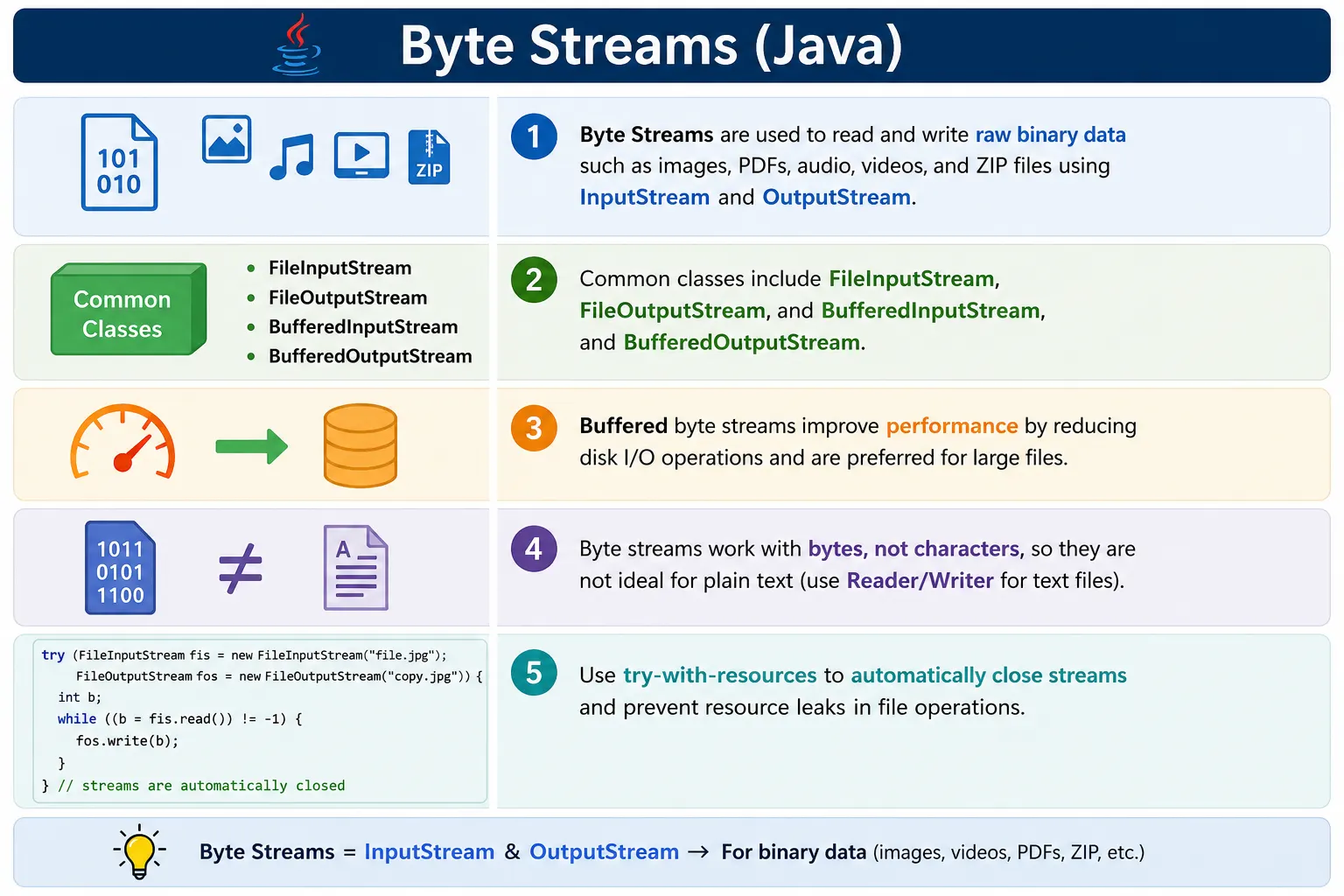
What Are Byte Streams?
A byte stream is an I/O stream that reads or writes 8-bit values. On the input side, Java uses
InputStream and its subclasses. On the output side, Java uses OutputStream and its
subclasses. An input stream brings bytes into the program from a source such as a file, memory buffer, socket,
or compressed stream. An output stream sends bytes out of the program to a destination such as a file, network
connection, memory buffer, or another processing layer.
The word "stream" is important. A stream represents a flow of data. The program usually reads or writes the data sequentially rather than loading and processing everything at once. This is useful for large files because a program can copy or process data in chunks without storing the entire file in memory. A video file of several gigabytes can be processed using a small buffer because the stream gives the program one portion at a time.
- Work with 8-bit bytes
- Used for binary data
- Platform-independent
- Part of java.io package
- Base classes:
- InputStream
- OutputStream
When to Use Byte Streams
Byte streams should be used when the content is binary or when the program must preserve bytes exactly. Images, audio files, videos, PDF documents, ZIP archives, serialized objects, and executable files are common examples. These formats have their own internal structure. Treating them as text can corrupt the file because character conversion may change byte values.
- ✔ Images (.jpg, .png)
- ✔ Audio / video files
- ✔ PDF, ZIP, executable files
- ✔ Network and socket data
- ❌ Not ideal for plain text (use character streams)
Plain text is different because text has character encoding. A byte value by itself does not tell Java which
character it represents unless an encoding such as UTF-8, UTF-16, or ISO-8859-1 is known. Character streams
such as Reader and Writer are designed for this problem. They convert bytes into
characters and characters into bytes using an encoding. Byte streams can still read a text file as bytes, but
they are not the most meaningful tool when the goal is to process text as characters or lines.
Byte Stream Class Hierarchy (Important)
The byte stream hierarchy starts with two abstract base classes: InputStream and
OutputStream. These classes define the common behavior expected from all byte input and output
streams. Subclasses provide the actual source, destination, buffering, data conversion, object serialization,
or other specialized behavior.
This design is based on composition. A program can wrap one stream inside another stream to add capability.
For example, a FileInputStream reads bytes from a file. A BufferedInputStream can
wrap that file stream to improve performance. A DataInputStream can wrap another input stream to
read primitive values. Each layer has a focused responsibility.
Input Side
InputStream
 ├── FileInputStream
 ├── BufferedInputStream
 ├── DataInputStream
 └── ObjectInputStream
Output Side
OutputStream
 ├── FileOutputStream
 ├── BufferedOutputStream
 ├── DataOutputStream
 └── ObjectOutputStream
InputStream (Base Class)
InputStream is the base class for reading bytes. The simplest method is read(),
which reads one byte and returns it as an integer. It returns -1 when the end of the stream is
reached. This return value is important because byte values range from 0 to 255 when read as unsigned data, so
Java uses -1 as a special end-of-stream signal.
Used to read bytes.
Key Methods
int read();            // reads one byte
int read(byte[] b);    // reads multiple bytes
void close();          // closes stream
✔ Returns -1 when end of stream is reached
Reading one byte at a time is easy to understand, but it is inefficient for large files because it may require
many I/O calls. The overloaded read(byte[] b) method reads multiple bytes into a buffer and
returns the number of bytes actually read. The last read may fill only part of the buffer, which is why copy
logic must use the returned length instead of assuming the whole buffer is valid every time.
OutputStream (Base Class)
OutputStream is the base class for writing bytes. It can write a single byte, a byte array, or a
portion of a byte array. Output streams may hold data temporarily in memory before sending it to the final
destination. The flush() method requests that buffered data be pushed out. The
close() method releases the underlying resource and usually flushes the stream as part of closing.
Used to write bytes.
Key Methods
void write(int b);          // writes one byte
void write(byte[] b);       // writes byte array
void flush();               // forces write
void close();               // closes stream
FileInputStream (Reading Binary Data)
FileInputStream is used when the byte source is a file. It is commonly used for images, PDFs,
binary configuration files, ZIP files, and any file that should be processed as raw bytes. Creating a
FileInputStream can throw FileNotFoundException if the file does not exist, if the
path points to a directory instead of a file, or if the program does not have permission to open it.
FileInputStream fis = new FileInputStream("image.jpg");

int data;
while ((data = fis.read()) != -1) {
    System.out.print(data);
}

fis.close();
✔ Reads byte-by-byte
❌ Slow without buffering
In beginner examples, reading byte-by-byte is useful because it clearly shows how read() works.
In real applications, buffered reading or array-based reading is normally preferred. Byte-by-byte loops can be
much slower because they perform many small operations instead of fewer larger operations.
FileOutputStream (Writing Binary Data)
FileOutputStream is used when the byte destination is a file. If the target file does not exist,
Java attempts to create it. If it already exists, the default constructor overwrites it. This default overwrite
behavior is useful in some cases, but it is also an interview trap and a real project risk. If the program
should preserve existing content, the append-mode constructor must be used.
FileOutputStream fos = new FileOutputStream("copy.jpg");

fos.write(65);  // writes byte
fos.close();
✔ Creates file if not exists
✔ Overwrites by default
Copying a File Using Byte Streams (Common Example)
File copying is the classic byte stream example because it shows both input and output working together. The program reads bytes from the source file and writes those same bytes to the destination file. For binary files, copying must preserve the exact byte sequence. If even a single byte changes in an image, PDF, archive, or executable file, the copied file may become invalid.
FileInputStream fis = new FileInputStream("source.jpg");
FileOutputStream fos = new FileOutputStream("dest.jpg");

byte[] buffer = new byte[1024];
int bytesRead;

while ((bytesRead = fis.read(buffer)) != -1) {
    fos.write(buffer, 0, bytesRead);
}

fis.close();
fos.close();
✔ Efficient
✔ Real-world usage
The key detail is fos.write(buffer, 0, bytesRead). The final read may return fewer bytes than the
buffer size. If the code writes the full buffer every time, stale bytes from the previous read may be written
at the end of the destination file. Writing only the number of bytes actually read is what makes the copy
correct.
Buffered Byte Streams (Performance Boost)
Buffering improves performance by reducing the number of direct interactions with the underlying file system or device. Without buffering, a program may perform many tiny read or write operations. With buffering, data is collected in memory and transferred in larger chunks. This is usually much faster, especially for large files or repeated small writes.
BufferedInputStream & BufferedOutputStream
- Use internal buffer
- Reduce disk I/O operations
- Faster than plain streams
BufferedInputStream bis =
    new BufferedInputStream(new FileInputStream("a.jpg"));

BufferedOutputStream bos =
    new BufferedOutputStream(new FileOutputStream("b.jpg"));
✔ Always preferred for large files
Buffered streams are wrappers. They do not replace the underlying source or destination. Instead, they sit on
top of another stream. A BufferedInputStream may wrap a FileInputStream, and a
BufferedOutputStream may wrap a FileOutputStream. This is a common Java I/O pattern:
choose the source or destination stream first, then wrap it with another stream that adds useful behavior.
Closing the outermost stream is normally enough because closing a wrapper stream closes the stream it wraps. This is another reason try-with-resources is useful. It reduces the chance of forgetting to close a stream and makes cleanup easier to read.
Byte Streams vs Character Streams (Interview Table)
The difference between byte streams and character streams is mostly about interpretation. Byte streams move raw bytes. Character streams understand characters and therefore involve encoding and decoding. When a file is binary, character interpretation is not wanted. When a file is text, character interpretation is usually required.
This is why using FileInputStream directly for a text file can produce confusing results. It may
show numeric byte values or create incorrect characters if the encoding is misunderstood. A
FileReader or InputStreamReader is usually better for text because it treats the data
as characters rather than raw bytes.
| Aspect | Byte Streams | Character Streams |
|---|---|---|
| Data type | Bytes | Characters |
| File type | Binary | Text |
| Base classes | InputStream / OutputStream | Reader / Writer |
| Encoding | ❌ No | ✔ Yes |
| Example | Image, PDF | Text, CSV |
Common Byte Stream Classes (Must Remember)
The common byte stream classes can be grouped by purpose. FileInputStream and
FileOutputStream connect byte streams to files. BufferedInputStream and
BufferedOutputStream improve performance. DataInputStream and
DataOutputStream read and write primitive values in a portable binary format.
ObjectInputStream and ObjectOutputStream are used for serialization and
deserialization.
- FileInputStream
- FileOutputStream
- BufferedInputStream
- BufferedOutputStream
- DataInputStream
- DataOutputStream
- ObjectInputStream
- ObjectOutputStream
Common Beginner Mistakes
The most common beginner mistake is using byte streams for all files just because all files are stored as bytes. Although byte streams can technically read text files, they do not solve the character encoding problem. If the task is to read lines, words, CSV records, properties, or human-readable text, character streams or higher-level APIs are usually better.
- Using byte streams for text files
- Forgetting to close streams
- Not using buffering
- Reading byte-by-byte unnecessarily
- Ignoring exception handling
Another common mistake is forgetting to close streams. A stream usually holds an operating system resource such as a file handle. If it is not closed, data may not be fully written, resources may remain locked, and later operations may fail. Try-with-resources is the standard solution because it closes streams automatically even when an exception occurs.
Beginners also forget that read(byte[]) returns the number of bytes read. They may convert or
write the entire buffer even when only part of it contains new data. This creates extra bytes in output and is
especially harmful when copying binary files. Always use the length returned by read().
Best Practices
The best practice for byte streams is to match the tool to the data. Use byte streams for binary data and character streams for text. Use buffering when files are large or when many small operations are expected. Use try-with-resources to close streams reliably. Check exceptions and understand whether a file will be created, overwritten, or appended.
- Use buffered streams for performance
- Use try-with-resources for auto-close
- Use byte streams only for binary data
- Prefer NIO (Files.copy) for modern code
try (FileInputStream fis = new FileInputStream("a.jpg");
     FileOutputStream fos = new FileOutputStream("b.jpg")) {
    // logic
}
In modern Java, the Files class often provides simpler methods for common tasks. For example,
Files.copy() can copy files with less manual loop code. Files.readAllBytes() can
read a small file completely into memory. These utilities are convenient, but they do not replace the need to
understand streams. Streams are still important for large files, network connections, layered processing, and
APIs that expose InputStream or OutputStream.
How Byte Streams Work in Real Applications
In real applications, byte streams appear in many places even when developers do not use them directly. A web application may receive uploaded files as an input stream. A REST API may return a PDF report through an output stream. A servlet may stream an image to the browser. A backup utility may copy archives from one folder to another. A client application may download a ZIP file from a server.
The common pattern is always source to destination. The source might be a file, socket, memory array, or compressed stream. The destination might be another file, HTTP response, socket, memory buffer, or encrypted stream. Java's stream design allows these pieces to be combined. For example, data might be read from a file, wrapped in a buffered stream, compressed, encrypted, and then written to a network connection.
This layered design is one of the strengths of Java I/O. Each stream class does one job. A file stream knows how to talk to the file system. A buffered stream knows how to reduce I/O calls. A data stream knows how to read and write primitive values. An object stream knows how to serialize objects. By combining them, programs can build powerful I/O workflows without each class needing to know every possible use case.
Memory and Large File Considerations
Large files should usually be processed in chunks rather than loaded fully into memory. A method such as
readAllBytes() is convenient for small files, but it can be risky for large files because the
entire content must fit in memory. A stream loop with a buffer is safer because it holds only a small portion
of the file at a time.
Buffer size is a practical tuning choice. A very small buffer causes too many I/O operations. A very large buffer uses more memory and may not improve performance after a certain point. Many examples use 1024 bytes because it is simple, but real applications often use larger buffers such as 8 KB, 16 KB, or 64 KB depending on the workload.
The important point is correctness first. Always write only the bytes that were actually read. Always close resources. Add buffering where it improves performance. Avoid loading large binary data into memory unless the file size is known and acceptable.
Exception Handling and Resource Cleanup
Byte stream operations commonly throw checked exceptions because file and network I/O can fail for many reasons. The file may not exist, the program may not have permission, the disk may be full, a network connection may close, or another process may lock the file. Java forces the code to acknowledge these possibilities through exception handling.
Before try-with-resources, code often used a finally block to close streams. That style works but
is verbose and easy to get wrong. Try-with-resources is cleaner because Java automatically closes resources
declared in the try statement. It also handles cleanup correctly when an exception is thrown while reading or
writing.
Resource cleanup is not just about memory. Streams may hold file handles, buffers, network sockets, or other operating system resources. Closing the stream tells the system that the program is finished with the resource. For output streams, closing also helps ensure that any buffered data is written before the resource is released.
Byte Streams in Testing and Automation
Test automation frequently uses byte streams when handling file uploads, downloads, screenshots, PDF validation, report attachments, and binary test data. A Selenium test may download a file and compare its size or checksum. An API test may verify that a binary response is a valid PDF or image. A framework may save screenshots by writing image bytes to disk.
In these scenarios, byte streams are preferred because the data should not be treated as text. A screenshot, PDF, or ZIP file must be preserved exactly. If automation code accidentally converts binary content to a string and back, the file may become corrupted. This is why testers working with file validation should understand the difference between byte handling and character handling.
Reliable automation should also avoid hardcoded timing around file creation. Instead of sleeping for a fixed number of seconds after a download, a test can wait until the expected file exists and its size stabilizes. Once the file is ready, byte streams or modern NIO methods can inspect or copy it safely.
Overwrite, Append, and Flush Behavior
Output behavior deserves special attention because writing bytes changes files. A normal
FileOutputStream constructor overwrites an existing file. This means old content is removed when
the stream is opened. If the requirement is to add content to the end of a file, the append constructor must be
used. This distinction is simple, but it is a common source of accidental data loss in beginner programs.
The flush() method is related to buffered output. When data is written through a buffered stream,
it may stay in memory temporarily until the buffer fills, the stream is flushed, or the stream is closed.
Calling flush() asks Java to push pending bytes to the destination. Closing the stream normally
flushes it too, but explicit flushing can be useful when data must be visible before the stream is closed, such
as when writing to a network response.
A good rule is to close streams when work is complete and use try-with-resources whenever possible. Use append mode only when the business requirement clearly says existing data should be preserved. Use flush when pending buffered output must be delivered before the stream closes. These small details make byte stream code safer and easier to reason about.
Choosing Between Streams and NIO
Modern Java provides convenient NIO methods such as Files.copy(), Files.readAllBytes(),
Files.newInputStream(), and Files.newOutputStream(). These methods are often clearer
for everyday file operations. If the task is simply to copy a file, using Files.copy() may be more
readable than writing a manual loop.
Streams are still important because not all byte data comes from files. Network sockets, HTTP request bodies,
servlet responses, compressed streams, encrypted streams, classpath resources, and in-memory byte arrays often
expose stream APIs. A developer who understands InputStream and OutputStream can work
across many I/O sources and destinations, not only local files.
The practical decision is straightforward. Use NIO utility methods when they express the operation directly. Use streams when data must be processed gradually, transformed through layers, copied between generic sources and destinations, or handled without loading everything into memory. Both APIs are useful, and strong Java code often combines them.
How to Explain Byte Streams in Interviews
A strong interview answer should begin with the definition: byte streams read and write raw binary data in
Java. Then mention the base classes, InputStream and OutputStream. After that,
explain that file-based byte streams are FileInputStream and FileOutputStream, and
buffered byte streams improve performance by reducing direct I/O operations.
The answer should also contrast byte streams with character streams. Byte streams are suitable for images, PDFs, ZIP files, audio, video, and other binary content. Character streams are suitable for text because they handle characters and encoding. This comparison shows that you know when to use the concept, not only how to define it.
Finally, include best practices. Use a buffer for efficient copying. Use try-with-resources to close streams.
Write only the number of bytes actually read from the buffer. Remember that FileOutputStream
overwrites by default unless append mode is enabled. Mentioning these details makes the answer practical and
interview-ready.
Interview-Ready Answers
Short Answer
Byte streams are used to read and write binary data in Java.
Detailed Answer
In Java, byte streams are based on InputStream and OutputStream classes and are used to handle raw binary data such as images, audio, and files. They operate on bytes, are platform-independent, and form the foundation of Java I/O.
Byte Stream Examples (Interview Cheat Sheet)
1. Writing Bytes to a File (FileOutputStream)
import java.io.*;

class Demo {
    public static void main(String[] args) throws Exception {
        FileOutputStream fos = new FileOutputStream("data.bin");
        fos.write(65);   // ASCII 'A'
        fos.close();
    }
}
Key Point
- Writes one byte
- Creates file if not present
2. Writing Multiple Bytes
import java.io.*;

class Demo {
    public static void main(String[] args) throws Exception {
        FileOutputStream fos = new FileOutputStream("data.bin");
        byte[] bytes = {65, 66, 67};
        fos.write(bytes);
        fos.close();
    }
}
Output in file
ABC
3. Reading a File (FileInputStream)
import java.io.*;

class Demo {
    public static void main(String[] args) throws Exception {
        FileInputStream fis = new FileInputStream("data.bin");
        int b;
        while ((b = fis.read()) != -1) {
            System.out.print((char) b);
        }
        fis.close();
    }
}
4. Reading into Byte Array (Efficient)
import java.io.*;

class Demo {
    public static void main(String[] args) throws Exception {
        FileInputStream fis = new FileInputStream("data.bin");
        byte[] buffer = new byte[1024];
        int length = fis.read(buffer);
        System.out.println(new String(buffer, 0, length));
        fis.close();
    }
}
5. Appending Data to File
import java.io.*;

class Demo {
    public static void main(String[] args) throws Exception {
        FileOutputStream fos =
            new FileOutputStream("data.bin", true);
        fos.write(68); // 'D'
        fos.close();
    }
}
Key Point
- true → append mode
6. Copying a File (Classic Interview Example)
import java.io.*;

class Demo {
    public static void main(String[] args) throws Exception {
        FileInputStream fis = new FileInputStream("source.bin");
        FileOutputStream fos = new FileOutputStream("target.bin");

        int b;
        while ((b = fis.read()) != -1) {
            fos.write(b);
        }

        fis.close();
        fos.close();
    }
}
7. Copying File Using Buffer (Better Performance)
import java.io.*;

class Demo {
    public static void main(String[] args) throws Exception {
        FileInputStream fis = new FileInputStream("source.bin");
        FileOutputStream fos = new FileOutputStream("target.bin");

        byte[] buffer = new byte[1024];
        int bytesRead;
        while ((bytesRead = fis.read(buffer)) != -1) {
            fos.write(buffer, 0, bytesRead);
        }

        fis.close();
        fos.close();
    }
}
8. BufferedInputStream & BufferedOutputStream
import java.io.*;

class Demo {
    public static void main(String[] args) throws Exception {
        BufferedOutputStream bos =
            new BufferedOutputStream(new FileOutputStream("data.bin"));
        bos.write("Hello".getBytes());
        bos.close();
    }
}
Why
- Reduces disk I/O calls
- Faster than plain streams
9. Reading Binary File (Image / PDF)
import java.io.*;

class Demo {
    public static void main(String[] args) throws Exception {
        FileInputStream fis = new FileInputStream("image.png");
        System.out.println("File size: " + fis.available());
        fis.close();
    }
}
Key Point
- Byte streams handle binary data
10. Try-With-Resources (Best Practice)
import java.io.*;

class Demo {
    public static void main(String[] args) throws Exception {
        try (FileInputStream fis = new FileInputStream("data.bin")) {
            System.out.println(fis.read());
        }
    }
}
Why
- Auto-closes resources
- Prevents memory leaks
11. Writing String as Bytes
import java.io.*;

class Demo {
    public static void main(String[] args) throws Exception {
        FileOutputStream fos = new FileOutputStream("text.bin");
        fos.write("Java IO".getBytes());
        fos.close();
    }
}
12. Overwriting File (Default Behavior)
new FileOutputStream("data.bin"); // overwrites existing file
Interview Trap
File content lost if append not enabled
13. Handling FileNotFoundException
import java.io.*;

class Demo {
    public static void main(String[] args) {
        try {
            new FileInputStream("missing.bin");
        } catch (FileNotFoundException e) {
            System.out.println("File not found");
        }
    }
}
14. Difference: Byte Stream vs Character Stream
FileInputStream   // binary data
FileReader        // text data
15. Reading All Bytes at Once (Java 9+)
import java.io.*;

class Demo {
    public static void main(String[] args) throws Exception {
        byte[] data =
            new FileInputStream("data.bin").readAllBytes();
        System.out.println(new String(data));
    }
}
16. Common Interview Trap – Forgetting to Close Stream
FileOutputStream fos = new FileOutputStream("a.bin");
fos.write(65);
// fos.close(); // ❌ resource leak
17. Byte Stream with Command Line Arguments
import java.io.*;

class Demo {
    public static void main(String[] args) throws Exception {
        FileInputStream fis = new FileInputStream(args[0]);
        FileOutputStream fos = new FileOutputStream(args[1]);

        fis.transferTo(fos);

        fis.close();
        fos.close();
    }
}
18. Using transferTo() (Java 9+)
fis.transferTo(fos);
Why
- Cleaner & optimized copying
19. When to Use Byte Streams
- Images
- Videos
- PDFs
- ZIP files
20. Interview Summary – Byte Streams
InputStream / OutputStream
Key Points
- Works with binary data
- Base classes: InputStream, OutputStream
- File versions: FileInputStream, FileOutputStream
- Use buffering for performance
- Close streams properly
Key Takeaway
Byte Streams = Binary Data Handling.
Use them for non-text files, add buffering for performance, and prefer modern NIO APIs in production.