Built-in Packages in Java
Built-in packages in Java are collections of predefined classes, interfaces, exceptions, annotations, and utility types provided as part of the Java platform. They give developers ready-made solutions for common programming needs such as working with text, collections, files, dates, numbers, databases, networking, and multithreading. Instead of writing every basic feature from the beginning, a Java developer can use these packages to build applications faster and with more confidence.
Built-in packages form the practical foundation of the Java Standard Library. When people say Java has a rich
standard library, they are usually referring to these packages. A beginner may first notice packages through
simple classes such as String, System, Scanner, and
ArrayList. As projects grow, the same idea expands into file handling with
java.io, modern path handling with java.nio.file, date and time processing with
java.time, database access with java.sql, and concurrent programming with
java.util.concurrent.
Understanding built-in packages is important because Java programming is not only about syntax. Real Java development depends heavily on knowing which library classes already exist and when to use them. A developer who understands built-in packages writes less unnecessary code, avoids many common mistakes, and follows standard practices that other Java developers can easily recognize. This is why built-in packages are often discussed in interviews along with imports, user-defined packages, classpath, APIs, and project structure.
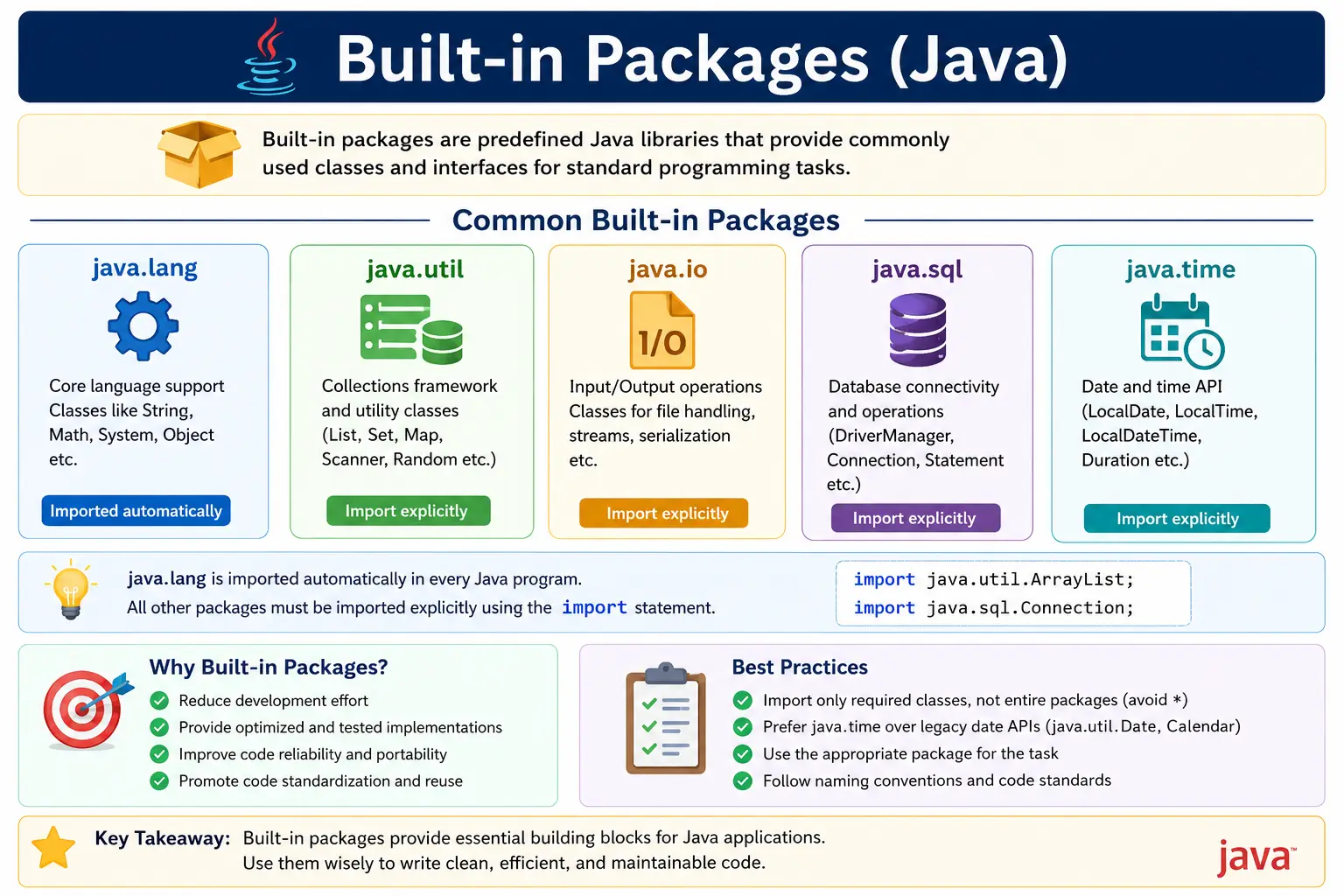
What Are Built-in Packages?
A built-in package is a package that comes with Java itself. It is not created by the application developer
and does not need to be downloaded separately for ordinary Java development. These packages are maintained as
part of the Java platform and are available through the installed JDK or runtime environment. For example,
java.lang, java.util, java.io, java.time,
java.net, and java.sql are built-in packages.
Each package groups related functionality under a meaningful namespace. The package java.util
contains utility classes and collection-related types. The package java.io contains classes for
file and stream input/output. The package java.time contains modern date and time classes. This
grouping makes the Java library easier to navigate because classes are not placed in one large, confusing
global space.
Built-in packages also protect naming clarity. Many applications may have a class named
Date, File, Logger, or List. Package names help identify
exactly which class is being used. For example, java.util.Date and java.sql.Date
are different classes even though both are named Date. The package name becomes part of the
fully qualified class name.
Why Built-in Packages Exist
Built-in packages exist because most software applications need certain common capabilities. Developers frequently need to store groups of values, read files, format dates, perform mathematical operations, connect to databases, handle exceptions, and communicate over networks. If every team had to implement these features independently, development would be slower and software quality would be less consistent.
Java solves this problem by providing reliable, reusable, and standardized implementations. A developer can
use ArrayList instead of creating a growable array from scratch. They can use
HashMap instead of manually building a key-value lookup structure. They can use
LocalDate instead of building their own date representation. These ready-made classes reduce
effort and allow developers to focus on business logic.
Built-in packages also promote consistency across Java programs. When different teams use the same standard
classes, code becomes easier to understand and maintain. A Java developer who sees List,
Map, BigDecimal, or ExecutorService can immediately understand the
general purpose of the code because these are widely recognized Java library types. Standardization is one of
the main reasons Java remains practical for large enterprise applications.
Another reason built-in packages matter is reliability. Classes in the Java Standard Library are used by millions of applications and have been refined over many years. They are not automatically perfect for every situation, but they are generally more tested, documented, and optimized than code a beginner might write quickly. Using standard library classes is often safer than reinventing basic functionality without a strong reason.
Most Important Built-in Packages (Must-Know)
Java contains many built-in packages, but a beginner does not need to memorize every class at once. A practical learning path is to understand the most commonly used packages first. These packages appear repeatedly in Java tutorials, interview questions, coding exercises, automation frameworks, backend applications, and enterprise projects.
1. java.lang - Core Language Support
The java.lang package contains classes that are so fundamental to Java programming that they are
automatically imported into every Java program. You do not need to write import java.lang.*;.
Classes such as String, Object, System, Math,
Exception, and wrapper classes are available by default.
This package supports the basic language experience. Every Java class indirectly inherits from
Object. Text is commonly represented using String. Console output often uses
System.out.println. Mathematical helper operations are available through Math.
Wrapper classes such as Integer, Double, and Boolean allow primitive
values to be treated as objects when needed.
Common classes:
- Object
- String, StringBuilder, StringBuffer
- Math
- System
- Exception, RuntimeException
- Wrapper classes (Integer, Double, etc.)
String s = "Java";
System.out.println(Math.sqrt(16));
2. java.util - Utilities and Collections
The java.util package is one of the most frequently used packages in Java. It contains
collection interfaces and classes, utility classes, date-related legacy classes, random number utilities,
scanners, iterators, and helper classes such as Collections and Arrays. For many
developers, java.util is the first package they import manually.
Collections are especially important. Interfaces such as List, Set, and
Map define common ways to store and access groups of data. Classes such as
ArrayList, HashSet, and HashMap provide practical implementations.
These classes appear in almost every real Java project because applications constantly need to store,
search, sort, group, and process data.
Common classes/interfaces:
- List, ArrayList, LinkedList
- Set, HashSet
- Map, HashMap
- Iterator
- Collections, Arrays
- Scanner
import java.util.*;

List<Integer> list = new ArrayList<>();
3. java.io - Input and Output
The java.io package provides classes for input and output operations, especially file handling
and stream-based processing. It includes classes for reading and writing bytes, characters, files, and
buffered data. Before modern APIs became common, java.io was the primary package used for many
file-related tasks.
A key idea in java.io is the stream. A stream represents a flow of data from a source to a
destination. For example, a program may read bytes from a file using an input stream or write characters to a
file using a writer. Many I/O operations can throw checked exceptions, so developers must handle or declare
them properly. This makes java.io closely connected with exception handling.
Common classes:
- File
- FileReader, FileWriter
- InputStream, OutputStream
- BufferedReader, BufferedWriter
import java.io.*;

File file = new File("data.txt");
4. java.nio - New I/O
The java.nio package was introduced to support newer and more flexible I/O capabilities. The
name is commonly understood as New I/O. It includes concepts such as buffers, channels, charsets, and file
APIs. A commonly used part of this area is java.nio.file, which provides modern classes such as
Path, Paths, and Files.
For many everyday file operations, java.nio.file.Files provides cleaner and more convenient
methods than older stream-based code. Developers can check whether a file exists, read lines, copy files,
create directories, and work with paths in a more expressive way. While beginners may start with
java.io, modern Java projects frequently use java.nio.file for file-system tasks.
Key features:
- Buffers
- Channels
- Paths & Files API
import java.nio.file.*;

Path p = Paths.get("data.txt");
5. java.sql - Database Connectivity
The java.sql package supports database connectivity through JDBC, which stands for Java Database
Connectivity. It defines standard interfaces and classes that allow Java applications to connect to
relational databases, send SQL statements, receive results, and handle database-related exceptions.
In real enterprise projects, developers may use frameworks that hide much of the direct JDBC code, but the
concepts from java.sql are still important. Classes and interfaces such as
Connection, PreparedStatement, ResultSet, and
SQLException explain how Java communicates with databases at a standard level. Testers and
developers often encounter these terms when debugging database problems.
Common interfaces/classes:
- Connection
- Statement, PreparedStatement
- ResultSet
- DriverManager
import java.sql.*;

Connection con = DriverManager.getConnection(url, user, pwd);
6. java.time - Date and Time API
The java.time package, introduced in Java 8, provides the modern date and time API. It is a
major improvement over older classes such as Date and Calendar. The newer API is
clearer, more reliable, and easier to use for most date and time operations.
Classes such as LocalDate, LocalTime, LocalDateTime,
Period, and Duration help represent dates, times, date-time values, and time
differences. These classes are important in business applications because many rules depend on dates:
subscription expiry, payment due dates, booking windows, age calculations, delivery estimates, and audit
timestamps.
Common classes:
- LocalDate
- LocalTime
- LocalDateTime
- Period, Duration
import java.time.*;

LocalDate today = LocalDate.now();
7. java.net - Networking
The java.net package provides classes for network programming. It includes support for URLs,
connections, sockets, and server sockets. While many modern applications use higher-level HTTP clients or web
frameworks, java.net explains the foundation of how Java can interact with resources across a
network.
For beginners, classes such as URL are useful for understanding how Java represents web
addresses. More advanced developers may use socket-related classes to understand lower-level communication.
Even when a project uses frameworks, the concepts behind networking remain important because distributed
applications depend on remote communication.
Common classes:
- URL
- URLConnection
- Socket
- ServerSocket
import java.net.*;

URL url = new URL("https://example.com");
8. java.util.concurrent - Multithreading Utilities
The java.util.concurrent package provides higher-level utilities for multithreaded programming.
Working directly with threads can be difficult because developers must think about scheduling, shared data,
synchronization, race conditions, and resource management. This package provides tools that make concurrent
programming more structured.
Classes and interfaces such as ExecutorService, Executors, Callable,
Future, and ConcurrentHashMap are used to manage tasks, thread pools, and
thread-safe data structures. A beginner does not need to master concurrency immediately, but knowing that
Java provides a dedicated package for it helps build awareness of real-world application requirements.
Common classes:
- ExecutorService
- Executors
- Future
- Callable
- ConcurrentHashMap
import java.util.concurrent.*;

ExecutorService ex = Executors.newFixedThreadPool(2);
9. java.math - High-Precision Arithmetic
The java.math package provides classes for high-precision arithmetic. The two most important
classes are BigInteger and BigDecimal. BigInteger is used for integer
values larger than the normal primitive integer range. BigDecimal is used when decimal precision
is critical.
BigDecimal is especially important in financial applications. Floating-point types such as
float and double can introduce precision issues because they represent decimal
values in binary form. For money, tax, interest, and billing calculations, BigDecimal is usually
the safer choice. This is a common interview point because it connects Java packages with real business
correctness.
Classes:
- BigInteger
- BigDecimal
import java.math.*;

BigDecimal bd = new BigDecimal("123.45");
Package Import Rules
Import statements allow Java source files to refer to classes by their simple names instead of fully
qualified names. For example, after importing java.util.ArrayList, the code can write
ArrayList directly. Without the import, the full name java.util.ArrayList would be
required.
The main exception is java.lang. Classes in this package are automatically available, so
String, System, Math, and wrapper classes can be used without an
import statement. Other packages generally require explicit imports unless the code uses fully qualified
names.
Wildcard imports such as import java.util.*; import types directly inside that package, but they
do not import sub-packages. This means java.util.* does not import
java.util.concurrent.*. If a program needs ExecutorService, it must import that
class or the java.util.concurrent package separately.
- java.lang is auto-imported
- Other packages must usually be imported explicitly
- Wildcard imports do not import sub-packages
import java.util.*; // only util, not util.concurrent
Built-in Packages Summary Table
| Package | Purpose |
|---|---|
| java.lang | Core language support |
| java.util | Collections & utilities |
| java.io | File & stream I/O |
| java.nio | Non-blocking I/O |
| java.sql | Database connectivity |
| java.time | Date & time |
| java.net | Networking |
| java.util.concurrent | Multithreading |
| java.math | High-precision math |
How Built-in Packages Improve Real Projects
Built-in packages are valuable because they let developers solve common problems with familiar tools. In a
real application, a login module may use String for credentials, List for roles,
LocalDateTime for audit timestamps, BigDecimal for billing amounts, and
SQLException handling for database failures. These are not isolated academic examples; they are
everyday building blocks.
Standard packages also make code more readable for other developers. If a project uses
ArrayList, HashMap, and LocalDate, most Java developers understand the
intent immediately. If the project used custom-made versions of every list, map, and date class, new team
members would need to learn unnecessary project-specific behavior. Built-in packages reduce that learning
burden.
They also support maintainability. Standard library classes are well documented and supported by IDEs, compilers, build tools, and static analysis tools. When a developer uses known Java APIs correctly, the code benefits from ecosystem support. IDEs can suggest imports, show documentation, detect unused classes, and help refactor code. This makes built-in packages part of the productivity environment, not just a set of classes.
Built-in Packages and API Thinking
Built-in packages are also a good way to understand the meaning of an API. An API is a public interface that
allows developers to use existing functionality without knowing every internal implementation detail. For
example, a developer can call Collections.sort without knowing all internal steps used by the
sorting implementation. They only need to understand the method contract, input, output, and expected
behavior.
This style of thinking is important in professional programming. Developers constantly use APIs provided by the JDK, frameworks, databases, cloud services, and internal teams. Built-in Java packages are often the first place where beginners learn to trust and use APIs correctly. Reading method names, class names, return types, and exceptions carefully becomes part of good development practice.
Choosing the Right Built-in Package
Many beginner mistakes come from choosing a class without understanding the problem clearly. For example, if
the requirement is to store ordered values and allow duplicates, ArrayList may be appropriate.
If the requirement is to avoid duplicates, a Set may be better. If the requirement is to store
values by key, a Map is usually suitable. The package provides the tools, but the developer must
choose the right one.
The same idea applies to date and time. For a date without time, LocalDate is clearer than using
a full date-time object. For a timestamp that includes date and time without timezone, LocalDateTime
may be suitable. For duration between two events, Duration expresses the intent better than a
manually calculated number of milliseconds. Good Java code often becomes clearer simply because the correct
standard class is chosen.
File handling provides another example. If the task is simple path-based file checking, the modern
java.nio.file API may be easier to use. If the task involves stream-based reading and writing,
classes from java.io may still be relevant. The point is not that one package is always better
than another. The point is that Java gives multiple standard tools, and developers should understand the
purpose of each.
Built-in Packages and Exception Handling
Many built-in packages are closely connected with exception handling. File operations can fail because a file is missing, access is denied, or a path is invalid. Database operations can fail because a connection is unavailable, SQL is incorrect, or credentials are invalid. Network operations can fail because a host cannot be reached or a request times out. Java represents many of these problems through exceptions.
This is why packages such as java.io, java.sql, and java.net are often
learned together with try, catch, finally, throw, and
throws. A developer must not only know how to call a class or method; they must also know how to
handle failure responsibly. Built-in package usage becomes practical only when errors are handled in a stable
and readable way.
Built-in Packages vs User-Defined Packages
Built-in packages and user-defined packages serve different purposes. Built-in packages are provided by Java
and contain reusable platform-level functionality. User-defined packages are created by developers to
organize their own application classes. For example, java.util is built into Java, while
com.company.order.service may be a package created for a specific business application.
In real projects, both are used together. A developer may create a user-defined class named
OrderService inside an application package, and that class may use built-in classes such as
List, Map, BigDecimal, and LocalDateTime. User-defined
packages organize business code, while built-in packages provide reliable supporting tools.
Common Beginner Mistakes
Beginners often forget that java.lang is imported automatically but other packages are not. This
leads to confusion when String works without import but ArrayList does not. The
rule is simple: core language classes from java.lang are available by default, while classes
from packages such as java.util, java.io, and java.time usually need
imports.
Another common mistake is relying too heavily on wildcard imports. Wildcard imports are not always wrong, but
explicit imports often make code clearer, especially for learners. If a file imports java.util.*
and java.sql.*, a class name such as Date may become ambiguous because both areas
contain a type with that name. Explicit imports reduce this kind of confusion.
Some beginners continue using older date classes such as Date and Calendar for all
date operations because they appear in old examples. Modern Java development generally prefers
java.time for new code. Legacy classes still exist and may appear in older systems, but new
learning should focus on the clearer and safer modern API.
Resource handling is another frequent issue. Classes that work with files, databases, or external connections often require cleanup. If streams, readers, writers, database statements, or connections are not closed properly, applications may leak resources. Modern Java commonly uses try-with-resources for this reason. A beginner should understand not only how to open a resource, but also how to close it safely.
Interview Perspective
In interviews, built-in packages are usually tested to check whether the candidate understands practical Java
library usage. A strong answer should explain that built-in packages are predefined packages provided by Java
to handle common programming tasks. The answer should include examples such as java.lang for core
language support, java.util for collections and utilities, java.io for input/output,
java.time for modern date and time handling, and java.sql for database connectivity.
A stronger interview answer also explains import behavior. Mention that java.lang is imported
automatically, other packages usually require import statements, and wildcard imports do not include
sub-packages. These details show that the candidate has written actual Java code and understands more than a
memorized definition.
How to Learn Built-in Packages Effectively
The best way to learn built-in packages is not to memorize package names as a long list. A better approach is
to connect each package with a practical problem. When you need to store multiple values, learn
java.util collections. When you need to represent dates, learn java.time. When you
need to read or write files, compare java.io and java.nio.file. When precision
matters, learn java.math. This problem-based learning makes package knowledge easier to retain.
Beginners should also practice reading official method names and class names carefully. Java class names are
usually descriptive. BufferedReader suggests buffered reading, PreparedStatement
suggests a prepared SQL statement, ConcurrentHashMap suggests a map designed for concurrent
access, and LocalDate suggests a date without time-zone details. These names provide clues about
purpose and usage.
A practical study habit is to build small examples for each package instead of only reading definitions.
Create a list and sort it. Read a file path and check whether it exists. Print today's date. Store a decimal
amount using BigDecimal. Start a small executor service and shut it down. These examples do not
need to be large, but they help convert package names into working knowledge.
Built-in Packages in Automation and Testing Work
Built-in packages are also useful for testers and automation engineers who write Java-based test frameworks.
Test automation commonly uses java.util for lists, maps, sets, properties, and random values.
It may use java.io or java.nio.file for reading test data, screenshots, reports,
logs, or configuration files. Date and time classes are useful for timestamps, report names, expiry checks,
and time-based test data.
Even when a framework depends on external libraries such as Selenium, TestNG, JUnit, Cucumber, or REST clients, built-in packages remain essential. External libraries solve specialized problems, while built-in packages support everyday programming. A test script may call a Selenium API to interact with a browser, but it still uses Java strings, collections, exceptions, file paths, and dates to manage the test logic around that interaction.
This is why interviewers often expect automation learners to understand core packages. Without
java.util, it is difficult to manage collections of test data. Without exception handling and
I/O awareness, it is difficult to work with files and reports. Without date and time classes, it is difficult
to create stable time-based checks. Built-in packages are not separate from real project work; they are part
of the daily toolkit.
Interview-Ready Answers
Short Answer
Built-in packages are predefined Java packages that provide commonly used classes and interfaces.
Detailed Answer
Java provides built-in packages such as java.lang, java.util, java.io, java.sql, and java.time to handle core language features, collections, I/O, databases, and date/time operations. These packages help developers write efficient, standardized, and maintainable code.
Built-in Package Examples (Quick Practice)
1. java.lang - String (Auto-Imported)
class Demo {
    public static void main(String[] args) {
        String s = "Java";
        System.out.println(s.toUpperCase());
    }
}
Output
JAVA
2. java.lang - Math Class
class Demo {
    public static void main(String[] args) {
        System.out.println(Math.max(10, 20));
        System.out.println(Math.sqrt(16));
    }
}
Output
20
4.0
3. java.lang - Wrapper Classes
class Demo {
    public static void main(String[] args) {
        Integer x = Integer.parseInt("100");
        System.out.println(x + 50);
    }
}
Output
150
4. java.util - ArrayList
import java.util.ArrayList;

class Demo {
    public static void main(String[] args) {
        ArrayList<String> list = new ArrayList<>();
        list.add("Java");
        list.add("Selenium");
        System.out.println(list);
    }
}
Output
[Java, Selenium]
5. java.util - HashSet
import java.util.HashSet;

class Demo {
    public static void main(String[] args) {
        HashSet<Integer> set = new HashSet<>();
        set.add(10);
        set.add(10);
        System.out.println(set);
    }
}
Output
[10]
6. java.util - HashMap
import java.util.HashMap;

class Demo {
    public static void main(String[] args) {
        HashMap<Integer, String> map = new HashMap<>();
        map.put(1, "Java");
        map.put(2, "API");
        System.out.println(map.get(1));
    }
}
Output
Java
7. java.util - Iterator
import java.util.ArrayList;
import java.util.Iterator;

class Demo {
    public static void main(String[] args) {
        ArrayList<String> list = new ArrayList<>();
        list.add("A");
        list.add("B");

        Iterator<String> it = list.iterator();
        while (it.hasNext()) {
            System.out.println(it.next());
        }
    }
}
Output
A
B
8. java.util - Collections Utility Class
import java.util.*;

class Demo {
    public static void main(String[] args) {
        List<Integer> list = Arrays.asList(3, 1, 2);
        Collections.sort(list);
        System.out.println(list);
    }
}
Output
[1, 2, 3]
9. java.util - Date
import java.util.Date;

class Demo {
    public static void main(String[] args) {
        Date d = new Date();
        System.out.println(d);
    }
}
Output
(Current date & time)
10. java.util - Scanner (User Input)
import java.util.Scanner;

class Demo {
    public static void main(String[] args) {
        Scanner sc = new Scanner(System.in);
        int x = sc.nextInt();
        System.out.println(x * 2);
    }
}
Explanation
Reads input from console
11. java.io - File Class
import java.io.File;

class Demo {
    public static void main(String[] args) {
        File f = new File("test.txt");
        System.out.println(f.exists());
    }
}
Output
false // if file not present
12. java.io - FileInputStream (Checked Exception)
import java.io.FileInputStream;

class Demo {
    public static void main(String[] args) {
        try {
            FileInputStream fis = new FileInputStream("test.txt");
        } catch (Exception e) {
            System.out.println("File not found");
        }
    }
}
Output
File not found
13. java.nio.file - Files API (Modern IO)
import java.nio.file.Files;
import java.nio.file.Paths;

class Demo {
    public static void main(String[] args) throws Exception {
        boolean exists = Files.exists(Paths.get("test.txt"));
        System.out.println(exists);
    }
}
14. java.time - LocalDate
import java.time.LocalDate;

class Demo {
    public static void main(String[] args) {
        LocalDate today = LocalDate.now();
        System.out.println(today);
    }
}
Output
YYYY-MM-DD
15. java.time - LocalDateTime
import java.time.LocalDateTime;

class Demo {
    public static void main(String[] args) {
        System.out.println(LocalDateTime.now());
    }
}
16. java.sql - SQLException (Exception Example)
import java.sql.SQLException;

class Demo {
    static void connect() throws SQLException {
        throw new SQLException("DB error");
    }

    public static void main(String[] args) {
        try {
            connect();
        } catch (SQLException e) {
            System.out.println(e.getMessage());
        }
    }
}
Output
DB error
17. java.net - URL Class
import java.net.URL;

class Demo {
    public static void main(String[] args) throws Exception {
        URL url = new URL("https://example.com");
        System.out.println(url.getHost());
    }
}
Output
example.com
18. java.util.concurrent - Thread Pool
import java.util.concurrent.ExecutorService;
import java.util.concurrent.Executors;

class Demo {
    public static void main(String[] args) {
        ExecutorService ex = Executors.newSingleThreadExecutor();
        ex.execute(() -> System.out.println("Task running"));
        ex.shutdown();
    }
}
Output
Task running
19. java.lang.System - System Properties
class Demo {
    public static void main(String[] args) {
        System.out.println(System.getProperty("os.name"));
    }
}
20. Interview Summary: Built-in Packages
import java.util.*;
import java.time.*;

class Demo {
    public static void main(String[] args) {
        System.out.println(LocalDate.now());
        System.out.println(new ArrayList<>());
    }
}
Key Points
- java.lang is auto-imported
- java.util provides collections and utilities
- java.io and java.nio support file handling
- java.time provides modern date and time handling
- java.sql supports database connectivity
Key Takeaway
Built-in packages are the backbone of Java development. Mastering them allows you to write powerful applications faster, cleaner, and more reliably.