Buffered Streams
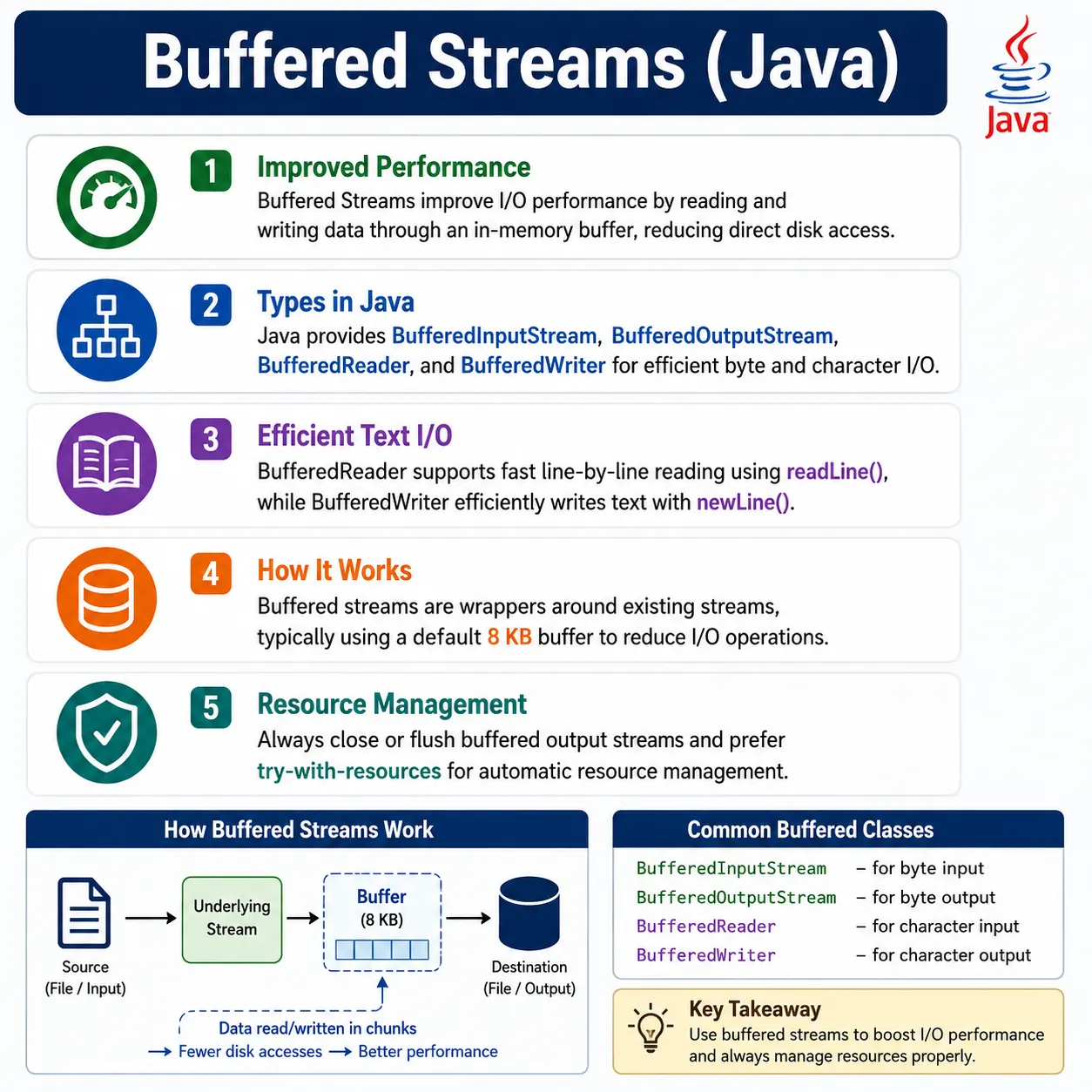
Buffered Streams in Java improve I/O performance by reducing the number of direct interactions with the underlying file system or device. They wrap existing streams and use an in-memory buffer to read/write data in larger chunks instead of byte-by-byte or char-by-char.
Input and output operations are often much slower than normal memory operations. Reading from disk, writing to disk, receiving data from a network, or sending data to a device involves resources outside the Java program. If a program asks the operating system for one byte or one character at a time, the overhead becomes large. Buffered streams solve this problem by using memory as a temporary holding area between the program and the actual I/O source or destination.
The idea is simple but powerful. Instead of reading directly from the file for every small request, a buffered input stream reads a larger block of data into memory. The program then consumes data from that memory buffer. Instead of writing every small output immediately to disk, a buffered output stream stores data in memory and writes it in larger chunks. This reduces the number of direct I/O operations and usually improves performance significantly.
Buffered streams are not a separate kind of data. They are wrappers. A BufferedInputStream wraps
an existing input stream. A BufferedOutputStream wraps an existing output stream. A
BufferedReader wraps a reader. A BufferedWriter wraps a writer. The wrapper adds
buffering while the underlying stream or reader still defines the real data source or destination.
This is a must-know Core Java I/O topic and a common interview question.
What Are Buffered Streams?
Buffered streams are I/O classes that use an internal memory buffer to make reading and writing more efficient. They are available for both byte-based I/O and character-based I/O. Byte buffered streams are used for binary data such as images, PDFs, ZIP files, and downloaded files. Character buffered streams are used for text data such as logs, CSV files, configuration files, and reports.
The most important point is that buffering improves how data is transferred; it does not change what kind of data is being processed. If the data is binary, use byte streams and optionally add buffering. If the data is text, use character streams and optionally add buffering. Buffering is a performance and convenience layer on top of the correct stream type.
- Streams that use an internal buffer
- Reduce disk I/O operations
- Increase performance significantly
- Part of the java.io package
- Available for both byte and character streams
Why Buffered Streams Are Needed
Without buffering, every small read or write may cause a direct interaction with the underlying device. For a tiny demo program, this may not be noticeable. For a large file, repeated log writing, report generation, downloads, uploads, or line-by-line processing, the overhead can become significant. Buffered streams reduce that overhead by grouping operations into larger blocks.
Without Buffering
- Frequent disk access
- Slow performance
- High I/O overhead
With Buffering
- Fewer disk reads/writes
- Faster execution
- Efficient memory usage
Buffering is useful because memory access is fast compared with disk or network access. The program can work with the buffer quickly, and the buffer communicates with the external resource less frequently. This does not mean buffering removes all I/O cost, but it reduces unnecessary repeated calls and makes many file operations much faster.
Types of Buffered Streams
Java provides two main groups of buffered streams. Buffered byte streams work with raw bytes and are based on
InputStream and OutputStream. Buffered character streams work with text characters
and are based on Reader and Writer. Choosing between them depends on the data type,
not on performance alone.
- 1️⃣ Buffered Byte Streams
- BufferedInputStream
- BufferedOutputStream
- 2️⃣ Buffered Character Streams
- BufferedReader
- BufferedWriter
Buffered Byte Streams
Buffered byte streams are used when the data should be handled as bytes. They are appropriate for binary files, image files, video files, PDFs, ZIP files, serialized data, and other content where exact byte preservation is required. The buffered wrapper improves performance while the byte stream keeps the data unchanged.
BufferedInputStream
BufferedInputStream reads binary data efficiently by reading chunks of bytes into an internal
buffer. When the program calls read(), data may be served from the buffer instead of going back to
the disk or source each time.
Used to read binary data efficiently.
BufferedInputStream bis =
    new BufferedInputStream(new FileInputStream("image.jpg"));

int data;
while ((data = bis.read()) != -1) {
    // process byte
}

bis.close();
- ✔ Uses byte buffer
- ✔ Faster than FileInputStream
BufferedOutputStream
BufferedOutputStream writes binary data efficiently by collecting output bytes in memory and
sending them to the destination in chunks. This is useful when many small writes occur, such as writing bytes
repeatedly inside a loop.
Used to write binary data efficiently.
BufferedOutputStream bos =
    new BufferedOutputStream(new FileOutputStream("copy.jpg"));

bos.write(65);
bos.flush();
bos.close();
- ✔ Data written in chunks
- ✔ flush() forces buffer write
Buffered Character Streams
Buffered character streams are used for text. They improve performance and add useful text-specific features.
BufferedReader is especially important because it supports line-by-line reading through
readLine(). BufferedWriter supports efficient text writing and provides
newLine() for platform-aware line separators.
BufferedReader (Most Common)
Used to read text efficiently, supports line-by-line reading.
BufferedReader br =
    new BufferedReader(new FileReader("data.txt"));

String line;
while ((line = br.readLine()) != null) {
    System.out.println(line);
}

br.close();
- ✔ Very fast
- ✔ Supports readLine()
BufferedWriter
Used to write text efficiently.
BufferedWriter bw =
    new BufferedWriter(new FileWriter("out.txt"));

bw.write("Hello Java");
bw.newLine();
bw.close();
- ✔ Efficient
- ✔ Platform-independent line separator
In real text processing, buffered character streams are often the default choice. A program that reads a log
file, imports CSV data, scans a configuration file, or writes a report usually benefits from line-oriented
reading and efficient writing. This is why BufferedReader and BufferedWriter appear
frequently in Java interview examples and production utility code.
Buffered Streams Class Hierarchy
Buffered streams fit naturally into Java's wrapper-based I/O design. On the byte input side,
BufferedInputStream extends FilterInputStream, which itself wraps another
InputStream. On the byte output side, BufferedOutputStream extends
FilterOutputStream. Character buffered classes wrap Reader and
Writer objects directly.
This hierarchy is useful because it lets developers combine capabilities. A file stream connects to a file. A buffered stream improves performance. A bridge stream controls encoding. Each layer solves one problem, and the final chain behaves like one stream to the calling code.
Byte Streams
InputStream
 └── FilterInputStream
       └── BufferedInputStream

OutputStream
 └── FilterOutputStream
       └── BufferedOutputStream
Character Streams
Reader
 └── BufferedReader

Writer
 └── BufferedWriter
How Buffering Works Internally
Internally, a buffered input stream maintains an array in memory. When the program asks for data and the buffer is empty, the stream fills the buffer from the underlying source. Later reads can be served from that buffer until it is exhausted. Then the stream fills the buffer again. This cycle reduces repeated calls to the underlying source.
A buffered output stream works in the opposite direction. The program writes data into the buffer. When the
buffer becomes full, the stream writes the buffered data to the underlying destination. The program can also
force this write by calling flush(). When the stream is closed, any remaining buffered output is
flushed before resources are released.
- Reads/writes blocks of data into memory
- Serves data from buffer instead of disk
- Disk accessed only when buffer is empty/full
Disk ↔ Buffer ↔ Program
Buffer Size
Buffer size controls how much data can be held in memory before the stream needs to interact with the underlying source or destination again. Java's default buffer size is usually sufficient for many cases. A custom buffer size can be provided when the workload has specific needs, such as large file copying or high-volume data transfer.
Default buffer size:
- 8 KB (8192 bytes/chars)
Custom buffer size:
new BufferedInputStream(new FileInputStream("a.bin"), 16384);
- ✔ Larger buffers → fewer I/O calls
- ⚠ Too large → memory waste
Bigger is not always better. A larger buffer may reduce I/O calls, but it also uses more memory. If many streams are open at the same time, large buffers can waste memory quickly. For most beginner and intermediate Java programs, the default buffer is a sensible choice. Custom sizes should be used when there is a measured reason or a clear workload requirement.
Buffered Streams vs Unbuffered Streams (Interview Table)
Buffered streams are usually faster than unbuffered streams because they reduce direct I/O calls. However, they are not magic. If the program reads an entire small file once, the difference may be tiny. If the program reads or writes large files, copies many files, processes logs, or writes repeatedly inside loops, buffering becomes much more valuable.
| Aspect | Buffered | Unbuffered |
|---|---|---|
| Performance | Fast | Slow |
| Memory | Uses buffer | Minimal |
| Disk I/O | Less | More |
| Recommended | ✔ Yes | ❌ No |
Buffered Streams vs Byte/Character Streams
Buffered streams should not be described as a third data type beside byte streams and character streams. They
are wrappers that improve byte or character streams. A BufferedInputStream is still a byte stream
because it works with bytes. A BufferedReader is still a character stream because it works with
characters.
- Buffered streams are wrappers, not standalone
- Work on top of existing streams
- Improve performance only
Common Beginner Mistakes
The first common mistake is not using buffering when processing large files or repeated I/O. The code may work, but it may be slower than necessary. The second mistake is assuming buffering changes the type of data being processed. It does not. Binary data still needs byte streams, and text data still needs character streams.
- Not using buffering for large files
- Forgetting flush() before close (output)
- Mixing byte and character streams incorrectly
- Using buffered streams for very small data unnecessarily
Another mistake is misunderstanding flush() and close(). If output is buffered, data
may sit in memory temporarily. Calling flush() pushes it to the destination while keeping the
stream open. Calling close() flushes pending data and closes the stream. Forgetting both can
result in missing or incomplete output.
Best Practices (Production-Grade)
The best practice is to choose the correct base stream first, then add buffering. For binary files, start with
byte streams such as FileInputStream or FileOutputStream. For text files, start with
readers and writers. Add buffered wrappers when the operation benefits from chunked reading, chunked writing,
or line-based convenience.
- Always use buffered streams for file I/O
- Use BufferedReader for text files
- Use BufferedInputStream for binary files
- Combine with try-with-resources
try (BufferedReader br =
         new BufferedReader(new FileReader("a.txt"))) {
    // read logic
}
Try-with-resources should be the default style for buffered streams. It closes the stream even when an exception occurs. Closing the outer buffered stream closes the underlying stream as well. This keeps resource management simple and avoids file handle leaks, incomplete output, and locked files.
Buffered Streams vs NIO (Modern Java)
Modern Java provides NIO APIs such as Files.copy(), Files.newBufferedReader(),
Files.newBufferedWriter(), channels, and memory-mapped files. These are useful for modern file
processing and may be preferable for some tasks. Still, buffered streams remain important because they are
simple, widely used, and accepted by many APIs.
- Buffered Streams → classic I/O
- NIO (Files, Channels) → faster, scalable
- Interviews expect buffered streams knowledge
A practical approach is to use NIO utility methods when they express the task clearly, such as copying a file or reading a small text file. Use buffered streams when working with stream-based APIs, processing large data gradually, wrapping layers together, or when maintaining older Java code. Both approaches are part of a strong Java I/O toolkit.
Line Processing with BufferedReader
BufferedReader is one of the most commonly used buffered classes because text files are often
line-oriented. Log files, CSV files, configuration files, and simple reports usually store one meaningful unit
of data per line. The readLine() method fits this pattern directly. It returns the next line of
text and returns null when the end of the stream is reached.
Line processing is also memory-friendly. Instead of loading a complete file into memory, the program can read one line, validate it, transform it, write output, and then move to the next line. This is useful for large logs, import jobs, migration tools, and data-driven tests. If the file grows from a few kilobytes to hundreds of megabytes, the line-by-line design remains stable.
The key detail is that readLine() removes the line separator. If the program copies text from one
file to another and wants each line to remain on a separate line, it must call newLine() or write
a line separator after writing the line. This is why examples that copy text using buffered character streams
usually write the line and then call bw.newLine().
Binary Copying with Buffered Byte Streams
Buffered byte streams are most useful when exact byte preservation matters. A binary file cannot be safely
copied through character streams because character conversion can change byte values. With
BufferedInputStream and BufferedOutputStream, the program reads bytes from the source
and writes the same bytes to the destination without interpreting them as text.
A correct binary copy still needs to respect the number of bytes actually read. When a buffer is filled, the final read may contain fewer bytes than the buffer size. The output stream should write only the bytes returned by the latest read operation. Writing the full buffer every time can add stale data at the end of the copied file.
This pattern appears in downloads, uploads, backup tools, report attachments, screenshot handling, PDF validation, and archive processing. Buffered byte streams keep these operations efficient while preserving the binary content exactly.
Flush and Close Behavior
Output buffering means data may not reach the final destination immediately. When a program writes to a
BufferedOutputStream or BufferedWriter, data can remain in memory until the buffer is
full, the stream is flushed, or the stream is closed. This behavior improves performance but requires correct
resource handling.
Calling flush() forces pending buffered data to be written while keeping the stream open. This is
useful when the program must make output visible before it finishes writing everything. Calling
close() flushes pending output and then releases the resource. For file-writing code,
try-with-resources is usually the cleanest way to ensure close() happens.
In interviews, a common question is whether close() calls flush(). The practical
answer is that closing an output stream or writer flushes pending data before closing. However, if the program
needs the data to be written while the stream remains open, call flush() explicitly.
Buffered Streams in Real Applications
Buffered streams appear in many real applications. A reporting job may write large text reports. A batch process may read millions of lines from a log file. A web application may stream downloaded files to users. A backup utility may copy binary archives. A test automation framework may write execution logs, reports, and screenshots. These operations all benefit from efficient I/O.
In these cases, buffering improves both performance and code clarity. BufferedReader.readLine()
makes log and CSV processing straightforward. BufferedWriter.newLine() makes report output
cleaner. BufferedInputStream and BufferedOutputStream make binary file copying more
efficient than reading or writing one byte at a time.
Buffered streams are especially useful when data size is unknown. A program can process data chunk by chunk or line by line instead of loading everything into memory. This makes the application more stable when file sizes grow unexpectedly.
Buffer Tuning and Performance Judgment
Buffer tuning should be based on the workload. The default buffer is suitable for many programs. Increasing the buffer size may improve performance when copying very large files or processing high-volume data, but it can also waste memory if many streams are open. A larger buffer is not automatically better in every case.
Performance should also be measured in context. If a program reads one small file once at startup, the choice of buffer size may not matter. If a server handles many concurrent downloads, or a batch job processes thousands of files, buffering and buffer size can matter a lot. Good engineering balances simplicity, memory usage, and measured performance.
The most important optimization is usually not a custom buffer size; it is avoiding unbuffered repeated I/O in the first place. After buffering is added, further tuning should be guided by real performance data rather than guesswork.
Buffered Streams in Testing and Automation
Test automation often uses buffered streams indirectly. Frameworks read test data files, write logs, generate
reports, attach screenshots, and validate downloads. Text files such as CSV, TXT, and logs are good candidates
for BufferedReader and BufferedWriter. Binary files such as screenshots, PDFs, and
ZIP downloads are better handled through buffered byte streams.
Buffering also helps when tests run in CI pipelines where disk and network performance may vary. A framework that reads or writes files efficiently is less likely to become a bottleneck. Combined with clear path handling and try-with-resources, buffered streams make automation utilities more reliable.
The main testing lesson is to match the stream type to the file type. Do not read screenshots or PDFs through character streams. Do not process CSV as raw bytes unless there is a specific reason. Add buffering where the file is large, the operation repeats often, or line-based reading improves clarity.
Stream Composition Patterns
Buffered streams are often part of a chain. For binary files, the chain may be a
FileInputStream wrapped by a BufferedInputStream. For text files with explicit
encoding, the chain may be a FileInputStream wrapped by an InputStreamReader with
UTF-8, then wrapped by a BufferedReader for line reading. Each layer has a clear reason.
This composition style makes Java I/O flexible. The source can be a file, socket, memory array, compressed
stream, encrypted stream, or classpath resource. The buffered wrapper can improve efficiency regardless of the
specific source. Higher-level code can work with the general InputStream, Reader,
OutputStream, or Writer abstraction.
A useful code-review habit is to ask what each wrapper contributes. If a class connects to a file, one layer is for the file. If another class controls encoding, one layer is for character conversion. If another class adds buffering, one layer is for performance and line convenience. Clear wrapper chains are easier to maintain than accidental combinations.
Safe Output Design with Buffered Streams
Buffered output should be designed with failure behavior in mind. When a program writes a report, export file, or generated configuration, the output may be partially written if an exception occurs midway. For low-risk temporary files this may be acceptable, but for files consumed by users or other systems, partial output can create confusion.
A safer design is to write to a temporary file first, close the buffered writer or output stream, and then move the completed file into the final location. This way, readers do not see a half-written final file. The same idea is useful in report generation, batch exports, test result files, and data transfer workflows.
Buffered streams do not automatically solve these design questions. They improve the efficiency of writing, but the application still needs clear rules for overwrite, append, temporary output, cleanup, and error reporting. Treat buffering as one part of reliable I/O design, not the whole design by itself.
How to Explain Buffered Streams in Interviews
A strong interview answer should start with the purpose: buffered streams improve I/O performance by reducing direct disk or device access. Then explain that they wrap existing streams and use an internal memory buffer. This shows that you understand buffering as a wrapper layer, not as a separate source of data.
Next, name the four main classes: BufferedInputStream, BufferedOutputStream,
BufferedReader, and BufferedWriter. Explain that the first two are for byte data and
the second two are for character data. Mention that BufferedReader supports
readLine() and BufferedWriter supports newLine().
Finally, mention best practices. Use buffering for file I/O, close streams with try-with-resources, flush output when data must be written before close, and choose byte or character streams based on the data type. This answer covers definition, implementation, usage, and practical caution.
Interview-Ready Answers
Short Answer
Buffered streams improve I/O performance by reducing disk access.
Detailed Answer
In Java, buffered streams wrap existing input or output streams and use an internal buffer to read or write data in chunks. This significantly improves performance by minimizing direct disk I/O operations and is applicable to both byte and character streams.
Key Takeaway
Buffered Streams = Performance Optimization for I/O. Always buffer file operations to achieve faster and more efficient input/output.
Buffered Stream Examples and Interview Notes
1. Writing Data Using BufferedOutputStream
import java.io.*;

class Demo {
    public static void main(String[] args) throws Exception {
        FileOutputStream fos = new FileOutputStream("buffer.bin");
        BufferedOutputStream bos = new BufferedOutputStream(fos);

        bos.write(65); // 'A'
        bos.write(66); // 'B'
        bos.close();
    }
}
Key Point: Data is written first to a memory buffer, then to disk.
2. Reading Data Using BufferedInputStream
import java.io.*;

class Demo {
    public static void main(String[] args) throws Exception {
        BufferedInputStream bis =
            new BufferedInputStream(new FileInputStream("buffer.bin"));

        int b;
        while ((b = bis.read()) != -1) {
            System.out.print((char) b);
        }
        bis.close();
    }
}
3. Copying File Using Buffered Byte Streams (Recommended)
import java.io.*;

class Demo {
    public static void main(String[] args) throws Exception {
        BufferedInputStream bis =
            new BufferedInputStream(new FileInputStream("source.bin"));
        BufferedOutputStream bos =
            new BufferedOutputStream(new FileOutputStream("target.bin"));

        byte[] buffer = new byte[1024];
        int bytesRead;
        while ((bytesRead = bis.read(buffer)) != -1) {
            bos.write(buffer, 0, bytesRead);
        }

        bis.close();
        bos.close();
    }
}
- Interview Favorite: Efficient file copy
- Reduced disk I/O
4. Writing Text Using BufferedWriter
import java.io.*;

class Demo {
    public static void main(String[] args) throws Exception {
        BufferedWriter bw =
            new BufferedWriter(new FileWriter("text.txt"));

        bw.write("Java");
        bw.newLine();
        bw.write("Buffered Writer");
        bw.close();
    }
}
5. Reading Text Line-by-Line Using BufferedReader
import java.io.*;

class Demo {
    public static void main(String[] args) throws Exception {
        BufferedReader br =
            new BufferedReader(new FileReader("text.txt"));

        String line;
        while ((line = br.readLine()) != null) {
            System.out.println(line);
        }
        br.close();
    }
}
6. Copying Text File Using Buffered Character Streams
import java.io.*;

class Demo {
    public static void main(String[] args) throws Exception {
        BufferedReader br =
            new BufferedReader(new FileReader("source.txt"));
        BufferedWriter bw =
            new BufferedWriter(new FileWriter("target.txt"));

        String line;
        while ((line = br.readLine()) != null) {
            bw.write(line);
            bw.newLine();
        }

        br.close();
        bw.close();
    }
}
7. Appending Data Using BufferedWriter
import java.io.*;

class Demo {
    public static void main(String[] args) throws Exception {
        BufferedWriter bw =
            new BufferedWriter(new FileWriter("log.txt", true));

        bw.write("New log entry");
        bw.newLine();
        bw.close();
    }
}
8. Why Buffering Improves Performance (Concept)
- FileOutputStream → disk write per byte ❌
- BufferedOutputStream → disk write per block ✅
9. flush() vs close()
BufferedWriter bw = new BufferedWriter(new FileWriter("a.txt"));
bw.write("Data");
bw.flush(); // forces write, stream still open
// bw.close(); // flush + close
Interview Tip: close() internally calls flush().
10. Forgetting to Close Buffered Streams (Trap)
BufferedWriter bw = new BufferedWriter(new FileWriter("a.txt"));
bw.write("Hello");
// ❌ data may not be written without close/flush
11. Try-With-Resources (Best Practice)
import java.io.*;

class Demo {
    public static void main(String[] args) throws Exception {
        try (BufferedReader br =
                 new BufferedReader(new FileReader("text.txt"))) {
            System.out.println(br.readLine());
        }
    }
}
12. Combining Buffered Streams with Encoding
import java.io.*;
import java.nio.charset.StandardCharsets;

class Demo {
    public static void main(String[] args) throws Exception {
        BufferedReader br =
            new BufferedReader(
                new InputStreamReader(
                    new FileInputStream("utf8.txt"),
                    StandardCharsets.UTF_8));

        System.out.println(br.readLine());
        br.close();
    }
}
13. Default Buffer Size (Interview Question)
BufferedInputStream bis = new BufferedInputStream(fis);
Explanation: Default buffer ≈ 8 KB. Can customize size if needed.
14. Custom Buffer Size
BufferedInputStream bis =
    new BufferedInputStream(new FileInputStream("a.bin"), 16384);
15. Buffered Streams with Large Files
- Always prefer Buffered streams
- Especially for logs, reports, downloads
16. Buffered vs Unbuffered (Code Comparison)
FileInputStream fis = new FileInputStream("a.txt");          // slow
BufferedInputStream bis = new BufferedInputStream(fis);     // fast
17. BufferedReader vs Scanner (Interview)
BufferedReader → faster, low-level
Scanner        → slower, parsing support
18. Reading Only First Line
BufferedReader br = new BufferedReader(new FileReader("a.txt"));
System.out.println(br.readLine());
br.close();
19. Real-World Use Cases
- Reading logs
- Writing reports
- Test automation output files
- Configuration files
20. Interview Summary – Buffered Streams
- BufferedInputStream
- BufferedOutputStream
- BufferedReader
- BufferedWriter
Key Points: Wraps low-level streams, improves performance, reduces disk I/O, must close or flush, preferred for large data.