Bitwise Operators in Java
Bitwise operators in Java represent one of the most fundamental yet often misunderstood areas of the language. While most developers spend their time working with high-level abstractions such as objects, collections, and frameworks, bitwise operators operate at a much lower level—directly manipulating the binary representation of data. This makes them extremely powerful, especially in scenarios involving performance optimization, memory-efficient operations, and system-level programming.
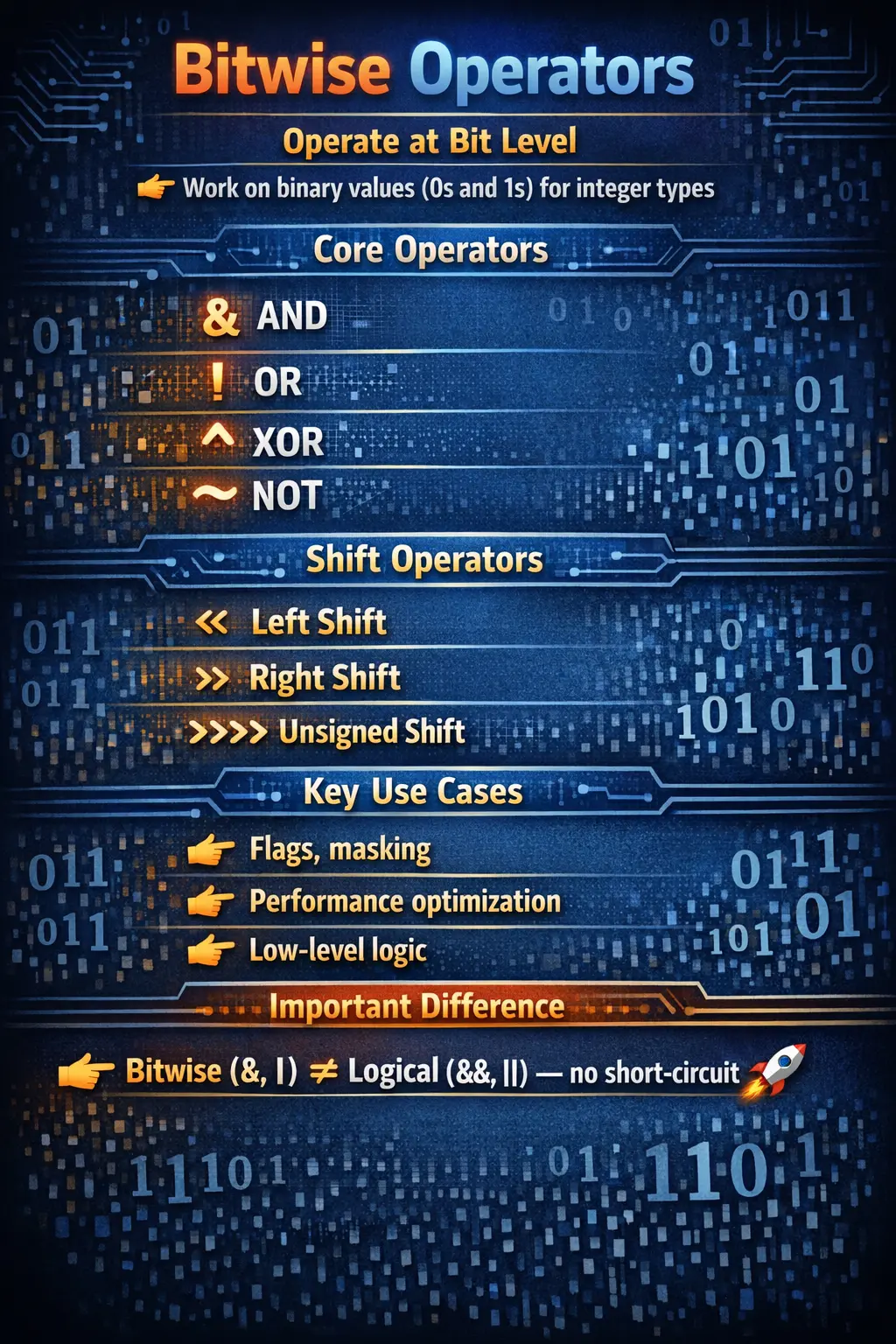
Although bitwise operators are not used frequently in everyday business applications like web development or enterprise systems, they are highly valued in interviews and core Java understanding. They test a developer’s ability to think at a deeper level, beyond syntax and APIs, and understand how data is actually stored and processed inside the system.
Understanding Bitwise Operations
At its core, every value in a computer is stored in binary form—a sequence of bits consisting of 0s and 1s. Bitwise operators allow you to perform operations directly on these bits rather than on the decimal representation of numbers.
In Java, bitwise operators work with integral data types such as byte, short, int, long, and char. They are not typically used with boolean, except in specific cases where & and | can act as logical operators without short-circuiting.
The key idea behind bitwise operations is simple: instead of working with whole numbers, you manipulate each bit individually. This allows for highly efficient computations and fine-grained control over data.
Types of Bitwise Operators
Java provides a complete set of bitwise operators that cover logical operations and bit shifting. These include AND, OR, XOR, complement, and shift operators. Each operator has a specific role and behavior, and understanding them requires thinking in binary rather than decimal.
Bitwise AND (&)
The bitwise AND operator compares corresponding bits of two numbers. A result bit is set to 1 only if both corresponding bits are 1; otherwise, it is set to 0.
Consider two numbers: 5 and 3. In binary, 5 is represented as 0101 and 3 as 0011. When you apply the AND operation, you compare each bit position. Only the last bit position has both bits set to 1, so the result becomes 0001, which is 1 in decimal.
This operator is commonly used for masking, where specific bits are isolated while others are ignored. For example, you can use AND to check whether a particular bit is set in a number.
Bitwise OR (|)
The bitwise OR operator sets a bit to 1 if at least one of the corresponding bits is 1. If both bits are 0, the result is 0.
Using the same example of 5 (0101) and 3 (0011), applying OR results in 0111, which is 7 in decimal. This operation effectively combines the bits of both numbers.
Bitwise OR is often used to set specific bits in a number without affecting others. It is useful in scenarios such as enabling flags or combining multiple binary states.
Bitwise XOR (^)
The XOR (exclusive OR) operator produces a result of 1 if the corresponding bits are different and 0 if they are the same. This unique behavior makes XOR particularly interesting and useful.
For example, 5 (0101) XOR 3 (0011) results in 0110, which is 6 in decimal. XOR has several special properties that make it valuable in algorithms and interview questions.
One of the most important properties is that any number XORed with itself results in 0, and any number XORed with 0 remains unchanged. These properties are often used in problems such as finding unique elements in arrays or swapping values without using a temporary variable.
Bitwise Complement (~)
The bitwise complement operator inverts all bits of a number. Every 0 becomes 1, and every 1 becomes 0. However, the result is not simply the negative of the number—it follows the rules of two’s complement representation.
For example, if you take the number 5 (00000101 in binary) and apply the complement operator, you get 11111010. In Java’s signed integer representation, this corresponds to -6.
This happens because the complement of a number is equal to the negative of that number minus one. In other words, ~x = -(x + 1). Understanding this relationship is crucial for correctly interpreting complement results.
Left Shift (<<)
The left shift operator moves bits to the left by a specified number of positions. As bits shift left, zeros are filled into the rightmost positions.
For example, shifting 5 (0101) one position to the left results in 1010, which is 10 in decimal. Each left shift effectively multiplies the number by 2.
This operator is commonly used for fast multiplication and performance optimization. Instead of using arithmetic multiplication, shifting can achieve the same result more efficiently at the binary level.
Right Shift (>>)
The signed right shift operator moves bits to the right while preserving the sign of the number. This means that the leftmost bit, known as the sign bit, is replicated to maintain the number’s sign.
For example, shifting -8 to the right results in -4. The sign bit ensures that the result remains negative.
Right shift is often used for dividing numbers by powers of two, similar to how left shift is used for multiplication.
Unsigned Right Shift (>>>)
The unsigned right shift operator also shifts bits to the right, but unlike the signed version, it fills the leftmost bits with zeros regardless of the sign.
This means that even negative numbers can become large positive numbers after an unsigned shift. This behavior is useful in specific low-level operations where the sign should not be preserved.
Unsigned right shift is less commonly used but is important for understanding how binary data is manipulated in systems programming.
Bitwise vs Logical Operators
A common source of confusion for beginners is the difference between bitwise and logical operators. While symbols such as & and | can be used in both contexts, their behavior is different.
Bitwise operators evaluate both operands fully and operate at the bit level. Logical operators such as && and || work with boolean expressions and use short-circuit evaluation, meaning they may skip evaluating the second operand.
Understanding this distinction is critical to avoid unexpected behavior, especially in conditional statements.
Real-World Use Cases
Although bitwise operators may seem abstract, they have practical applications in several domains. They are widely used in systems programming, where performance and memory efficiency are critical.
One common use case is managing flags and permissions. Each bit in a number can represent a specific permission, allowing multiple states to be stored in a single variable.
Bit masking is another important application, where specific bits are extracted or modified without affecting others. This technique is used in networking, encryption, and hardware-level programming.
Bitwise operations are also used in performance-critical algorithms, where traditional arithmetic operations may be too slow.
Common Mistakes
Despite their power, bitwise operators are often misused by beginners. One common mistake is confusing bitwise operators with logical operators, leading to incorrect results in conditional statements.
Another issue is ignoring the behavior of the sign bit, especially when using shift operators. This can result in unexpected negative values or incorrect calculations.
Overusing bitwise operators in business logic is also a mistake. While they are efficient, they can reduce code readability and make maintenance more difficult.
Understanding when to use bitwise operators—and when not to—is just as important as understanding how they work.
Interview Perspective
Bitwise operators are a favorite topic in technical interviews because they test fundamental understanding rather than memorization. Interviewers often use them to evaluate problem-solving skills and knowledge of binary operations.
A concise answer would describe bitwise operators as tools for performing operations on individual bits of integer data types. A more detailed explanation would include examples, use cases, and differences from logical operators.
Demonstrating familiarity with concepts such as XOR properties, shift operations, and masking techniques can significantly strengthen your interview performance.
Conclusion
Bitwise operators in Java may appear low-level and complex at first, but they provide powerful capabilities that are essential for certain types of programming. By allowing direct manipulation of binary data, they enable efficient operations that are not possible with standard arithmetic alone.
While they are not commonly used in everyday application development, understanding bitwise operators deepens your knowledge of how computers work and prepares you for advanced programming challenges.
The key is to approach them with clarity and purpose. Use them when they provide clear benefits, such as performance optimization or low-level control, and avoid them when they make code unnecessarily complex.
Mastering bitwise operators is not just about learning syntax—it is about developing a deeper understanding of computation itself.
Why Binary Thinking Matters
Bitwise operators become easier to understand when you stop thinking only in decimal numbers and start thinking in bit positions. A decimal number such as 13 looks like a single value, but internally it is represented as a pattern of bits. In a simplified four-bit view, 13 is 1101. Each bit position represents a power of two. From right to left, those positions represent 1, 2, 4, 8, and so on. The bits that are set to 1 contribute to the final value.
This representation is the reason bitwise operators are powerful. They do not ask whether a number is greater, smaller, positive, or negative in the usual business sense. They work on the individual switches inside the number. One bit can represent a permission, another can represent a feature flag, another can represent a status, and another can represent a compact piece of encoded data. A single integer can hold many yes-or-no states.
For most high-level application code, developers do not need to manipulate bits directly. But understanding binary representation strengthens overall Java knowledge. It explains why shifts multiply or divide by powers of two, why complement results look surprising, why overflow wraps, and why masks are useful. Bitwise operators reveal how values are stored beneath ordinary Java syntax.
Integral Types and Type Promotion
Bitwise operators in Java work with integral types: byte, short, char, int, and long. They do not work with float or double because floating-point values have a different binary format intended for approximate decimal representation. Bitwise operations are designed for integer-style bit patterns.
Smaller types such as byte, short, and char are promoted to int during bitwise operations. This means an expression like a & b, where both variables are bytes, produces an int result. If the result needs to be stored back into a byte, an explicit cast is required. This behavior is the same family of promotion rules seen in arithmetic operations.
This is important in interviews and real code because beginners often expect the result type to match the operand type. Java chooses promotion for consistency and safety during expression evaluation. Developers should be deliberate when converting the result back to a smaller type, especially because narrowing can lose information.
Bit Masks: The Most Practical Concept
A bit mask is a value used to select, set, clear, or toggle specific bits in another value. Masks are the heart of practical bitwise programming. If a particular bit represents a permission, a mask with that bit set can be used to check whether the permission exists. For example, if READ is represented by 0b0010, then (flags & READ) != 0 checks whether the read bit is enabled.
The mask works because bitwise AND keeps only the bits that are set in both values. All unrelated bits become zero. This allows one field to store many independent states while still letting code inspect one state at a time. It is compact and efficient, which is why flags and masks appear in operating systems, file permissions, graphics settings, network protocols, and low-level libraries.
Masks are not only for reading. Bitwise OR can set a bit, AND with complement can clear a bit, and XOR can toggle a bit. These operations are predictable and fast. Once the pattern is understood, many bitwise tasks become variations of the same idea: create the right mask, then apply the right operator.
Flags and Permissions
Flags are one of the clearest real-world uses of bitwise operators. Instead of storing several separate boolean variables, a program can store multiple flags inside one integer. One bit may mean read permission, another write permission, another execute permission, and another admin permission. This allows compact storage and fast checks.
For example, a value of 0b1010 may mean that the second and fourth permissions are enabled. To add another permission, code can use bitwise OR. To remove a permission, code can use AND with complement. To check a permission, code can use AND with the permission mask. This is a common pattern in systems where memory, performance, or compact encoding matters.
In modern business applications, developers often prefer enums, sets, or clearer object models because readability is important. However, flags remain useful in APIs, protocols, configuration values, and performance-sensitive code. Even if you do not write flag logic daily, you may need to read it in frameworks or interview problems.
Understanding Two's Complement
Java uses two's complement representation for signed integer values. This representation allows positive and negative numbers to be handled efficiently by the processor. The leftmost bit acts as the sign bit in signed integer interpretation. If the sign bit is 0, the number is non-negative. If it is 1, the number is negative.
This is why the bitwise complement operator can be surprising. Applying ~ to 5 does not produce -5. It flips every bit, and under two's complement rules the result is -6. The useful formula is ~x = -(x + 1). Once that formula is known, complement output becomes predictable rather than mysterious.
Two's complement also explains signed right shift. When a negative number is shifted right with >>, Java fills the leftmost bits with 1 to preserve the negative sign. Unsigned right shift, written as >>>, fills with zeros instead. This difference is crucial when interpreting binary data rather than mathematical signed values.
Shift Operators in Practical Terms
Shift operators move bits left or right. Left shift, <<, moves bits to the left and fills zeros on the right. For positive values, shifting left by one position usually has the same effect as multiplying by two. Shifting left by two positions is like multiplying by four. This relationship exists because each position in binary represents a power of two.
Signed right shift, >>, moves bits to the right and preserves the sign. For positive numbers, this often behaves like division by powers of two. For negative numbers, sign extension keeps the value negative. Unsigned right shift, >>>, also moves bits to the right but fills zeros on the left, which can turn negative values into large positive values.
In ordinary business code, using * and / is usually clearer than shifting for multiplication or division. Modern JVMs and processors are already highly optimized. Shift operators are best used when the logic is genuinely about bits, packing, unpacking, binary protocols, masks, or low-level representations.
Shift Count Masking
Java masks shift counts, which is a detail often tested in interviews. For int values, only the lower five bits of the shift distance are used. This means shifting an int by 33 is effectively the same as shifting it by 1, because 33 modulo 32 is 1. For long values, only the lower six bits are used, so the shift distance is effectively taken modulo 64.
This rule surprises developers who expect a large shift count to simply move all bits out of the value. Java follows the defined behavior of the language, so the result is predictable once the masking rule is known. It is another example of why bitwise operators require precise understanding rather than intuition alone.
In real code, it is usually better to avoid relying on obscure shift count behavior unless the code is explicitly low-level and well documented. If a shift count comes from input or dynamic calculation, validating it can make the logic clearer and safer.
Bitwise Operators with Boolean Values
The operators &, |, and ^ can be used with boolean operands as well as integral operands. With booleans, they produce boolean results. However, unlike && and ||, & and | do not short-circuit. Both sides are always evaluated.
This difference matters when the second condition is expensive or risky. A condition such as x != 0 & 10 / x > 1 evaluates both sides even when x is zero, which causes an exception. The short-circuit version, x != 0 && 10 / x > 1, skips the division when the first condition is false.
For ordinary conditional logic, use logical operators && and ||. Use non-short-circuit boolean operators only when evaluating both operands is intentional. This distinction is one of the most common interview traps around bitwise symbols.
XOR Properties and Algorithmic Use
XOR has special properties that make it useful in algorithms. A number XORed with itself becomes zero. A number XORed with zero remains unchanged. XOR is also reversible: if a ^ b = c, then c ^ b returns a. These properties are why XOR appears in interview problems involving unique values, toggling bits, and reversible transformations.
One classic problem is finding the single number in an array where every other number appears twice. XORing all values together cancels the pairs because x ^ x becomes zero, leaving only the unique value. This solution is efficient and elegant because it uses constant extra memory.
XOR can also toggle bits. If a specific mask is XORed with a flags value, the target bit changes from 0 to 1 or from 1 to 0. This is useful when a feature or state must be flipped without affecting other bits. As with other bitwise patterns, readability should be considered before using XOR in business code.
Packing and Extracting Data
Bitwise operators are often used to pack multiple small values into one larger value. For example, two bytes can be packed into one integer by shifting the high byte left and combining it with the low byte using OR. This technique is common in binary protocols, file formats, graphics, networking, and embedded-style programming.
Extraction reverses the process. A shifted value can be moved back down, and a mask such as 0xFF can isolate the lower byte. This allows code to store compact binary data and retrieve each part later. Packing and extraction require careful attention to shifts, masks, signedness, and promotion.
Most ordinary Java applications use higher-level formats such as JSON, XML, or database records. But understanding packing helps when dealing with binary files, byte streams, images, color values, protocol headers, and performance-sensitive data layouts.
Readability and Maintainability
Bitwise operators can make code extremely compact, but compact code is not always maintainable code. A line such as flags &= ~WRITE is clear to someone familiar with masks, but confusing to someone who has never seen bit clearing before. In team code, meaningful constant names and comments can make bitwise logic much safer.
Instead of using raw numeric values, define named masks such as READ, WRITE, and EXECUTE. This turns mysterious binary values into readable intent. The expression (permissions & WRITE) != 0 is much easier to understand than (permissions & 2) != 0.
Bitwise operators should be used when they solve a real problem: compact flags, binary protocols, masks, low-level data manipulation, or specific algorithmic needs. They should not be used merely to look clever. In ordinary business rules, clear booleans, enums, sets, or classes may be better choices.
Testing Bitwise Logic
Bitwise logic should be tested with specific binary patterns. For masks, tests should verify that each flag can be set, cleared, checked, and toggled independently. It is important to test combinations of flags, not only single flags, because bitwise logic is often used to represent multiple states at once.
Shift operations should be tested with positive values, negative values, zero, and boundary cases. Signed and unsigned right shift should be tested separately because their behavior diverges especially for negative numbers. Complement operations should be verified using known values and the formula ~x = -(x + 1).
When bitwise operators are used in production logic, tests should focus on intent rather than only numeric output. For example, a permission test should assert that write access is enabled or disabled, not merely that a binary number changed. This makes tests easier to understand and aligns them with business behavior.
Best Practices for Bitwise Operators
Use bitwise operators when the problem is naturally about bits, flags, masks, binary data, or low-level representation. Avoid using them in ordinary business logic where simpler structures are clearer. Prefer named constants over raw bit values. Keep mask operations small and well organized.
Be careful with signed numbers and shift operators. Understand the difference between >> and >>>. Remember that smaller integral types are promoted to int. Avoid assuming that complement simply means negation. These details prevent many common mistakes.
When using & and | with boolean values, remember that they do not short-circuit. For normal conditional logic, use && and ||. If a bitwise expression is difficult to understand, break it into named steps or add a short comment explaining the mask operation.
How to Explain Bitwise Operators in Interviews
A strong interview answer begins with a simple definition: bitwise operators operate on individual bits of integral values. Java includes bitwise AND, OR, XOR, complement, left shift, signed right shift, and unsigned right shift. These operators are used for masks, flags, binary manipulation, performance-sensitive algorithms, and low-level programming.
The answer should include examples. AND keeps only bits that are set in both operands. OR sets bits that appear in either operand. XOR sets bits that are different. Complement flips all bits and follows ~x = -(x + 1). Left shift moves bits left and often multiplies by powers of two. Signed right shift preserves sign, while unsigned right shift fills zeros.
The best answers mention practical traps: confusing bitwise and logical operators, ignoring sign extension, forgetting type promotion, and overusing bitwise logic where readability suffers. If you can explain masks, flags, XOR properties, and shift behavior clearly, you demonstrate a deeper understanding of Java and binary computation.
1. Bitwise AND (&)
int a = 6;   // 110
int b = 3;   // 011
System.out.println(a & b); // 010 -> 2
Explanation
• Each bit is 1 only if both bits are 1.2. Bitwise OR (|)
int a = 4;   // 100
int b = 3;   // 011
System.out.println(a | b); // 111 -> 7
Explanation
• Each bit is 1 if any bit is 1.3. Bitwise XOR (^)
int a = 5;   // 101
int b = 3;   // 011
System.out.println(a ^ b); // 110 -> 6
Explanation
• Each bit is 1 if bits are different.4. Bitwise NOT (~)
int a = 5;
System.out.println(~a); // -6
Explanation
	• Flips all bits.
	• Formula: ~x = -(x + 1).
5. Left Shift (<<)
int a = 3;   // 0011
System.out.println(a << 2); // 1100 -> 12
Explanation
	• Shifts bits left.
	• Multiplies by 2^n.
6. Signed Right Shift (>>) – Positive
int a = 8;   // 1000
System.out.println(a >> 2); // 0010 -> 2
Explanation
• Shifts right, preserving the sign bit.7. Signed Right Shift (>>) – Negative
int a = -8;
System.out.println(a >> 1);
Explanation
	• Leftmost bits filled with 1 (sign extension).
	• Result remains negative.
8. Unsigned Right Shift (>>>)
int a = -8;
System.out.println(a >>> 1);
Explanation
	• Leftmost bits filled with 0.
	• Produces a large positive number.
9. Shift Count Masking (Important)
int a = 1;
System.out.println(a << 33);
Explanation
	• For int, shift count uses lower 5 bits.
	• 33 becomes 1 → effectively a << 1.
10. Bitwise AND with boolean (Non–Short-Circuit)
boolean x = false;
boolean y = true;
System.out.println(x & y);
Explanation
	• Evaluates both operands.
	• Not short-circuiting.
11. Bitwise OR with boolean (Non–Short-Circuit)
boolean x = true;
boolean y = false;
System.out.println(x | y);
Explanation
	• Both sides evaluated.
	• Differs from ||.
12. XOR with boolean
boolean a = true;
boolean b = false;
System.out.println(a ^ b); // true
Explanation
• True only if exactly one operand is true.13. Toggling a Value Using XOR
int a = 10;
a = a ^ 1;
System.out.println(a);
Explanation
• XOR with 1 toggles the least significant bit.14. Swapping Two Numbers Using XOR (Interview Classic)
int a = 5;
int b = 7;
a = a ^ b;
b = a ^ b;
a = a ^ b;
System.out.println(a + " " + b);
Explanation
	• Swaps without a temporary variable.
	• Avoid in production for readability.
15. Checking Even/Odd Using AND
int n = 10;
System.out.println((n & 1) == 0);
Explanation
	• Last bit 0 → even, 1 → odd.
	• Faster than % 2.
16. Bit Masking (Read a Flag)
int flags = 0b1010;
int READ = 0b0010;
System.out.println((flags & READ) != 0);
Explanation
• AND with mask checks if a specific bit is set.17. Setting a Bit (OR)
int flags = 0b1000;
int WRITE = 0b0010;
flags |= WRITE;
System.out.println(Integer.toBinaryString(flags));
Explanation
• OR sets a bit without affecting others.18. Clearing a Bit (AND + NOT)
int flags = 0b1010;
int WRITE = 0b0010;
flags &= ~WRITE;
System.out.println(Integer.toBinaryString(flags));
Explanation
• Clears a specific bit using masking.19. Toggling a Bit (XOR)
int flags = 0b1010;
int EXECUTE = 0b1000;
flags ^= EXECUTE;
System.out.println(Integer.toBinaryString(flags));
Explanation
• XOR flips the target bit.20. Combining Shifts and OR (Pack Values)
int high = 0x12;
int low  = 0x34;
int packed = (high << 8) | low;
System.out.println(Integer.toHexString(packed));
Explanation
	• Packs two bytes into one int.
	• Common in protocols.
21. Extracting Packed Values
int packed = 0x1234;
int high = (packed >> 8) & 0xFF;
int low  = packed & 0xFF;
System.out.println(high + " " + low);
Explanation
• Shifts + masks to extract parts.22. Bitwise Operators with byte (Promotion)
byte a = 10;
byte b = 3;
// byte c = a & b; // compile-time error
byte c = (byte) (a & b);
System.out.println(c);
Explanation
	• Operands promoted to int.
	• Cast required to assign back.
23. Shift with char
char c = 'A'; // 65
System.out.println(c << 1);
Explanation
	• char promoted to int.
	• Arithmetic on Unicode value.
24. Bitwise vs Logical Operators (Key Difference)
int x = 0;
if (x != 0 & (10 / x) > 1) {
System.out.println("Risky");
}
Explanation
	• & evaluates both sides → exception risk.
	• Prefer && for conditions.
25. Interview Summary Example
int a = 6;   // 110
int b = 3;   // 011
System.out.println(a & b);   // 2
System.out.println(a | b);   // 7
System.out.println(a ^ b);   // 5
System.out.println(~a);      // -7
System.out.println(a << 1);  // 12
System.out.println(a >> 1);  // 3
Explanation
	• Covers AND, OR, XOR, NOT, shifts.
	• Common output-based interview question.