ArrayList in Java
ArrayList is one of the most widely used classes in the Java Collections Framework. It is a
resizable array implementation of the List interface, which means it stores elements in order,
allows duplicate values, supports index-based access, and grows dynamically as elements are added. For many
everyday Java programs, ArrayList is the default list implementation because it is simple,
flexible, and efficient for reading and iterating data.
The main idea behind ArrayList is convenience over a plain array. A normal array has a fixed
length. Once an array is created, its size cannot change. ArrayList solves this limitation by
managing a resizable internal array. Developers can add and remove elements without manually creating a new
array each time the data grows or shrinks. This makes it practical for real applications where the number of
values is not always known upfront.
ArrayList is also a high-frequency interview topic because it connects several core Java ideas:
collections, generics, arrays, dynamic resizing, time complexity, duplicate handling, insertion order,
iteration, sorting, thread safety, and the difference between removing by index and removing by object. A
strong understanding of ArrayList helps developers write cleaner code and choose the right data
structure for common problems.
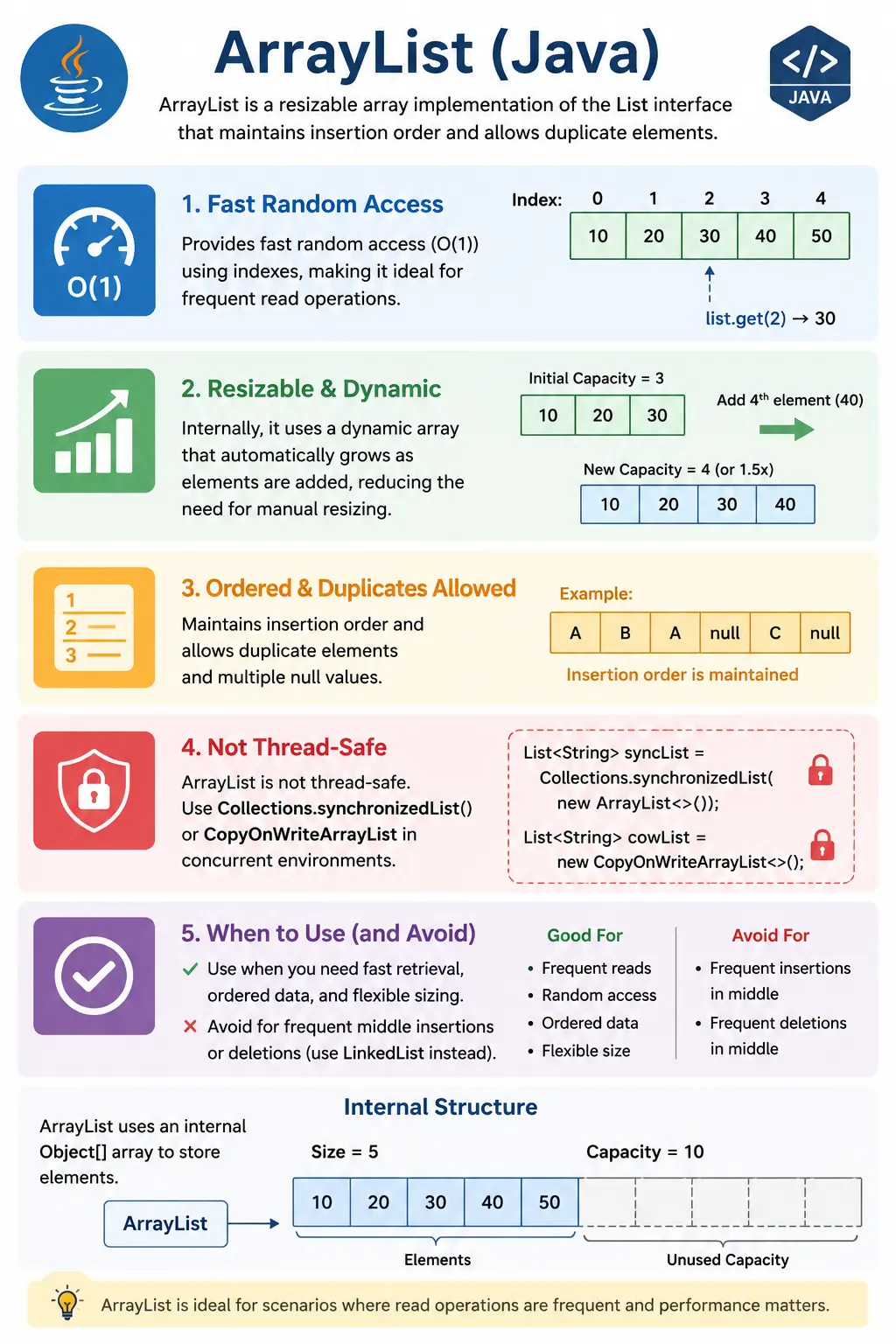
What Is ArrayList?
ArrayList is a class in the java.util package that implements the
List interface. Since it implements List, it behaves like an ordered sequence of
elements. Elements can be accessed using indexes, and the first element is stored at index 0.
This index-based model makes ArrayList familiar to developers who already understand arrays.
Unlike arrays, however, an ArrayList does not require the developer to decide the final size at
creation time. It can grow when more elements are added. Internally, it still uses an array-like structure,
but it handles resizing automatically. From the developer's point of view, adding values is straightforward
through methods such as add, set, get, and remove.
ArrayList allows duplicate values because each value has its own position. It also maintains
insertion order, so values are normally returned in the same order in which they were added. Common
implementations allow multiple null values as well, although null handling should be intentional in real
business code.
ArrayList<String> list = new ArrayList<>();
Position in Collection Hierarchy
ArrayList sits under the List branch of the Java Collections Framework. It inherits
general collection behavior from Collection and iteration capability from Iterable.
This is why an ArrayList can be used in enhanced for-each loops and can also be referenced by the
more general List interface.
Iterable
   |-- Collection
        |-- List
             |-- ArrayList
In real code, it is common to declare variables using the interface type and instantiate the implementation:
List<String> names = new ArrayList<>();. This keeps the code flexible because the
variable depends on list behavior rather than one specific implementation.
Key Characteristics of ArrayList
The most important characteristic of ArrayList is that it is backed by a dynamic array. This
gives it fast random access. When code calls get(5), the list can reach that position directly.
This makes ArrayList efficient for read-heavy operations, index-based access, and normal
sequential iteration.
Another important characteristic is automatic growth. When the internal array becomes full and a new element
is added, ArrayList creates a larger internal array and copies existing elements into it. This
resizing is handled internally, so the developer does not manually manage array length. Most additions at the
end are efficient, although occasional resizing creates extra work.
The tradeoff appears when elements are inserted or removed from the middle. Since elements are stored
sequentially in an internal array, elements after the insertion or removal point may need to shift. This makes
middle insertions and deletions more expensive than simple reads or appends. ArrayList is also
not synchronized, so it is not automatically safe for concurrent modification by multiple threads.
How ArrayList Works Internally
Internally, ArrayList uses an array to store elements. Conceptually, it behaves like an array
that can expand. The list keeps track of how many elements are actually stored, while the internal array may
have extra capacity available for future additions. The number of stored elements is the size. The length of
the internal storage is the capacity.
When the size reaches the current capacity and another element is added, the list grows by creating a larger internal array and copying existing elements into it. This is why adding to the end is described as amortized constant time. Most additions are cheap, but occasional additions trigger resizing and copying. Spread across many additions, the average cost remains efficient.
Older explanations often say the default capacity is 10. In modern Java implementations, the actual internal
allocation details are optimized, but the interview-level idea remains the same: ArrayList uses
internal array storage, has capacity separate from size, and grows automatically when needed. The important
practical point is that resizing has a cost, so providing an initial capacity can help when the expected size
is known.
Creating an ArrayList
An ArrayList can be created in several ways. The most common way is using the default
constructor. This creates an empty list and lets it grow as elements are added. This is suitable when the
expected number of elements is small or unknown.
1. Default Constructor
ArrayList<Integer> list = new ArrayList<>();
2. With Initial Capacity
ArrayList<Integer> list = new ArrayList<>(50);
Providing an initial capacity can improve performance when the approximate size is known. For example, if an application expects to load 50,000 records, creating the list with enough capacity can reduce repeated resizing. This does not set the list size; it only prepares internal storage.
3. From Another Collection
ArrayList<Integer> list = new ArrayList<>(existingList);
Creating an ArrayList from another collection is useful when a mutable list copy is needed. For
example, Arrays.asList returns a fixed-size list, but wrapping it in a new ArrayList
creates a list where elements can be added and removed.
Commonly Used Methods
ArrayList provides common list operations for adding, accessing, updating, removing, and
searching elements. These methods come from the List and Collection contracts and
are implemented by ArrayList.
Adding Elements
list.add(10);
list.add(1, 20);
Accessing Elements
int value = list.get(0);
Updating Elements
list.set(0, 100);
Removing Elements
list.remove(0);       // by index
list.remove(Integer.valueOf(10)); // by value
Size and Search
list.size();
list.contains(20);
list.indexOf(20);
The contains and indexOf methods search through elements. Because
ArrayList is not a hash-based structure, searching by value usually requires scanning elements
one by one. If frequent membership checks are the main requirement, a HashSet may be more
suitable.
Iterating an ArrayList
Iteration is one of the most common operations on an ArrayList. A for-each loop is simple and
readable when the code only needs to read elements. An Iterator is useful when elements need to
be removed safely during traversal. A ListIterator supports movement in both directions and can
also work with positions.
Using for-each loop
for (Integer i : list) {
    System.out.println(i);
}
Using Iterator
Iterator<Integer> it = list.iterator();
while (it.hasNext()) {
    System.out.println(it.next());
}
Using ListIterator
ListIterator<Integer> li = list.listIterator();
Performance Complexity (Important)
Performance is one of the main reasons ArrayList is popular. Accessing and updating by index are
fast because the internal array allows direct positional access. Adding at the end is usually fast, although
occasional resizing may occur. Insertions and removals in the middle are slower because elements may need to
shift.
| Operation | Time Complexity |
|---|---|
| get/set | O(1) |
| add (end) | O(1) amortized |
| add (middle) | O(n) |
| remove (middle) | O(n) |
| search | O(n) |
ArrayList vs Array (Quick Comparison)
Arrays and ArrayList are closely related but not the same. An array is fixed in size and can
store primitives or objects. An ArrayList is dynamic and stores objects, so primitive values are
stored through wrapper classes such as Integer, Double, and Boolean.
Autoboxing makes this convenient, but the distinction matters.
| Aspect | Array | ArrayList |
|---|---|---|
| Size | Fixed | Dynamic |
| Type | Primitive + Object | Object only |
| Methods | Limited | Rich API |
| Performance | Faster | Slight overhead |
Arrays are useful when size is fixed and maximum performance or primitive storage is important.
ArrayList is better when the number of elements changes, when list methods are useful, or when
the code benefits from the Collections Framework API. Most business application code uses
ArrayList more often than raw arrays for dynamic groups of objects.
Thread Safety
ArrayList is not synchronized. If multiple threads modify the same ArrayList at the
same time without coordination, the result can be unpredictable. The list may produce inconsistent data,
runtime exceptions, or corrupted internal state. In single-threaded usage, this is not a concern. In
concurrent applications, it must be handled deliberately.
Thread-safe alternatives include Collections.synchronizedList and
CopyOnWriteArrayList. A synchronized list wraps a normal list with synchronized access.
CopyOnWriteArrayList is useful for cases with many reads and few writes because modifications
create a new copy internally. The right choice depends on the access pattern.
ArrayList and Generics
ArrayList is almost always used with generics. An ArrayList<String> stores
strings, while an ArrayList<Integer> stores integer objects. Generics allow the compiler to
catch incorrect element types early and reduce the need for casting when retrieving elements.
Using raw ArrayList without generics is a common beginner mistake. Raw lists can accept mixed
object types, which may lead to runtime casting errors. Generics make code safer and more readable because
the intended element type is visible in the declaration.
ArrayList and Null Values
ArrayList can store null values, including multiple null values. Since it allows duplicates and
stores elements by position, null can appear at different indexes. This can be useful in some cases, but it
can also create NullPointerException risks if the code assumes every element is non-null.
In real applications, null values should be handled intentionally. If null is not a valid business value, it should be filtered out or rejected before being added. If null represents missing information, later code should check for it before calling methods on the element.
When to Use ArrayList
Use ArrayList when order matters, duplicates are allowed, fast index-based access is needed, and
most operations involve reading, appending, or iterating. It is a strong default for storing results, test
data, records, menu items, report rows, messages, and sequential values.
Avoid ArrayList as the first choice when frequent insertions or deletions happen near the
beginning or middle of a large list, when uniqueness is required, or when many threads modify the same list.
In those cases, another collection such as LinkedList, HashSet, or a concurrent
collection may fit better.
ArrayList in Real Projects
ArrayList appears throughout real Java projects. A service may return an
ArrayList or List of users. A test automation framework may store a list of page
elements, validation messages, or test data rows. A reporting module may collect rows before writing output.
A backend API may build a list of response objects before returning JSON.
In professional code, developers often declare variables and method return types as List while
using ArrayList as the implementation. This communicates that callers should depend on list
behavior rather than the specific implementation. It also allows the implementation to change later if needed.
ArrayList and Safe Removal
Removing elements while iterating is a common source of bugs. If code uses a for-each loop and directly calls
list.remove, Java may throw a ConcurrentModificationException. The safe approach is
to use an Iterator and call iterator.remove, or to create a separate list of items
to remove after iteration.
This matters in real applications because filtering and cleanup logic often removes values based on a condition. For example, a test may remove invalid data rows, a service may remove inactive records, or a report may filter entries. Safe removal keeps this logic stable.
Size vs Capacity
One of the most useful internal distinctions in ArrayList is the difference between size and
capacity. Size means the number of elements currently stored in the list. Capacity means the amount of
internal storage currently available before another resize is needed. The size() method returns
the number of actual elements, not the capacity.
For example, an ArrayList may have capacity for many elements but still have size zero if no
elements have been added. When elements are added, size increases. When the list grows beyond current
capacity, the internal storage expands. This growth is automatic, but it is not free because the old elements
must be copied into a larger internal array.
The ensureCapacity method can be used when the expected number of elements is known. It prepares
enough internal storage in advance and reduces repeated resizing. This is useful when loading large data sets,
processing files, collecting database records, or building large result lists. It is not necessary for small
lists, but it shows practical understanding of how ArrayList manages memory.
remove(int) vs remove(Object)
The overloaded remove method is one of the most common ArrayList interview traps.
When the list contains objects such as strings, the difference is usually obvious. remove(0)
removes the element at index zero, while remove("A") removes the first matching value. With
integer lists, the distinction becomes more subtle.
In a List<Integer>, calling remove(1) removes the element at index
1, not the value 1. To remove the value, the code should use
remove(Integer.valueOf(1)). This happens because Java chooses the remove(int)
overload when an int literal is provided. Understanding this behavior prevents accidental removal of the
wrong element.
This issue is not just academic. A production bug can occur if a developer intends to remove a value from a list of IDs but accidentally removes by index. The code may compile and run, but the wrong data is removed. Clear method usage and tests around removal logic are important when working with integer lists.
Sorting an ArrayList
Sorting is a common operation on ArrayList because it preserves order. The list can be sorted
using Collections.sort or the list's sort method. Natural sorting works when the
elements implement Comparable, such as integers and strings. Custom sorting uses a
Comparator to define the ordering rule.
For business objects, sorting usually depends on a specific field. A list of users may be sorted by name, age, registration date, or account status. A list of products may be sorted by price, rating, or availability. A list of test results may be sorted by execution time or severity. A comparator makes these rules explicit.
Sorting modifies a mutable list in place. If the original order is important, create a copy before sorting. This matters when insertion order has business meaning, such as user-selected priority, original file order, or search ranking. A clean implementation decides whether sorting should mutate the existing list or produce a sorted copy.
Converting Between Arrays and ArrayList
Conversion between arrays and ArrayList is common because Java APIs sometimes use arrays while
application logic often prefers collections. Arrays.asList creates a list view backed by an
array. This list has fixed size, so elements can be replaced, but elements cannot be added or removed. This is
a common source of UnsupportedOperationException.
When a fully mutable list is required, wrap the result in a new ArrayList. For example,
new ArrayList<>(Arrays.asList(arr)) creates a separate mutable list. This allows normal
add and remove operations. Understanding this difference helps avoid bugs when converting array data into a
list for further processing.
Converting an ArrayList back to an array can be done with toArray. The typed form,
such as list.toArray(new String[0]), is usually more useful than receiving an
Object[] because it preserves the expected array type. This is useful when calling APIs that
require arrays.
ArrayList and API Design
In method signatures, it is often better to use List instead of ArrayList unless
the method specifically requires ArrayList behavior. For example, a service method can return
List<Order> even if it internally builds an ArrayList. This gives callers the
behavior contract without forcing them to depend on one concrete class.
The same idea applies to parameters. If a method only needs ordered list behavior, accept
List<String> instead of ArrayList<String>. This allows callers to pass
different list implementations. It also makes the method easier to test and reuse. Programming to interfaces
is a strong design habit supported by the Collections Framework.
API design should also consider mutability. Returning an internal mutable ArrayList directly can
allow outside code to change an object's internal state. If the caller should only read the data, return an
unmodifiable list or a defensive copy. This connects ArrayList usage with encapsulation and safe
object design.
ArrayList in Coding Interviews
ArrayList appears frequently in coding interviews because it is flexible and easy to use for
ordered results. It is commonly used to store output, collect matching elements, build dynamic sequences,
convert arrays, sort values, and return answers from methods. Many array problems can be adapted into
ArrayList problems when the result size is not known in advance.
Common patterns include adding elements conditionally, removing invalid entries with an iterator, sorting
before processing, checking size, accessing neighboring elements by index, and converting between array and
list forms. Interviewers may also ask why ArrayList is better than an array in certain cases and
why it is weaker than a set for uniqueness checks.
A strong interview answer explains both behavior and tradeoff. ArrayList is ordered, dynamic,
duplicate-friendly, and fast for index access. It is not synchronized, not ideal for frequent middle
insertion or deletion, and not designed for uniqueness enforcement. That balanced explanation is stronger
than simply saying it is a dynamic array.
Common Beginner Mistakes
Beginners often use ArrayList in a multi-threaded context without synchronization. This can be
unsafe if multiple threads modify the list. Another common mistake is removing elements incorrectly during
iteration, which can cause runtime exceptions. Safe removal should use an iterator or a separate filtering
approach.
Another frequent issue is forgetting generics and using raw ArrayList. This weakens type safety.
Beginners also use ArrayList for frequent middle insertions, even though shifting elements can
make that inefficient. Choosing a collection should always depend on the dominant operation.
Interview Perspective
In interviews, a strong answer should define ArrayList as a resizable array implementation of
the List interface. It should mention that it maintains insertion order, allows duplicates,
allows null values, provides fast random access, and is not synchronized. These are the core facts
interviewers expect.
A stronger answer explains internal behavior. ArrayList uses an internal array, grows when
capacity is exceeded, and copies elements during resizing. Access by index is fast, adding at the end is
usually efficient, and adding or removing in the middle may require shifting elements. Mentioning
remove(int) versus remove(Object) is also useful because it is a common interview
trap.
Interview-Ready Answers
Short Answer
ArrayList is a resizable array implementation of the List interface.
Detailed Answer
In Java, ArrayList is a dynamic array-based implementation of the List interface. It allows duplicates, maintains insertion order, and provides fast random access. It is not synchronized and is best suited for scenarios with frequent read, append, and iteration operations.
ArrayList Examples (Top Interview Patterns)
1. Creating an ArrayList
import java.util.*;

class Demo {
    public static void main(String[] args) {
        ArrayList<String> list = new ArrayList<>();
        list.add("Java");
        list.add("Selenium");
        System.out.println(list);
    }
}
Output
[Java, Selenium]
2. ArrayList Allows Duplicate Values
import java.util.*;

class Demo {
    public static void main(String[] args) {
        ArrayList<Integer> list = new ArrayList<>();
        list.add(10);
        list.add(10);
        System.out.println(list);
    }
}
Output
[10, 10]
3. Maintains Insertion Order
import java.util.*;

class Demo {
    public static void main(String[] args) {
        ArrayList<Integer> list = new ArrayList<>();
        list.add(3);
        list.add(1);
        list.add(2);
        System.out.println(list);
    }
}
Output
[3, 1, 2]
4. Accessing Elements by Index
import java.util.*;

class Demo {
    public static void main(String[] args) {
        ArrayList<String> list = new ArrayList<>(Arrays.asList("A", "B", "C"));
        System.out.println(list.get(1));
    }
}
Output
B
5. Modifying Elements using set()
import java.util.*;

class Demo {
    public static void main(String[] args) {
        ArrayList<String> list = new ArrayList<>(Arrays.asList("Java", "API"));
        list.set(1, "Selenium");
        System.out.println(list);
    }
}
Output
[Java, Selenium]
6. Removing Element by Index
import java.util.*;

class Demo {
    public static void main(String[] args) {
        ArrayList<String> list = new ArrayList<>(Arrays.asList("A", "B", "C"));
        list.remove(0);
        System.out.println(list);
    }
}
Output
[B, C]
7. Removing Element by Object
import java.util.*;

class Demo {
    public static void main(String[] args) {
        ArrayList<String> list = new ArrayList<>(Arrays.asList("A", "B", "C"));
        list.remove("B");
        System.out.println(list);
    }
}
Output
[A, C]
8. remove(int) vs remove(Object) (Very Important)
import java.util.*;

class Demo {
    public static void main(String[] args) {
        ArrayList<Integer> list = new ArrayList<>(Arrays.asList(10, 20, 30));
        list.remove(1);                  // removes index 1
        // list.remove(Integer.valueOf(20)); // removes value
        System.out.println(list);
    }
}
Output
[10, 30]
9. Iterating Using for-each Loop
import java.util.*;

class Demo {
    public static void main(String[] args) {
        ArrayList<String> list = new ArrayList<>(Arrays.asList("X", "Y", "Z"));
        for (String s : list) {
            System.out.println(s);
        }
    }
}
10. Iterating Using Iterator
import java.util.*;

class Demo {
    public static void main(String[] args) {
        ArrayList<Integer> list = new ArrayList<>(Arrays.asList(1, 2, 3));
        Iterator<Integer> it = list.iterator();
        while (it.hasNext()) {
            System.out.println(it.next());
        }
    }
}
11. Removing While Iterating (Correct Way)
import java.util.*;

class Demo {
    public static void main(String[] args) {
        ArrayList<Integer> list = new ArrayList<>(Arrays.asList(1, 2, 3));
        Iterator<Integer> it = list.iterator();
        while (it.hasNext()) {
            if (it.next() == 2) {
                it.remove();
            }
        }
        System.out.println(list);
    }
}
Output
[1, 3]
12. ArrayList Size
import java.util.*;

class Demo {
    public static void main(String[] args) {
        ArrayList<String> list = new ArrayList<>(Arrays.asList("A", "B"));
        System.out.println(list.size());
    }
}
Output
2
13. Checking Element Existence
import java.util.*;

class Demo {
    public static void main(String[] args) {
        ArrayList<String> list = new ArrayList<>(Arrays.asList("Java", "API"));
        System.out.println(list.contains("Java"));
    }
}
Output
true
14. Sorting an ArrayList
import java.util.*;

class Demo {
    public static void main(String[] args) {
        ArrayList<Integer> list = new ArrayList<>(Arrays.asList(3, 1, 2));
        Collections.sort(list);
        System.out.println(list);
    }
}
Output
[1, 2, 3]
15. Custom Sorting using Comparator
import java.util.*;

class Demo {
    public static void main(String[] args) {
        ArrayList<String> list = new ArrayList<>(Arrays.asList("Java", "API", "Test"));
        list.sort((a, b) -> a.length() - b.length());
        System.out.println(list);
    }
}
Output
[API, Test, Java]
16. Converting Array to ArrayList
import java.util.*;

class Demo {
    public static void main(String[] args) {
        String[] arr = {"A", "B"};
        ArrayList<String> list = new ArrayList<>(Arrays.asList(arr));
        System.out.println(list);
    }
}
17. Converting ArrayList to Array
import java.util.*;

class Demo {
    public static void main(String[] args) {
        ArrayList<String> list = new ArrayList<>(Arrays.asList("A", "B"));
        Object[] arr = list.toArray();
        System.out.println(arr.length);
    }
}
18. ensureCapacity() (Performance)
import java.util.*;

class Demo {
    public static void main(String[] args) {
        ArrayList<Integer> list = new ArrayList<>();
        list.ensureCapacity(1000);
        System.out.println("Capacity ensured");
    }
}
Explanation
Reduces resizing overhead
19. Thread-Unsafe Nature of ArrayList
import java.util.*;

class Demo {
    public static void main(String[] args) {
        ArrayList<String> list = new ArrayList<>();
        list.add("Not Thread Safe");
        System.out.println(list);
    }
}
Explanation
Use Collections.synchronizedList() or CopyOnWriteArrayList
20. Interview Summary: ArrayList
import java.util.*;

class Demo {
    public static void main(String[] args) {
        ArrayList<String> list = new ArrayList<>();
        list.add("Ordered");
        list.add("Dynamic");
        list.add("Duplicate");
        System.out.println(list);
    }
}
Key Points
- Dynamic array
- Index-based access (fast)
- Allows duplicates
- Maintains insertion order
- Not thread-safe
Key Takeaway
Use ArrayList when fast access and iteration are required. Avoid it when frequent insertions/deletions in the middle or thread safety is a concern.