Array Initialization Techniques
Array initialization is a foundational concept in Java that directly impacts how efficiently and correctly data is managed within applications. While arrays themselves provide a structured way to store multiple values of the same type, the way those arrays are initialized determines their usability, performance, and maintainability. In real-world development, choosing the right initialization technique is not just a matter of syntax; it reflects design decisions about how data is sourced, processed, and consumed.
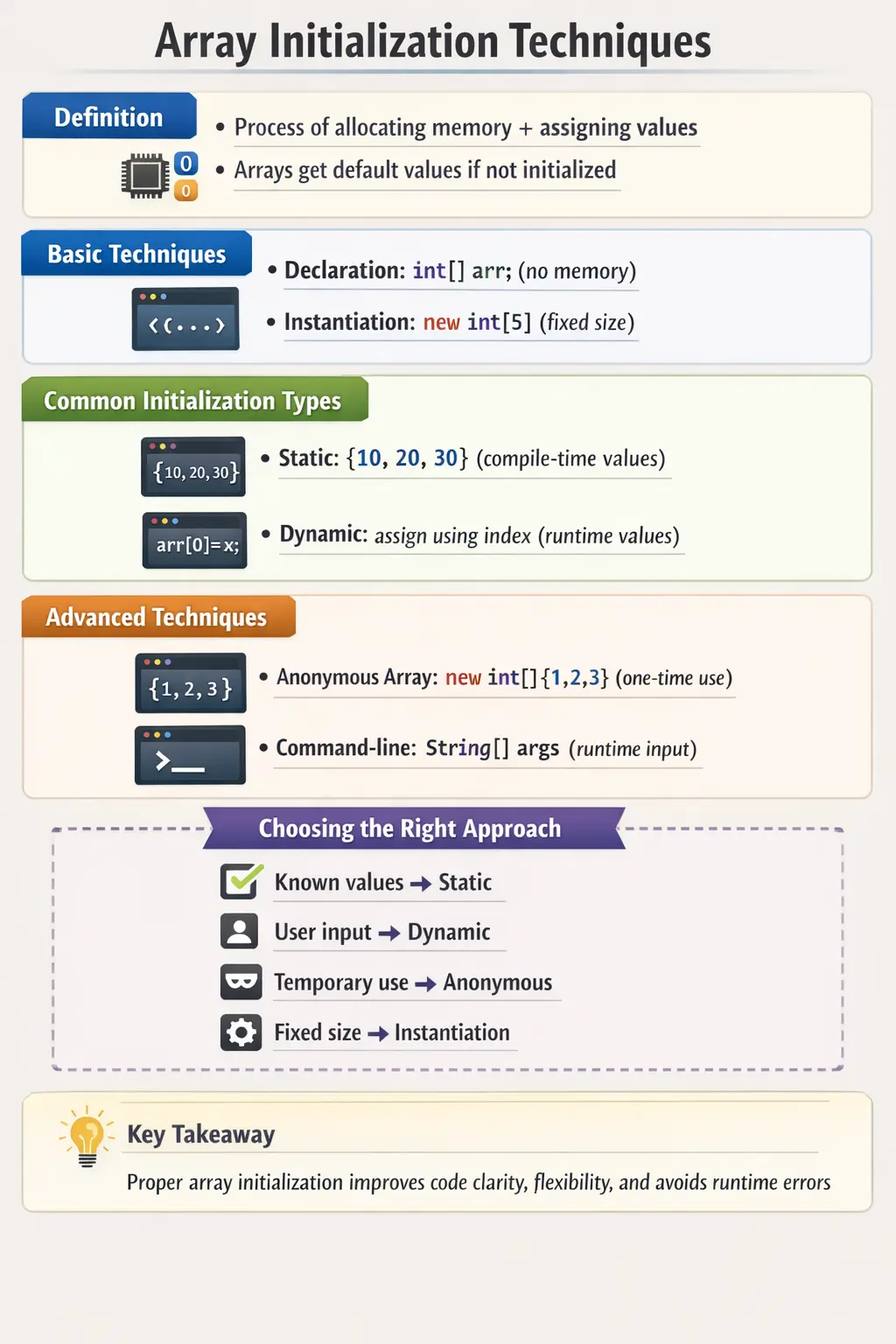
At its core, array initialization involves two essential steps: allocating memory and assigning values. Java provides several distinct techniques to accomplish this, each suited for different scenarios such as compile-time constants, runtime data, temporary usage, or external inputs. Understanding these techniques in depth allows developers to write cleaner code, avoid common pitfalls, and build robust systems.
Understanding Array Initialization
An array in Java is an object stored in heap memory. When you initialize an array, you are essentially telling the Java Virtual Machine to allocate a contiguous block of memory capable of holding multiple elements of the same data type. Along with allocation, Java ensures that each element is assigned a default value if no explicit value is provided.
This behavior is important because it guarantees that arrays are always in a valid state after creation. However, it also introduces subtle complexities. Developers must clearly distinguish between declaring an array reference and actually allocating memory for it. Misunderstanding this distinction is one of the most common sources of beginner errors.
Declaration Without Initialization
The simplest form of array usage begins with declaration. In this stage, you define a reference variable that can point to an array, but no memory is allocated yet. This means the array does not actually exist in memory; it is merely a reference placeholder.
This approach is often used when the array needs to be initialized later based on conditions or external inputs. While it provides flexibility, it also requires careful handling. Attempting to use the array before instantiation will result in a runtime exception, typically a NullPointerException.
This separation between declaration and initialization reflects Java’s emphasis on explicit memory management and type safety.
Declaration with Instantiation
The next step is instantiation, where memory is allocated for the array. When you combine declaration and instantiation, you create an array with a fixed size. At this point, all elements are initialized with default values based on their data type.
This technique is widely used when the size of the array is known in advance but the values are not yet available. It provides a structured container that can be filled later.
One of the key characteristics of this approach is immutability of size. Once the array is created, its length cannot be changed. This limitation is important to understand because it differentiates arrays from dynamic data structures like ArrayList.
Static Initialization
Static initialization is one of the most commonly used techniques in Java. It is used when all the values of the array are known at compile time. In this approach, values are provided directly during declaration, and Java automatically determines the size of the array.
This method is concise, readable, and efficient. It eliminates the need for separate allocation and assignment steps, making it ideal for small datasets, constants, or predefined configurations.
Static initialization also improves code clarity. When values are embedded directly in the code, it becomes easier to understand the purpose of the array without tracing multiple lines of assignment logic.
However, this approach lacks flexibility. It cannot be used when values are determined dynamically at runtime.
Dynamic Initialization (Index-Based Assignment)
Dynamic initialization is used when array values are not known at compile time and must be assigned during program execution. This approach involves first allocating memory and then assigning values individually using indices.
This technique is essential in scenarios where data is sourced from user input, files, databases, or computations. It provides maximum flexibility and control over how each element is populated.
Although dynamic initialization is more verbose than static initialization, it is indispensable in real-world applications. It allows arrays to adapt to changing conditions and supports data-driven programming.
One important consideration is ensuring that all required elements are properly assigned. Leaving elements uninitialized may result in unintended use of default values.
Anonymous Arrays
Anonymous arrays are a specialized initialization technique used when an array is required temporarily and does not need a named reference. Instead of declaring a variable, the array is created and passed directly to a method or expression.
This approach is particularly useful for one-time operations, such as passing arguments to a method. It reduces unnecessary variable declarations and keeps the code concise.
Despite its simplicity, anonymous arrays should be used carefully. Overuse can reduce readability, especially when complex data is embedded directly in method calls.
Command-Line Initialization
Java programs can also receive input through command-line arguments, which are stored in a String[] array. This form of initialization allows external data to be passed into the program at runtime.
Command-line initialization is commonly used in utility programs, scripts, and automation tasks. It enables dynamic behavior without modifying the source code.
However, it requires validation to ensure that the expected number of arguments is provided. Accessing an index that does not exist will result in an exception.
Initialization of Multi-Dimensional Arrays
The concepts of array initialization extend naturally to two-dimensional arrays. These arrays can also be initialized statically or dynamically, depending on the use case.
Static initialization is used when the entire matrix is known in advance, while dynamic initialization is used when dimensions or values are determined at runtime.
Understanding multi-dimensional array initialization is crucial for handling structured data such as tables, grids, and matrices.
Default Values and Their Importance
When arrays are instantiated, Java assigns default values to all elements. These defaults ensure that the array is safe to use even before explicit assignment.
For numeric types, the default is zero. For boolean values, it is false. For object references, it is null. These defaults can influence program logic, especially in conditional checks.
Developers must be aware of these defaults to avoid unintended behavior. For example, assuming that an uninitialized element contains meaningful data can lead to logical errors.
Choosing the Right Initialization Technique
Selecting the appropriate initialization technique depends on the context of the problem. Static initialization is ideal for known values, while dynamic initialization is suited for runtime data.
Anonymous arrays are useful for temporary operations, and command-line arrays are best for external inputs. Declaration with instantiation is appropriate when size is known but values are not.
Making the right choice improves code readability, reduces complexity, and enhances maintainability.
Declaration, Allocation, and Assignment as Separate Ideas
Array initialization becomes much easier to understand when declaration, allocation, and assignment are treated as three separate ideas. Declaration creates a reference variable. Allocation creates the actual array object in memory. Assignment places values into the array positions. Sometimes these three actions happen in one line, and sometimes they happen across multiple lines. The syntax may change, but the underlying process remains the same.
For example, declaring int[] numbers only tells Java that numbers can refer to an integer array. It does not create storage for any values. Writing new int[5] creates an array object with five integer slots. Assigning numbers[0] = 10 places a value into the first slot. When beginners confuse these stages, they often try to access an array before it exists or assume that declaration automatically creates elements. Java is strict about this distinction, and understanding it prevents many runtime errors.
This separation is also useful in professional code reviews. When a developer sees an array reference, they should know where it is allocated, how large it is, and where values are assigned. If those steps are scattered across unrelated methods, the code can become difficult to maintain. Clear initialization keeps data flow understandable. It shows whether the array contains meaningful business values, default placeholders, or data that will be populated later.
Static Initialization for Known Data
Static initialization is best when the values are stable and known while writing the code. Examples include days of the week, fixed status codes, menu options, sample values, or small lookup lists. The main advantage is readability. A reader can immediately see what the array contains without searching for later assignments. This makes static initialization ideal for simple constants and teaching examples.
Static initialization also prevents size mismatch errors because Java calculates the array length from the values provided. If four values are written inside the braces, the array length becomes four. The developer does not have to separately declare a size and then remember to fill every position. This reduces unnecessary code and avoids cases where the array size and assigned values drift apart.
However, static initialization should not be used for data that changes often or comes from external sources. Hardcoding values directly into source code can make updates harder and may require redeployment when business data changes. If the values come from configuration, database records, user input, or an API, dynamic initialization or collection-based handling is usually better. The key question is whether the data belongs in the source code or should be supplied at runtime.
Dynamic Initialization for Runtime Data
Dynamic initialization is important because real applications rarely know all data in advance. A program may ask the user how many marks need to be entered. It may read a list of IDs from a file. It may receive values from an API response. In these cases, the array must be created based on runtime conditions, and values are assigned after the program starts executing.
This technique gives the developer more control. The program can validate the size before creating the array, decide which values should be stored, skip invalid inputs, or transform values before assigning them. Dynamic initialization supports decision-making and data-driven behavior. It is more verbose than static initialization, but that extra code often reflects real business logic.
The main risk is incomplete or incorrect assignment. If an array is created with ten positions but only six positions are filled, the remaining positions still contain default values. Sometimes this is acceptable, but sometimes it creates logical defects. For example, an unfilled int element contains 0, which may look like a real score, quantity, or amount. Developers should be clear about whether default values are meaningful or merely placeholders.
Default Values and Hidden Assumptions
Default values are convenient, but they can hide assumptions. When an integer array is created, all elements start as 0. When a boolean array is created, all elements start as false. When an object array is created, all elements start as null. These values are predictable, but they are not always meaningful. A default value tells us what Java placed in memory, not necessarily what the business data should mean.
Consider an array of student marks. If a mark is 0, does that mean the student scored zero, or does it mean the value was never entered? The array alone cannot answer that question. The program logic must define it. In some systems, 0 is a valid business value. In others, an uninitialized value should be treated differently. This is why developers must be careful when using default values in calculations, validations, and reports.
Object arrays require even more attention because null values can cause NullPointerException if the code assumes objects exist. Creating an Employee[] array does not create Employee objects automatically. It creates positions that can hold Employee references. Each element must still be assigned an actual Employee object before methods or fields are accessed. This distinction is one of the most important parts of object-array initialization.
Initializing Arrays Inside Loops
Loops are commonly used with dynamic initialization because they allow repeated assignment without duplicating code. A loop can populate an array from user input, generate a sequence of numbers, copy values from another source, or apply a calculation to each index. This pattern is especially useful when the array size is large or when values follow a predictable rule.
When initializing arrays inside loops, the loop boundary must be tied to the array length. The safest pattern is to start at index 0 and continue while the index is less than array.length. This prevents off-by-one errors and keeps the loop flexible if the array size changes. Hardcoded bounds make initialization fragile because they can become incorrect when the array size is modified later.
The value assigned inside the loop should also be clear. If the array stores generated values, the formula should be simple and readable. If the array stores external input, validation should happen before assignment when possible. If invalid data is skipped, the code must decide whether to leave a default value, retry input, or use another structure such as a list. Good initialization logic considers both normal data and imperfect data.
Initializing Object Arrays Correctly
Object arrays are common in real-world Java programs because applications work with entities such as users, products, orders, employees, and test cases. An array such as Student[] students can store multiple student references, but creating the array does not create the students. Each element must be assigned a Student object separately. This is different from primitive arrays, where default primitive values are available immediately.
This distinction matters during initialization. A common beginner mistake is to create an object array and then immediately access a field or method on one of its elements. If that element is still null, the program fails. The correct approach is to create the object for each position before using it. This may be done with static initialization when objects are known, or with a loop when objects are created from input or external data.
Object array initialization also raises design questions. If the number of objects is fixed and small, an array may be fine. If objects are frequently added and removed, ArrayList is usually more practical. If objects need to be searched by ID, a Map may be better. Understanding how to initialize object arrays is important, but equally important is knowing when another data structure would express the problem more clearly.
Anonymous Arrays in Method Calls
Anonymous arrays are useful when an array is needed only for a short moment. Instead of creating a named variable, the array can be created directly in a method call. This keeps the code concise when the array values are small and obvious. For example, a method that prints selected numbers can receive new int[]{10, 20, 30} directly.
The benefit is reduced clutter. If the array has no meaning outside the method call, naming it may not add much value. Anonymous arrays are also useful in examples, tests, and quick utility calls. They show that an array object can be created wherever an array expression is expected, as long as the type is clear.
The risk is readability. Large anonymous arrays embedded inside method calls can make code difficult to scan. If the values represent meaningful business data, a named variable may be better. Naming the array tells the reader what the data represents. As with many Java techniques, anonymous arrays are best used when they make the code simpler, not when they hide important meaning.
Multi-Dimensional Array Initialization in Practice
Multi-dimensional arrays follow the same initialization principles, but the structure has more levels. A two-dimensional array can be initialized with fixed rows and columns, with literal row values, or as a jagged array where each row has a different length. This flexibility is useful, but it requires careful thinking about the shape of the data.
For rectangular data, fixed-size initialization is straightforward. A matrix with three rows and four columns can be created as new int[3][4]. Java initializes every cell with a default value. The program can then populate each cell using nested loops. For known matrices, static initialization with nested braces is often clearer because the row-column structure is visible directly in the code.
Jagged initialization is useful when rows are uneven. In this approach, the outer array may be created first, and each row is initialized separately with a different length. Traversal must then use the length of each current row rather than assuming a uniform column count. This makes initialization and traversal work together. The way the array is initialized directly affects how it must be processed later.
Array Initialization and Test Data
Array initialization is highly relevant for software testing and automation learners. Arrays can store valid inputs, invalid inputs, expected messages, browser names, user roles, or sample datasets. Static initialization is useful for small predefined data sets, while dynamic initialization is useful when data is generated or loaded during execution. This makes arrays a simple entry point into data-driven thinking.
For example, a password validation test may use an array of invalid passwords. A login test may use a two-dimensional array where each row contains username, password, and expected result. A browser execution utility may initialize an array of browser names and loop through them. These examples show how initialization techniques support repeated testing without repeating the same code manually.
In larger frameworks, test data may come from JSON, Excel, databases, or APIs, but the same core idea remains. Data must be loaded, stored, and passed into test logic. Understanding array initialization helps learners understand this flow before moving to advanced data providers and collections. It also strengthens the ability to reason about input preparation, expected outcomes, and test coverage.
Initialization Safety and Validation
Safe initialization means making sure the array size, values, and usage all match the program's expectations. If the size comes from user input, it should be validated before allocation. Negative sizes cause NegativeArraySizeException, and extremely large sizes can create memory problems. The program should not blindly trust external values when creating arrays.
Values should also be validated before assignment when they come from outside the program. If an array stores ages, marks, prices, or quantities, invalid values should be handled according to business rules. The array itself only stores values; it does not know whether those values are correct. Validation belongs in the logic that prepares and assigns the data.
Initialization safety also includes null handling. If an array is returned from a method, the caller should know whether it can be null or whether an empty array will be returned when there is no data. Returning an empty array is often cleaner because callers can loop safely without null checks. Clear method contracts make array initialization more predictable across the codebase.
Debugging Initialization Problems
When array code fails, the first debugging question should be whether the array reference actually points to an array object. If the reference is null, the problem is not the index or the value; the array was never allocated or was overwritten with null. Checking where the reference is assigned usually reveals the issue quickly. This is especially common when declaration and initialization are separated by conditional logic.
If the array exists but contains unexpected values, the next step is to check the assignment logic. Confirm whether every required index is assigned, whether the loop visits the correct range, and whether default values are being interpreted as real data. Printing the index and value during initialization can help identify skipped positions, incorrect formulas, or assignments happening in the wrong order.
For object arrays, debugging should also verify whether each element has been assigned an object. The array structure may exist even when its elements are still null. This is why a NullPointerException inside array processing does not always mean the array itself is null. Sometimes the specific element being accessed is null. Careful inspection of both the array reference and individual elements makes initialization defects much easier to solve.
Performance Considerations
Array initialization also has performance implications. Static initialization is generally faster because values are assigned at compile time. Dynamic initialization involves additional steps during runtime.
However, performance differences are usually negligible for small arrays. In large-scale applications, optimizing initialization strategies can contribute to overall efficiency.
Caching values, minimizing repeated assignments, and avoiding unnecessary allocations are common optimization techniques.
Common Beginner Mistakes
One of the most frequent mistakes is confusing declaration with initialization. Declaring an array does not allocate memory, and attempting to use it prematurely results in errors.
Another common issue is mixing static and dynamic initialization syntax incorrectly. Developers may also hardcode array sizes or assume incorrect lengths.
Failing to validate command-line arguments and misusing anonymous arrays can also lead to runtime issues. Understanding these pitfalls is essential for writing reliable code.
Real-World Applications
In real-world applications, array initialization is used in various scenarios. Configuration data, lookup tables, and test datasets are often initialized statically.
Dynamic initialization is used for processing user input, reading files, and handling API responses. Anonymous arrays are used in method calls, and command-line arrays are used in automation scripts.
These techniques form the foundation for more advanced data structures and frameworks.
Interview Perspective
From an interview standpoint, array initialization is a fundamental topic. Candidates are expected to understand different techniques and their appropriate use cases.
A short answer typically defines array initialization as the process of allocating memory and assigning values. A detailed answer explains static, dynamic, anonymous, and command-line initialization methods.
Interviewers may also test understanding through coding questions that involve initializing arrays in different scenarios.
Key Takeaway
Array initialization in Java is more than a basic concept; it is a critical skill that influences how data is structured and processed. Each technique serves a specific purpose, and choosing the right one is essential for writing clean, efficient, and maintainable code.
By mastering declaration, instantiation, static and dynamic initialization, and advanced techniques like anonymous and command-line arrays, developers build a strong foundation for working with collections, algorithms, and real-world applications.
A clear understanding of array initialization not only improves coding skills but also prepares developers for more advanced topics in Java programming.
1. One-Line Initialization (Static Initialization)
int[] nums = {1, 2, 3, 4};
Explanation
- Most common and concise form.
- Size is inferred automatically.
2. Declaration and Initialization in Separate Lines
int[] nums;
nums = new int[]{10, 20, 30};
Explanation
- Useful when initialization is deferred.
- Required syntax uses new int[]{}.
3. Initialize Array with Fixed Size (Default Values)
int[] nums = new int[3];
Explanation
- Allocates memory for 3 elements.
- Default values:
- ○ int → 0
- ○ boolean → false
- ○ String → null
4. Fixed Size + Manual Assignment
int[] nums = new int[3];
nums[0] = 5;
nums[1] = 10;
nums[2] = 15;
Explanation
- Explicit element assignment.
- Common in dynamic logic.
5. Initialize Using a for Loop
int[] nums = new int[5];
for (int i = 0; i < nums.length; i++) {
nums[i] = i + 1;
}
Explanation
- Programmatic initialization.
- Useful when values follow a pattern.
6. Initialize Using Enhanced for-each (Read-Only Limitation)
int[] nums = {1, 2, 3};
for (int n : nums) {
n = n * 2;
}
Explanation
- Does not modify the array.
- Loop variable is a copy.
7. Initialize Array from Another Array (Manual Copy)
int[] src = {1, 2, 3};
int[] dest = new int[src.length];
for (int i = 0; i < src.length; i++) {
dest[i] = src[i];
}
Explanation
- Creates independent copy.
- Changes to dest don’t affect src.
8. Initialize Using System.arraycopy()
int[] src = {1, 2, 3};
int[] dest = new int[3];
System.arraycopy(src, 0, dest, 0, src.length);
Explanation
- Faster than manual loop.
- Preferred for performance.
9. Initialize Using Arrays.copyOf()
import java.util.Arrays;
int[] src = {1, 2, 3};
int[] dest = Arrays.copyOf(src, src.length);
Explanation
- Clean and readable.
- Creates a new array.
10. Initialize Using Arrays.fill()
import java.util.Arrays;
int[] nums = new int[5];
Arrays.fill(nums, 7);
Explanation
- Sets all elements to same value.
- Output: 7 7 7 7 7
11. Initialize with User-Defined Objects
class Student {
String name;
Student(String name) {
this.name = name;
}
}
Student[] students = {
new Student("John"),
new Student("Alice")
};
Explanation
- Array holds object references.
- Common real-world scenario.
12. Initialize String Array
String[] langs = {"Java", "Python", "C++"};
Explanation
- Reference type array.
- Default value would be null if not initialized.
13. Initialize Boolean Array
boolean[] flags = new boolean[3];
Explanation
- Default value: false.
- Often used as markers/flags.
14. Initialize 2D Array (Static)
int[][] matrix = {
{1, 2},
{3, 4}
};
Explanation
- Rows and columns defined inline.
- Very common in matrix problems.
15. Initialize 2D Array with Size
int[][] matrix = new int[2][3];
Explanation
- Creates 2 rows and 3 columns.
- Default values set automatically.
16. Initialize Jagged (Irregular) 2D Array
int[][] jagged = {
{1, 2},
{3, 4, 5},
{6}
};
Explanation
- Each row can have different length.
- Supported only in Java-like languages.
17. Initialize Array Using Stream (Java 8+)
int[] nums = java.util.stream.IntStream.range(1, 6).toArray();
Explanation
- Functional style.
- Output: 1 2 3 4 5
18. Initialize Array with Lambda Logic
int[] nums = java.util.stream.IntStream.of(2, 4, 6).toArray();
Explanation
- Useful in test data creation.
- Readable and concise.
19. Initialize Array with Random Values
import java.util.Random;
int[] nums = new int[5];
Random r = new Random();
for (int i = 0; i < nums.length; i++) {
nums[i] = r.nextInt(100);
}
Explanation
- Useful for testing.
- Generates values between 0–99.
20. Interview Summary Example (Array Initialization)
int[] nums = new int[]{10, 20, 30};
Explanation
- Safe when separating declaration and initialization.
- Frequently asked interview syntax question.