Access Modifiers
Access modifiers in Java control the visibility and accessibility of classes, variables, methods, and constructors. They are a core mechanism for encapsulation, security, and clean API design. This is a must-know interview topic and heavily used in real-world Java projects.
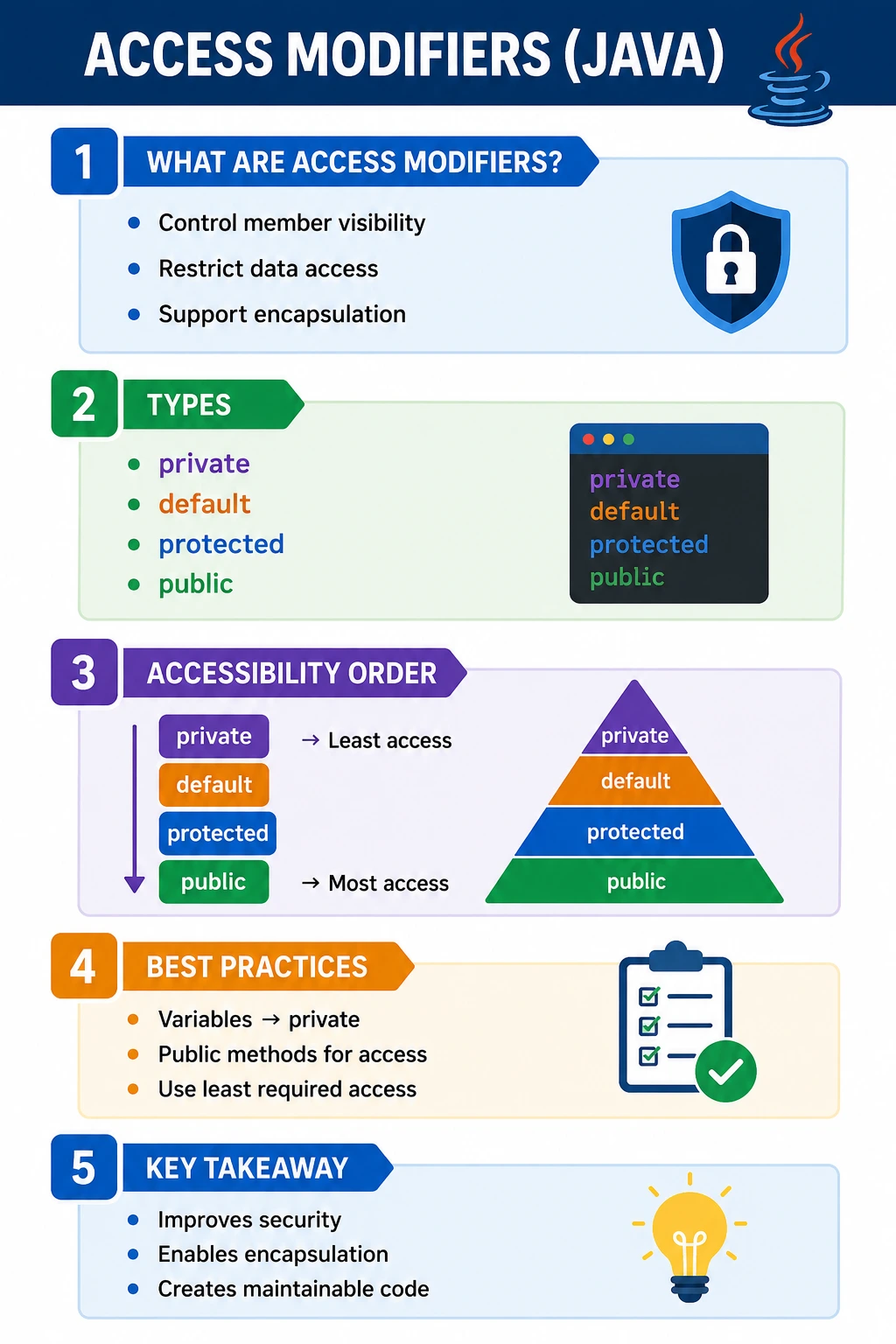
What Are Access Modifiers?
Access modifiers are Java keywords that define where a class, constructor, field, or method can be accessed from. They form the visibility rules of a Java program. Without access control, every part of an application could reach every field and method, making the code fragile, insecure, and difficult to maintain. Access modifiers allow a class to expose what is necessary and hide what should remain internal.
Access control is closely connected to encapsulation. Encapsulation is about protecting object state and exposing controlled behavior. Access modifiers are one of the primary tools that make encapsulation possible in Java. A private field keeps direct access inside the class. A public method exposes a safe operation to outside code. A protected member supports inheritance-based extension. A default member supports package-level collaboration.
Good access control is not about hiding everything blindly. It is about making deliberate design decisions. A class should expose a stable public API and keep implementation details hidden. This reduces accidental misuse and allows internal code to change without breaking callers.
Types of Access Modifiers in Java
Java provides four access levels: private, default, protected, and public. The default access level is also called package-private because it has no keyword and allows access only within the same package. These levels form a practical visibility range from most restrictive to least restrictive.
private < default < protected < public
Private is the most restrictive because access is limited to the same class. Default is wider because classes in the same package can access the member. Protected is wider than default in inheritance scenarios because subclasses in different packages may access inherited protected members. Public is the least restrictive because it allows access from anywhere that can see the class.
The best general rule is to start restrictive and open access only when needed. This is often called the principle of least privilege. If a field does not need to be accessed outside the class, make it private. If a helper class is used only inside a package, keep it package-private. If a method is part of the official API, make it public. This discipline keeps code safer and easier to evolve.
private Access Modifier
The private modifier restricts access to the same class only. A private field, method, or constructor cannot be accessed directly from another class, even if that other class is in the same package. This makes private the strongest access level for protecting internal state and implementation details.
class Student {
    private int age;

    private void calculate() { }
}
Private is commonly used for instance variables because object state should usually be controlled by the class that owns it. Instead of allowing outside code to write student.age directly, the class can expose a method such as setAge that validates the value. This prevents invalid state and keeps rules centralized.
Private methods are useful for internal helper logic. If a method exists only to support other methods inside the class, it should not be public. Keeping helper methods private prevents outside code from depending on implementation details. This makes future refactoring safer because private methods can be changed without affecting external callers.
Private constructors are also useful in special designs. Utility classes may use private constructors to prevent object creation. Singleton or factory patterns may use private constructors to control how objects are created. The key idea is that private access gives the class full control.
default or Package-Private Access
Default access means no access modifier keyword is written. It is also called package-private access. A default member can be accessed by other classes in the same package, but not by classes in different packages. This is useful when classes are designed to collaborate internally within a package but should not expose those details to the rest of the application.
class Student {
    int marks; // default access
}
Package-private access is common for helper classes, internal utilities, and package-level implementation details. For example, a package may contain several classes that work together to implement a feature. Some methods may need to be shared inside that package but should not become public API. Default access supports that middle ground.
Many beginners forget that default access is not the same as public. A class or member with default access cannot be used from a different package. This is why package organization matters. Java packages are not only naming structures; they also define access boundaries.
protected Access Modifier
The protected modifier allows access within the same package and also from subclasses, even when those subclasses are in different packages. This makes protected important in inheritance-based designs. It is less restrictive than default in subclass scenarios, but it is not the same as public.
class Parent {
    protected int value;
}
Protected is useful when a parent class wants to expose certain members to subclasses while keeping them hidden from unrelated outside code. Frameworks sometimes use protected methods as extension points. A base class may define a protected method that child classes can override or call as part of customization.
Protected is also one of the most misunderstood modifiers. It does not mean "package only." Same-package access is allowed, and subclass access is also allowed. In a different package, access through inheritance has specific rules. A subclass can access inherited protected members through its own inheritance context, but protected does not simply make the member public to every class in every package.
public Access Modifier
The public modifier allows access from anywhere, as long as the class itself is visible and available on the classpath or module path. Public is the least restrictive access level. It is used for APIs, service methods, main entry points, controllers, public model behavior, and functionality that external code is intentionally allowed to call.
public class Student {
    public void display() { }
}
Public access should be used carefully because it creates a contract. Once other code depends on a public method, changing or removing it can break callers. This is why public APIs require more design discipline than private helpers. A public method should have a clear purpose, stable behavior, and meaningful name.
Public fields are usually discouraged because they expose internal state directly. Public methods are safer because they allow validation, logging, transformation, and business rules. A class can keep fields private and expose public operations that protect object integrity.
Access Modifiers Visibility Table (Interview Favorite)
The visibility table is a high-value interview tool because it summarizes the practical reach of each access level. Memorizing the table is helpful, but understanding the reason behind it is more important. As access becomes wider, the class gives more permission to outside code. Wider access should therefore be chosen only when it is part of the design.
| Access Modifier | Same Class | Same Package | Subclass (diff pkg) | Everywhere |
|---|---|---|---|---|
| private | Yes | No | No | No |
| default | Yes | Yes | No | No |
| protected | Yes | Yes | Yes | No |
| public | Yes | Yes | Yes | Yes |
Access Modifiers with Class Declaration
Top-Level Classes
Top-level classes in Java can use only public or default access. A public top-level class can be accessed from other packages. A default top-level class can be accessed only from the same package. Private and protected are not allowed for top-level classes because they do not make sense at that level in Java's access model.
public class Test { }
class Helper { } // default
A public top-level class must be declared in a file with the same name as the class. A package-private helper class can live in the same file or package depending on design. Keeping helper classes package-private is useful when they support internal package behavior and should not become part of the public API.
Access Modifiers with Constructors
Constructors can also use access modifiers. This allows a class to control how objects are created. A public constructor allows object creation from anywhere. A private constructor prevents direct object creation from outside the class. A protected constructor supports subclassing while restricting general construction. A package-private constructor allows creation only within the same package.
class Example {
    private Example() { }   // restrict object creation
    public Example(int x) { }
}
Private constructors are used in utility classes, singleton patterns, and factory-controlled designs. Protected constructors are common in base classes that are intended for inheritance. Constructor access is therefore not just a syntax detail; it is a way to control the object lifecycle.
Access Modifiers and Encapsulation (Best Practice)
Access modifiers are central to encapsulation. A common Java best practice is to keep fields private and expose behavior through methods. This allows the class to validate input, enforce rules, and hide internal representation.
class Account {
    private double balance;

    public double getBalance() {
        return balance;
    }

    public void deposit(double amount) {
        if (amount > 0) {
            balance += amount;
        }
    }
}
- Data hidden
- Controlled access
- Business rules enforced
In this Account class, balance is private. Outside code cannot directly assign an invalid balance. The deposit method controls how balance changes. This is stronger than simply exposing a public field. Access modifiers make the class responsible for protecting its own state.
Access Modifiers in Real Projects
In real-world Java projects, access modifiers define module boundaries and team contracts. Public classes and methods are the parts other code is allowed to use. Private members are internal implementation. Package-private members support internal package collaboration. Protected members provide extension points for subclasses.
In a service layer, public methods may represent use cases that controllers or other services call. Private methods may contain helper logic for validation or transformation. In a test automation framework, public page methods represent actions tests can perform, while locators and wait helpers are often private. In a library, public APIs must be stable because external users depend on them.
Choosing access levels carefully reduces accidental coupling. If too many methods are public, other code can start depending on internal details. Later refactoring becomes harder. If access is too restrictive, legitimate collaboration becomes awkward. The goal is controlled exposure: open what should be used, hide what should remain internal.
Access Modifiers and Package Design
Packages are important because default and protected access depend on package boundaries. A package is not only a folder-like naming convention; it is also an access-control boundary. Classes in the same package can access package-private members. Classes in different packages cannot.
This means package organization affects design. Classes that collaborate closely may belong in the same package so they can share package-private helpers without exposing them publicly. Classes that should be isolated can be placed in different packages to prevent accidental access. Good package design supports good access control.
Beginners often focus only on public and private, but default access is very useful for internal package design. It allows a team to create helper classes and methods that are available within a package but hidden from the rest of the application.
Choosing the Right Access Level
The safest approach is to choose the most restrictive access level that still supports the design. Start with private for fields and helper methods. Use default when several classes in the same package need to collaborate. Use protected when subclasses genuinely need access. Use public when the member is intentionally part of the external API.
Do not make something public just because it is convenient during development. Public access is a long-term commitment. Once outside code depends on it, changing it becomes harder. Similarly, do not make fields protected casually. Protected fields can weaken encapsulation because subclasses may modify parent state directly. Protected methods are usually safer extension points than protected data.
Good access control improves security, readability, and maintainability. It makes the intended usage of a class clearer and prevents accidental misuse.
Access Modifiers and API Contracts
Every public class and public method becomes part of a contract with other code. Once a method is public, callers can use it from outside the class and often from outside the package. This means the method name, parameters, return type, and behavior become harder to change later. Public access should therefore be intentional. It should represent behavior that the class is ready to support as part of its stable interface.
Private members are different. They are implementation details. A private helper method can be renamed, removed, split, or rewritten without affecting callers outside the class. This freedom is one of the main benefits of keeping implementation details private. It allows the class to evolve internally while preserving its public behavior.
Package-private members sit between those extremes. They can be useful for internal APIs within a package. For example, several classes in a parsing package may collaborate through package-private helpers. Outside packages do not see those helpers, so the broader application remains protected from internal complexity. This design keeps the public API smaller and cleaner.
Access Modifiers and Inheritance
Access modifiers affect inheritance in practical ways. A subclass inherits accessible members from a parent class, but private members are not directly accessible in the subclass. They still exist as part of the parent object state, but the subclass must use parent methods if it needs controlled access. This protects parent class internals from being modified freely by child classes.
Protected members are designed for inheritance scenarios, but they should be used carefully. A protected method can provide an extension point for subclasses. A protected field exposes parent state more directly and can make the parent class harder to protect. In many designs, protected methods are better than protected variables because they allow the parent class to preserve rules while still supporting customization.
When overriding methods, Java does not allow reducing visibility. If a parent method is public, the overriding method in the child class must also be public. If a parent method is protected, the child can keep it protected or make it public, but cannot make it private. This rule preserves substitutability: code that can call the parent method should still be able to call the child version through the parent type.
Access Modifiers in Test Automation
Access modifiers are useful in test automation frameworks as well. In a Page Object Model class, locators are usually private because tests should not depend on locator details. Public methods represent business actions such as login, search, submit, or addToCart. This keeps tests readable and protects them from UI implementation changes.
Helper methods inside page objects may be private if they support only one page class. Shared helper methods may be package-private if they are used by several classes in the same framework package. Public utility methods should be reserved for operations that test classes are expected to call directly. This mirrors the same design principle used in application code: expose behavior, hide implementation.
Good access control makes automation easier to maintain. If every locator and low-level click method is public, tests may bypass page-level behavior and become brittle. If the page class exposes a clean public API, tests remain focused on user behavior, and internal page implementation can change with less impact.
Access Modifiers and Security
Access modifiers are not a complete security system, but they support safer code by reducing accidental exposure. Sensitive fields such as passwords, tokens, balances, roles, or internal configuration should not be public. Even when data must be readable, the class can expose it in a controlled form. For example, a password object should not return the raw password value through a public getter.
Public access increases the number of places where data can be read or modified. Private access limits direct modification to the class that owns the data. This makes validation and auditing easier. If a balance changes only through deposit and withdraw, those methods become the controlled points where rules, logs, and checks can exist.
Security-conscious design uses access modifiers together with validation, immutability, defensive copying, and clear API boundaries. The access modifier is the first gate. The class behavior behind that gate must still be designed responsibly.
Refactoring Benefits of Restrictive Access
Restrictive access makes refactoring safer. If a method is private, only the same class can call it. A developer can inspect one file and understand all usages. If a method is public, usages may exist across the entire application or even outside the project if it is a library. This makes change risk much higher.
Private fields also allow internal representation to change. A class may replace two fields with one object, change a list to a map, or compute a value dynamically instead of storing it. If callers use public methods, those internal changes can often happen without caller changes. If callers directly access fields, every internal change becomes a breaking change.
This is why experienced developers often choose private first. Restrictive access is not about making code difficult to use; it is about making the allowed usage clear and keeping future change manageable.
Common Access Design Decisions
Several access decisions appear repeatedly in Java projects. Instance variables are usually private because object state should be controlled by the class. Constructors are public when normal callers should create objects directly, private when construction must be restricted, and protected when construction is intended mainly for subclasses. Utility helper methods are usually private if they support only one class and package-private if they support several classes in the same package.
Service methods, controller endpoints, and library methods are often public because they represent intentional behavior for callers. However, not every method inside a service should be public. A service may expose one public operation and use several private methods internally to validate input, map data, or prepare results. This keeps the public surface focused and prevents outside code from depending on partial internal steps.
For inheritance, protected should be used when subclass extension is part of the design. If a method is not intended for subclass customization, private or package-private may be better. Protected access creates a relationship with future subclasses, so it should be treated as a design commitment. Public access creates an even wider commitment because any caller may depend on it.
When in doubt, ask who genuinely needs access. If only the current class needs it, use private. If only the package needs it, use default. If subclasses need it, consider protected. If the broader application or external users need it, use public. This simple question leads to cleaner access decisions than choosing modifiers casually.
How Access Modifiers Support Clean Code
Clean code is not only about formatting and naming. It is also about clear boundaries. Access modifiers define boundaries between public behavior and private implementation. A reader can look at a class and understand which methods are intended for outside use and which methods exist only to support internal logic.
This improves code review. Public methods deserve more careful review because they affect callers. Private methods can be reviewed as implementation details. Package-private methods reveal package-level collaboration. Protected methods indicate extension points. Access modifiers therefore communicate design intent to humans as much as they instruct the compiler.
Used well, access modifiers reduce accidental complexity. They prevent unnecessary dependencies, protect internal state, and make future changes safer. Used poorly, they either expose too much or restrict legitimate collaboration. The goal is not maximum restriction at all costs; the goal is the right level of visibility for the responsibility of the code.
Common Beginner Mistakes
The most common beginner mistake is making variables public. Public fields allow direct modification and bypass validation. Private fields with controlled methods are usually a better design. Another common mistake is making every method public. Helper methods should often be private or package-private because they are implementation details.
Many learners also confuse protected with default. Default allows access within the same package only. Protected allows same-package access and subclass access, including subclass access from a different package under inheritance rules. This difference is important in interview questions.
Another mistake is not understanding package boundaries. Code may work when classes are in the same package and fail when moved to a different package. This often happens with default access. Finally, beginners sometimes use access modifiers to force code to compile rather than to express design intent. Access levels should be chosen deliberately, not randomly.
Interview-Ready Answers
Short Answer
Access modifiers control the visibility of classes, variables, and methods in Java.
Detailed Answer
Java provides four access levels: private, default, protected, and public. They define where a class member can be accessed from and are essential for encapsulation, security, and maintainable object-oriented design. Private is limited to the same class, default is limited to the same package, protected supports same-package and subclass access, and public is accessible everywhere.
Key Takeaway
Use the most restrictive access level that supports the design. Good access control protects object state, reduces accidental coupling, keeps APIs clean, and makes Java applications easier to maintain. Private supports encapsulation, default supports package collaboration, protected supports inheritance extension, and public exposes intentional API behavior.
Access Modifiers Examples (Interview Friendly)
1. private – Accessible Only Within Same Class
class Demo {
    private int x = 10;

    private void show() {
        System.out.println(x);
    }

    public static void main(String[] args) {
        Demo d = new Demo();
        d.show();
    }
}
Explanation
private members accessible only inside the same class
Output: 10
2. private Not Accessible Outside Class
class A {
    private int x = 10;
}

class B {
    public static void main(String[] args) {
        A a = new A();
        // System.out.println(a.x); // Compile-time error
    }
}
Explanation
Even same package cannot access private
3. Default (No Modifier) – Package-Private Access
class A {
    int x = 10;   // default access
}

class B {
    public static void main(String[] args) {
        A a = new A();
        System.out.println(a.x);
    }
}
Explanation
Accessible within same package
Output: 10
4. Default Access – Not Visible Outside Package
// package p1;
class A {
    int x = 10;
}

// package p2;
class B {
    public static void main(String[] args) {
        // new A().x; // Compile-time error
    }
}
Explanation
Default access is package-level only
5. public – Accessible Everywhere
public class A {
    public int x = 10;
}

class B {
    public static void main(String[] args) {
        A a = new A();
        System.out.println(a.x);
    }
}
Explanation
public has no access restriction
Output: 10
6. protected – Same Package Access
class A {
    protected int x = 10;
}

class B {
    public static void main(String[] args) {
        A a = new A();
        System.out.println(a.x);
    }
}
Explanation
protected works like default inside same package
Output: 10
7. protected – Access via Inheritance (Different Package)
// package p1;
class A {
    protected int x = 10;
}

// package p2;
class B extends A {
    public static void main(String[] args) {
        B b = new B();
        System.out.println(b.x);
    }
}
Explanation
protected accessible through inheritance
Output: 10
8. protected Not Accessible via Object (Different Package)
// package p1;
class A {
    protected int x = 10;
}

// package p2;
class B {
    public static void main(String[] args) {
        A a = new A();
        // System.out.println(a.x); // Compile-time error
    }
}
Explanation
Must use subclass reference, not parent object
9. Access Modifiers on Methods
class A {
    protected void show() {
        System.out.println("Protected Method");
    }
}

class B extends A {
    public static void main(String[] args) {
        new B().show();
    }
}
Explanation
Same rules apply to methods
Output: Protected Method
10. Overriding Method – Cannot Reduce Visibility
class A {
    protected void show() {}
}

class B extends A {
    // void show() {} // Compile-time error (cannot reduce visibility)
}
Explanation
Overridden method must be same or more accessible
11. Increasing Visibility While Overriding
class A {
    protected void show() {
        System.out.println("A");
    }
}

class B extends A {
    public void show() {
        System.out.println("B");
    }

    public static void main(String[] args) {
        new B().show();
    }
}
Explanation
Visibility increased from protected to public
Output: B
12. Access Modifiers with Constructors
class A {
    private A() {
        System.out.println("Private Constructor");
    }

    public static void main(String[] args) {
        new A();
    }
}
Explanation
Constructor can be private
Used in Singleton pattern
13. private Constructor Prevents Object Creation
class A {
    private A() {}
}

class B {
    public static void main(String[] args) {
        // new A(); // Compile-time error
    }
}
Explanation
Object creation blocked outside class
14. Access Modifiers with Variables (Encapsulation)
class User {
    private int age;

    public int getAge() {
        return age;
    }
}
Explanation
Encapsulation uses private + public methods
15. Class-Level Access Modifiers
public class A {}

// protected class B {} // not allowed
// private class C {}   // not allowed
Explanation
Top-level classes can be only public or default
16. Nested Class Access Modifiers
class Outer {
    private class Inner {
        void show() {
            System.out.println("Inner");
        }
    }

    void call() {
        new Inner().show();
    }

    public static void main(String[] args) {
        new Outer().call();
    }
}
Explanation
Inner classes can be private
Output: Inner
17. Access Modifier Matrix (Conceptual)
/*
Modifier     Same Class  Same Package  Subclass  Other Package
private         Yes          No           No          No
default         Yes          Yes          No          No
protected       Yes          Yes          Yes         No*
public          Yes          Yes          Yes         Yes
*/
Explanation
protected across packages only via inheritance
18. Access Modifiers and Static Members
class A {
    protected static int x = 10;
}

class B extends A {
    public static void main(String[] args) {
        System.out.println(x);
    }
}
Explanation
Same access rules apply to static members
Output: 10
19. Common Interview Trap
class A {
    protected int x = 10;
}

class B {
    void test() {
        A a = new A();
        // System.out.println(a.x); // error if different package
    }
}
Explanation
protected ≠ public across packages
20. Interview Summary – Access Modifiers
class Demo {
    private int a = 10;
    int b = 20;
    protected int c = 30;
    public int d = 40;
}
Explanation
private means class only
default means package access
protected means package plus subclass access
public means everywhere