Access Control Rules in Java
Access control rules in Java define who can access classes, constructors, fields, methods, and nested types
across the boundaries of a class, package, and inheritance hierarchy. These rules are controlled by the four
access levels: private, default or package-private access, protected, and
public. They decide whether a member is visible only inside one class, inside a package, through
inheritance, or everywhere.
Access control is not just a syntax topic. It is one of the foundations of encapsulation. A well-designed class hides internal data and exposes only the operations that outside code should use. A well-designed package exposes a limited public surface and keeps helper classes internal. A well-designed API makes intentional promises through public methods and avoids exposing implementation details that may change later. Access modifiers make these design choices enforceable by the compiler.
This topic is also important for interviews because many Java access rules are simple at first but subtle in
real code. Most learners understand that private means class-only and public means
everywhere. The more common mistakes happen around default access, package boundaries, sub-packages, and the
exact meaning of protected across packages. Understanding these details helps developers write
safer, cleaner, and more maintainable Java code.
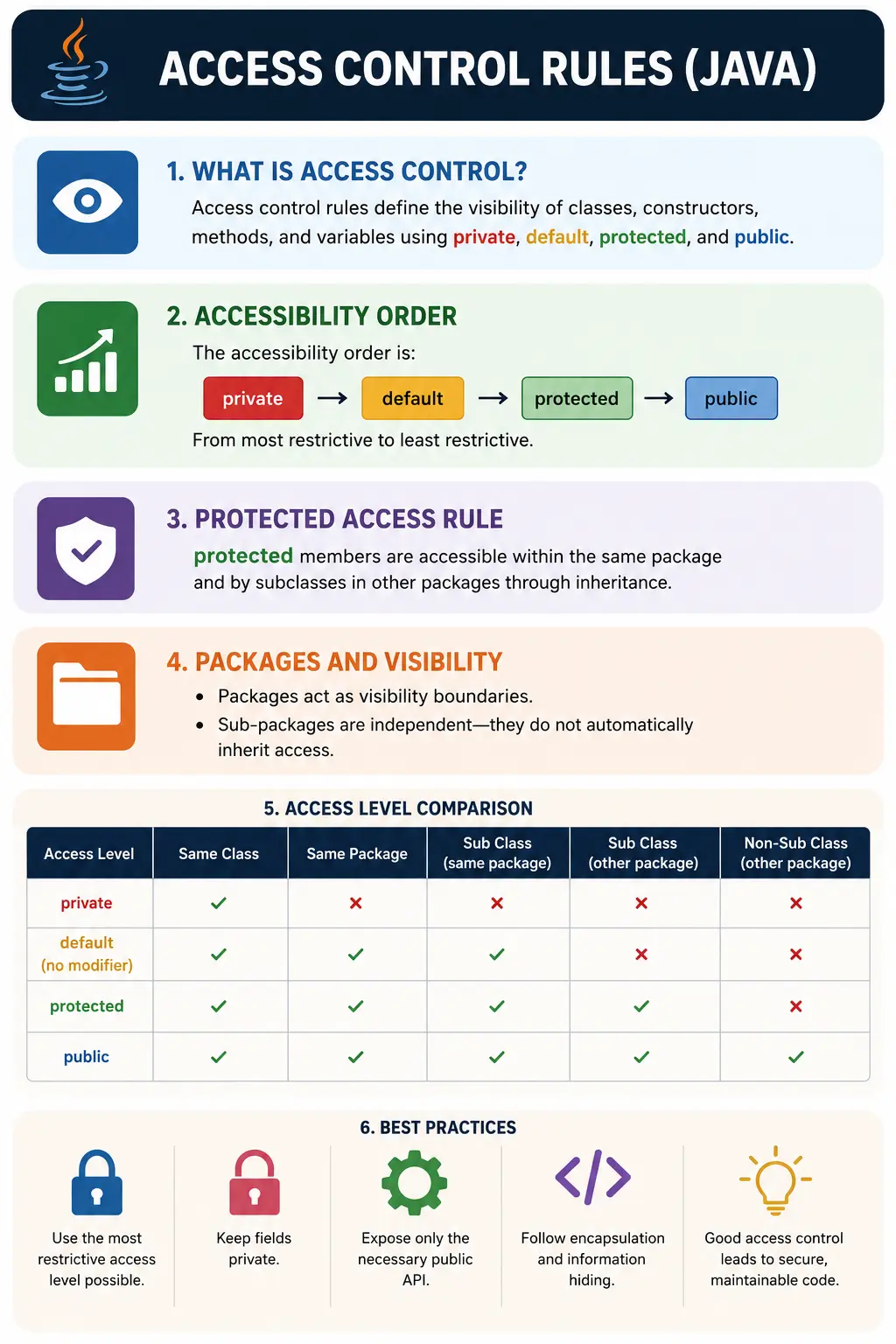
The Four Access Levels
Java's access levels can be understood from least accessible to most accessible. The most restrictive level is
private, which keeps access inside the declaring class. Default access, also called
package-private access, allows access from classes in the same package. protected allows same
package access and limited subclass access from different packages. public is the most open
level and allows access from anywhere.
private < default (package-private) < protected < public
The general design principle is to use the most restrictive access level that still allows the code to work. This keeps the visible surface of a class or package small. When fewer members are exposed, fewer outside classes can depend on internal details. That makes future changes easier because internal implementation can evolve without breaking callers.
Where Access Modifiers Can Be Applied
Access modifiers can be applied to different Java elements, but not every modifier is valid everywhere.
Top-level classes can only be public or package-private. Member classes, methods, fields, and
constructors can use all four access levels. This distinction matters because a top-level class is either part
of the public API of a package or internal to that package.
| Target | Allowed Modifiers |
|---|---|
| Top-level class | public, default |
| Member class | all four |
| Methods | all four |
| Variables (fields) | all four |
| Constructors | all four |
A source file may contain only one public top-level class, and the file name must match that public class name. Other top-level classes in the same file can exist, but they are package-private. In production code, teams usually keep one main top-level class per file for readability, even when Java technically allows additional package-private classes.
Core Visibility Matrix
The visibility matrix is one of the easiest ways to remember access control rules. It compares each modifier
against four common access locations: the same class, another class in the same package, a subclass in a
different package, and unrelated code from anywhere else. The matrix is useful, but it should be read with
care because protected has an important inheritance nuance.
| Modifier | Same Class | Same Package | Subclass (diff pkg) | Everywhere |
|---|---|---|---|---|
| private | Yes | No | No | No |
| default | Yes | Yes | No | No |
| protected | Yes | Yes | Yes* | No |
| public | Yes | Yes | Yes | Yes |
* Protected nuance: accessible in a subclass only via inheritance (not via a parent reference from outside the package).
Detailed Rules by Modifier
Each modifier has a specific purpose. Choosing the correct modifier is not about making code compile with the least effort. It is about deciding what should be visible, what should remain internal, and what outside code should be allowed to depend on.
1. private
The private modifier is the most restrictive access level. A private field, method, constructor,
or nested class can be accessed only inside the declaring class. Other classes cannot access it directly, even
if they are in the same package or are subclasses. This makes private the standard choice for
fields and internal helper methods.
class A {
    private int x;
}
Private fields support encapsulation because they prevent outside code from modifying object state directly. Instead, the class can expose controlled behavior through methods. This allows validation, consistency checks, and internal representation changes without forcing every caller to change.
2. default or Package-Private
Default access is used when no access modifier is written. It is also called package-private access. A package-private class or member is accessible only from other classes in the same package. It is not visible from different packages, even if the accessing class is a subclass.
class A { int y; } // default
Package-private access is useful for internal collaboration inside a package. A group of related classes can work together without exposing every helper class publicly. This keeps the public API smaller while still allowing package-level implementation details to be shared.
3. protected
The protected modifier is often misunderstood. It allows access from the same package, just like
package-private access. It also allows access from subclasses in different packages, but that access happens
through inheritance. A subclass in another package cannot freely access a protected member through any parent
object reference.
package p1;
public class Parent { protected int v; }

package p2;
public class Child extends Parent {
    void ok() { System.out.println(v); } // accessible through inheritance
    void bad(Parent p) {
        // System.out.println(p.v); // not accessible outside package via parent ref
    }
}
This protected nuance is a common interview trap. The keyword does not mean public-to-all-subclasses in every possible reference form. It means same package access plus subclass access through the inherited member. This distinction protects the parent class from being treated as a public field holder by unrelated code.
4. public
The public modifier is the most accessible level. A public class or member can be accessed from
anywhere, as long as the class itself is available and other language rules are satisfied. Public access is
appropriate for APIs, entry points, interfaces, and behavior that outside code is intentionally allowed to use.
public class Service {
    public void run() {}
}
Public should not be used casually. Once a method or class becomes public, other code may depend on it. In a library or shared application, changing a public API later can break callers. Good design exposes only what is necessary and keeps implementation details private or package-private.
Class-Level Access Rules
Top-level classes can only be public or package-private. They cannot be declared private or protected. A public top-level class is visible outside its package and must be stored in a file with the same name. A package-private top-level class is visible only to classes in the same package.
public class A {}   // A.java
class Helper {}     // default
This rule encourages clear source organization. Public top-level classes normally represent the visible building blocks of a package. Package-private helper classes can support package internals without becoming part of the external API.
Constructor Access Control
Constructors can also use access modifiers. Constructor access controls who is allowed to create objects of a class. A public constructor allows any accessible code to instantiate the class. A private constructor prevents outside object creation and is often used in utility classes, singleton-style designs, or factory-controlled object creation.
class Util {
    private Util() {} // no instances
}
A protected constructor is sometimes used when subclasses or frameworks should be allowed to create objects while ordinary callers should not. Package-private constructors are useful when object creation should be limited to a package, such as through a factory class in the same package.
Access Control with Inheritance (Key Points)
Inheritance interacts with access control in several important ways. Private members are not inherited in the sense of being directly accessible by the child class. They still exist inside the parent part of the object, but the child cannot directly use them. Protected and public members are inherited and can be used by the subclass according to access rules.
When overriding a method, a subclass cannot reduce visibility. If a parent method is protected, the overriding method in the child can remain protected or become public, but it cannot become default or private. This rule preserves substitutability: code that can call the parent method should not lose access when working with a child object.
class P { protected void f() {} }
class C extends P { public void f() {} } // allowed
Packages as Visibility Boundaries
Packages are visibility boundaries in Java. Default access depends entirely on the package boundary, and protected access includes same-package visibility. This means package design is part of access design. Classes that are intended to collaborate internally may be placed in the same package. Classes that should not depend on each other's internal details should be placed in separate packages.
com.app
 |-- service
 |-- util   // util is not service
Sub-packages are independent. A package named com.app.service does not automatically share
package-private access with com.app.util or com.app. The names look hierarchical,
but Java treats each full package name as a separate access boundary.
Best Practices for Access Control
The safest general practice is to start restrictive and open access only when there is a clear reason. Fields should almost always be private. Public fields expose internal state directly and make validation difficult. Methods should be public only when outside callers genuinely need them. Helper methods should usually be private or package-private depending on whether they are used only inside one class or across a package.
Protected should be used thoughtfully. It is useful when a class is designed for inheritance and subclasses need extension points. However, protected members become part of a subclass-facing API, so they should be stable and intentional. If a class is not meant to be extended, protected members may create unnecessary coupling.
Package-private access is useful for implementation details inside an application, but public libraries should be careful with it because it may create an unclear API surface. In libraries, the public API should be explicit and documented. Internal implementation should remain hidden wherever possible.
Access Control and Encapsulation
Encapsulation means bundling data and behavior together while protecting internal details from uncontrolled access. Access control is the mechanism that helps Java enforce this idea. By keeping fields private and exposing behavior through methods, a class controls how its state changes. This prevents outside code from placing an object into an invalid or inconsistent state.
For example, a bank account class should not expose its balance as a public field that any class can change. It should provide controlled methods such as deposit and withdraw, where validation rules can be applied. Access control allows the class to protect its internal data while still offering useful behavior.
Access Control in Real Projects
In real projects, access control shapes APIs and module boundaries. A service package may expose public service classes while keeping validators, mappers, and helper classes package-private. A framework may expose protected methods that subclasses can override. A utility class may use a private constructor to prevent accidental object creation. These choices make the codebase easier to understand and safer to change.
Good access control also reduces accidental dependencies. If every class and method is public, other code can start depending on implementation details. Later, when the team wants to refactor those details, many callers may break. Restrictive access creates freedom to improve internals without disturbing external behavior.
Access Control and Testing
Testing sometimes raises questions about access control. Beginners may be tempted to make private methods public just so tests can call them directly. This is usually a poor design tradeoff. Tests should generally validate visible behavior rather than private implementation details. If a private method is complex enough to require direct testing, it may indicate that the logic should be moved into a separate class with an appropriate access level.
Package-private access can be useful for tests when internal collaboration needs to be verified. Test classes
can be placed in the same package under src/test/java, allowing them to access package-private
members without exposing those members publicly to production callers. This keeps the production API clean
while still supporting focused tests.
Access Control and API Design
Access control is one of the main tools used to design clean APIs. An API is not only a web service or an external library contract. Every public class and public method inside a Java project forms an API for other code. When a method is public, other classes are free to call it. When a class is public, other packages are free to depend on it. This is why public access should represent an intentional design decision, not a default habit.
A clean API exposes behavior and hides implementation. For example, a payment module may expose a public
PaymentService with methods such as processPayment or refundPayment.
Internally, that service may use validators, formatters, mappers, rule evaluators, and repository helpers.
Those helper classes do not need to be public if outside code should not depend on them. Keeping them private
or package-private gives the team freedom to change implementation later.
Overexposed APIs create long-term cost. If every helper class is public, other packages may start using those helpers directly. Later, when the team wants to improve the payment module, those external dependencies make refactoring risky. Good access control keeps the public surface small, stable, and meaningful.
Access Control in Framework-Based Code
Frameworks can influence access control decisions. Some frameworks need public classes or constructors so they can create objects through reflection or dependency injection. Others allow protected constructors, package-private classes, or annotation-driven access depending on how they are designed. Developers should understand the framework requirements instead of making everything public by default.
In many enterprise applications, service classes, controller classes, configuration classes, and data transfer objects are public because the framework or other packages need to access them. However, internal helper methods inside those classes may remain private. Supporting classes that are used only inside one package can remain package-private. The framework may need some public entry points, but it rarely requires every member to be public.
Protected access is also common in framework-style designs where a base class provides extension points for subclasses. A testing framework, page object base class, or reusable template class may expose protected methods that child classes can use or override. This should be done carefully because protected members form a contract for subclasses. Once subclasses depend on protected behavior, changing it may break derived classes.
Access Control and Java Modules
Java's module system adds another layer of visibility beyond traditional access modifiers. A public class is
not automatically visible to every module unless its package is exported by the module. This means access
control still starts with private, default, protected, and public, but
modular applications can further restrict which packages are exposed outside the module.
Beginners do not need to master modules before understanding access modifiers, but it is useful to know the relationship. Access modifiers control visibility at the class, package, and inheritance level. Modules control whether packages are exposed between modules. A public class in a non-exported package may still be hidden from other modules. This allows larger applications to create stronger boundaries.
The key idea remains the same: expose only what is necessary. Whether a project uses simple packages or full Java modules, access control protects internal implementation from unnecessary external dependency.
Access Control and Refactoring
Good access control makes refactoring easier. Private methods can be renamed, reorganized, or rewritten with low risk because only the declaring class uses them. Package-private helpers can be changed with moderate risk because only the same package depends on them. Public methods require more caution because callers may exist throughout the application or even outside the project.
This is why experienced developers avoid making code public too early. A public method may feel convenient in the short term, but it can become a long-term commitment. If outside code starts depending on it, changing the method signature or behavior becomes harder. Restrictive access gives the codebase more flexibility.
During refactoring, access modifiers should be reviewed intentionally. If a public method is used only inside one class, it can often become private. If a public helper is used only within one package, it may become package-private. If a protected method is not intended for subclass extension, it may be better as private or package-private. Reducing visibility is often a useful cleanup step when done safely.
Access Control in Interview Scenarios
Interview questions on access control often test practical judgment rather than memorization alone. A common
scenario is choosing the right modifier for fields. The best answer is usually private because
fields represent internal state. Another scenario asks whether a subclass in a different package can access a
protected member. The correct answer must mention the inheritance rule and the restriction on parent
references.
Another frequent question asks why a top-level class cannot be private. A top-level class is not enclosed inside another class, so private access would have no meaningful enclosing class boundary. Java therefore allows only public or package-private access for top-level classes. Member classes, because they are declared inside another class, can use all four access levels.
Strong interview answers connect rules to design. Instead of only saying "public means everywhere," explain that public members form the external API. Instead of only saying "private means same class," explain that private access protects state and implementation details. This shows that you understand why the rule exists, not just what the rule says.
Common Pitfalls
One common pitfall is assuming protected means package-only. It does not. Protected members are
accessible inside the same package and through inheritance from subclasses in other packages. Another common
mistake is trying to access a protected member through a parent reference from a different package. That is
not allowed unless the access follows the inheritance rule correctly.
Another frequent mistake is overexposing fields as public. Public fields may look convenient, but they remove control from the class. If validation rules change later, every direct field access becomes a problem. Private fields with controlled methods are usually safer.
Beginners also expect sub-packages to inherit access from parent packages. Java does not work that way.
com.app, com.app.service, and com.app.util are separate packages for
access purposes. Package-private access is limited to the exact same package.
Interview-Ready Answers
Short Answer
Access control rules define the visibility of classes and members using private, default, protected, and public.
Detailed Answer
Java access control governs where classes and members can be accessed within a class, package, subclass, or globally. private restricts to the class, default to the package, protected adds subclass access across packages (via inheritance), and public allows universal access. Proper use enforces encapsulation and secure APIs.
Key Takeaway
Access control is the gatekeeper of encapsulation. Design with the smallest visible surface area to achieve safe, maintainable, and scalable Java code.
Access Control Examples (Quick Reference)
1. public Access: Everywhere Accessible
package p1;

public class A {
    public int x = 10;
}

package p2;

import p1.A;

class Demo {
    public static void main(String[] args) {
        A a = new A();
        System.out.println(a.x);
    }
}
Explanation
- public is accessible from any package
- Output: 10
2. private Access: Same Class Only
class A {
    private int x = 10;

    void show() {
        System.out.println(x);
    }
}

class Demo {
    public static void main(String[] args) {
        A a = new A();
        // System.out.println(a.x); // not accessible
        a.show();
    }
}
Explanation
- private provides class-level access only
- Output: 10
3. Default (Package-Private) Access: Same Package
package p1;

class A {
    int x = 10; // default
}

package p1;

class Demo {
    public static void main(String[] args) {
        A a = new A();
        System.out.println(a.x);
    }
}
Explanation
- Default access is available only within the same package
- Output: 10
4. Default Access: Different Package Not Allowed
package p1;

class A {
    int x = 10;
}

package p2;

// import p1.A;

class Demo {
    public static void main(String[] args) {
        // A a = new A(); // not accessible
    }
}
Explanation
- Default members cannot cross package boundary
5. protected Access: Same Package Without Inheritance
package p1;

public class A {
    protected int x = 10;
}

package p1;

class Demo {
    public static void main(String[] args) {
        A a = new A();
        System.out.println(a.x);
    }
}
Explanation
- protected is accessible within the same package
- Output: 10
6. protected Access: Different Package via Inheritance
package p1;

public class A {
    protected int x = 10;
}

package p2;

import p1.A;

class B extends A {
    public static void main(String[] args) {
        B b = new B();
        System.out.println(b.x);
    }
}
Explanation
- protected works across packages only through inheritance
- Output: 10
7. protected Access: Different Package Without Inheritance
package p2;

import p1.A;

class Demo {
    public static void main(String[] args) {
        A a = new A();
        // System.out.println(a.x); // not accessible
    }
}
Explanation
- protected is not the same as public
- Needs subclass reference
8. Access Control with Methods
class A {
    private void m1() {}
    void m2() {}
    protected void m3() {}
    public void m4() {}
}
Explanation
- Same rules apply to methods as variables
9. Overriding: Cannot Reduce Visibility
class A {
    protected void show() {}
}

class B extends A {
    // void show() {} // cannot reduce visibility
}
Explanation
- Visibility must be same or wider
10. Overriding: Increasing Visibility Allowed
class A {
    protected void show() {
        System.out.println("A");
    }
}

class B extends A {
    public void show() {
        System.out.println("B");
    }

    public static void main(String[] args) {
        new B().show();
    }
}
Explanation
- protected to public is allowed
- Output: B
11. private Methods Are Not Overridden
class A {
    private void show() {
        System.out.println("A");
    }
}

class B extends A {
    void show() {
        System.out.println("B");
    }

    public static void main(String[] args) {
        new B().show();
    }
}
Explanation
- private methods are class-specific
- Output: B
12. Access Control with Constructors
class A {
    private A() {}
}

class Demo {
    public static void main(String[] args) {
        // new A(); // constructor not accessible
    }
}
Explanation
- private constructors prevent object creation (Singleton pattern)
13. Access Modifiers with Abstract Methods
abstract class A {
    protected abstract void show();
}

class B extends A {
    public void show() {
        System.out.println("Implemented");
    }

    public static void main(String[] args) {
        new B().show();
    }
}
Explanation
- Abstract method visibility can be widened
- Output: Implemented
14. Access Control with Interfaces
interface A {
    int x = 10;
    void show();
}
Explanation
- Interface members are public by default
- public static final variables
- public abstract methods
15. Access Modifiers and Packages (Summary Code)
package p1;

public class A {
    public int a = 1;
    protected int b = 2;
    int c = 3;
    private int d = 4;
}

package p2;

import p1.A;

class B extends A {
    void test() {
        System.out.println(a); // public
        System.out.println(b); // protected
        // System.out.println(c); // default
        // System.out.println(d); // private
    }
}
16. Access Control with Static Members
class A {
    protected static int x = 10;
}

class B extends A {
    public static void main(String[] args) {
        System.out.println(x);
    }
}
Explanation
- Access rules apply same to static
17. Access Control with Nested Classes
class Outer {
    private int x = 10;

    class Inner {
        void show() {
            System.out.println(x);
        }
    }

    public static void main(String[] args) {
        Outer.Inner i = new Outer().new Inner();
        i.show();
    }
}
Explanation
- Inner class can access private members
- Output: 10
18. Access Control and this Compared to super
class A {
    protected int x = 10;
}

class B extends A {
    int x = 20;

    void show() {
        System.out.println(this.x);
        System.out.println(super.x);
    }

    public static void main(String[] args) {
        new B().show();
    }
}
Output
20
10
19. Common Interview Trap
class A {
    protected void show() {}
}

class B extends A {
    // private void show() {} // compile-time error
}
Explanation
- Cannot reduce visibility while overriding
20. Interview Summary: Access Control Rules
class Demo {
    public int a;
    protected int b;
    int c;
    private int d;
}
Key Rules
- public is accessible everywhere
- protected allows same-package access and subclass access
- default is limited to the same package
- private is limited to the same class
- Overriding cannot reduce visibility