What Is Semantic HTML?
Introduction
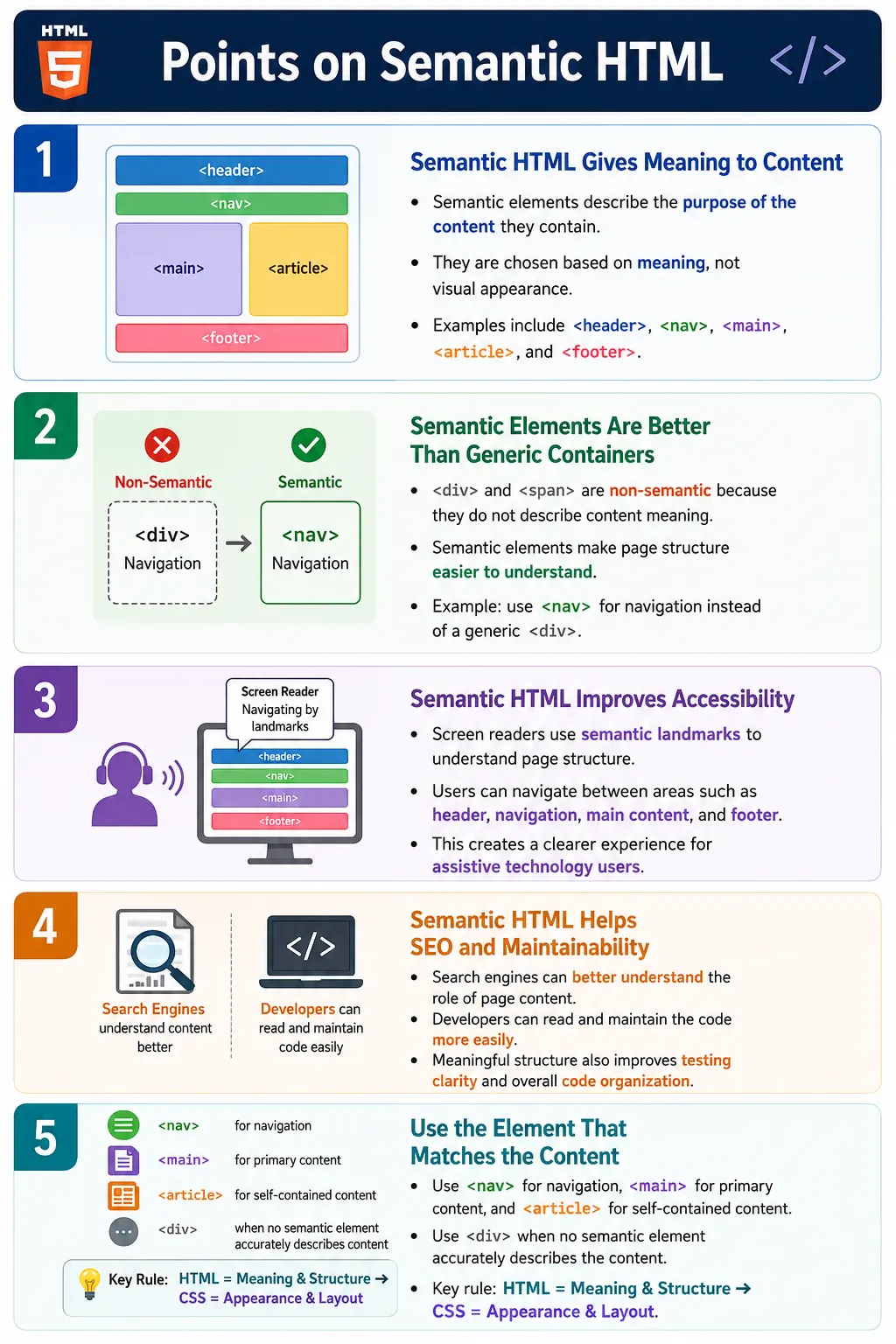
Semantic HTML is the practice of using HTML elements according to their meaning and purpose, rather than simply using elements for visual appearance or layout convenience. A semantic element clearly describes what its content represents. It tells browsers, search engines, screen readers, developers, and automated tools something meaningful about the role of that content on the page.
For example, a navigation menu can be wrapped in a <nav> element instead of a generic <div>. A page footer can use <footer>. A self-contained article can use <article>. These elements do not only create boxes on the page. They communicate meaning.
Semantic HTML is one of the core principles of modern web development. It improves accessibility, search engine understanding, code readability, maintainability, and testing clarity. It helps a webpage become more than a visual arrangement of boxes; it becomes a meaningful document structure.
What Does Semantic Mean?
The word semantic means related to meaning. In HTML, semantic elements are elements that convey the meaning or purpose of the content they contain. The element itself gives context.
Element
  |
Conveys meaning
  |
Browser understands purpose
Consider this example:
<header>
  Welcome
</header>
The browser, developer, assistive technology, and search engine can understand that this content belongs to a header section. The element name itself describes the role of the content.
This is different from choosing an element only because it has a certain default style. Semantic HTML is about meaning first. Styling should be handled by CSS.
Why Semantic HTML Was Introduced
Before HTML5, developers commonly used generic elements such as <div> and <span> for almost everything. A page structure might look like this:
<div id="header">
  ...
</div>

<div id="menu">
  ...
</div>

<div id="content">
  ...
</div>

<div id="footer">
  ...
</div>
This structure can work visually, but the HTML itself does not clearly describe the purpose of each section. The browser sees generic containers. A developer can infer meaning from IDs such as header or menu, but those IDs are not as strong as real semantic elements.
HTML5 introduced many semantic elements that describe common page regions and content types more directly.
<header>
  ...
</header>

<nav>
  ...
</nav>

<main>
  ...
</main>

<footer>
  ...
</footer>
Now the structure is clear. Browsers, developers, search engines, and assistive technologies can understand the page organization more easily.
Semantic vs Non-Semantic Elements
Semantic elements describe the meaning of their content. Examples include <header>, <nav>, <main>, <section>, <article>, <aside>, <footer>, <figure>, and <figcaption>.
Non-semantic elements provide no information about the content they contain. The most common examples are <div> and <span>. These elements are generic containers. They are useful, but they do not describe content meaning by themselves.
<div>
  ...
</div>

<span>
  ...
</span>
A <div> can contain a header, footer, article, sidebar, menu, or any other content. The element name does not reveal the role. A semantic element narrows that meaning and makes the structure clearer.
Example Comparison
Here is a non-semantic navigation area:
<div id="navigation">
  ...
</div>
The intended meaning is navigation, but the element itself is still a generic <div>. The meaning depends on an ID written by the developer.
A semantic version uses the <nav> element.
<nav>
  ...
</nav>
Now the meaning is explicit. The section is a navigation area. The browser and assistive technologies can treat it as a navigation landmark. Developers reading the page can understand it immediately.
Common Semantic HTML Elements
HTML provides several semantic elements that describe common webpage structures and content types.
| Element | Purpose |
|---|---|
<header> | Introductory content or a page or section header |
<nav> | Navigation links |
<main> | Main content of the page |
<section> | Thematically related content |
<article> | Independent, self-contained content |
<aside> | Related or supplementary content |
<footer> | Footer information |
<figure> | Self-contained media or illustration |
<figcaption> | Caption for a figure |
<time> | Date or time value |
<address> | Contact information |
Choosing the correct element depends on what the content represents. If the content is the main content of the page, use <main>. If it is navigation, use <nav>. If it is an independent post, tutorial, news item, or card that can stand alone, <article> may be appropriate.
Benefits of Semantic HTML
Semantic HTML provides better accessibility, better SEO, easier maintenance, cleaner code, improved readability, better browser understanding, and better screen reader support. These benefits come from the same core idea: meaningful structure is easier to understand than generic structure.
When the document uses meaningful elements, developers can read the page faster. Testers can locate important regions more clearly. Search engines can better interpret content relationships. Assistive technologies can expose page landmarks and regions to users.
Semantic HTML also reduces the need for unnecessary class names. Instead of writing <div class="footer">, a developer can use <footer>. CSS can still style it, but the HTML now carries meaning.
Browser Perspective
When a browser reads a semantic element such as <nav>, it understands that the section represents navigation.
Browser reads:
<nav>

Browser understands:
Navigation section
This information can be used by assistive technologies and browser features. The browser still renders the page visually, but the semantic structure becomes part of the document model.
Semantic HTML does not usually create dramatic visual differences by itself. The real value is structural meaning. CSS controls the appearance, while HTML describes the content.
Accessibility Benefits
Screen readers use semantic elements to understand page structure. A page with clear landmarks allows users to move between the header, navigation, main content, and footer more efficiently.
Header
  |
Navigation
  |
Main content
  |
Footer
Without semantic HTML, the structure may feel like a long series of generic containers.
Div
  |
Div
  |
Div
The content may still be visible, but it is less meaningful to assistive technologies. Semantic landmarks reduce confusion and improve navigation for users who rely on screen readers or keyboard navigation.
SEO Benefits
Search engines analyze page structure to understand content. Semantic elements help describe the role of different parts of a page. For example, <article> indicates a self-contained piece of content, such as a blog post, tutorial, documentation page, or news article.
<article>
  ...
</article>
Semantic HTML alone does not guarantee higher rankings. SEO depends on many factors, including content quality, performance, links, metadata, usability, and search intent. However, semantic HTML helps search engines interpret the page more accurately and supports a cleaner content structure.
Developer Benefits
Semantic HTML makes code easier to read and maintain. Compare a generic container:
<div class="header">
  ...
</div>
with a semantic element:
<header>
  ...
</header>
The second version communicates purpose immediately. Developers joining a project can understand the layout faster. Maintenance becomes easier because the structure itself tells a story.
Semantic elements also encourage better page organization. Instead of thinking only in terms of visual boxes, developers think in terms of content roles and document structure.
Example Page Structure
A semantic page structure might look like this:
<header>
  Logo
  Navigation
</header>

<main>
  <section>
    <h2>Courses</h2>
  </section>

  <section>
    <h2>Tutorials</h2>
  </section>
</main>

<footer>
  Copyright
</footer>
This structure is easy to read. The header contains introductory branding and navigation. The main element contains the page's main content. Sections divide related content. The footer contains footer information.
Browser Workflow
The browser reads the HTML, identifies semantic elements, creates the DOM, exposes structure to assistive technologies, and renders the page.
Read HTML
  |
Identify semantic elements
  |
Create DOM
  |
Assistive technologies use structure
  |
Render page
This workflow shows why semantic HTML matters beyond visual display. The elements become part of the structured meaning of the document.
Semantic HTML in Real Websites
Most modern websites use semantic elements for headers, navigation menus, blog posts, product pages, news articles, documentation pages, sidebars, contact information, and footers.
Header
  |
Navigation
  |
Main
  |
Article
  |
Footer
A product page may use <main> for the main content, <section> for product details, <article> for reviews, <aside> for related products, and <footer> for site information. A documentation site may use <nav> for the sidebar and <main> for the article content.
When to Use Div
<div> is still useful. Semantic HTML does not mean replacing every <div> with a semantic element. Use <div> when no semantic element accurately describes the content, when creating layout containers, when applying CSS or JavaScript hooks, or when grouping unrelated elements for technical reasons.
The goal is not to avoid <div>. The goal is to choose the element that best matches the content. If the content is navigation, use <nav>. If it is only a layout wrapper, <div> may be correct.
Common Mistakes
A common mistake is using <div> for everything.
<div>
  Header
</div>
A better structure is:
<header>
  Header
</header>
Another mistake is choosing the wrong semantic element. For example, using <nav> around an article is incorrect because <nav> is for navigation links, not general content.
<nav>
  Article content
</nav>
Developers also sometimes use semantic elements only for styling. Semantic elements should be chosen because of their meaning, not because of their default appearance. CSS should handle visual presentation.
Real-World Example
A simple SoftwareTips4U homepage can use semantic structure like this:
<header>
  <h1>SoftwareTips4U</h1>
</header>

<nav>
  Courses
  Tutorials
  Contact
</nav>

<main>
  <section>
    <h2>Latest Tutorials</h2>
  </section>
</main>

<footer>
  © 2026 SoftwareTips4U
</footer>
The page structure is clear to users, developers, search engines, and assistive technologies. Each region has a meaningful role.
Selenium Perspective
Semantic HTML can make automated testing easier because elements are more meaningful. Selenium can locate a navigation area by tag name.
WebElement nav =
driver.findElement(
    By.tagName("nav"));
It can also locate the header:
WebElement header =
driver.findElement(
    By.tagName("header"));
Automation testers commonly verify the presence of semantic landmarks, page structure, accessibility, correct headings, navigation sections, and main content regions. Semantic HTML does not replace robust selectors, but it often makes the page easier to inspect and understand.
Comparison Table
| Semantic Elements | Non-Semantic Elements |
|---|---|
| Describe meaning | Generic containers |
| Improve accessibility | No inherent meaning |
| Better for SEO structure | Limited SEO value by themselves |
| Easier to maintain | Can become harder to understand if overused |
<header>, <main>, <article> | <div>, <span> |
Common Interview Questions
What is Semantic HTML? Semantic HTML uses elements that describe the meaning and purpose of their content.
Why is Semantic HTML important? It improves accessibility, SEO, maintainability, and code readability.
What is the difference between semantic and non-semantic elements? Semantic elements have meaning, such as <header> or <article>, while non-semantic elements like <div> and <span> are generic containers.
Is <div> deprecated? No. It is still useful when no semantic element is appropriate.
Does Semantic HTML improve SEO? It helps search engines better understand page structure and content, which can contribute to improved indexing and overall SEO.
Interview-Ready Answer
Semantic HTML is the practice of using HTML elements based on their meaning rather than their appearance. Elements such as <header>, <nav>, <main>, <section>, <article>, and <footer> clearly describe the role of different parts of a webpage. This improves accessibility for screen readers, helps search engines understand the content structure, makes the code easier to read and maintain, and provides a more meaningful document structure. Generic elements like <div> and <span> should be used only when no semantic element appropriately represents the content.
One-Line Insight
Semantic HTML tells browsers, search engines, and assistive technologies what your content means, not just how it looks.