W3C Standards
Introduction
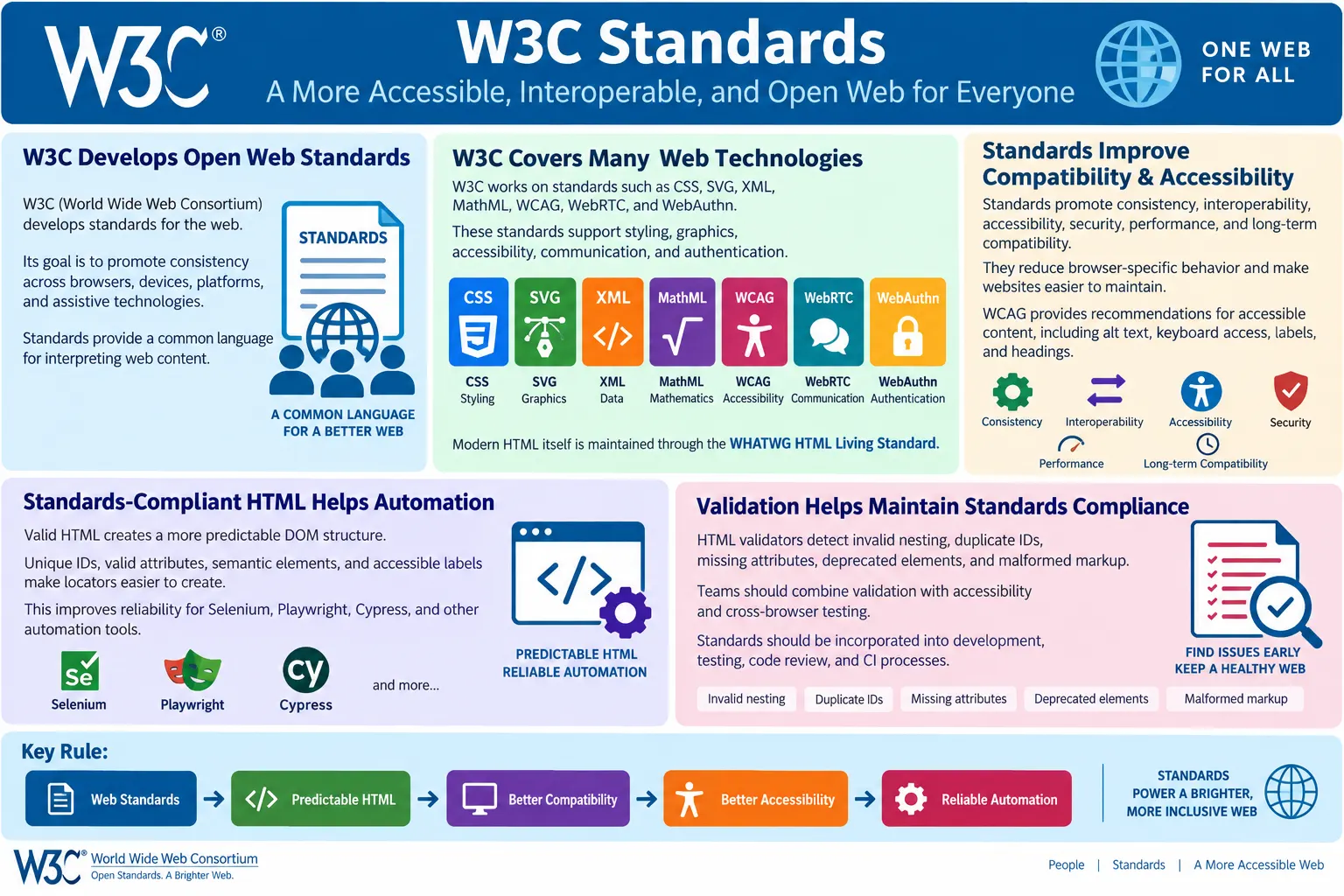
W3C Standards are a set of open web standards and technical specifications developed by the World Wide Web Consortium to help websites and web applications work consistently across browsers, devices, platforms, and assistive technologies. The web is not controlled by one browser or one company. Users may open the same page in Chrome, Edge, Firefox, Safari, a mobile browser, a screen reader, a search engine crawler, or an automation tool. Standards give all of these systems a common language for interpreting web content.
These standards define how technologies such as CSS, SVG, XML, MathML, Web Accessibility Guidelines, Web Authentication, and many other web platform features should be implemented. Historically, W3C also published HTML specifications. Today, modern HTML is maintained through the WHATWG HTML Living Standard, while W3C continues to develop and publish many other core web standards and works closely with the broader web platform community. For learners, testers, and developers, the practical point is simple: standards make the web interoperable, accessible, maintainable, and future-ready.
For automation testers, W3C Standards matter because standards-compliant HTML usually creates a more predictable DOM. A predictable DOM makes locators easier to write and maintain. Valid, semantic, accessible markup reduces cross-browser differences, duplicate IDs, malformed structures, and browser repair behavior. The result is more reliable testing with Selenium, Playwright, Cypress, Puppeteer, and other automation tools.
What Is the W3C?
The World Wide Web Consortium, commonly called W3C, is an international organization founded in 1994 by Sir Tim Berners-Lee, the inventor of the World Wide Web. Its primary goal is to develop open web standards that allow websites and applications to work consistently across browsers, devices, operating systems, and user agents. The W3C brings together browser vendors, technology companies, accessibility experts, researchers, developers, and other stakeholders to define technical specifications for the web.
W3C
  ↓
Creates Standards
  ↓
Browser Vendors
  ↓
Implement Standards
  ↓
Developers Build Websites
This workflow is important because the web depends on cooperation. If each browser invented its own version of HTML, CSS, accessibility behavior, graphics, and APIs, developers would need separate websites for every browser. Standards reduce that fragmentation. They allow developers to write one standards-compliant page and expect broadly consistent behavior across supported browsers.
Why W3C Standards Are Important
Without standards, the same web page could behave differently in every browser. One browser might interpret an element one way, another browser might interpret it differently, and a third browser might not support it at all. That would make web development expensive, testing difficult, and user experience inconsistent. Standards create shared rules that browser vendors can implement and developers can rely on.
Without standards:

Browser A
  ↓
Different HTML
  ↓
Browser B
  ↓
Different HTML
  ↓
Broken Websites
With standards:
Standard HTML
↓
Chrome
↓
Firefox
↓
Edge
↓
Safari
↓
Consistent ExperienceStandards promote interoperability across browsers. Interoperability means different systems can work together using shared expectations. A standards-compliant link, form, table, heading, image, SVG, or CSS rule should have a predictable meaning. There may still be browser differences, especially in native controls and newer features, but standards dramatically reduce chaos.
Goals of W3C Standards
W3C standards aim to provide consistency, interoperability, accessibility, security, performance, and long-term compatibility. These goals are connected. Consistency helps developers and testers predict behavior. Interoperability helps different browsers and tools work with the same content. Accessibility ensures that people using assistive technologies can access web content. Security and privacy standards help protect users. Long-term compatibility allows websites to continue working as browsers evolve.
- Consistency
- Interoperability
- Accessibility
- Security
- Performance
- Long-term compatibility
For testers, these goals translate into practical quality checks. Does the page behave consistently across browsers? Can users with assistive technologies use it? Is the document valid and semantic? Are deprecated elements avoided? Does the application rely on standards or browser-specific tricks? These questions connect standards to real QA work.
Technologies Covered by W3C
W3C has worked on many web technologies. Examples include CSS, SVG, XML, MathML, Web Accessibility Guidelines, WebRTC, Web Authentication, and other web platform specifications. These technologies support styling, graphics, structured markup, mathematical notation, accessibility, real-time communication, authentication, and more.
- CSS
- SVG
- XML
- MathML
- Web Accessibility Guidelines (WCAG)
- WebRTC
- Web Authentication (WebAuthn)
Historically, W3C also published HTML specifications. Modern HTML is now maintained through the WHATWG HTML Living Standard. However, W3C remains highly important because many technologies used by web pages are still standardized through W3C work. A modern website is not only HTML. It often includes CSS, SVG, accessibility requirements, authentication flows, media, APIs, and structured data.
HTML Standards
Modern browsers implement the HTML Living Standard. HTML defines the structure of web documents: document type, root element, head, metadata, body, headings, paragraphs, links, forms, images, tables, sections, and interactive elements. Standards-compliant HTML helps browsers parse the document predictably.
<!DOCTYPE html>
<html>
<head>
  <title>HTML Tutorial</title>
</head>
<body>
  <h1>Welcome</h1>
</body>
</html>
Using standards-compliant HTML improves browser compatibility. It reduces the need for browser error recovery. It also improves maintainability because the document structure is understandable to developers, testers, search engines, screen readers, and automation tools.
CSS Standards
CSS standards define how web pages are styled. Browsers interpret CSS rules according to standardized specifications. Without CSS standards, properties such as color, font size, layout, spacing, flexbox, grid, transitions, and media queries could behave unpredictably across browsers.
h1 {
  color: blue;
  font-size: 36px;
}
For testers, CSS standards matter because visual layout and responsive behavior depend on them. Cross-browser differences still exist, especially with newer CSS features, but standards provide the baseline. When a layout issue appears in one browser, testers should consider feature support, vendor implementation, and whether the CSS follows standard usage.
Accessibility Standards and WCAG
The W3C publishes the Web Content Accessibility Guidelines, commonly known as WCAG. WCAG defines recommendations for making web content more accessible to people with disabilities. It covers areas such as text alternatives, keyboard access, color contrast, focus visibility, labels, headings, predictable navigation, error identification, and assistive technology support.
<img
  src="logo.png"
  alt="Company Logo">
Following WCAG improves usability for people with disabilities and often improves usability for everyone. Proper alt text helps screen reader users. Labels help form users. Keyboard accessibility helps users who cannot use a mouse and also helps power users. Clear headings help navigation. Accessibility standards are not optional quality extras in serious web development; they are part of building inclusive and professional software.
Standard HTML Structure
A standard HTML document structure includes the doctype, language attribute, head metadata, character encoding, title, and body content. This structure gives browsers and tools the information they need to parse and present the page correctly. It also improves maintainability because each part of the document has a clear role.
<!DOCTYPE html>
<html lang="en">
<head>
  <meta charset="UTF-8">
  <title>HTML</title>
</head>
<body>
  <header>
    <h1>HTML Tutorial</h1>
  </header>
</body>
</html>
Using standard document structure improves consistency. The doctype tells browsers to use standards mode. The language attribute supports accessibility and translation tools. The character set avoids text encoding problems. The title supports browser tabs and search results. Semantic body structure supports accessibility and SEO.
Browser Workflow
Browsers process standards-compliant HTML through a predictable workflow. They parse the HTML, build the DOM, apply styles, compute layout, paint the page, and allow user interaction. Standards ensure that browsers interpret HTML in broadly predictable ways.
HTML
  ↓
Browser
  ↓
Parse HTML
  ↓
Build DOM
  ↓
Render Page
If the HTML is invalid, browsers may repair it. That repair behavior can create a DOM different from what the developer intended. Standards-compliant HTML reduces repair behavior and makes the DOM easier to understand. This is why validation and standards matter for both developers and automation testers.
Benefits of Following Standards
Following standards gives developers better browser compatibility, easier maintenance, better accessibility, improved SEO, more predictable behavior, and better future compatibility. These are not abstract benefits. They directly affect development cost, user experience, testing reliability, and long-term site quality.
- Better browser compatibility
- Easier maintenance
- Better accessibility
- Improved SEO
- More predictable behavior
- Better future compatibility
For example, a semantic heading structure helps users, search engines, and screen readers. Unique IDs help JavaScript and automation. Valid nesting helps browsers build the intended DOM. Avoiding deprecated elements makes the page more future-proof. Standards create practical quality across multiple areas at once.
W3C Validation
The W3C provides tools to validate HTML. Validation checks whether markup follows standards and reports syntax or structural issues. It helps identify invalid nesting, duplicate IDs, missing attributes, deprecated elements, and malformed markup before these issues cause runtime problems.
Write HTML
  ↓
Validator
  ↓
Errors Found
  ↓
Fix HTML
  ↓
Valid HTML
Validation does not guarantee that a page is perfect. A valid page can still be inaccessible, slow, poorly designed, or functionally broken. But validation is a valuable baseline. It catches structural issues that are easy to miss during visual inspection.
Standards and Automation
Automation tools work more reliably with standards-compliant HTML because it typically provides predictable DOM structures, valid attributes, unique IDs, better accessibility, and fewer browser inconsistencies. Selenium, Playwright, Cypress, and similar tools locate elements through the DOM. If the DOM is malformed or unpredictable, tests become harder to write and maintain.
- Predictable DOM structures
- Valid attributes
- Unique IDs
- Better accessibility
- Fewer browser inconsistencies
For example, duplicate IDs can cause locators to match the wrong element. Invalid nesting can make the browser move elements in the DOM. Missing labels can make form controls harder to understand and locate. Standards-compliant HTML reduces these problems and leads to more reliable element identification.
W3C vs WHATWG
Modern web learners often hear both W3C and WHATWG. The relationship can be confusing at first. W3C develops many web standards, including CSS-related work, WCAG, SVG, and other specifications. WHATWG maintains the HTML Living Standard and focuses heavily on HTML and DOM evolution. Modern browsers follow the WHATWG HTML Living Standard while also implementing many W3C specifications.
| W3C | WHATWG |
|---|---|
| Develops many web standards such as CSS, WCAG, SVG, and more | Maintains the HTML Living Standard |
| Focuses on broad web platform standardization | Focuses primarily on HTML and DOM evolution |
| Publishes accessibility guidelines such as WCAG | Maintains a continuously updated HTML specification |
For interview answers, avoid saying that W3C alone maintains modern HTML today. A more accurate answer is that modern HTML is maintained through the WHATWG HTML Living Standard, while W3C continues to develop many important web standards and accessibility guidelines.
Standards and SEO
Standards-compliant HTML helps search engine parsing, accessibility, semantic structure, and clean document hierarchy. Search engines are robust and can parse imperfect pages, but clean markup makes the document easier to understand. Proper titles, headings, links, image alt text, canonical links, structured data, and valid document structure all support technical SEO quality.
- Search engine parsing
- Accessibility
- Semantic structure
- Clean document hierarchy
Validation alone does not improve rankings. A page still needs useful content, performance, internal linking, mobile usability, and good user experience. But standards support the technical foundation that helps search engines process pages consistently.
Standards and Accessibility
Following standards encourages semantic HTML, proper headings, labels for forms, alt text for images, and keyboard accessibility. These practices improve usability for everyone, not only users with permanent disabilities. A user with a temporary injury, a small mobile screen, poor lighting, or a keyboard-only workflow also benefits from accessible standards-based design.
- Semantic HTML
- Proper headings
- Labels for forms
- Alt text for images
- Keyboard accessibility
Accessibility is also closely related to automation. Elements with proper labels and accessible names are easier to locate and verify. A real button is easier to test than a clickable div. A properly labeled input is easier to understand than an anonymous input. Standards improve both human access and machine interaction.
Standards and Performance
Using standards helps developers avoid deprecated elements, write semantic HTML, build efficient page structures, and improve maintainability. Performance still depends on many factors beyond standards compliance: image size, CSS and JavaScript weight, server response time, caching, rendering work, and network conditions. However, clean standards-based markup usually supports better performance practices.
For example, semantic HTML often reduces unnecessary wrapper elements. Valid document structure reduces browser repair work. Proper responsive image attributes help browsers choose suitable resources. Standards do not automatically make a page fast, but they make performance optimization easier and more reliable.
How Standards Become Practical Quality
Standards can sound theoretical, but their value appears in daily development and testing. When a developer uses a real <button> instead of a clickable <div>, the browser automatically provides keyboard behavior, focus behavior, and semantic meaning. When a form field uses a proper <label>, the field becomes easier to use, easier to understand, and easier to automate. When a document uses a correct doctype and valid nesting, the browser can build the intended DOM with fewer surprises.
This is why standards are not only documentation for browser vendors. They are engineering agreements that influence code quality. A standards-based page is easier to reason about. A non-standard page may work in one browser today but fail in another browser, screen reader, crawler, or automation framework tomorrow. Standards reduce the number of special cases that teams must maintain.
For QA engineers, standards become practical quality through checklist items. Are IDs unique? Are form labels present? Are headings structured logically? Are deprecated elements avoided? Are images described when meaningful? Does the page validate? Does it work in supported browsers? These checks turn broad standards into concrete testing activity.
Standards and Cross-Browser Testing
Cross-browser testing is one of the clearest reasons standards matter. Chrome, Edge, Firefox, and Safari use different browser engines and may implement features at different speeds. Standards provide the shared target that browser vendors work toward. If a page follows standards, the chance of consistent behavior is much higher. If a page depends on browser-specific behavior, compatibility risk increases.
Standards do not remove the need for testing. They reduce risk, but compatibility is confirmed through real checks. Native form controls, media controls, validation messages, and newer APIs can still differ across browsers. A standards-compliant page should still be tested in all supported browsers, especially for critical workflows.
When a cross-browser issue appears, testers should first ask whether the markup follows standards. Invalid nesting, duplicate IDs, deprecated elements, and unsupported features can all produce browser-specific behavior. Validating the HTML is often a useful diagnostic step before assuming the browser or automation tool is at fault.
Standards and Team Communication
Standards help teams communicate using shared language. A tester can report that a page has duplicate IDs, missing labels, invalid nesting, or insufficient accessible names. These are not vague opinions. They are based on recognized web quality rules. Developers can then fix the markup with clear expectations. Product teams can understand that these issues affect usability, accessibility, SEO, and automation reliability.
This shared language is especially valuable in large teams. Without standards, every discussion becomes subjective. One developer may consider a clickable div acceptable. A tester may object because keyboard users cannot activate it. A standards-based discussion clarifies the issue: if it behaves like a button, use a button or implement equivalent semantics and keyboard support. Standards make quality conversations more precise.
For interviews, this is a useful angle. A strong candidate can explain that standards are not only for browser vendors. They help developers, testers, accessibility specialists, SEO specialists, and automation engineers collaborate around common expectations.
Standards in Real Projects
In real projects, standards are applied through coding guidelines, code reviews, validators, accessibility audits, browser testing, and automation feedback. A team may define that all new pages must use semantic landmarks, all forms must have labels, all important automation targets should have stable attributes, and all pages must pass basic validation before release. These practices make standards part of everyday work.
Standards are also useful when evaluating third-party components. A UI library may look attractive but produce poor accessibility or difficult markup. A custom component may render excessive nested divs or missing roles. Testers and developers should inspect the generated HTML, not only the visual result. A component that violates standards can create long-term maintenance cost.
When a project grows, standards prevent quality drift. Without agreed rules, pages built by different developers may use different patterns. One form may have labels, another may use placeholders only. One page may use semantic sections, another may use anonymous divs everywhere. Standards create consistency across the site.
Standards and Backward Compatibility
One strength of the web is backward compatibility. Old pages often continue to work for many years because browsers preserve support for long-standing standards. This does not mean developers should keep using obsolete patterns. It means that standards give web content a stable foundation. Modern standards encourage better markup while browsers continue to support existing content as much as possible.
Backward compatibility is one reason deprecated elements may still appear to work. A browser may still render <center> or <font>, but that does not make them good choices. Modern CSS and semantic HTML are better for maintainability, accessibility, and consistency. The fact that something renders is not the same as saying it follows current best practice.
For testers, this matters when reviewing legacy applications. A legacy page may function visually but contain outdated markup. Testing should identify whether the old markup creates real risk: accessibility issues, browser inconsistencies, SEO problems, or automation fragility. Standards provide the baseline for modernization decisions.
Standards and Progressive Enhancement
Progressive enhancement is a standards-friendly approach to building web pages. The idea is to start with meaningful HTML that works at a basic level, then enhance it with CSS and JavaScript. If JavaScript fails or a feature is unsupported, the page should still provide useful content or a reasonable fallback where possible. Standards make this approach practical because semantic HTML carries meaning even before styling or scripting is applied.
For example, a form built with standard inputs and buttons can still submit or validate at a basic level. A navigation menu built with real links remains navigable. A heading structure remains meaningful. When developers build everything as custom divs controlled entirely by JavaScript, the page becomes more fragile. It may be harder for browsers, assistive technologies, search engines, and automation tools to understand.
Progressive enhancement does not mean avoiding modern features. It means using them responsibly. Feature detection, fallbacks, semantic HTML, and standards-based APIs help applications remain robust across different environments.
Role of Validation in Standards Compliance
Validation is one of the simplest ways to check standards compliance. A validator cannot judge every quality concern, but it can identify structural mistakes that should not be ignored. Invalid nesting, missing required attributes, duplicate IDs, and obsolete elements are all problems that validation can reveal quickly.
Validation should be used during development, not only after release. IDEs can catch mistakes early. W3C validation tools can check completed pages. CI pipelines can validate generated HTML. Browser DevTools can inspect the live DOM. Together, these tools help teams keep standards compliance from becoming a late-stage cleanup task.
Testers can use validation results as evidence. If a browser-specific issue appears and the page has invalid markup, reporting the validation problem can help developers find the root cause faster. Valid markup narrows the debugging space.
Best Practices
Good standards-based development follows modern HTML standards, uses semantic HTML, validates HTML regularly, avoids deprecated elements, applies accessibility best practices, tests across supported browsers, and keeps HTML clean and maintainable. These habits reduce technical debt.
- Follow modern HTML standards
- Use semantic HTML
- Validate HTML regularly
- Avoid deprecated elements
- Use accessibility best practices
- Test across supported browsers
- Keep HTML clean and maintainable
For teams, standards should be part of code review. Reviewers can check for semantic structure, unique IDs, labels, valid nesting, accessible names, and deprecated markup. These checks are small but prevent many downstream issues.
Common Mistakes
A common mistake is using deprecated elements such as <font> and <center>. These should be replaced with CSS and semantic HTML. Another mistake is ignoring validation errors because the page appears to work. Invalid HTML may still render, but it can produce inconsistent behavior across browsers.
Avoid:

<font>
<center>
Duplicate IDs are another serious issue. IDs should be unique in a document. Duplicate IDs can confuse JavaScript, CSS, accessibility tools, and automation frameworks.
Bad:

<input id="email">
<input id="email">
Invalid nesting is also common. A <div> should not be placed directly inside a <p>. Browsers may repair this markup, creating a DOM different from the source. Missing accessibility features are also common, such as missing alt text, missing form labels, and incorrect heading hierarchy.
Bad:

<p>
  <div>Text</div>
</p>
Selenium Perspective
Standards-compliant HTML benefits automation by providing predictable DOM structures, stable attributes, better accessibility, and improved cross-browser consistency. This leads to more reliable element identification and fewer automation issues. Selenium itself does not enforce standards. It interacts with whatever DOM the browser creates. If the markup is poor, Selenium tests inherit that complexity.
A stable standards-based page is easier to automate. Inputs have labels and names. Buttons are real buttons. IDs are unique. Data attributes are stable. Semantic structure is clear. There are fewer hidden duplicates and fewer browser repair surprises. This makes locator design simpler and test failures easier to diagnose.
W3C Standards Overview
| Standard Area | Purpose |
|---|---|
| CSS | Styling web pages |
| WCAG | Accessibility guidelines |
| SVG | Scalable vector graphics |
| XML | Structured data markup |
| WebAuthn | Passwordless authentication |
| WebRTC | Real-time communication |
Common Interview Questions
What is W3C? The World Wide Web Consortium is an international organization that develops open web standards for technologies such as CSS, SVG, WCAG, and many other web platform specifications.
Who founded the W3C? Sir Tim Berners-Lee founded the W3C in 1994.
Why are W3C standards important? They promote consistency, interoperability, accessibility, and compatibility across browsers and devices.
Does W3C maintain HTML today? Modern HTML is maintained through the WHATWG HTML Living Standard. W3C continues to develop many other important web standards.
What is WCAG? WCAG stands for Web Content Accessibility Guidelines. It is published by the W3C and defines recommendations for making web content more accessible.
Why should automation testers care about standards? Standards-compliant HTML generally produces a more predictable DOM, making locators more reliable and reducing browser-specific issues.
Interview-Ready Answer
W3C Standards are open web standards developed by the World Wide Web Consortium to ensure that web technologies work consistently across browsers and devices. The W3C develops specifications for technologies such as CSS, SVG, XML, WCAG, WebRTC, and WebAuthn, while modern HTML is maintained through the WHATWG HTML Living Standard.
Following web standards helps developers create interoperable, accessible, maintainable, and future-compatible websites. For automation testers, standards-compliant HTML provides a predictable DOM and improves the reliability of UI automation across different browsers.
One-Line Insight
Web standards create one common language for the web, allowing websites to work consistently across browsers, devices, and automation tools.