View Source vs Inspect Element
Introduction
One of the most common misunderstandings among beginners in HTML, browser internals, JavaScript, and Selenium automation is assuming that View Source and Inspect Element show the same thing. At first glance, both seem to display HTML-like code, so it is easy to believe they are identical. However, they are not the same. They represent two different stages of a webpage’s life cycle.
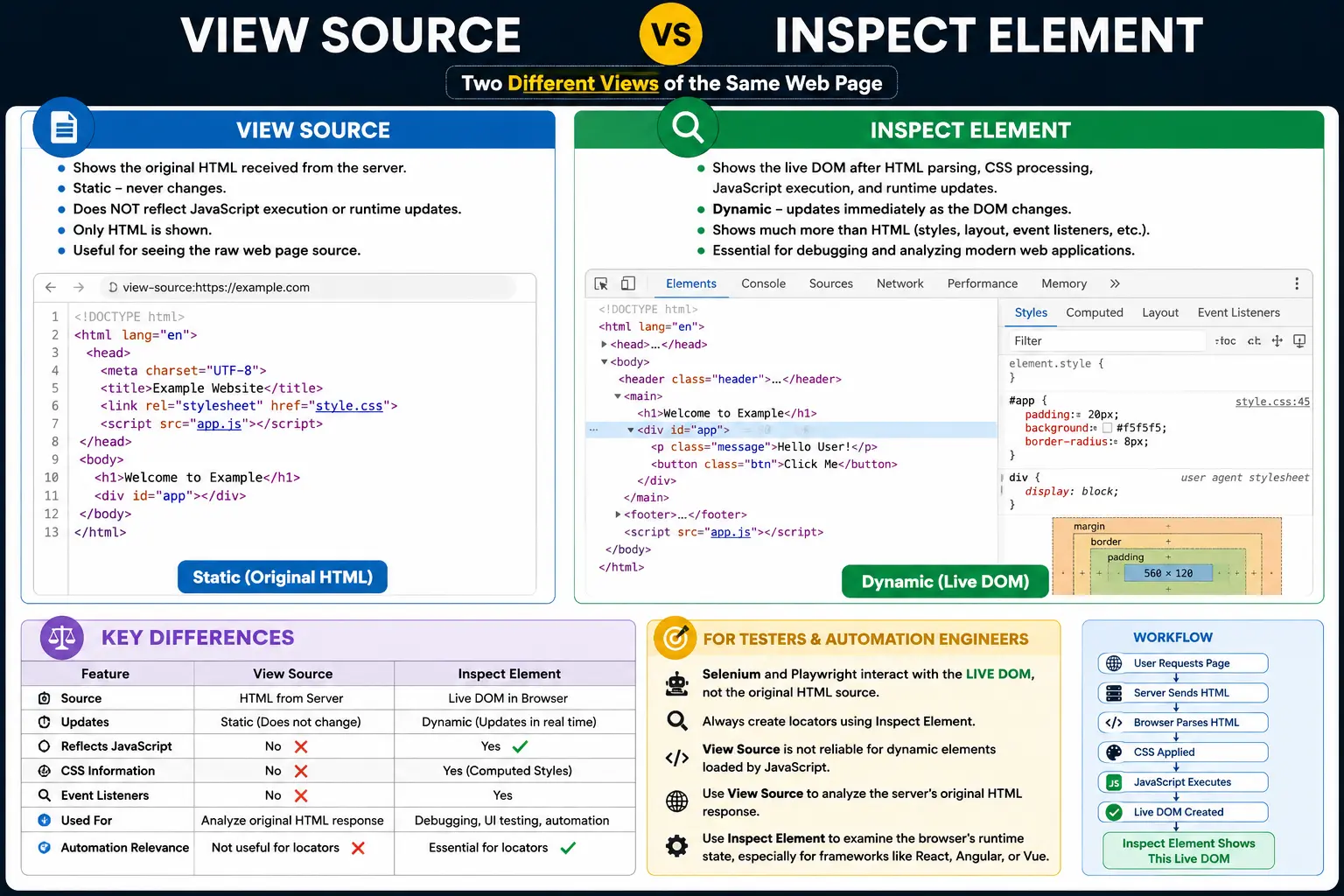
View Source shows the original HTML document received from the server. Inspect Element shows the current live DOM that exists inside the browser after HTML parsing, CSS processing, JavaScript execution, and runtime updates.
This difference is extremely important in modern web development because most websites are no longer simple static HTML pages. JavaScript can change text, add elements, remove elements, update attributes, apply classes, inject styles, and generate entire page sections after the initial HTML is loaded. Frontend frameworks such as React, Angular, Vue, and Next.js often create or update large portions of the DOM dynamically. As a result, the code shown in View Source may be very different from what actually exists in the browser at runtime.
For Selenium and Playwright automation, this topic is even more important. Automation tools interact with the live DOM, not the original HTML source. Therefore, if you are writing XPath or CSS selectors based only on View Source, your locators may fail. Inspect Element is usually the more accurate view for automation because it shows the actual DOM structure Selenium sees.
In simple terms:
View Source = Original HTML from server
Inspect Element = Current live DOM in browser
Understanding this distinction helps you debug webpages correctly, write better automation locators, understand JavaScript behavior, and avoid many beginner-level mistakes.
Quick Definition of View Source
View Source is a browser feature that displays the original HTML document received from the server.
When you right-click on a webpage and select:
View Page Sourcethe browser opens the source HTML response.
Example:
<html>
<body>
    <h1>Hello</h1>
</body>
</html>
This represents what the server originally sent to the browser.
View Source does not show later JavaScript changes. It does not update dynamically. It does not show computed CSS styles. It does not show the final browser-rendered DOM after scripts have modified the page.
It is useful for understanding the original HTML response, but it is not always useful for understanding the current state of a modern webpage.
Quick Definition of Inspect Element
Inspect Element is part of Browser Developer Tools. It displays the current live DOM in browser memory.
When you right-click on a page and choose:
Inspectyou see the DOM as it currently exists.
If JavaScript changes the page, Inspect Element reflects that change.
Example JavaScript:
document.querySelector("h1").innerText = "Welcome";Inspect Element may show:
<h1>Welcome</h1>even if the original server HTML was:
<h1>Hello</h1>Inspect Element is dynamic, live, interactive, and much closer to what users and automation tools actually interact with.
Simple Analogy: Blueprint vs Actual Building
A useful analogy is a building project.
View Source is like the original blueprint received from the architect. It shows the initial plan.
Inspect Element is like the actual building after construction, renovation, painting, wiring, furniture, and modifications.
The blueprint may say one thing, but the actual building may look different after changes.
Similarly:
View Source
      ↓
Original HTML Blueprint

Inspect Element
      ↓
Live DOM Structure
Modern webpages often change after loading, so Inspect Element reflects the real current structure.
High-Level Difference
The difference can be represented as two flows.
View Source flow:
Server
  ↓
Original HTML
  ↓
View Source
Inspect Element flow:
Server
  ↓
Original HTML
  ↓
Browser Parsing
  ↓
DOM Creation
  ↓
JavaScript Execution
  ↓
DOM Changes
  ↓
Inspect Element
View Source stops at the server response.
Inspect Element shows the browser’s processed and updated version.
What Does View Source Show?
View Source shows the original HTML response.
For example, if the server sends:
<html>
<body>
    <h1>Hello</h1>
</body>
</html>
View Source displays that exact source structure.
It represents:
What Server Sentnot necessarily:
What Browser Currently HasThis distinction matters because browsers create the DOM from the source, and JavaScript may later modify that DOM.
Characteristics of View Source
View Source Is Static
View Source shows the original source only. Once the server response is loaded, View Source does not continuously update.
If JavaScript changes the page after load, View Source remains the same.
Example original HTML:
<h1>Hello</h1>JavaScript:
document.querySelector("h1").innerText = "Welcome";View Source still shows:
<h1>Hello</h1>View Source Does Not Show Runtime Changes
Modern applications frequently update content after page load.
These updates may include:
- API response data
- User profile information
- Product prices
- Shopping cart count
- Notifications
- Search results
- Error messages
View Source does not show these runtime changes.
View Source Represents Server Response
View Source is useful when you want to inspect the original document sent by the server.
It helps answer questions such as:
- What HTML did the server return?
- Is this content server-rendered?
- Are meta tags present in the original source?
- Is SEO-critical content included in the initial HTML?
For SEO and server-side rendering analysis, View Source can be useful.
What Does Inspect Element Show?
Inspect Element shows the live DOM.
The DOM is the browser-created object representation of the webpage. It is created after parsing the HTML source, and it may be updated by JavaScript.
If JavaScript changes:
document.querySelector("h1").innerText = "Welcome";Inspect Element shows:
<h1>Welcome</h1>because the DOM has changed.
Inspect Element reflects:
Current DOMnot only:
Original HTMLThis makes Inspect Element essential for debugging modern webpages.
Characteristics of Inspect Element
Inspect Element Is Dynamic
Inspect Element changes as the DOM changes.
If JavaScript adds a new paragraph, Inspect Element shows the new paragraph immediately.
Example:
document.body.innerHTML += "<p>New Content</p>";Inspect Element shows:
<body>
    <p>New Content</p>
</body>
Inspect Element Is Live
Inspect Element reflects the current page state.
If a user opens a dropdown, a modal appears, or a form validation message is added, Inspect Element can show those changes.
This live behavior makes it useful for:
- Debugging JavaScript
- Checking dynamic content
- Writing automation locators
- Inspecting CSS styles
- Understanding runtime UI state
Inspect Element Represents Browser Memory
The DOM exists inside browser memory.
Inspect Element displays that in-memory structure.
The original HTML file may remain unchanged, but the browser’s DOM can change many times while the page is running.
Example 1: Static HTML
Suppose the server sends:
<h1>SoftwareTips4U</h1>If no JavaScript modifies the page, then both View Source and Inspect Element show:
<h1>SoftwareTips4U</h1>In simple static pages, both tools may appear identical.
This is why beginners often assume they are the same.
Example 2: Dynamic Text Update
Suppose the server sends:
<h1>Hello</h1>Then JavaScript executes:
document.querySelector("h1").innerText = "Welcome";View Source still shows:
<h1>Hello</h1>Inspect Element shows:
<h1>Welcome</h1>This example clearly shows the difference.
View Source shows the original HTML.
Inspect Element shows the updated DOM.
Example 3: Dynamically Added Elements
Original HTML:
<body>
</body>
JavaScript:
document.body.innerHTML += "<p>New Content</p>";View Source shows:
<body>
</body>
Inspect Element shows:
<body>
    <p>New Content</p>
</body>
This is common in modern frontend applications, where the original HTML may be minimal and JavaScript builds most of the visible content.
Why Do View Source and Inspect Element Differ?
They differ because the browser creates a DOM from HTML and then allows JavaScript to modify that DOM.
The flow is:
HTML Source
      ↓
HTML Parser
      ↓
DOM
      ↓
JavaScript Changes
      ↓
Updated DOM
View Source shows:
HTML SourceInspect Element shows:
Updated DOMThis is the core difference.
View Source and Browser Rendering
Browser rendering uses the DOM, not the raw HTML source.
The rendering process depends on:
DOM + CSSOM
      ↓
Render Tree
      ↓
Layout
      ↓
Paint
Because rendering uses the DOM, Inspect Element is closer to what users actually see on the screen.
View Source may show outdated or incomplete information for dynamic applications.
Inspect Element and CSS
Inspect Element does more than show DOM structure. It also shows CSS rules, computed styles, box model information, event listeners, layout details, and sometimes accessibility information.
Example CSS:
h1 {
    color: blue;
    font-size: 32px;
}
Inspect Element can show:
color: blue
font-size: 32px
margin
padding
border
computed height
computed width
View Source cannot show computed CSS because CSS is applied after HTML parsing.
This makes Inspect Element much more powerful for visual debugging.
Inspect Element and JavaScript
Inspect Element reflects JavaScript-driven changes.
Example:
element.style.color = "red";Inspect Element updates immediately and may show:
<h1 style="color: red;">Hello</h1>This helps developers verify whether JavaScript actually modified the DOM or applied styles correctly.
View Source cannot show this runtime style change.
Developer Tools and Inspect Element
Inspect Element is part of Browser Developer Tools.
Developer Tools usually provide multiple panels, including:
- Elements or Inspector panel
- CSS styles panel
- Console
- Network tab
- Sources tab
- Performance tools
- Application or Storage tab
- Accessibility tools
Inspect Element is mainly associated with the Elements panel, but it connects with many other debugging features.
For example, you can select an element, view its CSS, check event listeners, inspect layout, test selectors, and modify styles live.
Which One Does Selenium Use?
This is extremely important.
Selenium interacts with the live DOM.
It does not interact with the original HTML source shown in View Source.
A Selenium command such as:
driver.findElement(By.id("login"));searches the current DOM inside browser memory.
This is equivalent to what you inspect using Inspect Element.
That means Selenium sees what the browser currently has, not necessarily what the server originally sent.
Common Selenium Scenario
Suppose View Source shows:
<div id="login"></div>But JavaScript later changes the DOM to:
<div id="login-btn"></div>Selenium searches the current DOM.
So Selenium sees:
<div id="login-btn"></div>not the old source.
If your locator is based on id="login", it may fail.
This is why automation engineers should inspect the live DOM, not only the page source.
Why This Matters for XPath and CSS Selectors
XPath and CSS selectors work on the DOM structure.
If the DOM changes dynamically, locators must match the current DOM.
For example, a selector from View Source may not work if JavaScript has changed classes, ids, hierarchy, or attributes.
Inspect Element helps identify the real structure that automation tools interact with.
Real-World Example: Amazon
When you open a large modern website like Amazon, View Source may show the initial HTML response. It may include scripts, placeholders, initial metadata, and some server-rendered content.
Inspect Element, however, may show thousands of DOM nodes generated or modified by JavaScript.
Examples of dynamically generated content include:
- Product recommendations
- Price updates
- Search suggestions
- Cart count
- Reviews
- Ads
- Delivery information
Most modern websites heavily modify the DOM after page load.
Therefore, Inspect Element provides a much more accurate view for runtime debugging and automation.
Comparison Table
| Feature | View Source | Inspect Element |
|---|---|---|
| Shows Original HTML | Yes | No |
| Shows Live DOM | No | Yes |
| Reflects JavaScript Changes | No | Yes |
| Updates Dynamically | No | Yes |
| Shows CSS Rules | Limited/No | Yes |
| Shows Computed Styles | No | Yes |
| Represents Server Response | Yes | No |
| Represents Browser Memory | No | Yes |
| Useful for Selenium | No | Yes |
| Useful for SEO Source Check | Yes | Sometimes |
Common Interview Questions
Which Shows the Original HTML?
View Source shows the original HTML received from the server.
Which Shows the Live DOM?
Inspect Element shows the live DOM.
Can Inspect Element Show JavaScript-Generated Elements?
Yes. Inspect Element shows JavaScript-generated elements because they exist in the current DOM.
Can View Source Show JavaScript-Generated Elements?
No. View Source does not show elements added after the original HTML response.
Which One Is Used by Selenium?
Selenium interacts with the live DOM, which is closer to Inspect Element.
Interview-Ready Answer
View Source displays the original HTML document received from the server, while Inspect Element displays the current live DOM after the browser has parsed HTML, applied CSS, and executed JavaScript. View Source is static and does not reflect runtime changes. Inspect Element is dynamic and shows the actual structure currently used by the browser for rendering, styling, JavaScript interaction, and automation.
Key Takeaway
View Source and Inspect Element may look similar, but they serve different purposes. View Source shows the original HTML response sent by the server. Inspect Element shows the browser’s current live DOM after parsing, styling, JavaScript execution, and dynamic updates.
For simple static pages, both may look almost the same. For modern dynamic applications, they can be very different. Developers should use View Source to understand the original server response and Inspect Element to debug the real runtime page. Automation testers should primarily rely on Inspect Element because Selenium and Playwright interact with the live DOM.
One-Line Insight
View Source = Original HTML, Inspect Element = Current Live DOM.