Text Formatting Tags (<b>, <strong>, <i>, <em>)
Introduction
HTML provides several tags for formatting and emphasizing text. Among the most commonly used are <b>, <strong>, <i>, and <em>. At first glance, these tags may look simple because browsers often display them in similar ways. The <b> and <strong> tags usually appear bold, while the <i> and <em> tags usually appear italic. Because of this visual similarity, many beginners assume that they are interchangeable. That is not correct.
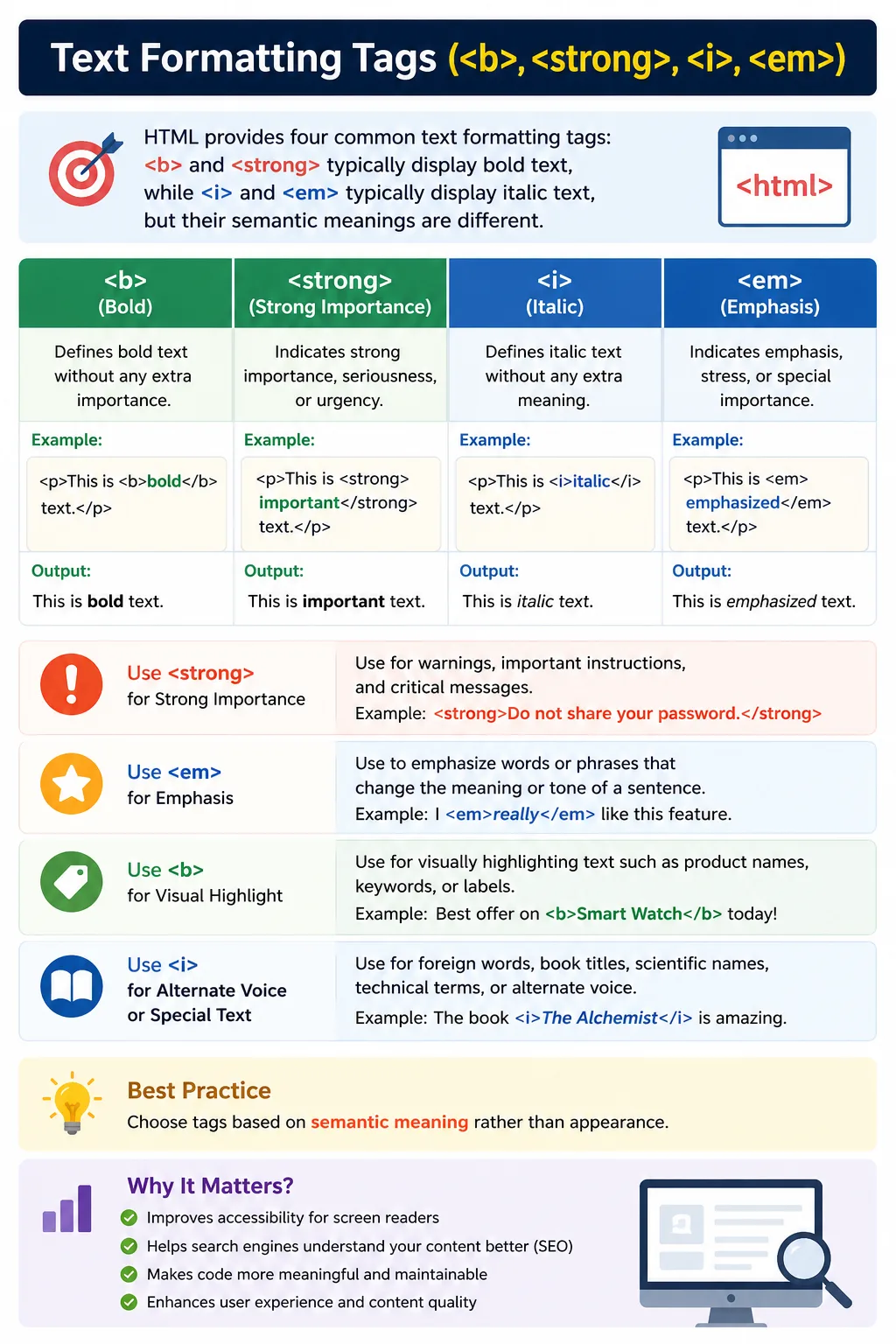
The important difference between these tags is not only how they look, but what they mean. In modern HTML, meaning is extremely important. HTML is not just used to display content visually; it also helps browsers, search engines, screen readers, accessibility tools, and automation systems understand the purpose of the content.
The <b> tag makes text bold without adding special meaning. The <strong> tag also appears bold by default, but it indicates that the text is strongly important. The <i> tag displays text in italic style and is often used for alternate voice, foreign words, technical terms, or titles. The <em> tag also appears italic by default, but it indicates emphasis in the sentence.
This distinction is called semantic meaning. Semantic HTML improves accessibility, SEO, maintainability, and document clarity. A user may visually see bold or italic text, but assistive technologies and search engines may interpret semantically meaningful tags differently.
Understanding these four tags properly is essential for writing clean, professional HTML.
Why Text Formatting Tags Matter
Text formatting tags help writers and developers control how specific words or phrases are presented inside a webpage. Sometimes a word needs to stand out visually. Sometimes a phrase carries strong importance. Sometimes a foreign word or book title should be styled differently. Sometimes a sentence changes meaning because one word is emphasized.
For example:
<b>Warning</b>and:
<strong>Warning</strong>may look almost the same in the browser because both usually appear bold. However, their meaning is different.
The <b> tag says: “Make this text visually bold.”
The <strong> tag says: “This text is important.”
That difference matters for screen readers, accessibility tools, search engines, and future developers reading the code.
In the same way:
<i>must</i>and:
<em>must</em>may both appear italic, but <em> communicates real emphasis, while <i> usually represents alternate voice or a special term.
Modern HTML encourages developers to think about meaning first and appearance second.
Quick Comparison
The four tags can be understood like this:
| Tag | Default Visual Appearance | Semantic Meaning |
|---|---|---|
<b> | Bold | No special importance |
<strong> | Bold | Strong importance |
<i> | Italic | Alternate voice, term, title, or mood |
<em> | Italic | Emphasized content |
This table shows the most important point: visual appearance and semantic meaning are not always the same.
CSS can change visual appearance, but semantic meaning comes from the HTML tag itself.
The <b> Tag
The <b> tag is used to make text bold without giving it extra semantic importance.
Example:
<p>
Welcome to <b>SoftwareTips4U</b>.
</p>
The browser displays “SoftwareTips4U” in bold.
The <b> tag is useful when you want to draw visual attention to text, but the text is not necessarily important in meaning.
For example:
<p>
HTML stands for <b>HyperText Markup Language</b>.
</p>
Here, the full form of HTML may be visually highlighted using bold text. However, the tag itself does not tell the browser that the content is urgent or strongly important.
The semantic meaning of <b> is minimal. It mainly affects presentation.
When to Use <b>
Use <b> when text should stand out visually but does not carry strong importance.
Common uses include product names, keywords, labels, lead-in text, or visually highlighted terms.
Example:
<p>
The course includes <b>HTML</b>, <b>CSS</b>, and <b>JavaScript</b>.
</p>
This helps visually highlight the technology names.
However, if the text represents a warning, instruction, or important message, <strong> is usually better.
Accessibility Behavior of <b>
Screen readers usually do not announce <b> with special vocal emphasis. They typically read it like normal text.
This is because <b> does not communicate strong importance. It only communicates visual bold styling.
Therefore, if the text must be understood as important by all users, including screen reader users, <strong> is the better choice.
The <strong> Tag
The <strong> tag indicates that text has strong importance, seriousness, or urgency.
Example:
<p>
<strong>Warning:</strong> Do not share your password.
</p>
The word “Warning” appears bold by default, but more importantly, it carries semantic meaning. It tells browsers and assistive technologies that the content is important.
Another example:
<p>
<strong>Important:</strong> Save your work before exiting.
</p>
This is a strong use case because the instruction matters to the user.
The <strong> tag should be used when the meaning of the content is important, not just when you want bold text.
When to Use <strong>
Use <strong> for warnings, critical information, important instructions, serious notices, security messages, and content that must stand out because of meaning.
Good examples:
<strong>Account Suspended</strong><strong>Payment Failed</strong><strong>Do not close this window.</strong>In these examples, the text is not simply styled. It communicates importance.
SEO and Accessibility Benefits of <strong>
Search engines may treat strongly marked content as meaningful because it indicates importance in the document. This does not mean developers should overuse <strong> for keyword stuffing. It should be used naturally and honestly.
For accessibility, <strong> can help screen readers communicate emphasis or importance. Depending on the screen reader and settings, the text may be spoken with stronger stress or indicated as important.
This makes <strong> better than <b> when importance matters.
<b> vs <strong>
The difference between <b> and <strong> is one of the most common HTML interview questions.
Example:
<b>SoftwareTips4U</b>Meaning:
The text is bold visually.
Example:
<strong>Warning</strong>Meaning:
The text is important.
Both may look bold, but they are not semantically equal.
Use <b> when only appearance matters.
Use <strong> when meaning and importance matter.
The <i> Tag
The <i> tag displays text in italic style without necessarily indicating emphasis.
Example:
<p>
The term <i>Bonjour</i> means hello in French.
</p>
The word “Bonjour” is italicized because it is a foreign word.
Another example:
<p>
I recently read <i>Atomic Habits</i>.
</p>
Here, <i> is used for a book title.
The <i> tag is commonly used for alternate voice, technical terms, foreign words, thoughts, scientific names, and titles.
When to Use <i>
Use <i> when text represents something different from the normal surrounding text, but not necessarily emphasized.
Common use cases include foreign words, book titles, technical terms, scientific names, idiomatic phrases, thoughts, and alternate voice.
Examples:
<p>
The word <i>Namaste</i> is commonly used as a greeting.
</p>
<p>
The scientific name of humans is <i>Homo sapiens</i>.
</p><p>
The variable <i>x</i> represents the input value.
</p>In these cases, the italic style indicates a different kind of text, not emotional emphasis.
The <em> Tag
The <em> tag represents emphasized text.
Example:
<p>
You <em>must</em> complete the assignment.
</p>
The word “must” is emphasized. The meaning of the sentence changes depending on the emphasis.
Compare:
You must complete the assignment.with:
You must complete the assignment.When “must” is emphasized, the sentence feels stronger and more urgent.
The <em> tag communicates this emphasis semantically.
When to Use <em>
Use <em> when you want to stress a word or phrase in a sentence.
Example:
<p>
This is <em>not</em> optional.
</p>
Another example:
<p>
You should <em>always</em> validate user input.
</p>
The emphasized word affects how the sentence should be understood.
This is different from <i>, which is usually used for alternate text style rather than emphasis.
Accessibility Behavior of <em>
Screen readers may read <em> content with vocal emphasis depending on the tool and configuration.
This helps users understand that the word carries special stress in the sentence.
For this reason, <em> is better than <i> when emphasis is part of the meaning.
<i> vs <em>
The difference between <i> and <em> is similar to the difference between <b> and <strong>.
Example:
<i>Bonjour</i>Meaning:
This is a foreign word or alternate term.
Example:
<em>must</em>Meaning:
This word is emphasized.
Both may appear italic, but their semantic meaning is different.
Use <i> when the text is stylistically different.
Use <em> when the text is emphasized.
Combining Formatting Tags
Sometimes tags can be combined.
Example:
<p>
<strong>Warning:</strong> You <em>must</em> save your work.
</p>
Here, “Warning” is strongly important, and “must” is emphasized.
Output:
Warning: You must save your work.
This creates a sentence where both importance and emphasis are clearly communicated.
Nested Formatting
HTML allows nested formatting when meaningful.
Example:
<strong>
    <em>Critical Error</em>
</strong>
This means the text has both strong importance and emphasis.
However, nesting should be used carefully. Too much formatting can make content noisy and difficult to read.
Use nested tags only when the meaning justifies it.
Browser Default Styling
By default, browsers usually render these tags as follows:
| Tag | Default Appearance |
|---|---|
<b> | Bold |
<strong> | Bold |
<i> | Italic |
<em> | Italic |
However, default browser styling can be changed using CSS.
For example:
strong {
    color: red;
}
Even if <strong> is styled differently, its semantic meaning remains strong importance.
CSS Alternative
If you only need visual styling, CSS may be more appropriate.
Example:
<span class="bold">Text</span>CSS:
.bold {
    font-weight: bold;
}
This changes appearance without adding semantic meaning.
However, if the text is important, use <strong> instead of a styled <span>.
The decision should be based on meaning.
Ask yourself:
Does this text need meaning, or only appearance?
If meaning matters, use semantic HTML.
If only appearance matters, CSS is enough.
Real-World Examples
Product name:
<p>
New model: <b>iPhone 17</b>
</p>
This visually highlights the product name.
Important notice:
<p>
<strong>Account Suspended:</strong> Please contact support.
</p>
This communicates strong importance.
Foreign word:
<p>
<i>Vanakkam</i> means greeting in Tamil.
</p>
This marks a foreign or alternate term.
Emphasized statement:
<p>
You <em>must</em> verify your email.
</p>
This stresses the word “must.”
Each tag has a proper role.
Best Practices
Use <strong> instead of <b> when the text is important.
Use <em> instead of <i> when the text is emphasized.
Use <i> for foreign words, technical terms, titles, thoughts, and alternate voice.
Use <b> only when text needs visual attention without special importance.
Do not use these tags to create headings. Use heading tags like <h1> to <h6> for titles and section structure.
Always choose semantic meaning first, then style with CSS if needed.
Common Mistakes
A common mistake is using <b> for headings.
Bad:
<b>HTML Tutorial</b>Better:
<h1>HTML Tutorial</h1>Another mistake is using <i> for emphasis.
Bad:
<i>must</i>Better:
<em>must</em>Another mistake is using formatting tags instead of proper structure.
Bad:
<b>Section Title</b>Better:
<h2>Section Title</h2>Formatting tags should not replace semantic structural elements.
Selenium Perspective
Selenium can locate these tags if needed.
Example:
driver.findElement(By.tagName("strong"));This may be useful for validating warning messages, important notices, or highlighted content.
For example, if a login page shows:
<strong>Invalid password</strong>an automation script can verify that the important error message appears.
However, Selenium tests usually focus on visible text, attributes, and behavior rather than formatting tags alone.
Common Interview Questions
A common question is: What is the difference between <b> and <strong>?
Answer: <b> is used for bold visual styling without special importance, while <strong> indicates strong importance.
Another common question is: What is the difference between <i> and <em>?
Answer: <i> indicates alternate voice, term, or stylistic difference, while <em> indicates emphasis.
Which tags have semantic meaning?
<strong> and <em> have strong semantic meaning. <i> also has some semantic use for alternate voice or special terms. <b> is mostly visual.
Which tags are mainly visual?
<b> is mainly visual. <i> is often visual but can also indicate alternate voice or terms depending on usage.
Comparison Table
| Tag | Visual Style | Semantic Meaning | Best Use |
|---|---|---|---|
<b> | Bold | No strong importance | Product names, keywords, labels |
<strong> | Bold | Strong importance | Warnings, urgent instructions |
<i> | Italic | Alternate voice or term | Foreign words, titles, terms |
<em> | Italic | Emphasis | Stressed words or phrases |
Interview-Ready Answer
The <b> and <i> tags are primarily used for visual formatting, while <strong> and <em> provide semantic meaning. The <strong> tag indicates important or urgent content, and the <em> tag indicates emphasized text. The <b> tag makes text bold without special importance, while <i> is used for alternate voice, foreign words, technical terms, or titles. In modern HTML, semantic tags are preferred when meaning matters.
Key Takeaway
Text formatting tags in HTML may look similar visually, but they are not always semantically equal. The <b> tag makes text bold without importance. The <strong> tag marks important content. The <i> tag marks alternate voice, special terms, or stylistic text. The <em> tag marks emphasized content.
The best practice is to choose the tag based on meaning, not appearance. If the content is important, use <strong>. If the content is emphasized, use <em>. If you only need visual styling, use <b>, <i>, or CSS depending on the situation.
One-Line Insight
Use <strong> and <em> when meaning matters; use <b> and <i> when only appearance or alternate styling matters.