Target Attribute
Introduction
The target attribute is used with the anchor tag and other navigational elements to specify where a linked document should open. By default, when a user clicks a normal link, the destination page opens in the same browser tab or window. This default behavior is usually correct for internal website navigation, but there are situations where developers want a link to open in a new tab, a parent frame, the full browser window, or a named frame. The target attribute controls that behavior.
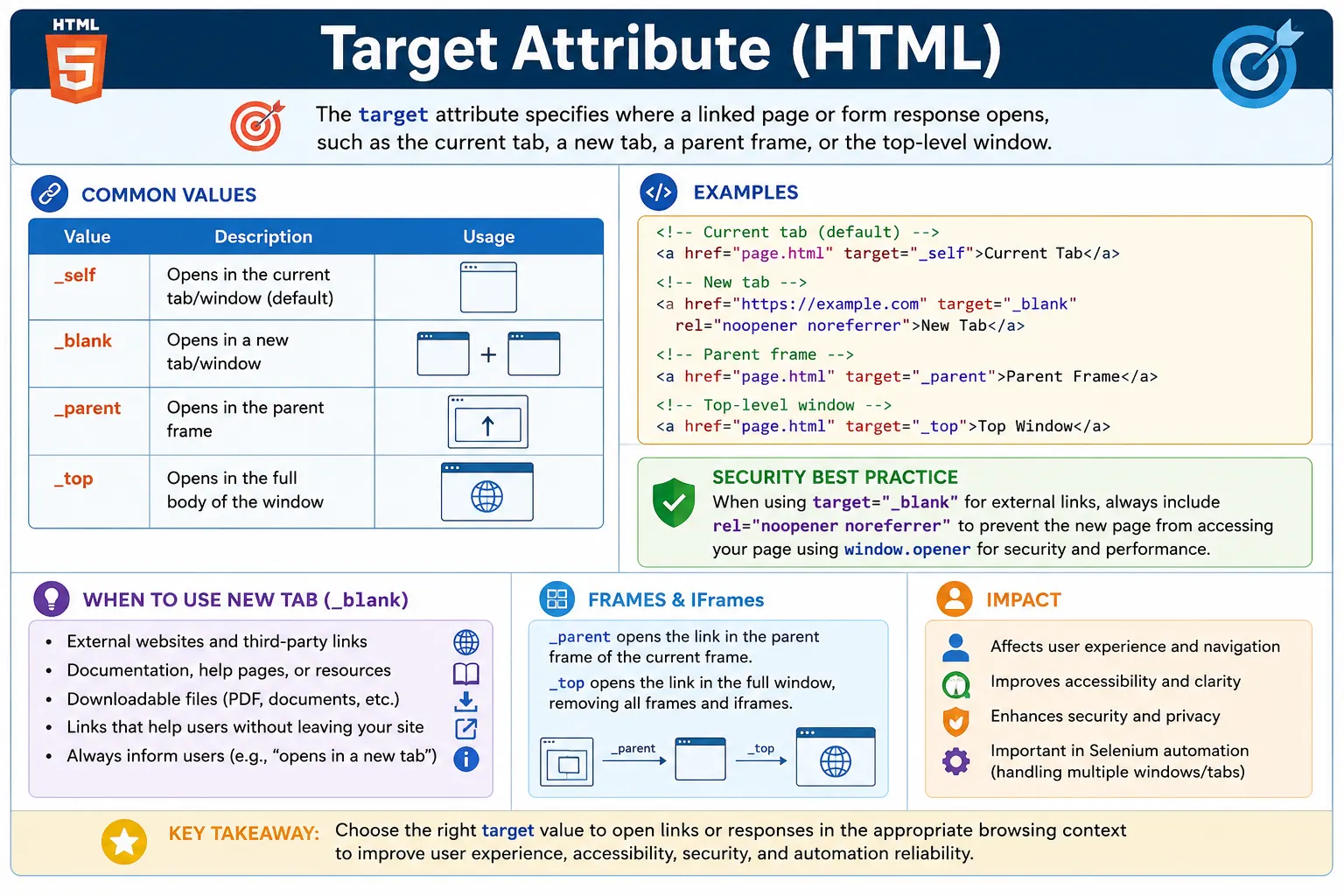
Although the attribute is small, it has important effects on user experience, accessibility, security, testing, and navigation flow. A link that opens in the same tab feels different from a link that opens in a new tab. A link inside an iframe behaves differently when it targets the parent frame or the top-level window. A form submission can open in the same page or in a new browsing context. Because of this, developers should not use target casually. It should be chosen deliberately based on what helps the user.
The most commonly used target values are _self and _blank. The value _self opens the link in the current tab and is the default. The value _blank opens the destination in a new tab or new window. Other values such as _parent, _top, and named frames are mainly useful in frame-based layouts or embedded content scenarios.
What Is the Target Attribute?
The target attribute tells the browser: open the linked resource in this specific browsing context. A browsing context can be the current tab, a new tab, a parent frame, the full window, or a named frame. In simple pages, this usually means deciding whether a link should open in the same tab or a new tab.
<a href="https://www.google.com"
   target="_blank">
  Google
</a>
When this link is clicked, Google opens in a new tab or new window depending on browser settings. The current page remains open. This is useful for some external references, but it can be annoying if overused.
Basic Syntax
The syntax places the target attribute on the anchor element along with href. The href attribute defines the destination. The target attribute defines where that destination should open.
<a href="URL"
   target="value">
  Link Text
</a>
A simple same-tab link can explicitly use _self.
<a href="about.html"
   target="_self">
  About Us
</a>
In practice, writing target="_self" is often unnecessary because _self is the browser's default behavior. However, knowing this default is important for interviews and for understanding how links behave when no target is provided.
Why Use Target?
The target attribute is useful when a page needs specific navigation behavior. It is commonly used when opening external websites, documentation pages, downloadable documents, reports, or reference materials where the current page should remain available. It is also used in frames, iframes, form submissions, and older or specialized applications that depend on multiple browsing contexts.
For example, an educational page might link to external documentation. If the user is in the middle of a lesson, opening the documentation in a new tab can help them keep the lesson open. On the other hand, if every internal navigation link opens a new tab, the user quickly ends up with too many tabs and a frustrating experience. Good use of target requires judgment.
Browser Default Behavior
If no target attribute is specified, the browser assumes target="_self". This means the linked page opens in the current tab or current browsing context.
<a href="about.html">
  About
</a>
This behaves the same as:
<a href="about.html"
   target="_self">
  About
</a>
Most internal website navigation uses this default behavior. Menus, breadcrumbs, course links, article links, and footer links typically open in the same tab.
Common Target Values
HTML provides several predefined target values. The most important are _self, _blank, _parent, and _top. A target can also reference a named frame.
| Target Value | Behavior |
|---|---|
_self | Current tab or window |
_blank | New tab or window |
_parent | Parent frame |
_top | Entire browser window |
| Frame name | Specific named frame |
The _self Value
The value _self opens the linked page in the current tab or window. It is the default behavior, so it does not need to be written unless you want to be explicit or override another inherited target value.
<a href="about.html"
   target="_self">
  About
</a>
If the current page is the homepage and the user clicks this link, the About page replaces the homepage in the same tab. This is the standard navigation pattern for most websites.
Because _self is equivalent to omitting the target, the following is usually enough:
<a href="about.html">
  About
</a>
The _blank Value
The value _blank opens the linked page in a new tab or window. Modern browsers usually open it in a new tab. This is often used for external websites, PDFs, documentation, and reference materials.
<a href="https://google.com"
   target="_blank">
  Google
</a>
If the current tab contains SoftwareTips4U and the user clicks this link, Google opens in a new tab while SoftwareTips4U remains open. This can be useful when users need to compare information or return to the original page.
Common uses include external websites:
<a href="https://github.com"
   target="_blank">
  GitHub
</a>
It is also common for documents:
<a href="manual.pdf"
   target="_blank">
  Open Manual
</a>
Security Risk With _blank
When a link opens with target="_blank", the newly opened page may have access to the original page through window.opener in some contexts. This can create security risks, including tab hijacking, where the new page attempts to manipulate the original page.
<a href="https://example.com"
   target="_blank">
  Example
</a>
For external links that open in a new tab, professional HTML should include rel="noopener noreferrer".
<a href="https://google.com"
   target="_blank"
   rel="noopener noreferrer">
  Google
</a>
The noopener value prevents the new page from controlling the original page through window.opener. The noreferrer value prevents referrer information from being sent and also implies opener protection in many browsers. This pattern improves security and can improve performance by separating the new tab from the original browsing context.
The _parent Value
The value _parent opens the linked page in the parent frame. It is mainly relevant when a page is displayed inside a frame or iframe. If there is no parent frame, _parent behaves similarly to _self.
<a href="home.html"
   target="_parent">
  Home
</a>
Imagine a page loaded inside a child frame. A link with target="_parent" tells the browser to load the destination in the parent frame instead of inside the child frame.
Parent Frame
    ↓
Child Frame
This behavior is not common in modern basic websites, but it is useful to understand when working with embedded pages, legacy applications, dashboards, and iframe-based systems.
The _top Value
The value _top loads the destination page in the entire browser window. It breaks out of all frames and replaces the topmost browsing context.
<a href="home.html"
   target="_top">
  Home
</a>
This is useful when a page is deeply nested inside frames and the link should open in the full browser window rather than inside one frame.
Frame
 └── Frame
      └── Frame
The difference between _parent and _top is that _parent moves one level up, while _top moves to the topmost window. In simple pages without frames, this difference may not be visible.
Named Frames
The target attribute can also reference a specific named frame. This is done by giving an iframe a name and then using that name as the target value.
<iframe name="contentFrame">
</iframe>
A link can then load content into that frame.
<a href="about.html"
   target="contentFrame">
  About
</a>
When clicked, the About page loads inside contentFrame. This pattern is less common in modern responsive websites but still appears in certain embedded systems, documentation viewers, old enterprise tools, and specialized layouts.
Visual Example
Consider a current tab showing Page A. If a link uses target="_self", Page B replaces Page A in the same tab. If a link uses target="_blank", Page A stays open and Page B opens in a new tab.
Using _self:
Page A → Page B replaces Page A

Using _blank:
Page A stays open
New tab opens Page B
This simple difference has a major impact on user experience. Use same-tab navigation for normal site flow. Use new-tab navigation only when it genuinely helps the user keep the current context.
Target Attribute in Forms
The target attribute can also be used with forms. It specifies where the response from form submission should open.
<form action="submit.html"
      target="_blank">
  ...
</form>
In this example, the form submission result opens in a new tab. This can be useful for reports, previews, generated documents, or workflows where the user should keep the original form open. However, just like links, opening new tabs from forms should be done carefully.
Target Attribute in the Base Tag
The <base> element can set a default target for all relative links on a page. If a page contains <base target="_blank">, links inherit that target unless they explicitly override it.
<base target="_blank">This means many links may open in new tabs automatically. While this can be useful in special documents or embedded pages, it can also create confusing behavior if used casually. Most websites should avoid broad new-tab defaults unless there is a strong reason.
Accessibility Considerations
Opening new tabs unexpectedly can confuse users. Screen reader users, keyboard users, and users with cognitive disabilities may not immediately realize that a new browsing context opened. Even sighted users can lose track when many links open new tabs.
<a href="guide.pdf"
   target="_blank">
  User Guide
</a>
A better practice is to indicate the behavior in the link text when opening a new tab is important.
<a href="guide.pdf"
   target="_blank">
  User Guide (opens in new tab)
</a>
This gives users a clear expectation before clicking. Accessibility is not only about screen readers; it is also about predictable behavior and user control.
SEO Impact
Search engines generally follow links regardless of the target value. A link with target="_blank" does not directly improve or reduce rankings simply because it opens in a new tab. SEO impact is more closely related to crawlability, anchor text, link relevance, internal linking structure, and whether the link can be discovered.
From an SEO perspective, the more important question is whether the link has a valid href and meaningful anchor text. The target attribute mainly affects user navigation behavior, not search ranking directly.
Real-World Examples
An external GitHub link may open in a new tab and include security attributes.
<a href="https://github.com"
   target="_blank"
   rel="noopener noreferrer">
  GitHub
</a>
Internal navigation usually opens in the same tab, either explicitly with _self or by omitting the target.
<a href="courses.html"
   target="_self">
  Courses
</a>
A PDF document may open in a new tab so the user can keep the original page open.
<a href="html-guide.pdf"
   target="_blank">
  Open Guide
</a>
Common Mistakes
A common mistake is using _blank everywhere. This creates unnecessary tabs and interrupts normal navigation. Most internal links should open in the same tab.
<a href="about.html" target="_blank">
  About
</a>
Another mistake is opening external links in new tabs without security attributes.
<a href="https://site.com"
   target="_blank">
  Site
</a>
A better version includes rel="noopener noreferrer".
<a href="https://site.com"
   target="_blank"
   rel="noopener noreferrer">
  Site
</a>
Developers also sometimes confuse _parent and _top. These values are rarely needed outside frame-based applications. For normal pages, most links should use the default _self, and external references may use _blank when appropriate.
Selenium Perspective
In Selenium automation, links that open new tabs require special handling. Clicking a link is simple:
driver.findElement(By.linkText("Google")).click();But if the link uses target="_blank", the browser opens a new window handle. Selenium must switch to the new window before interacting with the new page.
driver.switchTo().window(handle);Testers often validate that a link has the expected target attribute and that new-tab links include rel="noopener noreferrer". This is especially useful in UI audits, accessibility checks, and security-focused tests.
Comparison Table
| Target Value | Behavior | Common Use |
|---|---|---|
_self | Current tab or window | Normal internal navigation |
_blank | New tab or window | External links and documents |
_parent | Parent frame | Frame-based pages |
_top | Entire browser window | Breaking out of nested frames |
| Frame name | Specific named frame | Targeted iframe content |
Common Interview Questions
A common interview question is: what is the purpose of the target attribute? The answer is that it specifies where a linked document or form response should open.
Another common question is: what is the default target value? The answer is _self, which opens the destination in the current tab or window. Interviewers may also ask which target opens a new tab. The answer is _blank.
A security-focused question is: why should rel="noopener noreferrer" be used with target="_blank"? The answer is that it improves security and performance by preventing the newly opened page from accessing the original page through window.opener.
Another likely question is: what does _top do? It loads the page in the full browser window, escaping nested frames.
Interview-Ready Answer
The target attribute specifies where a linked resource should open. The most common values are _self, which opens the link in the current tab and is the default, and _blank, which opens the link in a new tab or window. When using _blank, developers should include rel="noopener noreferrer" for better security and performance.
Key Takeaway
The target attribute controls the browsing context in which a hyperlink or form response opens. It should be used carefully because it changes user navigation behavior. Most internal links should use the default same-tab behavior. External resources, documents, or references may open in a new tab when that helps the user.
When opening new tabs, communicate the behavior clearly and include the proper security attributes. A small attribute can have a large effect on usability, accessibility, security, and automated testing.
One-Line Insight
The target attribute controls the browsing context in which a hyperlink opens.