Tables vs CSS Layouts
Introduction
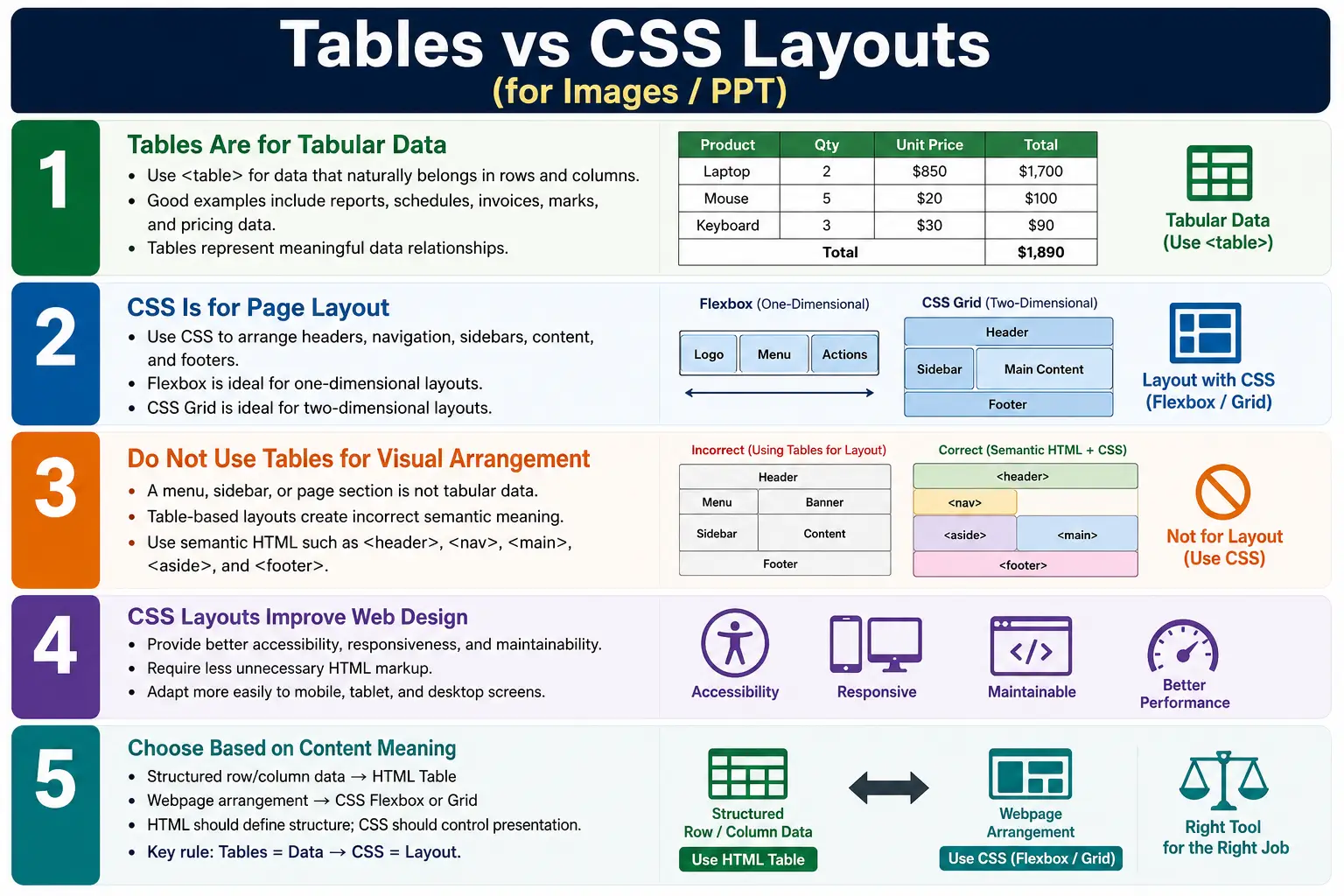
One of the most common interview questions in HTML is whether tables should be used to design page layouts. The short answer is no. HTML tables are intended for displaying tabular data, while CSS layout systems such as Flexbox and Grid are intended for arranging web page sections. This distinction is important because HTML is not only about how a page looks. It is also about what the content means.
When a developer uses a table to display records, reports, schedules, invoices, marks, or pricing data, the table has a meaningful purpose. Rows and columns represent relationships in the data. A browser, a screen reader, a search engine, and a tester can understand that the content is tabular. When a developer uses a table to place a header, sidebar, content area, and footer on a page, the table no longer represents data. It becomes a visual trick, and that creates semantic, accessibility, maintenance, and responsive design problems.
Modern web development separates structure from presentation. HTML describes the meaning and structure of content. CSS controls visual presentation and layout. JavaScript adds behavior when needed. Tables still have an important place in HTML, but their role is data presentation, not page design. Understanding this boundary helps developers write cleaner markup and helps testers identify whether a page is built in a maintainable and accessible way.
Why This Comparison Matters
In the early days of the web, developers often used tables for page layout because CSS layout systems were limited. Creating columns, aligning content, and building predictable page structures was difficult with the CSS features available at that time. Tables naturally provided rows, columns, and cells, so developers used them to create website layouts.
Header

Menu | Content

Footer
This type of structure was commonly created with tables. A table cell might contain the menu, another cell might contain the main content, and another row might contain the footer. At that time, the approach solved a practical layout problem. However, it also created a long-term misunderstanding: many developers started treating tables as general-purpose layout tools.
Today, the situation is completely different. CSS has mature layout systems designed specifically for page arrangement. Flexbox is excellent for one-dimensional layouts such as navigation bars, toolbars, horizontal cards, and vertical alignment. CSS Grid is excellent for two-dimensional layouts such as dashboards, page templates, image galleries, and complex responsive sections. Because these tools exist, there is no technical reason to use tables for layout.
What Is an HTML Table?
An HTML table represents structured data arranged in rows and columns. The relationship between each row, column, header, and data cell is the reason a table exists. A simple table might show employee names and departments, student marks, product prices, flight schedules, or transaction histories.
+-----------+--------+
| Name      | Age    |
+-----------+--------+
| John      | 25     |
| Alice     | 30     |
+-----------+--------+
In this example, the column headers define the meaning of the values below them. John is a name, 25 is an age, Alice is a name, and 30 is an age. The table structure communicates relationships that would be harder to understand if the values were presented as disconnected text.
HTML provides table-specific elements because tabular data has special meaning. The <table> element defines the table. The <tr> element defines each row. The <th> element defines headers. The <td> element defines data cells. Additional elements such as <caption>, <thead>, <tbody>, and <tfoot> make the structure clearer.
What Is a CSS Layout?
A CSS layout arranges page components. A typical web page may contain a header, navigation menu, main content area, sidebar, article sections, cards, forms, and footer. These parts are not necessarily tabular data. They are page regions. Their purpose is to organize the user interface, not to represent rows and columns of related data.
Header
Navigation
Main Content
Sidebar
Footer
HTML should describe these regions using semantic elements where possible. A header belongs in <header>. Navigation belongs in <nav>. The primary content belongs in <main>. Supporting sections may use <section>, <article>, or <aside>. The footer belongs in <footer>. CSS then controls how these elements appear on the screen.
This approach is cleaner because each technology does its own job. HTML describes the page meaning. CSS decides whether the page should use one column on mobile, two columns on tablet, or a wider grid on desktop. The visual layout can change without corrupting the meaning of the HTML.
Main Difference
The main difference can be stated very simply: tables display data, while CSS layouts arrange web pages.
Tables
  ↓
Display Data

CSS Layout
  ↓
Arrange Web Page
A table is correct when the content makes sense as rows and columns even without styling. If removing CSS still leaves a meaningful data grid, a table is probably appropriate. A CSS layout is correct when the goal is to arrange page regions, align interface elements, or build a responsive structure. If the content is a header, menu, sidebar, and footer, it should not be placed inside a table merely to create columns.
Correct Table Example
The following table is a correct use of HTML tables because it presents structured data. Each row represents a person, and each column describes one attribute of that person.
<table>
    <tr>
        <th>Name</th>
        <th>Department</th>
    </tr>
    <tr>
        <td>John</td>
        <td>IT</td>
    </tr>
</table>
This table has semantic value. The browser can identify it as a table. A screen reader can announce the row and column structure. A tester can locate the table and validate its rows. Search engines can understand that the content is structured data.
Correct CSS Layout Example
The following structure is a correct layout approach because it uses semantic HTML elements for page regions and CSS for visual arrangement.
<header>Header</header>
<nav>Menu</nav>
<main>Content</main>
<footer>Footer</footer>
main {
display: grid;
}Here, the HTML tells us what each part means. The CSS controls how those parts are arranged. The layout can be changed from a single-column mobile view to a multi-column desktop view without rewriting the HTML into a table structure.
Old Table-Based Layout
Years ago, developers commonly wrote layouts like this:
<table>
    <tr>
        <td>Menu</td>
        <td>Content</td>
    </tr>
</table>
The visual result might show the menu on the left and the content on the right. However, the markup tells the browser that the menu and content are table data. That is not true. The menu is navigation, and the content is the main page content. The table is being used only to force a visual arrangement.
This type of layout was once common, but it is now considered poor practice. It hides the real meaning of the page, creates unnecessary markup, and makes the page harder to adapt to different screen sizes.
Why Tables Were Used for Layout
Early HTML and CSS did not provide the layout tools developers have today. There was no Flexbox and no CSS Grid. Browser support for CSS was inconsistent, and many layout tasks were difficult. Tables provided predictable columns and rows, so developers used them for alignment, spacing, and page structure.
At the time, table-based layouts felt practical. Developers could create a two-column page, center content, or build a header and footer with predictable widths. But the solution came at the cost of semantic correctness. A table layout may look acceptable visually, but the underlying document structure is misleading.
Modern CSS removed the need for this workaround. Flexbox and Grid allow developers to create cleaner, more flexible, more responsive layouts without misusing table elements. This is why modern best practice strongly discourages using tables for layout.
Problems with Table Layouts
The first problem with table layouts is poor semantics. A page header placed inside a table cell is not table data. A navigation menu placed inside a table row is not table data. When markup does not match meaning, browsers and assistive technologies receive inaccurate information about the content.
<table>
    <tr>
        <td>Header</td>
    </tr>
</table>
This code may visually display a header, but semantically it announces a table. A screen reader may report that the user has entered a table with rows and columns, even though the content is actually a page header. That creates confusion and makes navigation less natural.
The second problem is accessibility. Screen readers expect tables to contain data relationships. When the entire page is built with nested tables, users may hear repeated announcements about tables, rows, and columns. Instead of moving through header, navigation, main content, and footer, they are forced to navigate through artificial table structures.
The third problem is maintenance. Old table layouts often contained deeply nested tables. A table cell might contain another table, which might contain another table, which might contain another table. Updating such markup is difficult because visual changes require editing many structural elements that have no real content meaning.
Table
  ↓
Nested Table
  ↓
Nested Table
  ↓
Nested Table
The fourth problem is extra HTML. Table layouts require many additional elements such as <table>, <tr>, and <td> only to create visual placement. Modern semantic HTML with CSS requires much less markup and is easier to read.
The fifth problem is responsive design. Tables are naturally grid-like, and large table-based layouts may not adapt well to small screens. Mobile users may experience horizontal scrolling, cramped content, or broken layouts. CSS layouts can change direction, order, column count, spacing, and alignment based on screen size.
CSS Layout Advantages
CSS layout systems provide cleaner HTML, better accessibility, easier maintenance, and stronger responsiveness. With Flexbox or Grid, the layout is controlled in CSS instead of being hardcoded into table rows and cells.
Cleaner HTML
  ↓
Responsive Layout
  ↓
Accessible Structure
  ↓
Easy Maintenance
Flexbox is especially useful when content needs to flow in one direction. A navigation bar, button group, row of cards, or vertical alignment problem can often be solved with Flexbox. It gives developers control over direction, spacing, wrapping, alignment, and ordering without changing the HTML structure.
<div class="container">
    <div>Menu</div>
    <div>Content</div>
</div>
.container {
display: flex;
}CSS Grid is especially useful for two-dimensional layouts. A page template with a header, sidebar, content area, and footer can be handled naturally with grid rows and columns. Grid allows developers to define layout areas and place content without pretending that page regions are table cells.
<div class="layout">
    <header>Header</header>
    <main>Main</main>
    <aside>Sidebar</aside>
    <footer>Footer</footer>
</div>
.layout {
display: grid;
}This approach is modern, flexible, and meaningful. The HTML remains semantic, and the visual layout stays in CSS.
When Should Tables Be Used?
Tables should be used when the content is genuinely tabular. If the data is best understood through rows and columns, a table is appropriate. Common examples include student marks, employee records, product prices, flight schedules, bank statements, reports, invoices, timetable data, comparison data, and transaction histories.
For example, a product list with product name, price, and stock count is a valid table. A bank statement with date, description, debit, credit, and balance is a valid table. A flight schedule with flight number, origin, destination, departure time, and status is a valid table.
Product | Price | StockThe key test is whether the relationship between values depends on rows and columns. If yes, a table can provide useful structure. If no, another HTML structure is probably better.
When Should Tables Not Be Used?
Tables should not be used for headers, navigation menus, sidebars, footers, login page design, dashboard structure, card layouts, two-column page layout, or general visual alignment. These are page layout problems, not data problems.
A navigation menu should usually be built with <nav> and links, often with a list when the links form a list of destinations. A page header should use <header>. A sidebar should use <aside> when it contains supporting content. A footer should use <footer>. CSS should then arrange these elements.
Using tables for layout may appear to work visually, but it creates the wrong document meaning. Good HTML should remain understandable even before CSS is applied.
Semantic HTML Comparison
Semantic HTML describes the purpose of content. The following structure communicates page meaning clearly:
<header>
<nav>
<main>
<footer>
The following structure does not communicate page meaning clearly:
<table>
    <tr>
        <td>Header</td>
    </tr>
</table>
The first structure tells browsers, assistive technologies, and developers what each region is. The second structure only says that something is inside a table cell. It loses the meaning of the content.
Accessibility Comparison
Accessibility is one of the strongest reasons to avoid table layouts. A screen reader encountering a layout table may announce table information that does not help the user. Instead of hearing that a region is navigation or main content, the user may hear that they are entering a table, row, and column.
Table layout:
Screen Reader
  ↓
Table
  ↓
Row
  ↓
Column
A semantic CSS layout gives a clearer experience:
CSS layout:
Screen Reader
  ↓
Header
  ↓
Navigation
  ↓
Main
  ↓
Footer
This difference matters because users of assistive technologies often navigate by landmarks and headings. Semantic layout gives them meaningful shortcuts and a more predictable page structure.
Performance and Rendering
Table layouts often require more HTML and more complex rendering. Browsers must calculate rows, columns, cell dimensions, and nested table relationships before rendering the final layout. When tables are used for actual data, this is appropriate. When they are used only for page layout, the browser is doing table work unnecessarily.
Table layout:
Read Table
  ↓
Calculate Rows
  ↓
Calculate Columns
  ↓
Render Layout
Modern CSS layouts are designed for page rendering. Browsers are optimized for Flexbox and Grid, and developers can create responsive behavior with media queries, container queries, and flexible sizing.
CSS layout:
Read HTML
  ↓
Apply CSS
  ↓
Render Flex/Grid
The performance difference may not matter for a tiny page, but it matters for maintainability and scalability. Clean semantic markup with CSS layout is easier for browsers, developers, testers, and users to work with.
Real-World Example
A modern homepage should normally use semantic structure rather than table layout. A site such as SoftwareTips4U can organize its page using a header, navigation area, main content, sections, cards, and footer.
<header>
<nav>
<main>
    <section>
    <section>
</main>
<footer>
CSS can then decide whether the sections appear in one column, two columns, or a grid. The same HTML can work across mobile, tablet, and desktop screens. There is no need to use tables unless the page contains actual tabular data such as course schedules, pricing comparisons, or report tables.
Common Mistakes
A common mistake is using tables for navigation. A navigation menu is not tabular data. It should be marked up as navigation links.
<table>
    <tr>
        <td>Home</td>
        <td>Courses</td>
    </tr>
</table>
A better approach is to use a navigation element with links.
<nav>
    <ul>
        <li><a href="#">Home</a></li>
        <li><a href="#">Courses</a></li>
    </ul>
</nav>
Another common mistake is using a table for a two-column layout. A sidebar and content area can be arranged with Flexbox or Grid. They should not be placed into table cells unless the content itself is tabular.
Bad:
Table
  ↓
Sidebar cell + Content cell

Better:
CSS Flexbox or CSS Grid
Nested tables are another serious maintenance problem. Each layer of nesting makes the HTML harder to read, debug, style, and test. If a page needs nested tables just to create visual placement, the structure should be redesigned using CSS.
Selenium Perspective
Automation testers often encounter both real data tables and layout structures. For a real data table, Selenium can locate the table and read rows and cells.
WebElement table =
driver.findElement(By.tagName("table"));

List<WebElement> rows =
driver.findElements(By.tagName("tr"));
This is useful when validating reports, transaction tables, schedules, or comparison data. A tester may count rows, read header values, validate cell text, or compare displayed data with expected values.
For CSS-based layouts, Selenium usually locates semantic elements or stable attributes instead of table rows and cells.
WebElement header =
driver.findElement(By.tagName("header"));

WebElement nav =
driver.findElement(By.tagName("nav"));

WebElement main =
driver.findElement(By.tagName("main"));
This difference helps testers understand the intent of the page. If a layout is built semantically, locators become more meaningful. If a page layout is built with tables, automated tests may be forced to navigate irrelevant table structures, making tests less readable and more fragile.
Modern Best Practice
The modern best practice is simple: use tables for data and use CSS for layout. This rule keeps HTML meaningful and CSS responsible for presentation. It also makes pages easier to maintain, easier to test, easier to make responsive, and easier for assistive technologies to understand.
A good developer does not ask, "Can I make this look correct with a table?" Instead, the better question is, "What does this content mean?" If the content is data arranged in rows and columns, use a table. If the content is part of the page structure, use semantic HTML and CSS.
Comparison Table
| Feature | HTML Tables | CSS Layouts |
|---|---|---|
| Primary Purpose | Display tabular data | Arrange page layout |
| Semantic Meaning | Data relationships | Page structure |
| Responsive Design | Limited when misused | Excellent with Flexbox and Grid |
| Accessibility | Good for real data tables | Good for page landmarks and regions |
| Maintenance | Harder when used for layout | Easier and cleaner |
| Modern Best Practice | Use for data only | Use for layouts |
Common Interview Questions
Should HTML tables be used for page layout? No. Tables should only be used for tabular data. Page layouts should be created with semantic HTML and CSS.
Why are table layouts discouraged? They create poor semantics, reduce accessibility, complicate maintenance, add unnecessary markup, and are less suitable for responsive design.
Which CSS features replaced table layouts? Flexbox and CSS Grid are the main modern layout systems used instead of table-based layouts.
When is it appropriate to use a table? A table is appropriate when displaying structured data with meaningful rows and columns, such as reports, schedules, records, invoices, and comparison data.
What should be used for website layouts? Website layouts should use semantic HTML elements such as <header>, <nav>, <main>, <section>, <aside>, and <footer>, combined with CSS Flexbox or Grid.
Interview-Ready Answer
HTML tables are intended to display tabular data such as reports, schedules, records, invoices, and comparison tables. They should not be used for page layouts because layout tables create poor semantics, accessibility issues, difficult maintenance, unnecessary markup, and weak responsive behavior. Modern web layouts should be created using semantic HTML elements such as <header>, <nav>, <main>, <section>, and <footer> together with CSS Flexbox or CSS Grid. This approach improves accessibility, responsiveness, maintainability, and semantic correctness.
One-Line Insight
Use tables to organize data, not to organize your webpage; let HTML describe the content and let CSS control the layout.