Superscript & Subscript
Introduction
Superscript and subscript are small but important HTML text formatting features that help developers represent specialized information accurately. In normal writing, most characters sit on the same baseline, which is the invisible line on which ordinary text rests. However, not every kind of content fits naturally on that baseline. Mathematical exponents, chemical formulas, scientific notation, footnotes, ordinal indicators, and measurement units often need characters that appear slightly above or below the normal text line. HTML provides the <sup> and <sub> elements for this purpose.
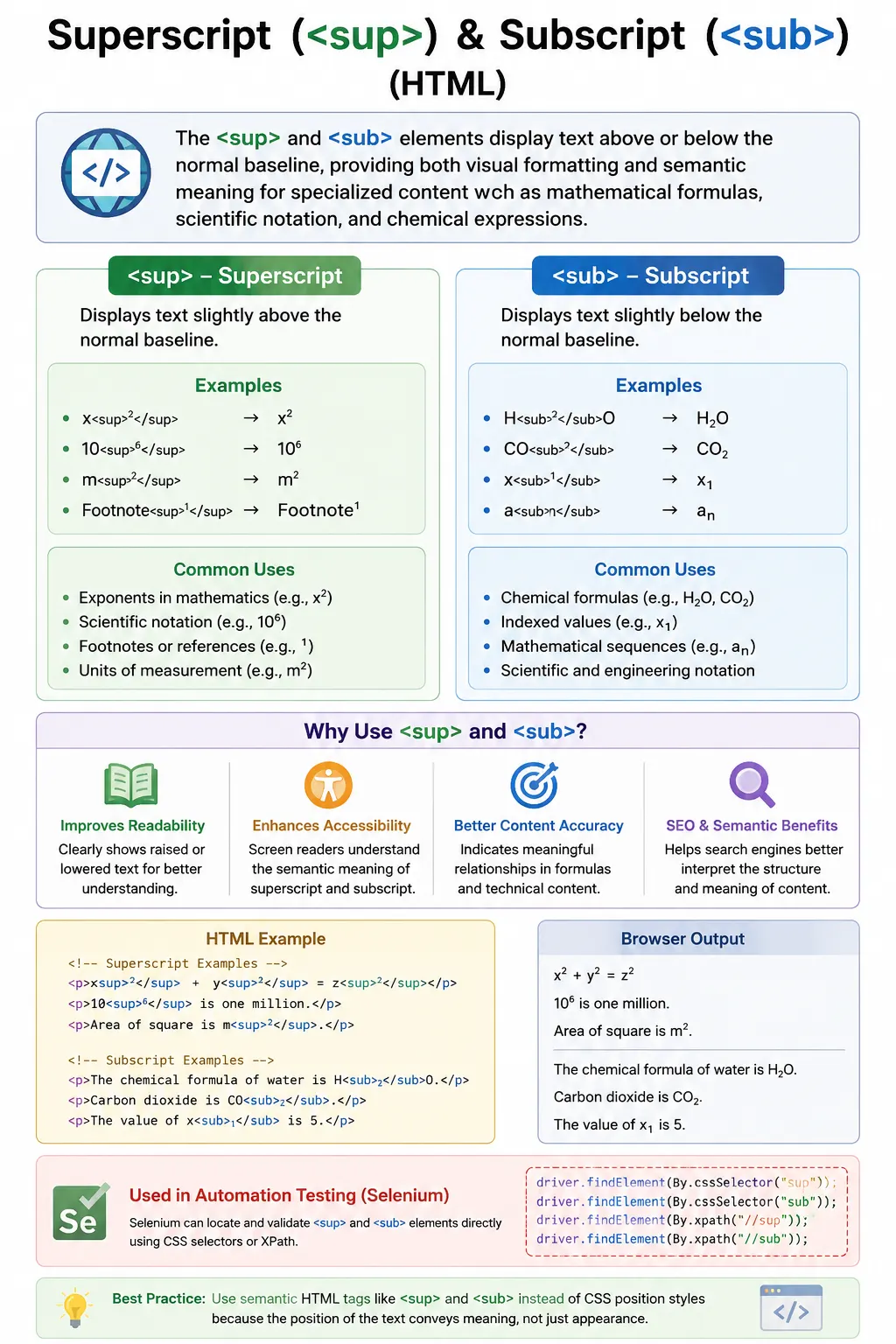
The <sup> element is used for superscript text, which appears slightly above the normal baseline. The <sub> element is used for subscript text, which appears slightly below the normal baseline. These elements may look like simple visual formatting tags, but they are more meaningful than ordinary styling. They help communicate that the text has a special role in the content. For example, the number 2 in x2 is not just a smaller raised number; it represents an exponent. The number 2 in H2O is not just a smaller lowered number; it is part of a chemical formula.
Superscript and subscript are commonly used in mathematical formulas, scientific expressions, chemistry, physics, footnotes, dates, ordinal numbers, and units of measurement. A webpage that teaches science, mathematics, engineering, medicine, data analysis, academic writing, or technical documentation will often need these elements. Without them, content may still be readable, but it can become less accurate, less professional, and sometimes even misleading.
Understanding these tags is important because good HTML is not only about displaying text. It is also about representing meaning clearly. When developers use <sup> and <sub> correctly, they improve readability, support semantic structure, help assistive technologies interpret specialized content, and make formulas easier to validate in testing and automation.
What Is Superscript?
Superscript is text displayed slightly above the normal text baseline. It is commonly used when a character modifies or qualifies the preceding text from an elevated position. The most familiar example is an exponent in mathematics. When we write x squared, we usually represent it as x2. The 2 appears above the normal line because it is not an ordinary digit in the sentence. It has a mathematical role.
In HTML, superscript text is created using the <sup> element. The text placed between the opening and closing tags is rendered above the baseline by the browser.
<p>x<sup>2</sup></p>The browser displays this as x2. In this example, the 2 appears raised above the normal text line. This communicates that the value is an exponent rather than part of the ordinary text sequence.
Superscript is also useful for scientific notation, footnotes, measurement units, and ordinal indicators. For example, 106 represents ten raised to the sixth power. The unit m2 represents square meters. A reference such as HTML Tutorial1 may indicate a footnote. In each case, the raised text carries a specific meaning.
What Is Subscript?
Subscript is text displayed slightly below the normal text baseline. It is commonly used in chemical formulas, mathematical variables, scientific notation, and indexed values. The most familiar example is water, written as H2O. The 2 appears below the baseline because it indicates that two hydrogen atoms are present in the molecule. If we wrote H2O as plain text, the formula would be less scientifically accurate and less visually clear.
In HTML, subscript text is created using the <sub> element. The text inside the tag is rendered below the normal baseline.
<p>H<sub>2</sub>O</p>The browser displays this as H2O. The lowered 2 makes it clear that the character belongs to the chemical formula. Subscript is also used in mathematical variables such as x1, an, and indexed data values. In science and engineering documentation, subscripts often carry essential meaning.
Subscript should be used when the lowered position is part of the content itself. If the lowered effect is only decorative, CSS may be enough. But when the content represents a chemical formula, variable index, or scientific notation, the semantic HTML element is the better choice.
Why These Tags Are Needed
The need for superscript and subscript becomes clear when we compare unformatted text with correctly formatted text. Consider the chemical formula for water. Written without formatting, it appears as H2O. A reader may understand it, but the presentation is not scientifically precise. Written with subscript, it becomes H2O, which is the correct and familiar representation.
H<sub>2</sub>OThe same idea applies to mathematical powers. The expression 23 clearly means two cubed. If it is written as 23 in plain text, the meaning changes completely. In mathematics, scientific writing, and academic material, correct positioning is not just a design choice. It affects meaning.
These elements are also helpful because they keep HTML readable and maintainable. A developer reading <sup>2</sup> understands that the 2 is intended to be superscript. A developer reading <sub>2</sub> understands that the character is intended to be subscript. The markup itself communicates the purpose of the content.
Syntax of Superscript
The syntax of superscript is straightforward. Any text that should appear above the baseline is placed inside the <sup> element.
<sup>Text</sup>For example, the expression 2 cubed can be written as:
2<sup>3</sup>The browser displays the result as 23. Similarly, x squared can be written as:
x<sup>2</sup>This displays as x2. The superscript element can contain numbers, letters, symbols, or short text, but it should be used only where the raised position has a meaningful purpose.
Syntax of Subscript
The syntax of subscript is similar. Any text that should appear below the baseline is placed inside the <sub> element.
<sub>Text</sub>For example, carbon dioxide can be written as:
CO<sub>2</sub>The browser displays this as CO2. Oxygen can be represented as O2, methane as CH4, and indexed mathematical variables as x1 or an. As with superscript, subscript should be used because the lowered position means something, not merely because the style looks interesting.
Common Uses of Superscript
One of the most common uses of superscript is mathematical powers. When a number or variable is raised to a power, the exponent is shown as superscript. For example, x2 represents x squared, a3 represents a cubed, and (x + y)2 represents the square of the expression x plus y.
x<sup>2</sup>
a<sup>3</sup>
(x + y)<sup>2</sup>
Superscript is also common in scientific notation. Large numbers are often written as powers of 10. For example, 106 represents 1,000,000, and 109 represents 1,000,000,000. This notation is compact and widely used in science, engineering, computing, and data analysis.
Units of measurement are another frequent use case. Square meters are written as m2, and cubic centimeters are written as cm3. The superscript is essential because m2 and cm3 as plain text are less precise and less professional. Superscript also appears in footnotes and references. For example, a sentence may include a reference marker such as HTML Tutorial1, with the full note appearing later in the document.
Common Uses of Subscript
Subscript is most strongly associated with chemical formulas. Water is written as H2O, carbon dioxide as CO2, methane as CH4, and sulfuric acid as H2SO4. In each case, the subscript communicates the number of atoms in the molecule. Without subscript, the formula becomes less accurate and less recognizable.
H<sub>2</sub>O
CO<sub>2</sub>
CH<sub>4</sub>
H<sub>2</sub>SO<sub>4</sub>
Subscript is also used in mathematics and scientific writing for indexed variables. For example, x1 may represent the first value in a series, x2 may represent the second value, and an may represent the nth term of a sequence. In physics and engineering, subscripts are often used to distinguish related variables, such as initial velocity, final velocity, or measured values from different sources.
Scientific expressions also rely on subscript. Oxygen as a molecule is written as O2. This is different from the single oxygen atom represented by O. The lowered number is not decoration; it changes the scientific meaning of the expression.
Using Superscript and Subscript Together
Sometimes superscript and subscript appear together in the same expression. For example, a variable may have both an index and a power. The expression x12 may represent the square of the first x value. HTML allows these elements to be combined when the content requires it.
x<sub>1</sub><sup>2</sup>The browser displays this as x12. This kind of expression is common in mathematics, statistics, and scientific notation. When combining these elements, developers should keep the markup simple and readable. If the formula becomes highly complex, MathML or an equation-rendering library may be more appropriate, but for simple expressions, <sup> and <sub> are clear and effective.
Browser Rendering
Browsers render superscript and subscript by changing the vertical alignment and usually reducing the font size slightly. Normal text such as ABC123 sits on the same baseline. Superscript text such as ABC123 appears raised, while subscript text such as ABC123 appears lowered. The browser handles this automatically when it sees the appropriate HTML tags.
The exact appearance may vary slightly by browser, font, and CSS rules, but the basic behavior is consistent. Superscript appears above the baseline. Subscript appears below the baseline. Developers can style these elements with CSS if needed, but the default rendering is usually enough for normal educational, scientific, and documentation content.
Semantic Meaning
The most important point is that <sup> and <sub> are not merely visual tricks. They communicate that the enclosed text has a particular textual role. In H2O, the subscript communicates a chemical formula. In x2, the superscript communicates an exponent. In m2, the superscript communicates a unit of area.
This semantic meaning matters because HTML is meant to describe content, not just decorate it. A styled <span> can make text appear raised or lowered, but it does not communicate the same meaning. When the text truly represents superscript or subscript notation, the semantic HTML element should be used.
Accessibility Benefits
Accessibility is another reason to use the correct elements. Screen readers and assistive technologies may interpret superscript and subscript differently from ordinary text depending on their capabilities and settings. For example, x2 may be understood as x squared rather than simply x 2. H2O may be interpreted more clearly as a chemical formula than plain H2O.
Assistive technology support can vary, so developers should not assume that every formula will be perfectly spoken in every environment. However, using semantic HTML gives browsers and accessibility tools the best possible information. It is better than using plain text or purely visual CSS because the markup itself indicates that the text has a superscript or subscript role.
For complex formulas, additional accessibility techniques may be needed, such as explanatory text, accessible labels, MathML, or clear surrounding context. For simple notation, <sup> and <sub> are appropriate and useful.
CSS Alternative
It is possible to simulate superscript and subscript with CSS. For example, a developer might create a class that uses vertical alignment:
.sup {
    vertical-align: super;
}
This may visually raise the text, but it does not provide the same semantic meaning as <sup>. Similarly, a custom class could lower text visually, but it would still be only styling. If the content truly represents an exponent, footnote, chemical formula, or indexed value, the semantic element is better.
CSS should be used when the goal is appearance only. HTML should be used when the goal is meaning. In this case, superscript and subscript usually carry meaning, so <sup> and <sub> should be preferred.
Real-World Examples
In real webpages, superscript and subscript appear in many practical scenarios. A page about geometry may write area as 100 m2. A chemistry lesson may write carbon dioxide as CO2. A physics or computing article may write 109 to represent one billion. A documentation page may use HTML Tutorial1 to point to a footnote.
Area = 100 m<sup>2</sup>
CO<sub>2</sub>
10<sup>9</sup>
HTML Tutorial<sup>1</sup>
These examples show why the tags are useful. They make content more accurate, easier to scan, and closer to the way readers expect technical notation to appear. For educational websites, tutorial platforms, documentation systems, and academic pages, this small detail improves professionalism.
Common Mistakes
A common mistake is writing formulas with plain numbers when subscript or superscript is required. For example, writing H2O is understandable, but H2O is better because it represents the formula correctly. Similarly, writing x2 can be ambiguous, while x2 clearly represents x squared.
Bad:
H2O

Better:
H<sub>2</sub>O
Another mistake is using CSS instead of semantic tags for meaningful notation. For example, using <span class="sub">2</span> for a chemical formula may produce the desired visual appearance, but it does not communicate the same semantic meaning. When the text represents true subscript notation, use <sub>.
Developers should also avoid overusing superscript or subscript for ordinary decorative effects. Writing an entire phrase inside <sup> or <sub> is usually poor practice unless the content genuinely belongs above or below the line. These elements are intended for small pieces of notation, not long paragraphs or decorative typography.
Selenium Perspective
From a Selenium testing perspective, superscript and subscript elements can be validated when a page contains formulas, scientific content, or technical notation. Selenium can locate these elements by tag name:
driver.findElement(
By.tagName("sup")
);

driver.findElement(
By.tagName("sub")
);
This can be useful when verifying that a formula is rendered with correct semantic markup. For example, a chemistry learning page may need to confirm that the 2 in H2O is inside a <sub> element. A mathematics page may need to verify that the exponent in x2 is inside a <sup> element.
Most automation tests focus on visible text, user actions, and application behavior, but semantic validation can be useful in educational, scientific, publishing, or accessibility-sensitive applications. Correct markup can matter when content accuracy is part of the product quality.
Comparison Table
| Feature | <sup> | <sub> |
|---|---|---|
| Position | Above baseline | Below baseline |
| Common Use | Exponents, footnotes, units | Chemical formulas, indices |
| Example | x2 | H2O |
| Semantic Meaning | Exponent or reference notation | Subscript notation |
| Accessibility Support | Yes | Yes |
Common Interview Questions
A common interview question is: what is the purpose of <sup>? The answer is that <sup> displays superscript text above the normal baseline and is commonly used for exponents, footnotes, scientific notation, and units such as m2.
Another common question is: what is the purpose of <sub>? The answer is that <sub> displays subscript text below the baseline and is commonly used for chemical formulas and mathematical indices such as H2O and x1.
Interviewers may also ask whether <sup> and <sub> are semantic elements. The answer is yes. They provide meaningful notation in mathematical, scientific, academic, and technical contexts. They should be used when the position of the text is part of the meaning.
Interview-Ready Answer
The <sup> element displays superscript text above the baseline and is commonly used for exponents, footnotes, scientific notation, and units such as m2. The <sub> element displays subscript text below the baseline and is commonly used for chemical formulas and mathematical indices such as H2O and x1. Both elements provide visual formatting and semantic meaning, so they should be used when the raised or lowered text position is part of the content's meaning.
Key Takeaway
Superscript and subscript are simple HTML elements, but they are important for writing accurate technical, mathematical, scientific, and academic content. Superscript places text above the baseline, while subscript places text below the baseline. The difference may look small visually, but it can significantly affect meaning.
Use <sup> for exponents, footnotes, scientific notation, and units such as x2, 106, and m2. Use <sub> for chemical formulas, indexed variables, and scientific notation such as H2O, CO2, and x1. Avoid replacing these tags with plain numbers or purely visual CSS when the notation has semantic meaning.
One-Line Insight
Use <sup> for text that belongs above the line and <sub> for text that belongs below the line.