Structured Data (JSON-LD)
Introduction
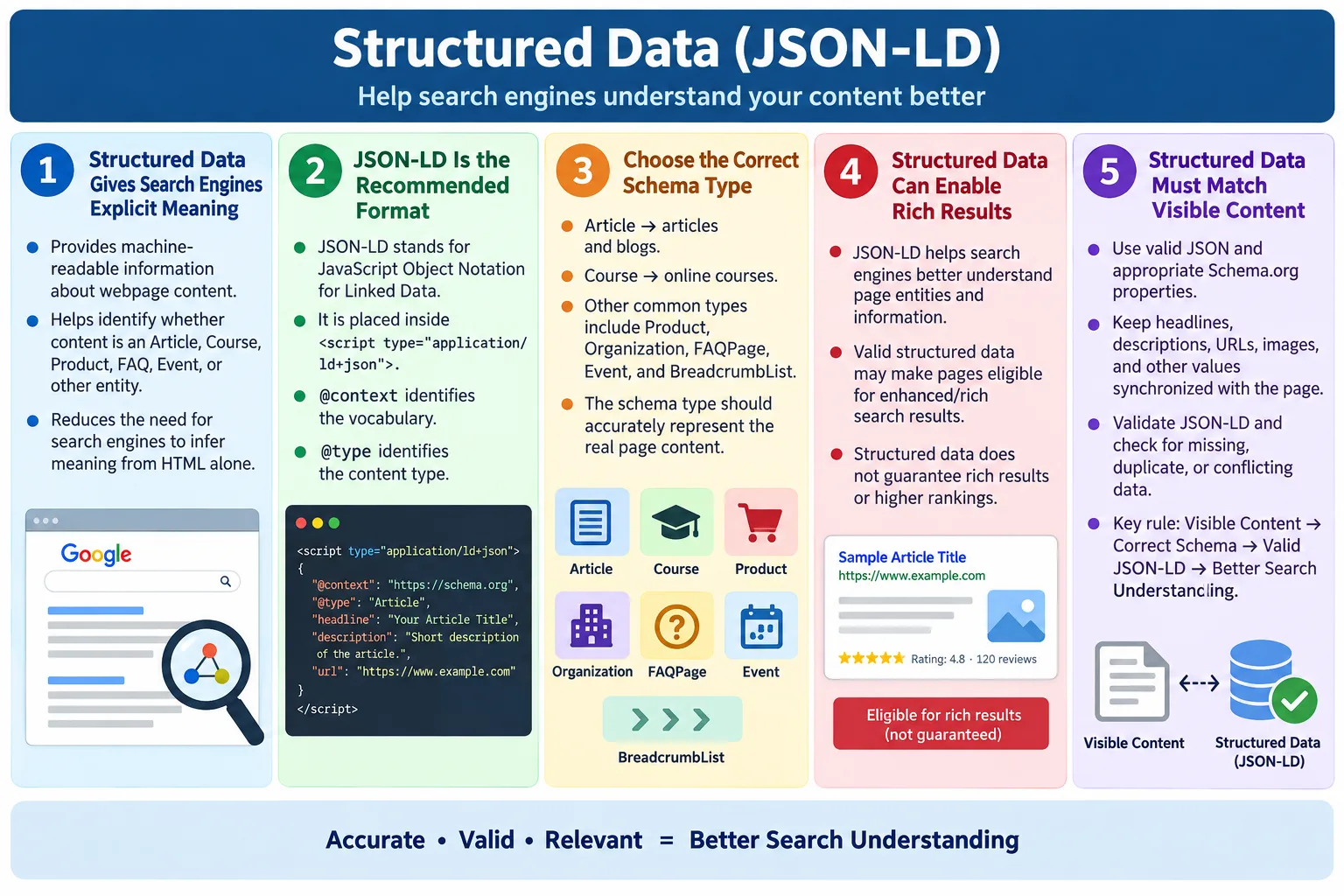
Structured Data is a standardized way of providing additional information about a webpage so that search engines can better understand its content. A normal HTML page contains visible text, headings, links, images, and layout. Search engines can read that content and infer meaning from it. Structured data goes one step further. It gives explicit machine-readable meaning to the page. Instead of making search engines guess whether a page is an article, course, product, recipe, FAQ, event, organization, or breadcrumb trail, structured data can state that meaning directly.
The recommended format for adding structured data is JSON-LD, which stands for JavaScript Object Notation for Linked Data. JSON-LD is written as JSON inside a special script block. It is separate from the visible HTML markup, which makes it easier to maintain than older formats that mix schema attributes directly into HTML elements. Major search engines recommend JSON-LD for most structured data implementations because it is clean, readable, and flexible.
JSON-LD helps search engines understand the meaning of a page, and it may make the page eligible for rich results, also called rich snippets. Rich results can include ratings, FAQs, breadcrumbs, product information, event details, course information, recipe details, and other enhanced search displays. Adding structured data does not guarantee that rich results will appear. Search engines decide whether to show them based on many factors. However, structured data improves the clarity of the page and gives search engines a better foundation for interpreting the content.
What Is Structured Data?
Structured data is machine-readable information added to a webpage. It describes the entities and relationships on the page in a standardized format. A normal HTML page may say HTML Tutorial in a heading and include paragraphs explaining the lesson. A search engine can infer that the page is probably an article or tutorial. Structured data can explicitly say that the page is an Article, Course, Product, Organization, FAQPage, BreadcrumbList, or another recognized type.
HTML Page
  ↓
Search Engine Reads Text
Structured data adds meaning beyond plain text reading. It gives crawlers a clear data model. For example, an article may have a headline, author, publication date, image, description, and URL. A product may have a name, price, rating, availability, image, and brand. A course may have a name, description, provider, and educational information. These details can be expressed with Schema.org vocabulary through JSON-LD.
HTML Page
  ↓
Structured Data
  ↓
Search Engine Understands Content
Structured data should describe the actual visible page content. It is not a place to add hidden claims or unrelated information. If a page is a tutorial, structured data should describe the tutorial. If a page is a product, it should describe the product. If a page includes FAQ structured data, the FAQ content should be visible to users on the page. Matching structured data with visible content is one of the most important rules.
What Is JSON-LD?
JSON-LD stands for JavaScript Object Notation for Linked Data. It uses JSON syntax to describe structured data. The data is placed inside a <script type="application/ld+json"> element. Although it uses a script element, it is not JavaScript that runs like application logic. It is a data block that search engines and other tools can read.
<script type="application/ld+json">
{
  ...
}
</script>
The JSON-LD block usually includes @context and @type. The @context tells tools which vocabulary is being used, usually https://schema.org. The @type identifies what kind of thing is being described, such as Article, Course, Product, Organization, FAQPage, Event, Recipe, or BreadcrumbList. Additional properties describe details about that thing.
JSON-LD is preferred because it keeps structured data separate from HTML presentation. Older approaches such as microdata require adding attributes directly to visible HTML elements. That can make markup harder to read and maintain. JSON-LD can be updated as a single data block while the HTML content remains clean.
Why Use JSON-LD?
Without structured data, search engines must infer meaning from text, headings, links, and surrounding context. They are good at this, but inference can still be imperfect. With JSON-LD, the page provides explicit structured meaning. It tells the search engine what the content is, who created it, what the title is, what organization owns the site, or what items appear in a breadcrumb trail.
Without structured data:

HTML
  ↓
Search Engine Guesses

With JSON-LD:

HTML
  ↓
JSON-LD
  ↓
Search Engine Knows
  ↓
Article
Course
Product
Organization
This does not mean search engines blindly trust every JSON-LD block. They compare structured data with visible content and other page signals. If structured data is misleading, invalid, incomplete, or unrelated to the page, it may be ignored. When it is accurate, valid, and aligned with the visible content, it can improve understanding and eligibility for enhanced search features.
JSON-LD is also useful because it scales well. A website can use templates to generate structured data for many pages. Blog articles can use an Article schema template. Product pages can use Product schema. Course pages can use Course schema. Breadcrumbs can use BreadcrumbList schema. This consistency helps search engines interpret the site more reliably.
Where JSON-LD Is Added
JSON-LD is usually added inside the HTML <head> section. This keeps metadata and structured information together. It can also be placed in the <body> if needed, but the head is the most common location for static pages, tutorials, blog posts, and documentation pages.
<head>

<script type="application/ld+json">
{
  ...
}
</script>

</head>
For a static website, adding JSON-LD to the head is straightforward. The page template can include organization and website structured data, while individual pages can include Article, Course, BreadcrumbList, or other page-specific schema. The important point is that the JSON-LD must be valid JSON. A missing quote, trailing comma, or unescaped character can break the data.
When JSON-LD is generated dynamically, review the final rendered HTML. The template may look correct, but the final output may contain missing values, duplicate scripts, invalid JSON, or mismatched URLs. Search engines process the final page, not the developer's intention. Testing the output is essential.
Basic JSON-LD Example
A basic JSON-LD example can describe a page as an Article. The block includes the Schema.org context, the type, the headline, and author information. In a real production page, additional properties such as description, image, date published, date modified, and URL may be recommended or required depending on the rich result type.
<script type="application/ld+json">
{
  "@context": "https://schema.org",
  "@type": "Article",
  "headline": "HTML Tutorial",
  "author": {
    "@type": "Person",
    "name": "John Smith"
  }
}
</script>
This tells search engines that the page is an Article. The headline is HTML Tutorial, and the author is a person named John Smith. The visible page should support this data. If the visible heading is completely different or the author is not shown where expected, the structured data may be less trustworthy.
For tutorial websites, Article, Course, Organization, BreadcrumbList, and FAQPage are common schema choices. The correct type depends on what the page is. A lesson page may be an Article or Course depending on how the content is structured. A site-wide data block may describe the Organization and WebSite. Breadcrumb structured data can describe page hierarchy.
Common JSON-LD Properties
JSON-LD properties describe the details of an entity. The @context property identifies the vocabulary being used, usually Schema.org. The @type property identifies the type of content. Other properties such as name, description, url, image, author, and datePublished describe specific details.
| Property | Purpose |
|---|---|
@context |
Vocabulary being used, usually https://schema.org |
@type |
Type of content |
name |
Name of the item |
description |
Description |
url |
Webpage URL |
image |
Image URL |
author |
Author information |
datePublished |
Publication date |
The required and recommended properties vary by schema type and by search engine feature. A Product rich result may need product-specific properties such as price or availability. An Article may need headline, image, author, and date information. An FAQPage needs questions and accepted answers that match visible content. Always validate the chosen schema against the intended use.
Common Schema Types
Some commonly used structured data types include Article for articles and blogs, Course for online courses, Product for products, Organization for companies, Person for individuals, FAQPage for frequently asked questions, Event for events, Recipe for recipes, BreadcrumbList for breadcrumb navigation, and LocalBusiness for local businesses. These types come from the Schema.org vocabulary.
| Type | Used For |
|---|---|
Article |
Articles and blogs |
Course |
Online courses |
Product |
Products |
Organization |
Companies |
Person |
Individuals |
FAQPage |
Frequently asked questions |
Event |
Events |
Recipe |
Recipes |
BreadcrumbList |
Breadcrumb navigation |
LocalBusiness |
Local businesses |
Choosing the right schema type matters. Do not mark a product page as an Article if the page primarily describes a product. Do not mark a normal tutorial as a Recipe. Do not mark hidden questions as FAQPage if the user cannot see those questions and answers. Schema type should reflect the real content and purpose of the page.
Example: Organization
Organization structured data describes a company, website owner, brand, or similar entity. It can include the organization name, URL, logo, contact information, and social profile links when appropriate. A simple organization block can help search engines connect a site with its brand identity.
<script type="application/ld+json">
{
  "@context":"https://schema.org",
  "@type":"Organization",
  "name":"SoftwareTips4U",
  "url":"https://www.softwaretips4u.com"
}
</script>
Organization data is often included site-wide because the same organization owns many pages. It should be accurate and consistent with visible branding, contact pages, logo URLs, and site identity. If the site name changes, the structured data should be updated as well.
Example: Course
Course structured data can describe an online course or learning program. It may include the course name, description, provider, and other educational details. For a learning website, Course schema can be useful when the page truly represents a course rather than a single short article.
<script type="application/ld+json">
{
  "@context":"https://schema.org",
  "@type":"Course",
  "name":"HTML Complete Course",
  "description":"Learn HTML from beginner to advanced."
}
</script>
The visible page should support the course claim. If the page is only a short note, Course schema may not be appropriate. If the page introduces a complete HTML course with lessons, structure, and educational value, Course schema may be a better fit. The schema should describe what the user can actually find.
Example: FAQ
FAQ structured data describes a page containing frequently asked questions and answers. It should be used only when the visible page actually contains those questions and answers. The schema should match the visible content closely. Search engines may use FAQ structured data to understand the page and, where eligible, show enhanced results.
<script type="application/ld+json">
{
  "@context":"https://schema.org",
  "@type":"FAQPage"
}
</script>
A complete FAQPage schema usually contains a list of questions and accepted answers. The short example above only shows the type concept. In production, include the required structure and validate it. Do not add FAQ structured data for questions that are not visible to users. Hidden or misleading structured data can be ignored and may create quality problems.
Example: Breadcrumb
Breadcrumb structured data helps search engines understand page hierarchy. A breadcrumb trail describes where the current page sits inside the website. For example, a page may belong under Home, then HTML, then SEO, then Structured Data. BreadcrumbList schema communicates this hierarchy in a machine-readable way.
<script type="application/ld+json">
{
  "@context":"https://schema.org",
  "@type":"BreadcrumbList"
}
</script>
Breadcrumb structured data is useful for large tutorial sites because it helps connect related pages and categories. It should match the visible or logical site hierarchy. If the visible navigation and breadcrumb schema disagree, review the structure. Consistency helps search engines and users understand the page's place in the site.
Browser Workflow
The browser loads HTML and can parse JSON-LD as a script block with the type application/ld+json. The script does not run as normal JavaScript. Instead, it provides data that search engines and tools can read. Search engines process the page, read the JSON-LD, understand the entity type, and may use that understanding for rich result eligibility.
HTML
  ↓
JSON-LD
  ↓
Search Engine
  ↓
Better Understanding
  ↓
Possible Rich Results
The visible page should still be strong without structured data. JSON-LD is an enhancement. It cannot rescue weak content, misleading content, thin pages, or poor user experience. Search engines use structured data as one part of their understanding, not as a replacement for content quality.
JSON-LD vs Microdata
Microdata is an older approach that embeds structured data attributes directly into HTML elements. JSON-LD keeps structured data in a separate JSON block. This makes JSON-LD easier to read, edit, generate, and validate. It also keeps the visible HTML cleaner.
Older HTML:

<div itemscope>
  ...
</div>

Modern approach:

<script type="application/ld+json">
  ...
</script>| JSON-LD | Microdata |
|---|---|
| Separate from HTML markup | Mixed with HTML |
| Easier to maintain | More difficult to maintain |
| Recommended by major search engines | Still supported in many cases |
| Cleaner HTML | More markup mixed into content |
Real-World Examples
On a product page, structured data can identify product name, price, rating, availability, image, and brand. This gives search engines a clearer understanding of the product. On an online course page, structured data can identify the course, instructor or provider, and description. On a news article, it can identify headline, author, published date, and image. On a company website, it can identify organization name, logo, website, and contact information.
Product Page
Product
  ↓
Price
  ↓
Rating
  ↓
Availability

Online Course
Course
  ↓
Instructor
  ↓
Description

News Article
Headline
  ↓
Author
  ↓
Published Date

Company Website
Organization
  ↓
Logo
  ↓
Website
  ↓
Contact
These examples show that structured data is not one-size-fits-all. The schema type should match the page type. The properties should describe the visible content. The data should be kept current. A product price that is outdated, an event date that has passed, or an incorrect author name can reduce trust and create search quality issues.
Best Practices
Use valid JSON syntax. Use the appropriate Schema.org type. Ensure structured data matches the visible page content. Include required and recommended properties for the chosen schema. Keep the information up to date. Validate structured data before publishing. These practices reduce errors and improve the chance that search engines can use the data correctly.
- Use valid JSON syntax.
- Use the appropriate Schema.org type.
- Ensure structured data matches visible page content.
- Include required and recommended properties for the chosen schema.
- Keep the information up to date.
- Validate structured data before publishing.
Structured data should be maintained like any other page content. If a headline changes, update the JSON-LD headline. If a page URL changes, update the URL. If an author changes, update the author data. If a course description changes, update the structured data description. Outdated schema creates a mismatch between machine-readable data and visible content.
Common Mistakes
Invalid JSON is one of the most common mistakes. JSON does not allow trailing commas. Property names and string values must use double quotes. Braces and brackets must be balanced. A small syntax error can make the entire JSON-LD block invalid.
{
  "name":"HTML",
}
The trailing comma in the example above makes the JSON invalid. Another common mistake is structured data that does not match the page. For example, a page visibly showing a shopping cart should not be marked as a Course. A product page should not be marked as an Article if the primary purpose is selling a product. Missing required properties can also prevent eligibility for rich results.
Some teams expect rich results automatically. Adding structured data does not guarantee rich results. Search engines decide whether and how to display enhanced search features. Structured data makes a page eligible when valid and appropriate, but search quality, content quality, site trust, query relevance, and search engine policies still matter.
SEO Benefits
Structured data can improve search engine understanding, make pages eligible for rich results, improve search result appearance, clarify page content and entities, and enhance discoverability. It is an enhancement, not a substitute for high-quality content and good SEO practices.
- Improve search engine understanding.
- Make pages eligible for rich results.
- Improve search result appearance.
- Clarify page content and entities.
- Enhance discoverability.
Structured data works best when paired with strong HTML structure, accurate titles, good meta descriptions, canonical links, robots directives, useful content, and accessible markup. It should be part of a complete SEO strategy. A page with poor content and valid schema is still a weak page. A strong page with accurate schema is easier for search engines to understand.
Selenium Perspective
Automation testers may verify that the JSON-LD script exists, the correct schema type is used, required fields are present, and values match visible content. Selenium can locate the JSON-LD script by CSS selector and read its inner content. The data can then be parsed or checked as text.
WebElement script =
driver.findElement(
By.cssSelector(
"script[type='application/ld+json']"));

String json =
script.getAttribute("innerHTML");

System.out.println(json);
For deeper validation, tests can parse the JSON and verify properties such as @context, @type, name, description, and url. Testers can also compare JSON-LD values against visible page headings or metadata. For example, the Article headline should match or closely align with the page's main heading.
Large websites often use SEO crawlers or structured data validation tools for broad audits. Selenium is useful for important flows and browser-rendered pages. The key testing goal is to catch missing, invalid, duplicated, or mismatched structured data before release.
Validation Workflow
A practical validation workflow starts with choosing the right schema type. Next, write the JSON-LD using valid JSON syntax. Then compare the structured data against the visible page content. After that, validate the page with a structured data testing tool or rich result testing tool. Finally, include checks in regression testing if the site depends heavily on structured data.
Validation should happen whenever templates change. A template may accidentally remove required properties, output empty values, duplicate script blocks, or generate invalid JSON. A page may still look correct visually while its structured data is broken. This is why testing the final HTML output matters.
For static tutorial pages, validation can be simple. Confirm the script tag exists, check that the JSON is valid, verify the schema type, and make sure key values match the page. For dynamic product pages, validation may need to include price, availability, ratings, and product identifiers. The complexity depends on the schema type and business impact.
Structured Data Checklist
A checklist keeps structured data consistent. Start by confirming that structured data is needed for the page. Then choose the right Schema.org type. Write valid JSON-LD. Match the data to visible content. Include required and recommended properties. Use accurate URLs and image URLs. Validate before publishing. Recheck after content updates.
- Choose the correct Schema.org type.
- Use
application/ld+jsonscript blocks. - Keep JSON syntax valid.
- Match structured data to visible page content.
- Include required and recommended properties.
- Use accurate URLs, names, descriptions, and images.
- Validate structured data before publishing.
- Update structured data when page content changes.
Structured Data in Static Websites
Static websites can benefit from structured data even though they do not use a database or server-side rendering. Each static HTML page can include a JSON-LD block that describes the page. For a tutorial website, this might include Organization or WebSite structured data across the site and Article or Course structured data on individual lessons. BreadcrumbList structured data can also help describe the page's position inside the course structure.
The biggest risk in static websites is copied metadata. A developer may duplicate an existing page, update the article text, but forget to update the JSON-LD headline, description, URL, or type. The page will look correct to users, but the structured data will describe the wrong page. This mismatch can confuse search engines and make audits harder. Every new static page should be checked for page-specific JSON-LD values.
A good static-site workflow treats structured data as part of the page template and part of the page content. Site-wide data such as Organization can remain consistent. Page-specific data such as headline, description, URL, and breadcrumb position should change for each page. This keeps the structured data accurate while reducing repeated manual work.
Structured Data and Visible Content
Structured data should match visible content because search engines use it to understand what users can actually see or access. If a page includes FAQPage structured data, the questions and answers should be present on the page. If a page includes Product structured data, the product information should be visible. If a page includes Course structured data, the page should genuinely describe a course or educational offering.
This rule protects users from misleading search results. For example, a page should not add review rating structured data if users cannot see reviews. A page should not claim event information if the page does not describe an event. A page should not mark itself as a recipe if it is not a recipe. Structured data is a clarification layer, not a hidden promotion layer.
When visible content changes, structured data should be updated. If the page headline changes, update the JSON-LD headline. If a course description changes, update the schema description. If an event date changes, update the event data. Keeping structured data synchronized with visible content is one of the simplest ways to avoid schema quality issues.
Structured Data and Rich Results
Rich results are enhanced search result displays that may show additional information beyond a normal title, URL, and snippet. Depending on the content type and search engine policies, rich results may show breadcrumbs, product details, review ratings, FAQs, event dates, recipe information, or other details. Structured data is often required for eligibility, but eligibility is not the same as guarantee.
Search engines decide whether to show rich results based on query relevance, content quality, structured data validity, site trust, device type, search result layout, and policy requirements. A page can have perfect JSON-LD and still not show a rich result for every query. This is normal. The purpose of structured data is to help search engines understand the page accurately and make the page eligible where appropriate.
Teams should avoid promising rich results as an automatic outcome. A better explanation is that structured data improves machine understanding and may qualify the page for enhanced display. This expectation is more accurate and helps stakeholders understand why structured data matters without treating it as a guaranteed ranking or display shortcut.
Structured Data and Other SEO Signals
Structured data works alongside other SEO signals. The page title identifies the page in search results. The meta description summarizes the page. The canonical link identifies the preferred URL. The robots meta tag controls indexing behavior. Heading hierarchy organizes visible content. Structured data adds explicit machine-readable meaning. These signals should support each other.
For example, if a page's <h1> says Structured Data (JSON-LD), the meta title and JSON-LD headline should be consistent with that topic. The canonical URL should point to the same page. The robots tag should allow indexing if the page is meant to appear in search results. If the structured data says the page is about a product while the visible content is a tutorial, the signals conflict.
Good technical SEO is coherent. Each metadata element tells part of the same story. Structured data should not be viewed in isolation. It should be reviewed with the rest of the document head, visible page content, internal links, images, and navigation structure.
Implementation Review Workflow
A practical implementation workflow starts by identifying the page type. Is it an article, course, product, organization page, FAQ page, event page, recipe page, or breadcrumb structure? After identifying the type, check Schema.org and search engine documentation for required and recommended properties. Then create the JSON-LD block using valid JSON syntax.
After creating the block, compare every important value against the visible page. The headline should match the page heading. The description should match the page summary. The URL should match the canonical URL. The image should be accessible and relevant. The author or organization should be accurate. Breadcrumb items should match the site hierarchy. This comparison catches many real-world mistakes.
Finally, validate the page. Use structured data testing tools, rich result tools, or local scripts to check JSON syntax and schema shape. During release, test the final production output, not only the template. The template may look correct while rendered pages contain empty strings, stale URLs, duplicated blocks, or invalid characters. The final HTML is what search engines process.
Testing and Audit Checklist
Structured data audits should be both technical and content-aware. Technical checks verify that JSON exists, parses correctly, and includes expected properties. Content-aware checks verify that the data accurately describes the visible page. Both are necessary. A syntactically valid JSON-LD block can still be wrong if it describes content that does not exist on the page.
- Confirm the JSON-LD script exists on pages that need structured data.
- Validate that the JSON syntax is correct.
- Verify the
@contextand@typevalues. - Check required and recommended properties for the chosen schema type.
- Compare headline, name, description, URL, and image values with visible content.
- Ensure structured data does not describe hidden or unrelated content.
- Check for duplicate or conflicting JSON-LD blocks.
- Revalidate after template changes or content migrations.
This checklist helps developers, testers, and SEO reviewers work from the same standard. Developers can prevent template mistakes. Testers can catch regressions. SEO reviewers can validate that structured data supports search understanding. Content teams can ensure that structured data remains accurate after edits.
Common Interview Questions
What is structured data? Structured data is machine-readable information added to webpages to help search engines understand content. It describes entities such as articles, products, courses, organizations, FAQs, events, recipes, and breadcrumbs.
What does JSON-LD stand for? JSON-LD stands for JavaScript Object Notation for Linked Data. It is the recommended format for most structured data implementations.
Where is JSON-LD placed? JSON-LD is usually placed inside the HTML <head> section, although it can also appear in the body if needed.
What is @context? It specifies the vocabulary being used, typically https://schema.org. What is @type? It identifies the type of content, such as Article, Product, Course, FAQPage, or Organization.
Does structured data guarantee rich results? No. It makes a page eligible for rich results, but search engines decide whether to display them. Which format is recommended? JSON-LD is the recommended format for most implementations.
Comparison Table
| JSON-LD | Microdata |
|---|---|
| Separate JSON block | Embedded in HTML elements |
| Easier to maintain | More complex |
| Recommended by major search engines | Supported but less commonly recommended |
| Cleaner HTML | More markup mixed into content |
Interview-Ready Answer
Structured Data is machine-readable information added to webpages to help search engines understand the content more accurately. The recommended implementation format is JSON-LD, which uses a <script type="application/ld+json"> block containing Schema.org data. Common schema types include Article, Product, Course, Organization, FAQPage, and BreadcrumbList. Structured data can make pages eligible for rich results in search engines, improving how they appear in search results, although it does not guarantee those enhancements will be shown.
A strong interview answer should also mention accuracy. Structured data should match the visible content on the page, use valid JSON syntax, use the correct Schema.org type, and include required properties where needed. It is an SEO enhancement that improves machine understanding, not a substitute for good content, clean HTML, accessibility, and technical SEO fundamentals.
One-Line Insight
Structured data tells search engines exactly what your content is, instead of making them infer it from HTML alone.