Stable Locators from HTML
Introduction
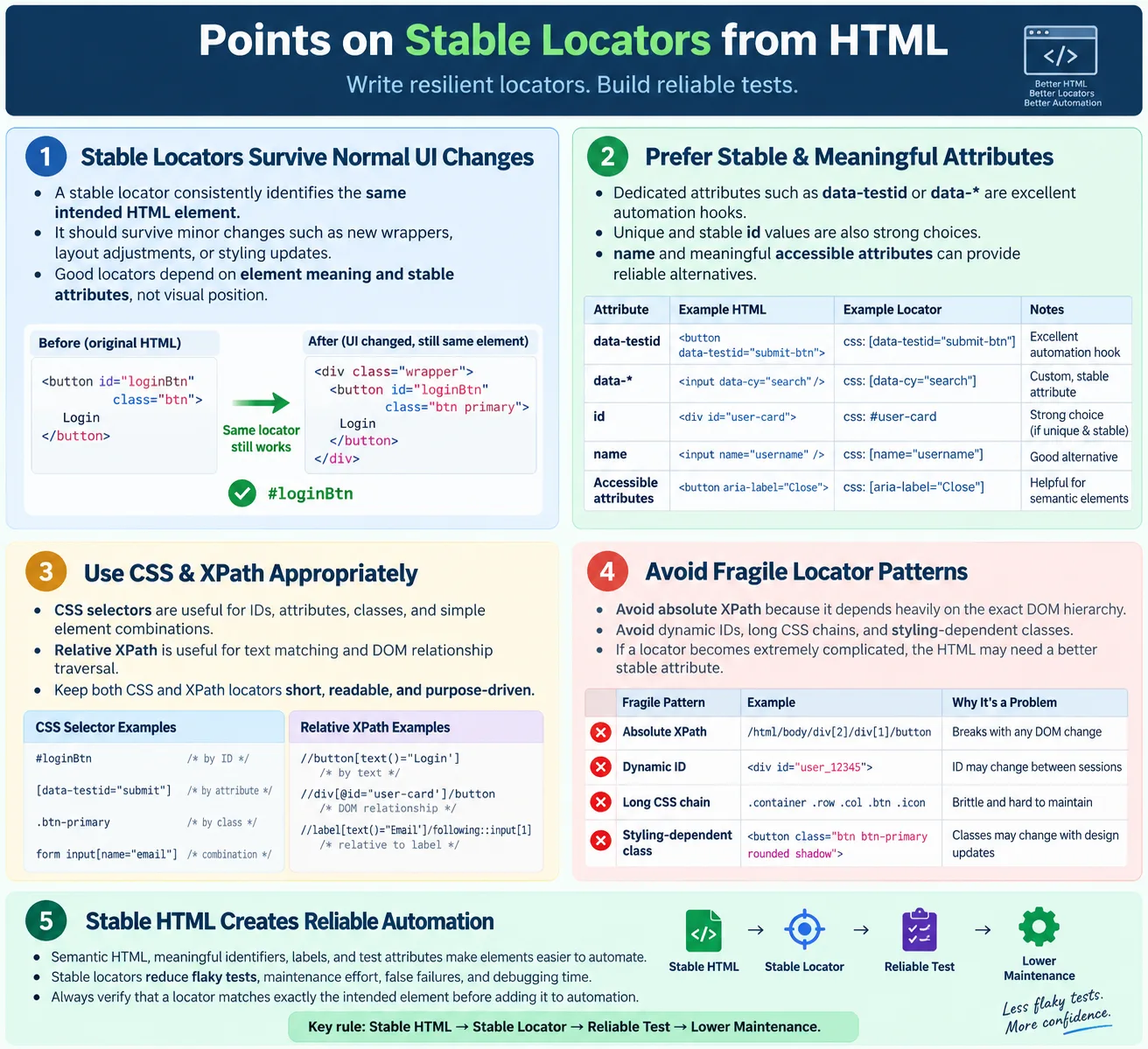
Stable locators are element locators that continue to work even when an application's user interface changes. In UI automation, the quality of a locator is directly influenced by the quality of the HTML. Automation tools such as Selenium, Playwright, Cypress, Puppeteer, and Appium for WebView do not interact with a page in a vague visual way. They inspect the browser's DOM, find matching elements, and then perform actions such as clicking, typing, selecting, reading text, or validating attributes. If the locator is unstable, the test becomes unstable even when the application itself is working correctly.
A stable locator should uniquely identify an element and remain unchanged across builds, deployments, and minor UI updates. This does not mean that a locator can survive every possible redesign. If a feature is removed or the business workflow changes, tests must change too. Stability means the locator should not break because a designer added a wrapper div, changed a color class, moved a button slightly, or adjusted the layout. Good locators depend on meaning and stable HTML attributes, not on temporary visual structure.
For testers, stable locators are one of the foundations of reliable automation. Many flaky tests are not caused by product defects. They are caused by weak locators, dynamic IDs, absolute XPath expressions, styling classes, or timing assumptions. A test suite with poor locators creates noise. Teams stop trusting failures because too many failures are caused by automation fragility. A test suite with stable locators gives cleaner feedback, faster debugging, and better confidence in release decisions.
What Is a Stable Locator?
A stable locator consistently identifies the same HTML element. The browser receives HTML, creates a DOM, and the automation tool searches that DOM using a locator strategy. The locator may use an ID, name, CSS selector, XPath, visible text, role, accessible name, or a dedicated test attribute. The important point is that the locator should point to the intended element every time the test runs.
HTML
  ↓
DOM
  ↓
Stable Locator
  ↓
Automation Tool
  ↓
Correct Element
Even if the page layout changes slightly, the locator should continue working. For example, if a login input has id="username", a locator based on that ID is usually stable because the element's purpose has not changed. But if a locator is based on the input being the third child of the second div inside a form, it may break when the UI is reorganized. Both locators may work today, but only one expresses the element's purpose clearly.
Stable locators are also predictable. They should not match five different elements when the test needs one. They should not depend on random values generated by the server. They should not depend on animation state or screen size. When a locator fails, the tester should be able to inspect the DOM and quickly understand whether the HTML changed, the application state is wrong, or the test needs an update.
Why Stable Locators Matter
Without stable locators, automation becomes fragile. A small application update can break many tests even though the business behavior still works. The build is updated, the locator breaks, and the test fails. The failure may look like a real regression, but after investigation the team discovers that the element still exists and the test simply used a weak locator. This wastes time and weakens confidence in automation.
Application Updated
  ↓
Locator Breaks
  ↓
Test Fails
With stable locators, many UI changes do not affect the test. The page may receive a new container, a CSS class may change, or the button may move to a different place, but the locator remains valid because it is based on a stable attribute. The application is updated, the locator is still valid, and the test continues to pass if the feature works correctly.
Application Updated
  ↓
Locator Still Valid
  ↓
Test Passes
This matters at scale. A small project may have only a few automated tests, but a serious regression suite can contain hundreds or thousands of locators. If ten percent of those locators are fragile, every UI change can produce maintenance work. Stable locators reduce maintenance, improve readability, and make automation a trusted engineering asset instead of a constant source of false alarms.
Characteristics of a Good Locator
A good locator is unique, stable, readable, easy to maintain, independent of page layout, and independent of styling where possible. Uniqueness means the locator should match the intended element only. Stability means it should survive normal product updates. Readability means another tester or developer should understand what the locator is trying to find. Maintainability means the locator can be updated easily when the product intentionally changes.
- Unique
- Stable
- Readable
- Easy to maintain
- Independent of page layout
- Independent of styling where possible
The best locators usually describe what the element is, not where it happens to be. For example, [data-testid='login-button'] describes a login button. The locator body div div form div:nth-child(3) button describes a position inside a layout. The first locator is tied to product meaning. The second locator is tied to implementation detail. When the implementation detail changes, the locator breaks.
Locator Priority
A common locator priority order starts with dedicated test attributes, then unique IDs, names, accessible attributes, CSS selectors, relative XPath, link text, and finally absolute XPath, which should generally be avoided. The exact order may vary by organization, framework, and application architecture, but the principle remains the same: prefer stable, intentional, meaningful attributes over accidental structure.
data-testid / data-* (if provided)
  ↓
id
  ↓
name
  ↓
Accessible attributes
  ↓
CSS Selector
  ↓
Relative XPath
  ↓
Link Text
  ↓
Absolute XPath (Avoid)
This order is not a law. A bad ID can be worse than a good data attribute. A dynamic ID such as btn_984729 is not reliable just because it is an ID. A carefully written relative XPath may be better than a class selector that depends on design styling. The priority list is a guide, but the real decision should be based on the HTML in front of you.
Prefer Unique IDs
Unique IDs are often excellent locators because HTML IDs are intended to identify individual elements. If an input has a clear and stable ID, Selenium can locate it directly. The locator is short, readable, and fast to understand.
<input
  id="username"
type="text">driver.findElement(By.id("username"));This locator communicates exactly what the test needs: the username element. It does not depend on the input's position in the form or the class names used for styling. If the form layout changes but the username field remains the username field, the locator should still work.
However, testers must confirm that IDs are truly unique and stable. Some applications generate IDs dynamically. Some pages accidentally duplicate IDs, which is invalid HTML and harmful for automation. A unique-looking ID should still be verified in DevTools before being trusted in test code.
Use Data Attributes
Many development teams add automation-specific attributes to important elements. These are usually written as data-testid, data-test, data-qa, or similar names. They are part of HTML's custom data attribute mechanism. Their main advantage is that they can be independent of styling, layout, and visible text.
<button data-testid="login-button">
  Login
</button>
driver.findElement(
By.cssSelector("[data-testid='login-button']"));Data attributes are valuable because they create a clear contract between the application and the automation suite. Designers can change button colors, developers can reorganize containers, and content teams can adjust visible text, but the test attribute can remain stable. This is especially helpful in modern component-based applications where UI classes are generated, minimized, or frequently changed.
The best practice is to use test attributes intentionally, not everywhere. Critical workflows, buttons, form controls, alerts, tabs, menus, table rows, cards, and important state indicators are good candidates. Adding test attributes to every tiny decorative element can make HTML noisy. Adding them to meaningful automation targets makes the system easier to test.
Use the Name Attribute
The name attribute is commonly used in form controls and can provide a stable locator when IDs are missing. Many login, registration, search, and settings forms use meaningful names such as email, password, firstName, or country. Selenium supports locating by name directly.
<input name="email">driver.findElement(By.name("email"));Name attributes are often stable because they are tied to form submission and backend processing. Still, they are not always unique. A page may contain multiple forms, and more than one input could use the same name in certain contexts. When using name, confirm that it identifies the intended element in the current page state.
Use Accessible Attributes
Accessible attributes can also help create meaningful locators. Attributes such as aria-label, visible labels, roles, and accessible names are primarily for accessibility, not testing, but they often describe the purpose of an element clearly. When used properly, they make the page easier for assistive technologies and easier for automation tools to understand.
<input aria-label="Email Address">input[aria-label='Email Address']Accessible attributes should not be added only to satisfy automation. They must remain truthful for users. If an aria-label says Email Address, the element should really be an email address control. When accessibility and automation needs align, the result is strong HTML that benefits real users, testers, and maintainers.
CSS Selectors
CSS selectors are widely used in UI automation because they are concise and familiar. They can locate elements by ID, class, tag, attribute, and structural relationships. A button with class login-btn can be located with .login-btn. An input with a type can be located with input[type='email']. A data attribute can be located with [data-testid='login-button'].
<button class="login-btn">
Login
</button>driver.findElement(
By.cssSelector(".login-btn"));CSS selectors are good for classes, attributes, IDs, and element combinations. They are usually readable when kept short. The risk appears when testers build long chains that mirror the page layout. A selector such as body div.container div.row form input is technically a CSS selector, but it is not a good locator. It depends on containers that may have nothing to do with the element's business purpose.
Another concern is styling classes. A class such as btn blue rounded large may exist only for design. If the design changes, the class can change even though the business function remains the same. Styling classes can be used when they are stable and meaningful, but dedicated test attributes or unique IDs are usually safer.
Relative XPath
Relative XPath is useful when a locator needs text matching or DOM relationship traversal. It can locate a button by visible text, move from a label to its related input, find a parent container, or select an action inside a table row. XPath is more expressive than CSS in these relationship-based situations.
<button>
Login
</button>driver.findElement(
By.xpath("//button[text()='Login']"));Relative XPath is preferable to absolute XPath because it does not start from the root of the document and depend on every container in between. A relative XPath focuses on the meaningful part of the DOM. It may use an attribute, text, or a relationship that is likely to remain stable. XPath should still be kept readable. A very long XPath can be just as fragile as a long CSS chain.
Avoid Absolute XPath
Absolute XPath is one of the most common sources of fragile automation. It starts at the root of the document and describes the exact path to the target element. A path such as /html/body/div/div/div/form/div[2]/button may work today, but it depends on the precise page structure. If a new div is inserted, a banner appears, or the form layout changes, the locator may break.
/html/body/div/div/div/form/div[2]/buttonAbsolute XPath is hard to maintain because it usually does not explain what the element is. It only explains where the element was located at one moment. In production applications, layout changes are normal. Therefore, locators should avoid depending on exact layout depth whenever possible.
Avoid Dynamic IDs
Dynamic IDs are IDs that change on every build, session, or page load. They often appear in applications that generate markup through frameworks or backend controls. A button may have id="btn_987654" in one run and id="btn_654321" in the next run. A locator based on the full ID will fail unpredictably.
<button id="btn_987654">Login</button><button id="btn_654321">Login</button>The better solution is to ask for a stable attribute, such as data-testid="login-button". If that is not possible, a partial attribute selector or a relative XPath may help, but partial matching should be used carefully. A partial match can accidentally identify the wrong element if many IDs share the same pattern.
Avoid Long CSS Chains
Long CSS chains are fragile for the same reason absolute XPath is fragile. They depend on visual layout rather than element purpose. A selector such as body div.container div.row form input may match the intended input today, but it can break when the layout receives a new wrapper or when the form moves to a different section. It can also match more than one element if similar structures exist elsewhere.
body div.container div.row form inputA shorter selector such as #username or [data-testid='username'] is clearer and more stable. If a locator becomes long, that is often a signal that the HTML needs better attributes. Instead of making the selector more complicated, it may be better to improve the markup.
Avoid Depending Only on Class Names
Class names can be useful locators when they represent component identity or stable state. However, many class names exist only for styling. A button may have classes such as btn blue rounded large. During a redesign, the button may become green, flat, or small. The classes change, but the button is still the login button. A test based on styling classes may fail even though the user-facing behavior remains correct.
<button class="btn blue rounded large">
Login
</button>Classes are especially risky in projects that use CSS modules, generated class names, utility-first CSS, or build tools that transform class names. If a class looks like Button_primary__2kf9a, it may not be stable enough for automation. Dedicated test attributes avoid this problem.
HTML Structure Matters
Good HTML leads to simple locators. A form with clear IDs and meaningful button attributes allows tests to be straightforward. Poor HTML with anonymous divs, missing labels, duplicate elements, and dynamic attributes forces tests to depend on complex paths. Locator stability is not only a tester responsibility. It is also a result of how developers structure the page.
<form>
<input id="email">
<button id="submit">
Submit
</button>
</form>In this example, the email input and submit button are easy to locate. The HTML exposes meaningful identifiers. If the same form were built with nested divs and no attributes, the test would need to guess based on position or text. That is less reliable and harder to maintain.
Semantic HTML also helps. Real buttons are better than clickable divs. Real labels are better than visual text floating near inputs. Proper roles and accessible names help users and can help automation frameworks that support accessibility-based locators. HTML quality improves usability, accessibility, and testability together.
Dynamic HTML
Modern applications frequently update the DOM after the initial page load. A page may load, send an AJAX request, receive data, and then render new elements. A stable locator should still work after the element appears, but the test must also wait correctly. A locator can be well designed and still fail if the automation searches before the element exists.
Page Loads
↓
AJAX Request
↓
DOM Updated
↓
Element AppearsFor dynamic HTML, stable locators must be combined with appropriate waits. Selenium tests often wait until an element is present, visible, or clickable. Playwright and Cypress include stronger automatic waiting behavior, but they still benefit from good locator design. A stable locator tells the tool what to find. Synchronization ensures the tool looks at the right time.
Dynamic pages can also replace elements. A button may be removed and recreated after a state change. In Selenium, this can cause stale element reference errors if the test stores an old element reference and uses it after the DOM changes. The fix is not always a new locator; sometimes the test must re-query the element after the DOM update.
Browser Workflow
The automation workflow starts with HTML and ends with a reliable test action. The browser parses HTML, builds the DOM, applies JavaScript updates, and exposes the current document structure. The automation tool uses a locator to search that structure. If the locator is stable and the timing is correct, the correct element is found and the test can proceed.
HTML
↓
DOM
↓
Stable Locator
↓
Automation
↓
Reliable TestThis workflow shows why testers must understand HTML. Locator problems are not solved only inside Java or JavaScript test code. They often begin in markup. If the HTML does not expose stable hooks, test code becomes complicated. If the HTML is clear, test code becomes simpler and more reliable.
Selenium Examples
Selenium supports many locator strategies. Locating by ID is simple when the ID is stable. Locating by name is useful for forms. CSS selectors are useful for attributes, IDs, and classes. XPath is useful for text and relationships. Data attributes can be used through CSS selectors or XPath.
Locate by ID:
driver.findElement(
By.id("username"));
Locate by Name:
driver.findElement(
By.name("email"));
Locate by CSS:
driver.findElement(
By.cssSelector(".login-btn"));
Locate by XPath:
driver.findElement(
By.xpath("//button[text()='Login']"));
Locate by Data Attribute:
driver.findElement(
By.cssSelector("[data-testid='login-button']"));In a page object model, these locators are usually stored in page classes or component classes. That keeps the locator decision centralized. If the HTML changes intentionally, one locator can be updated in one place. This is another reason stable locators matter: they support cleaner framework design.
Stable Locators in Page Object Models
The page object model is a common automation design pattern where each page or component exposes meaningful actions instead of exposing raw Selenium calls everywhere. Stable locators fit naturally into this pattern. A page object may have a locator for the username field, password field, and login button. Test cases call methods such as loginAsUser instead of repeating locator logic in many files.
If locators are weak, the page object still fails frequently. The design pattern cannot protect bad locator choices. However, when locators are stable, page objects become very effective. Tests read like workflows, locator maintenance is centralized, and failures are easier to diagnose. Strong locators and clean framework design support each other.
Collaboration Between Testers and Developers
Stable locators are easier to create when testers and developers collaborate. Testers can explain which elements are important for automation. Developers can add stable attributes during feature development instead of after tests become flaky. This is more efficient than asking testers to reverse-engineer fragile DOM structures after the UI is complete.
For example, if a checkout page has a Place Order button, an order summary, a payment error message, and a confirmation number, those elements are business-critical. Adding stable test attributes to them makes automation clear. The attributes do not change the user interface, but they make automated validation reliable.
This collaboration is especially useful in Agile teams, where UI changes happen frequently. If testability is considered part of development quality, automation becomes easier to maintain. Stable locators should be treated as part of the application's engineering contract, not as an afterthought.
Best Practices
Good locator practice begins with stable HTML. Prefer data-* attributes created for testing when available. Use unique ID attributes when they are stable. Keep locators short and readable. Avoid absolute XPath. Avoid dynamic IDs. Avoid overly complex CSS selectors. Use relative XPath when the scenario requires text matching or DOM traversal. Build locators that survive normal UI layout changes.
- Prefer
data-*attributes created for testing - Use unique
idattributes when available - Keep locators short and readable
- Avoid absolute XPath
- Avoid dynamic IDs
- Avoid overly complex CSS selectors
- Use relative XPath only when necessary
- Build locators that survive UI layout changes
Another best practice is to validate locators in the browser before adding them to test code. Check whether the locator matches exactly one intended element. Check whether it still works after the page state changes. Check whether it depends on visual styling or generated values. A few minutes of locator review can prevent many future failures.
Common Mistakes
Using absolute XPath is a common mistake because it is easy to copy from browser tools. The copied XPath may work immediately, but it often contains every layout container from the root of the document to the target element. Small layout changes break it. Another mistake is using dynamic IDs without recognizing that the value changes between sessions.
Using styling classes is another frequent problem. Classes often change during redesigns or when a frontend framework changes. Ignoring HTML structure can also create weak locators. A tester who understands the DOM can create a locator based on a stable relationship. A tester who does not inspect the DOM may copy a fragile selector without knowing why it works.
Making locators too complex is also a warning sign. Complex selectors are harder to understand and maintain. When a locator becomes difficult to read, step back and ask whether the HTML needs a better attribute. The solution to a fragile locator is often simpler markup, not a more complicated selector.
Selenium Perspective
From a Selenium perspective, stable locators reduce test failures, maintenance effort, flaky tests, and debugging time. They improve reliability, readability, and framework quality. Selenium can only act on what it can locate. If the locator is unstable, every action built on it becomes unstable.
- Reduced test failures
- Reduced maintenance effort
- Fewer flaky tests
- Less debugging time
- Better reliability
- Better readability
- Stronger automation framework quality
Stable locators also make failure reports easier to interpret. If a test fails because an element cannot be found, and the locator is known to be stable, the team can investigate application state, timing, or a real UI change. If the locator is weak, every failure begins with uncertainty. Removing that uncertainty is one of the biggest benefits of stable locator design.
Locator Preference Table
| Locator Type | Stability | Recommendation |
|---|---|---|
data-testid / data-* |
Very High | Best if available |
id |
Very High | Excellent when unique and stable |
name |
High | Very good for forms |
| Accessible attributes | High | Good when meaningful and stable |
| CSS Selector | Medium | Good for simple attributes and classes |
| Relative XPath | Medium | Use when relationship or text matching is needed |
| Link Text | Limited | Useful for stable links only |
| Absolute XPath | Very Low | Avoid |
Common Interview Questions
What is a stable locator? A stable locator is a locator that consistently identifies the same element even after minor UI or layout changes. It is usually based on stable HTML attributes rather than visual position.
Which locator is usually preferred? If available, a unique and stable data-* attribute or ID is generally preferred. The final choice depends on the application's HTML and team standards.
Why should absolute XPath be avoided? Absolute XPath depends on the exact DOM hierarchy. It breaks easily when containers, layout, or page structure changes.
Why are data-testid attributes useful? They are intended specifically for automation and are usually independent of styling, visible text, and layout changes.
Should class names always be used? Not necessarily. Class names used only for styling may change frequently. Use them only when they are stable or when no better option exists.
Why is understanding HTML important? Locator quality depends on understanding HTML structure, attributes, semantic elements, and DOM relationships. Better HTML knowledge leads to better automation.
Interview-Ready Answer
Stable locators are reliable element identifiers that continue to work even when an application's UI changes. They are built using stable HTML attributes such as data-*, id, name, or accessible attributes like aria-label. CSS selectors are commonly used for simple attribute-based element selection, while relative XPath is useful for complex relationships or text-based matching.
Testers should avoid dynamic IDs, styling-dependent classes, long selector chains, and absolute XPath because they lead to fragile automation. Understanding HTML and the DOM is essential for creating maintainable and reliable UI automation scripts.
One-Line Insight
The most reliable automation tests begin with stable HTML and stable locators.