src, alt, title Attributes
Introduction
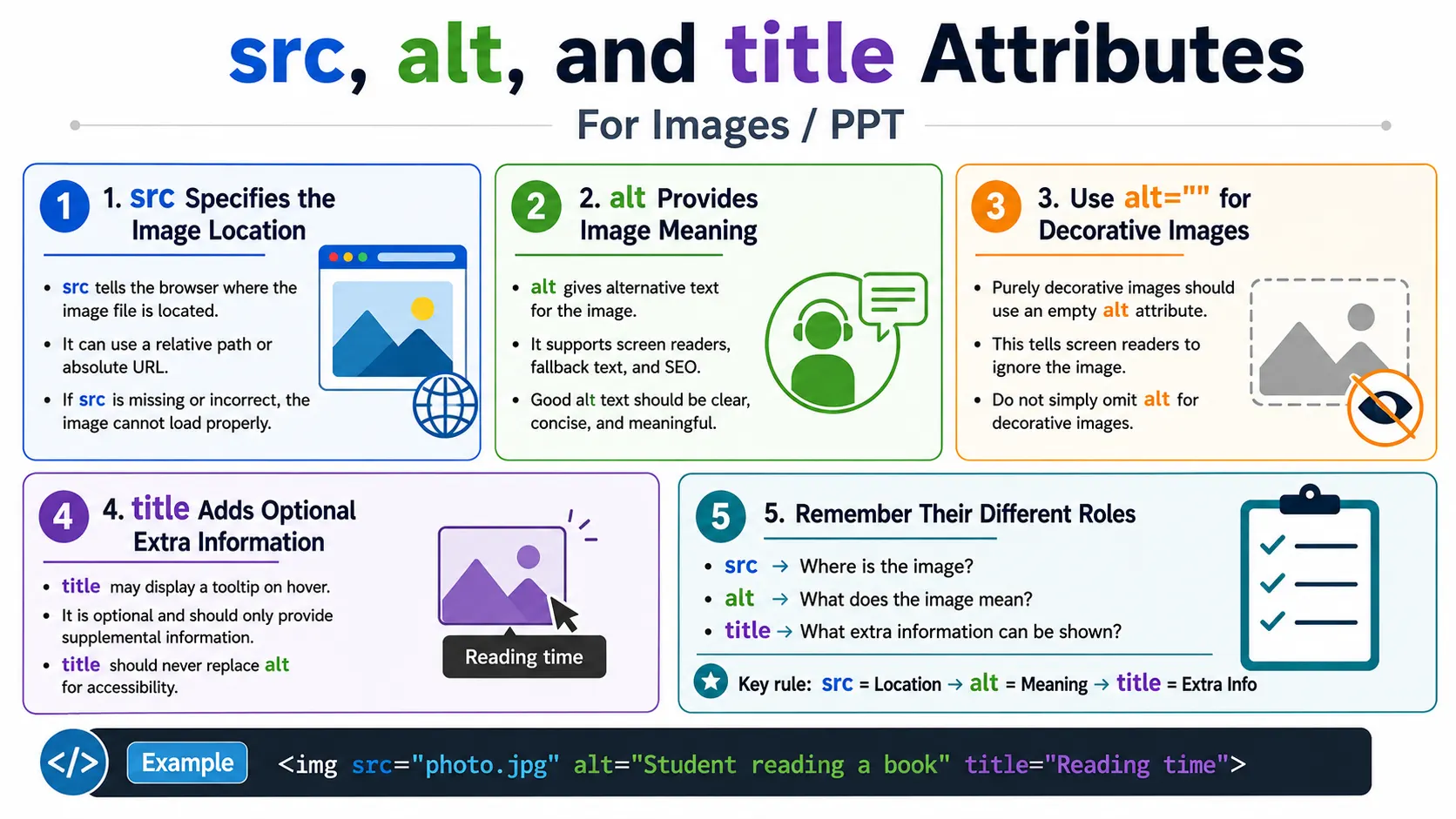
The three most commonly used attributes of the <img> tag are src, alt, and title. They are often written together, but they do not do the same job. The src attribute specifies where the image file is located. The alt attribute provides alternative text describing the image. The title attribute provides additional information that may appear as a tooltip when the user hovers over the image.
These attributes serve different purposes and should not be confused. A page can display an image only when the browser knows where to load it from, so src is essential for display. A page can be much more accessible and meaningful when the image has good alt text. A page may optionally provide a title when extra supplemental information is useful, but the title attribute is not a replacement for alt text.
Understanding the difference between these attributes is important for HTML interviews, accessibility, SEO, debugging broken images, and writing professional front-end code. Many beginners use title when they should use alt, write generic alt text such as Image, or forget that a broken src path prevents the image from loading at all.
Overview of the Three Attributes
The three attributes can be summarized by their responsibilities. The src attribute answers where the image is. The alt attribute answers what the image means. The title attribute provides extra information that may be shown on hover.
| Attribute | Purpose | Required |
|---|---|---|
| src | Specifies the image file location | Yes |
| alt | Provides alternative text for accessibility and fallback | Strongly recommended |
| title | Displays additional information as a tooltip | Optional |
A well-written image element usually includes at least src and alt. The title attribute should be added only when it provides useful extra context.
The src Attribute
The src attribute stands for source. It tells the browser where to find the image file. Without src, the browser has no image location to request.
<img src="image.jpg">When the browser sees an image with a source, it reads the path, sends a request for the image, downloads the file, decodes it, and displays it in the page.
<img src="nature.jpg" alt="Beautiful Nature">HTML Parser
↓
Reads src
↓
Requests nature.jpg
↓
Downloads Image
↓
Displays ImageIn this example, the browser displays the image named nature.jpg. If the file exists and the path is correct, the image appears. If the file does not exist or the path is wrong, the image fails to load.
Relative Image Paths
A relative image path points to a file based on the current HTML file location. If the image is in the same folder as the HTML file, the path is simple.
<img src="logo.png" alt="Company Logo">project/
│
├── index.html
└── logo.pngIf the image is inside a folder, include the folder name in the path.
<img src="images/logo.png"
     alt="Company Logo">
project/
│
├── index.html
└── images/
└── logo.pngRelative paths are common in websites because they work naturally with local project folders and deployed static files. The most common mistake is spelling the folder name or file name incorrectly.
Absolute Image URLs
An absolute URL includes the full web address of the image. The browser downloads the image from another server.
<img src="https://example.com/logo.png"
     alt="Company Logo">
Absolute image URLs can be useful for externally hosted images, content delivery networks, or shared assets. However, they create a dependency on the external server. If that server is slow or unavailable, your page image may not load correctly.
If src Is Missing
If src is missing, the browser does not know where the image is located.
<img alt="Mountain">The result is simple: no image can be displayed. The alternative text may describe what should have been there, but the image itself cannot load because the browser has no source.
If src Is Incorrect
If the src path is incorrect, the browser requests the wrong file and the image breaks.
<img src="imagess/logo.png"
     alt="Company Logo">
The problem is the misspelled folder name. The browser may show a broken image icon, and the alt text may appear as fallback. Broken image paths are common during development, especially when files are moved or renamed.
The alt Attribute
The alt attribute stands for alternative text. It provides a text description of an image.
<img src="dog.jpg"
     alt="Golden Retriever">
The alt attribute is used when the image cannot load, when a user is using a screen reader, when images are disabled, and when search engines analyze page content. It is one of the most important image attributes because it affects accessibility and meaning.
Why alt Exists
Images are visual, but not every user can see them. A screen reader user needs meaningful text that communicates the image's purpose. A user on a slow network may see fallback text if the image fails. Search engines also use alt text as one signal to understand image content.
<img src="cat.jpg"
     alt="White Cat Sitting">
If the image fails to load, the text White Cat Sitting may be displayed instead. If a screen reader reads the image, it can announce that description.
Accessibility Example
Good alt text helps users who cannot visually inspect the image.
<img src="book.jpg"
     alt="HTML Programming Book">
A screen reader may announce:
Image
HTML Programming Book
The exact announcement depends on the screen reader, browser, and user settings, but the purpose is the same: the alt text communicates the image meaning.
SEO Benefits of alt
Search engines cannot understand image pixels in the same way humans do. Instead, they analyze file names, alt text, page content, captions, and surrounding context.
<img src="html-course.jpg"
     alt="HTML Beginner Course">
This helps search engines understand that the image is related to an HTML beginner course. Good alt text should be descriptive and natural. It should not be stuffed with repeated keywords.
Good and Poor Alt Text
Good alt text describes the actual image or the image's purpose in context.
<img src="laptop.jpg"
     alt="Silver Laptop on Wooden Desk">
Poor alt text is too generic.
<img src="laptop.jpg"
     alt="Image">
<img src="laptop.jpg"
alt="Photo">Keyword stuffing is also poor practice.
<img src="laptop.jpg"
     alt="Laptop Laptop Laptop">
The best alt text is concise, useful, and written for people first.
Decorative Images
If an image is purely decorative, use an empty alt attribute.
<img src="divider.png"
     alt="">
An empty alt tells screen readers to ignore the image. This is useful for decorative dividers, ornamental shapes, or background-like images that do not add meaningful information. Do not omit the alt attribute entirely for decorative images; use alt="" intentionally.
The title Attribute
The title attribute provides additional information about an element. On images, browsers may display the title value as a tooltip when the user hovers over the image.
<img src="logo.png"
     alt="Company Logo"
     title="SoftwareTips4U Official Logo">
When the user hovers over the image, the tooltip may show SoftwareTips4U Official Logo. This behavior is browser-dependent and device-dependent. Touchscreen users may not experience hover tooltips in the same way.
Is title Required?
No. The image works perfectly without the title attribute.
<img src="flower.jpg"
     alt="Rose">
This still displays the image correctly. The title attribute is optional and should be treated as supplemental information, not core content. Important information should not be hidden only in a tooltip.
Difference Between alt and title
Many beginners confuse alt and title. They are not the same. The alt attribute is used for accessibility, screen readers, broken image fallback, and SEO. The title attribute is mainly used for extra hover information.
<img src="car.jpg"
     alt="Blue Sports Car"
     title="2025 Sports Edition">
If the image fails, the alt text Blue Sports Car is useful as fallback. When a user hovers over the image, the title text 2025 Sports Edition may appear as a tooltip.
The key interview point is simple: title is not a replacement for alt. If accessibility matters, provide meaningful alt text.
Browser Interpretation
The three attributes can be understood as three separate questions.
src
 │
 ├── Where Is Image?
 │
 ▼
Downloads Image

alt
 │
 ├── What Does Image Mean?
 │
 ▼
Accessibility & SEO

title
 │
 ├── Extra Information
 │
 ▼
Tooltip
This mental model prevents confusion. If you need the image file location, think src. If you need accessible meaning or fallback text, think alt. If you need optional hover information, think title.
Using All Three Together
All three attributes can be used together when each one serves a purpose.
<img src="mountain.jpg"
     alt="Snow Covered Mountain"
     title="Swiss Alps">
The src loads the image, the alt describes the image, and the title provides extra information. This is acceptable when the title adds meaningful supplemental context. If the title merely repeats the alt text without adding value, it may not be necessary.
Real-World Example
A logo inside a header is a common real-world example.
<header>
  <a href="index.html">
    <img src="logo.png"
         alt="SoftwareTips4U Logo"
         title="Visit Home Page">
  </a>
</header>
The image source loads the logo. The alt text describes the logo. The title gives extra information about the link purpose. In many cases, the alt text may also describe the link purpose, especially when the image is the only content inside the anchor.
Accessibility Best Practices
Always provide meaningful alt text for informative images. Use empty alt="" for decorative images. Avoid phrases like Image of or Picture of unless they are truly necessary, because screen readers usually already communicate that the element is an image.
<img src="dog.jpg"
     alt="Golden Retriever Playing">
A better alt text describes what matters in context. If the same image appears in different contexts, the alt text may change because the purpose changes.
SEO Best Practices
Good image SEO starts with descriptive filenames and meaningful alt text.
<img src="html-course.jpg"
     alt="HTML Beginner Course">
A weaker version uses a generic file name and generic alt text.
<img src="img001.jpg"
     alt="Picture">
Use descriptive filenames, write natural alt text, avoid keyword stuffing, and make sure the surrounding page content supports the image topic.
Common Mistakes
A missing src means no image can load.
<img alt="Mountain">A missing alt creates poor accessibility.
<img src="mountain.jpg">Using title instead of alt is also a common mistake.
<img src="dog.jpg"
     title="Dog">
Screen readers may not use title as a reliable replacement for alt. The correct version is:
<img src="dog.jpg"
     alt="Golden Retriever"
     title="Golden Retriever">
Keyword stuffing is another mistake.
<img src="course.jpg"
     alt="HTML HTML HTML HTML Course HTML">
Alt text should be useful, not repetitive.
Browser Behavior Summary
| Attribute | Browser Behavior |
|---|---|
| src | Downloads and displays the image |
| alt | Displays fallback text if the image fails and provides accessible text |
| title | Shows a tooltip on hover in some browsers |
Selenium Perspective
From a Selenium perspective, these attributes can be inspected directly. First locate the image.
WebElement image =
driver.findElement(By.tagName("img"));
Get the image source:
String src =
image.getAttribute("src");
Get the alt text:
String alt =
image.getAttribute("alt");
Get the title:
String title =
image.getAttribute("title");
Automation can verify that important images have a non-empty source, meaningful alt text, and title text only where expected.
Comparison Table
| Feature | src | alt | title |
|---|---|---|---|
| Loads Image | Yes | No | No |
| Accessibility | No | Yes | Limited |
| SEO | No | Yes | Minimal |
| Tooltip | No | No | Yes |
| Fallback Text | No | Yes | No |
| Required for Display | Yes | No, but strongly recommended | No |
Common Interview Questions
A common interview question is: what does the src attribute do? It specifies the location of the image file.
Another question is: what is the purpose of the alt attribute? It provides alternative text for accessibility, fallback content, and SEO. Interviewers may also ask what the title attribute does. It displays additional information as a tooltip when the user hovers over the image, depending on browser behavior.
They may ask whether title is a replacement for alt. No. alt is for accessibility and fallback text, while title is optional and mainly provides supplemental information. They may ask which attribute is mandatory for displaying an image. The answer is src.
Interview-Ready Answer
The src attribute specifies the image location, the alt attribute provides alternative text for accessibility, SEO, and fallback when the image cannot be displayed, and the title attribute supplies optional tooltip text shown on hover. Although src is required to display an image, providing meaningful alt text is considered an essential accessibility best practice.
Key Takeaway
The src, alt, and title attributes work together, but they are not interchangeable. src is about loading the image. alt is about meaning, accessibility, fallback, and SEO. title is about optional supplemental tooltip information.
Professional HTML uses these attributes intentionally. Do not omit alt for meaningful images. Do not rely on title for essential information. Keep source paths correct, alt text descriptive, and title text optional.
One-Line Insight
Think of src as where the image is, alt as what the image means, and title as extra information shown on hover.