Separation of Concerns
Introduction
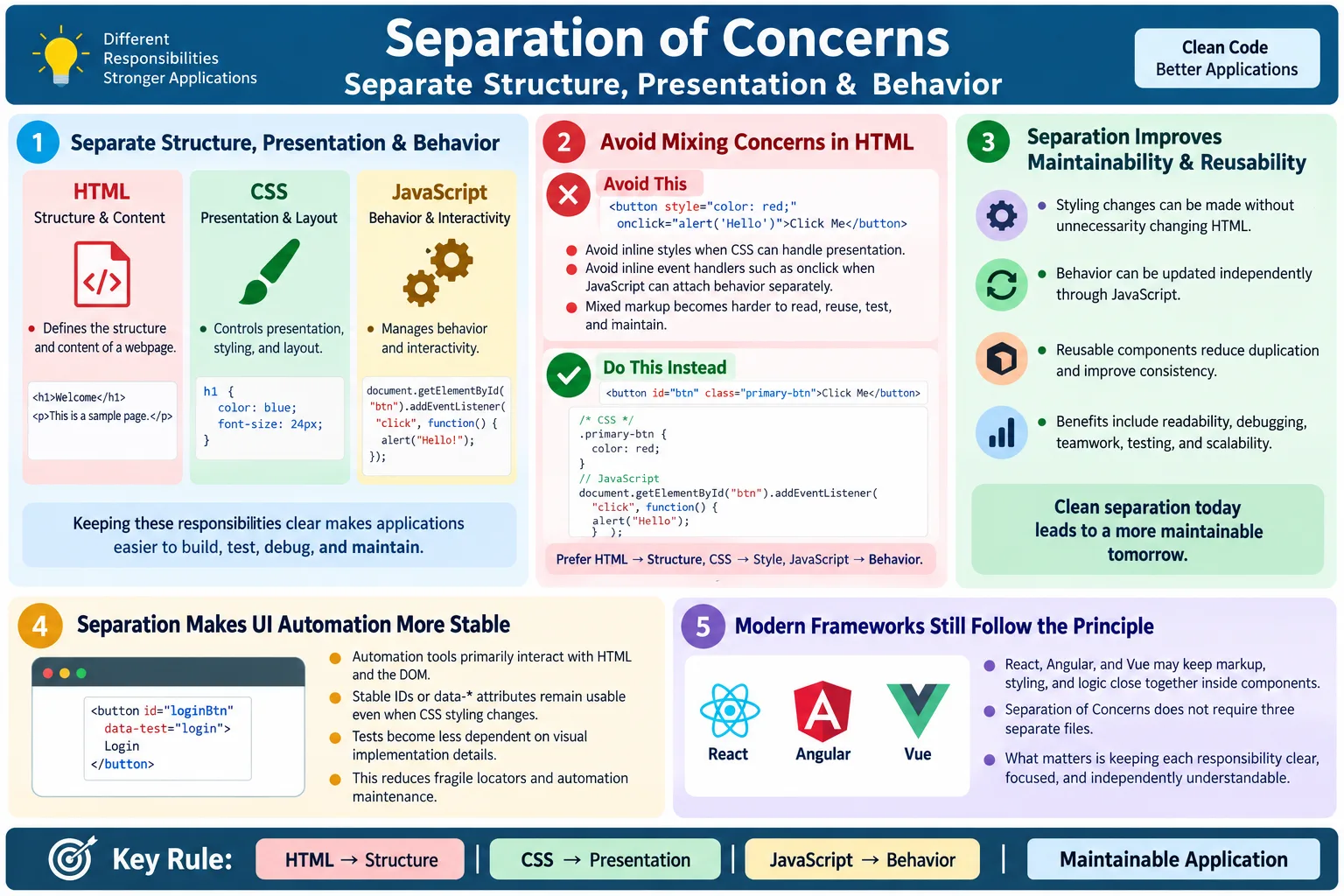
Separation of Concerns, often shortened as SoC, is a software design principle that says each part of an application should have a single, well-defined responsibility. In web development, this principle is commonly explained through the relationship between HTML, CSS, and JavaScript. HTML defines structure and content, CSS controls presentation and styling, and JavaScript manages behavior and interactivity. When these responsibilities are kept clear, the application becomes easier to build, test, debug, maintain, and scale.
This principle is especially important for beginners because web pages can easily become messy when structure, style, and behavior are mixed together. A button may contain inline styles, inline JavaScript, unclear class names, and no semantic meaning. That may work for a small demo, but it quickly becomes difficult to maintain in a real project. Clean separation keeps each layer focused on what it does best.
For testers and automation engineers, Separation of Concerns is not just a developer theory. It affects locator stability, accessibility, browser behavior, and test maintenance. If HTML remains meaningful and stable, CSS can change without breaking automation. If JavaScript behavior is attached cleanly, it can be tested and debugged more easily. If structure, styling, and behavior are mixed everywhere, both development and testing become harder.
What Is Separation of Concerns?
Separation of Concerns means avoiding unnecessary mixing of responsibilities. Instead of placing structure, styling, and behavior in one place, each technology handles its own role. HTML should describe what content exists and how it is structured. CSS should describe how the content looks. JavaScript should describe what happens when the user interacts with the page.
HTML
  ↓
Structure

CSS
  ↓
Presentation

JavaScript
  ↓
Behavior
Each technology focuses on one concern. This creates cleaner code and clearer mental models. If a developer wants to change the color of a heading, they should look in CSS. If they want to change the page structure, they should look in HTML. If they want to change what happens after clicking a button, they should look in JavaScript. The project becomes easier to navigate because responsibilities are predictable.
Why Separation of Concerns Is Important
Without separation, code becomes tangled. HTML may contain inline styles, JavaScript event handlers, layout hacks, and unclear structure. A simple change may require editing many places. Developers may be afraid to change CSS because it also affects behavior. Testers may struggle to find stable elements because HTML is used for visual tricks instead of meaningful structure.
Without separation:

HTML
  ↓
Structure
  ↓
Styles
  ↓
JavaScript
  ↓
Difficult Maintenance
With separation, each layer remains easier to reason about. HTML provides structure. CSS provides styling. JavaScript provides behavior. A change in one layer is less likely to create accidental problems in another layer. The application becomes more organized and easier to manage.
With separation:

HTML
  ↓
Structure

CSS
  ↓
Styling

JavaScript
  ↓
Behavior
  ↓
Easy Maintenance
The Three Layers of a Web Page
A web page can be understood as three cooperating layers. The HTML layer defines content and document structure. The CSS layer defines appearance and layout. The JavaScript layer defines behavior and interaction. These layers work together, but they should not lose their individual responsibilities.
| Technology | Responsibility |
|---|---|
| HTML | Structure and content |
| CSS | Appearance and layout |
| JavaScript | Behavior and interaction |
This separation makes development more modular. It also makes learning easier. A beginner can first understand HTML structure, then CSS styling, then JavaScript behavior. In real projects, the layers may be organized through components or build tools, but the conceptual separation remains valuable.
HTML: Structure
HTML defines the content and structure of a page. It answers questions such as: what content exists, what elements are on the page, what headings are present, what form controls are available, and how sections relate to each other. HTML gives meaning to the document.
<h1>HTML Course</h1>

<p>Learn HTML step by step.</p>

<button>
  Enroll Now
</button>
This HTML does not decide whether the heading is blue, whether the button is green, or what alert appears after clicking. It simply states that the page has a heading, a paragraph, and a button. That is HTML's responsibility.
CSS: Presentation
CSS controls how HTML looks. It answers questions such as: what color should the text be, how large should the heading appear, where should elements be placed, how much spacing should exist, and how should the layout respond to different screen sizes?
h1 {
  color: blue;
  font-size: 36px;
}

button {
  background: green;
}
CSS should not define the meaning of the content. It should style content that HTML has already structured. This keeps visual changes separate from structural changes. If a designer wants the button to become blue instead of green, the HTML should not need to change.
JavaScript: Behavior
JavaScript controls interactions. It answers questions such as: what happens when users click, type, submit, select, drag, scroll, or receive data from an API? JavaScript can update the DOM, validate input, show messages, open dialogs, fetch data, and create dynamic experiences.
button.onclick = function() {
  alert("Welcome!");
};
In clean separation, JavaScript should attach behavior to meaningful HTML elements. It should not be mixed directly into markup through inline event handlers when avoidable. External or modular JavaScript is easier to test, debug, reuse, and maintain.
Bad Example: Mixed Concerns
A common poor practice is mixing HTML, CSS, and JavaScript inside the same element. The following button contains structure, styling, and behavior all in one place. It may work, but it is not clean or maintainable.
<button
  style="background:red"
  onclick="alert('Hello')">
  Click
</button>
This example has several problems. HTML contains styling. HTML contains JavaScript. The button is harder to reuse. The behavior is harder to test independently. If many buttons follow this pattern, changing style or behavior across the application becomes tedious. It also makes the markup noisy and harder to read.
Good Example: Separated Concerns
A cleaner version gives each layer its own responsibility. HTML provides the button. CSS styles the button. JavaScript attaches the behavior. The result is more maintainable and easier to reason about.
HTML:

<button id="welcomeBtn">
  Click
</button>
CSS:
#welcomeBtn {
background: red;
}JavaScript:
document
.getElementById("welcomeBtn")
.addEventListener("click", function () {
alert("Hello");
});Each technology handles its own responsibility. If the button color changes, update CSS. If the button text changes, update HTML. If the click behavior changes, update JavaScript. This separation makes the codebase easier to manage as the application grows.
Benefits of Separation of Concerns
Separation of Concerns improves maintainability, readability, code reuse, debugging, teamwork, testing, and scalability. These benefits appear gradually as projects grow. Small pages may survive mixed code, but larger applications need clearer boundaries.
- Easier maintenance
- Better readability
- Improved code reuse
- Easier debugging
- Better teamwork
- Simpler testing
- Better scalability
When code is separated, different team members can work more effectively. A designer can adjust CSS. A frontend developer can change behavior. A tester can inspect HTML and stable locators. Code reviews become clearer because each change has a focused purpose.
Real-World Example
Consider an e-commerce website. HTML defines product information such as product title, image, price, description, quantity input, and buttons. CSS controls product layout, card spacing, responsive grid, colors, and typography. JavaScript manages add-to-cart behavior, quantity updates, checkout actions, validation, and API calls.
E-commerce Website

HTML
  ↓
Product Information

CSS
  ↓
Product Layout

JavaScript
  ↓
Add to Cart
  ↓
Quantity Updates
  ↓
Checkout Actions
Each layer focuses on a different responsibility. If the product card design changes, CSS changes. If the Add to Cart process changes, JavaScript changes. If a new product field is added, HTML changes. This separation prevents one simple requirement from turning into a confusing edit across mixed markup.
Browser Workflow
The browser processes these layers separately. It downloads HTML, creates the DOM, downloads CSS, creates the CSSOM, combines structure and styling for rendering, downloads and runs JavaScript, and then creates an interactive page. This workflow reflects the separation of responsibilities.
Download HTML
  ↓
Create DOM
  ↓
Download CSS
  ↓
Create CSSOM
  ↓
Download JavaScript
  ↓
Interactive Page
Understanding this workflow helps testers and developers debug issues. If the element exists but looks wrong, CSS may be the issue. If the element looks correct but does not respond, JavaScript may be the issue. If the element is missing or badly structured, HTML may be the issue.
Separation and Accessibility
Separation of Concerns supports accessibility because semantic HTML provides structure for screen readers, search engines, keyboard users, and automation tools. CSS controls appearance without changing meaning. JavaScript adds behavior without destroying document structure. When these layers are used properly, the page remains understandable even when styles or scripts change.
- Screen readers rely on meaningful HTML structure
- Search engines parse semantic content
- Automation tools inspect the DOM
- CSS changes presentation without changing meaning
- JavaScript enhances behavior without replacing structure
For example, a real button styled with CSS is better than a div that looks like a button. The real button has built-in semantics and keyboard behavior. Styling should enhance the button, not replace its meaning.
Separation and SEO
Good separation helps search engines understand HTML. Important content should be present in meaningful markup. CSS should remain focused on visual presentation. JavaScript should avoid hiding essential content in ways that make crawling or rendering difficult. Search engines are more capable than before, but semantic HTML still provides the clearest foundation.
For SEO, headings, links, images, metadata, and content structure matter. If essential content is only injected late by JavaScript or hidden behind unclear markup, search engines may have a harder time understanding the page. Clean HTML gives crawlers a strong baseline.
Separation and UI Automation
Automation tools primarily interact with the HTML and DOM. Good separation makes automation easier because HTML contains meaningful structure, CSS changes do not affect stable locators, and JavaScript behavior can be tested independently. If a locator is based on a data attribute or unique ID, changing button color or layout should not break the test.
<button data-testid="login-button">
  Login
</button>
driver.findElement(
By.cssSelector("[data-testid='login-button']"))
.click();Changing CSS does not affect this locator. This is a practical benefit of separation. Tests become less fragile because they are not tied to styling details. JavaScript behavior can then be validated through user actions and expected results.
Separation in Modern Frameworks
Modern frameworks such as React, Angular, and Vue may place HTML-like markup, styling, and logic closer together inside components. At first, this may look like the opposite of Separation of Concerns. However, the principle still applies. Responsibilities are separated at the component level instead of always being separated into completely different files.
A component may contain template, styles, and behavior, but each concern should still remain clear. The template should describe structure. The styles should control appearance. The logic should manage behavior and state. A component should have a focused purpose rather than becoming a large mixture of unrelated responsibilities.
Modern development changes the organization of files, but it does not remove the need for clean boundaries. Good components follow separation by keeping responsibilities understandable and testable.
File Separation vs Conceptual Separation
Beginners often think Separation of Concerns means HTML, CSS, and JavaScript must always be in three separate files. Separate files are a common and useful way to apply the principle, but they are not the only way. The deeper idea is conceptual separation. The structure should remain structure, the styling should remain styling, and the behavior should remain behavior, regardless of how the project physically organizes files.
In a traditional website, separation may mean index.html, style.css, and script.js. In a component-based application, separation may happen inside a component folder. A React component may include JSX, a CSS module, and a JavaScript function. An Angular component may have a template, stylesheet, and TypeScript file. A Vue component may use template, style, and script sections. These formats place related code close together while still preserving responsibility boundaries.
The key question is not whether the code is in one file or many files. The key question is whether responsibilities are clear. If markup is full of styling decisions, if CSS depends on business logic, or if JavaScript creates unnecessary structure that could have been semantic HTML, the concerns are becoming mixed. Good organization keeps each concern understandable even when modern tooling changes file layout.
Separation and Reusability
Reusable code depends heavily on separation. A button component that mixes hardcoded colors, inline click behavior, and fixed text is difficult to reuse. A cleaner button has structural markup, reusable CSS classes, and behavior that can be attached depending on context. This allows the same component to be used for Save, Cancel, Submit, or Login actions without duplicating code.
Reusable CSS also benefits from separation. A class such as primary-button can style many buttons consistently. If every button has inline styling, changing the design system becomes slow and error-prone. Reusable JavaScript benefits too. A function that handles form validation can be tested and reused more easily when it is not buried inside inline event attributes.
In large projects, reusability is not only about saving typing. It reduces inconsistency. If each page implements buttons, forms, dialogs, and alerts differently, the user experience becomes uneven and tests become harder to maintain. Separation encourages shared patterns.
Separation and Debugging
Separation of Concerns makes debugging more direct. When a page looks wrong but the content exists, the likely problem is CSS. When a button looks correct but does nothing, the likely problem is JavaScript. When the button is missing or placed in the wrong part of the document, the likely problem is HTML structure or rendering logic. Clear boundaries help narrow the investigation.
Mixed concerns make debugging slower. If a button has inline styles, inline event handlers, generated markup, and styling classes all mixed together, it becomes harder to determine what is responsible for the problem. A tester may report that the button is not working, but the root cause could be bad markup, broken CSS, a JavaScript error, an overlay, or an invalid event handler. Separation reduces this confusion.
Browser DevTools also reflect these layers. The Elements panel shows HTML and DOM structure. The Styles panel shows CSS rules. The Console and Sources panels help debug JavaScript. When code follows separation, DevTools investigation maps naturally to the problem area.
Separation and Team Workflow
Separation of Concerns improves teamwork because different responsibilities can be handled by different people or reviewed separately. A designer or frontend developer can adjust CSS without rewriting HTML. A JavaScript developer can improve interactions without changing visual styles. A tester can inspect semantic structure and stable locators without reading every style rule.
Code reviews also become cleaner. A pull request that changes only CSS should mostly affect appearance. A pull request that changes HTML should be reviewed for structure, accessibility, and SEO. A pull request that changes JavaScript should be reviewed for behavior, state handling, and error cases. If every change mixes all three concerns, review becomes harder and risk increases.
In Agile teams, separation helps parallel work. UI styling, behavior implementation, accessibility review, and automation planning can progress with clearer boundaries. The team can discuss structure, presentation, and behavior separately while still delivering one cohesive feature.
Separation and Maintainability
Maintainability is one of the biggest benefits of Separation of Concerns. Applications live longer than their first release. Requirements change, designs change, browsers change, and teams change. Code that is easy to understand today is easier to modify tomorrow. Code that mixes responsibilities becomes harder to change because every edit may have unexpected side effects.
For example, if visual styling is written inline across hundreds of elements, a redesign requires editing hundreds of places. If styling is centralized in CSS, the redesign can be handled with fewer changes. If click behavior is written inline across many buttons, updating behavior requires markup changes everywhere. If behavior is handled through JavaScript modules, logic can be updated more cleanly.
Maintainability also affects testing. When structure is stable and styling is separate, tests can continue using stable locators through visual redesigns. When behavior is modular, unit tests and integration tests can focus on logic. This reduces long-term cost.
Separation and Progressive Enhancement
Progressive enhancement is closely related to Separation of Concerns. It starts with meaningful HTML, then adds CSS for presentation, then adds JavaScript for enhanced behavior. This approach ensures the core content and structure remain useful even if styles fail to load or JavaScript is delayed. It also encourages developers to use native HTML features before building custom behavior.
For example, a link should be a real <a> element when it navigates. A submit action should use a real button. A form should use proper form controls and labels. CSS can improve the appearance, and JavaScript can enhance the experience, but the basic structure remains meaningful. This makes the page more robust.
Progressive enhancement is not only for simple websites. Even modern web applications benefit from meaningful HTML. It improves accessibility, SEO, error recovery, and testability. Separation makes enhancement safer because each layer builds on the previous one rather than replacing it completely.
Separation and Security
Separation of Concerns can also support safer code. Inline JavaScript encourages mixing behavior directly into markup, which can make it harder to apply strict security policies. Modern security practices often prefer external scripts, event listeners, and content security policies that restrict inline script execution. While security involves many topics beyond HTML, clean separation helps create a more controlled structure.
Inline styles can also complicate policy and maintainability. A consistent CSS layer is easier to review than style fragments scattered through markup. JavaScript behavior kept in modules is easier to audit than behavior hidden inside many attributes. Separation improves visibility, and visibility helps security review.
Best Practices
Good Separation of Concerns starts with simple habits. Keep HTML focused on structure. Keep CSS focused on presentation. Keep JavaScript focused on behavior. Avoid inline styles when possible. Avoid inline event handlers when possible. Use semantic HTML. Organize code into reusable components. Keep files modular and maintainable.
- Keep HTML focused on structure
- Keep CSS focused on presentation
- Keep JavaScript focused on behavior
- Avoid inline styles when possible
- Avoid inline event handlers when possible
- Use semantic HTML
- Organize code into reusable components
- Keep files modular and maintainable
These practices make the code easier to change. They also help teams review code more effectively because each file or component has a clearer purpose.
Common Mistakes
Inline styles are a common mistake. They mix structure with presentation and make maintenance harder. If the same style appears across many elements, changing it later becomes tedious. A class-based CSS rule is more maintainable.
Bad:

<p style="color:red">
  Hello
</p>

Better:

.error {
  color: red;
}

<p class="error">
  Hello
</p>
Inline JavaScript is another common mistake. It mixes structure with behavior, reducing readability and maintainability. Event listeners in JavaScript keep behavior easier to organize and test.
Bad:

<button onclick="save()">
  Save
</button>

Better:

button.addEventListener(
  "click",
  save
);
Using HTML for styling is also a concern. Avoid adding extra HTML elements purely for visual effects when CSS can achieve the same result. HTML should describe content, not define every visual detail or application behavior.
Selenium Perspective
Separation of Concerns benefits automation because HTML remains stable, CSS changes rarely affect locators, JavaScript behavior can be tested independently, DOM inspection becomes easier, and tests become more maintainable. A clean HTML structure gives testers reliable targets. A clear JavaScript layer makes behavior easier to diagnose.
- HTML remains stable
- CSS changes rarely affect locators
- JavaScript behavior can be tested independently
- DOM inspection becomes easier
- Tests become more maintainable
If styling and behavior are mixed into markup everywhere, automation failures become harder to analyze. If concerns are separated, testers can more quickly identify whether a failure is structural, visual, behavioral, or timing-related.
Responsibility Comparison
| Technology | Primary Responsibility |
|---|---|
| HTML | Structure and content |
| CSS | Styling and layout |
| JavaScript | Behavior and interaction |
Good vs Poor Separation
| Good Practice | Poor Practice |
|---|---|
| Semantic HTML | Inline styles everywhere |
| External or modular CSS | Styling inside HTML |
| External or modular JavaScript | Inline event handlers |
| Stable HTML structure | Mixed responsibilities |
| Reusable components | Duplicated code |
Common Interview Questions
What is Separation of Concerns? It is a design principle where each part of an application has a single responsibility.
What are the three concerns in web development? HTML is structure, CSS is presentation, and JavaScript is behavior.
Why avoid inline CSS? Inline CSS mixes structure with presentation and makes maintenance harder.
Why avoid inline JavaScript? Inline JavaScript mixes structure with behavior, reducing readability and maintainability.
Does Separation of Concerns improve automation? Yes. Stable HTML structure makes locators more reliable and reduces test maintenance.
Do modern frameworks still follow Separation of Concerns? Yes. Although HTML, CSS, and JavaScript may be grouped within components, responsibilities are still separated conceptually.
Interview-Ready Answer
Separation of Concerns is a software design principle that assigns a single responsibility to each part of an application. In web development, HTML defines the structure and content, CSS controls presentation and layout, and JavaScript manages behavior and interactivity. Keeping these concerns separate improves readability, maintainability, scalability, accessibility, SEO, and UI automation.
Although modern frameworks may organize these responsibilities within components, the underlying principle remains the same: each concern should be managed independently and clearly.
One-Line Insight
Keep structure in HTML, style in CSS, and behavior in JavaScript; clean separation leads to cleaner, more maintainable applications.