SEO-Related Meta Tags
Introduction
Search Engine Optimization (SEO) is the practice of improving a website's visibility in search engines such as Google, Bing, Yahoo, and DuckDuckGo. When users search for information online, search engines analyze billions of web pages and determine which pages are the most relevant and useful for a particular query. While modern search engines use hundreds of ranking factors, they still rely heavily on information provided within a webpage itself. One of the most important sources of that information is SEO-related meta tags.
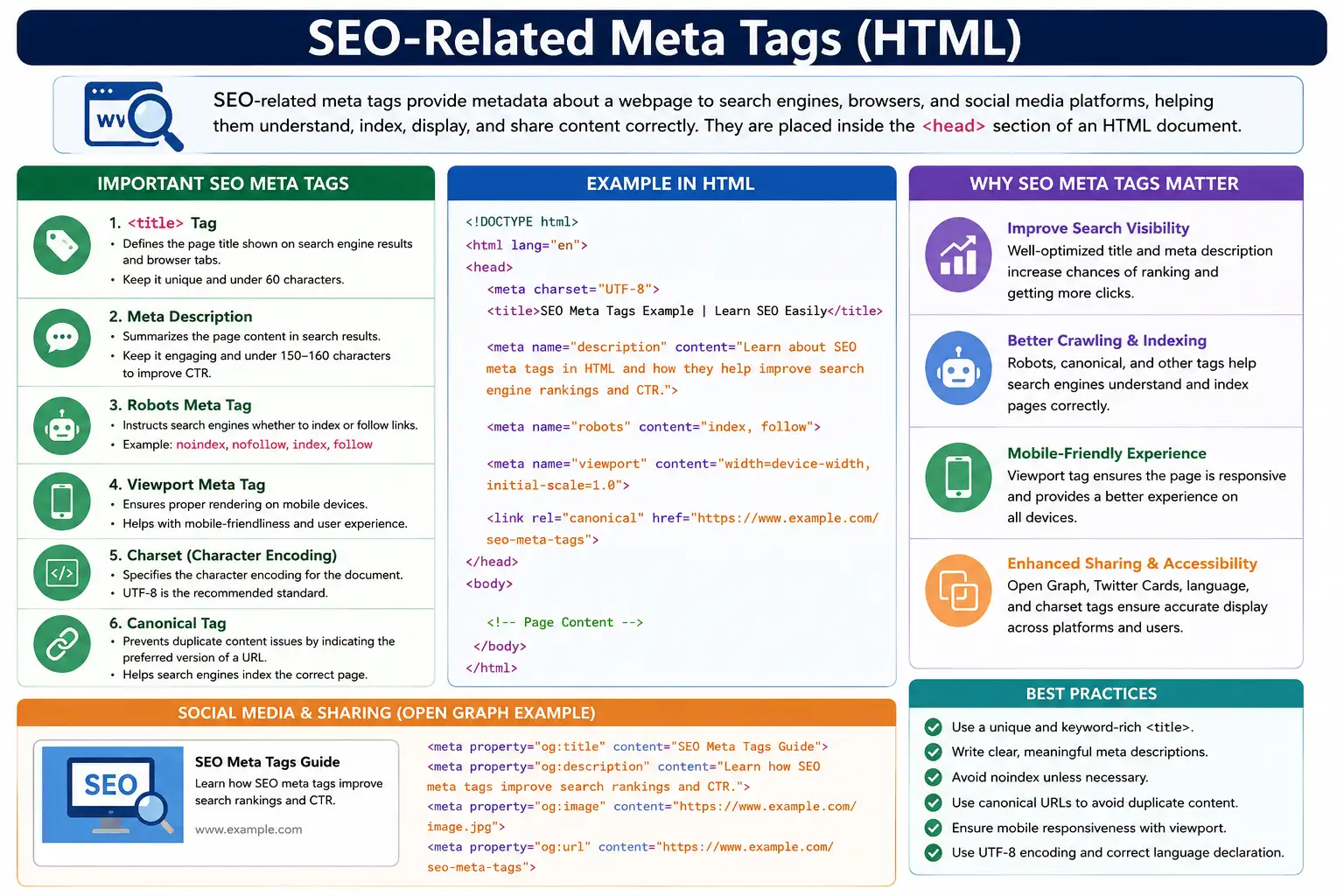
SEO meta tags are special HTML elements placed inside the <head> section of a document. They provide metadata—information about the webpage rather than content displayed directly to users. Search engines, browsers, social media platforms, and other web services read these tags to understand how a page should be processed, indexed, displayed, and shared.
Although meta tags are invisible to most visitors, they have a significant impact on search visibility, click-through rates, mobile friendliness, social sharing, accessibility, and content discoverability. A well-optimized webpage often begins with a properly structured set of SEO-related meta tags.
Understanding SEO meta tags is essential for web developers, content creators, digital marketers, SEO specialists, technical SEO engineers, and even automation testers who validate website quality and compliance.
What Are SEO Meta Tags?
SEO meta tags are HTML elements that provide descriptive information about a webpage to search engines and other systems. Unlike headings, paragraphs, images, and links, meta tags are not part of the visible content displayed within the browser window.
For example:
<meta name="description"
content="Learn HTML from beginner to advanced.">
This meta tag provides a summary of the webpage. Visitors do not see it directly on the page, but search engines may display it in search results.
The term "meta" means information about information. In the context of HTML, meta tags describe characteristics of the document itself rather than the actual content.
Search engines use meta tags to better understand:
- What the page is about
- Whether the page should be indexed
- How the page should appear in search results
- Which URL should be considered canonical
- Whether the page is optimized for mobile devices
- How the page should appear when shared on social media
SEO meta tags act as communication tools between website owners and search engines.
Where SEO Meta Tags Are Placed
SEO meta tags belong inside the <head> section of an HTML document.
Example:
<head>
<title>HTML Tutorial</title>
<meta name="description"
content="Learn HTML from beginner to advanced.">
<meta name="robots"
content="index, follow">
</head>
The browser processes the head section before rendering the visible page content. Search engine crawlers also examine the head section to gather important metadata about the page.
Because the head section is designed specifically for document metadata, placing SEO tags elsewhere in the document is considered invalid HTML.
Why SEO Meta Tags Matter
Search engines cannot think like humans. They rely on structured signals to understand webpages. SEO meta tags provide some of the most important signals available.
These tags help search engines determine:
- Page topic
- Page purpose
- Content summary
- Indexing instructions
- Mobile compatibility
- Canonical URLs
- Social sharing information
- Language preferences
Good SEO meta tags can improve visibility, increase click-through rates, reduce duplicate content issues, and create better user experiences.
Poorly configured meta tags can cause pages to be ignored, indexed incorrectly, displayed poorly in search results, or shared improperly across social networks.
The Title Tag: The Most Important SEO Tag
Among all SEO-related tags, the title tag is generally considered the most important.
Example:
<title>
HTML Tutorial for Beginners |
SoftwareTips4U
</title>
The title tag defines the page title that appears in browser tabs, bookmarks, browser history, and most importantly, search engine results.
When users search on Google, the blue clickable headline often originates from the title tag.
Example search result:
HTML Tutorial for Beginners | SoftwareTips4U
www.softwaretips4u.com
The title provides search engines with a strong indication of the page topic.
A well-written title should:
- Clearly describe the content
- Include important keywords
- Remain concise
- Be unique for each page
- Encourage clicks
Good example:
<title>
HTML Forms Tutorial |
SoftwareTips4U
</title>
Poor example:
<title>Home</title>A generic title provides very little context to users or search engines.
Because of its direct influence on search visibility and click-through rates, the title tag remains one of the strongest on-page SEO signals.
Meta Description Tag
The meta description tag provides a brief summary of the webpage.
Example:
<meta
name="description"
content="Learn HTML from beginner to advanced with examples and interview questions.">
Search engines frequently display this description beneath the page title in search results.
Example:
HTML Tutorial for Beginners
Learn HTML from beginner to advanced with examples and interview questions.
Although the description does not directly improve rankings, it strongly influences user behavior.
A compelling description can increase:
- Click-through rate (CTR)
- User engagement
- Search result attractiveness
A poorly written description may discourage users from clicking.
Best practices include:
- Keeping descriptions around 150–160 characters
- Clearly describing page content
- Including important keywords naturally
- Making each page description unique
Good descriptions help users decide whether a page contains the information they need.
Robots Meta Tag
The robots meta tag controls how search engines interact with a webpage.
Example:
<meta
name="robots"
content="index, follow">
This tells search engines:
- Index this page
- Follow links on this page
The robots tag is important because not every page should necessarily appear in search results.
For example:
<meta
name="robots"
content="noindex">
This tells search engines not to include the page in search results.
Other common values include:
content="nofollow"which prevents crawlers from following links, and
content="noindex, nofollow"which blocks both indexing and link following.
The robots tag is particularly useful for:
- Login pages
- Admin panels
- Duplicate content pages
- Internal search result pages
- Temporary content
Incorrect robots settings can accidentally remove important pages from search results, making careful configuration essential.
Viewport Meta Tag and SEO
Mobile friendliness has become a major ranking factor.
The viewport meta tag helps ensure proper mobile rendering.
Example:
<meta
name="viewport"
content="width=device-width,
initial-scale=1.0">
This tag tells browsers to use the actual device width and display the page at normal zoom.
Without a viewport tag, mobile devices may render pages as desktop layouts scaled down to fit smaller screens.
This can lead to:
- Tiny text
- Small buttons
- Horizontal scrolling
- Poor usability
Google strongly recommends responsive design and considers mobile usability an important ranking factor.
Therefore, the viewport tag indirectly contributes to SEO by supporting a better mobile experience.
Charset Meta Tag and SEO
The charset meta tag defines character encoding.
Example:
<meta charset="UTF-8">UTF-8 supports virtually every language and symbol used on the web.
Without proper encoding, content may appear corrupted.
Example:
Tamil text:
தமிழ்may become:
à ®¤à ®®à ®¿à ®´à ¯Âif interpreted incorrectly.
Search engines rely on properly encoded content for accurate indexing and language analysis.
While charset is not a direct ranking factor, it supports correct content interpretation, especially for multilingual websites.
Language Declaration
Language identification helps search engines understand the intended audience of a webpage.
Example:
<html lang="en">This indicates that the primary language is English.
Other examples include:
<html lang="ta">for Tamil,
<html lang="fr">for French,
and
<html lang="hi">for Hindi.
Language declarations improve:
- International SEO
- Search result targeting
- Translation support
- Accessibility
For multilingual websites, correct language identification becomes especially important.
Open Graph Meta Tags
SEO extends beyond search engines. Social media visibility also matters.
Open Graph meta tags control how content appears when shared on platforms such as:
- Messenger
Example:
<meta
property="og:title"
content="HTML Tutorial">
This defines the title used in social previews.
Example:
<meta
property="og:description"
content="Learn HTML with examples.">
This defines the preview description.
Example:
<meta
property="og:image"
content="html-course.jpg">
This defines the preview image.
Without Open Graph tags, social platforms attempt to generate previews automatically, often with poor results.
Proper Open Graph implementation creates more attractive and consistent social sharing experiences.
Twitter Card Meta Tags
Twitter (now X) uses its own metadata system called Twitter Cards.
Example:
<meta
name="twitter:card"
content="summary_large_image">
Twitter card tags control:
- Preview style
- Title
- Description
- Thumbnail image
Proper Twitter metadata improves engagement when content is shared on the platform.
Canonical Tag
Duplicate content can create SEO problems.
Consider these URLs:
https://example.com/html
https://www.example.com/html
https://example.com/html?ref=123
All may display identical content.
Search engines may struggle to determine which version should rank.
The canonical tag solves this problem.
Example:
<link
rel="canonical"
href="https://softwaretips4u.com/html">
This tells search engines:
"This is the preferred version of the page."Canonical tags help:
- Consolidate ranking signals
- Prevent duplicate content issues
- Improve crawl efficiency
- Clarify URL ownership
They are considered one of the most important technical SEO tags.
A Complete SEO-Friendly Head Section
A well-optimized page often includes:
<head>
<title>
HTML Tutorial for Beginners |
SoftwareTips4U
</title>
<meta charset="UTF-8">
<meta
name="viewport"
content="width=device-width,
initial-scale=1.0">
<meta
name="description"
content="Learn HTML from beginner to advanced.">
<meta
name="robots"
content="index, follow">
<link
rel="canonical"
href="https://softwaretips4u.com/html">
</head>
This configuration provides search engines with essential information about the page.
Meta Tags That Have Lost Importance
One of the most famous examples is the keywords meta tag.
Example:
<meta
name="keywords"
content="HTML,CSS,JavaScript">
Years ago, search engines used keywords heavily.
However, abuse became widespread. Website owners stuffed hundreds of unrelated keywords into pages.
As a result, major search engines such as Google largely ignore the keywords meta tag today.
Modern SEO focuses far more on:
- Content quality
- User experience
- Relevance
- Authority
- Technical optimization
rather than keyword metadata.
Common SEO Meta Tag Mistakes
Many websites still make avoidable mistakes.
Some common problems include:
Missing title tags, duplicate titles across multiple pages, missing meta descriptions, incorrect robots directives, absent canonical tags, poor mobile configuration, and incomplete social sharing metadata.
A page with:
<title>Home</title>provides little information.
A page with:
<meta name="robots"
content="noindex">
may accidentally disappear from search results.
Technical mistakes in meta tags can have significant SEO consequences.
SEO Meta Tags and Selenium Testing
SEO validation is increasingly automated.
Selenium can verify SEO metadata directly.
Example:
driver.getTitle();can validate title tags.
Selenium can also inspect descriptions:
driver.findElement(
By.cssSelector(
"meta[name='description']"
));
Automation teams often verify:
- Page titles
- Meta descriptions
- Canonical URLs
- Robots directives
- Open Graph tags
- Viewport tags
This helps maintain SEO quality across large websites.
Interview Perspective
SEO meta tags are frequently discussed during frontend development, web development, SEO, and automation testing interviews.
Candidates should understand:
- Purpose of title tags
- Role of meta descriptions
- Robots directives
- Canonical URLs
- Viewport configuration
- Open Graph metadata
- Keywords tag limitations
A strong understanding demonstrates knowledge of both technical SEO and browser behavior.
Conclusion
SEO-related meta tags remain a fundamental part of modern web development. Although search engines have become far more sophisticated than in the past, they still rely on metadata to understand webpages efficiently.
Title tags help define page topics. Meta descriptions improve click-through rates. Robots tags control indexing behavior. Canonical tags prevent duplicate content problems. Viewport tags support mobile usability. Charset and language declarations improve content interpretation. Open Graph and Twitter tags enhance social sharing experiences.
Together, these tags create a communication layer between websites, search engines, browsers, social networks, and users.
A well-crafted set of SEO meta tags does not guarantee top rankings, but it provides search engines with the information they need to understand, present, and index content effectively. In modern SEO, strong content and technical optimization work together, and SEO-related meta tags remain one of the most important foundations of that technical optimization.
One-Line Insight
SEO meta tags do not create content—they help search engines, browsers, and social platforms understand, index, and present your content correctly.