SEO Case Studies (HTML Level)
Introduction
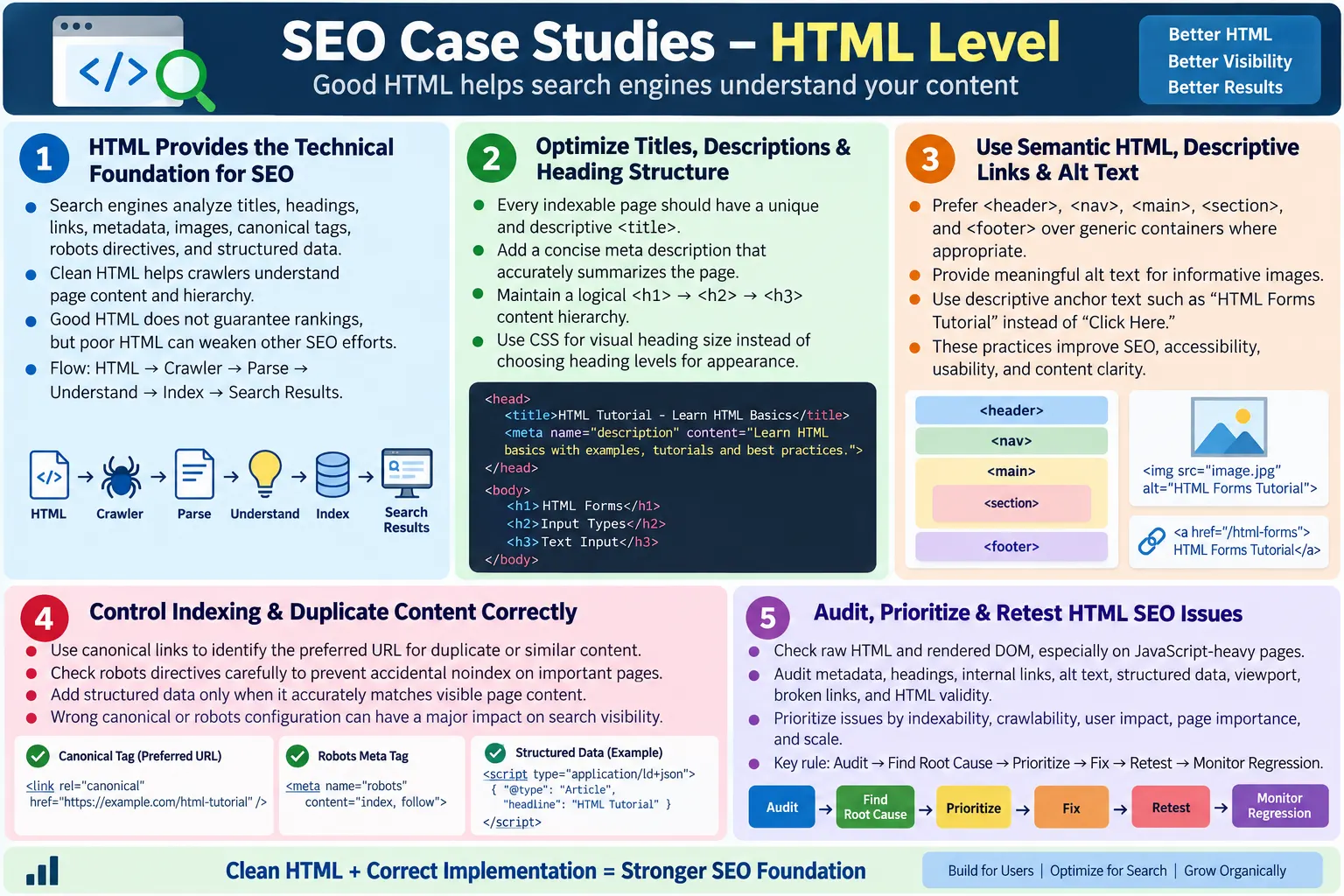
SEO case studies at the HTML level are practical examples that show how markup decisions affect search visibility, indexing, search result appearance, accessibility, maintainability, and user experience. SEO is much larger than HTML alone. Content quality, authority, backlinks, page speed, user intent, technical infrastructure, and site reputation all matter. Even so, HTML is the foundation that search engines first analyze when they discover and understand a page.
Search engines read page titles, headings, links, image attributes, metadata, canonical tags, robots directives, structured data, language settings, and content hierarchy from HTML. If the HTML is unclear, duplicated, incomplete, or misleading, search engines may still crawl the page, but they may not interpret it in the way the site owner expects. Good HTML does not guarantee top rankings, but weak HTML can make every other SEO effort less effective.
These case studies focus on common technical SEO issues that can be found by inspecting the HTML source, the live DOM, browser developer tools, crawlers, and SEO audit tools. The goal is to understand not only what the correct tag is, but why the tag matters and how it affects the way a page is discovered, interpreted, indexed, and presented in search results.
Why HTML Matters for SEO
HTML gives search engines the first structured signal about a page. The crawler requests the page, receives HTML, parses the document, follows links, extracts meaningful content, evaluates metadata, and uses that information as part of indexing. A crawler may also render JavaScript, but the HTML response and final rendered DOM remain central to technical SEO.
HTML
  ?
Search Engine Crawler
  ?
Parse HTML
  ?
Understand Content
  ?
Index Page
  ?
Search Results
Clean HTML makes the crawler's job easier. A clear title tells the main topic. A useful meta description can influence search snippets. A logical heading hierarchy reveals the content structure. Descriptive links provide context for related pages. Alt text helps describe images. Canonical links reduce duplicate URL confusion. Structured data can make entities and page types clearer. These individual signals work together to create a stronger technical foundation.
Case Study 1: Missing or Generic Page Title
The page title is one of the most important HTML-level SEO elements. A weak implementation may look like this:
<head>
  <title></title>
</head>
Another common issue is giving many pages the same generic title:
<head>
  <title>Home</title>
</head>
The impact is practical. Search engines may struggle to distinguish pages from one another. Users may see vague results in search pages or browser tabs. If every page says "Home" or "Untitled," the site loses an opportunity to communicate relevance. A page about HTML forms should not have the same title as a page about CSS selectors or Java exceptions.
A better title is unique, descriptive, and aligned with the page's content:
<title>HTML Forms Tutorial | SoftwareTips4U</title>The fix is simple, but the discipline matters at scale. Every indexable page should have a title that describes its specific topic. For tutorial sites, course pages, article pages, documentation pages, and product pages, titles should be generated carefully rather than copied blindly from a template.
Case Study 2: Missing Meta Description
A page can rank without a meta description, but missing descriptions reduce control over how the page is summarized in search results. A weak page may have a head section with no description at all:
<head>
</head>
When no description is present, search engines may generate their own snippet from page content. Sometimes that generated snippet is useful. Other times it may pull incomplete, unrelated, or awkward text. This can reduce click-through appeal, especially when the page has a clear educational or commercial purpose.
A better implementation provides a concise, relevant summary:
<meta
  name="description"
  content="Learn HTML forms with examples, validation, and accessibility best practices.">
The description should not be stuffed with keywords. It should explain what the page offers. For a learning site, a good description often mentions the topic, the learning value, and any practical examples included. The description should match the actual content, because misleading snippets can harm user trust.
Case Study 3: Poor Heading Structure
Headings help users, assistive technologies, and search engines understand content structure. A weak example is:
<h1>HTML</h1>
<h4>Forms</h4>
The problem is not merely visual. Heading levels communicate hierarchy. A page that jumps randomly from <h1> to <h4> can make the document outline unclear. Search engines can still parse the page, but the content organization becomes less disciplined. Screen reader users who navigate by headings may also find the structure harder to follow.
A better structure uses headings in a logical order:
<h1>HTML</h1>
<h2>Forms</h2>
<h3>Validation</h3>
Headings should describe sections, not just style text. If a heading needs to look smaller or larger, CSS should handle the visual appearance. The HTML heading level should represent content hierarchy. For long tutorial pages, well-written headings also improve readability and help users scan the article.
Case Study 4: Non-Semantic HTML
Older or rushed pages often use generic containers for everything:
<div class="header">
<div class="menu">
<div class="content">
This structure may render visually, but it communicates less meaning. Search engines and assistive technologies benefit when the page uses semantic landmarks. A clearer structure uses elements such as:
<header>
<nav>
<main>
<section>
<footer>
Semantic HTML does not magically increase rankings by itself, but it improves page clarity. It helps define navigation areas, main content, sections, articles, sidebars, and footer content. It also supports accessibility, which often overlaps with better technical quality. For large websites, semantic consistency also makes templates easier to audit and maintain.
Case Study 5: Images Without Alt Text
An image without alt text is a common issue:
<img src="course.png">The impact is both accessibility and SEO related. Screen reader users may not understand the image. Search engines receive less descriptive context about the image. If the image is important, missing alt text weakens the page's communication. For educational images, diagrams, screenshots, and product visuals, alt text should describe the image's purpose.
A better implementation is:
<img
  src="course.png"
  alt="HTML Forms Tutorial">
Alt text should be meaningful and natural. It should not be stuffed with repeated keywords. If an image is decorative, use an empty alt attribute so assistive technologies can ignore it. If an image contains important information, make sure that information is also available in text, especially when the image is a chart or diagram.
Case Study 6: Generic Link Text
Generic link text is a common weakness:
<a href="/course">
  Click Here
</a>
The problem is that "Click Here" does not describe the destination. Users scanning the page cannot quickly understand the link. Screen reader users who navigate by links may hear repeated vague phrases. Search engines also use anchor text as one contextual signal about the linked page.
A better link uses descriptive anchor text:
<a href="/course">
  HTML Forms Tutorial
</a>
Descriptive links improve usability and strengthen internal linking context. A site with clear internal anchor text helps users and crawlers understand relationships between pages. For a tutorial website, anchor text should usually name the topic being linked, such as "HTML Forms Tutorial," "CSS Flexbox Guide," or "Selenium Waits in Java."
Case Study 7: Duplicate Content and Canonical URLs
Duplicate content can occur when multiple URLs show the same or very similar page:
/page
/page?ref=facebook
Search engines may treat these as separate URLs. This can split signals, create indexing confusion, and produce inconsistent search results. Duplicate content is especially common when pages use tracking parameters, sort parameters, print versions, HTTP and HTTPS duplication, or trailing slash variations.
A canonical link tells search engines which URL is the preferred version:
<link
  rel="canonical"
  href="https://example.com/page">
The canonical tag should point to the preferred clean URL. It should not be added blindly. If a page is genuinely unique, it should have its own canonical URL. If several URLs represent the same content, canonicalization helps consolidate meaning. During an SEO audit, canonical tags should be checked for accuracy, consistency, and production correctness.
Case Study 8: Wrong Robots Meta Tag
A dangerous production issue is an accidental noindex directive:
<meta
  name="robots"
  content="noindex">
This tells search engines not to index the page. It may be correct for private, duplicate, thin, or temporary pages, but it can be disastrous when accidentally deployed on important public pages. A production tutorial page, course page, product page, or landing page should not be blocked unless there is a clear reason.
For an indexable public page, the directive may be:
<meta
  name="robots"
  content="index, follow">
SEO audits should check robots directives carefully. The issue is easy to miss because the page still loads normally in a browser. Users can see it, but search engines may be instructed not to include it in search results. This is one of the clearest examples of how a small HTML tag can have a major SEO impact.
Case Study 9: Missing Structured Data
Structured data helps search engines understand entities, content types, relationships, and page purpose more explicitly. Not every page needs structured data, and structured data does not guarantee rich results. But when it is appropriate, it can improve clarity.
For example, a course page may include JSON-LD:
<script type="application/ld+json">
{
  "@context": "https://schema.org",
  "@type": "Course",
  "name": "HTML Course"
}
</script>
The key is that structured data must match visible page content. Do not add schema that claims something the page does not provide. Invalid or misleading structured data can be ignored and may create quality problems. For tutorial pages, organization, website, article, breadcrumb, FAQ, course, or how-to schema may be considered depending on the actual content and eligibility guidelines.
Case Study 10: Large DOM
HTML can become bloated when pages contain hundreds or thousands of unnecessary nested elements:
<div>
  <div>
    <div>
      <div>
        ...
      </div>
    </div>
  </div>
</div>
A large DOM can slow rendering, increase memory usage, make layout calculations heavier, and make debugging harder. It also makes automation locators more fragile because important content may be buried under excessive wrappers. Large DOM size is not only an SEO issue, but performance and user experience are part of modern technical quality.
The better solution is to simplify markup, use semantic elements, remove unnecessary wrappers, avoid duplicated hidden content, and keep templates clean. A clean DOM helps browsers render faster, helps developers inspect pages, and helps crawlers process content more efficiently.
Case Study 11: Missing Viewport Tag
Mobile rendering depends heavily on the viewport meta tag. A weak page may omit it:
<head>
</head>
The better implementation is:
<meta
  name="viewport"
  content="width=device-width, initial-scale=1.0">
Without the viewport tag, mobile browsers may render the page with a desktop layout scale, forcing users to zoom and pan. Since mobile usability is central to modern search and user experience, missing viewport configuration is a serious technical issue. Every responsive page should include the viewport meta tag unless there is an intentional specialized reason not to.
Case Study 12: Poor Internal Linking
Internal links help users navigate and help search engines discover related pages. A weak site may have isolated pages with few internal links. Even if those pages exist, crawlers may not discover them easily, and users may not move naturally between related topics.
A better approach is to link related learning paths and supporting content:
<a href="/html">
  HTML Tutorial
</a>

<a href="/css">
  CSS Tutorial
</a>
Internal links should be meaningful, relevant, and placed where they help the reader. For a tutorial site, links can connect prerequisite lessons, next lessons, related examples, interview questions, and language-specific versions. Good internal linking supports crawlability, topic clustering, and user engagement.
Case Study 13: Broken Links
Broken links create poor user experience and waste crawler effort. A simple example is:
<a href="/old-course">
  HTML
</a>
If the destination returns a 404, users hit a dead end. Search engines may also discover outdated paths. Broken links often appear after file renaming, migration, deleted pages, route changes, or inconsistent extension usage.
The fix is to update the link to the correct destination, add redirects where appropriate, and periodically scan the site for broken links. For static tutorial sites, this is especially important because many pages may be linked from navigation files, content sections, and search indexes. A reliable internal link structure improves trust and crawl quality.
Case Study 14: Deprecated HTML
Deprecated tags can signal outdated markup practices. For example:
<center>
  Welcome
</center>
A better approach separates structure from presentation:
<h1 class="title">
  Welcome
</h1>
.title {
text-align: center;
}Modern HTML should describe structure and meaning. CSS should handle layout and visual presentation. Deprecated tags may still render in browsers, but they reduce maintainability and can make pages harder to modernize. Clean HTML supports long-term quality, accessibility, and consistent rendering.
Case Study 15: Accessibility Improvements That Support SEO
Accessibility and SEO have different goals, but they often benefit from the same HTML improvements. Missing alt text, missing labels, poor headings, vague links, and non-semantic markup can harm accessibility and reduce content clarity. Search engines are not screen readers, but both benefit from meaningful structure.
For example:
<img
  alt="HTML Tutorial">

<label>
  Email
</label>
Alt text helps users who cannot see images and gives search engines image context. Labels help users understand forms and create clearer markup. Semantic headings help users navigate and help search engines interpret the content outline. Accessibility alone does not guarantee rankings, but accessible HTML is usually cleaner, more structured, and easier to interpret.
HTML SEO Checklist
| HTML Area | Good Practice |
|---|---|
| Title | Use a unique and descriptive page title |
| Meta description | Provide a concise and relevant summary |
| Headings | Maintain a logical hierarchy |
| Images | Use meaningful alt text when images communicate content |
| Links | Use descriptive anchor text |
| Semantic HTML | Use landmarks and meaningful elements |
| Canonical | Specify the preferred URL when needed |
| Robots | Use directives appropriate for the page |
| Structured data | Add valid JSON-LD where relevant |
| Viewport | Include the mobile viewport tag |
Browser and Search Engine Workflow
From an HTML-level SEO perspective, the workflow begins with the page response. The crawler receives HTML, parses the head and body, extracts links, evaluates metadata, and processes content. If JavaScript is involved, search engines may render the page later, but relying entirely on delayed client-side rendering can still complicate discovery and indexing.
HTML
  ?
Crawler
  ?
Parse HTML
  ?
Understand Content
  ?
Index
  ?
Search Results
This is why important content should be present clearly and consistently. The crawler relies on what the markup communicates. If the title is generic, headings are random, links are vague, images have no descriptions, canonical tags point to the wrong URL, or robots tags block indexing, the page sends weak or incorrect signals.
Best Practices
HTML-level SEO is mostly about clarity, consistency, and correctness. Use semantic HTML. Write unique titles and descriptions. Maintain proper heading hierarchy. Use descriptive link text. Add meaningful alt attributes. Avoid deprecated tags. Use canonical links when appropriate. Validate HTML. Keep the DOM simple. Implement structured data only where relevant and accurate.
- Use semantic HTML for page structure.
- Write unique titles and descriptions for indexable pages.
- Maintain clear heading hierarchy.
- Use descriptive anchor text for internal links.
- Add meaningful alt attributes for content images.
- Avoid deprecated tags and invalid markup.
- Use canonical URLs carefully.
- Validate HTML before production.
- Keep the DOM simple and maintainable.
- Use structured data only when it matches visible content.
The strongest SEO foundations are not built from tricks. They are built from pages that clearly describe their purpose, expose important content, link related resources, and avoid contradictory technical signals.
How to Audit These Issues
An HTML-level SEO audit should inspect both the raw source and the rendered DOM. View Source helps identify what the server sends initially. Inspect Element shows what the browser renders after scripts run. Both views matter, especially for JavaScript-heavy pages. If important content exists only after delayed rendering, the team should confirm that search engines can discover it reliably.
Auditors should check page titles, meta descriptions, canonical tags, robots directives, heading hierarchy, internal links, image alt text, structured data, language attributes, viewport tags, duplicate IDs, invalid nesting, and broken links. For large sites, automated crawlers can identify patterns. For important pages, manual review is still valuable because tools cannot always judge meaning, usefulness, or context.
A practical audit should also connect issues to business impact. A missing title on a low-value test page is different from a noindex tag on a main course page. A broken link in an old archive is different from a broken link in the main navigation. Prioritization helps teams fix the issues that matter most first.
Raw HTML vs Rendered HTML in SEO Audits
One important lesson from real SEO case studies is that raw HTML and rendered HTML may not be the same. Raw HTML is what the server sends in the first response. Rendered HTML is what exists in the browser after scripts execute, components render, API data arrives, and the DOM changes. For traditional static pages, both may be very similar. For JavaScript-heavy pages, they may be very different.
This difference matters because some crawlers and tools inspect the initial response, while modern search engines may also render JavaScript later. If the initial HTML contains only an empty root element and the important content appears only after multiple client-side operations, indexing may become slower or less predictable. The page may still be indexable, but it depends more heavily on rendering resources, script execution, and crawler behavior.
A practical SEO audit should therefore answer two questions. First, what important content is available in the initial HTML? Second, what important content appears only after rendering? For public educational pages, product pages, documentation pages, and landing pages, key headings, body content, internal links, canonical tags, metadata, and structured data should be reliable. If the rendered page is correct but the initial source is nearly empty, the team should evaluate whether server-side rendering, static generation, or prerendering would create a stronger SEO foundation.
Case Study 16: JavaScript Hides Important Content
A common modern SEO issue occurs when the page's main content is generated entirely by JavaScript after load. The browser eventually displays the content, but the initial HTML response contains very little meaningful information. This can happen in single-page applications, client-side route systems, or pages that fetch all article content from an API after the shell loads.
The problem is not that JavaScript is always bad for SEO. The problem is risk and timing. If important content depends on JavaScript execution, failed API calls, blocked resources, slow hydration, or delayed rendering, crawlers and users may receive a weaker experience. Search engines have improved JavaScript rendering, but clean HTML available early is still a stronger technical pattern for content-heavy pages.
A better solution is to make important content available in the initial HTML when possible. Server-side rendering and static site generation are common approaches. For tutorial sites, documentation, blogs, and course pages, static generation is often especially effective because the content does not need to be generated uniquely for every user request. The page can be generated once and served quickly as HTML.
Case Study 17: Metadata Reused Across Many Pages
Another real-world SEO problem appears when a site uses the same title, description, Open Graph tags, and canonical URL across many pages because of a shared template mistake. Visually, each page may appear different. Technically, the metadata tells search engines and social platforms that the pages are almost the same or that they all represent the same topic.
For example, every page in a tutorial section might accidentally use the title "HTML Tutorial" and the same description. This weakens page differentiation. A page about form validation, a page about semantic HTML, and a page about image SEO should not all present identical metadata. Each page should explain its own topic.
The fix is to generate metadata from page-specific values. The page title should match the article topic. The meta description should summarize that article. The canonical URL should point to that exact page. Open Graph and Twitter tags should also reflect the page's real content. In an audit report, this issue should be grouped as a template-level defect because fixing the template can improve many pages at once.
Case Study 18: Important Text Stored Only Inside Images
Some pages use images that contain important text, such as course outlines, pricing details, flow diagrams, menus, or announcements. This can look visually attractive, but it creates SEO and accessibility problems when the same information is not available as real HTML text.
Search engines and assistive technologies cannot rely on image text as strongly as real HTML content. If a course page's main explanation is embedded in a graphic, the page loses semantic structure. Users cannot easily copy, translate, zoom, search, or interact with that text. Screen reader users may receive only the alt text, which is usually too short to replace a full explanation.
The better approach is to use real HTML text for important content and images for supporting visuals. If a diagram is useful, include it with meaningful alt text and explain the concept in nearby paragraphs. For SEO, the page should not depend on an image alone to communicate its core topic. For accessibility, users should be able to access the same meaning without needing to see the image.
Case Study 19: Internal Navigation Not Crawlable
Internal navigation sometimes looks fine visually but is not implemented with crawlable links. For example, a menu may use click handlers on generic elements instead of real anchor tags, or it may load navigation only after a delayed script. Users with JavaScript enabled may still navigate, but crawlers and assistive technologies may receive weaker signals.
For page-to-page navigation, real anchor elements are the strongest foundation:
<a href="/html-forms.html">
  HTML Forms
</a>
If a control changes application state without navigation, a button may be appropriate. If it navigates to another page or route, a link is usually appropriate. This distinction matters for semantics, accessibility, browser behavior, opening links in new tabs, copying URLs, and crawling. A site with clear anchor-based internal links is easier for users and search engines to explore.
Case Study 20: Multiple H1 Elements Used Carelessly
Modern HTML can technically allow more than one <h1> in some contexts, but many real-world SEO audits still recommend one clear main heading per page because it creates a simpler and more predictable content outline. Problems occur when templates add repeated <h1> elements for logo text, sidebar titles, cards, widgets, and page content without any hierarchy.
The practical issue is confusion. If the page has five top-level headings, which one represents the main topic? Users may still see a nice visual layout, but the structural meaning is weaker. Search engines are capable of handling imperfect HTML, but clean structure removes ambiguity.
A better approach is to reserve the main <h1> for the page topic and use <h2>, <h3>, and lower levels for sections and subsections. Sidebar titles, card labels, and repeated widget headings should be chosen carefully so they do not disrupt the document outline. This is especially important on article pages, tutorial pages, and documentation pages where content hierarchy matters.
Prioritizing HTML SEO Fixes
Not every HTML SEO issue has the same urgency. A noindex tag on an important public page is critical. A wrong canonical on a major page is high risk. Duplicate titles across hundreds of pages may require a template fix. Missing alt text on decorative images may be lower priority than broken navigation links. Good SEO work depends on prioritization, not just collecting a long checklist.
Prioritization should consider indexability, crawlability, user impact, page importance, and scale. An issue affecting the home page, main navigation, popular course pages, or high-traffic articles should usually be fixed before an issue on a low-value archived page. A template-level issue affecting many pages should often be fixed before a one-off issue affecting a single minor page.
Good reports also separate symptoms from root causes. If many pages have the same missing meta description pattern, the root cause may be the page template or content generation process. If many links are broken after a filename change, the root cause may be navigation data or deployment routing. Fixing the root cause prevents the same SEO defect from returning.
Reporting HTML SEO Findings
A useful SEO defect report should be specific. It should include the affected URL, the current HTML issue, the expected HTML behavior, the observed impact, and the recommended fix. For example, "The page uses noindex in production" is better than "SEO issue found." Even better is a report that includes the exact tag, the page URL, why it matters, and what should replace it.
For title and description issues, include the current value and a suggested improved value. For canonical issues, include the current canonical URL and the expected canonical URL. For broken links, include the source page, the anchor text, the broken href, and the correct destination if known. For structured data, include validation results and the specific schema property that is missing or invalid.
This reporting discipline helps developers and content teams act quickly. SEO findings become easier to fix when they are written as clear engineering tasks rather than vague recommendations. It also makes retesting easier because the expected outcome is documented.
Retesting After SEO Fixes
After HTML SEO fixes are implemented, retesting should confirm both the source and rendered output. If a title was fixed, verify the <title> tag and social metadata if relevant. If a canonical was changed, verify the exact canonical URL in the final page. If a robots issue was fixed, confirm that the production page no longer contains accidental noindex. If internal links were corrected, click them and check that crawlers can discover them.
Retesting should also watch for regression. A template fix may solve one page but accidentally affect another. A global metadata change may overwrite page-specific values. A routing change may create new broken links. For important changes, run a small crawl before and after the fix, compare outputs, and verify the pages that matter most manually.
SEO changes often take time to reflect in search results, but HTML verification can happen immediately. The team can confirm that the technical signals are correct before waiting for search engines to recrawl and update their index.
Common Interview Questions
How does HTML affect SEO? HTML provides the structure and metadata that search engines use to understand, index, and display webpages. Titles, headings, links, images, canonical tags, robots directives, structured data, and semantic markup all contribute to technical clarity.
Why is the <title> tag important? It identifies the page in browser tabs and search results, helps distinguish one page from another, and gives search engines a concise signal about the page topic.
Why use semantic HTML? Semantic elements make page structure clearer for browsers, assistive technologies, developers, and search engines. They also improve maintainability and accessibility.
Why are canonical links important? Canonical links identify the preferred URL when similar or duplicate content is available at multiple URLs. They help reduce duplicate content confusion.
Does accessibility help SEO? Accessibility and SEO are different disciplines, but many accessibility practices such as semantic HTML, meaningful headings, descriptive links, and useful alt text also improve how search engines interpret content.
Why is heading hierarchy important? It creates a logical content outline that benefits readers, assistive technologies, and search engines. It also improves page readability and scanning.
Interview-Ready Answer
HTML plays a critical role in technical SEO by providing the structure and metadata that search engines use to understand webpages. Real-world HTML SEO improvements include using unique page titles, relevant meta descriptions, semantic HTML, logical heading hierarchy, meaningful image alt text, descriptive links, canonical URLs, robots meta tags, structured data, viewport tags, valid markup, and a clean DOM.
These practices improve crawlability, indexing, accessibility, maintainability, and the overall quality of a website. Good HTML does not replace content quality or broader SEO strategy, but it gives search engines a clear technical foundation. When the markup clearly communicates what the page is about, how content is structured, which URL is preferred, and how pages relate to each other, search engines and users can understand the site more effectively.
One-Line Insight
Good SEO starts with good HTML because search engines can only understand what your markup clearly communicates.