SEO Best Practices for Links
Introduction
Links are one of the most important elements in Search Engine Optimization, commonly called SEO. Search engines use links to discover pages, understand website structure, pass ranking signals, determine page relationships, and evaluate content relevance. A website may have excellent content, but if its pages are not linked clearly, search engines and users may struggle to find that content.
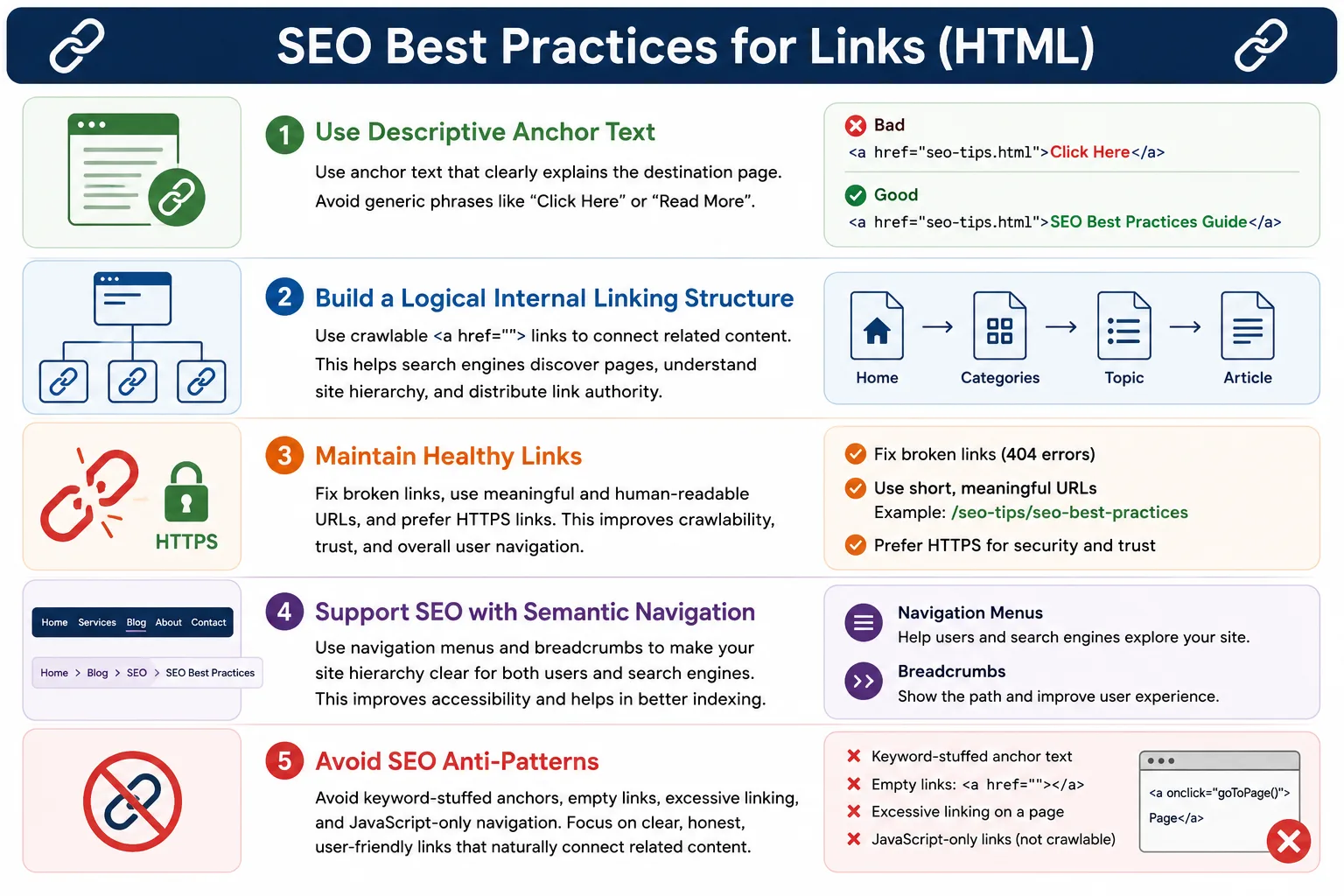
Well-optimized links improve crawlability, indexability, user experience, and search rankings. Crawlability means search engines can move from one page to another without confusion. Indexability means important pages can be found, understood, and considered for search results. User experience improves because visitors can move through the website naturally. Search rankings can improve because links help search engines understand which pages matter and what those pages are about.
Poorly implemented links can negatively affect both SEO and usability. Broken links create dead ends. Generic anchor text such as Click Here gives little context. JavaScript-only navigation may be harder for crawlers to interpret than standard hyperlinks. Excessive links can make a page noisy. Hidden or manipulative links can damage trust. Because links sit at the intersection of HTML, accessibility, usability, and SEO, learning link best practices is essential for anyone building websites.
Why Links Matter for SEO
Search engines navigate the web through links. A crawler starts from a known page, reads its HTML, finds links, and follows those links to discover more pages. This process is one of the foundations of web search.
Page A
   ↓ Link
Page B
When Page A links to Page B, Google's crawler can follow that link and discover Page B. Without links, Page B may never be found, especially if it is not included in a sitemap or connected from any other discoverable page.
Page B
May Never Be Found
This is why internal linking is so important. Every useful page should be reachable through normal navigation or contextual links. If a page exists on the server but no page links to it, users cannot naturally reach it, and search engines may treat it as isolated or unimportant.
How Search Engines Use Links
Search engines analyze several link-related signals. They look at the link destination, anchor text, surrounding context, link quality, and site structure. A link is not only a path to another page. It is also a clue about the meaning of the destination page.
<a href="html-tutorial.html">
    HTML Tutorial
</a>
From this link, a search engine can understand that the destination page is likely about HTML tutorials. The href value tells the destination. The visible text tells the topic. The surrounding paragraph or navigation area may provide additional context.
This is also useful for users. Before clicking, the user can predict where the link will take them. Good SEO practice and good usability often point in the same direction: make links clear, meaningful, and honest.
Use Descriptive Anchor Text
Anchor text is the visible clickable text inside a link. It should describe the destination page clearly. A good link tells users and search engines what they will find after clicking.
<a href="html-course.html">
    HTML Course
</a>
This is a good example because the anchor text says that the link points to HTML course content. It is short, natural, and descriptive.
<a href="html-course.html">
    Click Here
</a>
This is a weak example because search engines and users learn very little from the words Click Here. The link may still work technically, but it does not communicate topic relevance. If several links on a page all say Click Here, screen reader users and SEO crawlers lose important context.
Why Anchor Text Matters
Anchor text matters because it connects the current page's context to the destination page's topic. Consider this link:
<a href="css-tutorial.html">
    CSS Tutorial
</a>
The text CSS Tutorial provides topic relevance and keyword context for both users and search engines. It tells the user that the linked page is about CSS. It also helps search engines associate the destination URL with CSS tutorial content.
Anchor text should not be treated as a place to repeat keywords aggressively. The purpose is clarity, not stuffing. If the natural phrase is HTML Forms Tutorial, use it. If the page is an overview, HTML Overview may be enough. The best anchor text usually sounds like something a human would write for another human.
Avoid Generic Link Text
Generic link text creates ambiguity. Phrases such as Read More, Learn More, Click Here, and More may be acceptable in rare visual contexts where nearby headings provide strong context, but they are usually weaker than descriptive links.
<a href="html.html">
    Read More
</a>
A better version names the destination clearly.
<a href="html.html">
    HTML Beginner Tutorial
</a>
This version is more helpful because it explains the destination before the user clicks. It also improves accessibility because screen reader users can understand the purpose of the link even when links are listed separately.
Keep Anchor Text Natural
Descriptive anchor text should still be natural. A concise, relevant phrase is better than an overloaded keyword string.
<a href="html-forms.html">
    HTML Forms Tutorial
</a>
This is natural and useful. It identifies the topic without sounding artificial.
<a href="html-forms.html">
    HTML Forms HTML Forms Tutorial HTML Forms Guide
</a>
This looks unnatural and may appear spammy. Keyword stuffing does not improve user experience and can reduce trust. Search engines are designed to detect unnatural patterns, so link text should be written for clarity rather than repetition.
Use Meaningful Internal Links
Internal links are links between pages on the same website. They help search engines understand site structure and help users continue learning. A page about HTML can naturally link to CSS, JavaScript, HTML forms, accessibility, and browser rendering topics when those links support the reader's path.
<a href="css-tutorial.html">
    Learn CSS
</a>
A website may organize content like this:
HTML
 │
 ├── CSS
 │
 ├── JavaScript
 │
 └── Forms
Links establish relationships. When several HTML pages link to HTML forms, semantic elements, and accessibility topics, search engines can understand that those pages belong to the same learning cluster. Users also benefit because they can move from one related concept to the next without returning to the homepage every time.
Create a Logical Site Structure
Good linking begins with good structure. A website should have a clear hierarchy, with important pages reachable through predictable paths.
Home
 │
 ├── Courses
 │     ├── HTML
 │     ├── CSS
 │     └── JavaScript
 │
 └── Blog
This structure helps search engines crawl efficiently. The homepage links to Courses, Courses links to HTML, and the HTML section links to individual HTML lessons. Each level has a purpose. Users can understand where they are, and crawlers can understand which pages are central to the site.
A messy structure creates confusion. If important lessons are only linked from random pages, they may receive less visibility. If all pages link to all other pages without organization, the site becomes noisy. SEO-friendly linking is not about adding the maximum number of links. It is about adding the right links in the right places.
Use Relative URLs for Internal Pages
For internal pages, relative URLs are often easier to maintain.
<a href="html-course.html">
    HTML Course
</a>
This is usually cleaner than writing the full domain for every internal link.
<a href="https://softwaretips4u.com/html-course.html">
    HTML Course
</a>
Relative URLs make code cleaner and easier to move between environments. During local development, staging, and production, relative links can continue working as long as the file structure remains consistent. Absolute URLs are still useful in canonical tags, social metadata, external links, and cases where a full destination is required.
Avoid Broken Links
Broken links harm both users and SEO quality. A simple spelling mistake can create a 404 error.
<a href="htlm-course.html">
    HTML Course
</a>
If the actual file is named html-course.html, the link above will fail. Broken links can harm user experience, waste crawl budget, and signal poor maintenance. Users who reach a dead page may leave the website. Crawlers may spend time requesting pages that do not exist instead of discovering useful content.
Broken link checks should be part of regular website maintenance. When pages are renamed, deleted, or moved, update the links that point to them. If a page must be removed, provide a useful replacement or redirect when appropriate.
Use Crawlable Links
Search engines understand standard HTML links very well. Whenever navigation is important for discovery, use a real anchor element with a real href value.
<a href="contact.html">
    Contact
</a>
A JavaScript button may visually navigate the user, but it is not the same as a normal hyperlink.
<button onclick="location='contact.html'">
    Contact
</button>
Search engines may not treat this as a normal crawlable link. Buttons are appropriate for actions, such as submitting a form or opening a dialog. Links are appropriate for navigation. Using the correct HTML element improves SEO, accessibility, and code semantics.
Always Use the href Attribute
An anchor without an href is not a proper navigational link.
<a href="about.html">
    About Us
</a>
This is a proper link because it has a destination. The browser can navigate to it, users can open it in a new tab, and crawlers can follow it.
<a>
    About Us
</a>
Without href, the element may not be crawlable as a link. It also changes keyboard and accessibility behavior. If the content should navigate somewhere, provide an href. If it should trigger an action, consider using a button instead.
Use Keyword-Relevant Links
Keyword relevance matters when it is natural and accurate. If a page is about HTML forms, a link using HTML Forms Tutorial helps search engines associate that topic with the destination page.
<a href="html-forms.html">
    HTML Forms Tutorial
</a>
This does not mean every link must include a target keyword. It means the link text should accurately describe the destination. If the page is a reference, use reference. If it is a tutorial, use tutorial. If it is a checklist, use checklist. Accuracy is more valuable than repetition.
Link to Important Pages Frequently
Pages receiving more internal links often appear more important within a website. If a page is central to the site, it should be linked from relevant places such as the homepage, course overview, navigation menu, related lessons, and footer if appropriate.
Home
  ↓
Courses
  ↓
HTML
Multiple relevant references can strengthen importance. However, frequency should be meaningful. Linking to a page from every sentence is not useful. Linking from every relevant learning path is useful. The goal is to create a natural web of relationships that reflects how users actually learn or browse.
Use Navigation Menus Properly
Navigation menus help search engines discover important pages and help users move to main areas of the website. A simple navigation block can contain direct links to important sections.
<nav>
  <a href="index.html">Home</a>
  <a href="courses.html">Courses</a>
  <a href="contact.html">Contact</a>
</nav>
The <nav> element gives semantic meaning. It tells browsers and assistive technologies that the links form a navigation region. From an SEO perspective, clear navigation makes important pages easier to find. From a user perspective, it creates predictability.
Use Breadcrumb Links
Breadcrumb links communicate hierarchy and provide quick paths back to parent sections.
<nav aria-label="breadcrumb">
  <a href="index.html">Home</a>
  >
  <a href="courses.html">Courses</a>
  >
  HTML
</nav>
Breadcrumbs provide better site hierarchy and improved crawlability. They are especially useful for learning platforms, documentation websites, e-commerce categories, and large blogs. They also help users who arrive from search results because the user can immediately understand where the page belongs inside the site.
Use Descriptive Image Links
When an image is used as a link, the image should have meaningful alternative text. Without alt text, search engines and assistive technologies have less context.
<a href="html-course.html">
    <img src="course.png">
</a>
A better version describes the linked image.
<a href="html-course.html">
    <img src="course.png"
         alt="HTML Course">
</a>
The alt text acts similarly to anchor text when the image is the link content. It helps users who cannot see the image and helps search engines understand the destination.
Optimize External Links
External links point to pages on other websites. They should also use descriptive anchor text.
<a href="https://developer.mozilla.org">
    MDN HTML Documentation
</a>
This link is clear because it names the destination and topic. External links can improve user value when they point to trustworthy, relevant resources. Avoid linking to low-quality or unrelated pages. A good external link supports the reader's task instead of distracting from it.
Use HTTPS Links
When linking to external resources, prefer HTTPS when it is available.
https://example.comAvoid older HTTP links when an HTTPS version exists.
http://example.comHTTPS improves security, trust, and user confidence. Search engines also prefer secure experiences. Even when the SEO impact is small compared to content quality and structure, secure linking is a professional baseline.
Use rel nofollow When Appropriate
The rel="nofollow" attribute tells search engines not to treat the link as a normal ranking endorsement.
<a href="https://example.com"
   rel="nofollow">
   External Site
</a>
This is useful for paid links, untrusted content, and user-generated content. It helps separate editorial links from links that should not pass ranking signals. Other related values, such as sponsored and ugc, may also be used in modern SEO practice depending on the situation.
Understand Link Equity
Links can pass authority from one page to another. This concept is commonly called link equity or link juice.
Page A
   ↓
Page B
If Page A is important and links to Page B, search engines may treat Page B as more important than an isolated page. Internal link equity helps distribute importance across a site. This is why important pages should not be buried too deeply or left without internal links.
Link equity is not a reason to add links carelessly. A clean structure with relevant links is more effective than a crowded page with hundreds of unrelated links.
Avoid Excessive Links
A page with hundreds of links can become difficult for users to scan and may dilute focus. Search engines can crawl many links, but excessive linking can make the page less useful.
100+ Links
On One Page
A better practice is to include only relevant links. Navigation pages and index pages naturally contain more links, but article pages should link where the link genuinely supports understanding or next steps.
Use Human-Friendly URLs
Human-friendly URLs make links easier to understand. A descriptive URL gives both users and search engines another clue about the page topic.
<a href="html-forms-tutorial.html">
    HTML Forms Tutorial
</a>
A less helpful URL may look like this:
<a href="page?id=12784">
    HTML Forms Tutorial
</a>
The second link can still work, but the URL does not communicate meaning. Readable URLs improve maintainability, sharing, and trust. They also reduce confusion when users copy links or view them in search results.
Avoid Keyword-Stuffed Links
Keyword-stuffed links look unnatural and can reduce quality.
<a href="html.html">
HTML Tutorial HTML Course HTML Training HTML Guide
</a>
A better link is simple and direct.
<a href="html.html">
HTML Tutorial
</a>
Search engines value useful signals. Repeating similar words inside one anchor does not make a page more useful. It makes the page harder to read.
Make Links Accessible
Accessibility and SEO often align. A descriptive link helps everyone, including keyboard users, screen reader users, and search engines.
<a href="html-course.html">
HTML Course
</a>
This is better than:
<a href="html-course.html">
Click Here
</a>
When a screen reader user opens a list of links, descriptive text is much easier to understand. Instead of hearing Click Here repeated multiple times, the user hears HTML Course, CSS Tutorial, Contact, or Privacy Policy.
Mobile SEO Considerations
Links must work well on mobile devices. Mobile users tap with fingers, not mouse pointers. Links should be easy to tap, easy to read, and well spaced. If links are too close together, users may tap the wrong destination. If text is too small, users may struggle to read the navigation.
Poor mobile navigation can hurt user experience. Since search engines evaluate mobile usability as part of overall page quality, mobile-friendly links are part of SEO best practice. Responsive layout, readable text, and clear spacing all support better link behavior.
SEO-Friendly Footer Links
Footer links are useful when they provide access to important supporting pages such as privacy policy, terms, contact, about, and sitemap pages.
<footer>
  <a href="privacy-policy.html">
    Privacy Policy
  </a>

  <a href="contact.html">
    Contact
  </a>
</footer>
Footer links should not be treated as a place to dump every keyword or every possible internal page. A concise footer helps users and search engines reach important site information without overwhelming the page.
Common SEO Link Mistakes
One common mistake is using Click Here as the main anchor text.
<a href="html.html">
Click Here
</a>
Another mistake is creating broken links.
<a href="htlm.html">
HTML
</a>
Empty links are also a problem when they have no real purpose.
<a href="#">
Empty Link
</a>
Too many links on a single page can create clutter. Hidden links, such as links hidden with display:none; for SEO manipulation, can violate search engine guidelines. The safest approach is simple: links should be visible, useful, honest, and relevant.
Real-World Example
A good navigation block uses clear link text and points to important learning sections.
<nav>
  <a href="html-tutorial.html">
    HTML Tutorial
  </a>

  <a href="css-tutorial.html">
    CSS Tutorial
  </a>

  <a href="javascript-tutorial.html">
    JavaScript Tutorial
  </a>
</nav>
This example provides clear navigation, descriptive text, and strong internal linking. A user can immediately choose the topic they need. A crawler can discover the major tutorial pages. The page structure becomes easier to understand.
SEO Checklist for Links
A practical SEO checklist for links includes using descriptive anchor text, avoiding Click Here, using proper href values, fixing broken links, building logical internal linking, using breadcrumbs, using HTTPS where possible, keeping URLs readable, adding alt text for image links, and avoiding keyword stuffing.
This checklist is useful during development, content review, and QA. Link quality should not be checked only after a site goes live. It should be part of page creation from the beginning.
Selenium Perspective
From a Selenium automation perspective, links can be validated by checking anchor text and destination URLs. For example, automation can verify that a specific descriptive link exists.
String text =
driver.findElement(
  By.linkText("HTML Tutorial")
).getText();
The destination can be checked through the href attribute.
String url =
driver.findElement(
  By.linkText("HTML Tutorial")
).getAttribute("href");
SEO testing tools often validate broken links, redirect chains, missing anchor text, generic anchor text, and HTTP links. Selenium can support these checks at the UI level, while specialized crawlers can scan the whole website more efficiently.
Comparison Table
| Practice | SEO Impact |
|---|---|
| Descriptive Anchor Text | Positive |
| Internal Linking | Positive |
| Breadcrumbs | Positive |
| HTTPS Links | Positive |
| Broken Links | Negative |
| Click Here Links | Negative |
| Keyword Stuffing | Negative |
Common Interview Questions
A common interview question is: why is anchor text important for SEO? The answer is that anchor text helps search engines and users understand the destination page.
Another question is whether Click Here is good anchor text. Usually, no. Descriptive text is better because it explains the destination before the user clicks.
Interviewers may also ask what internal linking is. Internal linking means linking pages within the same website. They may ask what link equity means. Link equity is the ranking value or authority that can be passed through links. They may also ask why broken links are harmful. Broken links negatively affect user experience, crawling efficiency, and perceived site quality.
Interview-Ready Answer
SEO-friendly links use descriptive anchor text, logical internal linking, crawlable href values, and meaningful URLs. Search engines rely on links to discover pages and understand relationships between content. Proper link optimization improves crawlability, user experience, accessibility, and search engine rankings.
Key Takeaway
Links are not just clickable text. They are structural signals, accessibility aids, navigation tools, and SEO signals. A good link clearly explains where it leads, uses a real destination, fits naturally into the page, and supports the user's journey.
For best results, use descriptive anchor text, maintain a logical internal linking structure, fix broken links, prefer crawlable HTML anchors, use breadcrumbs where helpful, keep URLs readable, and avoid manipulative link practices. These habits make websites easier to crawl, easier to understand, and easier to use.
One-Line Insight
A good link tells both users and search engines exactly where it leads before it is clicked.