SEO Audits from HTML View
Introduction
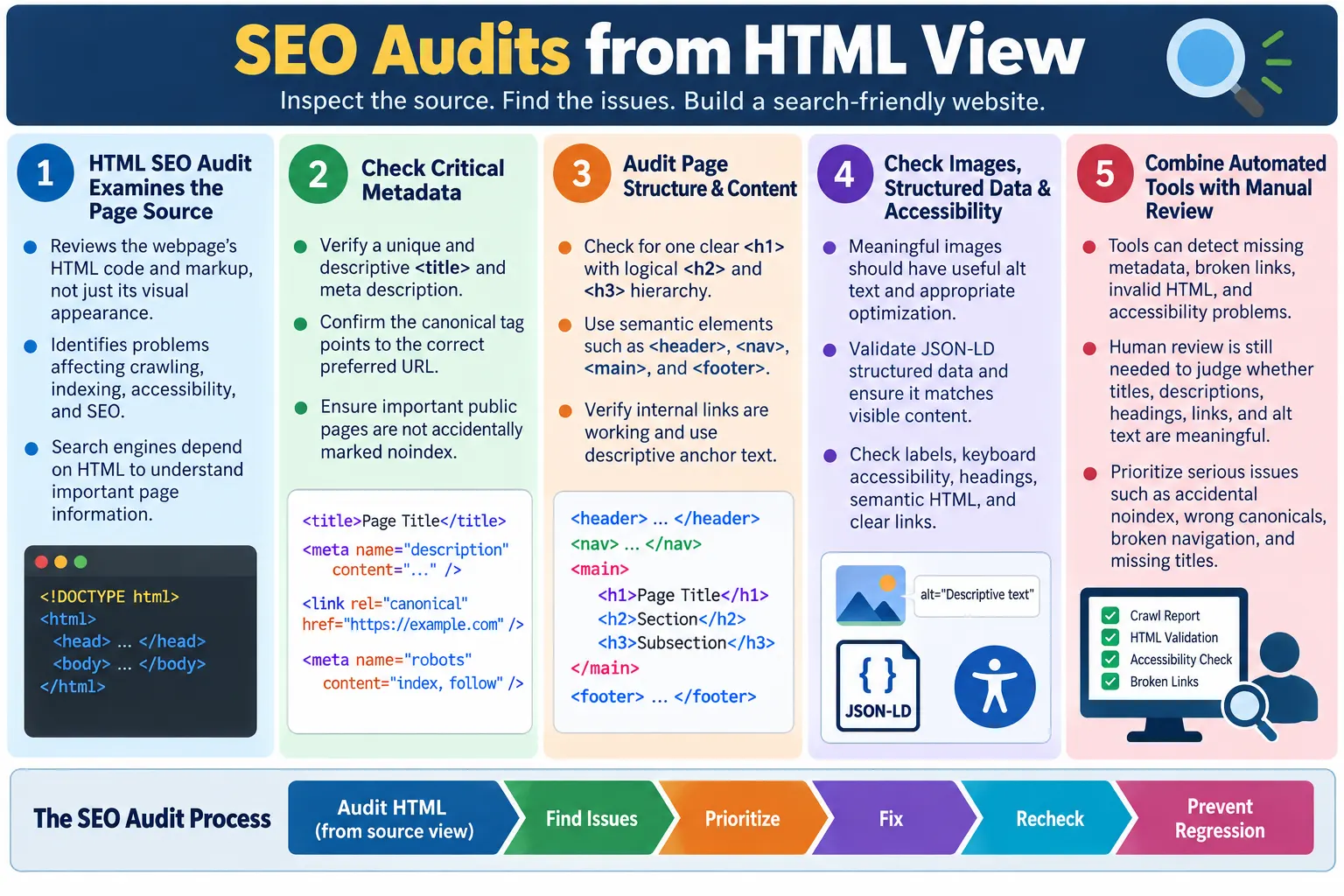
An SEO Audit from an HTML View is the process of reviewing a webpage's HTML source code to identify issues that may affect search engine crawling, indexing, accessibility, and overall SEO performance. Instead of focusing only on visual design, colors, layout, or branding, an HTML SEO audit looks at the code and markup that search engines, browsers, and assistive technologies use to understand the page. It asks whether the page communicates clearly at the HTML level.
This type of audit is practical because search engines begin with HTML. They read titles, meta descriptions, canonical links, robots directives, headings, links, images, structured data, semantic sections, language attributes, and other markup. If those elements are missing, duplicated, invalid, or misleading, the page may not communicate its purpose as effectively as it should. A beautiful page can still have weak SEO if the underlying HTML is incomplete or incorrect.
A good HTML audit helps identify problems before they impact search visibility. It can catch missing titles, duplicate descriptions, broken internal links, incorrect canonical tags, accidental noindex directives, missing image alt text, invalid structured data, and accessibility issues. It also helps teams maintain consistency across many pages, especially on static tutorial websites where files are often created from copied templates.
What Is an HTML SEO Audit?
An HTML SEO audit analyzes the HTML source code of a webpage. It checks whether important SEO elements are correctly implemented and whether the page structure supports search engine understanding. It is not the same as a full SEO audit that includes backlinks, keyword strategy, competitors, server logs, content quality, and analytics. It is a focused technical review of the HTML layer.
HTML Source
  ↓
SEO Audit
  ↓
Identify Issues
  ↓
Fix Issues
  ↓
Improve SEO
The HTML source is the evidence. The audit looks for what is present, what is missing, what is duplicated, what conflicts, and what does not match the page's purpose. For example, a page may have a good title but a wrong canonical URL. Another page may have useful content but no meta description. Another may have visible headings but poor semantic order. The audit identifies these problems so they can be fixed systematically.
HTML SEO audits are useful for developers, testers, content writers, and SEO reviewers. Developers verify templates. Testers verify page output. Content writers verify metadata and headings. SEO reviewers verify crawl and indexing signals. A shared audit checklist helps all roles work from the same standard.
Why Perform an HTML SEO Audit?
An HTML audit helps improve crawlability, indexing, accessibility, content structure, user experience, and technical SEO quality. It can reveal problems that are invisible in a normal visual review. A user may see the page content, but a crawler may see duplicate metadata. A page may look structured, but its headings may be skipped or generic. A navigation link may look correct, but its href may point to a missing page.
- Improve crawlability
- Improve indexing
- Improve accessibility
- Improve content structure
- Improve user experience
- Detect technical SEO problems
Audits are especially important before major releases, after template changes, after migrations, after bulk content creation, and when organic traffic depends on many static pages. A single template mistake can affect hundreds of pages. A short audit can prevent a large SEO cleanup later.
HTML SEO Audit Checklist
A typical HTML SEO audit checks document structure, metadata, headings, images, links, semantic HTML, structured data, accessibility, and technical SEO tags. These categories cover the main HTML signals used by browsers, crawlers, and assistive technologies. The goal is not to make every page identical. The goal is to ensure every page has the right structure for its purpose.
- Document structure
- Metadata
- Headings
- Images
- Links
- Semantic HTML
- Structured data
- Accessibility
- Technical SEO tags
Check the DOCTYPE
The first check is the document type declaration. A modern HTML page should use the HTML5 doctype. This helps browsers render the page in standards mode rather than quirks mode. Standards mode improves predictable rendering across browsers.
<!DOCTYPE html>The doctype is simple, but it belongs at the very beginning of the document. Missing or incorrect doctype declarations can affect rendering behavior. While this is not usually the biggest SEO issue, it is part of a clean document foundation. A page audit should confirm it exists.
Check the HTML Language
The lang attribute tells browsers and assistive technologies the language of the page. It helps screen readers pronounce content correctly and helps tools process the page. For an English page, the language can be declared as en. For other languages, the value should match the page content.
<html lang="en">During an audit, verify that the language attribute exists, is correct, and matches page content. This is especially important on multilingual sites. A Tamil page, English page, or bilingual page should be handled thoughtfully. Incorrect language metadata can create accessibility problems even if the visible content looks fine.
Check the Page Title
The page title is one of the most important HTML SEO elements. It identifies the page topic, appears in browser tabs, and is commonly shown in search results. The audit should verify that the title exists, is unique, descriptive, and relevant to the page content.
<title>
Complete HTML Tutorial
</title>
A weak title such as Home or Untitled does not communicate enough. Duplicate titles across many pages make it difficult for users and search engines to distinguish pages. Each important page should have a title that clearly describes its topic.
Check Meta Description
The meta description summarizes the page. It may appear as the search result snippet, although search engines may generate a different snippet when they believe it better matches the query. The audit should verify that the description exists, is unique, is relevant, and is not duplicated across pages.
<meta
name="description"
content="Learn HTML from beginner to advanced.">
A good meta description helps users decide whether to click. It should match the visible page content and user intent. Missing or duplicated descriptions are common when pages are created from templates. They should be corrected as part of page publishing quality.
Check Canonical Tag
The canonical tag identifies the preferred URL when duplicate or similar content may be available through multiple URLs. The audit should verify that a canonical exists where appropriate, points to the correct URL, and appears only once on the page.
<link
rel="canonical"
href="https://example.com/html">
Canonical mistakes are common in copied static pages. A new page may accidentally point to the old page's canonical URL. This can confuse search engines and cause the wrong URL to be treated as the preferred page. Always verify the final canonical value.
Check Robots Meta Tag
The robots meta tag tells search engines how to handle indexing and link following for the page. A typical public page uses index, follow. A utility page may use noindex. The audit should verify that important pages are not accidentally marked noindex and that directives match the intended SEO strategy.
<meta
name="robots"
content="index, follow">
This is a high-priority check because the wrong robots directive can prevent a page from appearing in search results. It is especially important when moving pages from staging to production.
Check Heading Hierarchy
Heading hierarchy organizes content. A good page usually has one clear <h1>, followed by logical <h2> and <h3> headings. The audit should verify logical hierarchy, one primary H1, and descriptive headings.
<h1>
HTML Course
</h1>

<h2>
Forms
</h2>

<h3>
Validation
</h3>
Headings should describe the content that follows. They should not be used only for styling. Poor heading hierarchy affects readability, accessibility, and search engine interpretation.
Check Semantic HTML
Semantic HTML provides meaning to page regions. Look for appropriate use of <header>, <nav>, <main>, <section>, <article>, and <footer>. Avoid excessive use of generic <div> elements when semantic elements are more appropriate.
<header>
<nav>
<main>
<section>
<article>
<footer>
Semantic HTML helps search engines and assistive technologies understand structure. It also makes code easier to maintain. A visual design can look correct while the underlying structure is weak. The audit should inspect the HTML, not only the appearance.
Check Internal Links
Internal links help users and search engines discover content. The audit should verify working links, descriptive anchor text, no broken links, and logical navigation. A useful internal link clearly describes the destination.
<a href="/html/forms">
HTML Forms Tutorial
</a>
Broken links create a poor user experience and waste crawl paths. Generic anchor text such as Click Here gives weak context. Internal links should connect related pages naturally and use preferred canonical URLs.
Check Image SEO
Images should be reviewed for file names, alt text, dimensions, lazy loading, responsive behavior, and file size. Meaningful images should have useful alt text. Decorative images should use empty alt text. Width and height attributes help reduce layout shift.
<img
src="html-forms.png"
alt="HTML Forms Example"
loading="lazy">
Image SEO affects accessibility, performance, and image search understanding. Large unoptimized images can slow pages. Missing alt text weakens accessibility and image context. A strong audit checks both technical attributes and content usefulness.
Check Structured Data
Structured data helps search engines understand content more explicitly. The audit should look for JSON-LD scripts where appropriate and verify valid JSON, correct schema type, and data that matches visible page content.
<script
type="application/ld+json">
...
</script>
Structured data should not be misleading. An FAQ schema should match visible FAQs. Product schema should describe a real product page. Article schema should match article content. Validation tools can catch syntax and schema problems.
Check Navigation
Navigation should help users and search engines reach important pages. The audit should verify that a navigation menu exists, breadcrumbs are correct if used, and important pages are reachable. Deep or orphan pages may be hard to discover.
For tutorial websites, navigation is especially important. Learners need a sequence and a way to move between topics. A numbered navigation menu, previous and next links, breadcrumbs, and related content links can all support discovery.
Check Accessibility
Accessibility improvements often benefit SEO as well. The audit should verify labels for forms, alt text, heading hierarchy, keyboard accessibility, semantic HTML, and clear links. Accessible pages are easier for users and assistive technologies to understand.
HTML-level accessibility issues are often easy to catch. Missing labels, missing alt text, poor headings, and generic links are common. Fixing them improves both user experience and technical quality.
Check Forms
Forms should have labels, proper input types, required field indicators, and accessible validation. A form field without a label can be difficult for screen reader users. A wrong input type can reduce mobile usability and validation quality.
An HTML SEO audit may not deeply test business logic, but it should identify structural form issues. Forms are important conversion points, and poor form accessibility can affect user experience and business outcomes.
Check Tables
Tables should use table headers with <th> where appropriate, captions when helpful, and semantic structure. Tables used for real tabular data should be marked up as tables. Tables should not be used for page layout.
Good table markup helps users and assistive technologies understand relationships between rows and columns. For reporting pages, comparison tables, pricing pages, and data-heavy tutorials, table semantics matter.
Check Video and Audio
Media elements should include controls where appropriate, captions for videos where applicable, and descriptive context. Video and audio can improve content, but they should not exclude users who cannot hear, see, or play media in their environment.
An audit should verify that media does not block access to essential information. Important instructions should not exist only in audio or video. Captions, transcripts, or text summaries can improve accessibility and search understanding.
Check HTML Validation
HTML validation helps identify missing closing tags, invalid nesting, duplicate IDs, invalid attributes, and other markup problems. Clean HTML reduces rendering issues and improves maintainability.
Modern browsers can repair many errors, but relying on browser repair is not a good engineering practice. Severe invalid markup can create unpredictable DOM structure, accessibility problems, CSS issues, and test instability.
Check Performance-Related HTML
Performance-related HTML checks include lazy-loaded images, responsive images, optimized media, minimal unnecessary HTML, and avoiding duplicate scripts. These checks affect user experience and page quality. A page can have good content but still feel poor if it loads slowly or shifts during loading.
Performance should be reviewed with both code and browser tools. HTML attributes such as loading, srcset, sizes, width, and height can support better performance. Resource order and duplicate scripts should also be checked.
Browser Workflow
The browser and crawler process HTML as the foundation of the page. An HTML SEO audit examines that foundation, finds problems, and guides fixes. Clean HTML helps search engines interpret the page more reliably.
HTML
  ↓
Crawler
  ↓
HTML Audit
  ↓
Problems Found
  ↓
Fixes Applied
  ↓
Improved SEO
Manual HTML SEO Audit Example
A manual audit can use a checklist. Open the page, inspect the source or DOM, and verify the major elements. Confirm the doctype, language attribute, title, meta description, canonical, robots, H1, heading hierarchy, semantic HTML, internal links, image alt text, structured data, navigation, accessibility, and valid HTML.
✓ DOCTYPE
✓ lang attribute
✓ Title
✓ Meta description
✓ Canonical
✓ Robots
✓ H1
✓ Heading hierarchy
✓ Semantic HTML
✓ Internal links
✓ Image alt text
✓ Structured data
✓ Navigation
✓ Accessibility
✓ Valid HTML
Manual review is valuable because it can judge meaning. A tool can say a title exists, but a human decides whether it is descriptive. A tool can say alt text exists, but a human decides whether it is useful. A strong audit combines tools with judgment.
Common HTML SEO Problems
Common HTML SEO problems include missing title, duplicate titles, missing meta description, duplicate descriptions, missing canonical tag, incorrect robots tag, missing language attribute, poor heading hierarchy, missing image alt text, broken internal links, invalid HTML, and missing structured data where appropriate.
- Missing title
- Duplicate titles
- Missing meta description
- Duplicate descriptions
- Missing canonical tag
- Incorrect robots tag
- Missing lang
- Poor heading hierarchy
- Missing image alt
- Broken internal links
- Invalid HTML
- Missing structured data where appropriate
Tools Used for HTML SEO Audits
Common tools include Browser DevTools, W3C HTML Validator, Lighthouse, Google Search Console, Screaming Frog SEO Spider, Ahrefs Site Audit, Semrush Site Audit, Axe, and WAVE. These tools complement manual review by identifying technical issues efficiently.
- Browser DevTools
- W3C HTML Validator
- Lighthouse
- Google Search Console
- Screaming Frog SEO Spider
- Ahrefs Site Audit
- Semrush Site Audit
- Axe for accessibility
- WAVE for accessibility
Tools should not replace understanding. A crawler can report a missing description, but it cannot always decide whether a description is persuasive. Accessibility tools can flag missing labels, but human review is needed for clarity. Use tools to scale checks and human judgment to evaluate quality.
Selenium Perspective
Automation testers often verify HTML SEO elements. Selenium can read the page title, meta description, canonical URL, robots tag, headings, links, and other DOM elements. This makes it useful for regression checks on critical pages.
System.out.println(driver.getTitle());String description =
driver.findElement(
By.cssSelector(
"meta[name='description']"))
.getAttribute("content");String canonical =
driver.findElement(
By.cssSelector(
"link[rel='canonical']"))
.getAttribute("href");String robots =
driver.findElement(
By.cssSelector(
"meta[name='robots']"))
.getAttribute("content");Automation can help validate that required SEO elements are present, though a complete SEO audit also requires manual analysis, crawling, performance analysis, and specialized SEO tools. Selenium is strongest when checking rendered pages and critical browser flows.
Audit Workflow for Static HTML Sites
Static HTML sites need audit discipline because pages are often created by copying existing files. This creates risk of duplicated titles, copied canonical URLs, copied descriptions, stale structured data, and forgotten nav entries. An audit should compare page-specific values against the actual file and public URL.
Start by scanning all HTML files that are full documents. Skip nav fragments and partials. Check that every page has the expected Google snippets, title, description, canonical, robots tag, footer, scripts, and nav loader. Then check article-specific content such as H1, headings, list classes, image alt text, and internal links. This kind of audit catches both SEO and consistency problems.
For newly created pages, verify that the nav link exists and points to the file. Verify that the canonical URL is not copied from the previous article. Verify that the title, Open Graph title, Twitter title, H1, and description all match the new topic. These checks are simple but important.
Prioritizing Audit Findings
Not every audit finding has the same urgency. Critical issues include accidental noindex on important pages, broken navigation links, missing titles on key pages, wrong canonical URLs, and invalid structured data on pages that depend on rich result eligibility. These should be fixed first.
Medium-priority issues include duplicate meta descriptions, weak heading hierarchy, missing alt text, and generic anchor text. These should still be fixed, especially on important pages, but they may not be as urgent as indexing blockers. Lower-priority issues may include minor validation warnings that do not affect rendering or meaning, though they should still be cleaned up over time.
A practical audit report should group findings by severity, affected pages, and recommended fix. This makes the report actionable. A long list of unprioritized issues is harder for developers and content teams to use.
HTML SEO Audit Checklist Quick Reference
| Check | Verify |
|---|---|
| DOCTYPE | HTML5 declaration present |
| Language | Correct lang attribute |
| Title | Unique and descriptive |
| Meta Description | Present and relevant |
| Canonical | Correct preferred URL |
| Robots | Proper indexing directives |
| H1 | One clear main heading |
| Heading Hierarchy | Logical structure |
| Semantic HTML | Proper landmark elements |
| Internal Links | Working and descriptive |
| Images | Alt text and optimization |
| Structured Data | Valid JSON-LD if applicable |
| Accessibility | Labels, headings, keyboard support |
| HTML Validation | Valid markup |
Planning an HTML SEO Audit
A good audit starts with scope. Decide whether you are auditing one page, one section, one template, or the entire website. A single-page audit is useful before publishing a new article. A section audit is useful after adding many pages to a course. A template audit is useful after layout changes. A full-site audit is useful before a major release or migration. The scope determines how much automation and manual review you need.
For a small group of pages, manual review may be enough. Open each page, inspect source, review metadata, check headings, test links, and validate structured data. For hundreds of pages, manual review alone is inefficient. Use scripts or crawlers to detect missing titles, duplicate descriptions, missing canonicals, noindex pages, broken links, and missing alt attributes. Then manually review representative pages and high-priority pages for quality.
Before starting, define the expected standards. For example, every public article should have a unique title, unique meta description, canonical URL, robots tag, H1, footer, script includes, semantic main content, and no broken internal links. Utility pages may intentionally use noindex. Nav fragments may not be full HTML documents. Defining standards prevents false alarms and helps teams agree on what counts as a real issue.
Auditing Newly Created Pages
New pages deserve special attention because they are often created by copying an existing file. Copying is efficient, but it can carry old metadata into the new page. A new article may accidentally keep the previous article's title, canonical URL, Open Graph description, Twitter metadata, structured data, or H1. These mistakes are easy to miss visually because the body content may look correct.
When auditing a new page, compare the page topic against every head element. The title should match the page. The meta description should summarize the page. The canonical should point to the new URL. Open Graph and Twitter tags should use the new title and description. The H1 should match the content. The nav should include the page if it belongs to a course sequence. The footer and scripts should match the site standard.
Also inspect content formatting. Lists should use the site's expected list class when the design requires it. Tables should use proper table structure. Code examples should be escaped so tags display as code rather than being interpreted. Images should include alt text and dimensions where appropriate. These checks keep new pages consistent with the rest of the site.
Auditing Existing Content at Scale
Existing content should be audited periodically because websites drift. Pages are edited, moved, renamed, removed, and copied. A link that worked last month may now return a 404. A page that had a unique title may now duplicate another page after a content update. A canonical may become stale after a URL change. Regular audits catch this drift.
At scale, start with automated checks. Count all full HTML documents. Identify missing titles, descriptions, canonicals, robots tags, H1 elements, and footers. Find duplicate titles and descriptions. Check internal links against actual files or live URLs. Identify pages with no inbound links. Scan for unexpected noindex on public pages. These checks quickly reveal structural problems.
After automated checks, perform manual review on samples. Choose high-traffic pages, newly edited pages, template representatives, and pages with tool warnings. Manual review should focus on meaning: Is the title useful? Does the description match intent? Are headings logical? Is alt text meaningful? Are contextual links relevant? Does structured data match visible content? This combination of broad automation and focused manual review is effective.
Reporting HTML SEO Audit Findings
An audit is only useful if the findings are understandable and actionable. A good report should identify the issue, affected page, severity, why it matters, and recommended fix. For example, instead of saying bad metadata, say Missing meta description on html-example.html; add a page-specific summary to improve search snippet quality. Specific findings are easier to fix.
Severity helps teams prioritize. Critical issues include accidental noindex on important pages, broken primary navigation, wrong canonical URLs, and missing titles on major pages. Medium issues include duplicate descriptions, weak headings, missing alt text, and generic anchor text. Lower-priority issues may include minor validation warnings or small formatting inconsistencies that do not affect meaning.
Reports should also separate template issues from content issues. A template issue may affect many pages and should be fixed in the shared layout. A content issue may affect one article and should be fixed in that file. This distinction helps developers and content editors take the right action.
Fixing Audit Issues Safely
Fixes should be scoped and careful. If a page has a wrong canonical URL, update only the canonical unless related metadata is also wrong. If a navigation link is broken, fix the href without changing unrelated labels. If a template is missing a robots tag, update the template and then verify several generated pages. Avoid broad refactors when a targeted fix solves the audit issue.
After fixing, verify the output. Re-run the check that found the problem. Open the page if the change affects visible content. Confirm that scripts, footer, navigation, and styles still load. For SEO metadata changes, inspect the final HTML source. For link fixes, click the link or run a link checker. For structured data fixes, validate the JSON-LD.
When fixes affect many pages, keep a clear record of what changed. Large metadata updates can have site-wide impact. A short change summary helps future audits understand why values changed. Good audit work is repeatable and traceable.
Regression Prevention
The best audit process prevents old problems from returning. Once you identify a common issue, add a check for it. If pages often miss meta descriptions, add a script or review step. If new pages often copy old canonicals, add a check comparing canonical URL with file name or expected slug. If nav links break, add a link validation step. If lists lose styling classes, add a content markup review.
Regression checks do not need to be complicated. A simple PowerShell, Node, Python, or crawler-based audit can scan files for required snippets and metadata. Selenium can validate rendered pages for critical workflows. Accessibility tools can catch missing labels and alt attributes. The point is to catch mistakes early, before they reach production or before search engines process them.
Regression prevention also depends on habits. Developers should use reliable templates. Content writers should avoid copying without updating metadata. Testers should include SEO metadata in page checks. Reviewers should look at source, not only visual output. When the whole team understands HTML SEO quality, fewer mistakes reach production.
HTML SEO Audit for Learning Websites
Learning websites have special audit needs because they contain many related tutorial pages. Each page should fit into a course sequence. Navigation should be numbered or ordered where appropriate. Internal links should connect prerequisites, next lessons, related concepts, and interview topics. Metadata should distinguish pages clearly so learners and search engines understand the role of each lesson.
For a learning site, duplicate titles and descriptions are especially harmful because many pages cover related topics. A page about meta descriptions, a page about canonical links, and a page about robots tags all belong to HTML SEO, but they need unique metadata. Headings should be educational and descriptive. Code examples should be visible as code. Tables should be readable on mobile. Lists should follow the site style. These details create a consistent learning experience.
An audit should also check whether pages are discoverable from the course navigation. A newly created article that is not linked from the HTML nav becomes hard to find. A nav link pointing to a missing page creates frustration. In a learning website, navigation quality is part of content quality.
Common Interview Questions
What is an HTML SEO audit? An HTML SEO audit reviews a webpage's HTML source to identify issues that affect search engine crawling, indexing, accessibility, and SEO.
What HTML elements are checked? Common elements include title, meta description, canonical tag, robots meta tag, headings, semantic HTML, images, links, and structured data.
Why is semantic HTML important? It helps search engines and assistive technologies understand the page structure. It also makes code easier to maintain.
Why check heading hierarchy? Heading hierarchy improves readability, accessibility, and helps search engines interpret content organization.
Why verify canonical tags? Canonical tags ensure the preferred URL is identified when duplicate or similar content exists.
Can Selenium perform an SEO audit? Selenium can verify HTML elements such as titles, meta tags, headings, and links, but a complete SEO audit also involves crawling, performance analysis, accessibility review, and specialized SEO tools.
Interview-Ready Answer
An SEO audit from an HTML view is the process of examining a webpage's HTML source code to ensure it follows SEO and accessibility best practices. The audit includes checking the DOCTYPE, lang attribute, page title, meta description, canonical tag, robots meta tag, heading hierarchy, semantic HTML, internal links, image alt text, structured data, accessibility features, and HTML validity. Clean, semantic, and well-structured HTML helps search engines crawl, understand, and index webpages more effectively while also improving user experience.
A strong answer should also mention that an HTML SEO audit is not only about automated tools. Tools help detect issues quickly, but manual review is needed to judge whether headings, descriptions, links, alt text, and structured data are meaningful and aligned with the visible page content.
One-Line Insight
An HTML SEO audit ensures that the code behind your webpage communicates clearly with search engines, not just with browsers.