SEO & Accessibility Benefits
Introduction
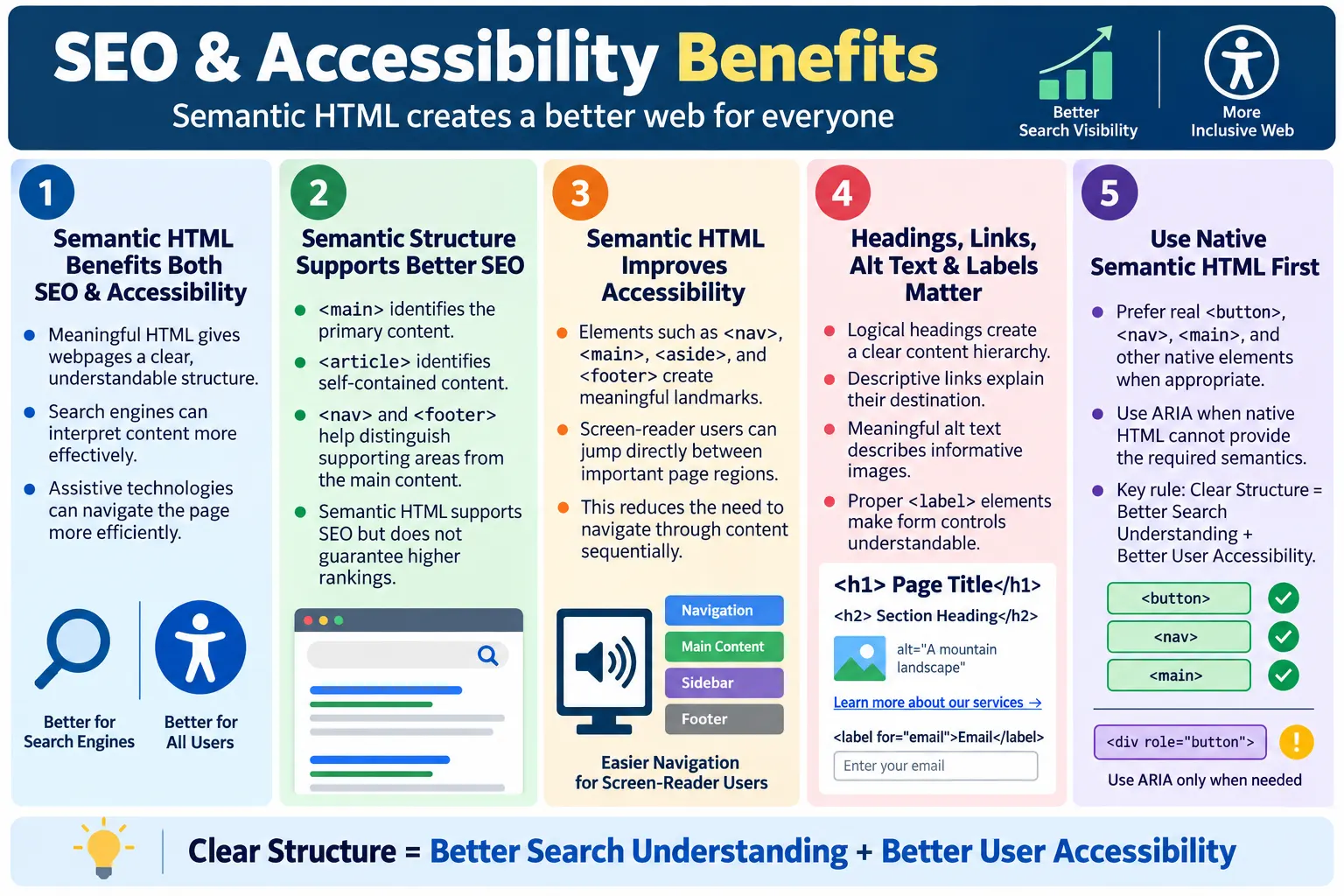
One of the biggest advantages of Semantic HTML is that it improves both Search Engine Optimization and Accessibility. These two areas are often discussed separately, but they are strongly connected by one common idea: meaningful structure. When a webpage is written with clear HTML elements, both search engines and assistive technologies can understand it more effectively. A page that is easier for machines to interpret is usually also easier for people to navigate, maintain, and test.
Semantic HTML uses meaningful elements such as <header>, <nav>, <main>, <section>, <article>, <aside>, and <footer>. These elements describe the role of different page regions. Instead of giving search engines and screen readers a stack of generic containers, semantic HTML gives them a structured document with recognizable parts.
Semantic HTML does not directly guarantee higher search rankings. A website still needs useful content, relevant titles, good performance, mobile friendliness, secure delivery, trustworthy links, and a good user experience. However, semantic HTML provides a strong foundation. It helps search engines discover and understand content, and it helps assistive technologies present the page in a more usable way.
This article explains how semantic HTML supports SEO and accessibility, why those benefits matter, and how developers and testers can verify that pages are using HTML structure effectively.
What Is SEO?
SEO, or Search Engine Optimization, is the process of making webpages easier for search engines to discover, understand, index, and present to users. Search engines crawl pages, read content, analyze links, interpret headings, inspect page titles, evaluate structure, and decide how the page relates to user queries.
Good SEO helps search engines answer important questions. What is this page about? Which content is the main content? What are the important headings? How is the page organized? Which links help users continue to related topics? Which images add meaning? Which repeated elements are navigation or footer content rather than primary article content?
Webpage
  ↓
Search Engine
  ↓
Understand Content
  ↓
Index Page
Search engines are powerful, but they still benefit from clean structure. A page written with meaningful headings, descriptive links, proper image alt text, and semantic regions gives crawlers a clearer path through the content. The page becomes easier to classify and easier to evaluate.
What Is Accessibility?
Accessibility means designing and developing websites so that everyone, including people with disabilities, can use them effectively. Accessibility benefits users who rely on screen readers, keyboard navigation, voice control software, screen magnifiers, switch devices, high contrast settings, captions, and other assistive technologies. It also benefits users in temporary or situational conditions, such as someone using a mobile phone in bright sunlight or someone navigating without a mouse.
Accessible HTML gives assistive technologies useful information. A screen reader can announce headings, landmarks, links, form labels, table headers, and image descriptions. A keyboard user can move through interactive controls in a logical order. A user with low vision can rely on correct structure and scalable text. A voice control user can activate controls by name when those controls are properly labeled.
Webpage
  ↓
Screen Reader
  ↓
Read Structure
  ↓
User Navigates Easily
Accessibility is not an optional extra for polished websites. It is part of building usable software. Semantic HTML is one of the simplest and most reliable foundations for accessibility because it uses native browser behavior instead of forcing developers to recreate meaning manually.
Why Semantic HTML Helps
Without semantic HTML, a page may be built from generic containers.
<div>
  <div>
    <div>
      ...
    </div>
  </div>
</div>
The browser can render this page, but the structure is weak. A search engine sees nested generic elements. A screen reader receives less useful landmark information. A developer must inspect class names to understand what each region represents. A tester has fewer meaningful hooks for structure-based validation.
With semantic HTML, the structure becomes meaningful.
<header>
  ...
</header>

<nav>
  ...
</nav>

<main>
  <article>
    ...
  </article>
</main>

<footer>
  ...
</footer>
The page now has recognizable regions. The header introduces the page, the navigation contains links, the main element contains the primary content, the article represents a self-contained piece, and the footer provides closing information. This helps both SEO and accessibility because both depend on understanding structure.
SEO Benefit: Better Content Structure
Search engines need to separate primary content from supporting content. On a tutorial page, the main article should be understood as the focus. Navigation links, sidebars, related posts, advertisements, and footer links are useful but secondary. Semantic HTML makes these roles clearer.
Header
  ↓
Main
  ↓
Article
  ↓
Footer
When a page uses <main> for the primary content and <article> for the tutorial, search engines receive a clearer signal about where the meaningful content lives. A <nav> element identifies navigation, and a <footer> identifies closing site information. This does not guarantee ranking, but it reduces ambiguity.
Better structure also helps content teams. When pages follow a predictable pattern, it becomes easier to audit whether titles, headings, internal links, images, and supporting sections are present. SEO is not only about search engines; it is also about keeping content organized and useful.
SEO Benefit: Better Heading Hierarchy
Headings are among the most important structural signals in HTML. A logical heading hierarchy helps search engines understand the relationships between topics. It also helps users scan the page visually and navigate with assistive technologies.
<h1>HTML Tutorial</h1>
<h2>Introduction</h2>
<h2>Forms</h2>
<h3>Input Elements</h3>
The <h1> identifies the main topic. The <h2> elements identify major sections. The <h3> identifies a subsection within Forms. This hierarchy creates an outline. Search engines can use that outline to understand what the page covers, and users can use it to scan or jump through the page.
A common mistake is choosing headings based on visual size instead of structure. For example, using <h4> because it looks smaller after an <h1> can create a confusing outline. CSS should control visual size. HTML heading levels should communicate document structure.
SEO Benefit: Better Article Identification
The <article> element identifies a self-contained piece of content, such as a blog post, tutorial, news story, forum post, or product review. This can help search engines recognize that the content is an independent unit.
<article>
  <h1>HTML Forms Explained</h1>
  <p>This tutorial explains how HTML forms collect user input.</p>
</article>
When a tutorial is wrapped in an article, the structure communicates that the content can stand on its own. This is more meaningful than placing the same content inside a generic div. It also helps developers and content systems treat the article as a reusable or indexable content unit.
SEO Benefit: Better Internal Navigation
Internal links help search engines discover related pages and understand how topics connect. The <nav> element identifies navigation groups, such as the main menu, sidebar course navigation, footer navigation, or table of contents.
<nav aria-label="HTML lessons">
  <a href="html-what-is-html.html">What Is HTML?</a>
  <a href="html-headings-h1-h6-usage-rules.html">Headings</a>
</nav>
This helps distinguish navigation links from ordinary links inside the article body. It also improves user experience. Clear navigation allows users to move through a course, find related lessons, and understand where they are within a larger content structure.
Navigation should be descriptive. A link labeled "Learn HTML Forms" is more useful than "Click Here." Search engines and users both benefit from descriptive link text because it explains the destination before the link is opened.
SEO Benefit: Better Image Understanding
Images can support SEO when they are properly described. The alt attribute helps search engines understand what an image represents, and it helps users who cannot see the image. Alt text should describe the meaningful content or purpose of the image.
<img src="html.png" alt="HTML Logo">If the image is decorative, an empty alt attribute may be appropriate. If the image conveys information, meaningful alt text is necessary. For example, a diagram of the HTML parsing process should have alt text that describes the diagram, not just the word "image."
Good image markup also includes practical performance considerations such as width, height, responsive image attributes, and lazy loading where appropriate. Semantic structure and performance work together to create better pages.
SEO Benefit: Better Link Descriptions
Descriptive links are useful for search engines and users. A link should make sense out of context whenever possible. Users of screen readers may navigate from link to link, so repeated "Click Here" links provide very little value.
<a href="html-course.html">Learn HTML</a>This is clearer than:
<a href="html-course.html">Click Here</a>The descriptive version tells the user and the crawler what the target page is about. This improves usability, internal linking clarity, and content interpretation.
Accessibility Benefit: Landmark Navigation
Semantic elements create landmarks. Landmarks are major page regions that assistive technology users can jump between quickly. Common landmarks come from elements such as <header>, <nav>, <main>, <aside>, and <footer>.
Header
  ↓
Navigation
  ↓
Main
  ↓
Footer
Without landmarks, a screen reader user may need to move through a page sequentially. With landmarks, the user can jump directly to navigation, main content, or footer information. This is especially important on pages with repeated headers, large menus, ads, sidebars, or long content.
Landmarks should be used thoughtfully. A page should usually have one primary <main>. Multiple navigation regions can exist, but labels such as aria-label="Main navigation" and aria-label="Footer navigation" help users distinguish them.
Accessibility Benefit: Better Form Accessibility
Forms are one of the most important areas for accessibility. A form control should have a programmatically associated label. The <label> element connects visible text with the input field so assistive technologies can announce the purpose of the control.
<label for="email">Email</label>
<input type="email" id="email">
A screen reader can announce "Email, edit text" instead of only "edit text." This difference is significant. Without a label, users may not know what information the field requires. Labels also improve usability for mouse and touch users because clicking the label can focus the input.
Semantic form elements such as <fieldset> and <legend> help group related controls. Native input types such as email, tel, date, and number provide useful browser behavior and accessibility support.
Accessibility Benefit: Better Table Accessibility
Tables should be used for tabular data, not page layout. When tables are used correctly, semantic elements such as <th>, <thead>, <tbody>, and <caption> help assistive technologies understand the relationship between headers and data cells.
<table>
  <caption>Course Fees</caption>
  <thead>
    <tr>
      <th>Course</th>
      <th>Fee</th>
    </tr>
  </thead>
  <tbody>
    <tr>
      <td>HTML</td>
      <td>$50</td>
    </tr>
  </tbody>
</table>
The table header cell tells assistive technologies that the cell is a header, not ordinary text. This helps users understand data relationships when navigating cell by cell.
Accessibility Benefit: Better Main Content Identification
The <main> element identifies the primary content of the page. This is important because many pages repeat headers, menus, banners, and sidebars across every page. Users of assistive technologies should be able to skip repetitive content and move directly to the unique content of the page.
<main>
  <h1>HTML Tutorial</h1>
  <p>Primary lesson content appears here.</p>
</main>
When <main> is used correctly, the document has a clear primary region. This supports accessibility and also clarifies SEO structure by making the central content easier to identify.
Browser Workflow
When a browser reads HTML, it creates the DOM. Semantic elements become part of that DOM just like generic elements, but they also carry meaningful roles. Search engines and accessibility tools can use this information as part of their interpretation.
Read HTML
  ↓
Identify Semantic Elements
  ↓
Create DOM
  ↓
Search Engines
  ↓
Accessibility Tools
  ↓
Render Page
The page is not only displayed visually. It is parsed, represented, indexed, inspected, tested, and navigated. Semantic HTML improves those non-visual workflows by making the document more understandable.
Real-World Example
A SoftwareTips4U tutorial page can use semantic HTML to make structure clear.
<header>
  <h1>SoftwareTips4U</h1>
</header>

<nav aria-label="Main navigation">
  ...
</nav>

<main>
  <article>
    <h2>HTML Forms</h2>
    <p>HTML forms collect user input.</p>
  </article>
</main>

<footer>
  © 2026 SoftwareTips4U
</footer>
This structure gives the page a clear header, navigation area, main content area, article, and footer. It improves accessibility, maintainability, and machine interpretation. It also helps testers validate the page consistently.
SEO Best Practices
Good SEO-friendly HTML begins with a meaningful page title and one clear primary topic. Use one meaningful <h1> for the page topic. Use a proper heading hierarchy for sections and subsections. Use semantic HTML elements to define page regions. Use descriptive link text so users and search engines understand where links go.
Images should have descriptive alt attributes when they convey information. Navigation should be logical and crawlable. Important links should not depend entirely on JavaScript. The page structure should be clean, with main content easy to identify. Meta descriptions should summarize the page accurately, even though they are not a direct ranking guarantee.
SEO also benefits from content quality. Semantic HTML supports content interpretation, but it cannot compensate for thin, misleading, duplicated, or low-value content. The best results come when useful content is combined with clear structure.
Accessibility Best Practices
Accessibility-friendly HTML begins with native elements. Use buttons for actions and links for navigation. Use labels for every form control. Use semantic regions for major page areas. Keep the heading hierarchy logical. Provide descriptive alt text for meaningful images. Use meaningful link text. Use <fieldset> and <legend> for related form controls where appropriate.
Keyboard accessibility must be preserved. All interactive elements should be reachable and operable using the keyboard. Focus indicators should be visible. Content should not rely only on color to communicate meaning. Error messages should be clear and connected to the relevant fields.
Use native HTML before ARIA. ARIA is useful when native HTML cannot express the needed behavior, but native elements are usually more reliable. A real <button> is better than a clickable div with a button role in most cases.
Shared Benefits for SEO and Accessibility
SEO and accessibility often improve together because both reward clarity. A meaningful heading helps search engines understand topics and helps screen reader users navigate. Descriptive link text helps crawlers understand destinations and helps users decide whether to activate a link. Alt text helps image understanding and helps users who cannot see the image. Semantic landmarks help assistive technologies and clarify page structure for crawlers.
This shared benefit is one reason accessibility should not be treated as separate from normal development. Accessible HTML is often better HTML. It is cleaner, easier to test, easier to maintain, and easier to understand.
Where SEO and Accessibility Differ
Although SEO and accessibility overlap, they are not the same. SEO focuses on discoverability, indexing, search presentation, and relevance to search queries. Accessibility focuses on whether people with different abilities and tools can use the page effectively. A page can have good SEO and still be inaccessible. A page can be accessible and still lack strong SEO content strategy.
For example, keyword research may be important for SEO but not directly relevant to accessibility. Keyboard focus order is essential for accessibility but is not usually described as a direct SEO factor. The overlap is strongest at the HTML structure level: headings, links, alt text, landmarks, forms, and readable content.
Common Mistakes
A common mistake is using <div> for everything. A generic div can display content, but it does not communicate whether the content is a header, navigation, main content, article, aside, or footer.
<div>
  Header
</div>
A better structure is:
<header>
  Header
</header>
Another mistake is skipping heading levels. Headings should form a logical outline.
<h1>Title</h1>
<h4>Details</h4>
A better version is:
<h1>Title</h1>
<h2>Details</h2>
Missing alt text is another common issue.
<img src="logo.png">A better version is:
<img src="logo.png" alt="SoftwareTips4U Logo">Using vague links such as "Click Here" is also weak. A better link describes the destination, such as "Download HTML Guide." Ignoring keyboard users is another serious problem. All interactive elements must be reachable and usable without a mouse.
Selenium Perspective
Automation testers often verify heading hierarchy, semantic landmarks, alt text, link text, form labels, keyboard accessibility, and page structure. Selenium can locate semantic elements directly by tag name.
WebElement main =
driver.findElement(
    By.tagName("main"));
Image alt text can be verified by reading the attribute.
String alt =
driver.findElement(
    By.tagName("img"))
    .getAttribute("alt");

System.out.println(alt);
Footer links, navigation regions, headings, and form labels can also be checked. Automated tests should not replace manual accessibility testing, but they can catch repeated structural problems across many pages.
Testing Checklist
When testing SEO and accessibility basics at the HTML level, verify that the page has a meaningful title, one clear <h1>, logical headings, semantic landmarks, descriptive links, alt text for meaningful images, labels for form controls, and a visible keyboard focus state. Check that the main content is inside <main> and that navigation is marked with <nav> where appropriate.
Also check that tables use table headers, forms use native controls, buttons are used for actions, and links are used for navigation. Review whether any content depends only on visual placement. If a user cannot see the layout, the structure should still make sense.
How to Audit SEO Structure
A practical SEO structure audit begins with the document title. The title should describe the page accurately and uniquely. It should not be a vague label such as "Home" or "Page." After that, inspect the <h1>. The page should have a clear primary heading that matches the main topic. The title and <h1> do not need to be identical, but they should be aligned.
Next, review the heading hierarchy. Scan the page and ask whether the headings create a useful outline. If an <h3> appears directly after an <h1> without an <h2> reason, the structure may be confusing. If headings are used only because they look bold or large, CSS should be adjusted and the heading levels should be corrected.
Then inspect the main content region. The primary article, tutorial, product description, or documentation content should be easy to identify. Repeated navigation, advertisements, sidebars, and footer links should not be mixed into the main content in a way that makes the page hard to interpret. Semantic elements help separate these areas cleanly.
Finally, review internal links. Links should use meaningful text and should point to relevant pages. A course page should link naturally to prerequisite lessons, next lessons, related topics, and important reference pages. Good internal navigation helps users and gives search engines a better understanding of site structure.
How to Audit Accessibility Structure
An accessibility structure audit begins by navigating the page with the keyboard. The user should be able to reach all interactive elements without a mouse. Focus should move in a logical order. Focus indicators should be visible. If the page has a navigation menu, links, forms, accordions, dialogs, or buttons, each should be operable from the keyboard.
Next, inspect landmarks. A page should usually have a main region. Navigation regions should be clear. Footer content should be identifiable. If there are multiple navigation regions, labels can help distinguish them. For example, "Main navigation" and "Footer navigation" are more useful than two unlabeled nav landmarks.
Then inspect form fields. Every form control should have a label or accessible name. Placeholder text alone is not a reliable label. Error messages should be understandable and connected to the relevant field. Required fields should be indicated in a way that does not depend only on color.
After that, review images. Meaningful images need useful alt text. Decorative images should use empty alt text so they are skipped by assistive technologies. Complex diagrams may need nearby explanatory text, not only a short alt attribute. The goal is to provide equivalent meaning, not to mechanically fill every image with keywords.
Real-World Impact on Users
The benefit of semantic HTML becomes clearer when viewed from real user situations. A screen reader user may open a long tutorial and immediately jump to the main content instead of listening through the same menu on every page. A keyboard user may tab through meaningful links and form controls in a predictable order. A low-vision user may rely on correct headings and scalable text to scan the page. A mobile user may benefit from clear structure and properly labeled controls.
Search users also benefit indirectly. When a page has clear headings, descriptive snippets, useful links, and understandable structure, it is more likely to satisfy the intent behind the search. SEO is not only about attracting clicks. It is also about helping users find the right content and complete their task once they arrive.
For educational websites, this matters even more. A learner may be reading on a phone, using translation tools, relying on screen readers, copying code examples, or jumping between lessons. Semantic HTML helps keep the learning experience stable across tools and devices.
Native HTML Before ARIA
One of the most important accessibility principles is to use native HTML before ARIA. Native elements already include built-in roles, keyboard behavior, and browser support. A real button is usually better than a clickable div with role="button". A real label is better than a visually placed text node that is not connected to a form control. A real nav element is better than a generic container with a custom role when native HTML can express the same meaning.
<button type="button">Open Menu</button>This is generally better than:
<div role="button" tabindex="0">Open Menu</div>The div version requires additional keyboard handling, state management, and testing. The native button already supports keyboard activation and communicates its role clearly. ARIA is powerful, but it should be used to enhance accessibility when native HTML is not enough, not to replace basic HTML semantics unnecessarily.
Content Quality and Semantic Structure
Semantic HTML supports SEO and accessibility, but it cannot rescue poor content. A page with perfect semantic structure but weak content may still fail users. Similarly, a page with helpful content but poor structure may be harder to discover, navigate, and understand. The best pages combine useful content with meaningful markup.
For SEO, content should answer real user questions clearly. Headings should introduce meaningful sections. Links should guide users to logical next steps. Images should support the content, not decorate it without purpose. For accessibility, the same content should be available through text, structure, labels, and keyboard interaction.
This is why semantic HTML should be part of content planning, not only development. Writers, developers, designers, testers, and SEO specialists all benefit when the page structure reflects the actual meaning of the content.
Common Misunderstandings
A common misunderstanding is that semantic HTML automatically guarantees SEO success. It does not. It creates a better foundation, but search ranking depends on many other factors. Another misunderstanding is that accessibility means only supporting screen readers. Accessibility includes keyboard use, visual clarity, cognitive usability, captions, contrast, focus management, and more.
Another mistake is thinking that ARIA can fix any HTML problem. ARIA can help, but incorrect ARIA can create confusing or broken experiences. Native HTML should be the first choice wherever possible. If a semantic element already exists, use it before recreating its behavior manually.
Some developers also believe accessibility makes design less attractive. In reality, accessible design is usually clearer design. Good contrast, readable text, predictable navigation, descriptive links, and usable forms improve the experience for everyone.
Developer and Tester Collaboration
SEO and accessibility quality improves when developers and testers collaborate early. Developers can build semantic structure into the page from the beginning. Testers can verify that structure before defects become repeated across many pages. SEO reviewers can confirm that the content hierarchy matches the topic strategy. Accessibility reviewers can validate keyboard behavior, screen reader output, labels, headings, and landmarks.
For static tutorial sites, reusable templates are especially important. If the template has a correct header, nav, main content region, footer, Google tag, and accessible links, every page starts with a stronger baseline. If the template has structural problems, the same problems can spread across hundreds of pages. This makes template-level verification valuable.
Automation can help by checking for missing alt attributes, missing labels, duplicate IDs, absent main regions, broken links, and heading issues. Manual review is still required because not every accessibility or SEO issue can be judged automatically. A tool can detect that alt text exists, but a human often needs to decide whether it is meaningful.
Practical Page Checklist
Before publishing a page, confirm that the document has a descriptive title, a meaningful meta description, one clear <h1>, logical section headings, semantic landmarks, descriptive internal links, useful image alt text, accessible form labels, and keyboard-friendly controls. Confirm that the main content is not buried below repeated navigation or advertisements in the source order.
Check that the footer contains expected legal and contact links. Check that navigation links are understandable. Check that tables are used only for tabular data. Check that buttons and links are used according to their purpose. Check that mobile layout does not reorder content in a way that makes reading or keyboard navigation confusing.
This checklist is simple, but it catches many common problems. It also reinforces the central idea: semantic HTML is not only about tags. It is about making content understandable and usable across browsers, search engines, assistive technologies, and user situations.
SEO vs Accessibility
| SEO Benefits | Accessibility Benefits |
|---|---|
| Better page structure | Better screen reader support |
| Improved content understanding | Landmark navigation |
| Better heading hierarchy | Keyboard navigation support |
| Better image understanding | Image descriptions through alt text |
| More meaningful links | Better form usability |
Common Interview Questions
Why is Semantic HTML important for SEO? It helps search engines better understand the structure and purpose of the content, which can improve indexing and overall discoverability.
Does Semantic HTML directly improve rankings? Not by itself. It provides clearer structure, which can support SEO, but rankings depend on many additional factors such as content quality, relevance, backlinks, page experience, and performance.
Why is Semantic HTML important for accessibility? It provides meaningful landmarks and structure that assistive technologies use to help users navigate webpages.
How does <main> help accessibility? It allows users to skip repeated content and move directly to the primary page content.
Why are descriptive link texts important? They help both users and search engines understand the destination of a link.
Why is alt text important? It describes meaningful images for users who cannot see them and gives search engines more context about image content.
Interview-Ready Answer
Semantic HTML improves both SEO and accessibility by providing meaningful structure to a webpage. Elements such as <header>, <nav>, <main>, <section>, <article>, <aside>, and <footer> help search engines better understand the organization of content and help assistive technologies navigate the page efficiently. Additional practices such as using descriptive headings, meaningful link text, proper form labels, table headers, and alt attributes for images further improve usability and content interpretation. While semantic HTML alone does not guarantee higher search rankings, it forms a strong foundation for both SEO and accessible web development.
One-Line Insight
Semantic HTML makes webpages easier for search engines to understand and easier for everyone, including users of assistive technologies, to navigate.