Semantic Meaning vs Visual Styling
Introduction
One of the most important concepts in modern HTML is understanding the difference between semantic meaning and visual styling. Many beginners start learning HTML by focusing on how elements look in the browser. For example, they may notice that <h1> creates large text, <b> creates bold text, and <i> creates italic text. Because of this, they may assume HTML is mainly used to control appearance. That understanding is incomplete.
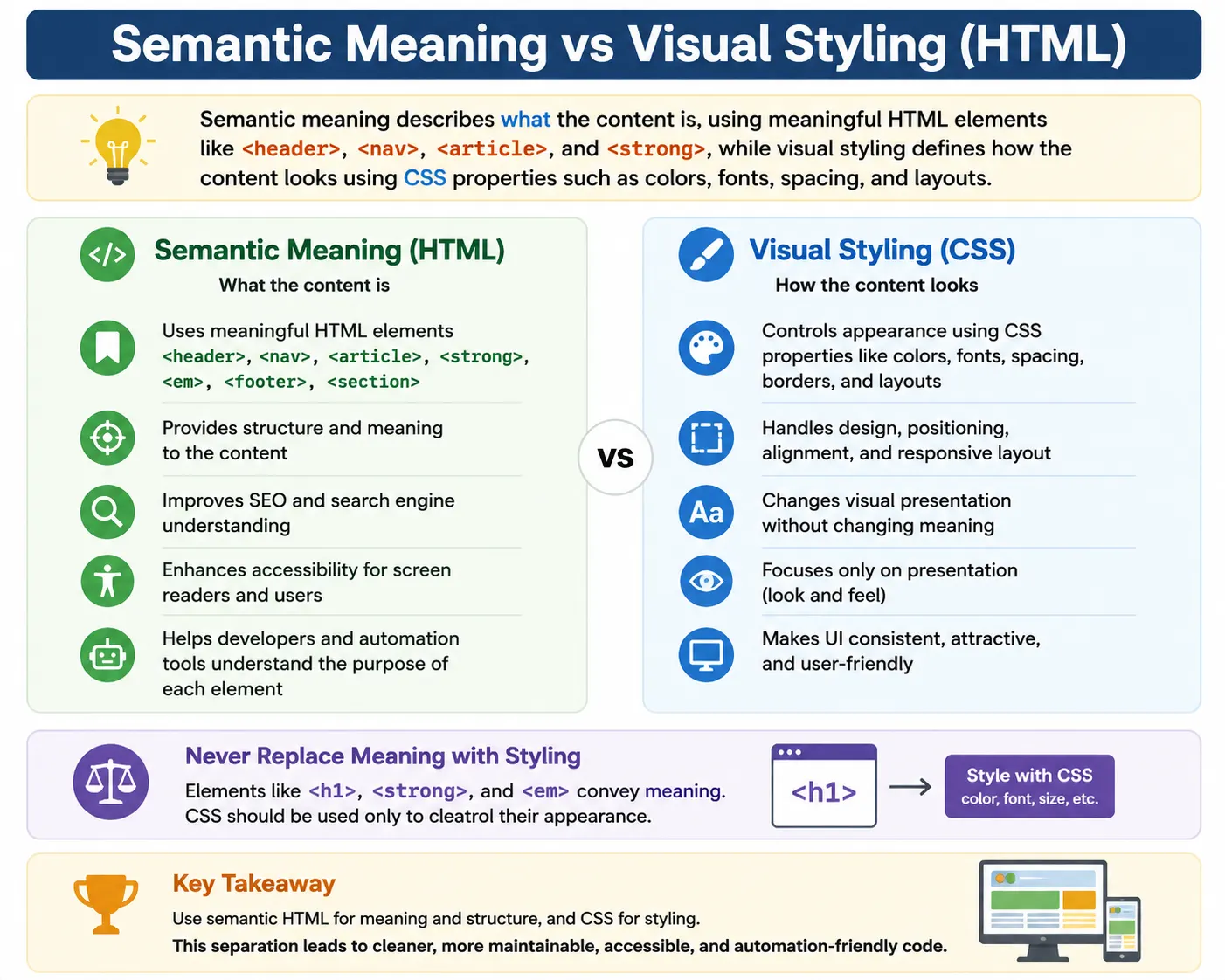
In modern web development, HTML is primarily responsible for meaning and structure. CSS is responsible for appearance and styling. This separation is one of the foundations of clean, maintainable, accessible, and professional web development.
A simple way to remember this is:
HTML tells the browser what the content is.
CSS tells the browser how the content should look.
For example, when you write:
<h1>HTML Tutorial</h1>you are not just making the text large. You are saying that this text is the main heading of the page. The browser may display it in a large font by default, but its real value is semantic. It communicates that the content is a primary heading.
On the other hand, when you write CSS like:
h1 {
    color: blue;
    font-size: 40px;
}
you are controlling appearance. You are saying how the heading should look visually.
Understanding this distinction helps developers write better HTML, improves accessibility for screen reader users, helps search engines understand content, and makes code easier to maintain.
What Is Semantic Meaning?
Semantic meaning refers to the purpose, role, or meaning of an element inside a document. Semantic HTML answers the question:
“What is this content?”
For example:
<h1>HTML Tutorial</h1>This means the content is the main heading of the page.
<nav>
    Navigation Links
</nav>
This means the content is a navigation area.
<article>
    Blog Content
</article>
This means the content is an independent article or post.
<footer>
    Copyright Information
</footer>
This means the content belongs to the footer section of the page.
These elements do more than display content. They describe the role of the content. That description is useful for browsers, search engines, screen readers, developers, and automation tools.
Semantic meaning makes HTML intelligent. Instead of simply saying “show this text,” semantic HTML says “this is a heading,” “this is navigation,” “this is a form,” “this is an article,” or “this is important information.”
What Is Visual Styling?
Visual styling refers to how content looks on the screen. Styling answers the question:
“How should this content appear?”
Visual styling is controlled mainly by CSS.
Example:
h1 {
    color: blue;
    font-size: 40px;
}
This CSS rule changes the color and size of the heading.
Another example:
footer {
    background: black;
    color: white;
}
This makes the footer background black and text white.
CSS controls visual appearance, including colors, fonts, spacing, borders, alignment, layout, animations, responsiveness, and positioning.
Visual styling is important because users need attractive, readable, and usable interfaces. However, styling should not replace semantic meaning. A visually large text is not automatically a heading. A bold text is not automatically important. A styled <div> is not automatically navigation.
Meaning should come from HTML. Appearance should come from CSS.
Simple Analogy: Book Structure
Think of a book.
The book has a title, chapters, sections, paragraphs, footnotes, and references. These describe the meaning and structure of the content.
That is semantic meaning.
The same book may use large fonts, bold headings, italic quotes, red text, spacing, and page borders. These describe appearance.
That is visual styling.
In a book, the chapter title is still a chapter title whether it is printed in blue, black, large font, or small font. Its role does not depend only on appearance.
HTML works the same way.
A heading remains a heading because it uses a heading tag, not because it looks big.
A navigation area remains navigation because it uses <nav>, not because it appears at the top of the page.
HTML vs CSS Responsibilities
HTML and CSS have different responsibilities.
HTML is responsible for content structure and meaning.
CSS is responsible for appearance and layout.
| Responsibility | HTML | CSS |
|---|---|---|
| Content structure | Yes | No |
| Semantic meaning | Yes | No |
| Colors | No | Yes |
| Fonts | No | Yes |
| Layout | No | Yes |
| Spacing | No | Yes |
| Visual design | No | Yes |
When developers mix these responsibilities incorrectly, code becomes harder to maintain and less accessible.
For example, using <b> to create a section heading is poor practice because <b> only makes text visually bold. It does not tell the browser that the text is a heading.
Correct HTML should describe meaning first.
Example of Semantic HTML
Consider this structure:
<header>
    SoftwareTips4U
</header>

<nav>
    Home
    Courses
</nav>

<main>
    HTML Tutorial
</main>

<footer>
    Copyright
</footer>
Each element communicates meaning.
<header> means the top introductory section of the page.
<nav> means navigation links.
<main> means the main content area.
<footer> means footer information.
Even before CSS is applied, the structure is meaningful.
A developer, browser, screen reader, or search engine can understand the purpose of each section.
Example of Non-Semantic HTML
Now consider this structure:
<div>
    SoftwareTips4U
</div>

<div>
    Home
    Courses
</div>

<div>
    HTML Tutorial
</div>

<div>
    Copyright
</div>
Visually, CSS can make this look exactly like the semantic version.
However, meaning is missing.
The browser only sees four generic containers. It does not know which one is the header, which one is navigation, which one is main content, and which one is footer.
This is why semantic HTML is better than using <div> everywhere.
The page may look the same to sighted users, but it is not equally meaningful to browsers, search engines, assistive technologies, and future developers.
Why Semantic Meaning Matters
Semantic HTML matters because webpages are not only consumed visually. They are also processed by machines and assistive technologies.
Semantic meaning helps browsers understand document structure. It helps search engines understand page topics. It helps screen readers help users navigate content. It helps developers maintain code more easily. It helps automation testers locate meaningful elements.
Without semantic meaning, a webpage may still look correct, but its internal structure may be weak.
Good semantic HTML improves the quality of the document beyond appearance.
Search Engine Perspective
Search engines analyze HTML structure to understand content.
Example:
<h1>HTML Tutorial</h1>This clearly communicates that “HTML Tutorial” is the main topic of the page.
Now compare:
<div>HTML Tutorial</div>This may look the same if styled with CSS, but it gives search engines less structural information.
Search engines can still read the text, but the semantic importance is weaker.
Headings, articles, sections, navigation areas, and footer elements all help search engines interpret page structure.
Semantic HTML does not guarantee ranking, but it supports better content understanding.
Accessibility Perspective
Accessibility is one of the strongest reasons to use semantic HTML.
Screen readers rely heavily on semantic elements.
For example:
<nav>
    Home
    Courses
    Contact
</nav>
A screen reader can announce this as a navigation region.
But if the same content is written as:
<div>
    Home
    Courses
    Contact
</div>
the screen reader only sees a generic container.
That is less useful.
Semantic elements help users with disabilities understand and navigate pages more efficiently.
For example, screen reader users can jump directly to headings, navigation areas, main content, forms, and landmarks when semantic HTML is used properly.
Semantic Tags Introduced in HTML5
HTML5 introduced many semantic elements that make page structure clearer.
Common examples include:
<header>
<nav>
<main>
<section>
<article>
<aside>
<footer>
Each element has a specific meaning.
<header> represents introductory content.
<nav> represents navigation links.
<main> represents the main content.
<section> represents a thematic section.
<article> represents independent content.
<aside> represents secondary or related content.
<footer> represents footer information.
These tags reduce the need to use generic <div> elements for everything.
Visual Styling Without Semantic Meaning
Consider:
<b>Warning</b>The browser displays the word in bold.
However, semantically, <b> does not indicate strong importance. It only draws visual attention.
If the content is truly important, this is better:
<strong>Warning</strong>Both may look bold by default, but <strong> communicates importance.
This matters for accessibility tools and document meaning.
Visual styling alone affects appearance. Semantic markup communicates purpose.
Semantic Meaning With Styling
Semantic elements can also be styled visually.
Example:
<strong>Warning</strong>By default, browsers display <strong> as bold. But the important part is not the bold style. The important part is the meaning: strong importance.
CSS can further style it:
strong {
    color: red;
}
Now the text is both semantically important and visually noticeable.
This is the correct approach: use HTML for meaning and CSS for appearance.
Another Example: <i> vs <em>
The difference between <i> and <em> is another good example.
Visual only or alternate voice:
<i>Bonjour</i>This may be used for a foreign word.
Semantic emphasis:
<em>must</em>This indicates that the word “must” is emphasized in the sentence.
Both may appear italic in the browser, but their meaning is different.
<i> usually represents alternate voice, a foreign term, a technical term, or a title.
<em> represents emphasis.
This distinction is important in semantic HTML.
Why HTML Should Not Be Used Only for Styling
Using HTML only for appearance creates poor structure.
Bad example:
<b>Course Details</b>If “Course Details” is actually a section heading, then this is better:
<h2>Course Details</h2>If the text only needs to look bold but is not a heading or important content, then CSS may be better:
<p class="bold-text">Course Details</p>CSS:
.bold-text {
    font-weight: bold;
}
The correct choice depends on meaning.
Ask first: What is this content?
Then decide the HTML element.
After that, use CSS to style it.
Separation of Concerns
Modern web development follows the principle called separation of concerns.
The three main layers are:
HTML for structure.
CSS for presentation.
JavaScript for behavior.
This can be summarized as:
HTML       → Structure and Meaning
CSS        → Appearance and Layout
JavaScript → Behavior and Interaction
When these responsibilities are separated, code becomes easier to maintain.
If the design changes, you update CSS.
If the structure changes, you update HTML.
If behavior changes, you update JavaScript.
This separation keeps projects clean and scalable.
Real-World Example: Old vs Modern Approach
Older HTML often mixed styling directly into markup.
Bad older approach:
<font color="red">
Important
</font>
This mixes content and styling. The <font> tag is outdated and should not be used in modern HTML.
Modern approach:
<p class="important">
Important
</p>
CSS:
.important {
    color: red;
}
This separates meaning and appearance.
If the text is truly important, an even better semantic version may be:
<strong class="important">
Important
</strong>
CSS:
.important {
    color: red;
}
Now the content has semantic importance and visual styling.
Semantic Elements vs Non-Semantic Elements
Semantic elements clearly describe their purpose.
Examples:
<header>
<nav>
<main>
<article>
<footer>
Non-semantic elements are generic containers.
Examples:
<div>
<span>
A <div> does not tell the browser what the content means. It only groups content.
A <span> is similar, but inline.
This does not mean <div> and <span> are bad. They are useful when no semantic element fits. But they should not replace semantic elements when a better option exists.
Example: Page Layout
Non-semantic layout:
<div id="top">
</div>

<div id="menu">
</div>

<div id="content">
</div>

<div id="bottom">
</div>
Semantic layout:
<header>
</header>

<nav>
</nav>

<main>
</main>

<footer>
</footer>
The semantic version is easier to read and understand.
A developer immediately knows the purpose of each section.
Screen readers and search engines also receive clearer structural information.
Impact on SEO
Semantic HTML supports SEO by helping search engines understand page structure.
Search engines can identify headings, main content, navigation, articles, and important sections more clearly when semantic HTML is used.
For example:
<main>
    <article>
        <h1>HTML Tutorial</h1>
        <p>HTML is used to structure webpages.</p>
    </article>
</main>
This structure clearly communicates that the main article is about HTML.
A search engine can still read content inside generic <div> elements, but semantic structure provides better context.
Good semantic HTML supports better crawling, indexing, and interpretation.
Impact on Accessibility
Semantic HTML has a major impact on accessibility.
Assistive technologies can identify page regions such as navigation, main content, articles, forms, and footers.
Example:
<main>
    <h1>HTML Tutorial</h1>
</main>
This helps users quickly move to the main content.
Another example:
<button>Submit</button>A real <button> is better than:
<div class="button">Submit</div>because the real button has built-in keyboard and accessibility behavior.
Semantic HTML often provides functionality and meaning automatically.
Impact on Maintainability
Semantic HTML makes code easier to maintain.
Compare:
<article>with:
<div id="box3">The first clearly tells the developer that the content is an article.
The second requires guessing.
In real projects, future developers may not know why a generic container exists. Semantic tags reduce confusion and improve team collaboration.
Clean semantic structure is easier to debug, update, test, and scale.
Impact on Selenium Testing
Semantic HTML can also help automation testing.
For example, Selenium can locate real buttons:
driver.findElement(By.tagName("button"));Forms:
driver.findElement(By.tagName("form"));Navigation:
driver.findElement(By.tagName("nav"));Headings:
driver.findElement(By.tagName("h1"));Semantic elements create more predictable page structure.
Automation becomes harder when everything is a <div> with random classes.
Good semantic HTML supports better locator strategy and more stable tests.
Common Mistake: Using Headings for Size
Bad:
<h1>Large Text</h1>if the text is not actually the main heading.
This creates false structure.
Better:
<p class="large-text">Large Text</p>CSS:
.large-text {
    font-size: 32px;
}
Use headings for document hierarchy, not just size.
Common Mistake: Using <b> Instead of <strong>
Bad:
<b>Important</b>if the text is truly important.
Better:
<strong>Important</strong>The visual result may look similar, but the semantic result is different.
<strong> communicates importance.
Common Mistake: Using <i> Instead of <em>
Bad:
<i>must</i>if the word is emphasized.
Better:
<em>must</em>The <em> tag communicates emphasis.
Use <i> for foreign words, titles, technical terms, or alternate voice.
Common Mistake: Excessive Use of <div>
Bad:
<div>
    <div>
        <div>
            Content
        </div>
    </div>
</div>
This creates generic structure with little meaning.
Better:
<main>
    <section>
        <article>
            Content
        </article>
    </section>
</main>
Use semantic elements when they match the content purpose.
Interview Questions
A common question is: What is semantic HTML?
Semantic HTML is HTML that describes the meaning and purpose of content using meaningful elements.
Another question is: What is visual styling?
Visual styling is the appearance of content, controlled mainly by CSS.
Which technology handles styling?
CSS handles styling.
Why is semantic HTML important?
It improves accessibility, SEO, maintainability, readability, and automation stability.
What is the difference between <strong> and <b>?
<strong> conveys importance. <b> only changes appearance.
Comparison Table
| Aspect | Semantic Meaning | Visual Styling |
|---|---|---|
| Purpose | Describes content | Changes appearance |
| Controlled By | HTML | CSS |
| Helps SEO | Yes | Not directly |
| Helps Accessibility | Yes | Not directly |
| Affects Appearance | Sometimes by default | Yes |
| Provides Meaning | Yes | No |
Interview-Ready Answer
Semantic meaning describes the purpose and structure of content using meaningful HTML elements such as <header>, <nav>, <article>, <strong>, and <em>. Visual styling controls how content looks using CSS properties such as colors, fonts, spacing, borders, and layouts. Modern web development separates meaning from appearance by using HTML for structure and CSS for presentation.
Key Takeaway
Semantic meaning and visual styling are different but connected concepts. Semantic meaning explains what the content is. Visual styling explains how the content should look. HTML should be used to define structure and meaning, while CSS should be used to control appearance and layout.
A webpage can look correct but still be poorly structured if semantic HTML is ignored. Good semantic HTML improves SEO, accessibility, maintainability, developer readability, and automation stability. CSS can always change appearance, but semantic meaning must come from the correct HTML element.
One-Line Insight
HTML tells the browser what content is; CSS tells the browser how that content should look.