Semantic HTML vs Div Soup
Introduction
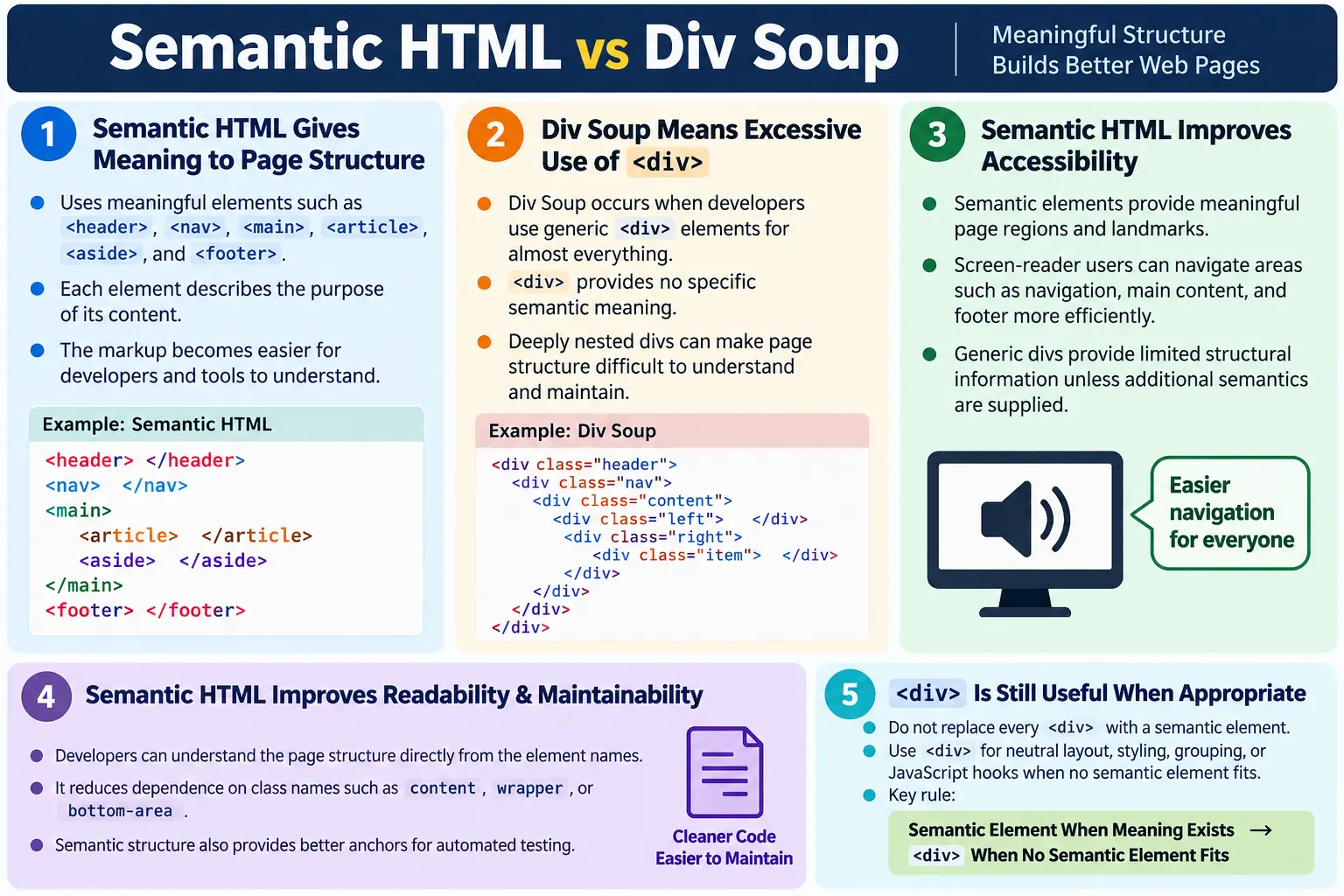
One of the biggest improvements introduced in HTML5 was the addition of semantic elements such as <header>, <nav>, <main>, <section>, <article>, <aside>, and <footer>. These elements allow developers to describe the meaning of different parts of a webpage directly in the markup. Instead of building a page as a collection of anonymous boxes, developers can create a document that clearly communicates its structure.
Before HTML5, many developers built almost every webpage with generic <div> elements. A header was often written as <div class="header">, the menu as <div class="menu">, the main area as <div class="content">, and the footer as <div class="footer">. This approach worked visually, but the HTML itself had very little meaning. Pages became filled with nested <div> tags, and this pattern became known as Div Soup.
Understanding the difference between Semantic HTML and Div Soup is essential for writing clean, accessible, SEO-friendly, and maintainable code. A page can look identical in the browser whether it uses semantic elements or generic containers, but the underlying structure is not the same. Semantic HTML gives meaning to the page. Div Soup mostly gives layout containers. That difference affects developers, testers, search engines, browsers, screen readers, and future maintenance.
What Is Semantic HTML?
Semantic HTML means using HTML elements according to their meaning and purpose, not simply according to their default appearance. A semantic element tells the reader of the code what kind of content it contains. For example, <header> represents introductory content, <nav> represents navigation links, <main> represents the primary content of the document, <article> represents independent content, <aside> represents supplementary content, and <footer> represents concluding information.
<header>
  ...
</header>

<nav>
  ...
</nav>

<main>
  ...
</main>

<footer>
  ...
</footer>
Each element clearly describes its role. A developer reading the page can quickly identify the major regions. A screen reader can expose landmarks. Search engines can better understand the structure. Automated tests can locate meaningful regions. The markup becomes self-explanatory.
Semantic HTML is not about using fancy tags. It is about choosing the correct tag for the content. If a block contains navigation links, <nav> is more meaningful than a generic <div>. If a block is the main content of the page, <main> is more meaningful than <div class="main">. If a block is a standalone article, <article> communicates that purpose better than <div class="post">.
What Is Div Soup?
Div Soup refers to excessive use of <div> elements to build every part of a webpage, even when more meaningful elements exist. The page may still render correctly, but the HTML provides little structural information. A browser sees generic containers. A developer must inspect class names, IDs, CSS, and surrounding code to understand what each container means.
<div>
  <div>
    <div>
      <div>
        ...
      </div>
    </div>
  </div>
</div>
This type of markup is difficult to understand because every part looks the same. A <div> can mean almost anything. It can be a header, menu, article, sidebar, footer, card, layout wrapper, modal, or random grouping element. Without meaningful names or context, the structure becomes unclear.
The problem is not that <div> exists. The <div> element is still useful and valid. The problem is using it for everything. Div Soup happens when developers ignore semantic elements and build the entire document from generic containers. The result is HTML that depends heavily on CSS class names for meaning.
Why Is It Called Div Soup?
The phrase Div Soup describes the visual experience of reading code filled with nested <div> tags. Like ingredients floating in a bowl of soup, the containers blend together. It becomes hard to identify where one meaningful region starts and another ends.
<div id="top">
  <div id="menu">
    <div id="content">
      <div id="left">
        <div id="right">
          <div id="bottom">
Everything is a <div>. The IDs give hints, but the elements themselves do not communicate meaning. A browser does not treat id="menu" exactly like a semantic <nav> element. A screen reader does not automatically receive the same landmark information from a generic div. A new developer must learn the naming conventions of the project before understanding the structure.
Div Soup becomes more painful as a project grows. A small page with five divs may be manageable. A real application with hundreds of components, nested wrappers, responsive containers, and JavaScript hooks can become difficult to debug. Semantic elements reduce that mental load by making the document structure visible in the markup.
Example of Div Soup
Consider a simple tutorial page written with generic containers.
<div class="header">
  <h1>SoftwareTips4U</h1>
</div>

<div class="menu">
  <a href="#">Home</a>
  <a href="#">Courses</a>
</div>

<div class="content">
  <div class="post">
    <h2>HTML Tutorial</h2>
    <p>...</p>
  </div>
</div>

<div class="footer">
  © 2026
</div>
This page can work visually. CSS can style the header, menu, content, post, and footer. Users can read the page. Links can be clicked. But structurally, the browser sees generic containers. The names are meaningful only because a human developer understands the class values.
This approach also encourages extra wrappers. One div becomes two, then three, then a deeply nested structure. Some wrappers exist for layout, some for styling, some for JavaScript, and some for historical reasons. Over time, the original intent becomes unclear.
Same Page Using Semantic HTML
The same page can be written with semantic elements.
<header>
  <h1>SoftwareTips4U</h1>
</header>

<nav>
  <a href="#">Home</a>
  <a href="#">Courses</a>
</nav>

<main>
  <article>
    <h2>HTML Tutorial</h2>
    <p>...</p>
  </article>
</main>

<footer>
  © 2026
</footer>
Now every part of the page has a clear purpose. The header introduces the site or page. The nav contains navigation links. The main element contains the primary content. The article is a standalone tutorial. The footer contains closing information. The visual result may be the same as the div version, but the document meaning is much stronger.
This semantic version is easier to read even without CSS. A developer can scan the markup and understand the page structure quickly. This is one of the practical strengths of semantic HTML: it makes the code communicate directly.
Browser Understanding
When a browser parses Div Soup, it understands that the document contains nested generic containers. The browser can render them, apply CSS, and attach JavaScript behavior, but the elements do not describe their roles.
Div
  ↓
Div
  ↓
Div
  ↓
Div
With semantic HTML, the structure is more meaningful.
Header
  ↓
Navigation
  ↓
Main
  ↓
Article
  ↓
Footer
The browser still renders both versions, but semantic markup provides better context for tools that use the document structure. This context is especially valuable for accessibility APIs, browser developer tools, testing tools, search engine crawlers, and maintainers.
Accessibility Comparison
Accessibility is one of the strongest reasons to prefer semantic HTML. Assistive technologies rely on structure. When a page uses semantic landmarks such as <header>, <nav>, <main>, and <footer>, screen reader users can navigate more efficiently. They can jump to main content, skip repetitive navigation, identify the footer, and understand the page layout.
In Div Soup, a screen reader may encounter many generic containers. Unless ARIA roles are added correctly, the page provides limited structural information. Users may need to move through content linearly instead of jumping between meaningful regions.
Div Soup:
Div
  ↓
Div
  ↓
Div

Semantic HTML:
Header
  ↓
Navigation
  ↓
Main
  ↓
Footer
Semantic HTML does not automatically make a page fully accessible. Developers still need good headings, labels, keyboard support, color contrast, focus indicators, alt text, and meaningful link text. But semantic elements provide a strong foundation. Without that foundation, developers often need to recreate meaning with ARIA, and incorrect ARIA can make accessibility worse.
SEO Comparison
Search engines need to understand what a page is about and how its content is organized. Semantic HTML helps by separating primary content from navigation, sidebars, footers, and independent articles. A generic <div> does not tell a crawler whether content is a menu, tutorial, article, sidebar, or footer. A semantic element gives a clearer signal.
<article>
  <h1>HTML Tutorial</h1>
  <p>The main article content appears here.</p>
</article>
The <article> element suggests that the content is an independent piece. The <main> element identifies the central content of the document. The <footer> element identifies supporting links and legal information. These distinctions help search engines analyze page structure more accurately.
Semantic HTML is not a replacement for useful content, good titles, descriptive meta information, fast performance, or mobile usability. However, it supports a clean structure. Good SEO begins with pages that are understandable to both humans and machines.
Code Readability
Code readability is where the difference between Semantic HTML and Div Soup becomes obvious during everyday development. Div Soup often looks like a stack of generic boxes.
<div class="box">
  <div class="wrapper">
    <div class="container">
      <div class="main">
        ...
      </div>
    </div>
  </div>
</div>
Semantic HTML shows the page structure directly.
<header>
  ...
</header>

<main>
  <section>
    ...
  </section>
</main>

<footer>
  ...
</footer>
Readable code reduces mistakes. When the structure is clear, developers are less likely to put content in the wrong place, duplicate unnecessary wrappers, or break layout while making changes. New team members can become productive faster because the HTML explains itself.
Developer Perspective
Imagine a new developer joining a project. In a Div Soup page, they may see class names such as top, content-wrap, inner, left-box, and bottom-area. They must inspect CSS and JavaScript to understand whether each div is structural, visual, interactive, or meaningful. This slows down onboarding.
In a semantic page, the developer sees <header>, <nav>, <main>, <article>, <aside>, and <footer>. The high-level structure is self-explanatory. Classes may still be used for styling, but the HTML element names already communicate purpose.
This is especially useful in large websites where content templates are reused. A consistent semantic structure allows shared CSS, shared tests, reusable components, and better documentation. It also reduces dependency on fragile naming conventions.
Browser Workflow
In a Div Soup structure, the browser reads a div, creates a generic element node, applies CSS, and renders it. In a semantic structure, the browser reads a header, nav, main, section, article, aside, or footer, creates the corresponding element node, and exposes more meaningful structure to accessibility APIs and developer tools.
Div Soup:
Read Div
  ↓
Generic Container
  ↓
Render

Semantic HTML:
Read Header
  ↓
Read Navigation
  ↓
Read Main
  ↓
Read Footer
  ↓
Render
The visual rendering can be similar, but the semantic version has richer document information. This is why semantic HTML is often described as meaningful markup. It does not merely draw a page; it describes a page.
Real-World Example
A real-world Div Soup layout might look like this:
<div id="header">
  SoftwareTips4U
</div>

<div id="menu">
  ...
</div>

<div id="content">
  ...
</div>

<div id="footer">
  ...
</div>
A semantic version communicates the same structure more clearly:
<header>
  SoftwareTips4U
</header>

<nav>
  ...
</nav>

<main>
  ...
</main>

<footer>
  ...
</footer>
The semantic version is easier to understand and maintain. It also gives browsers and assistive technologies more information. The page no longer depends only on class names or IDs to explain its structure.
When Should You Use Div?
The <div> element is not obsolete. It remains useful when no semantic element accurately represents the content. A div is appropriate for layout containers, style wrappers, JavaScript hooks, reusable UI components, grids, cards, modals, and other design patterns that do not have a specific HTML element.
<div class="card">
  <h2>HTML Course</h2>
  <p>Learn HTML from beginner to advanced.</p>
</div>
Here, card is a design pattern, not a semantic HTML concept. A div can be appropriate. If the card represents an independent article or product listing, another element such as <article> might be better. The decision depends on meaning.
Use div when you need a neutral container. Avoid div when a clear semantic element exists. This balanced approach is more realistic than saying "never use div" or "use div for everything."
When Should You Use Semantic Elements?
Use semantic elements when the content has a clear role. A website header should use <header>. A main menu should use <nav>. The primary page content should use <main>. A topic or chapter can use <section>. A blog post or standalone tutorial can use <article>. A sidebar or related content block can use <aside>. A page or section closing area can use <footer>.
| Content | Semantic Element |
|---|---|
| Website header | <header> |
| Main menu | <nav> |
| Primary page content | <main> |
| Topic or chapter | <section> |
| Blog post or tutorial | <article> |
| Sidebar or related content | <aside> |
| Page footer | <footer> |
The best element is the one that matches the role of the content. If you choose semantic elements only because they are available, you may create confusing structure. Semantic HTML requires judgment.
Semantic HTML and CSS
Semantic HTML does not limit CSS. Any semantic element can be styled just like a div. A <header> can be styled with a background color. A <nav> can be displayed horizontally. A <main> can be placed inside a grid. A <footer> can have columns.
header {
  background: #0b3d5c;
  color: white;
  padding: 20px;
}

main {
  max-width: 960px;
  margin: 0 auto;
}

footer {
  border-top: 1px solid #ddd;
  padding: 24px;
}
The element choice should come from meaning. The styling should come from CSS. Problems happen when developers choose elements based on appearance rather than purpose. For example, using <section> only because it creates a block-level element is not semantic. Using <footer> only because a block should appear at the bottom of a card is also not always correct.
Semantic HTML and ARIA
ARIA can add accessibility information when native HTML is not enough, but semantic HTML should be the first choice. Native semantic elements are usually more reliable than recreating the same meaning with ARIA roles on generic divs.
<div role="navigation">
  ...
</div>
This can be improved by using the native element:
<nav>
  ...
</nav>
The native element is shorter, clearer, and less error-prone. ARIA is useful for complex widgets and cases where HTML has no suitable semantic element. It should not be used as a replacement for basic semantic HTML when the correct element already exists.
Maintainability Benefits
Maintainability is one of the most practical benefits of semantic HTML. A clean semantic structure makes future changes safer. When a developer needs to update navigation, they can look for <nav>. When they need the main content, they can look for <main>. When they need footer links, they can look for <footer>.
In Div Soup, the same task may require searching through many class names. One project may use menu, another may use navigation, another may use nav-bar, and another may use links-wrapper. Semantic elements create a shared vocabulary built into HTML itself.
Maintainable code is not only code that works today. It is code that another developer can understand later. Semantic HTML makes that easier by reducing guesswork.
Testing and Automation Benefits
Semantic HTML often makes automated testing easier. Selenium, Playwright, Cypress, and accessibility tools can locate meaningful regions more reliably when the page uses semantic elements. Tests can verify that a page has one main region, a navigation region, a footer, and well-structured articles.
For example, Selenium can locate the main content by tag name:
WebElement main =
driver.findElement(
    By.tagName("main"));
Navigation can be located similarly:
WebElement nav =
driver.findElement(
    By.tagName("nav"));
Automation testers commonly verify the presence of semantic landmarks, page structure, accessibility basics, navigation, headers, footers, and responsive behavior. Semantic HTML gives tests better anchors. Class names may change during redesigns, but core semantic structure should remain stable when the content roles do not change.
Common Mistakes
The first common mistake is using <div> for everything. This creates generic markup and misses opportunities to communicate meaning.
<div class="header">
  ...
</div>
A better structure is:
<header>
  ...
</header>
The second mistake is replacing every div with a semantic element. This is also wrong. Not every container has a semantic role. A design wrapper, layout grid, or card container may be a valid div. Semantic HTML does not mean eliminating divs completely.
<header>
  Button
</header>
This is bad if the content is not introductory. The element should match meaning, not a desire to avoid divs.
The third mistake is choosing semantic elements for styling. CSS controls appearance. HTML controls meaning. A section should not be used merely because you want margin. A footer should not be used merely because something appears at the bottom of a visual card. A nav should not be used for every group of links unless that group is actually navigation.
The fourth mistake is ignoring headings. Elements such as <section> and <article> often need headings to clarify their purpose. A page full of anonymous sections can be only slightly better than a page full of anonymous divs.
Real-World Page Structure
A real-world semantic page may combine several semantic elements.
<header>
  Logo
</header>

<nav>
  Main Menu
</nav>

<main>
  <section>
    <h2>HTML</h2>
  </section>

  <article>
    <h2>Latest Tutorial</h2>
  </article>

  <aside>
    Related Courses
  </aside>
</main>

<footer>
  Copyright
</footer>
This structure is meaningful for users, browsers, developers, search engines, and assistive technologies. It separates page identity, navigation, main content, independent content, related content, and footer information.
Practical Refactoring Approach
When converting Div Soup into semantic HTML, do not replace everything at once without understanding the page. Start by identifying the major regions. Find the site header, main navigation, primary content, sidebars, articles, sections, and footer. Replace the obvious structural containers first.
Next, review headings. A semantic structure without good headings can still be confusing. Make sure the page has a logical heading hierarchy. Then review navigation groups. Use <nav> only for important navigation areas. Review sidebars and related content to decide whether <aside> is appropriate.
After the semantic structure is improved, test the page visually and functionally. The layout should remain correct. Then run accessibility checks. Semantic refactoring should improve the page without breaking CSS, JavaScript, or test automation.
Decision Checklist
Before choosing <div>, ask whether a more meaningful element exists. If the content is introductory, consider <header>. If it is navigation, consider <nav>. If it is the primary content, consider <main>. If it is a standalone item, consider <article>. If it is a thematic group, consider <section>. If it is supplementary, consider <aside>. If it is concluding information, consider <footer>.
If no semantic element fits, use <div>. That is not a failure. It is the correct choice for neutral grouping. The goal is not to remove all divs. The goal is to avoid using divs where HTML already provides a meaningful element.
Why Div Soup Happens in Real Projects
Div Soup often happens gradually. A project may start with clean markup, but as new features are added, developers insert extra wrappers for spacing, alignment, JavaScript behavior, animation, tracking, and responsive layout. Each wrapper may seem reasonable at the time. After many changes, the page becomes a deeply nested structure where the purpose of each layer is unclear.
Frameworks can also contribute to Div Soup when developers treat components as visual boxes instead of meaningful document parts. A component named Header may render a div. A component named ArticleCard may render another div. A layout system may wrap everything in containers. The final DOM may contain many layers before the actual content appears. This does not mean frameworks are bad. It means developers still need to think about HTML semantics inside components.
Another reason Div Soup happens is fear of choosing the wrong semantic element. Beginners may use div for everything because it feels safe. A div has no specific meaning, so it rarely feels obviously wrong. However, using div everywhere avoids making meaningful decisions. Good HTML requires deciding what content represents, not only how it should look.
Div Soup also appears when CSS architecture drives the HTML too strongly. If every visual requirement creates a new wrapper, the markup becomes layout-first. A better approach is content-first: choose meaningful HTML for the document, then use CSS classes and layout rules to style it. Some wrappers will still be needed, but they should not erase the semantic structure.
Semantic HTML in Component-Based Applications
Modern applications are often built with component frameworks. Even in those environments, semantic HTML still matters. A React, Angular, Vue, or server-rendered component ultimately produces HTML. Users, browsers, search engines, and assistive technologies interact with the final DOM, not with the component file names.
For example, a component named SiteHeader should usually render a <header> element. A component named MainNavigation should usually render a <nav>. A component named ArticlePage should likely contain <main> and <article>. If every component renders only <div>, the application may look organized in source files but still produce Div Soup in the browser.
<header class="site-header">
  <h1>SoftwareTips4U</h1>
</header>

<main class="page-content">
  <article class="tutorial">
    <h2>Semantic HTML</h2>
    <p>Tutorial content appears here.</p>
  </article>
</main>
Classes are still useful. They provide styling hooks and component-specific names. The key is that classes should complement semantic elements, not replace them. A semantic element with a class is often the best of both worlds: meaning for the document and control for styling.
Semantic HTML and Design Systems
Design systems define reusable visual patterns such as cards, buttons, grids, banners, alerts, tabs, and modals. These patterns often need neutral containers, so <div> still has a legitimate role. However, a design system should not force every component to become a div. It should allow semantic elements where appropriate.
For example, a card component can sometimes be an <article> when it represents a blog post, news item, product, or tutorial preview that can stand alone. The same visual card may be a <div> when it is only a layout group. A navigation component should render <nav> when it represents navigation. A footer component should render <footer> when it represents closing page information.
A strong design system separates visual styling from semantic responsibility. It may allow developers to choose the rendered element. For example, a Card component may support rendering as an article, section, anchor, or div depending on the use case. This flexibility helps teams avoid Div Soup without losing design consistency.
How to Audit a Page for Div Soup
A practical audit starts by opening the page in browser developer tools and inspecting the DOM. Look for long chains of nested divs. Then ask whether any of those containers represent recognizable page regions. If a div represents the site header, it may be a candidate for <header>. If it represents the main navigation, it may be a candidate for <nav>. If it wraps the primary content, it may be a candidate for <main>.
Next, inspect the accessibility tree if your browser provides one. Check whether landmarks such as navigation, main, complementary, and content information are present. If the visual page clearly has those regions but the accessibility tree does not, the markup may be too generic.
Then review headings. A semantic page should have a meaningful heading structure. If the page uses many sections without headings, users may still struggle to understand the document outline. If headings are used only for font size instead of structure, the page may need correction.
Finally, review automated tests and selectors. If tests rely heavily on fragile wrapper classes such as .container > div > div > div, the page may benefit from semantic structure and more stable selectors. Semantic elements are not a replacement for good test IDs in complex applications, but they provide better baseline structure.
Step-by-Step Refactoring Example
Suppose a page begins with this structure:
<div class="top">Logo</div>
<div class="links">Home Courses Contact</div>
<div class="middle">
  <div class="story">
    <h1>HTML Basics</h1>
    <p>Main tutorial content.</p>
  </div>
  <div class="side">Related lessons</div>
</div>
<div class="bottom">Copyright</div>
The first step is to identify the roles. The top area is a header. The links are navigation. The middle area contains main content. The story is an article. The side area is supplementary content. The bottom area is a footer.
<header>Logo</header>
<nav>Home Courses Contact</nav>
<main>
  <article>
    <h1>HTML Basics</h1>
    <p>Main tutorial content.</p>
  </article>
  <aside>Related lessons</aside>
</main>
<footer>Copyright</footer>
The second version is shorter and clearer. CSS classes can be added back where needed. For example, <header class="site-header"> is completely fine. The semantic element provides meaning, and the class provides styling control.
Performance and Semantics
Semantic HTML is not primarily a performance feature. Replacing divs with semantic elements will not automatically make a slow website fast. Performance depends on many factors, including JavaScript size, CSS complexity, images, fonts, server response time, caching, and rendering behavior. However, cleaner markup can indirectly help maintainability and reduce unnecessary wrapper elements.
Excessive nesting can make CSS more complex. Deep selectors, unnecessary wrappers, and layout hacks can increase maintenance cost and sometimes contribute to style recalculation complexity. The bigger benefit is usually clarity rather than raw speed. A clean semantic structure helps developers write simpler CSS and avoid fragile layout dependencies.
Performance work should not be confused with semantic work, but they support the same goal: building pages that are efficient, understandable, and user-friendly. Good HTML is a foundation, not the entire performance strategy.
Accessibility Landmarks in Practice
Landmarks are major page regions that assistive technology users can navigate quickly. Semantic elements such as <nav>, <main>, <aside>, and page-level <footer> can expose landmark roles. This gives users a shortcut map of the page.
In Div Soup, developers may need ARIA roles to create similar landmarks. For example, <div role="main"> can expose a main region. But if HTML already has <main>, the native element is simpler and clearer. Native semantics reduce the chance of mismatched roles, missing labels, or incorrect ARIA usage.
Good landmark usage also means avoiding too many repeated landmarks without labels. If a page contains multiple navigation areas, labels such as aria-label="Main navigation" and aria-label="Footer navigation" help users distinguish them. Semantic HTML gives structure, and thoughtful labels refine that structure.
What Semantic HTML Does Not Mean
Semantic HTML does not mean using the newest or most specific-looking element everywhere. It does not mean avoiding classes. It does not mean that every visual block must become a section. It does not mean that CSS becomes unnecessary. It does not mean that accessibility is solved automatically.
Semantic HTML means the element choice should reflect the content purpose. A div can be correct. A section can be wrong. A nav can be misused. A header can appear inside an article as well as at the page level. The correct answer depends on context.
This is why semantic HTML is a thinking skill, not a memorization exercise. Developers need to understand what the content represents, where it belongs in the document, and how users will navigate it. The elements are tools for expressing that understanding.
Comparison Table
| Semantic HTML | Div Soup |
|---|---|
| Uses meaningful elements | Uses mostly generic <div> elements |
| Easy to understand | Harder to understand |
| Better accessibility foundation | Limited semantic information |
| Better SEO structure | Less meaningful structure |
| Easier maintenance | Can become difficult to maintain |
Examples: <header>, <main>, <article> | Mostly <div> and <span> |
Common Interview Questions
What is Div Soup? Div Soup refers to the excessive use of generic <div> elements instead of meaningful semantic HTML elements.
Why is Semantic HTML better? It improves accessibility, SEO structure, readability, maintainability, document structure, and testing clarity.
Is <div> deprecated? No. The div element remains useful when no semantic element appropriately represents the content.
Should every <div> be replaced with a semantic element? No. Use semantic elements only when they accurately describe the content. Use div for neutral layout or grouping.
Does Semantic HTML improve accessibility? Yes. It provides meaningful landmarks and structure that help screen readers and keyboard users navigate the page.
Does Semantic HTML guarantee good SEO? No. It helps structure the page, but good SEO also requires useful content, proper titles, good performance, mobile friendliness, and clear internal linking.
Interview-Ready Answer
Semantic HTML uses elements such as <header>, <nav>, <main>, <section>, <article>, <aside>, and <footer> to describe the meaning of different parts of a webpage. In contrast, Div Soup refers to building an entire page using mostly generic <div> elements, making the document harder for browsers, search engines, assistive technologies, developers, and testers to understand. Semantic HTML improves accessibility, SEO structure, maintainability, readability, and document clarity, while <div> should be reserved for layout or grouping when no semantic element is appropriate.
One-Line Insight
Semantic HTML gives your webpage meaning; Div Soup gives it only containers.