<section> Element
Introduction
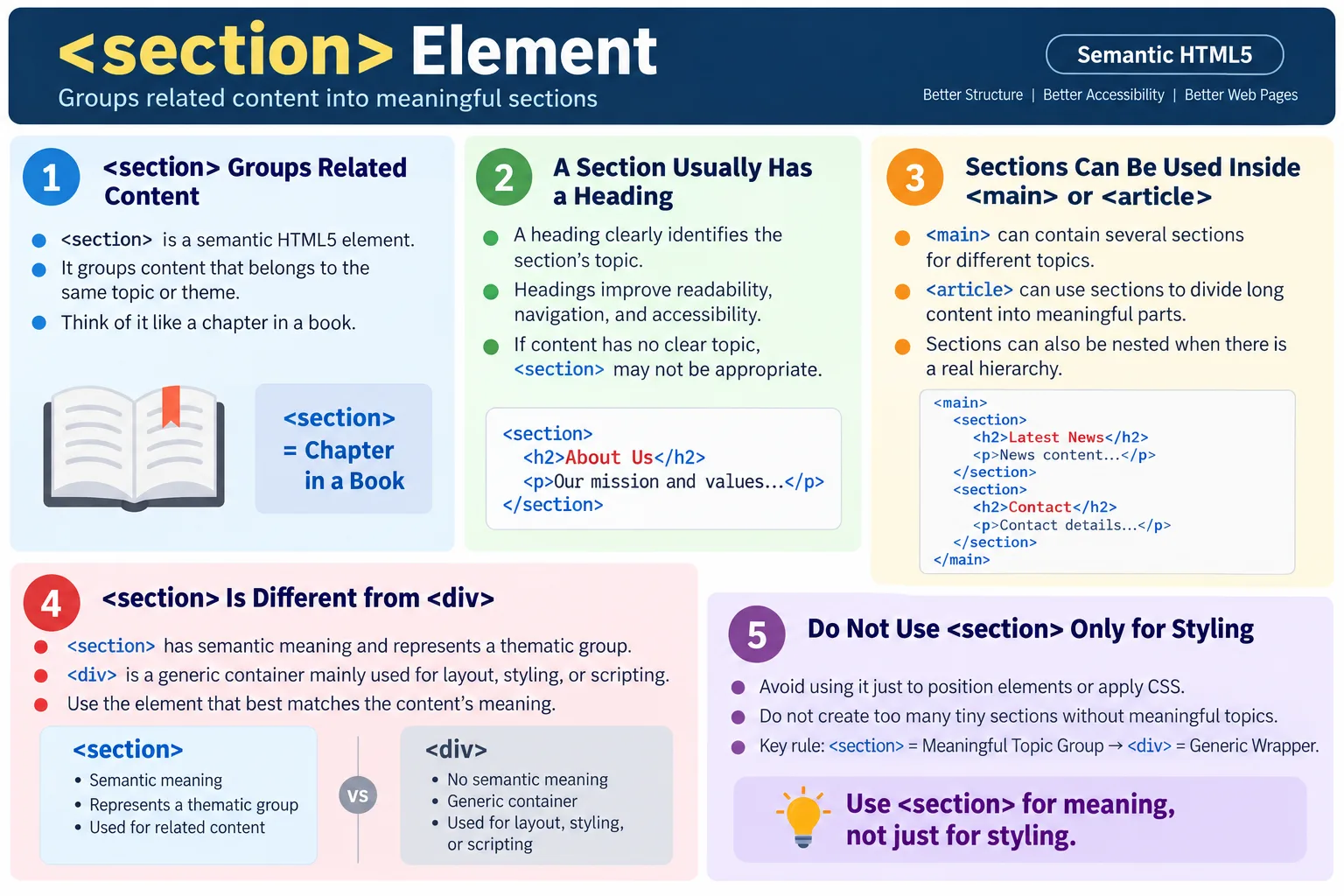
The <section> element is a semantic HTML5 element used to group thematically related content into logical sections within a webpage or document. A section represents a distinct topic or subject. It is commonly used inside <main>, <article>, and other content containers to divide larger content into meaningful parts.
Think of a section like a chapter in a book. A book chapter covers one topic, has a heading, and contains related paragraphs, images, examples, lists, or explanations. In the same way, a webpage section should usually focus on one topic and should usually include a heading that identifies that topic.
The <section> element helps organize content, improve accessibility, support SEO-friendly structure, make HTML easier to read and maintain, and create a meaningful document outline. It should be used for real thematic grouping, not merely as a replacement for <div> when styling is needed.
What Is the Section Element?
The <section> element defines a thematic grouping of content. Its syntax is simple.
<section>
  ...
</section>
The important part is not the syntax, but the meaning. A section should contain content that belongs together under one topic. If the content does not form a meaningful topic, another element such as <div> may be more appropriate.
A section is not just a visual block. It is a semantic grouping. It tells readers, browsers, developers, search engines, and assistive technologies that the content inside the section forms a logical unit.
Why Use Section?
Before HTML5, developers commonly used generic containers for content sections.
<div class="section">
  ...
</div>
This can work for layout and styling, but the browser cannot determine from the element itself that the content represents a thematic section. The meaning depends on a class name.
Using <section> communicates the purpose more clearly.
<section>
  ...
</section>
Now the structure says that the content belongs to one logical topic. This makes the HTML easier to understand and gives assistive technologies and search engines clearer information about the document structure.
What Belongs Inside a Section?
A section usually contains a heading, paragraphs, images, lists, tables, videos, forms, examples, summaries, or other related content. The content should all belong to the same topic.
HTML Forms
  |
Paragraph
  |
Image
  |
Example
  |
Summary
For example, a section titled "HTML Forms" might contain an explanation of forms, a diagram, code examples, common attributes, and a short summary. All of those pieces belong to the same topic, so grouping them in a section makes sense.
Basic Example
A simple section includes a heading and related content.
<section>
  <h2>HTML Basics</h2>
  <p>Learn the fundamentals of HTML.</p>
</section>
In the browser, users see the heading and paragraph.
HTML Basics
Learn the fundamentals of HTML.
This is a meaningful section because the heading identifies the topic and the paragraph belongs to that topic.
Why Headings Are Important
A section should generally have a heading. The heading gives the section a clear topic and makes the document easier to scan. It also helps assistive technologies and search engines understand the structure.
<section>
  <h2>CSS</h2>
  <p>...</p>
</section>
Without a heading, the section has no clear label.
<section>
  <p>...</p>
</section>
This may still be valid in some rare cases, but it is usually less meaningful. If a section has no heading and no clear topic, it may not need to be a section at all.
Multiple Sections
A page commonly contains multiple sections. Each section discusses a different topic.
<main>
  <section>
    <h2>HTML</h2>
  </section>

  <section>
    <h2>CSS</h2>
  </section>

  <section>
    <h2>JavaScript</h2>
  </section>
</main>
The page structure becomes easy to understand.
Main
  |
HTML
  |
CSS
  |
JavaScript
This pattern is common in course pages, landing pages, documentation pages, and long tutorials.
Browser Workflow
When the browser reads the HTML, it identifies the <section> element, reads its heading, creates a logical section in the document structure, and renders the page.
Read HTML
  |
<section>
  |
Read heading
  |
Create logical section
  |
Render page
The visual appearance of the section depends on CSS, but the semantic structure comes from the HTML element itself.
Accessibility Benefits
Screen readers can use sections and their headings to help users understand and navigate page structure. A section with a clear heading is easier to identify than a generic container with no semantic meaning.
Section
  |
HTML Forms
  |
Paragraph
Users who navigate by headings can move through a page more efficiently when sections are well organized. Good section structure also benefits sighted users because headings make long content easier to scan.
SEO Benefits
Search engines use headings and structure to understand how content is organized. A well-structured document with clear sections helps search engines interpret the relationship between topics.
HTML
  |
Forms
  |
Validation
The <section> element by itself does not guarantee better rankings, but it supports clearer content organization. Combined with useful headings and high-quality content, it helps create a more understandable document.
Section Inside Main
A common layout places sections inside the <main> element. The main element contains the primary content, and each section divides that content into logical topics.
<main>
  <section>
    <h2>HTML</h2>
  </section>

  <section>
    <h2>CSS</h2>
  </section>
</main>
This relationship is simple: <main> identifies the primary content area, and <section> divides that content into meaningful parts.
Section Inside an Article
Sections can also be used inside an article. This is common in long articles, tutorials, and documentation pages.
<article>
  <h1>HTML Tutorial</h1>

  <section>
    <h2>Introduction</h2>
  </section>

  <section>
    <h2>Examples</h2>
  </section>
</article>
Each section covers a different part of the article. The article is the complete self-contained content, while the sections organize its internal topics.
Nested Sections
Sections may contain other sections when there is a real hierarchy of topics.
<section>
  <h2>Programming</h2>

  <section>
    <h3>HTML</h3>
  </section>

  <section>
    <h3>CSS</h3>
  </section>
</section>
The structure is hierarchical.
Programming
  |
HTML
  |
CSS
Nested sections should be used only when they reflect a true hierarchy. Deep nesting without a clear reason can make content harder to understand.
Section vs Div
The difference between <section> and <div> is meaning. A <div> is a generic container.
<div>
  ...
</div>
Its meaning is unknown unless class names, IDs, or surrounding content explain it. A <section> represents a related topic.
<section>
  ...
</section>
Use <section> when the content forms a meaningful part of the document. Use <div> when you need a generic wrapper for layout, styling, or scripting and no semantic element fits.
When Not to Use Section
Avoid using <section> solely for styling or layout. If an element exists only to position a button, group a small layout fragment, or apply CSS, a <div> is often more appropriate.
<section>
  Button
</section>
This is usually a poor use of <section> because there is no clear thematic grouping or heading. Semantic elements should be chosen for meaning, not for appearance.
Styling Sections
The <section> element can be styled with CSS like any other element.
section {
  margin-bottom: 40px;
  padding: 20px;
}
CSS controls spacing, colors, layout, and visual presentation. The section element provides semantic meaning. Keep those responsibilities separate: HTML describes content, and CSS styles it.
Real-World Example
A SoftwareTips4U HTML course page can use sections to divide course content into chapters.
<main>
  <section>
    <h2>Introduction</h2>
    <p>Learn HTML fundamentals.</p>
  </section>

  <section>
    <h2>HTML Elements</h2>
    <p>Understand HTML tags.</p>
  </section>

  <section>
    <h2>HTML Forms</h2>
    <p>Build interactive forms.</p>
  </section>
</main>
Each section represents a separate chapter of the course. The page is easier to scan, easier to maintain, and easier for assistive technologies to interpret.
Common Mistakes
A common mistake is using <section> instead of <div> for layout only.
<section>
  <div>Button</div>
</section>
If the element exists only for styling or layout, use a <div>. Another mistake is creating sections without headings.
<section>
  <p>Content</p>
</section>
A better structure is:
<section>
  <h2>Content Title</h2>
  <p>Content</p>
</section>
Creating too many tiny sections is also a problem. Avoid wrapping every paragraph in its own section unless each paragraph truly represents a separate topic. Navigation belongs in <nav>, not in a section, unless the navigation is simply part of a larger thematic section.
Complete Example
The following complete example shows multiple sections inside the main content area.
<!DOCTYPE html>
<html>
<head>
  <title>SoftwareTips4U</title>
</head>
<body>
  <header>
    <h1>SoftwareTips4U</h1>
  </header>

  <main>
    <section>
      <h2>HTML Course</h2>
      <p>Master HTML from beginner to advanced.</p>
    </section>

    <section>
      <h2>CSS Course</h2>
      <p>Learn modern CSS.</p>
    </section>

    <section>
      <h2>Java Course</h2>
      <p>Master Core Java.</p>
    </section>
  </main>

  <footer>
    <p>© 2026 SoftwareTips4U</p>
  </footer>
</body>
</html>
This document is clearly organized. The main area contains course content, and each course is represented as its own thematic section.
Selenium Perspective
Selenium can locate all section elements on a page.
List<WebElement> sections =
driver.findElements(
    By.tagName("section"));
It can also read a section heading.
String heading =
driver.findElement(
    By.tagName("h2"))
    .getText();

System.out.println(heading);
Automation testers commonly verify the number of sections, section headings, content visibility, accessibility, and page organization. Semantic sections can make page structure easier to inspect and validate.
Comparison Table
<section> |
<div> |
|---|---|
| Semantic element | Generic container |
| Represents a thematic group | No inherent meaning |
| Usually contains a heading | No heading required |
| Improves accessibility | No semantic benefit by itself |
| Better for structured content | Better for layout and styling |
Common Interview Questions
What is the purpose of the <section> element? It groups thematically related content into a logical section.
Should every section have a heading? In most cases, yes. A heading helps identify the topic of the section and improves accessibility.
What is the difference between <section> and <div>? <section> has semantic meaning and represents a thematic grouping of content, while <div> is a generic container used mainly for layout or styling.
Can sections be nested? Yes, when there is a logical hierarchy of topics.
Is <section> used for page layout? No. Use it for grouping related content, not merely for positioning elements on the page.
Interview-Ready Answer
The <section> element is a semantic HTML5 element used to group thematically related content into logical sections. Each section typically has its own heading and contains content related to a single topic. It improves document structure, accessibility, SEO, and code readability. Unlike a generic <div>, a <section> conveys meaning and should be used only when the content forms a distinct, meaningful part of the document.
One-Line Insight
<section> divides your content into meaningful chapters, making webpages easier for users, browsers, and search engines to understand.