Robots Meta Tag
Introduction
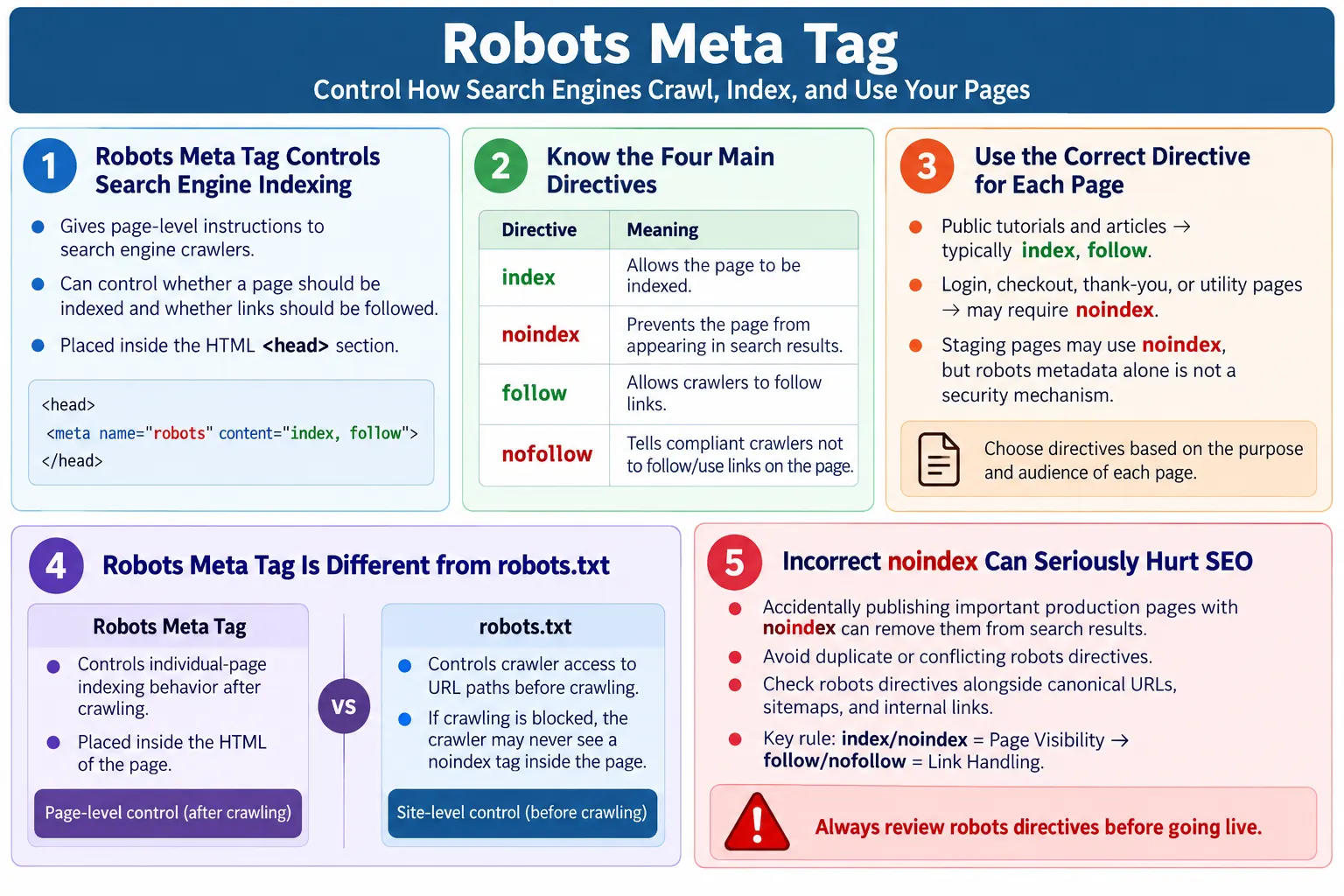
The Robots Meta Tag is an HTML <meta> tag that provides instructions to search engine crawlers about how they should handle an individual webpage. It tells search engines whether they should index the page, follow links on the page, display cached copies, show snippets in search results, or apply other supported indexing rules. It is one of the most important HTML-level SEO controls because it can directly affect whether a page appears in search results.
Unlike robots.txt, which controls crawler access to URL paths before crawling begins, the Robots Meta Tag controls indexing behavior after a crawler accesses the page. This distinction is important. A page may be crawlable but marked noindex, meaning the crawler can read the page but should not include it in search results. A page blocked by robots.txt may not be crawled at all, which means the crawler may not even see the meta tag inside the HTML.
The Robots Meta Tag is powerful because it operates at the page level. A public tutorial page can use index, follow. A login page can use noindex, nofollow. A thank-you page can use noindex, follow. A staging page can use noindex, nofollow to reduce the chance of development content appearing in search results. The tag is simple, but incorrect use can cause serious SEO problems.
What Is the Robots Meta Tag?
The Robots Meta Tag is placed inside the HTML <head> section. It uses the name attribute with the value robots, and the content attribute contains one or more directives. These directives tell compliant search engine crawlers how to treat the page.
<meta
    name="robots"
    content="index, follow">
The directive index tells search engines that the page may be included in search results. The directive follow tells search engines that links on the page may be followed. This is the common setting for public pages that should be discoverable and useful in search results.
The Robots Meta Tag is not visible on the webpage. Users will not see it as content. It is metadata intended for crawlers. Developers, testers, and SEO reviewers inspect it through the HTML source, browser developer tools, automated tests, or SEO crawling tools. Since it is invisible to normal users, it is easy to forget, but its effect can be significant.
Why It Is Needed
Not every webpage should appear in search results. Some pages are useful to users only after a specific action. Some pages are private. Some pages are temporary. Some pages are technical. Some pages exist for internal workflows rather than public discovery. The Robots Meta Tag helps control how these pages are handled by search engines.
- Login pages
- Admin dashboards
- Shopping cart pages
- Checkout pages
- Internal search result pages
- Test or staging pages
- Thank-you pages after form submission
A login page usually should not appear in search results because it does not provide useful public content. A checkout page is part of a private transaction flow. A thank-you page may be shown only after a user completes a form, and it may not be useful as a search result. A staging website may contain unfinished or duplicate content. The Robots Meta Tag allows these pages to instruct crawlers not to index them.
The tag is also useful for controlling link behavior in special cases. For example, a page may be marked noindex, follow when the page itself should not appear in search results but the links on it may still help crawlers discover related pages. This can be useful for some archive, category, or temporary pages depending on the SEO strategy.
Browser Workflow
The browser ignores the Robots Meta Tag for display purposes. It does not change how the page looks. It does not hide content. It does not block users. It does not create a redirect. Its main audience is search engine crawlers. The crawler reads the page, finds the robots directive in the head, and applies the instruction if it follows that standard.
HTML Page
  ↓
Robots Meta Tag
  ↓
Search Engine
  ↓
Follow Instructions
This workflow shows why the Robots Meta Tag must be included in the HTML that crawlers can access. If the tag is inserted too late by JavaScript or if the page is blocked before crawlers can read it, the directive may not work as expected. Static and server-rendered pages usually make this simpler because the tag is present in the original HTML.
Because users do not see the tag, quality checks are important. A production page can look perfect and still contain noindex by mistake. That mistake may prevent the page from appearing in search results. This is why SEO metadata should be part of release checks, not only content writing.
Default Behavior
If no Robots Meta Tag is present, most search engines generally treat pages as if they were index, follow, unless other signals indicate otherwise. That means the page may be indexed and links on the page may be followed. This default behavior is why many simple public pages can appear in search results even without an explicit robots meta tag.
Search Engine
  ↓
Index Page
  ↓
Follow Links
In practice, many websites still include an explicit robots meta tag such as index, follow on public pages. This makes the intention clear. It also creates consistency across templates, especially when some pages need noindex and others need normal indexing. Explicit metadata can make audits and automated checks easier.
However, adding robots tags mechanically without thinking can be risky. A template that accidentally uses noindex everywhere can remove important pages from search results. A template that defaults every page to index may expose pages that should not be indexed. The directive should match the page purpose.
The index Directive
The index directive allows the page to appear in search results. It is appropriate for public pages that provide useful content and should be discoverable. Tutorial articles, blog posts, product pages, documentation pages, and public landing pages often use index.
<meta
name="robots"
content="index">
Using index does not guarantee that a page will rank or even be indexed immediately. It only says that indexing is allowed. Search engines still decide whether to index the page based on crawlability, quality, duplication, canonical signals, internal links, content value, and many other factors. The directive gives permission; it does not create ranking by itself.
For most public educational pages, index, follow is the expected setting. It tells search engines that the page can be included in search results and that its links can be followed. This is suitable for content intended to help users through search discovery.
The noindex Directive
The noindex directive prevents the page from being indexed. It is useful for pages that should not appear in search results. Examples include login pages, internal dashboards, thank-you pages, private content, staging pages, and other utility pages.
<meta
name="robots"
content="noindex">
When a compliant search engine crawls a page and sees noindex, it should remove or avoid adding that page in search results. This is useful when the page is accessible but not valuable as a search result. For example, a thank-you page after form submission may be accessible through a URL, but it should not be shown to search users.
One important detail is that the crawler must be able to access the page to see the noindex tag. If the page is blocked by robots.txt, the crawler may not read the HTML and may not see the directive. This can create confusion. If you want a page removed from search results, it must be handled with a strategy that allows the search engine to see the noindex or otherwise remove the URL through proper tools and signals.
The follow Directive
The follow directive allows search engines to follow links on the page. This is usually paired with index for normal public content. It can also be paired with noindex when the page itself should not appear in results but its links may still be useful for discovery.
<meta
name="robots"
content="follow">
For example, a page may be noindex, follow. That means search engines should not include the page itself in search results, but they may still follow the links on that page. This can be useful in some cases where a page is not a good search result but still points to valuable content.
Most public pages do not need to think deeply about follow because following links is generally expected. The directive becomes important when combined with noindex or when a site has special rules about link crawling and ranking signals.
The nofollow Directive
The nofollow directive tells compliant crawlers not to use the page's links for crawling or ranking purposes. It is different from the rel="nofollow" attribute on individual links, though the idea is related. The meta directive applies at the page level.
<meta
name="robots"
content="nofollow">
This may be appropriate in some special situations, but site-wide use is generally discouraged. If every page is marked nofollow, search engines may have difficulty discovering and understanding the site's internal structure. Internal links are important for crawl discovery and content relationships.
Many beginners confuse noindex and nofollow. Noindex controls whether the page appears in search results. Nofollow controls whether links on the page should be followed or used. They solve different problems. A page can be noindex, follow, index, nofollow, or noindex, nofollow depending on strategy.
Combining Directives
Robots directives are commonly combined. The most common public-page value is index, follow. This means the page may be indexed and its links may be followed. For pages that should not appear in search results but can still help discovery, noindex, follow is often used. For pages that should not be indexed and whose links should not be followed, noindex, nofollow may be used.
<meta
name="robots"
content="index, follow">
<meta
name="robots"
content="noindex, follow">The second example means do not index this page, but still allow crawlers to follow its links. Another example is noindex, nofollow, which means do not index the page and do not follow links on the page.
<meta
name="robots"
content="noindex, nofollow">
Directives should be written clearly and consistently. Avoid conflicting values such as index, noindex in the same content attribute or multiple robots tags with different instructions. Conflicts make the page harder to interpret and can lead to unexpected crawler behavior.
Common Robots Directives
The most common directives are index, noindex, follow, and nofollow. Other directives include noarchive, nosnippet, max-snippet, max-image-preview, and max-video-preview. Support for some directives can vary by search engine, so always verify behavior for the search engines that matter to the site.
| Directive | Meaning |
|---|---|
index |
Allow indexing |
noindex |
Prevent indexing |
follow |
Follow links |
nofollow |
Do not follow links |
noarchive |
Do not show a cached version |
nosnippet |
Do not show a text snippet in search results |
max-snippet |
Limit the length of search snippets |
max-image-preview |
Control image preview size |
max-video-preview |
Control video preview length |
Real-World Examples
A public tutorial page should usually be indexable. It provides useful content and should be discoverable through search. A typical value is index, follow. This allows search engines to index the page and follow links to related lessons.
<meta
name="robots"
content="index, follow">
A login page usually should not appear in search results. It may use noindex, nofollow, although the exact choice depends on the site's internal link strategy. A thank-you page may use noindex, follow, excluding the page itself from results while still allowing crawlers to follow links if needed.
<meta
name="robots"
content="noindex, nofollow">
<meta
name="robots"
content="noindex, follow">A staging website may also use noindex, nofollow to reduce the chance of unfinished pages appearing in search results. However, for staging environments, meta tags alone are not enough security. Staging sites should usually be protected with authentication, restricted access, or other environment controls.
Robots Meta Tag vs robots.txt
The Robots Meta Tag and robots.txt are often confused, but they work at different stages. robots.txt is a file stored at the root of a website, such as /robots.txt. It tells crawlers which URL paths they are allowed or disallowed to crawl. The Robots Meta Tag is inside an HTML page and tells crawlers how that page should be indexed after it is crawled.
| Robots Meta Tag | robots.txt |
|---|---|
| Controls individual pages | Controls crawler access to URL paths or directories |
| Placed inside HTML | Stored as /robots.txt |
| Used after a crawler accesses the page | Used before crawling begins |
| Controls indexing behavior | Controls crawling permissions |
This distinction affects real SEO decisions. If a page is blocked by robots.txt, a crawler may not fetch the page and may not see a noindex directive inside it. If the goal is to remove a page from search results, blocking crawl access may not be enough in every case. The right approach depends on whether the page is already indexed, whether it should be crawled, and whether it should remain accessible to users.
Crawler Visits Page
  ↓
Reads Robots Meta Tag
  ↓
Applies Instructions
  ↓
Index or Skip
Best Practices
Use index, follow for public content you want in search results. Use noindex for pages that should not appear in search results. Place the tag inside the <head> section. Use only one Robots Meta Tag per page whenever possible. Verify that directives match your SEO strategy.
- Use
index, followfor public content. - Use
noindexfor pages that should not appear in search results. - Place the tag inside the
<head>section. - Use only one Robots Meta Tag per page whenever possible.
- Verify directives before production deployment.
- Do not use robots meta tags as a security mechanism.
Robots directives should be part of the page template strategy. Public article templates can default to index, follow. Utility pages such as removed pages, thank-you pages, or coming-soon pages may use noindex. Staging environments should have separate environment-level safeguards so that test pages do not accidentally become public.
Common Mistakes
One serious mistake is accidentally blocking important pages. Placing noindex on a homepage, major landing page, article, or product page can prevent that page from appearing in search results. This may happen when a staging template is copied into production or when a global setting is changed incorrectly.
<meta
name="robots"
content="noindex">
Using multiple Robots Meta Tags is another problem. Conflicting directives can create confusion. A page should not contain one robots tag saying index, follow and another saying noindex, nofollow. Templates, plugins, and custom code should be checked to avoid duplication.
<meta name="robots"...>

<meta name="robots"...>
Another mistake is confusing noindex with nofollow. Noindex controls page indexing. Nofollow controls whether search engines should follow links from the page. They are different directives. A page can be excluded from search results while still allowing link following through noindex, follow.
Forgetting to remove noindex from production is a common deployment mistake. A site may intentionally use noindex during development or staging, then accidentally publish the same directive live. This can damage search visibility. Production checks should explicitly verify that important pages are not marked noindex.
Finally, do not assume the Robots Meta Tag blocks access. It does not protect private content. Users who know the URL can still visit the page. Search engine instructions are not security controls. Use authentication, authorization, server restrictions, or other security mechanisms for truly private information.
SEO Considerations
Use the Robots Meta Tag carefully. Appropriate uses include login pages, admin pages, checkout pages, internal search results, staging environments, and thank-you pages. Avoid using noindex on pages that you want to rank in search engines. A single incorrect directive can undermine an otherwise well-written page.
Robots directives should be reviewed alongside canonical tags, sitemaps, internal links, and page content. If a page is listed in the sitemap but marked noindex, the signals conflict. If an important page is linked prominently but marked noindex, the page may not appear in search results despite being easy to find on the site. Consistency matters.
For large websites, robots meta strategy should be documented. Teams should know which templates are indexable and which are not. Developers should understand the default directive for each page type. Testers should verify that production pages have the expected directives. SEO reviewers should audit changes after deployments.
Selenium Perspective
Automation testers may verify the presence of the Robots Meta Tag, correct directive values, production pages not accidentally marked noindex, and staging pages including expected directives. Selenium can locate the tag and read its content attribute.
String robots =
driver.findElement(
By.cssSelector(
"meta[name='robots']"))
.getAttribute("content");

System.out.println(robots);
These checks are useful in SEO regression testing. For example, a smoke test can verify that major tutorial pages contain index, follow. Another test can verify that utility pages such as 404.html or coming-soon pages use noindex, follow where intended. Staging checks can verify that non-production environments are not accidentally indexable.
For a large site, a crawler or script may be more efficient than Selenium for checking every page. Selenium remains useful for high-value pages or end-to-end validation where the browser-rendered DOM matters. The key is to include robots metadata in quality checks instead of assuming it is correct.
Production and Staging Risk
The most dangerous Robots Meta Tag mistake is publishing production pages with noindex. This often happens when staging and production share the same templates or deployment pipeline. During development, teams may add noindex, nofollow to prevent staging pages from appearing in search results. If that directive is not removed or overridden during production deployment, important pages may disappear from search results.
The opposite problem is also serious. A staging website without noindex or access protection may be crawled and indexed. Users may find unfinished pages, duplicate content, test data, or internal information. Since the Robots Meta Tag is not a security mechanism, staging environments should not rely only on it. Authentication, IP restrictions, or server-level controls are safer.
A good deployment process should include environment-aware metadata. Production public pages should use the intended indexable directives. Staging pages should be protected and marked appropriately. Automated checks can compare expected directives by environment so that mistakes are caught before release.
Robots Meta Tag Checklist
A checklist makes robots metadata easier to manage. Before publishing a page, confirm whether the page should appear in search results. If yes, use index, follow or omit the tag only if that is the site standard. If no, use a suitable noindex directive. Then verify that the directive appears in the head and that there is only one robots meta tag.
- Decide whether the page should appear in search results.
- Use
index, followfor public pages that should rank. - Use
noindexfor pages that should not appear in results. - Place the tag inside the
<head>section. - Avoid conflicting or duplicate robots meta tags.
- Do not rely on robots metadata for private content protection.
- Check production pages for accidental
noindex. - Check staging pages for appropriate restrictions and directives.
Robots Meta Tag in Static Websites
Static websites still need careful robots meta handling. A static site may not have server-side routing or database-driven templates, but every HTML file still has metadata that affects search behavior. Public tutorial pages should usually be indexable. Utility pages such as removed pages, coming-soon pages, internal placeholders, or test pages may need noindex. Because static pages are often copied from existing files, metadata mistakes can spread quickly if developers do not review each new page.
One common static-site mistake is copying a page that has noindex, follow and using it as the base for a public article. The article may look complete, include a title, have good content, and be linked from navigation, but the robots tag quietly tells search engines not to index it. Another mistake is copying a public page into a utility page and forgetting to change index, follow. That can allow low-value pages to appear in search results.
A simple rule helps: decide the index status as part of page creation. When a new content article is created, confirm the robots tag is index, follow. When a placeholder, removed page, or temporary page is created, confirm whether noindex is more appropriate. This small check prevents large SEO issues later.
Robots Meta Tag and Canonical Links
The Robots Meta Tag and canonical links often appear together in the head, but they serve different purposes. The robots tag tells search engines whether a page should be indexed and whether links should be followed. The canonical link tells search engines which URL is the preferred version when duplicate or similar pages exist. These signals should not contradict each other without a clear reason.
For example, a public page may use index, follow and a self-referencing canonical. This is a clear signal: the page is indexable, links can be followed, and this URL is the preferred version. A utility page may use noindex, follow and still have a canonical pointing to itself or to the appropriate preferred page depending on the content strategy. The important thing is that the signals tell a coherent story.
Confusion happens when a page is marked noindex but also appears in the sitemap as an important canonical URL. Another conflict occurs when a page canonicalizes to another URL but is also marked noindex. Search engines may interpret these signals in different ways. Before publishing, review robots directives, canonical URLs, sitemap inclusion, and internal links together. Technical SEO works best when all page-level signals align.
Robots Meta Tag and Sitemaps
XML sitemaps should generally include pages that the site wants search engines to discover and index. If a page is marked noindex, including it in the sitemap creates a mixed signal. The sitemap says the page is important enough to list. The robots meta tag says the page should not be indexed. This does not always break a site, but it is poor hygiene and can make SEO audits noisy.
For public articles, the sitemap should list the canonical URLs, and those pages should normally use index, follow. For utility pages, private flows, staging content, and thank-you pages, the sitemap should usually exclude them. This keeps the sitemap focused on pages that deserve search visibility.
A good audit compares sitemap URLs with robots meta values. If a sitemap URL is marked noindex, review it. Either remove it from the sitemap or change the robots directive if the page should be indexed. This check is especially useful after bulk page generation, migrations, or template updates.
Robots Meta Tag in QA and Release Checks
QA teams often focus on visible behavior, but robots metadata should be part of release quality when organic search matters. A page can pass visual testing, functional testing, link testing, and content review while still failing SEO because of a wrong robots directive. This is why metadata validation should be included in a release checklist.
For production public pages, testers can verify that important pages are not marked noindex. For pages that should be hidden from search results, testers can verify that noindex exists. For staging environments, testers can verify that the environment is protected and that search indexing is discouraged. These checks are simple, fast, and valuable.
Release checks can be automated. A script can scan HTML files and flag unexpected robots values. Selenium can validate rendered metadata for important browser flows. SEO crawlers can report noindex pages, missing robots tags, and conflicting directives. The specific tool matters less than the discipline of checking the metadata before it causes search visibility problems.
Practical Review Workflow
A practical review workflow starts with page purpose. Ask whether the page should appear in search results. If the answer is yes, verify that the robots tag allows indexing and following. If the answer is no, identify why. A login page, cart page, internal dashboard, or thank-you page usually has a clear reason to use noindex. A public article usually does not.
Next, inspect the final HTML. Confirm that the robots tag appears in the head, not the body. Confirm that there is only one robots tag. Confirm that the content value does not contain contradictory directives such as index, noindex. Confirm that production pages do not accidentally inherit staging settings.
Finally, compare the robots directive with other SEO signals. If the page is in the sitemap, it should usually be indexable. If the page is linked prominently from navigation, make sure it is intended to be indexed. If the page is private or sensitive, do not rely on robots metadata for protection. Use real access control. This review workflow keeps the robots tag connected to the larger SEO and security context.
Common Interview Questions
What is the Robots Meta Tag? It is an HTML <meta> tag that tells search engines how to handle an individual webpage. It can allow indexing, prevent indexing, allow link following, or request that links not be followed.
Where is it placed? It is placed inside the HTML <head> section. Since it is metadata, it does not belong in the visible body content.
What does noindex mean? It instructs compliant search engines not to include the page in search results. The page may still be accessible to users who know the URL.
What does nofollow mean? It tells compliant search engines not to use the page's links for crawling or ranking purposes. It affects link handling, not page indexing.
What is the difference between robots.txt and the Robots Meta Tag? robots.txt controls crawler access to URLs or directories before crawling. The Robots Meta Tag controls how an individual page should be indexed after it is crawled.
Does the Robots Meta Tag secure a page? No. It only provides instructions to search engines. It does not restrict user access or protect sensitive content. Security requires authentication, authorization, or access control.
Comparison Table
| Directive | Effect |
|---|---|
index |
Allow indexing |
noindex |
Prevent indexing |
follow |
Allow crawlers to follow links |
nofollow |
Request that crawlers not follow links |
noarchive |
Prevent cached copy |
nosnippet |
Prevent search result snippets |
Interview-Ready Answer
The Robots Meta Tag is an HTML <meta> tag placed inside the <head> section that provides indexing instructions to search engine crawlers for an individual webpage. Common directives include index, noindex, follow, and nofollow. For example, noindex prevents a page from appearing in search results, while nofollow tells compliant search engines not to use links on that page for crawling or ranking purposes.
Unlike robots.txt, which controls crawler access to URLs, the Robots Meta Tag controls how a specific page should be indexed after it has been crawled. A strong interview answer should also mention that the Robots Meta Tag does not secure content. It only gives instructions to search engines. Users can still access the page if they know the URL unless proper authentication or authorization is implemented.
One-Line Insight
The Robots Meta Tag tells search engines what they should do with a page, not whether users can access it.