Reusable HTML Patterns
Introduction
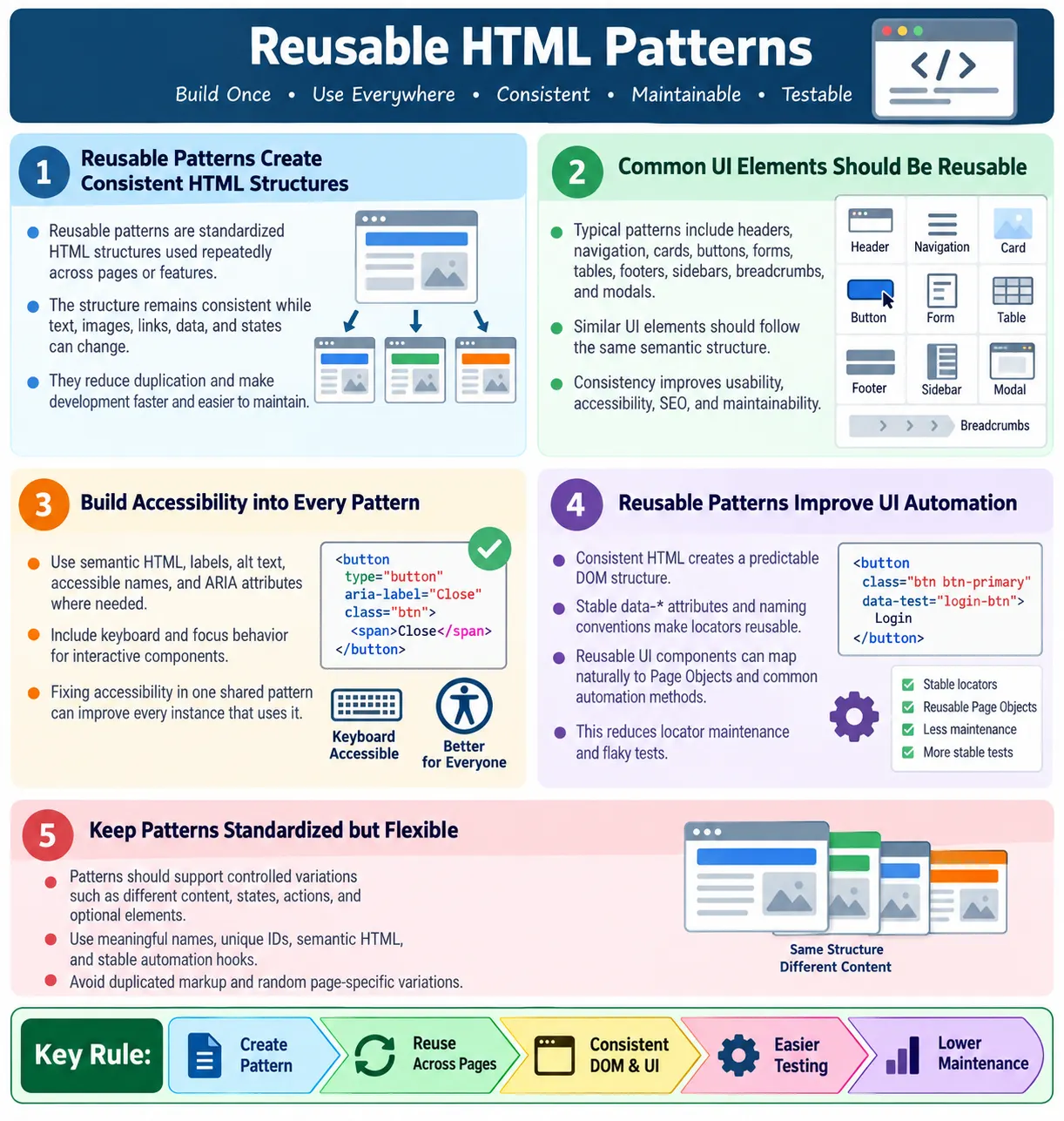
Reusable HTML patterns are standardized, repeatable HTML structures that can be used multiple times across a website or web application. Instead of creating new markup from scratch for every page or feature, developers define common structures and reuse them with different content. This keeps the user interface consistent, reduces duplication, improves maintainability, and makes development faster.
Reusable patterns are the foundation of modern UI development. They appear in plain HTML websites, design systems, static sites, and frameworks such as React, Angular, Vue, Bootstrap, Tailwind CSS, and Web Components. The exact technology may change, but the idea remains the same: build a reliable pattern once, use it repeatedly, and improve it centrally when needed.
For testers and automation engineers, reusable HTML patterns are especially useful because they create predictable DOM structures. A button pattern, card pattern, form pattern, or table pattern that remains consistent across pages is easier to automate. Locators can be reused. Page Object Models become cleaner. Accessibility checks become more predictable. A reusable pattern is not only a development convenience; it is also a quality strategy.
What Are Reusable HTML Patterns?
A reusable HTML pattern is a predefined HTML structure that can be used repeatedly with different content. The structure stays consistent, while the text, images, links, data, and state may change. For example, a course card may always contain an article element, a heading, a short description, and a link. One card may describe an HTML course, another may describe Java, and another may describe Selenium, but the structure remains the same.
Create Pattern
  ↓
Reuse Multiple Times
  ↓
Consistent UI
  ↓
Easy Maintenance
Instead of writing new HTML every time, the same pattern is reused. This reduces accidental inconsistency. It also makes future updates easier. If the card pattern needs a new label, accessibility attribute, or automation hook, the team can update the pattern rather than fixing many unrelated implementations manually.
Why Use Reusable Patterns?
Without reusable patterns, each page may solve the same UI problem differently. Page one may use one version of a card, page two may use another, and page three may use a third. The differences may seem small at first, but over time they make the site harder to maintain. Users see inconsistent interfaces, developers duplicate work, and testers must handle many different DOM structures for similar elements.
Without reusable patterns:

Page 1
  ↓
Different HTML
  ↓
Page 2
  ↓
Different HTML
  ↓
Hard to Maintain
With reusable patterns, similar features share a consistent structure. A reusable component can appear on many pages. Updating one pattern is easier than updating many unrelated implementations. This creates consistency across the site and reduces the long-term cost of change.
With reusable patterns:

Reusable Component
  ↓
Page 1
  ↓
Page 2
  ↓
Page 3
  ↓
Consistent Structure
Benefits
Reusable HTML provides consistency, easier maintenance, better readability, faster development, better accessibility, easier automation, and improved scalability. These benefits become more valuable as the site grows. A small website can survive inconsistent markup for a while. A large site cannot. Reusable patterns prevent repeated decisions and repeated mistakes.
- Consistency
- Easier maintenance
- Better readability
- Faster development
- Better accessibility
- Easier automation
- Improved scalability
Consistency matters to users because repeated structures teach them how the site works. It matters to developers because the same markup pattern is easier to understand. It matters to testers because stable structures reduce locator maintenance. Reusability is therefore both a technical and user-experience benefit.
Pattern 1: Header
A header pattern usually appears at the top of a page or section. It may contain a site name, page title, logo, search area, navigation trigger, or important introductory content. A consistent header helps users recognize where they are and gives pages a predictable start.
<header>
  <h1>SoftwareTips4U</h1>
</header>
This pattern can be used on the home page, about page, contact page, course pages, and article pages. The content may change, but the purpose remains the same. A reusable header should be semantic and accessible, not just a styled div.
Pattern 2: Navigation
A navigation pattern helps users move through the site. It should use semantic <nav> markup and meaningful links. Navigation is one of the most important reusable patterns because it appears across many pages and directly affects usability, SEO, and accessibility.
<nav>
  <ul>
    <li>
      <a href="/html">HTML</a>
    </li>
    <li>
      <a href="/css">CSS</a>
    </li>
  </ul>
</nav>
Navigation structure should remain consistent throughout the site. If every page implements navigation differently, users become confused and maintenance becomes difficult. Reusable navigation also helps automation because menu locators can remain stable.
Pattern 3: Card
A card pattern groups related content into a compact block. Cards are commonly used for courses, products, blog posts, news items, tutorials, profiles, and dashboard summaries. A good card pattern has predictable structure: container, heading, description, optional image, metadata, and action link or button.
<article class="course-card">
  <h2>HTML Course</h2>
  <p>Beginner to Advanced</p>
</article>
The same card structure can display many types of content. Only the content changes. This makes visual design, accessibility, and automation more consistent. If every card has a heading and clear link, users and tools can understand it more easily.
Pattern 4: Button
Buttons represent user actions. A reusable button pattern should use a real <button> element when the action happens on the page. It should have meaningful text or an accessible name. It can also include a stable data attribute for automation when the action is important.
<button data-testid="enroll-button">
  Enroll Now
</button>
Using the same button structure across the application improves accessibility and testability. Styling may vary through CSS classes, but the underlying behavior and semantics should remain reliable.
Pattern 5: Form
Forms collect user input. A reusable form pattern should include labels, inputs, validation structure, clear actions, and accessible error handling. Common forms include login, registration, contact, feedback, search, checkout, and profile update forms.
<form>
  <label for="email">Email</label>
  <input
    id="email"
    type="email">

  <button>
    Submit
  </button>
</form>
A reusable form pattern prevents inconsistent labeling and validation. It also helps testers because fields follow a predictable structure. Automation can locate labels, inputs, buttons, and error messages more reliably.
Pattern 6: Table
Tables display structured tabular data. A reusable table pattern should include <table>, <thead>, <tbody>, rows, header cells, and data cells. The table data changes, but the structure remains consistent.
<table>
  <thead>
    <tr>
      <th>Course</th>
    </tr>
  </thead>
  <tbody>
    <tr>
      <td>HTML</td>
    </tr>
  </tbody>
</table>
Reusable table patterns improve accessibility when headers and relationships are consistent. They also make reporting pages easier to automate because row and column structures remain predictable.
Pattern 7: Footer
A footer pattern usually contains copyright information, legal links, contact links, secondary navigation, or site metadata. It appears across every page, so reusability is important. A consistent footer helps users find expected information reliably.
<footer>
  <p>© 2026 SoftwareTips4U</p>
</footer>
If a footer link changes, a reusable pattern allows the update to happen in one place or one template rather than many individual files. This reduces maintenance errors.
Pattern 8: Article Layout
An article layout pattern is useful for tutorials, blog posts, news articles, documentation pages, and long-form learning content. It usually includes a heading, introduction, sections, paragraphs, code examples, tables, images, and related links.
<article>
  <h2>HTML Basics</h2>
  <p>Introduction...</p>
</article>
A consistent article pattern improves readability and SEO. It also makes content production easier because every new page follows a known structure.
Pattern 9: Sidebar
A sidebar pattern provides supplementary content, related links, course navigation, filters, recommendations, or contextual actions. It should be placed in an <aside> when the content is complementary to the main content.
<aside>
  <h3>Related Courses</h3>
</aside>
Reusable sidebars are common in tutorial sites and dashboards. They help users navigate related content and give pages a consistent layout.
Pattern 10: Search Box
A search box pattern allows users to find content. It may appear on the home page, navigation area, documentation pages, or product listings. A reusable search pattern should use appropriate input type, label, and submit behavior.
<form>
  <input
    type="search"
    placeholder="Search">
  <button>
    Search
  </button>
</form>
For accessibility, a visible or programmatic label should be provided. Search results should also be understandable and keyboard-friendly.
Pattern 11: Breadcrumb
A breadcrumb pattern shows the user's location within a site hierarchy. It is especially useful for documentation, tutorials, categories, product pages, and large websites. It should use navigation markup with an accessible label.
<nav aria-label="Breadcrumb">
  <a href="/">Home</a>
  >
  <a href="/html">HTML</a>
</nav>
Breadcrumbs improve navigation, SEO, and user orientation. A reusable breadcrumb pattern keeps hierarchy display consistent.
Pattern 12: Modal Structure
A modal pattern is used for dialogs, confirmations, alerts, forms, and focused tasks. Modals require careful accessibility because they involve focus management, keyboard behavior, and screen reader announcements. The structure should be consistent wherever modals appear.
<div class="modal">
  <h2>Confirmation</h2>
  <button>OK</button>
</div>
In real applications, a modal pattern should include proper roles, labels, focus handling, and closing behavior. Reusing a well-tested modal pattern is much safer than building new modal markup every time.
Browser Workflow
Reusable HTML patterns create consistent DOM structures. The browser parses the reusable HTML, builds the DOM, renders the interface, and users interact with a predictable UI. When patterns are consistent, the browser output is easier to reason about and easier to test.
Reusable HTML
  ↓
Browser
  ↓
DOM
  ↓
Render
  ↓
Consistent UI
Consistency does not mean every page looks identical. It means similar interface elements behave and structure themselves in similar ways. This reduces surprise for users and teams.
Reusable Patterns and Automation
Consistent HTML makes automation easier. If a submit button pattern always includes data-testid="submit-button" or a predictable naming convention, Selenium or Playwright tests can locate it reliably. If every form uses a different structure, automation becomes more fragile.
<button data-testid="submit-button">
  Submit
</button>
driver.findElement(
By.cssSelector("[data-testid='submit-button']"));Using the same pattern across pages reduces locator maintenance. It also supports Page Object Models because reusable UI components can map to reusable automation components.
Reusable Patterns and Accessibility
Reusable components should consistently include semantic HTML, labels, alt text, ARIA attributes where needed, and keyboard accessibility. Accessibility becomes easier to maintain when every instance follows the same pattern. A form pattern with labels prevents missing-label issues. A button pattern with accessible names prevents icon-only buttons from becoming unusable. A modal pattern with proper focus management prevents repeated keyboard traps.
- Semantic HTML
- Labels
- Alt text
- ARIA attributes where needed
- Keyboard accessibility
The best time to build accessibility is when the reusable pattern is created. Fixing accessibility once in a pattern improves every instance. Ignoring accessibility in a pattern spreads the same defect across the application.
Reusable Patterns and SEO
Consistent semantic HTML helps search engines understand headers, navigation, articles, breadcrumbs, and main content. Reusable patterns can support SEO by ensuring pages use proper headings, descriptive links, clean navigation, and structured article content.
- Headers
- Navigation
- Articles
- Breadcrumbs
- Main content
For content-heavy sites, reusable article patterns are especially important. They keep headings, sections, code examples, and links consistent. This improves readability and crawlability.
Modern Component-Based Development
Modern frameworks build on reusable HTML patterns. React components, Angular components, Vue components, and Web Components all package reusable structure, styling, and behavior. A course card component can render many cards with different data. A table component can render different datasets. A modal component can display different messages while preserving behavior.
Course Card
  ↓
HTML
  ↓
CSS
  ↓
JavaScript
  ↓
Reusable Component
The same component can be rendered many times with different data. This is one reason modern UI development is component-driven. Components formalize reusable patterns and make them easier to share across the application.
Design Systems and Pattern Libraries
A design system is a collection of reusable patterns, rules, components, and guidelines. It often includes button patterns, form patterns, cards, navigation, typography, colors, spacing, modals, alerts, and tables. A pattern library documents how each pattern should be used. This helps teams build consistent interfaces at scale.
Reusable HTML patterns are the structural side of a design system. The pattern should define not only how something looks, but also what HTML elements it uses, what accessibility behavior it needs, what states it supports, and what automation hooks it exposes. A design system that ignores HTML quality may look consistent visually but still produce inaccessible or hard-to-test markup.
When Patterns Should Be Flexible
Reusable patterns should be consistent, but they should not be rigid in the wrong way. A card pattern may need optional image, metadata, badges, or actions. A form pattern may need different fields. A table pattern may need sortable columns or empty states. Good patterns define a stable structure while allowing controlled variation.
The key is to make variation intentional. If every page modifies the pattern randomly, reusability is lost. If the pattern allows clear options, teams can adapt it while preserving consistency. Good reusable patterns balance standardization with flexibility.
Reusable Patterns and Component States
A reusable pattern should account for states, not only the default appearance. Buttons may be enabled, disabled, loading, focused, hovered, or active. Forms may be empty, valid, invalid, submitting, successful, or failed. Cards may have images, no images, long text, short text, badges, or unavailable content. Tables may be loading, empty, filtered, or paginated. If these states are not planned, each page may invent its own state markup.
State planning improves consistency. A reusable alert pattern can define success, warning, error, and information states. A reusable form field pattern can define label, help text, error message, and validation state. A reusable modal pattern can define open, closed, loading, and confirmation states. These decisions make behavior predictable for users and testers.
Automation also benefits from state consistency. If every error message uses the same structure and stable locator convention, tests can verify errors with reusable helper methods. If every loading button exposes the same disabled state, tests can wait for action completion more reliably. Good reusable patterns include the states that real users encounter.
Template-Based Reuse
Reusable HTML patterns do not always require a JavaScript framework. Static sites and server-rendered sites can reuse patterns through templates, includes, partials, layouts, and server-side components. A header can be stored in one include. A footer can be shared across every page. A tutorial layout can define the same article structure for all lessons. This is still reusable HTML, even without React or Angular.
Template-based reuse is especially useful for content-heavy sites. If every tutorial page shares the same header, sidebar, content card, footer, analytics code, and scripts, a template prevents inconsistencies. Without templates, small differences appear over time. One page may miss a footer. Another may have outdated navigation. Another may use old metadata. Reuse prevents that drift.
Even when pages are static HTML files, teams can still maintain reusable patterns through generation scripts, shared snippets, or disciplined templates. The important point is to avoid manually reinventing the same structure across hundreds of pages.
Reusable Patterns and Naming Conventions
Reusable patterns need clear naming conventions. Class names, data attributes, IDs, and component names should describe purpose. A card pattern might use course-card, a button pattern might use primary-button, and an automation hook might use data-testid="enroll-button". Names should be meaningful and consistent.
Poor naming weakens reusability. If one page uses box1, another uses tile-new, and another uses cardThing for the same pattern, the team loses consistency. Developers cannot quickly recognize shared structure. Testers cannot create reusable locators. Designers cannot reason about component usage. Names are part of the pattern.
Good naming also avoids tying structure to appearance too tightly. A class called green-card may become misleading if the design changes. A name like success-card or course-card is more meaningful because it describes role or purpose.
Reusable Patterns and Versioning
As a project grows, reusable patterns evolve. A card may need a new badge. A table may need sorting. A modal may need a secondary action. A form field may need help text. These changes should be handled carefully because one pattern may appear in many places. A small pattern update can affect many pages.
Versioning does not always mean formal package versions. It can mean documenting pattern changes, reviewing affected pages, and updating tests. If a reusable pattern changes its DOM structure, automation locators may need review. If a pattern changes accessibility behavior, screen reader and keyboard checks may need review. Reusable patterns are powerful because they centralize change, but centralized change also needs discipline.
For stable production sites, avoid unnecessary breaking changes to shared patterns. If the visual design changes but the business purpose remains the same, preserve stable automation hooks and semantic structure where possible. This reduces test maintenance and user-facing risk.
Accessibility by Default
The best reusable patterns are accessible by default. This means the pattern includes correct semantic elements, labels, roles where needed, keyboard support, focus behavior, and meaningful text from the beginning. Accessibility should not be something each page author has to remember separately. It should be built into the pattern.
For example, a reusable input field pattern should include a label and a place for error text. A reusable icon button pattern should require an accessible name. A reusable modal pattern should handle focus movement and closing behavior. A reusable table pattern should include headers. When these decisions are part of the pattern, every instance starts from a stronger baseline.
This also helps testing. Accessibility checks can be focused on the reusable pattern once, then spot-checked in context. If every page creates its own form markup, every page can repeat the same accessibility mistakes. Reusable patterns reduce repeated defects.
Reusable Patterns and Documentation
Reusable patterns need documentation. Documentation should explain when to use the pattern, what HTML structure it requires, what content is optional, what states are supported, what accessibility requirements exist, and what automation hooks are available. Without documentation, developers may copy the pattern incorrectly or modify it in ways that break consistency.
Documentation can be simple. A pattern library page might show the HTML structure, example usage, supported variations, and testing notes. For a button pattern, documentation can explain primary, secondary, disabled, loading, and icon-only buttons. For a form pattern, it can explain labels, help text, errors, and required fields. For a modal, it can explain heading, description, actions, focus, and close behavior.
Good documentation turns a reusable pattern into a shared team asset. It helps new developers onboard faster and helps testers understand expected structure.
Reusable Patterns in QA Review
QA review should check whether similar UI elements follow the same pattern. If one course card has a heading and description but another card uses a different heading level and missing link text, that inconsistency should be questioned. If one form field has a label and another similar field does not, the pattern may not be applied consistently.
Testers can also identify opportunities for reuse. If the same markup appears repeatedly with small differences, a reusable pattern may be needed. This is not only a developer concern. QA often sees repeated inconsistencies across pages and can help push the team toward standardization.
When reusable patterns are part of QA thinking, defects become easier to prevent. Instead of reporting the same missing label on ten pages, the team can fix the shared form pattern and prevent the issue from recurring.
Best Practices
Reusable HTML patterns should use semantic HTML, remain simple, support reusable components, use meaningful class names, keep IDs unique, use data attributes for automation, follow accessibility guidelines, avoid duplicate markup, and separate structure, styling, and behavior.
- Use semantic HTML
- Keep patterns simple
- Make components reusable
- Use meaningful class names
- Keep IDs unique
- Use
data-*attributes for automation - Follow accessibility guidelines
- Avoid duplicate markup
- Separate structure, styling, and behavior
Common Mistakes
A common mistake is duplicating HTML repeatedly instead of creating reusable components or templates. Copy-paste markup creates hidden inconsistency. One copy may get an accessibility fix, while another remains broken. One copy may receive an automation hook, while another does not.
Another mistake is using different structures for similar content. If every card, form, or button has different markup, the site becomes harder to maintain and test. Missing accessibility is also common. Reusable components should include labels, alt text, and keyboard support from the start.
Hardcoding content can also limit reusability. Keep the structure reusable and replace only the content. Avoid mixing responsibilities by placing excessive inline styling or JavaScript behavior directly inside the HTML pattern.
Selenium Perspective
Reusable HTML patterns improve automation because they provide consistent DOM structure, stable locators, easier Page Object Model implementation, lower maintenance, and more predictable behavior. A reusable card pattern can map to a reusable automation component. A reusable form pattern can map to common form helper methods.
- Consistent DOM structure
- Stable locators
- Easier Page Object Model implementation
- Lower maintenance
- More predictable behavior
When markup is inconsistent, every page object becomes custom. When patterns are reusable, automation can reuse logic too. This is one of the strongest testing benefits of reusable HTML.
Common Reusable Patterns
| Pattern | Typical Use |
|---|---|
| Header | Page heading |
| Navigation | Site navigation |
| Card | Products, courses, blogs |
| Form | User input |
| Button | User actions |
| Table | Data display |
| Footer | Site information |
| Sidebar | Related content |
| Breadcrumb | Navigation hierarchy |
| Modal | Dialogs and confirmations |
Common Interview Questions
What are reusable HTML patterns? They are standardized HTML structures that can be reused across multiple pages or features.
Why are reusable patterns important? They improve consistency, maintainability, scalability, accessibility, and development speed.
Give examples of reusable HTML patterns. Common examples include header, navigation, card, form, button, table, footer, modal, sidebar, and breadcrumb.
How do reusable patterns help automation? They create consistent DOM structures, allowing the same locators and automation logic to work across multiple pages.
Are reusable HTML patterns used in modern frameworks? Yes. Frameworks like React, Angular, and Vue are built around reusable components.
Why should reusable patterns be semantic? Semantic HTML improves accessibility, SEO, readability, and maintainability.
Interview-Ready Answer
Reusable HTML patterns are standardized HTML structures that can be used repeatedly across different pages or components. Common examples include headers, navigation bars, forms, cards, buttons, tables, footers, and modals. These patterns promote consistency, reduce code duplication, improve maintainability, support accessibility and SEO, and simplify UI automation by providing predictable DOM structures and stable locators.
Modern frameworks such as React, Angular, and Vue build on this concept by implementing reusable components. A strong reusable pattern is semantic, accessible, flexible, easy to maintain, and suitable for automation.
One-Line Insight
Reusable HTML patterns let you build once, use everywhere, and maintain less.