Responsive Tables (Concept)
Introduction
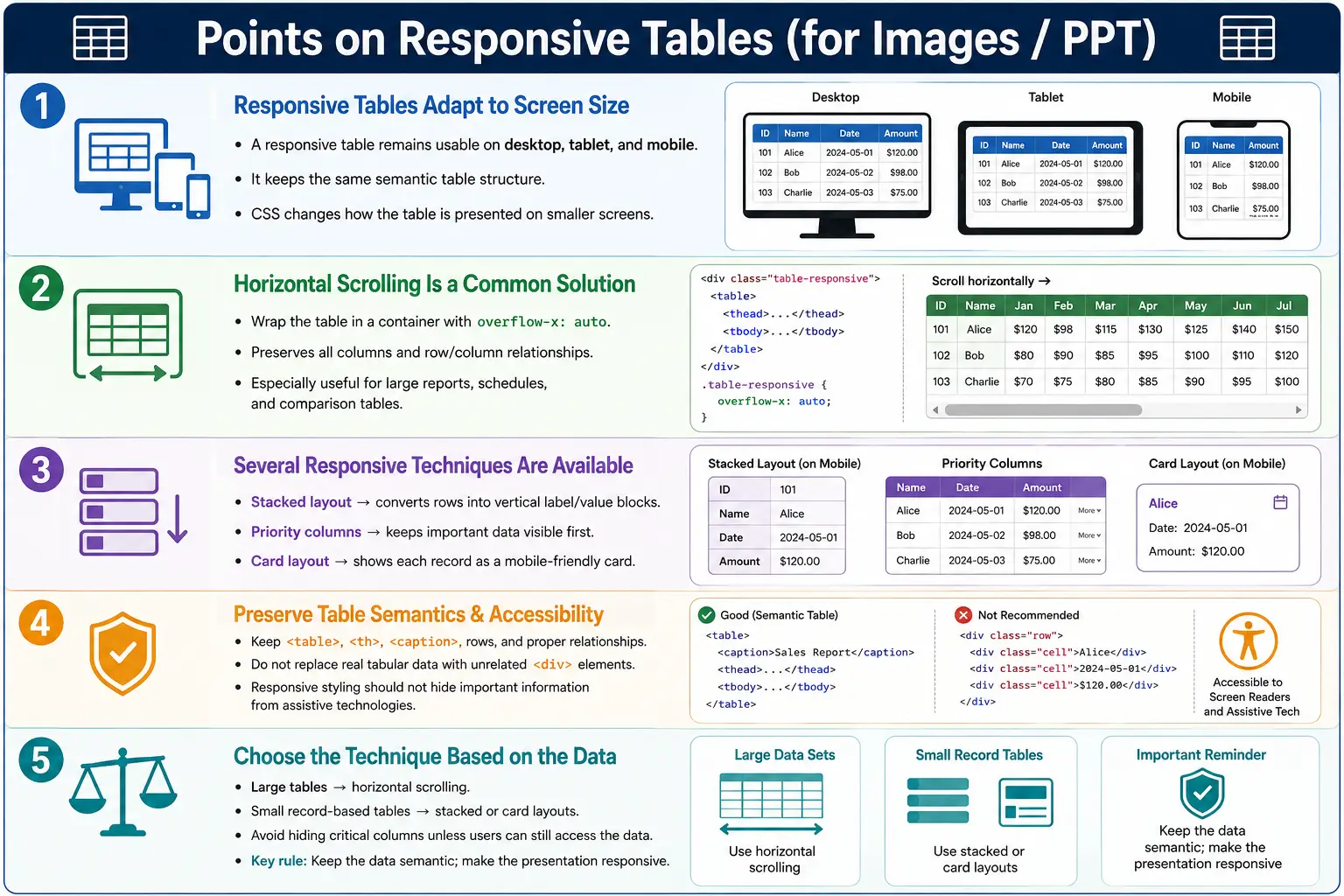
A responsive table is an HTML table that adapts to different screen sizes so that the data remains readable and usable on desktops, laptops, tablets, and mobile phones. Traditional HTML tables work very well on large screens because rows and columns have enough horizontal space. The problem appears when the same table is viewed on a narrow mobile screen. A table with many columns can become wider than the viewport, causing hidden content, cramped text, or horizontal overflow.
Responsive tables solve this problem by keeping the underlying table structure meaningful while changing the presentation with CSS. A responsive table is not a special HTML element. It is still a normal <table> with rows, headers, and data cells. The responsiveness comes from CSS techniques such as horizontal scrolling, stacked layouts, priority-based columns, or card-style presentation.
The main goal is not to make the table look smaller at any cost. The real goal is to preserve the relationship between rows and columns while making the data comfortable to read and interact with on different devices. Good responsive table design balances readability, completeness, accessibility, and usability.
Why Responsive Tables Are Needed
Modern websites are viewed on many different devices. A user may open the same page on a desktop monitor, a laptop, a tablet, or a mobile phone. The available width can change dramatically between these devices. A table that looks perfect on a wide desktop screen may become difficult or impossible to use on a phone.
Desktop:

+----------+--------+----------+---------+
| Name     | Age    | City     | Salary  |
+----------+--------+----------+---------+
| John     | 25     | London   | $5000   |
+----------+--------+----------+---------+
On a desktop, the data is easy to scan. The user can see every column at once, compare values, and understand the full row. On a mobile device, the same table may extend beyond the screen. The user may see only the first few columns and may not realize that more data exists to the right.
Mobile:

+------------------+
| Name | Age | City |
| Salary may be hidden beyond the screen |
+------------------+
This is why responsive table design is important. Without it, mobile users may miss important data, struggle with horizontal scrolling, or abandon the page because the information feels unusable.
The Problem with Traditional Tables
HTML tables naturally display data in rows and columns. This is exactly what makes them useful for structured data, but it also creates a challenge on small screens. A table with five columns may fit comfortably on a laptop. A table with ten or twenty columns may not fit even on a tablet. Large reporting tables may contain hundreds of rows and many columns, making the layout harder to manage.
Table Width
    ↓
Greater Than
Screen Width
    ↓
Horizontal Overflow
When the table width is greater than the viewport width, the browser must decide how to handle the overflow. If no responsive CSS is provided, the table may break the layout, force the entire page to scroll sideways, or make columns too narrow to read. None of these outcomes creates a good user experience.
The challenge is that tabular data often cannot simply be squeezed into a small area. If every column is reduced too much, the data becomes unreadable. If columns wrap aggressively, the row height becomes large and scanning becomes difficult. A responsive table strategy must therefore respect the nature of the data instead of forcing every table into the same pattern.
What Is a Responsive Table?
A responsive table is a standard HTML table enhanced with CSS so that it behaves better across different screen sizes. The HTML structure can remain exactly the same. The CSS determines how the table should behave when the available width changes.
<table>
    ...
</table>
The important point is that responsiveness does not require abandoning semantic table markup. If the content is tabular, it should remain a table. Replacing a genuine data table with unrelated <div> elements just to make it look responsive can harm accessibility and meaning. The better approach is to preserve the table semantics and adapt the presentation responsibly.
A responsive table may allow horizontal scrolling on small screens, convert rows into stacked blocks, hide less important columns, prioritize key columns, or present each row as a card. The correct choice depends on the type of data, the number of columns, user needs, and the importance of preserving all information.
Goals of Responsive Tables
Responsive tables aim to keep data readable, prevent broken layouts, improve mobile usability, maintain accessibility, and preserve relationships between rows and columns. These goals must be considered together. A table that looks attractive but hides important information may not be usable. A table that keeps all information but becomes impossible to navigate may also fail.
Readability means users can understand the values without zooming excessively or guessing what each value represents. Usability means users can move through the table, compare values, and access the information they need. Accessibility means the table still communicates proper headers, rows, columns, and captions to assistive technologies.
The best responsive table solution is usually the simplest solution that preserves meaning. For many data-heavy tables, horizontal scrolling is often the most reliable approach because it keeps the table intact. For smaller data sets, stacked or card-style layouts may provide a better mobile experience.
Browser Behavior
On a desktop screen, the entire table may be visible. On a tablet, the table may shrink slightly and still remain readable. On a mobile screen, responsive CSS can apply a different behavior. The browser loads the HTML, renders the table, checks the available screen width, applies CSS rules and media queries, and then presents the table according to the responsive strategy.
Load HTML
    ↓
Render Table
    ↓
Detect Screen Size
    ↓
Apply CSS Media Queries
    ↓
Responsive Layout
This workflow shows why the same HTML can produce different visual layouts on different devices. The table remains semantic, but the presentation adapts.
Common Responsive Table Techniques
There is no single technique that fits every table. Different tables require different strategies. A financial report with many columns may need horizontal scrolling. A small contact list may work well as stacked cards. A dashboard table may use priority columns so that the most important information remains visible first.
The most common responsive table techniques are horizontal scrolling, responsive stacking, hiding less important columns, priority-based layouts, and card-style layouts. Each technique has strengths and trade-offs. Choosing the right one depends on how users consume the data.
Technique 1: Horizontal Scrolling
Horizontal scrolling is the most common and often the recommended solution for wide data tables. In this approach, the table remains unchanged, but it is placed inside a container that allows sideways scrolling when the table is wider than the screen.
Phone Screen
    ↓
Scrollable Table

←────────────→
The typical CSS is simple:
.table-container {
    overflow-x: auto;
}
The table is wrapped in a container:
<div class="table-container">
    <table>
        ...
    </table>
</div>
This technique preserves all data, keeps the table structure intact, maintains row and column relationships, and is usually accessible. Users can scroll sideways to reach additional columns without losing the meaning of the table. It is especially suitable for large data tables, reports, transaction histories, schedules, and comparison tables where every column may be important.
The main weakness is discoverability. Some users may not immediately realize that the table can scroll horizontally. Designers often improve this by adding visible scrollbars, subtle shadows, or layout cues that indicate more content exists to the right.
Technique 2: Stacked Layout
A stacked layout changes the visual structure on small screens. Instead of displaying columns side by side, each row becomes a vertical block where labels and values are shown together.
Desktop:

Name   Age   City
John   25    London

Mobile:

Name : John
Age  : 25
City : London
This technique can be very readable on mobile because each data item appears with its label. It works well for small tables where each row represents one record, such as a contact, employee, product, or appointment. However, it may not suit large comparison tables because users lose the ability to quickly scan columns across multiple rows.
Stacked layouts often require extra CSS and sometimes data attributes to display labels before each value. Developers must take care not to break accessibility or duplicate confusing information for screen readers.
Technique 3: Hide Less Important Columns
Another technique is to hide less important columns on small screens. For example, a desktop employee table may display name, department, salary, joining date, and employee ID. On mobile, the table may show only name, department, and salary.
Desktop:
Name
Department
Salary
Joining Date
Employee ID

Mobile:
Name
Department
Salary
This technique can make tables compact, but it must be used carefully. Hiding information may reduce usability if users need the hidden columns. It may also create inconsistency between desktop and mobile experiences. If data is important, hiding it completely may not be acceptable.
A better version of this approach is to hide secondary data only when it can be accessed through an expand action, detail view, or horizontal scroll. Important business data should remain accessible on all devices.
Technique 4: Priority-Based Columns
Priority-based layouts keep the most important columns visible and make less important columns available only after scrolling, expansion, or a detail interaction. This approach is useful when some columns are clearly more important than others.
Always Visible:
Product
Price

Available When Needed:
Description
Manufacturer
Warranty
For example, in an e-commerce order table, order number, status, and total amount may be more important than internal tracking notes. On a mobile screen, the most important data can be shown first, while additional details can be revealed when the user selects a row.
Priority-based design requires good product judgment. Developers and testers must understand what users need most often and what information can be secondary. This technique works best when business rules clearly define the importance of each column.
Technique 5: Card Layout
In a card layout, each table row becomes a separate information card on small screens. This approach is popular in mobile applications, dashboards, admin panels, and user profile lists.
Desktop:
Name
Age
City

Mobile:
----------------
John
Age: 25
City: London
----------------
Card layouts can be highly readable on mobile because each record becomes self-contained. Users can scroll vertically through records, and each value can be paired with a clear label. This approach is useful when comparing columns across rows is less important than reading one record at a time.
The trade-off is that card layouts can become lengthy. A table with many rows may produce a long page of cards. Users may also find it harder to compare values across records because the column alignment is gone. For this reason, card layouts should be used thoughtfully.
HTML Structure Remains the Same
Responsive table behavior is usually achieved through CSS while preserving the same semantic HTML structure. A normal table may contain a caption, header, body, rows, and cells.
<table>
    <thead>
        <tr>
            <th>Name</th>
            <th>Age</th>
            <th>City</th>
        </tr>
    </thead>
    <tbody>
        <tr>
            <td>John</td>
            <td>25</td>
            <td>London</td>
        </tr>
    </tbody>
</table>
The HTML continues to describe tabular data. CSS changes how the data is presented. This separation is important because it keeps the content meaningful even if CSS fails, changes, or loads later.
Responsive Tables and Accessibility
Good responsive tables should keep table semantics intact. The table should still use <table> for tabular data, <caption> when a description is useful, <th> for header cells, and proper row and column relationships. Responsive styling should not remove the information that assistive technologies need.
Accessibility becomes especially important when using stacked or card-style layouts. If labels are visually inserted with CSS, screen readers may not always interpret them the same way as visible users. Developers should test the experience and avoid solutions that make the visual table readable but the semantic table confusing.
Horizontal scrolling usually preserves accessibility well because the table structure remains unchanged. However, keyboard users must still be able to access the scrollable area. The table should not trap focus, hide important content, or require mouse-only interaction.
Responsive Tables and SEO
Responsive tables do not directly improve SEO simply because they are responsive. However, they improve mobile usability, and mobile-friendly pages generally provide a better user experience. Search engines value pages that users can read and interact with comfortably on mobile devices.
Keeping real tabular data in semantic table markup can also help preserve content meaning. Search engines can better understand structured information when the HTML reflects the content correctly. Replacing a data table with unrelated elements may reduce clarity.
Performance Considerations
Large tables can contain thousands of rows and many columns. Responsiveness alone does not solve data volume problems. A table with too much data can be slow to render, difficult to scroll, and hard to use on any device. For very large data sets, developers should consider pagination, server-side filtering, search, sorting, lazy loading, or virtualization.
Pagination limits how many rows appear at once. Filtering helps users narrow the data. Virtualization renders only the visible rows while keeping the experience fast for very large tables. These techniques are especially important in admin dashboards, reporting systems, and enterprise applications.
CSS should also be optimized for mobile devices. Heavy layout recalculation, unnecessary animations, and complex nested structures can make table-heavy pages feel slow. A responsive table should be readable and efficient.
Real-World Examples
Responsive tables are common in banking websites, student result portals, flight booking systems, e-commerce order history pages, hospital management systems, admin dashboards, employee management portals, and reporting applications. In all these systems, users often need to view structured data on different devices.
An employee directory may show ID, name, department, salary, and location on desktop. On mobile, the table may use horizontal scrolling so that all columns remain available, or it may present each employee as a card.
Desktop:
ID
Name
Department
Salary
Location

Mobile Option 1:
← Scroll →
ID
Name
Department
Salary
Location

Mobile Option 2:
Employee
ID: 101
Name: John
Department: IT
Salary: $5000
The best option depends on how users work with the data. If users frequently compare salaries across employees, horizontal scrolling may be better. If users usually read one employee profile at a time, a card layout may be more comfortable.
Common Mistakes
A major mistake is using tables for layout. Tables should represent data, not page structure. A sidebar and main content area should be arranged with CSS, not table cells.
<table>
    <tr>
        <td>Sidebar</td>
        <td>Main Content</td>
    </tr>
</table>
Another mistake is hiding too much data on mobile. Removing important columns can make the table less useful. If users need the data, it should remain accessible through scrolling, expansion, or a detail view.
A third mistake is breaking table semantics by replacing real tables with unrelated <div> structures solely for responsiveness. If the content is genuinely tabular, the semantic table should remain. CSS should adapt the presentation without destroying meaning.
A fourth mistake is ignoring mobile testing. A table that works on desktop must be tested on mobile phones, tablets, and different browsers. Developers should verify that content does not overlap, columns remain accessible, and scrolling behavior works as expected.
Selenium Perspective
Automation testers frequently validate responsive behavior by running tests at different viewport sizes. A table may pass on a desktop viewport but fail on a mobile viewport because columns are clipped, scroll containers are missing, or important values are hidden.
driver.manage().window()
      .setSize(new Dimension(390, 844));
After setting a mobile viewport, testers can verify that the table remains visible and usable.
WebElement table =
driver.findElement(By.tagName("table"));

System.out.println(table.isDisplayed());
Typical validations include checking that the table is displayed, horizontal scrolling works if implemented, important columns remain accessible, no content is clipped, no text overlaps, and the table container does not break the page layout. For stacked or card layouts, testers may verify that each data value still appears with the correct label.
Comparison Table
| Technique | Best Use Case | Main Benefit |
|---|---|---|
| Horizontal Scrolling | Large data tables | Preserves all columns |
| Stacked Layout | Small tables on mobile | Improves vertical readability |
| Hide Less Important Columns | Secondary information | Reduces visual width |
| Priority-Based Columns | Important business data | Keeps key columns visible |
| Card Layout | Mobile dashboards and apps | Makes each record easy to read |
Common Interview Questions
What is a responsive table? A responsive table is a standard HTML table styled with CSS so it remains readable and usable on different screen sizes.
Does HTML provide a special responsive table tag? No. Responsive behavior is achieved using CSS, not a different HTML element.
What is the most common responsive table technique? Wrapping the table in a container with overflow-x: auto is one of the most common and practical techniques.
Should tables be converted into layouts using <div> elements? No. If the content is tabular, it should remain an HTML table to preserve semantics and accessibility.
Why are responsive tables important? They improve usability and readability on mobile devices while preserving the structure and meaning of tabular data.
Interview-Ready Answer
A responsive table is a standard HTML table enhanced with CSS so it displays correctly on different screen sizes. Common techniques include horizontal scrolling, stacked layouts, priority-based columns, selectively hiding secondary columns, and card-style presentations. The recommended approach for many large tables is horizontal scrolling because it preserves the table's semantic structure, accessibility, and complete data while allowing users to navigate wide tables on smaller screens.
One-Line Insight
A responsive table does not change the data; it changes how the data is presented so users can read and interact with it comfortably on any device.