Rendering Engine Overview
Introduction
The rendering engine is one of the most important internal components of a web browser. When a browser receives HTML, CSS, JavaScript, images, fonts, and other web resources, those files do not automatically become a visible webpage. They are only code and data. The browser needs a specialized component that can interpret those resources, understand their structure, calculate how they should appear, and finally draw them on the screen. That specialized component is called the rendering engine.
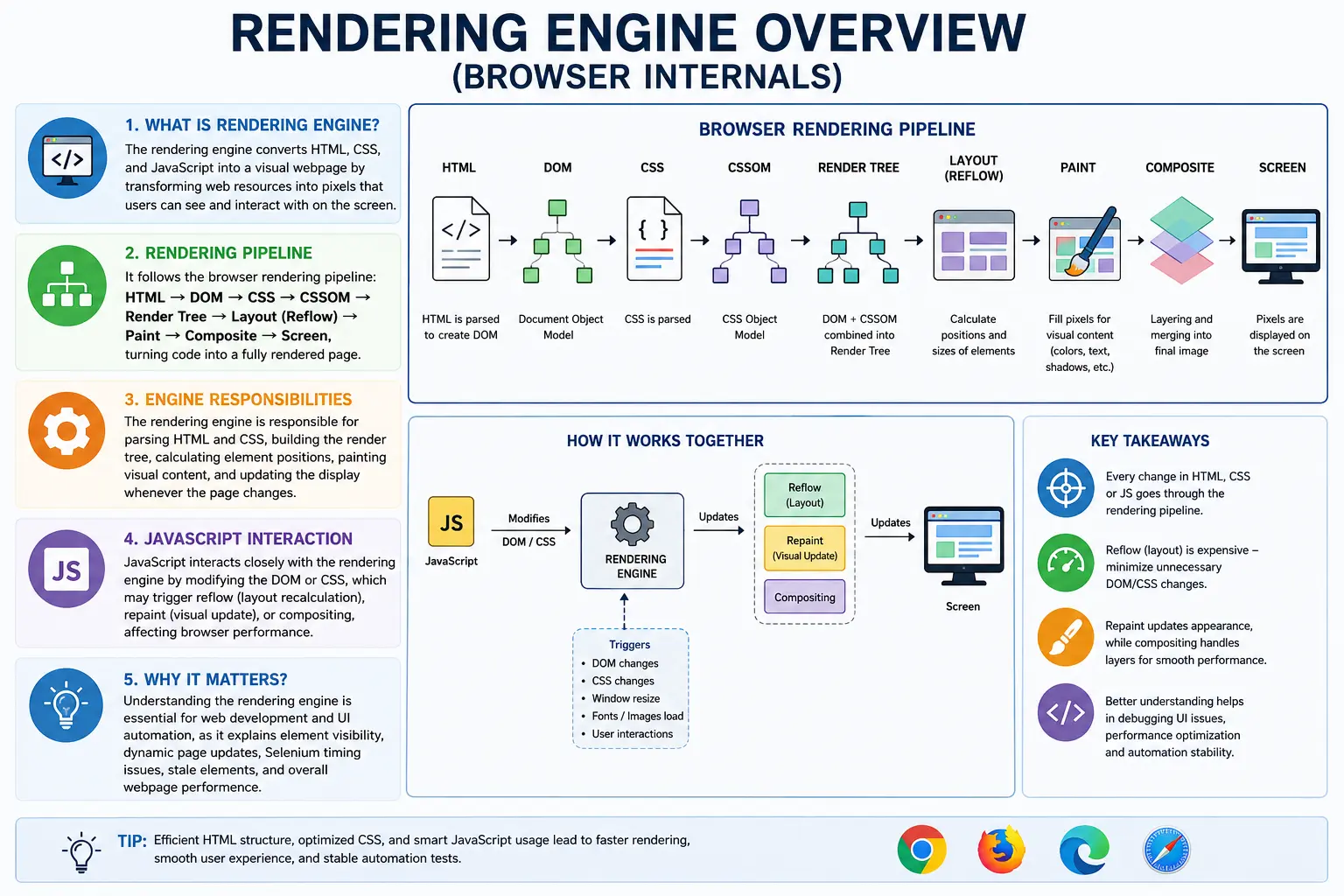
In simple terms, the rendering engine is the browser’s visualization system. It converts web code into the final visual page that users see and interact with. Without a rendering engine, a browser could download HTML files from a server, but it would not be able to display headings, paragraphs, layouts, buttons, images, colors, or animations as a usable webpage.
For web developers, understanding the rendering engine helps explain how HTML, CSS, and JavaScript work together. For automation testers, especially Selenium and Playwright users, rendering engine knowledge helps explain why elements may exist in the DOM but still not be visible or clickable. For performance engineers, it explains why large DOM trees, complex CSS, heavy JavaScript, and frequent layout changes can slow down a page.
A simple flow looks like this:
HTML + CSS + JavaScript
        ↓
Rendering Engine
        ↓
Visual Webpage
The rendering engine sits at the center of browser rendering. It receives structured page information, processes styling rules, calculates positions, paints pixels, and updates the screen whenever content changes.
What Is a Rendering Engine?
A rendering engine is a browser subsystem responsible for converting HTML, CSS, and JavaScript-generated content into a visual webpage. It takes the internal structures created by the browser, such as the DOM and CSSOM, and transforms them into pixels on the screen.
When a browser receives HTML like this:
<h1>SoftwareTips4U</h1>the browser does not directly display this code. First, it parses the HTML, creates DOM nodes, applies CSS styles, builds a render tree, calculates layout, paints visual elements, and composites layers. The rendering engine coordinates these visual-processing steps.
The rendering engine is responsible for parsing HTML, parsing CSS, building the render tree, calculating layout, painting pixels, handling visual updates, and responding to changes caused by JavaScript or user interactions.
A useful way to understand it is:
Code
 ↓
Objects
 ↓
Layout
 ↓
Pixels
 ↓
Screen
This conversion from code to pixels is the core responsibility of the rendering engine.
Why Rendering Engines Exist
Browsers receive web content mostly as text files. HTML, CSS, and JavaScript are text-based resources. A browser may receive this HTML from a server:
<h1>Hello World</h1>
<p>Learning HTML</p>
To a human, this code is readable. But to display it visually, the browser must understand what elements exist, how they are related, how they should be styled, where they should be positioned, and how they should be drawn.
The rendering engine exists to solve this problem.
It transforms plain code into a visible interface. It converts text-based instructions into visual output. It understands the relationship between structure and style. It decides where every element appears on the page. It draws text, colors, borders, backgrounds, images, and animations.
Without a rendering engine, the browser would only be a downloader of web files. It would not be a webpage viewer.
Major Rendering Engines
Different browsers use different rendering engines. Although all modern rendering engines follow web standards, their internal implementations differ.
Blink
Blink is used by Google Chrome, Microsoft Edge, Opera, Brave, and many Chromium-based browsers.
It is currently the most widely used rendering engine. Blink originated as a fork of WebKit and is now developed as part of the Chromium project. Because Chrome and Edge dominate much of the browser market, Blink has a major influence on modern web development.
Blink is known for fast rendering, frequent updates, strong support for modern web standards, and tight integration with the V8 JavaScript engine.
WebKit
WebKit is used by Safari and browsers on iPhone and iPad.
Before Blink was created, Google Chrome also used WebKit. Later, Google forked WebKit to create Blink. WebKit remains especially important because Apple requires browsers on iOS and iPadOS to use WebKit internally.
WebKit plays a major role in mobile web rendering, especially for Safari users.
Gecko
Gecko is used by Mozilla Firefox.
It is an independent rendering engine developed by Mozilla. Gecko is known for strong standards compliance and for preserving diversity in the browser ecosystem. While many browsers are Chromium-based today, Firefox continues to use Gecko, making it an important alternative implementation of web standards.
For developers and testers, differences between Blink, WebKit, and Gecko can sometimes explain cross-browser rendering issues.
Browser Architecture Overview
A browser is made of multiple internal components, and the rendering engine is only one part of the whole system.
A simplified browser architecture looks like this:
User Interface
       ↓
Browser Engine
       ↓
Rendering Engine
       ↓
DOM + CSSOM
       ↓
Layout
       ↓
Paint
       ↓
Screen
The user interface includes the address bar, tabs, back button, refresh button, and other browser controls. The browser engine coordinates communication between the UI and rendering engine. The rendering engine handles the webpage itself.
The rendering engine works closely with the networking layer, JavaScript engine, storage system, and graphics/compositing system. Together, these components convert network resources into interactive webpages.
Core Responsibilities of the Rendering Engine
The rendering engine performs several important responsibilities. Each responsibility contributes to converting source code into a visual page.
HTML Parsing
The rendering engine begins by processing HTML.
When it sees:
<h1>Hello</h1>it creates a DOM node representing the h1 element.
The HTML parser reads the document, identifies tags, creates nodes, and builds the DOM tree. The DOM becomes the structural representation of the page.
For example:
<body>
    <h1>Hello</h1>
</body>
becomes:
Document
   │
 html
   │
 body
   │
 h1
   │
 Hello
The rendering engine relies on this DOM structure for later rendering steps.
CSS Parsing
The rendering engine also parses CSS.
Example:
h1 {
   color: blue;
}
The browser converts this CSS into an internal structure called the CSSOM, or CSS Object Model.
The CSSOM stores styling rules. It tells the browser which elements should receive which styles.
CSS parsing is essential because the browser cannot render the page correctly without knowing colors, fonts, sizes, margins, padding, display values, positioning rules, and responsive behavior.
Render Tree Creation
After the DOM and CSSOM are available, the rendering engine combines them to create the render tree.
The render tree contains visible elements and their calculated styles.
The process can be summarized as:
DOM + CSSOM = Render TreeThe render tree is not identical to the DOM.
The DOM contains all elements in the document, including hidden elements. The render tree contains only elements that need to be visually rendered.
For example:
<body>
    <h1>Hello</h1>
    <div style="display:none">Hidden</div>
</body>
The DOM contains both h1 and div.
body
├── h1
└── div
But the render tree includes only the visible heading.
body
└── h1
The hidden div is excluded because display: none means it should not be rendered.
Layout Calculation
After the render tree is created, the rendering engine performs layout calculation. This step is also called reflow.
During layout, the browser calculates the exact size and position of every visible element.
It determines:
- Width
- Height
- Top position
- Left position
- Margins
- Padding
- Borders
- Line breaks
- Element flow
For example:
Header → Top
Sidebar → Left
Content → Center
Footer → Bottom
Layout is necessary because knowing that an element exists is not enough. The browser must know where it should appear and how much space it should occupy.
Layout depends on viewport size, CSS rules, font metrics, images, flexbox, grid, positioning, and responsive design conditions.
Painting
After layout is complete, the rendering engine paints the page.
Painting means drawing visual details such as text, colors, borders, shadows, images, backgrounds, and outlines.
For example:
Draw background
Draw heading text
Draw paragraph
Draw image
Draw button
Painting converts layout information into actual pixels.
If an element’s color changes, the browser may need to repaint that element. If only visual appearance changes and size remains the same, repainting may be cheaper than recalculating layout.
Compositing
Modern browsers often split pages into layers.
Example:
Background Layer
Text Layer
Animation Layer
Fixed Header Layer
Compositing combines these layers into the final image displayed on the screen.
Compositing improves performance because the browser can update certain layers independently instead of repainting the entire page. This is especially useful for animations, transforms, scrolling, videos, and fixed-position elements.
Modern rendering engines rely heavily on GPU acceleration for compositing. The graphics hardware helps render and combine layers smoothly.
Internal Rendering Pipeline
The complete rendering pipeline can be represented as:
HTML
 ↓
DOM
 ↓
CSS
 ↓
CSSOM
 ↓
Render Tree
 ↓
Layout
 ↓
Paint
 ↓
Composite
 ↓
Screen
This pipeline is known as the rendering process.
Every visible webpage goes through this process in some form. Modern browsers optimize it heavily, but the conceptual flow remains the same.
DOM vs Render Tree
Many beginners confuse the DOM and render tree. They are related, but they are not the same.
The DOM is the complete document structure created from HTML.
The render tree is the visual structure used for rendering.
Consider this HTML:
<body>
    <h1>Hello</h1>
    <div style="display:none">
        Hidden
    </div>
</body>
The DOM contains:
body
├── h1
└── div
The render tree contains:
body
└── h1
The hidden div exists in the DOM but not in the render tree.
This distinction is very important for Selenium automation. An element may exist in the DOM but not be visible on the screen. Selenium may find the element but fail when trying to click it if it is hidden, covered, or not rendered interactively.
How JavaScript Affects the Rendering Engine
JavaScript can modify the DOM and CSS dynamically.
Example:
document.querySelector("h1").innerText = "Updated";When JavaScript changes page content, the rendering engine may need to update the visual page.
The process may look like:
JavaScript Changes DOM
      ↓
DOM Updated
      ↓
Layout Recalculated
      ↓
Repaint
      ↓
Composite
Not every JavaScript change triggers every rendering step. If JavaScript only changes text color, the browser may repaint without recalculating layout. If JavaScript changes width, height, font size, or element position, the browser may need to perform reflow.
This is why heavy DOM manipulation can affect page performance.
Reflow or Layout Recalculation
Reflow occurs when the browser must recalculate element positions and dimensions.
Example:
div.style.width = "500px";Changing width affects layout. The browser must determine how this change impacts the element itself and possibly surrounding elements.
Reflow is expensive because it can affect large parts of the page. If one element changes size, other elements may move, line breaks may change, and the browser must update layout calculations.
Common causes of reflow include changing width or height, modifying font size, adding or removing elements, changing display values, resizing the window, and updating content that affects layout.
Repaint
Repaint occurs when the visual appearance of an element changes but its layout does not need recalculation.
Example:
div.style.color = "red";Changing color affects how the element looks, but it does not necessarily affect its size or position.
Repaint is generally cheaper than reflow, but it still requires browser work.
Common repaint triggers include changing color, background color, visibility, box shadow, and border color.
Reflow vs Repaint
Reflow and repaint are common performance concepts.
Reflow recalculates layout.
Repaint redraws visual appearance.
A simple comparison:
Reflow  → Position/size changes → More expensive
Repaint → Visual changes only   → Less expensive
Efficient web applications avoid unnecessary reflows and repaints.
Rendering Engine and CSS
The rendering engine applies CSS rules to matching DOM nodes.
Example:
h1 {
   color: blue;
}
The engine finds all h1 DOM nodes and applies the rule.
The process looks like:
DOM Node + CSS Rule
      ↓
Styled Element
CSS selector matching is part of the rendering work. If CSS is overly complex, selector matching can become more expensive, especially on large DOM trees.
This is one reason clean CSS architecture matters for performance.
Rendering Engine and Responsive Design
Responsive design depends heavily on the rendering engine.
When the viewport changes, the browser evaluates CSS media queries.
Example:
@media (max-width: 768px) {
    body {
        font-size: 14px;
    }
}
When the screen width becomes smaller than 768 pixels, the rendering engine applies the matching rules and recalculates layout.
The rendering engine responds to:
- Window resizing
- Device rotation
- Viewport changes
- Zoom changes
- Media query changes
- Container size changes
This is how websites adapt across desktop, tablet, and mobile devices.
Rendering Engine Performance Factors
Rendering performance depends on several factors.
Large DOM Trees
A large DOM means more nodes for the browser to process.
More Nodes
 ↓
More Parsing
 ↓
More Style Matching
 ↓
More Layout Work
Deeply nested structures can also make rendering more expensive.
Complex CSS
Complex selectors and large stylesheets increase style calculation work.
Example:
body div section article ul li a span {
    color: red;
}
This type of selector is harder to maintain and may increase matching complexity.
Heavy JavaScript
JavaScript can trigger repeated DOM updates.
Example:
JavaScript Changes DOM
 ↓
Reflow
 ↓
Repaint
 ↓
Repeat
Frequent layout changes can reduce performance and make pages feel slow.
Large Images and Fonts
Large images and custom fonts can delay rendering.
Images affect layout when dimensions are unknown. Fonts can affect text rendering and layout when they load late.
Modern Browser Optimization Techniques
Modern rendering engines use many optimization techniques.
Incremental Rendering
Browsers can render portions of a page before the entire page finishes loading.
This improves perceived performance because users see content earlier.
GPU Acceleration
Rendering engines use graphics hardware for certain operations.
GPU acceleration is commonly used for:
- Animations
- Transforms
- Compositing
- Video rendering
This makes visual updates smoother.
Layer-Based Rendering
Modern browsers separate content into layers.
If only one layer changes, the browser may update just that layer instead of repainting the entire page.
This improves animation and scrolling performance.
Caching
Browsers cache CSS, images, scripts, and fonts so they do not need to be downloaded again.
Caching reduces network work and speeds up repeat visits.
Why Rendering Engine Knowledge Matters for Selenium
Many Selenium issues are not caused by Selenium itself. They are caused by browser rendering behavior.
Element Exists but Is Not Visible
An element may exist in the DOM but not in the render tree.
Example:
display: none;Selenium may locate the element, but it cannot interact with it as a visible user-facing element.
Element Not Clickable
An element may be visible but covered by another layer.
This can happen due to modals, loaders, sticky headers, or animations.
Timing Issues
The DOM may be loaded, but CSS may not yet be fully applied, or JavaScript may still be updating the page.
This creates timing problems in automation scripts.
Dynamic Updates
JavaScript can replace DOM nodes after Selenium finds them.
This may cause stale element reference errors.
Understanding rendering helps testers design better wait strategies, use stable locators, and debug UI automation failures more effectively.
Real-World Example: Opening Amazon
When a user opens an Amazon product page, the rendering engine performs many steps.
Request Page
      ↓
Receive HTML
      ↓
Create DOM
      ↓
Download CSS
      ↓
Create CSSOM
      ↓
Execute JavaScript
      ↓
Build Render Tree
      ↓
Calculate Layout
      ↓
Paint Products
      ↓
Composite Layers
      ↓
Display Page
The page may continue changing after the initial display because JavaScript loads recommendations, reviews, ads, offers, and dynamic product details.
This shows how rendering is not always a one-time process. In modern applications, rendering continues as the page updates.
Rendering Engine and Web Performance
Rendering engine behavior is directly connected to web performance.
A slow page may be caused by:
- Large DOM
- Blocking CSS
- Blocking JavaScript
- Complex layouts
- Too many reflows
- Heavy animations
- Large images
- Late-loading fonts
Developers improve performance by reducing DOM size, minimizing render-blocking resources, optimizing CSS, using efficient animations, avoiding unnecessary layout changes, and deferring non-critical JavaScript.
A good performance mindset requires understanding how rendering engines work.
Interview-Ready Answer
A concise interview answer would be:
A rendering engine is the browser component responsible for converting HTML, CSS, and JavaScript-generated content into a visual webpage. It builds the DOM and CSSOM, creates the render tree, calculates layout, paints pixels, composites layers, and updates the screen when content changes.
A stronger technical answer would be:
The rendering engine is the core browser subsystem that takes parsed HTML and CSS, constructs the DOM and CSSOM, combines them into a render tree, calculates the geometry of visible elements through layout, paints visual content, and composites layers to display the final webpage. It also responds to JavaScript-driven DOM and style changes through reflow, repaint, and compositing updates.
Key Takeaway
The rendering engine is the component that turns web code into the visual webpage users see. It processes HTML, CSS, and JavaScript-generated changes, builds internal structures, calculates layout, paints pixels, and updates the interface dynamically.
For developers, understanding the rendering engine improves HTML structure, CSS design, JavaScript performance, and debugging ability. For Selenium testers, it explains visibility issues, stale elements, timing problems, and dynamic UI behavior. For performance optimization, it explains why large DOM trees, complex CSS, and frequent JavaScript updates can slow down applications.
One-Line Insight
Rendering Engine = DOM + CSS Processing + Layout + Paint + Display.