Real-World Optimization Tips
Introduction
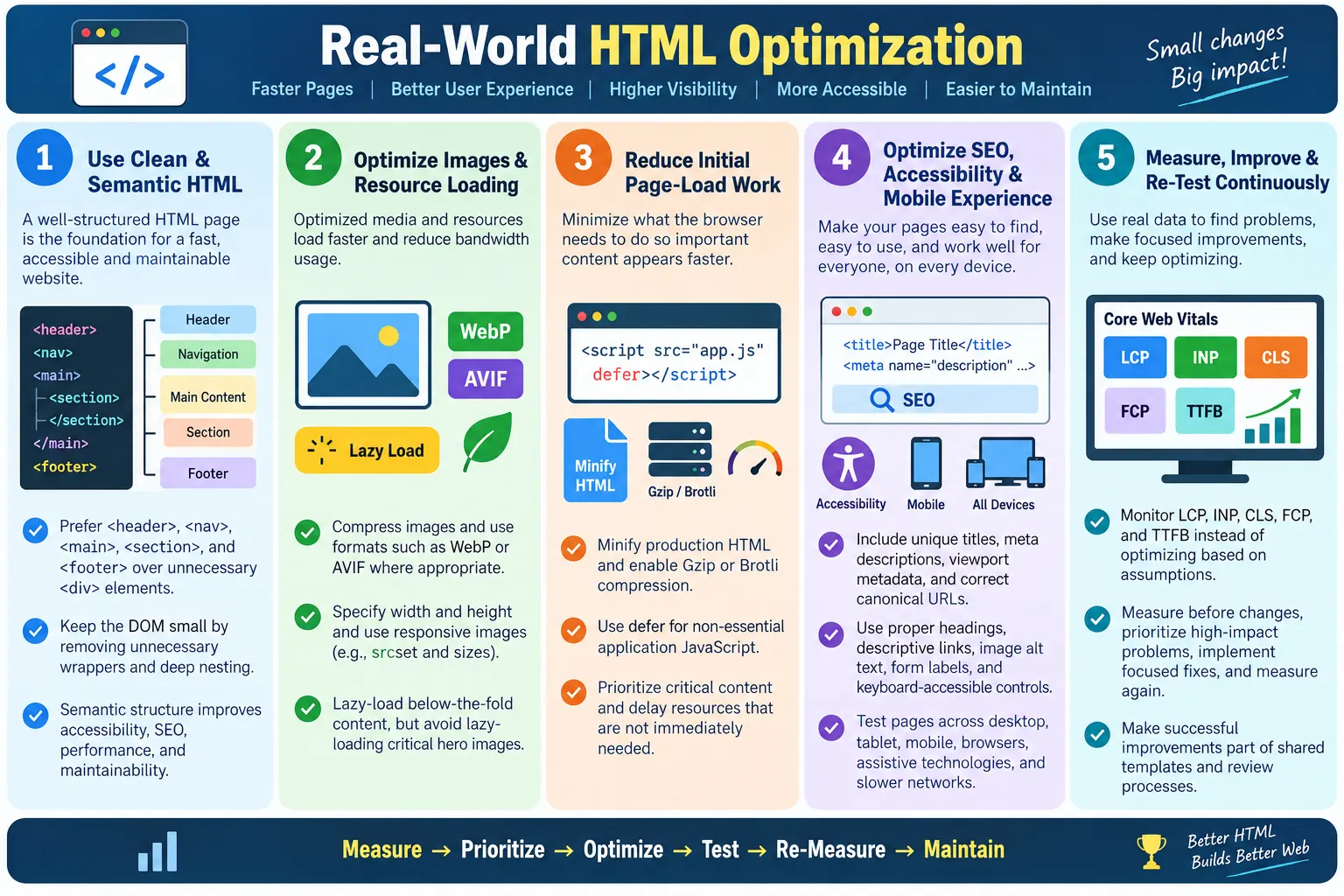
Real-World HTML Optimization is the practice of applying performance, SEO, accessibility, maintainability, and usability best practices to HTML pages used in production websites. It is different from isolated examples because real pages must work across browsers, devices, network conditions, search engines, assistive technologies, analytics tools, advertising scripts, content updates, and user behavior. A real page is not judged only by whether it renders once in a developer's browser. It is judged by whether it loads quickly, communicates clearly, remains accessible, and stays maintainable over time.
Unlike theoretical examples, real-world optimization focuses on building fast, clean, scalable, accessible, and search-engine-friendly webpages that work efficiently across different browsers and devices. The goal is not to chase one metric at the cost of everything else. A page that is fast but inaccessible is not well optimized. A page that has perfect metadata but loads slowly is not well optimized. A page that looks good on desktop but fails on mobile is not well optimized. Real optimization balances all of these concerns.
A well-optimized HTML page improves page speed, user experience, SEO, accessibility, maintainability, and scalability. It gives the browser a clean structure, gives users clear content, gives search engines understandable signals, gives assistive technologies meaningful landmarks, and gives developers code that can be updated safely. HTML is the foundation of the webpage, so improving it improves everything built on top of it.
Why HTML Optimization Matters
Every webpage begins with HTML. The browser requests the page, downloads the HTML, parses it, builds the DOM, discovers CSS and JavaScript, loads additional resources, and renders the final page. If the HTML is bloated, unclear, invalid, or poorly ordered, every later step becomes harder. Efficient HTML speeds up the work that follows because the browser starts with a better document.
Browser Request
  ↓
Download HTML
  ↓
Parse HTML
  ↓
Build DOM
  ↓
Load CSS and JavaScript
  ↓
Render Page
HTML optimization matters because it sits at the beginning of the loading chain. Good HTML helps the browser find critical content early, build a manageable DOM, reserve space for media, discover links, and expose semantic structure. Poor HTML can create a large DOM, delay important content, hide meaning inside generic wrappers, and make maintenance difficult.
Optimization also matters because production websites change. New pages are added, templates are copied, ads are inserted, tracking scripts change, images are replaced, and content grows. Without consistent HTML practices, pages gradually become heavier and less reliable. Real-world optimization is therefore an ongoing discipline, not a one-time cleanup.
1. Use Semantic HTML
Semantic HTML is one of the most valuable optimization practices because it improves structure without adding complexity. Instead of using generic <div> elements for every region, use meaningful elements such as <header>, <nav>, <main>, <section>, and <footer>. These elements describe the purpose of the content directly.
Instead of:

<div class="header">
<div class="menu">
<div class="content">

Use:

<header>
<nav>
<main>
<section>
<footer>
The benefits include better accessibility, better SEO, cleaner code, and easier maintenance. Screen reader users can navigate landmarks. Search engines can understand page organization. Developers can scan the source and identify page regions quickly. Semantic HTML also reduces the need for comments such as "header starts" and "main content begins" because the elements already communicate that meaning.
2. Keep the DOM Small
A smaller DOM improves rendering and JavaScript performance. Every HTML element becomes a DOM node. The browser must parse, store, style, lay out, paint, and update these nodes. Unnecessary wrappers increase file size and DOM complexity without improving the user experience.
Bad:

<div>
  <div>
    <div>
      <div>
        <div>
          <p>Hello</p>
        </div>
      </div>
    </div>
  </div>
</div>

Better:

<section>
  <p>Hello</p>
</section>
Keeping the DOM small does not mean removing meaningful structure. It means removing unnecessary elements. Use the wrappers that are needed for layout, semantics, accessibility, or behavior. Remove the wrappers that exist only because a template was copied or a design changed. Large lists should use pagination, lazy loading, or virtualization when appropriate.
3. Use Proper Heading Hierarchy
Headings create the outline of the page. A proper heading hierarchy helps users scan content, helps screen reader users navigate, and helps search engines understand the structure. A typical page should have one main <h1> that describes the page topic, followed by logical <h2> and <h3> sections.
<h1>HTML Course</h1>

<h2>Forms</h2>

<h3>Validation</h3>
Avoid skipping heading levels without reason. Also avoid using headings purely for visual styling. If text needs to look large but is not a section heading, style it with CSS instead of using the wrong heading element. Real-world pages often become confusing when headings are chosen for appearance rather than meaning.
4. Optimize Images
Images are often the largest resources on a page. Optimized image markup improves performance, accessibility, SEO, and layout stability. An image should use an appropriate file format, descriptive alt text, dimensions, and lazy loading when it is below the fold.
<img
  src="course.webp"
  alt="HTML Course"
  loading="lazy"
  width="800"
  height="400">
Best practices include compressing images, using modern formats such as WebP or AVIF where appropriate, providing descriptive alt text, specifying dimensions, and lazy-loading below-the-fold images. However, avoid lazy-loading the hero image because it is visible immediately and may affect Largest Contentful Paint. Optimization means choosing the right loading behavior for each image.
5. Include Essential Metadata
Every production page should include essential metadata. The title helps browsers, search engines, and users identify the page. The meta description can influence search snippets and helps summarize the page. The viewport meta tag is required for proper mobile rendering. These small pieces of markup have large practical impact.
<title>HTML Tutorial</title>

<meta
  name="description"
  content="Learn HTML step by step.">

<meta
  name="viewport"
  content="width=device-width, initial-scale=1.0">
Metadata should be unique and relevant. Duplicate titles and descriptions make pages harder to distinguish. Missing viewport metadata can make mobile pages render incorrectly. Metadata is part of the page's communication layer, so it should be treated as content, not decoration.
6. Use Descriptive Links
Links should tell users where they go. Vague anchor text such as "Click Here" is weak because it does not describe the destination. Descriptive anchor text improves usability, accessibility, and internal linking quality. It also helps search engines understand the relationship between pages.
Bad:

<a href="/forms">Click Here</a>

Better:

<a href="/forms">Learn HTML Forms</a>
Meaningful anchor text is especially important in learning websites, documentation, and content-heavy sites. Users should be able to scan links and understand their purpose without reading surrounding paragraphs. Screen reader users often navigate by links, so descriptive text matters.
7. Minify Production HTML
Minification reduces file size without changing functionality. During development, readable formatting is useful. In production, extra blank lines, indentation, and comments are often unnecessary. Minified HTML is smaller and faster to transfer.
Development:

<h1>
  HTML
</h1>

Production:

<h1>HTML</h1>
Developers should usually edit readable source files and let build tools generate minified output. Manual editing of minified files is difficult and error-prone. Minification should be part of a repeatable production workflow.
8. Enable Compression
Compression reduces the amount of data transferred over the network. Common compression methods include Gzip and Brotli. These are configured at the server, hosting platform, or CDN level. HTML, CSS, and JavaScript compress well because they are text-based and contain repeated patterns.
- Gzip
- Brotli
Compression is different from minification. Minification removes unnecessary characters from the source output. Compression encodes the transferred data more efficiently and is decompressed by the browser. Real-world sites often use both.
9. Lazy Load Non-Critical Content
Lazy loading delays non-critical content until it is needed. Images below the fold, embedded maps, videos, iframes, comments, and recommendation sections often do not need to load before the first visible content. Native HTML lazy loading makes this simple for images and iframes.
<img
  loading="lazy"
  src="lesson.webp"
  alt="Lesson">
Avoid lazy-loading the hero image because it is part of the initial viewport. Lazy loading is most effective for below-the-fold resources that users may or may not reach. It reduces initial network usage and improves perceived speed.
10. Defer Non-Essential JavaScript
JavaScript can block rendering if loaded synchronously. Non-essential scripts should not delay the initial display. The defer attribute allows a script to download while HTML is parsed and execute after parsing completes, while preserving script order.
<script
  src="app.js"
  defer>
</script>
This prevents render-blocking while preserving predictable execution order. Use defer for application scripts that can run after parsing. Use async for independent third-party scripts when order does not matter.
11. Use Responsive Images
Responsive images allow the browser to select the most appropriate image for the device. This prevents mobile users from downloading unnecessarily large desktop images. HTML supports responsive images through srcset and sizes.
<img
  src="course-800.webp"
  srcset="course-400.webp 400w,
          course-800.webp 800w,
          course-1200.webp 1200w"
  sizes="100vw"
  alt="HTML Course">
This technique improves mobile performance and user experience. It is especially important for hero images, product images, blog images, course thumbnails, and galleries.
12. Use Mobile-Friendly HTML
Mobile-friendly HTML starts with the viewport meta tag and continues with simple structure, semantic elements, optimized touch targets, and appropriate form input types. The same HTML should usually serve all devices, with CSS and JavaScript adapting presentation and behavior.
<meta
  name="viewport"
content="width=device-width, initial-scale=1.0">- Use semantic HTML
- Optimize touch targets
- Use appropriate form input types
- Keep content order logical
Mobile-first structure supports modern search indexing, accessibility, and performance. Pages should be tested on mobile viewport sizes and real devices where possible.
13. Improve Accessibility
Accessibility is a core part of optimization. Accessible pages are easier to use, easier to navigate, and more robust. Include labels for forms, alt text for images, semantic elements, keyboard accessibility, and logical heading hierarchy. Accessibility often improves usability and SEO because it makes content clearer.
- Labels for forms
- Alt text for images
- Semantic elements
- Keyboard accessibility
- Logical heading hierarchy
Accessibility should be built into HTML from the start. Retrofitting accessibility later is harder and often less reliable. Good HTML makes accessible design much easier.
14. Validate HTML
Valid HTML reduces unexpected browser behavior. Browsers are forgiving, but invalid markup can still create rendering differences, broken layouts, accessibility problems, and testing issues. Validation helps catch missing closing tags, invalid nesting, duplicate IDs, and invalid attributes.
- Missing closing tags
- Invalid nesting
- Duplicate IDs
- Invalid attributes
Validation is especially useful before publishing many pages based on copied templates. A small mistake copied across many files can become a large cleanup problem.
15. Use Structured Data
Structured data helps search engines understand the content and may make pages eligible for rich results. JSON-LD is commonly used for structured data because it can be placed in a script block without changing visible content.
<script type="application/ld+json">
{
  "@context": "https://schema.org"
}
</script>
Structured data should match the visible content. Do not add misleading markup. Real-world optimization includes accuracy as well as technical implementation.
16. Use Canonical URLs
Canonical URLs help search engines identify the preferred version of a page when duplicate or similar URLs exist. This is important for SEO because the same content may be reachable through multiple paths, parameters, or variants.
<link
  rel="canonical"
  href="https://example.com/html-course">
Canonical links should be accurate and page-specific. Copying a template without updating the canonical URL is a common SEO mistake. Every production page should be reviewed for correct canonical metadata.
17. Optimize Internal Linking
Internal links help users discover related content and assist search engine crawling. They also distribute context across a website. Descriptive internal links are more useful than generic links. A link labeled "HTML Forms Tutorial" is clearer than "Read More."
<a href="/html/forms">
  HTML Forms Tutorial
</a>
For learning websites, internal links are especially important because topics build on each other. Navigation, previous and next links, related topics, and contextual references help learners move through the material.
18. Cache HTML Properly
Use appropriate HTTP caching headers. Frequently updated pages typically require shorter cache durations or validation, while static assets are often cached much longer. HTML is usually cached more carefully than CSS, JavaScript, and images because it may change more often and may reference current asset versions.
Proper caching reduces repeat downloads, server load, and bandwidth usage. Poor caching can show stale content or force unnecessary downloads. The right caching policy depends on the page type and update frequency.
19. Monitor Performance
Optimization should be based on real measurements, not assumptions. Regularly measure Largest Contentful Paint, Interaction to Next Paint, Cumulative Layout Shift, First Contentful Paint, and Time to First Byte. These metrics show different parts of the user experience.
- LCP
- INP
- CLS
- FCP
- TTFB
Use tools such as Chrome DevTools, Lighthouse, PageSpeed Insights, WebPageTest, and Search Console reports. Measure before and after changes so improvements are proven rather than assumed.
20. Test Across Devices
Real-world pages must work across desktop, mobile, and tablet devices. They should also be tested with keyboard navigation, screen readers, different browsers, and slow network conditions. A page that works only on a developer's laptop is not production-ready.
- Desktop
- Mobile
- Tablet
- Keyboard navigation
- Screen readers
- Different browsers
- Slow network conditions
Testing across conditions reveals problems that local development may hide. Mobile layouts, slow images, inaccessible navigation, broken links, and layout shifts often appear only when testing realistic scenarios.
Browser Workflow
Optimized HTML leads to a smaller DOM, faster parsing, faster rendering, and a better user experience. The browser benefits when the document is clear, compact, semantic, and prioritized. Every unnecessary wrapper, oversized image, blocking script, missing dimension, or invalid element creates extra work.
Optimized HTML
  ↓
Small DOM
  ↓
Fast Parsing
  ↓
Fast Rendering
  ↓
Better User Experience
Real-world optimization should therefore be understood as a full workflow. The browser receives the document, builds the page, loads resources, renders content, and responds to users. HTML choices influence each step.
Real-World Optimization Workflow
A practical optimization workflow starts with measurement. Before changing a page, measure its current performance, inspect its HTML structure, review its metadata, and check its accessibility. This baseline prevents random changes. If the page has poor LCP, the likely fix may involve the hero image, server response, or critical CSS. If the page has poor CLS, the likely fix may involve missing image dimensions or late-inserted ads. If the page has a large DOM, the likely fix may involve templates, lists, hidden content, or repeated wrapper elements.
After measuring, prioritize changes by user impact. Fix critical rendering problems before minor code style issues. Optimize the largest images before worrying about tiny whitespace savings. Correct missing viewport tags before adjusting small layout details. Fix broken links and missing labels before adding advanced structured data. Real-world optimization is strongest when the team focuses on the problems that most directly affect users.
Next, implement changes in small, reviewable steps. A broad refactor can introduce new bugs and make it hard to know which change improved performance. A focused change, such as adding image dimensions, deferring a script, cleaning a template, or fixing metadata, is easier to review and verify. After each meaningful change, measure again. Optimization without verification becomes guesswork.
Finally, make the improvement repeatable. If one page had missing image dimensions, update the content guidelines or template. If several pages had duplicate meta descriptions, add a review step. If a navigation template created excessive DOM nodes, fix the shared template rather than only one page. The best real-world optimization work prevents the same issue from returning.
Production Review Checklist
Before publishing a production HTML page, review both the visible page and the underlying source. The visible page confirms layout, content, and interaction. The source confirms metadata, semantics, links, scripts, structured data, image attributes, and accessibility foundations. A page can look correct while still having poor metadata, missing alt text, wrong canonical URL, or heavy hidden markup.
Start with the document head. Confirm the title is unique, the meta description is specific, the canonical URL is correct, the viewport tag exists, robots settings are intentional, and analytics or advertising snippets are present only when needed. Then review the body structure. Confirm there is a clear <h1>, logical heading hierarchy, semantic regions, descriptive links, accessible forms, and meaningful image attributes.
Continue with resource loading. Check whether images are appropriately sized, below-the-fold images are lazy-loaded, hero images are not accidentally delayed, scripts use defer or async where appropriate, and non-critical third-party resources do not block initial rendering. Use the Network panel to confirm compression and cache behavior. Use Lighthouse or PageSpeed Insights to identify major performance problems.
End with cross-device validation. Test mobile, tablet, and desktop layouts. Check keyboard navigation. Confirm forms are usable. Inspect the page on a slower network profile. Review whether content remains readable and stable while resources load. This production review turns optimization from a theoretical list into a real quality gate.
Complete HTML Optimization Checklist
A practical checklist helps teams maintain quality across many pages. It also reduces the chance of forgetting important details when creating new content or copying templates.
- Semantic HTML
- Small DOM
- Proper headings
- Optimized images
- Image alt text
- Responsive images
- Viewport meta tag
- Meta description
- Unique title
- Canonical URL
- Structured data
- Descriptive internal links
- Lazy loading
- Deferred JavaScript
- Minified HTML
- Gzip or Brotli compression
- HTML validation
- Accessibility
- Performance monitoring
Common Mistakes
Common mistakes include using too many wrapper <div> elements, missing the viewport meta tag, missing image alt text, deeply nested HTML, large unoptimized images, broken internal links, duplicate metadata, missing canonical URLs, lazy-loading above-the-fold images, and ignoring accessibility. These issues are common because they often appear harmless at first. Over time, they reduce quality.
The best defense is a repeatable review process. New pages should be checked for metadata, headings, images, links, accessibility, scripts, styles, and performance basics. Templates should be reviewed whenever they are copied or changed. Automated checks can catch many issues, but manual review is still needed for meaning and quality.
Maintaining Optimization Over Time
Real-world optimization is not finished after one page is published. Websites change continuously. New articles are added, old pages are edited, navigation grows, images are replaced, scripts are added, and third-party services change. A page that is optimized today can become slow or inconsistent later if the team does not maintain standards. This is why optimization should be part of the normal content and release process.
Teams can maintain quality by using shared templates, review checklists, periodic audits, and automated scans. A shared page template helps keep metadata, scripts, footer, navigation, and structured data consistent. A review checklist catches content-specific issues such as missing alt text or unclear headings. Periodic audits reveal drift across the site. Automated checks can quickly find missing titles, broken links, missing canonical tags, and inconsistent snippets.
Optimization also requires ownership. Content writers should understand headings, links, images, and metadata. Developers should understand semantic structure, script loading, compression, and responsive behavior. Testers should verify rendering, navigation, accessibility attributes, and key workflows. SEO reviewers should check metadata, internal linking, canonical URLs, structured data, and crawlability. When every role owns part of the quality process, optimized HTML is easier to sustain.
Selenium Perspective
Automation testers commonly verify titles and meta tags, responsive layouts, images and alt text, navigation links, forms, accessibility attributes, lazy loading behavior, and page rendering. Selenium is useful for checking whether important HTML elements exist and behave correctly. It can also simulate viewport sizes and user interactions.
Performance metrics such as LCP, INP, and CLS are typically measured using Lighthouse, Chrome DevTools, PageSpeed Insights, or WebPageTest rather than Selenium alone. Selenium confirms functional behavior. Performance tools explain timing and rendering cost. Both perspectives are useful in production-quality testing.
Common Interview Questions
What are the most important HTML optimization techniques? Important techniques include semantic HTML, small DOM, optimized images, responsive design, minification, compression, lazy loading, deferred JavaScript, accessibility, and structured data.
Why is semantic HTML important? It improves accessibility, SEO, and code maintainability.
Why should HTML be minified? HTML should be minified to reduce file size and improve download speed.
Why optimize images? Images are often large resources. Optimizing them reduces loading time and improves Core Web Vitals.
Does HTML optimization improve SEO? Not directly in every case, but it improves page performance, accessibility, crawlability, and user experience, all of which support overall SEO.
What tools are commonly used to measure HTML performance? Common tools include Chrome DevTools, Lighthouse, PageSpeed Insights, WebPageTest, and Google Search Console Core Web Vitals reports.
Comparison Table
| Optimized HTML | Poor HTML |
|---|---|
| Semantic structure | Generic <div> elements everywhere |
| Small DOM | Large DOM |
| Optimized images | Large uncompressed images |
| Responsive | Desktop-only design |
| Accessible | Missing labels and alt text |
| Minified | Large unminified files |
| Fast loading | Slow loading |
| SEO-friendly | Missing metadata |
Interview-Ready Answer
Real-world HTML optimization involves applying best practices that improve performance, accessibility, SEO, and maintainability. This includes using semantic HTML, keeping the DOM small, optimizing images, implementing responsive design, adding essential metadata, using structured data, creating descriptive internal links, minifying HTML, enabling Gzip or Brotli compression, deferring non-essential JavaScript, lazy-loading below-the-fold content, validating HTML, and monitoring Core Web Vitals.
Together, these practices create fast, scalable, and user-friendly websites that perform well across devices and browsers. A strong answer should emphasize that real-world optimization is not one technique. It is a combination of clean structure, efficient resource loading, accessibility, SEO clarity, and continuous measurement.
One-Line Insight
Real-world HTML optimization is about delivering the right content, in the right structure, at the right time, with the least possible overhead.