Real-World HTML Request Flow
Introduction
Every time a user opens a website, an extraordinary sequence of events takes place behind the scenes. What appears to be a simple action—typing a URL into a browser and pressing Enter—actually triggers a sophisticated chain of networking, server communication, browser processing, resource loading, parsing, rendering, and execution steps. Within a matter of milliseconds or seconds, raw data is transformed into a fully interactive webpage containing text, images, buttons, forms, animations, and dynamic content.
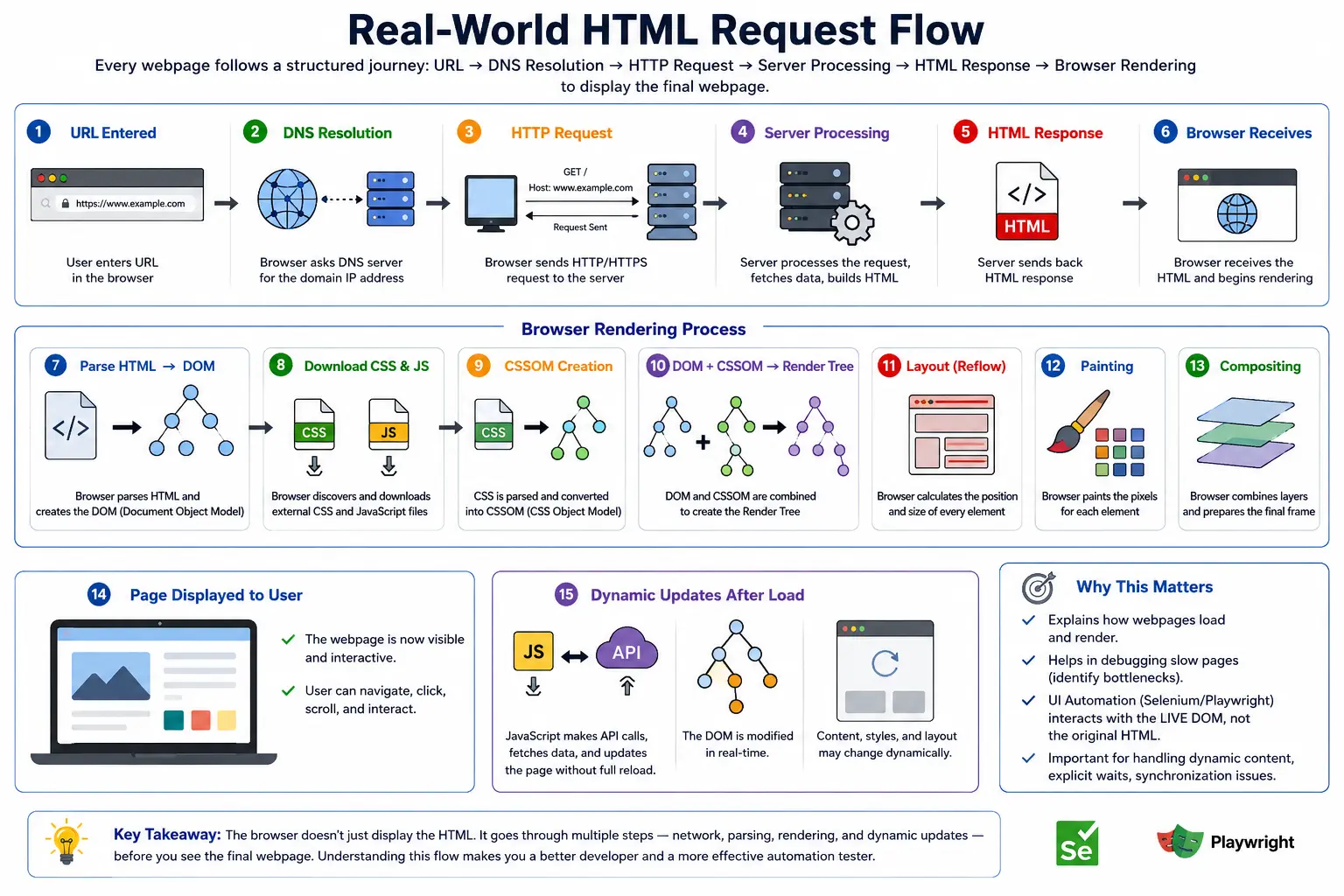
This complete journey is known as the Real-World HTML Request Flow. It represents the end-to-end lifecycle of a webpage, beginning with a user's request and ending with a rendered page displayed on the screen. Understanding this flow is essential because it brings together many core concepts of web technology, including the Client–Server Model, DNS resolution, HTTP communication, HTML parsing, DOM creation, CSSOM creation, JavaScript execution, rendering engines, and the Critical Rendering Path.
For developers, this knowledge helps build faster and more efficient applications. For Selenium and Playwright engineers, it explains why timing issues occur and why waits are necessary. For API testers, it demonstrates how backend responses eventually become visible UI content. For performance engineers, it reveals where bottlenecks occur and how page load speed can be optimized.
A modern webpage is not created instantly. Instead, it follows a carefully structured pipeline that transforms a URL into a visible user interface. Understanding that pipeline provides a deep appreciation for how the web truly works.
Understanding the Big Picture
At a high level, the flow looks like this:
User Enters URL
        ↓
DNS Resolution
        ↓
HTTP Request
        ↓
Server Processing
        ↓
HTML Response
        ↓
HTML Parsing
        ↓
DOM Creation
        ↓
CSS & JS Loading
        ↓
Render Tree Creation
        ↓
Layout Calculation
        ↓
Painting
        ↓
Visible Web Page
Although this diagram appears simple, every stage involves multiple browser and server operations working together.
The browser acts as the client requesting information. The server acts as the provider supplying resources. HTML acts as the foundation of the page. CSS controls presentation. JavaScript adds behavior. The browser combines everything into a final visual representation.
Let us walk through each stage of the process exactly as it happens in the real world.
Step 1: User Enters a URL
The journey begins when a user enters a web address into the browser's address bar.
For example:
https://www.softwaretips4u.comAt this moment, the browser knows only the human-readable domain name. It does not yet know where the website is physically located on the internet.
Before the browser can request any webpage, it must first discover the server responsible for hosting the website.
The URL itself contains important information.
https://www.softwaretips4u.comComponents include:
- Protocol (HTTPS)
- Domain Name (softwaretips4u.com)
- Optional Path
- Optional Query Parameters
The browser begins processing this information immediately after the user presses Enter.
Step 2: DNS Resolution
Computers communicate using IP addresses rather than domain names.
Humans prefer:
softwaretips4u.comComputers require something like:
142.250.xxx.xxxThis conversion is performed by the Domain Name System (DNS).
The browser asks:
Where is softwaretips4u.com located?DNS servers respond with the IP address associated with that domain.
The process may involve:
- Browser cache lookup
- Operating system cache lookup
- Router cache lookup
- ISP DNS server lookup
- Root DNS servers
- Authoritative DNS servers
Once the IP address is found, the browser knows exactly where to send the request.
Without DNS, the web would be practically unusable because users would need to remember numerical IP addresses for every website.
Step 3: Establishing a Connection
Now that the browser knows the server's IP address, it must establish communication.
For HTTP websites:
Client ↔ ServerFor HTTPS websites:
Client
   ↓
TLS Handshake
   ↓
Encrypted Connection
   ↓
Server
Most modern websites use HTTPS because it provides:
- Encryption
- Data integrity
- Authentication
- Security against interception
The browser and server negotiate encryption settings before any webpage data is exchanged.
Only after this secure channel is established can the actual request begin.
Step 4: Browser Sends the HTTP Request
The browser now asks the server for the webpage.
Example:
GET / HTTP/1.1
Host: softwaretips4u.com
This request essentially means:
Please send me the homepage.The request may also contain:
- Headers
- Cookies
- Authentication tokens
- Language preferences
- Cache information
The browser sends this request across the internet to the target server.
Step 5: Request Reaches the Web Server
The request eventually arrives at a server.
Depending on the application architecture, the request may be handled by:
- Apache
- Nginx
- IIS
- Spring Boot
- Node.js
- Django
- ASP.NET
- Express.js
The server receives the request and determines how it should respond.
At this stage, the server becomes responsible for generating or retrieving the appropriate content.
Step 6: Server Processing
Server behavior depends on whether the site is static or dynamic.
Static Website Processing
For a static website:
Request
   ↓
Locate HTML File
   ↓
Return File
Example:
index.htmlThe server simply retrieves the existing HTML document and sends it back.
No database queries are needed.
No business logic is executed.
Dynamic Website Processing
Modern websites are usually dynamic.
The flow becomes:
Request
   ↓
Business Logic
   ↓
Database Query
   ↓
Data Processing
   ↓
Generate HTML
Consider Amazon.
When a user requests a product page:
Product Request
      ↓
Database Lookup
      ↓
Retrieve Product Details
      ↓
Generate HTML
      ↓
Send Response
The HTML is often created on demand based on current data.
This allows content to be personalized and continuously updated.
Step 7: Server Sends the HTML Response
Once processing is complete, the server sends an HTML document back to the browser.
Example:
<!DOCTYPE html>
<html>
<head>
    <title>SoftwareTips4U</title>
</head>
<body>
    <h1>Welcome</h1>
</body>
</html>
This response travels across the network to the user's browser.
At this moment, the browser has received only text.
The webpage is not yet visible.
Step 8: Browser Receives HTML
The browser now holds the HTML document.
However, receiving HTML does not automatically mean displaying a webpage.
The browser still needs to:
- Parse HTML
- Build the DOM
- Load resources
- Apply styles
- Execute scripts
- Render the page
Therefore:
HTML Receiveddoes not equal:
Page DisplayedMany more steps remain.
Step 9: HTML Parsing Begins
The browser starts reading the HTML document from top to bottom.
Example:
<html>
<head>
<body>
The HTML parser examines every character and tag.
It identifies:
- Elements
- Attributes
- Text nodes
- Parent-child relationships
The parser converts plain text into meaningful structures the browser can understand.
This stage is known as HTML Parsing.
Step 10: DOM Creation
As parsing continues, the browser constructs the Document Object Model (DOM).
HTML:
<body>
    <h1>Hello</h1>
</body>
Becomes:
Document
 │
 html
 │
 body
 │
 h1
 │
 Hello
The DOM is a tree-like structure stored in browser memory.
This DOM becomes the browser's internal representation of the webpage.
Everything that follows depends on the DOM.
Without the DOM:
- CSS cannot be applied
- JavaScript cannot interact
- Rendering cannot occur
Step 11: Resource Discovery
While parsing HTML, the browser encounters external resources.
Example:
<link rel="stylesheet" href="style.css">
<script src="app.js"></script>
<img src="logo.png">
The browser now realizes additional files are required.
These resources are queued for download.
The browser begins requesting them from the server.
Step 12: CSS Request Flow
The browser sends:
GET style.cssThe server responds:
h1 {
    color: blue;
}
The browser downloads the stylesheet and begins CSS parsing.
CSS contains information about how elements should appear.
Without CSS, content would display using default browser styling.
Step 13: CSSOM Creation
After parsing CSS, the browser creates the CSS Object Model (CSSOM).
Example:
h1 {
    color: blue;
}
Becomes an internal structure representing styling rules.
The CSSOM allows the browser to determine:
- Colors
- Fonts
- Sizes
- Margins
- Layout properties
The CSSOM works alongside the DOM.
Step 14: JavaScript Request Flow
The browser also requests JavaScript files.
Example:
<script src="app.js"></script>Server returns:
console.log("Loaded");The browser downloads and executes the script.
JavaScript can:
- Modify DOM nodes
- Create elements
- Remove elements
- Call APIs
- Handle user events
This step often introduces dynamic behavior into the page.
Step 15: Render Tree Creation
The browser now combines:
DOM
+
CSSOM
to create:
Render TreeThe Render Tree contains:
- Visible elements
- Applied styles
Hidden elements such as:
display: none;are excluded.
The Render Tree serves as the blueprint for visual rendering.
Step 16: Layout Calculation
Now the browser calculates the position and size of every visible element.
Examples include:
- Width
- Height
- Padding
- Margins
- Coordinates
The browser determines:
Header → Top
Sidebar → Left
Content → Center
Footer → Bottom
This stage is called Layout or Reflow.
The browser now knows where everything belongs.
Step 17: Painting
After layout is complete, the browser begins painting.
Painting means converting instructions into actual pixels.
The browser draws:
- Text
- Colors
- Images
- Borders
- Shadows
- Backgrounds
Everything visible on the page is painted during this stage.
The page begins appearing on the screen.
Step 18: Compositing
Modern browsers use layers for performance.
Example:
Background Layer
Text Layer
Animation Layer
Video Layer
The browser combines these layers into the final display.
This process is called Compositing.
GPU acceleration often helps make this stage faster.
Compositing improves:
- Animation smoothness
- Scrolling performance
- Rendering efficiency
Step 19: Page Becomes Visible
Finally, the user sees the webpage.
What started as:
https://softwaretips4u.comhas now become:
Visible User Interfacecontaining:
- Text
- Images
- Buttons
- Menus
- Forms
- Interactive components
The browser has completed the initial rendering process.
What Happens After Initial Rendering?
The story does not end once the page appears.
Users continue interacting with the application.
Examples:
- Clicking buttons
- Submitting forms
- Searching products
- Navigating menus
- Loading additional content
Each interaction may trigger additional requests.
Example: Login Flow
User enters:
Username
Password
and clicks Login.
Browser sends:
POST /loginServer validates credentials.
Response may be:
Dashboardor
Login FailedA new cycle begins.
Modern SPA Flow
Traditional websites:
Request
 ↓
HTML
 ↓
Render
Modern React, Angular, and Vue applications often work differently.
Request
 ↓
Minimal HTML
 ↓
JavaScript Bundle
 ↓
API Calls
 ↓
DOM Updates
 ↓
UI Rendered
Even in SPAs, HTML remains the starting point.
The difference is that JavaScript performs much more work after the initial page load.
Why This Matters for Selenium
When Selenium executes:
driver.get("https://example.com");the browser performs the same request flow.
Only after:
HTML Parsing
 ↓
DOM Creation
 ↓
Rendering
can Selenium interact with elements.
Understanding the request flow helps explain:
- Element not found errors
- Timing issues
- Dynamic content loading
- Explicit waits
- Stale element exceptions
Many automation failures occur because Selenium attempts interaction before the flow is fully complete.
Common Failure Points
Several stages can fail.
Network Problems
- DNS failures
- Connection timeouts
- SSL errors
Server Problems
- 500 Internal Server Error
- Server crashes
- Database failures
HTML Problems
- Malformed markup
- Missing resources
CSS Problems
- Broken stylesheets
- Incorrect layouts
JavaScript Problems
- Runtime exceptions
- Failed API calls
- DOM update failures
Understanding the request flow helps identify exactly where failures occur.
Interview-Ready Answer
The Real-World HTML Request Flow begins when a user enters a URL. The browser resolves the domain through DNS, establishes a connection, sends an HTTP request, and receives an HTML response from the server. The browser then parses the HTML, creates the DOM, discovers CSS and JavaScript resources, builds the CSSOM, creates the Render Tree, calculates layout, paints pixels on the screen, and displays the final webpage. Modern applications may continue updating the DOM through JavaScript and API calls even after the initial rendering is complete.
Key Takeaway
Every webpage follows a complex journey before becoming visible. What appears to users as a simple page load actually involves networking, DNS resolution, server processing, HTML parsing, DOM creation, CSS processing, JavaScript execution, rendering, layout calculation, painting, and compositing. Understanding this complete request flow provides the foundation for mastering HTML, browser behavior, web performance, frontend development, API testing, and UI automation.
One-Line Insight
URL → DNS → HTTP Request → HTML → DOM → CSSOM → Render Tree → Layout → Paint → Visible Web Page.